检测
VM
csharp
using System;
using System.Collections.Generic;
using System.Linq;
using System.Text;
using System.Threading.Tasks;
using System.Windows;
using System.Windows.Input;

namespace WpfApp5
{
    public class MainViewModel: InotifyBase
    {
		private string  name;

		public string  Name
		{
			get { return name; }
			set { name = value;
				OnPropertyChanged();
			}
		}
		private double scanProgress;

		public double ScanProgress
		{
			get { return scanProgress; }
			set { scanProgress = value;
				OnPropertyChanged();
			}
		}
		private string deviceStatus;

		public string DeviceStatus
		{
			get { return deviceStatus; }
			set { deviceStatus = value;
				OnPropertyChanged();
				CommandManager.InvalidateRequerySuggested();
            }
		}

		public RelayCommand StartCommand { get; set; }
		public RelayCommand StopCommand { get; set; }
        public RelayCommand CCommand { get; set; }
		public MainViewModel()
		{
			CCommand = new RelayCommand(cc);
			DeviceStatus = "设备未就绪";
			ScanProgress= 0;
            StartCommand = new RelayCommand(start,CanStart );
			StopCommand = new RelayCommand(stop,CanClose);
            Name = "张三";
			InitDevice();
        }

        private bool CanClose()
        {
            //throw new NotImplementedException();
			return DeviceStatus !="初始化中"
				&& !DeviceStatus.StartsWith("扫描中")
				&& DeviceStatus != "设备已关闭"
				&& DeviceStatus != "设备故障"
			&& DeviceStatus != "关闭中";
        }

        private bool CanStart()
        {
            //throw new NotImplementedException();
			return DeviceStatus=="设备就绪"||DeviceStatus == "检测完成";
        }

		private void InitDevice()
		{
			DeviceStatus = "初始化中";
			Task.Run(() =>
			{
				try
				{
					//throw new NotImplementedException();
					Task.Delay(1000).Wait();
					Task.Delay(1000).Wait();
					Task.Delay(1000).Wait();
					Application.Current.Dispatcher.BeginInvoke(new Action(() =>
					{
						DeviceStatus = "设备就绪";


					}));
				}
				catch (Exception ex)
				{
					MessageBox.Show(ex.Message);
					Application.Current.Dispatcher.BeginInvoke(new Action(() =>
					{
						DeviceStatus = "设备故障";
						// DeviceStatus = "设备就绪";
					}));
				}
			});
		}
		private void stop()
		{
			//throw new NotImplementedException();
			DeviceStatus = "关闭中";
			Task.Run(() =>
			{
				try
				{
					Task.Delay(1000).Wait();
					Application.Current.Dispatcher.BeginInvoke(new Action(() =>
					{
						ScanProgress = 0;
						DeviceStatus = "设备已关闭";
					}
					));
				}
				catch (Exception ex)
				{
					MessageBox.Show(ex.Message);
					Application.Current.Dispatcher.BeginInvoke(new Action(() =>
					{
						DeviceStatus = "设备故障";
						// DeviceStatus = "设备就绪";
					}));
				}
			});
		}

		private void start()
		{
			//throw new NotImplementedException();
			if (DeviceStatus.StartsWith("扫描中"))
			{
				Application.Current.Dispatcher.BeginInvoke(new Action(() =>
				{
					MessageBox.Show("正在扫描中,请稍后...");
					// DeviceStatus = "设备就绪";
				}));
				return;
			}
			Task.Run(() =>
			{
				try
				{
					Application.Current.Dispatcher.BeginInvoke(new Action(() =>
					{
						DeviceStatus = "扫描中 0%";
						ScanProgress = 0;

						// DeviceStatus = "设备就绪";
					}));
					for (int i = 1; i <= 100; i++)
					{
						System.Threading.Thread.Sleep(100);
						double currentProgress = i * 0.01;
						Application.Current.Dispatcher.BeginInvoke(new Action(() =>
						{
							ScanProgress = currentProgress;
							DeviceStatus = $"扫描中...{(i)}%";
						}));

					}
					Application.Current.Dispatcher.BeginInvoke(new Action(() =>
					{
						ScanProgress = 1;
						DeviceStatus = "检测完成";
						// DeviceStatus = "设备就绪";
					}));
				}
				catch (Exception ex)
				{
					Application.Current.Dispatcher.BeginInvoke(new Action(() =>
					{
						MessageBox.Show($"扫描异常:{ex.Message}");
						DeviceStatus = "设备故障";
						ScanProgress = 0;
						// DeviceStatus = "设备就绪";
					}));

					// throw;
				}
			});		}

        private void cc()
        {
           // throw new NotImplementedException();
		   MessageBox.Show("Hello " + Name);
        }
    }
}
csharp
using System;
using System.Collections.Generic;
using System.Linq;
using System.Text;
using System.Threading;
using System.Threading.Tasks;
using System.Windows;
using System.Windows.Input;

namespace WpfApp6
{
	public class MainViewModel : Inotifybase
	{
		private string status;

		public string Status
		{
			get { return status; }
			set
			{
				status = value;
				OnPropertyChanged();
				CommandManager.InvalidateRequerySuggested();
			}
		}
		private double rate;

		public double Rate
		{
			get { return rate; }
			set
			{
				rate = value;
				OnPropertyChanged();
			}
		}
		public RelayCommand StartC { get; }
		public RelayCommand StopC { get; }
		public MainViewModel()
		{
			StartC = new RelayCommand(Start, CanStart);
			StopC = new RelayCommand(Stop, CanStop);
			Loading();

		}

		private void Loading()
		{
			Task.Run(() =>
			{
				try
				{
					//throw new NotImplementedException();
					Task.Delay(1000).Wait();
					Task.Delay(1000).Wait();
					Task.Delay(1000).Wait();
					Application.Current.Dispatcher.Invoke(() =>
					{
						Status = "已就绪";
						Rate = 0;
					});
				}
				catch (Exception ex)
				{
					Application.Current.Dispatcher.Invoke(() =>
					{
						Status = "故障";
						MessageBox.Show(ex.Message + "故障");
					});
				}
			});
		}

		private bool CanStop()
		{
			//throw new NotImplementedException();
			return Status != "停止" && Status != "故障";

		}

		private void Stop()
		{
			//throw new NotImplementedException();
			Task.Run(() =>
			{
				try
				{
					Task.Delay(1000).Wait();
					Application.Current.Dispatcher.Invoke(() =>
					{
						Status = "停止";
						Rate = 0;
					});
				}
				catch (Exception ex)
				{
					Application.Current.Dispatcher.Invoke(() =>
					{
						Status = "故障";
						MessageBox.Show(ex.Message);
					});
				}
			});

		}

		private bool CanStart()
		{
			//throw new NotImplementedException();
			return Status == "已就绪";
		}

		private void Start()
		{
			//throw new NotImplementedException();
			if (Status == "运行")
			{
				Application.Current.Dispatcher.Invoke(new Action(() =>
				{
					MessageBox.Show("已在运行中");
				}));
				return;
			}
			Task.Run(() =>
			{
				try
				{
					for (int i = 1; i <= 100; i++)
					{
						double LRate = i;
						Thread.Sleep(1000);
						Application.Current?.Dispatcher.Invoke(new Action(() =>
						{
							Rate = LRate * 0.01;
							Status = "运行";
						}));
					}
					Application.Current.Dispatcher.Invoke(new Action(() =>
					{
						Status = "停止";
					}));
				}
				catch (Exception ex)
				{
					Application.Current.Dispatcher.Invoke(new Action(() =>
					{
						MessageBox.Show("已故障");
					}));

				}

			});

		}
	}
}
v
csharp
<Window x:Class="WpfApp5.MainWindow"
        xmlns="http://schemas.microsoft.com/winfx/2006/xaml/presentation"
        xmlns:x="http://schemas.microsoft.com/winfx/2006/xaml"
        xmlns:d="http://schemas.microsoft.com/expression/blend/2008"
        xmlns:mc="http://schemas.openxmlformats.org/markup-compatibility/2006"
        xmlns:local="clr-namespace:WpfApp5"
        mc:Ignorable="d"
        Title="MainWindow" Height="450" Width="800">
    <Grid>
        <Grid.RowDefinitions>
            <RowDefinition/>
            <RowDefinition/>
        </Grid.RowDefinitions>
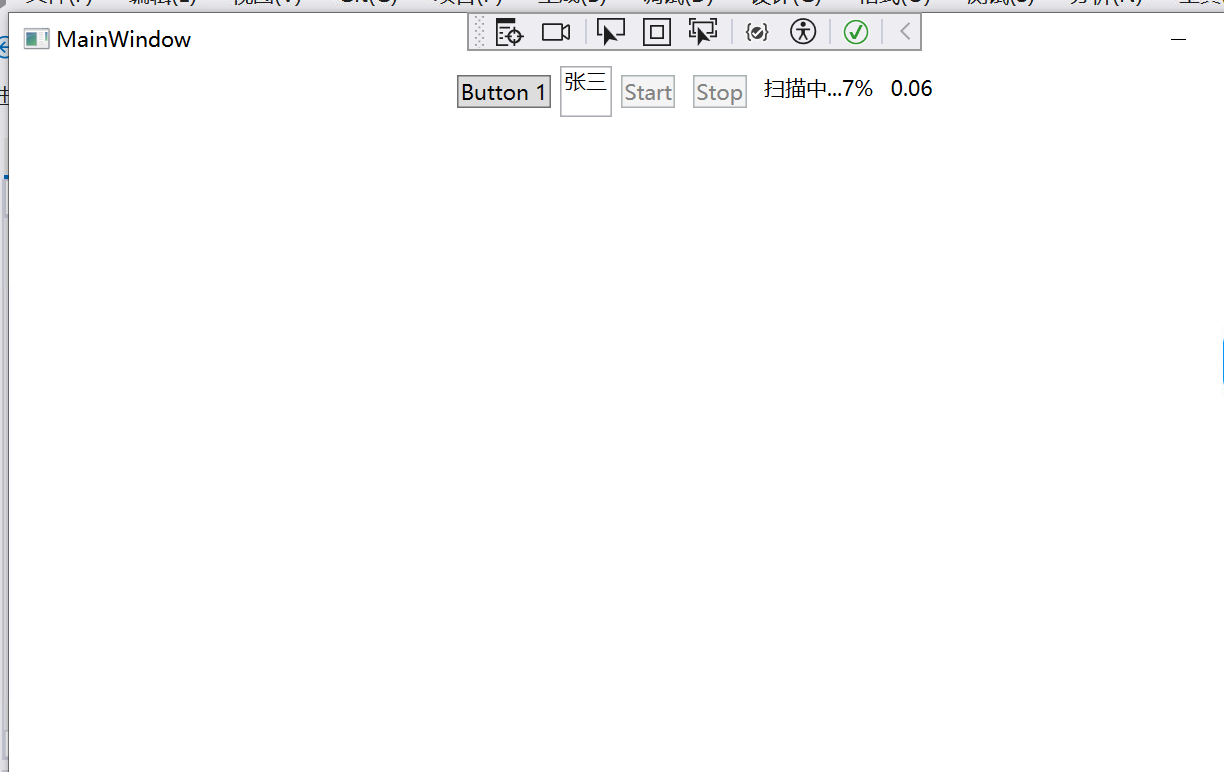
        <StackPanel Grid.Row="0" Orientation="Horizontal" HorizontalAlignment="Center" VerticalAlignment="Top">
            <Button Content="Button 1" Margin="5" Command="{Binding CCommand}"/>
            <TextBox Text="{Binding Name}"/>
            <Button Command="{Binding StartCommand}" Content="Start" Margin="5"/>
            <Button Command="{Binding StopCommand}" Content="Stop" Margin="5"/>
            <TextBlock Text="{Binding DeviceStatus}" Margin="5" Name="Status" Width="auto"/>
            <TextBlock Text="{Binding ScanProgress}" Margin="5" Name="Status2"/>
        </StackPanel>
    </Grid>
</Window>
csharp
using System;
using System.Collections.Generic;
using System.Linq;
using System.Text;
using System.Threading.Tasks;
using System.Windows;
using System.Windows.Controls;
using System.Windows.Data;
using System.Windows.Documents;
using System.Windows.Input;
using System.Windows.Media;
using System.Windows.Media.Imaging;
using System.Windows.Navigation;
using System.Windows.Shapes;

namespace WpfApp5
{
    /// <summary>
    /// MainWindow.xaml 的交互逻辑
    /// </summary>
    public partial class MainWindow : Window
    {
        public MainWindow()
        {
            InitializeComponent();
            this.DataContext = new MainViewModel();
        }
    }
}
base
csharp
// 引用必要的命名空间(你的代码里漏了,必须补充)
using System.ComponentModel;
using System.Runtime.CompilerServices;

public class InotifyBase1 : INotifyPropertyChanged
{
    // 1. 声明属性变更事件(接口要求)
    // UI会订阅这个事件,接收属性变化通知
    public event PropertyChangedEventHandler PropertyChanged;

    // 2. 封装通知方法(核心)
    // [CallerMemberName]:自动获取调用该方法的属性名,无需手动传参
    protected void OnPropertyChanged([CallerMemberName] string propertyName=null)
    {
        // 触发事件:通知UI"某个属性值变了,赶紧刷新"
        // ?. 是空值保护:避免没有订阅者时抛出空引用异常
        PropertyChanged?.Invoke(this, new PropertyChangedEventArgs(propertyName));
    }
}
Application.Current.是什么
1. 官方定义
Application.Current是System.Windows.Application类的静态只读属性,返回当前正在运行的 WPF 应用程序的唯一实例(单例模式)。
简单说:一个 WPF 程序从启动到关闭,只有一个Application实例,Current就是获取这个实例的 "快捷方式"。
核心用途
1. 访问 UI 线程的 Dispatcher(你最常用的场景)
csharp
// 跨线程更新UI的核心:获取UI线程的调度器
Application.Current.Dispatcher.BeginInvoke(() =>
{
    DeviceStatus = "扫描中 0%";
});
Dispatcher是Application实例的核心属性,绑定到UI 主线程;
无论在哪个后台线程,只要通过Current拿到 Dispatcher,就能安全更新 UI。
2. 管理应用程序的窗口
csharp
// 获取当前激活的窗口(比如你的扫描主窗口)
var mainWindow = Application.Current.MainWindow;

// 遍历所有打开的窗口(比如弹窗、设置窗口)
foreach (Window win in Application.Current.Windows)
{
    if (win.Name == "ScanWindow")
    {
        win.Close(); // 关闭指定窗口
    }
}

// 退出整个应用程序(工业级上位机退出逻辑)
Application.Current.Shutdown();
3. 全局资源与配置
csharp
// 获取App.xaml中定义的全局资源(比如颜色、样式)
var scanProgressColor = Application.Current.Resources["ProgressColor"] as SolidColorBrush;

// 获取应用程序的启动路径(保存扫描日志/结果)
string appPath = Application.Current.StartupUri?.ToString();
string exePath = System.IO.Path.GetDirectoryName(Application.Current.GetType().Assembly.Location);
4. 应用程序生命周期事件
csharp
// 监听应用退出事件(保存扫描配置、清理资源)
Application.Current.Exit += (s, e) =>
{
    // 关闭扫描设备、保存进度
    SaveScanConfig();
    CloseXRayDevice();
};

// 监听未捕获异常(全局异常处理)
Application.Current.DispatcherUnhandledException += (s, e) =>
{
    MessageBox.Show($"程序异常:{e.Exception.Message}", "错误");
    e.Handled = true; // 标记异常已处理,避免程序崩溃
};