生产追溯:条码触发自动记录
这是「从零搭建灌装监控系统」系列第10篇。上一篇把 SQLite 和 FreeSql 接通了,但数据库不会自动知道一批产品什么时候开始、什么时候结束。这篇从 PLC 轮询到的条码变化入手,实现去重、记录快照和异常保护,让"看见一个新条码"真正变成一条生产记录。
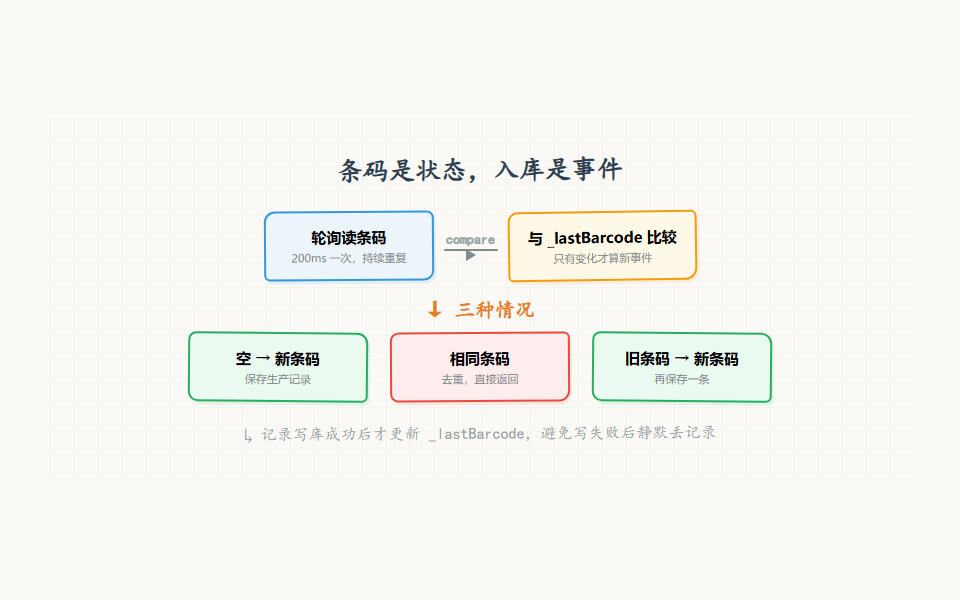
条码读到了,为什么数据库里有三条
第一次把条码接到轮询循环时,代码很直观:每次收到设备状态,就读取条码;只要条码不为空,就插入一条记录。
测试人员扫入一个条码,界面上很快出现了记录。看起来没问题。过了一会儿打开数据库,发现同一个条码有几十条。
这不是数据库重复提交,也不是扫描枪坏了。轮询本来就会持续运行,200ms 一次意味着同一个条码在传感器保持期间会被读到很多次。条码是状态,入库动作是事件。 如果没有把这两个概念分开,重复记录只是时间问题。
这一篇做的事情不复杂:保存上一次处理过的条码,只有从"没有条码"到"出现新条码"或从"旧条码"到"新条码"时才创建记录,同时把当时的工艺数据冻结下来。
先区分状态和事件
设备状态可以这样理解:
text
当前状态:Barcode = B20260923001
下一次轮询:Barcode = B20260923001
再下一次轮询:Barcode = B20260923001
这是同一个状态,不是三个生产事件。只有下面的变化才值得触发入库:
text
空字符串 -> B20260923001       开始记录
B20260923001 -> B20260923001   不处理
B20260923001 -> B20260923002   新批次记录
B20260923001 -> 空字符串       条码离开,结束当前状态
代码中的 _lastBarcode 就是一个小型状态机记忆。它不是数据库,也不是缓存系统,只负责回答一个问题:这次看到的条码,和上次相比有没有变化?
#mermaid-svg-fPJhkBcVVcUQeZxu{font-family:"trebuchet ms",verdana,arial,sans-serif;font-size:16px;fill:#333;}@keyframes edge-animation-frame{from{stroke-dashoffset:0;}}@keyframes dash{to{stroke-dashoffset:0;}}#mermaid-svg-fPJhkBcVVcUQeZxu .edge-animation-slow{stroke-dasharray:9,5!important;stroke-dashoffset:900;animation:dash 50s linear infinite;stroke-linecap:round;}#mermaid-svg-fPJhkBcVVcUQeZxu .edge-animation-fast{stroke-dasharray:9,5!important;stroke-dashoffset:900;animation:dash 20s linear infinite;stroke-linecap:round;}#mermaid-svg-fPJhkBcVVcUQeZxu .error-icon{fill:#552222;}#mermaid-svg-fPJhkBcVVcUQeZxu .error-text{fill:#552222;stroke:#552222;}#mermaid-svg-fPJhkBcVVcUQeZxu .edge-thickness-normal{stroke-width:1px;}#mermaid-svg-fPJhkBcVVcUQeZxu .edge-thickness-thick{stroke-width:3.5px;}#mermaid-svg-fPJhkBcVVcUQeZxu .edge-pattern-solid{stroke-dasharray:0;}#mermaid-svg-fPJhkBcVVcUQeZxu .edge-thickness-invisible{stroke-width:0;fill:none;}#mermaid-svg-fPJhkBcVVcUQeZxu .edge-pattern-dashed{stroke-dasharray:3;}#mermaid-svg-fPJhkBcVVcUQeZxu .edge-pattern-dotted{stroke-dasharray:2;}#mermaid-svg-fPJhkBcVVcUQeZxu .marker{fill:#333333;stroke:#333333;}#mermaid-svg-fPJhkBcVVcUQeZxu .marker.cross{stroke:#333333;}#mermaid-svg-fPJhkBcVVcUQeZxu svg{font-family:"trebuchet ms",verdana,arial,sans-serif;font-size:16px;}#mermaid-svg-fPJhkBcVVcUQeZxu p{margin:0;}#mermaid-svg-fPJhkBcVVcUQeZxu .label{font-family:"trebuchet ms",verdana,arial,sans-serif;color:#333;}#mermaid-svg-fPJhkBcVVcUQeZxu .cluster-label text{fill:#333;}#mermaid-svg-fPJhkBcVVcUQeZxu .cluster-label span{color:#333;}#mermaid-svg-fPJhkBcVVcUQeZxu .cluster-label span p{background-color:transparent;}#mermaid-svg-fPJhkBcVVcUQeZxu .label text,#mermaid-svg-fPJhkBcVVcUQeZxu span{fill:#333;color:#333;}#mermaid-svg-fPJhkBcVVcUQeZxu .node rect,#mermaid-svg-fPJhkBcVVcUQeZxu .node circle,#mermaid-svg-fPJhkBcVVcUQeZxu .node ellipse,#mermaid-svg-fPJhkBcVVcUQeZxu .node polygon,#mermaid-svg-fPJhkBcVVcUQeZxu .node path{fill:#ECECFF;stroke:#9370DB;stroke-width:1px;}#mermaid-svg-fPJhkBcVVcUQeZxu .rough-node .label text,#mermaid-svg-fPJhkBcVVcUQeZxu .node .label text,#mermaid-svg-fPJhkBcVVcUQeZxu .image-shape .label,#mermaid-svg-fPJhkBcVVcUQeZxu .icon-shape .label{text-anchor:middle;}#mermaid-svg-fPJhkBcVVcUQeZxu .node .katex path{fill:#000;stroke:#000;stroke-width:1px;}#mermaid-svg-fPJhkBcVVcUQeZxu .rough-node .label,#mermaid-svg-fPJhkBcVVcUQeZxu .node .label,#mermaid-svg-fPJhkBcVVcUQeZxu .image-shape .label,#mermaid-svg-fPJhkBcVVcUQeZxu .icon-shape .label{text-align:center;}#mermaid-svg-fPJhkBcVVcUQeZxu .node.clickable{cursor:pointer;}#mermaid-svg-fPJhkBcVVcUQeZxu .root .anchor path{fill:#333333!important;stroke-width:0;stroke:#333333;}#mermaid-svg-fPJhkBcVVcUQeZxu .arrowheadPath{fill:#333333;}#mermaid-svg-fPJhkBcVVcUQeZxu .edgePath .path{stroke:#333333;stroke-width:2.0px;}#mermaid-svg-fPJhkBcVVcUQeZxu .flowchart-link{stroke:#333333;fill:none;}#mermaid-svg-fPJhkBcVVcUQeZxu .edgeLabel{background-color:rgba(232,232,232, 0.8);text-align:center;}#mermaid-svg-fPJhkBcVVcUQeZxu .edgeLabel p{background-color:rgba(232,232,232, 0.8);}#mermaid-svg-fPJhkBcVVcUQeZxu .edgeLabel rect{opacity:0.5;background-color:rgba(232,232,232, 0.8);fill:rgba(232,232,232, 0.8);}#mermaid-svg-fPJhkBcVVcUQeZxu .labelBkg{background-color:rgba(232, 232, 232, 0.5);}#mermaid-svg-fPJhkBcVVcUQeZxu .cluster rect{fill:#ffffde;stroke:#aaaa33;stroke-width:1px;}#mermaid-svg-fPJhkBcVVcUQeZxu .cluster text{fill:#333;}#mermaid-svg-fPJhkBcVVcUQeZxu .cluster span{color:#333;}#mermaid-svg-fPJhkBcVVcUQeZxu div.mermaidTooltip{position:absolute;text-align:center;max-width:200px;padding:2px;font-family:"trebuchet ms",verdana,arial,sans-serif;font-size:12px;background:hsl(80, 100%, 96.2745098039%);border:1px solid #aaaa33;border-radius:2px;pointer-events:none;z-index:100;}#mermaid-svg-fPJhkBcVVcUQeZxu .flowchartTitleText{text-anchor:middle;font-size:18px;fill:#333;}#mermaid-svg-fPJhkBcVVcUQeZxu rect.text{fill:none;stroke-width:0;}#mermaid-svg-fPJhkBcVVcUQeZxu .icon-shape,#mermaid-svg-fPJhkBcVVcUQeZxu .image-shape{background-color:rgba(232,232,232, 0.8);text-align:center;}#mermaid-svg-fPJhkBcVVcUQeZxu .icon-shape p,#mermaid-svg-fPJhkBcVVcUQeZxu .image-shape p{background-color:rgba(232,232,232, 0.8);padding:2px;}#mermaid-svg-fPJhkBcVVcUQeZxu .icon-shape rect,#mermaid-svg-fPJhkBcVVcUQeZxu .image-shape rect{opacity:0.5;background-color:rgba(232,232,232, 0.8);fill:rgba(232,232,232, 0.8);}#mermaid-svg-fPJhkBcVVcUQeZxu .label-icon{display:inline-block;height:1em;overflow:visible;vertical-align:-0.125em;}#mermaid-svg-fPJhkBcVVcUQeZxu .node .label-icon path{fill:currentColor;stroke:revert;stroke-width:revert;}#mermaid-svg-fPJhkBcVVcUQeZxu :root{--mermaid-font-family:"trebuchet ms",verdana,arial,sans-serif;} 是
否
是
否
是
否
轮询读到条码
条码为空?
清空 _lastBarcode
与上次相同?
跳过,不入库
写生产记录
写入成功?
更新 _lastBarcode
保留旧值,下次重试
最小实现:变化时才保存
在 DashboardViewModel 或专门的生产追溯服务里,可以写出这样的逻辑:
csharp
private string _lastBarcode = "";
private readonly SemaphoreSlim _recordLock = new(1, 1);

private async Task HandleDeviceStateAsync(DeviceStates state)
{
    var barcode = state.Barcode?.Trim() ?? "";

    if (string.IsNullOrWhiteSpace(barcode))
    {
        _lastBarcode = "";
        return;
    }

    if (string.Equals(barcode, _lastBarcode,
                      StringComparison.OrdinalIgnoreCase))
        return;

    _lastBarcode = barcode;
    await SaveNewRecordAsync(barcode, state);
}
这里先 Trim,避免扫码器在末尾带回车或空格时把同一个条码当成不同字符串。比较时是否忽略大小写,要根据业务规则决定。很多工厂条码是大小写敏感的,不能机械地统一转小写。示例使用忽略大小写只是为了说明"同一条码"的判断点,正式项目应以条码规范为准。
保存方法负责组装快照:
csharp
private async Task SaveNewRecordAsync(string barcode, DeviceStates state)
{
    await _recordLock.WaitAsync();
    try
    {
        var record = new ProductionRecord
        {
            Time = DateTime.Now,
            BatchNo = barcode,
            Volume = state.CurrentVolume,
            Temperature = state.Temperature,
            CycleTime = state.CurrentCycleTime,
            Operator = CurrentUser.Name
        };

        await DataService.SaveProductionRecordAsync(record);
        LogService.Info($"生产记录已保存:{barcode}");
    }
    finally
    {
        _recordLock.Release();
    }
}
为什么要保存快照,而不是只保存条码?因为设备状态会继续变化。把当前液位、温度、周期时间等字段写入记录后,后续查询看到的是"当时发生了什么",而不是"现在设备是什么状态"。
_lastBarcode 放在哪里
放在 ViewModel 里可以快速完成,但它有一个明显限制:页面重新创建,状态就可能丢失。更稳妥的做法是把去重逻辑放到独立服务中:
csharp
public sealed class ProductionTraceService
{
    private string _lastBarcode = "";
    private readonly SemaphoreSlim _gate = new(1, 1);

    public async Task<bool> TryRecordAsync(DeviceStates state,
                                            string operatorName)
    {
        var barcode = state.Barcode?.Trim() ?? "";
        if (barcode.Length == 0)
        {
            _lastBarcode = "";
            return false;
        }

        await _gate.WaitAsync();
        try
        {
            if (barcode == _lastBarcode)
                return false;

            var record = ProductionRecord.From(state, operatorName);
            await DataService.SaveProductionRecordAsync(record);
            _lastBarcode = barcode;
            return true;
        }
        finally
        {
            _gate.Release();
        }
    }
}
这里把 _lastBarcode 的更新放在数据库写入成功之后。这样做的好处是:如果数据库写失败,下一次轮询仍然会再次尝试,而不是因为内存状态已经更新导致这条记录永远丢失。
不过也要看到它的边界:如果数据库写成功、进程在更新 _lastBarcode 前崩溃,重启后可能再次写入。真正需要强一致去重时,不能只靠内存变量,要给数据库增加唯一约束或记录业务键。
用业务键做第二道保险
生产记录可以增加一个业务键,例如"条码 + 开始时间"或设备侧的批次号。SQLite 里把业务键设置为唯一,重复写入时由数据库拒绝。
csharp
public class ProductionRecord
{
    [Column(IsIdentity = true, IsPrimary = true)]
    public long Id { get; set; }

    [Column(IsNullable = false, StringLength = 64)]
    public string BatchNo { get; set; } = "";

    public DateTime Time { get; set; }
    public string RecordKey { get; set; } = "";
}
如果一个条码可以重复生产,就不能简单地把 BatchNo 设置成唯一。可以让设备批次号、开始时间窗口或生产流水号参与业务键。关键是先问清楚业务:同一条码重复出现代表重复扫描,还是代表返工?技术方案必须服从这个答案。
数据库唯一约束是最后一道防线,不是替代业务判断。把每一次重复都交给数据库抛异常,会让日志充满"正常重复"的错误,看起来像系统经常失败。
条码不是永远可靠
现场采集还有几种情况需要处理:
条码分段到达
如果条码由多个寄存器组成,某一次轮询可能只读到前半段。不能看到非空字符串就马上入库,需要确认长度、结束符或连续两次读取一致。
csharp
private string? _candidateBarcode;
private int _stableCount;

private bool IsStable(string barcode)
{
    if (barcode == _candidateBarcode)
        _stableCount++;
    else
    {
        _candidateBarcode = barcode;
        _stableCount = 1;
    }

    return _stableCount >= 2;
}
条码包含不可见字符
回车、换行和零字节在寄存器转换时很常见。清洗逻辑要集中处理,并保留原始数据的诊断日志,但日志里不要输出完整的敏感生产编码。
通信重连后重复上报
断线重连后设备可能把当前条码再次上报。只要 _lastBarcode 没有被错误清空,就不会重复插入。只有收到明确的"条码离开"状态,才应该把上一次条码置空。
记录失败和 UI 不能互相拖住
轮询线程发现新条码后,不应该同步等待一个慢数据库操作再继续读取设备。可以把入库交给后台任务,但要用队列或锁控制并发,不能每次轮询都 Task.Run 一把:
csharp
private readonly Channel<ProductionRecord> _records =
    Channel.CreateUnbounded<ProductionRecord>();

private async Task WriterLoopAsync(CancellationToken token)
{
    await foreach (var record in _records.Reader.ReadAllAsync(token))
    {
        try
        {
            await DataService.SaveProductionRecordAsync(record);
        }
        catch (Exception ex)
        {
            LogService.Error("保存生产记录失败", ex);
        }
    }
}
文章前面的最小实现适合数据量小、链路简单的项目。数据量上来后,单独的写入队列更容易做重试、统计和停机排空。无论采用哪种方案,都要保证"采集线程不被数据库卡死"和"写入失败不会被静默吞掉"。
踩坑记录
只判断非空,不判断变化
这是重复数据的根因。状态持续存在不等于事件持续发生。
先更新 _lastBarcode 再写数据库
写库失败后,下一次不会再尝试,造成静默丢记录。除非使用了可靠队列,否则应在写入成功后更新状态。
把条码清洗写在多个页面
一个页面去空格,另一个页面转大小写,最后同一条码在不同功能里变成不同值。清洗、校验和去重应该集中在追溯服务。
用 UI 集合当数据库
UI 集合适合显示最近记录,不适合承担持久化职责。页面关闭、导航切换或程序重启都会让集合失效。
本篇小结
| 问题 | 做法 |
|---|---|
| 轮询重复读取怎么办 | 把状态变化转换成事件 |
| 如何避免重复记录 | _lastBarcode + 数据库业务键 |
| 保存什么数据 | 条码和当时的设备状态快照 |
| 数据库写失败怎么办 | 不提前更新状态,记录错误并重试 |
| 页面重建会丢状态吗 | 将追溯逻辑放到独立服务 |
| 采集和入库如何解耦 | 小项目用锁,大项目用写入队列 |
到这里,监控系统已经能留下生产记录。下一步要解决的是:数据不能只躺在数据库里,现场还需要把它交给 Excel、质量系统或客户。
下期预告
第11篇:CSV 流式导出
下一篇实现按时间范围查询生产记录、分批写入 CSV、处理中文编码和大数据量导出,重点是避免一次性把所有数据塞进内存。