一、mybatis执行流程
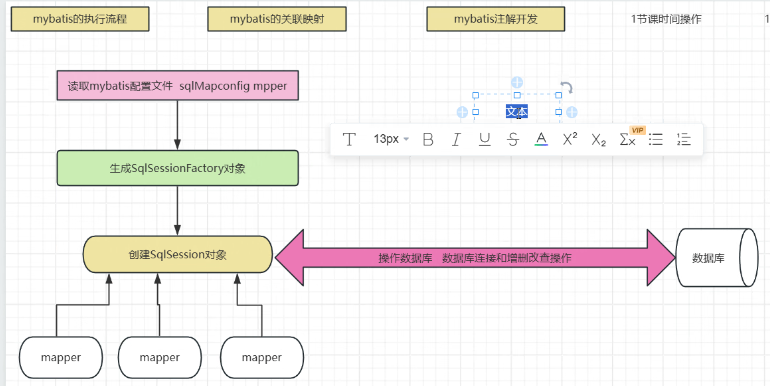
| 对象 | 作用 | 线程安全 |
|---|---|---|
SqlSessionFactory |
会话工厂,创建 SqlSession |
线程安全(全局单例) |
SqlSession |
数据库会话,执行 SQL、事务控制 | 非线程安全(每次操作新建) |
Mapper 代理对象 |
执行 SQL 的接口代理 | 非线程安全(依赖 SqlSession) |
1.1核心执行流程
读取配置文件 MyBatis 首先会加载核心配置文件(
sqlMapConfig.xml/mybatis-config.xml)和所有 Mapper 映射文件。
- 核心配置文件:包含数据库连接信息、环境配置、事务管理器、类型别名等全局设置。
- Mapper 映射文件:包含具体的 SQL 语句、参数映射、结果映射规则。
构建
SqlSessionFactory对象 这一步是 MyBatis 的初始化阶段,会解析配置文件并构建SqlSessionFactory。
SqlSessionFactory是 MyBatis 的核心工厂对象,全局单例 ,负责创建SqlSession。- 它内部维护了数据库连接池、配置元信息,是线程安全的。
创建
SqlSession对象 通过SqlSessionFactory打开会话,创建SqlSession。
SqlSession是 MyBatis 与数据库交互的会话对象,非线程安全,每次数据库操作都应创建新实例。- 它封装了数据库连接、事务控制、SQL 执行的核心方法。
获取 Mapper 代理对象 图中多个
mapper指向SqlSession,代表通过SqlSession.getMapper(xxxMapper.class)获取 Mapper 接口的代理对象。
- 这个代理对象由 MyBatis 动态生成,实现了 Mapper 接口的所有方法,会自动关联对应的 SQL 语句。
- 这是 MyBatis 推荐的操作方式,替代了传统的
selectOne/insert等方法。执行数据库操作通过 Mapper 代理对象调用方法,MyBatis 会执行以下操作:
- 封装 SQL 参数
- 执行预编译 SQL
- 处理结果集映射(将数据库记录转为 Java 对象)
- 管理事务(提交 / 回滚)最终与数据库完成交互,实现增删改查操作。
sqlsession可以实现JDBC的connection以及mysql执行(本质操作数据库)
mybatis实现目前是mapper接口+xml映射
二、mybatis关联映射
把数据库表之间的关系 → 映射成 Java 对象之间的关系
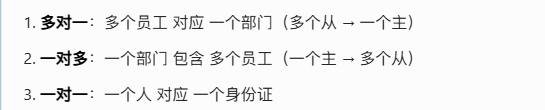
| 关系 | 标签 | 作用 |
|---|---|---|
| 多对一 / 一对一 | <association> |
关联单个对象 |
| 一对多 | <collection> |
关联集合对象 |
- 查单个对象 (多对一 / 一对一)→ 用
<association> - 查集合对象 (一对多)→ 用
<collection>
三、注解开发
把原来写在 Mapper.xml 里的 SQL,直接写在 DAO 接口的方法上面 ,不用 XML 文件 !
步骤 1:DAO 接口上直接写 SQL(重点)
直接在 DAO 接口的方法上加注解,写 SQL 就行。
1. 查询(@Select)
public interface UserDao {

    // 查询所有用户
    @Select("select * from user")
    List<User> findAll();
}
2. 新增(@Insert)
// 新增用户
@Insert("insert into user(name,age) values(#{name},#{age})")
int addUser(User user);
3. 修改(@Update)
// 修改用户
@Update("update user set name=#{name} where id=#{id}")
int updateUser(User user);
4. 删除(@Delete)
// 删除用户
@Delete("delete from user where id=#{id}")
int deleteUser(int id);
步骤 2:MyBatis 核心配置文件中注册 DAO 接口
在
sqlMapConfig.xml中,直接注册 DAO 接口:
<mappers>
    <!-- 注解开发:直接写接口全类名 -->
    <mapper class="com.qcby.dao.UserDao"/>
</mappers>
步骤 3:测试调用(和之前一样)
UserDao userDao = session.getMapper(UserDao.class);
List<User> list = userDao.findAll(); // 直接调用
关联映射(多对一)
用 @Results + @Result 代替 XML:
@Select("select u.*, d.id dept_id, d.name dept_name from user u left join dept d on u.dept_id=d.id")
@Results({
    @Result(property = "id", column = "id"),
    @Result(property = "name", column = "name"),
    // 关联对象:property=实体类属性, javaType=类型, column=外键列
    @Result(property = "dept", javaType = Dept.class, column = "dept_id",
            one = @One(select = "com.qcby.dao.DeptDao.findById"))
})
List<User> findUserWithDept();
== 对比的是对象
User
dao
package com.qcby.dao;

import com.qcby.entity.User;
import org.apache.ibatis.annotations.*;

import javax.jws.soap.SOAPBinding;
import java.util.List;

public interface UserDao {
    //查询所有
    @Select("select * from user")
    @Results(id="userMap",value = {
            @Result(property = "id",column = "id"),
            @Result(property = "username",column = "username"),
            @Result(property = "birthday",column = "birthday"),
            @Result(property = "sex",column = "sex"),
            @Result(property = "address",column = "address")
    })
    public List<User> findAll();

    //通过ID查询
    @Select("select * from user where id = #{id}")
    @ResultMap(value = "userMap")
    public User findById(int id);

    //增加
    @Insert("insert into user(username,birthday,sex,address) values(#{username},#{birthday},#{sex},#{address})")
    @SelectKey(statement="select last_insert_id()",keyColumn = "id",keyProperty = "id",before =false,resultType =Integer.class)
    public int insert(User user);

    //更新
    @Update("update user set username = #{username},birthday = #{birthday},sex = #{sex},address = #{address} where id = #{id}")
    public int update(User user);

    //删除
    @Delete("delete from user where id = #{id}")
    public int delete(int id);

    //查询数量
    @Select("select count(*) from user")
    public int findCount();

    //模糊查询
    @Select("select * from user where username like  concat('%',#{username},'%')")
    public List<User> findByName(String username);

}
test
import com.qcby.dao.UserDao;
import com.qcby.entity.User;
import org.apache.ibatis.io.Resources;
import org.apache.ibatis.session.SqlSession;
import org.apache.ibatis.session.SqlSessionFactory;
import org.apache.ibatis.session.SqlSessionFactoryBuilder;
import org.junit.After;
import org.junit.Before;
import org.junit.Test;

import java.io.IOException;
import java.io.InputStream;
import java.sql.Date;
import java.util.List;

public class UserTest {
    private InputStream in = null;
    private SqlSession session = null;
    private UserDao mapper = null;

    @Before
    public void init() throws IOException {
        in = Resources.getResourceAsStream("SqlMapConfig.xml");
        SqlSessionFactory factory = new SqlSessionFactoryBuilder().build(in);
        session = factory.openSession();
        mapper = session.getMapper(UserDao.class);
    }

    @After
    public void destory() throws IOException {
        session.close();
        in.close();
    }

    @Test
    public void findAll() throws IOException {
        List<User> users = mapper.findAll();
        for (User user:users) {
            System.out.println(user);
        }
    }

    @Test
    public void findById(){
        User user = mapper.findById(4);
        System.out.println(user);
    }

    // ====================== 这里修复了日期!======================
    @Test
    public void insert(){
        User user = new User();
        user.setSex("女");
        user.setUsername("小美");
        // 正确写法
        user.setBirthday(new Date(System.currentTimeMillis()));
        user.setAddress("保定");
        int insert = mapper.insert(user);
        session.commit();
        System.out.println("插入成功:" + insert);
    }

    // ====================== 这里修复了日期!======================
    @Test
    public void update(){
        User user = new User();
        user.setId(22);
        user.setSex("女");
        user.setUsername("小美");
        // 正确写法
        user.setBirthday(new Date(System.currentTimeMillis()));
        user.setAddress("上海");
        int insert = mapper.update(user);
        session.commit();
        System.out.println("修改成功:" + insert);
    }

    @Test
    public void delete(){
        int delete =  mapper.delete(22);
        session.commit();
        System.out.println("删除成功:" + delete);
    }

    @Test
    public void findCount(){
        int count = mapper.findCount();
        System.out.println("总记录数:" + count);
    }

    @Test
    public void findByName(){
        List<User> list  = mapper.findByName("小");
        for (User user : list) {
            System.out.println(user);
        }
    }

}