一、将/home/mysql-5.7.26/data/目录复制出来
[root@orderer home]# cd mysql-5.7.26/

[root@orderer mysql-5.7.26]# cp -R data/ ../data_bak
二、删除/home/mysql-5.7.26/data/目录,因为初始化数据库的时候,data目录必须为空
[root@orderer mysql-5.7.26]# rm -rf data/

[root@orderer mysql-5.7.26]# mkdir data

## 由于我是root账户操作的,所以将data目录权限赋予mysql用户

[root@orderer mysql-5.7.26]# chown -R mysql:mysql data
三、重新初始化数据库
[root@orderer home]# mysqld_safe --defaults-file=/etc/mysql/my.cnf --initialize --basedir=/home/mysql-5.7.26/ --datadir=/home/mysql-5.7.26/data/

2020-01-19T07:11:22.220590Z mysqld_safe Logging to '/home/mysql-5.7.26/log/mysqld.log'.

2020-01-19T07:11:22.266396Z mysqld_safe Starting mysqld daemon with databases from /home/mysql-5.7.26/data

2020-01-19T07:11:33.111853Z mysqld_safe mysqld from pid file /home/mysql-5.7.26/run/mysqld.pid ended
此时,查看data目录下已经生成了相关文件
[root@orderer mysql-5.7.26]# ll data

??? 110668

-rw-r----- 1 mysql mysql 56 1? 19 15:11 auto.cnf

-rw------- 1 mysql mysql 1680 1? 19 15:11 ca-key.pem

-rw-r--r-- 1 mysql mysql 1112 1? 19 15:11 ca.pem

-rw-r--r-- 1 mysql mysql 1112 1? 19 15:11 client-cert.pem

-rw------- 1 mysql mysql 1680 1? 19 15:11 client-key.pem

-rw-r----- 1 mysql mysql 419 1? 19 15:11 ib_buffer_pool

-rw-r----- 1 mysql mysql 12582912 1? 19 15:11 ibdata1

-rw-r----- 1 mysql mysql 50331648 1? 19 15:11 ib_logfile0

-rw-r----- 1 mysql mysql 50331648 1? 19 15:11 ib_logfile1

-rw-r----- 1 mysql mysql 177 1? 19 15:11 master-18-69.000001

-rw-r----- 1 mysql mysql 22 1? 19 15:11 master-18-69.index

drwxr-x--- 2 mysql mysql 4096 1? 19 15:11 mysql

drwxr-x--- 2 mysql mysql 8192 1? 19 15:11 performance_schema

-rw------- 1 mysql mysql 1680 1? 19 15:11 private_key.pem

-rw-r--r-- 1 mysql mysql 452 1? 19 15:11 public_key.pem

-rw-r--r-- 1 mysql mysql 1112 1? 19 15:11 server-cert.pem

-rw------- 1 mysql mysql 1676 1? 19 15:11 server-key.pem

drwxr-x--- 2 mysql mysql 8192 1? 19 15:11 sys
查找mysql.log日志过滤"temporary password",得到系统生成的初始随机密码,第一次登陆使用
[root@orderer mysql-5.7.26]# cat /home/mysql-5.7.26/log/mysqld.log|grep 'temporary password'

2020-01-19T07:11:25.453456Z 1 [Note] A temporary password is generated for root@localhost: PcrY;58llX3
四、启动mysql
[root@orderer home]# mysqld_safe --defaults-file=/etc/mysql/my.cnf

2020-01-19T07:16:34.019182Z mysqld_safe Logging to '/home/mysql-5.7.26/log/mysqld.log'.

2020-01-19T07:16:34.065328Z mysqld_safe Starting mysqld daemon with databases from /home/mysql-5.7.26/data
连接mysql,使用初始随机密码登陆
[root@orderer mysql-5.7.26]# mysql -uroot -p -S /home/mysql-5.7.26/mysql.sock

Enter password:

Welcome to the MySQL monitor. Commands end with ; or \g.

Your MySQL connection id is 10

Server version: 5.7.26-log

Copyright (c) 2000, 2019, Oracle and/or its affiliates. All rights reserved.

Oracle is a registered trademark of Oracle Corporation and/or itsaffiliates. Other names may be trademarks of their respectiveowners.

Type 'help;' or '\h' for help. Type '\c' to clear the current input statement.

mysql>
五、修改root密码
mysql> alter user 'root'@'localhost' identified by 'xxxxxxx';

Query OK, 0 rows affected (0.01 sec)

mysql> flush privileges;

Query OK, 0 rows affected (0.01 sec)

mysql>
使用新密码重新登录
[root@orderer mysql-5.7.26]# mysql -uroot -p -S /home/mysql-5.7.26/mysql.sock

Enter password:

Welcome to the MySQL monitor. Commands end with ; or \g.

Your MySQL connection id is 14

Server version: 5.7.26-log Source distribution

Copyright (c) 2000, 2019, Oracle and/or its affiliates. All rights reserved.

Oracle is a registered trademark of Oracle Corporation and/or its

affiliates. Other names may be trademarks of their respective

owners.

Type 'help;' or '\h' for help. Type '\c' to clear the current input statement.

mysql> show databases;

+--------------------+

| Database |

+--------------------+

| information_schema |

| mysql |

| performance_schema |

| sys |

+--------------------+

4 rows in set (0.01 sec)

mysql>
允许root远程登陆
[root@push-5-222 /]# mysql -uroot -p -S /home/mysql-5.7.26/mysql.sock

Enter password:

Welcome to the MySQL monitor. Commands end with ; or \g.

Your MySQL connection id is 5

Server version: 5.7.26 MySQL Community Server (GPL)

Copyright (c) 2000, 2019, Oracle and/or its affiliates. All rights reserved.

Oracle is a registered trademark of Oracle Corporation and/or its

affiliates. Other names may be trademarks of their respective

owners.

Type 'help;' or '\h' for help. Type '\c' to clear the current input statement.

mysql> use mysql;

Reading table information for completion of table and column names

You can turn off this feature to get a quicker startup with -A

Database changed

mysql> update user set host='%' where user='root';

Query OK, 1 row affected (0.00 sec)

Rows matched: 1 Changed: 1 Warnings: 0

mysql> flush privileges;

Query OK, 0 rows affected (0.00 sec)

mysql>
此时,看到数据库只有mysql,接下来,我们停掉mysql服务
[root@orderer mysql-5.7.26]# mysqladmin -uroot -p -S /home/mysql-5.7.26/mysql.sock shutdown

Enter password:

[root@orderer mysql-5.7.26]#
六、将备份的数据文件中的数据库目录文件夹test复制到data目录下
[root@orderer mysql-5.7.26]# cp -r ../data_bak/test/ data/查看data目录
[root@orderer mysql-5.7.26]# ll data/

??? 110672

-rw-r----- 1 mysql mysql 56 1? 19 15:11 auto.cnf

-rw------- 1 mysql mysql 1680 1? 19 15:11 ca-key.pem

-rw-r--r-- 1 mysql mysql 1112 1? 19 15:11 ca.pem

-rw-r--r-- 1 mysql mysql 1112 1? 19 15:11 client-cert.pem

-rw------- 1 mysql mysql 1680 1? 19 15:11 client-key.pem

-rw-r----- 1 mysql mysql 356 1? 19 15:23 ib_buffer_pool

-rw-r----- 1 mysql mysql 12582912 1? 19 15:23 ibdata1

-rw-r----- 1 mysql mysql 50331648 1? 19 15:23 ib_logfile0

-rw-r----- 1 mysql mysql 50331648 1? 19 15:11 ib_logfile1

-rw-r----- 1 mysql mysql 177 1? 19 15:11 master-18-69.000001

-rw-r----- 1 mysql mysql 573 1? 19 15:23 master-18-69.000002

-rw-r----- 1 mysql mysql 44 1? 19 15:16 master-18-69.index

drwxr-x--- 2 mysql mysql 4096 1? 19 15:11 mysql

drwxr-x--- 2 mysql mysql 8192 1? 19 15:11 performance_schema

-rw------- 1 mysql mysql 1680 1? 19 15:11 private_key.pem

-rw-r--r-- 1 mysql mysql 452 1? 19 15:11 public_key.pem

-rw-r--r-- 1 mysql mysql 1112 1? 19 15:11 server-cert.pem

-rw------- 1 mysql mysql 1676 1? 19 15:11 server-key.pem

drwxr-x--- 2 mysql mysql 8192 1? 19 15:11 sys

drwxr-x--- 2 root root 202 1? 19 15:24 test
test目录已经复制过来,因为是用root账户复制的,所以这里将文件所有者变更为mysql
[root@orderer mysql-5.7.26]# chown -R mysql:mysql data/test/

[root@orderer mysql-5.7.26]# ll data

??? 110672

-rw-r----- 1 mysql mysql 56 1? 19 15:11 auto.cnf

-rw------- 1 mysql mysql 1680 1? 19 15:11 ca-key.pem

-rw-r--r-- 1 mysql mysql 1112 1? 19 15:11 ca.pem

-rw-r--r-- 1 mysql mysql 1112 1? 19 15:11 client-cert.pem

-rw------- 1 mysql mysql 1680 1? 19 15:11 client-key.pem

-rw-r----- 1 mysql mysql 356 1? 19 15:23 ib_buffer_pool

-rw-r----- 1 mysql mysql 12582912 1? 19 15:23 ibdata1

-rw-r----- 1 mysql mysql 50331648 1? 19 15:23 ib_logfile0

-rw-r----- 1 mysql mysql 50331648 1? 19 15:11 ib_logfile1

-rw-r----- 1 mysql mysql 177 1? 19 15:11 master-18-69.000001

-rw-r----- 1 mysql mysql 573 1? 19 15:23 master-18-69.000002

-rw-r----- 1 mysql mysql 44 1? 19 15:16 master-18-69.index

drwxr-x--- 2 mysql mysql 4096 1? 19 15:11 mysql

drwxr-x--- 2 mysql mysql 8192 1? 19 15:11 performance_schema

-rw------- 1 mysql mysql 1680 1? 19 15:11 private_key.pem

-rw-r--r-- 1 mysql mysql 452 1? 19 15:11 public_key.pem

-rw-r--r-- 1 mysql mysql 1112 1? 19 15:11 server-cert.pem

-rw------- 1 mysql mysql 1676 1? 19 15:11 server-key.pem

drwxr-x--- 2 mysql mysql 8192 1? 19 15:11 sys

drwxr-x--- 2 mysql mysql 202 1? 19 15:24 test
再次启动mysql服务,并连接mysql,查看数据库
[root@orderer mysql-5.7.26]# mysql -uroot -p -S /home/mysql-5.7.26/mysql.sock

Enter password:

Welcome to the MySQL monitor. Commands end with ; or \g.

Your MySQL connection id is 3

Server version: 5.7.26-log Source distribution

Copyright (c) 2000, 2019, Oracle and/or its affiliates. All rights reserved.

Oracle is a registered trademark of Oracle Corporation and/or its

affiliates. Other names may be trademarks of their respective

owners.

Type 'help;' or '\h' for help. Type '\c' to clear the current input statement.

mysql> show databases;

+--------------------+

| Database |

+--------------------+

| information_schema |

| mysql |

| performance_schema |

| sys |

| test |

+--------------------+

5 rows in set (0.00 sec)

mysql>
发现已经出现了test数据库,我们切换到test,并查看表
mysql> use test;

Reading table information for completion of table and column names

You can turn off this feature to get a quicker startup with -A

Database changed

mysql> show tables;

+----------------+

| Tables_in_test |

+----------------+

| t_product_item |

| test |

+----------------+

2 rows in set (0.00 sec)
可以看到数据库中的表,我们查询一个表
mysql> select * from test;

ERROR 1146 (42S02): Table 'test.test' doesn't exist

mysql>
此时,报错,表不存在,这是因为我们没有将备份的data目录下的ibdata1文件复制过来的原因,数据库引擎使用innodb时,ibdata1文件保存了数据库元数据信息,里面保存了每个数据库里的每个表的ID
所以,我们接下来将备份的data目录下的ibdata1复制到新的数据库data目录下覆盖
七、将备份data目录下的ibdata1文件复制到新数据库data目录下并覆盖
停掉mysql
[root@orderer mysql-5.7.26]# mysqladmin -uroot -p -S /home/mysql-5.7.26/mysql.sock shutdown

Enter password:

[root@orderer mysql-5.7.26]#
复制备份data目录下的ibdata1文件到数据库data目录下,提示是否覆盖,输入y
[root@orderer mysql-5.7.26]# cp ../data_bak/ibdata1 data/

cp:????"data/ibdata1"? y

[root@orderer mysql-5.7.26]#
我们再次启动mysql,并连接mysql
[root@orderer home]# mysqld_safe --defaults-file=/etc/mysql/my.cnf

2020-01-19T07:36:22.526939Z mysqld_safe Logging to '/home/mysql-5.7.26/log/mysqld.log'.

2020-01-19T07:36:22.574112Z mysqld_safe Starting mysqld daemon with databases from /home/mysql-5.7.26/data

[root@orderer mysql-5.7.26]# mysql -uroot -p -S /home/mysql-5.7.26/mysql.sock

Enter password:

Welcome to the MySQL monitor. Commands end with ; or \g.

Your MySQL connection id is 2

Server version: 5.7.26-log Source distribution

Copyright (c) 2000, 2019, Oracle and/or its affiliates. All rights reserved.

Oracle is a registered trademark of Oracle Corporation and/or its

affiliates. Other names may be trademarks of their respective

owners.

Type 'help;' or '\h' for help. Type '\c' to clear the current input statement.
打开test数据库,并查看表
mysql> use test;

Database changed

mysql> show tables;

+----------------+

| Tables_in_test |

+----------------+

| t_product_item |

| test |

+----------------+

2 rows in set (0.00 sec)

mysql>
再查询test表
mysql> select * from test;

+------+--------+

| id | name |

+------+--------+

| 1 | aaaaa |

| 2 | bbbb |

| 3 | ccccc |

| 4 | dddddd |

| 5 | eeeeee |

| 6 | fffff |

| 7 | rrrrr |

| 8 | uuuuuu |

| 10 | eerrrr |

+------+--------+

9 rows in set (0.00 sec)

mysql>
数据库可以正常读取了,我们再插入一条数据
mysql> insert into test values(11,'hhhhhh');

Query OK, 1 row affected (0.03 sec)

成功,查询

mysql> select * from test;

+------+--------+

| id | name |

+------+--------+

| 1 | aaaaa |

| 2 | bbbb |

| 3 | ccccc |

| 4 | dddddd |

| 5 | eeeeee |

| 6 | fffff |

| 7 | rrrrr |

| 8 | uuuuuu |

| 10 | eerrrr |

| 11 | hhhhhh |

+------+--------+

10 rows in set (0.00 sec)

mysql>
可以正常读写,至此数据文件恢复数据完成。
Mysql从Data文件夹中恢复数据库 另一种办法
原数据库Data文件保存好,用原文件中的 这六个文件夹替换Data新文件夹的文件,并且将所需要的数据库文件也复制过去即可。
要替换的文件主要有:
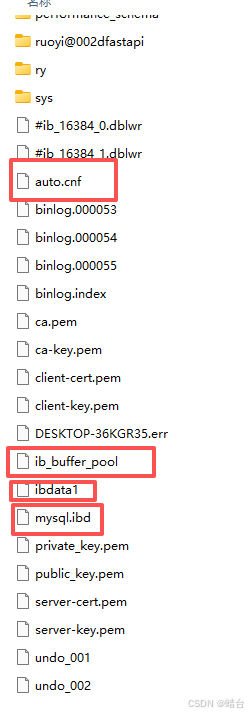
ib_logfile0 和 ib_logfile1 文件