提示:本文原创作品,良心制作,干货为主,简洁清晰,一看就会
文章目录
- 前言
- 一、Pushgateway简介
-
- [1.1 pushgateway是什么](#1.1 pushgateway是什么)
- [1.2 工作原理](#1.2 工作原理)
- 二、Pushgateway安装使用
-
- [2.1 环境介绍](#2.1 环境介绍)
- [2.2 Pushgateway安装配置](#2.2 Pushgateway安装配置)
- [2.3 向pushgateway推送数据](#2.3 向pushgateway推送数据)
- [2.4 pushgateway实例](#2.4 pushgateway实例)
- [2.5 设置警告](#2.5 设置警告)
- [2.6 grafana添加dashboard](#2.6 grafana添加dashboard)
前言
Prometheus默认以拉取模式采集监控数据,面对批量任务、临时脚本、异构业务等无法主动暴露指标的场景,采集存在局限。PushGateway作为推送式网关,可承接各类自定义指标上报,补齐拉取模式短板。本文围绕PushGateway展开,讲解自定义监控搭建流程,实操指标推送、数据查看与告警配置,助力灵活适配多样化业务监控需求
一、Pushgateway简介
1.1 pushgateway是什么
PushGateway是Prometheus生态的推送网关,接收业务主动推送指标,再由Prometheus拉取存储,适配无法暴露指标接口的监控场景
使用它的主要原因是:
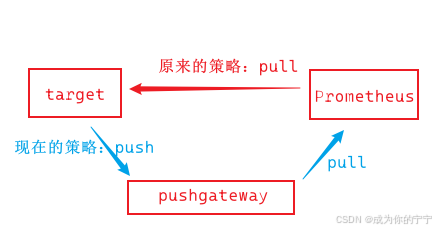
- Prometheus采用pull模式,可能由于不在一个子网或者防火墙原因,导致Prometheus无法直接拉取各个target数据
- 在监控业务数据的时候,需要将不同数据汇总,由Prometheus统一收集
- 当exporter不能满足需要时,也可以通过自定义(python,java,shell)监控我们想要的数据
使用它会产生的弊端:
- 存在单节点故障:如果多个监控目标的数据都汇总到同一个pushgateway,它就成了整个监控链路的单点故障源
- 监控健康状态盲区:Prometheus拉取状态up只针对pushgateway,无法做到对每个节点有效
- 数据残留引发的"僵尸指标":pushgateway会默认
永久存储所有推送过的指标序列,除非通过api主动删除,当一个任务实例运行结束后,它的指标数据依然残留在pushgateway中,形成误导性的"僵尸指标"
1.2 工作原理
- 业务程序/脚本主动将指标POST推送到网关
- 网关临时缓存上报数据
- Prometheus按配置周期,主动拉取网关内指标入库
二、Pushgateway安装使用
2.1 环境介绍
| 主机名 | ip地址 | 服务 | 备注 |
|---|---|---|---|
| prometheus | 192.168.13.141 | docker、docker-compose、prometheus、alertmanager、grafana | 监控端,已安装 |
关于监控端的服务我已经安装好了,prometheus有两种安装方式:二进制安装和docker安装 ,本次实验使用的容器安装的,后续被监控端我也统一使用容器部署,大家可以自行选择
关于监控端的服务如何安装,这里不在赘述,有不懂的同学可以查看此篇文章
Prometheus二进制安装:https://blog.csdn.net/m0_63756214/article/details/161196428?spm=1001.2014.3001.5501
Prometheus容器安装:https://blog.csdn.net/m0_63756214/article/details/161225636?spm=1001.2014.3001.5501
2.2 Pushgateway安装配置
yaml
root@prometheus:~# mkdir /opt/prometheus/pushgateway
root@prometheus:~# cd /opt/prometheus/pushgateway
root@prometheus:/opt/prometheus/pushgateway# vim docker-compose.yaml
version: '3.8'
services:
  pushgateway:
    image: prom/pushgateway
    container_name: pushgateway
    restart: always
    expose:
      - 9091
    ports:
      - "9091:9091"
root@prometheus:/opt/prometheus/pushgateway# docker-compose up -d
yaml
root@prometheus:~# vim /opt/prometheus/prometheus/prometheus.yml
scrape_configs:
  # 新增job
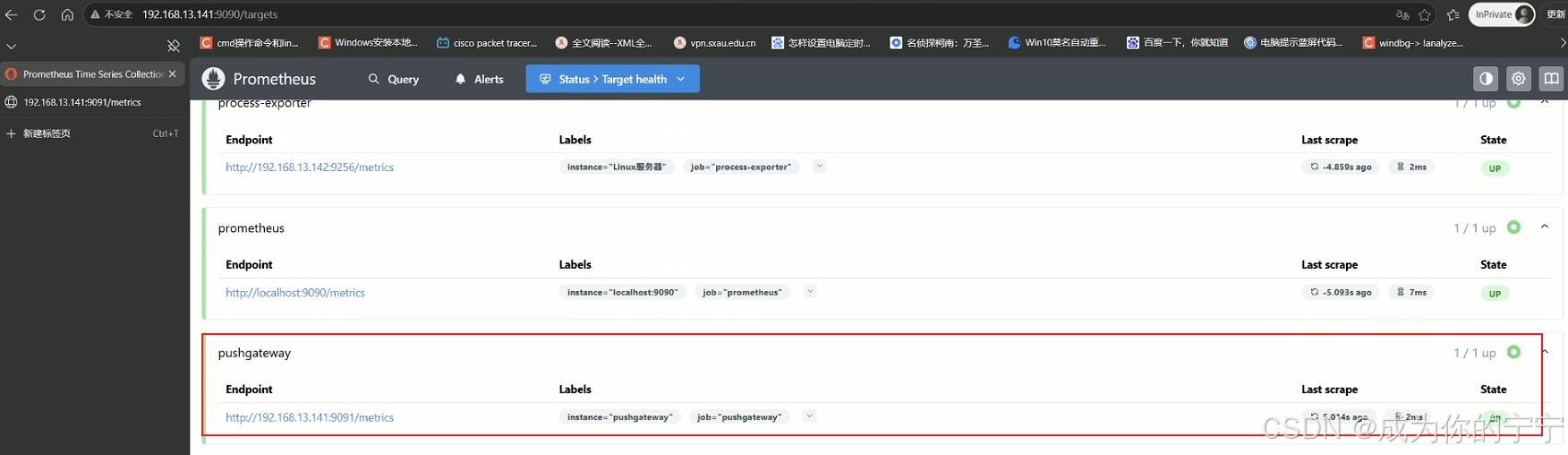
  - job_name: 'pushgateway'
    scrape_interval: 15s
    # 保留推送过来的原始标签,不被 Prometheus 自动覆盖
    honor_labels: true
    static_configs:
    - targets: ['192.168.13.141:9091']
      labels:
        instance: pushgateway
root@prometheus:~# curl -X POST http://localhost:9090/-/reload
2.3 向pushgateway推送数据
使用curl向pushgateway推送监控数据
yaml
# 推送单条数据
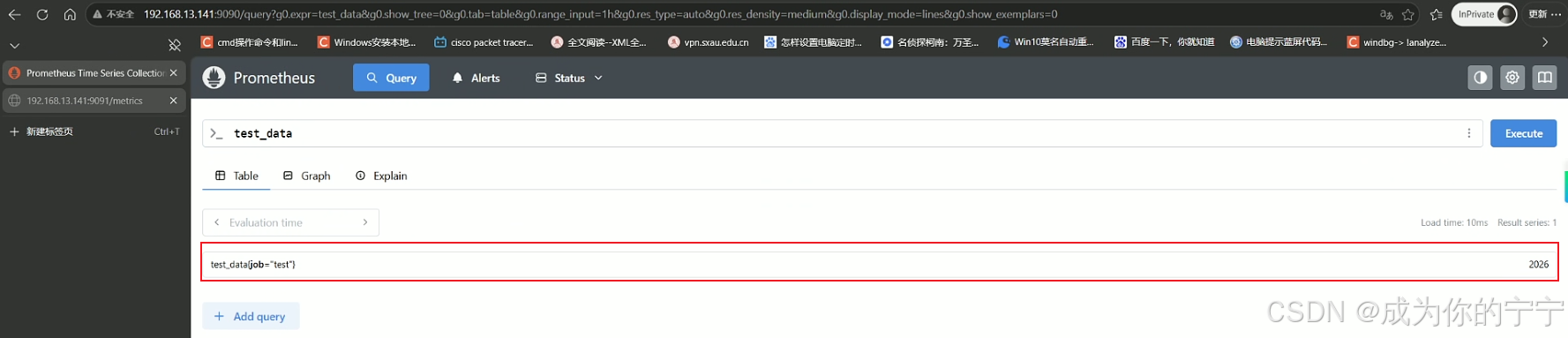
root@prometheus:~# echo "test_data 2026" | curl --data-binary @- http://192.168.13.141:9091/metrics/job/test浏览器访问192.168.13.141:9090
yaml
# 删除单条数据
root@prometheus:~# curl -X DELETE http://192.168.13.141:9091/metrics/job/test

# 推送多条数据
root@prometheus:~# cat << eof | curl --data-binary @- http://192.168.13.141:9091/metrics/job/test_job/instance/test_instance
some_metric{lable="val"} 42
another_metrics 11.1
eof


yaml
root@prometheus:~# curl -X DELETE http://192.168.13.141:9091/metrics/job/test_job使用python向pushgateway推送监控数据
yaml
root@prometheus:~# apt -t install python3-pip
root@prometheus:~# pip3 install  prometheus_client
root@prometheus:~# vim push.py
# 导入依赖包,用来创建指标,注册指标,推送到网关
from prometheus_client import CollectorRegistry, Gauge, push_to_gateway
# 创建一个"指标注册表"
registry = CollectorRegistry()
# 创建一个Gauge指标
g = Gauge('job_last_success_unixtime', 'Last time a batch job successfully finished', registry=registry)
# 把指标值设置为当前时间
g.set_to_current_time()
# 推送到 PushGateway
push_to_gateway('192.168.13.141:9091', job='batchA', registry=registry)
root@prometheus:~# python3 push.py 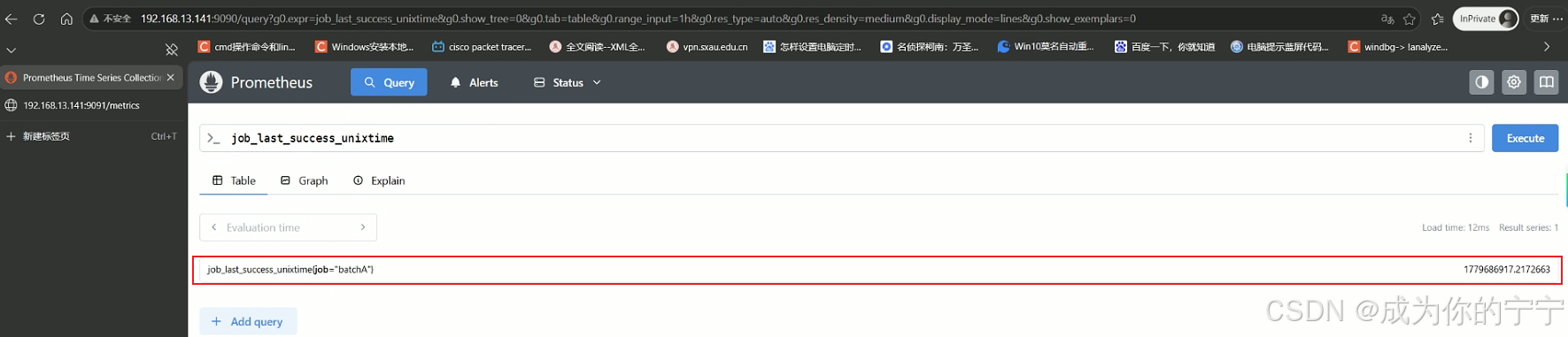
2.4 pushgateway实例
目前需求:监控/opt目录下的文件数量
yaml
root@prometheus:~# ls /opt/
containerd  prometheus
root@prometheus:~# ls -l /opt/ | sed 1d | wc -l
2
用shell处理
yaml
root@prometheus:~# vim shell.sh
#!/bin/bash
filenum=`ls -l /opt | sed 1d | wc -l`
echo "opt_file_num ${filenum}" | curl --data-binary @- http://192.168.13.141:9091/metrics/job/filenum/instance/opt_filename
root@prometheus:~# crontab -e
*/1 * * * * bash /root/shell.sh > /dev/null 2>&1
yaml
root@prometheus:~# touch /opt/1.txt
用python处理
yaml
root@prometheus:~# vim python.py
from prometheus_client import CollectorRegistry, Gauge, push_to_gateway
import os
path = '/opt'               # 输入文件夹地址
files = os.listdir(path)   # 读入文件夹
num_png = len(files)         # 统计文件夹中的文件个数
registry = CollectorRegistry()
g = Gauge('python_opt_file_num', 'opt file num', ['instance'], registry=registry)
g.labels('test').set(num_png)
push_to_gateway('192.168.13.141:9091', job='test_job', registry=registry)
root@prometheus:~# crontab -e
*/1 * * * * /usr/bin/python3 /root/python.py > /dev/null 2>&1
root@prometheus:~# 
yaml
root@prometheus:~# touch /opt/2.txt
2.5 设置警告
yaml
root@prometheus:~# vim /opt/prometheus/prometheus/rules/pushgateway.yml
groups:
- name: pushgateway
  rules:
  - alert: DataFileNum
    expr: python_opt_file_num > 5
    for: 0m
    labels:
      severity: warning
    annotations:
      summary: 'opt数据目录文件数过多'
      description: "opt数据目录文件数>5,当前数量:{{ $value }}"
root@prometheus:~# curl -X POST http://localhost:9090/-/reload
root@prometheus:~# touch /opt/3.txt
root@prometheus:~# touch /opt/4.txt
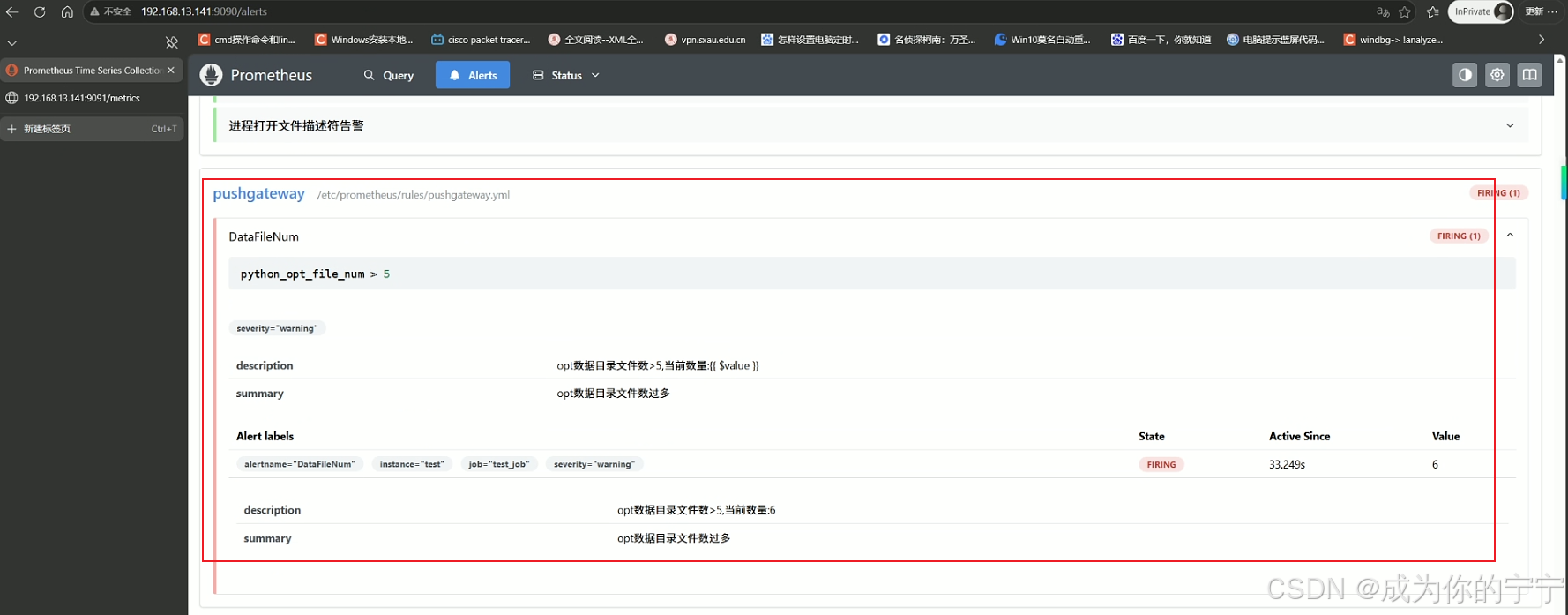
可以看到文件数量超过5,已经触发了告警
2.6 grafana添加dashboard
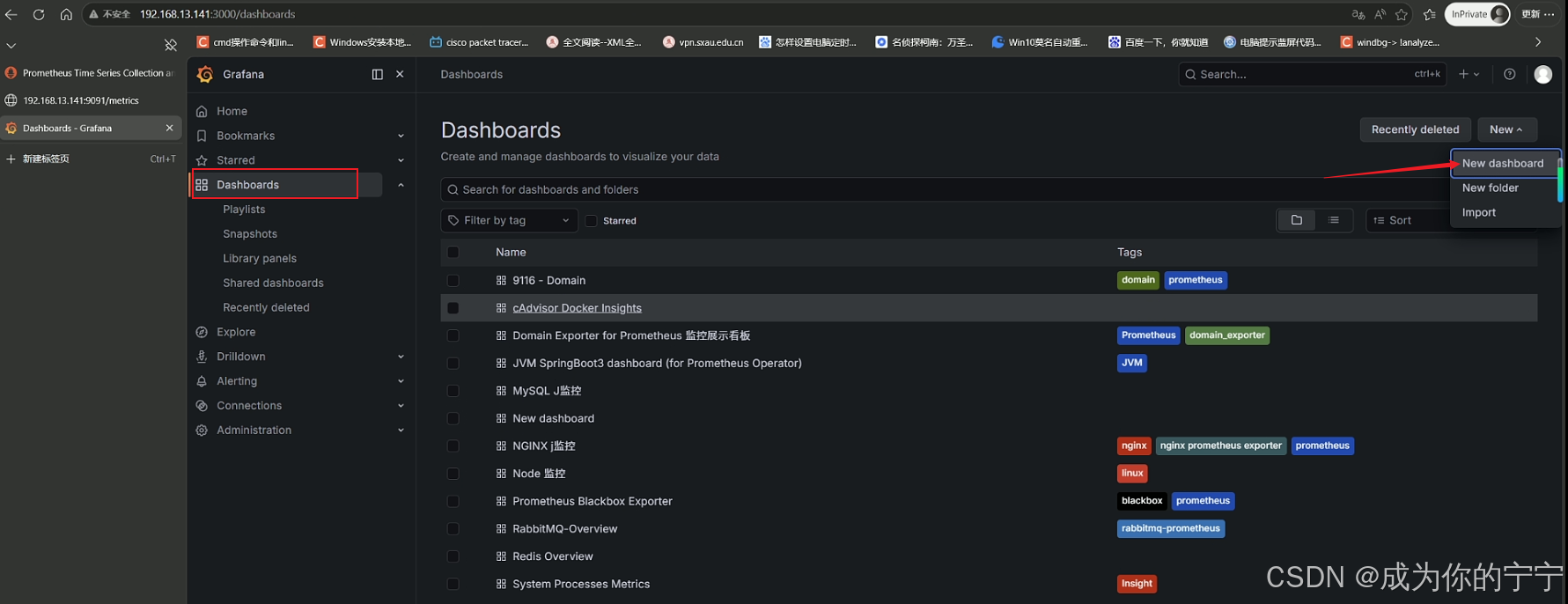
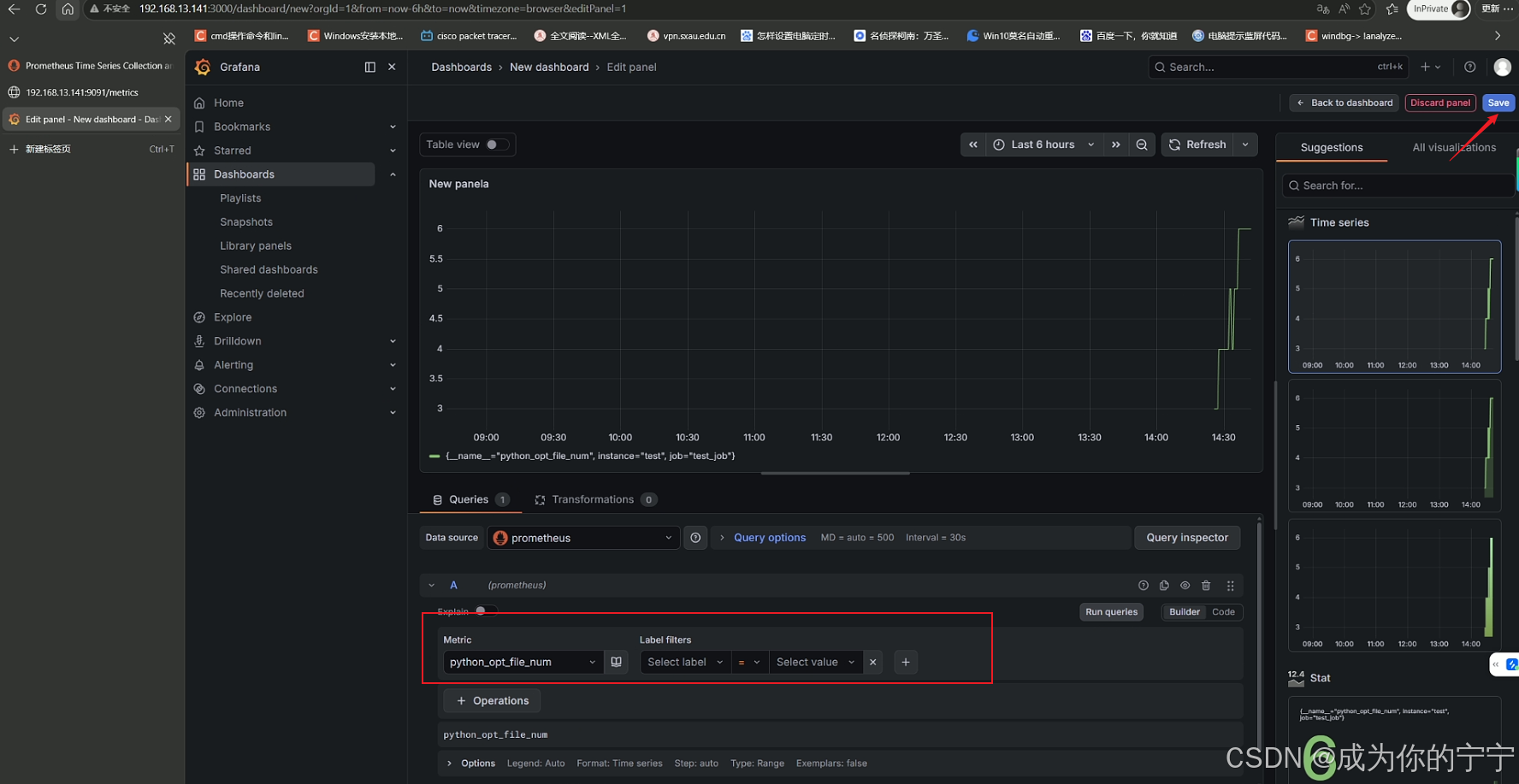
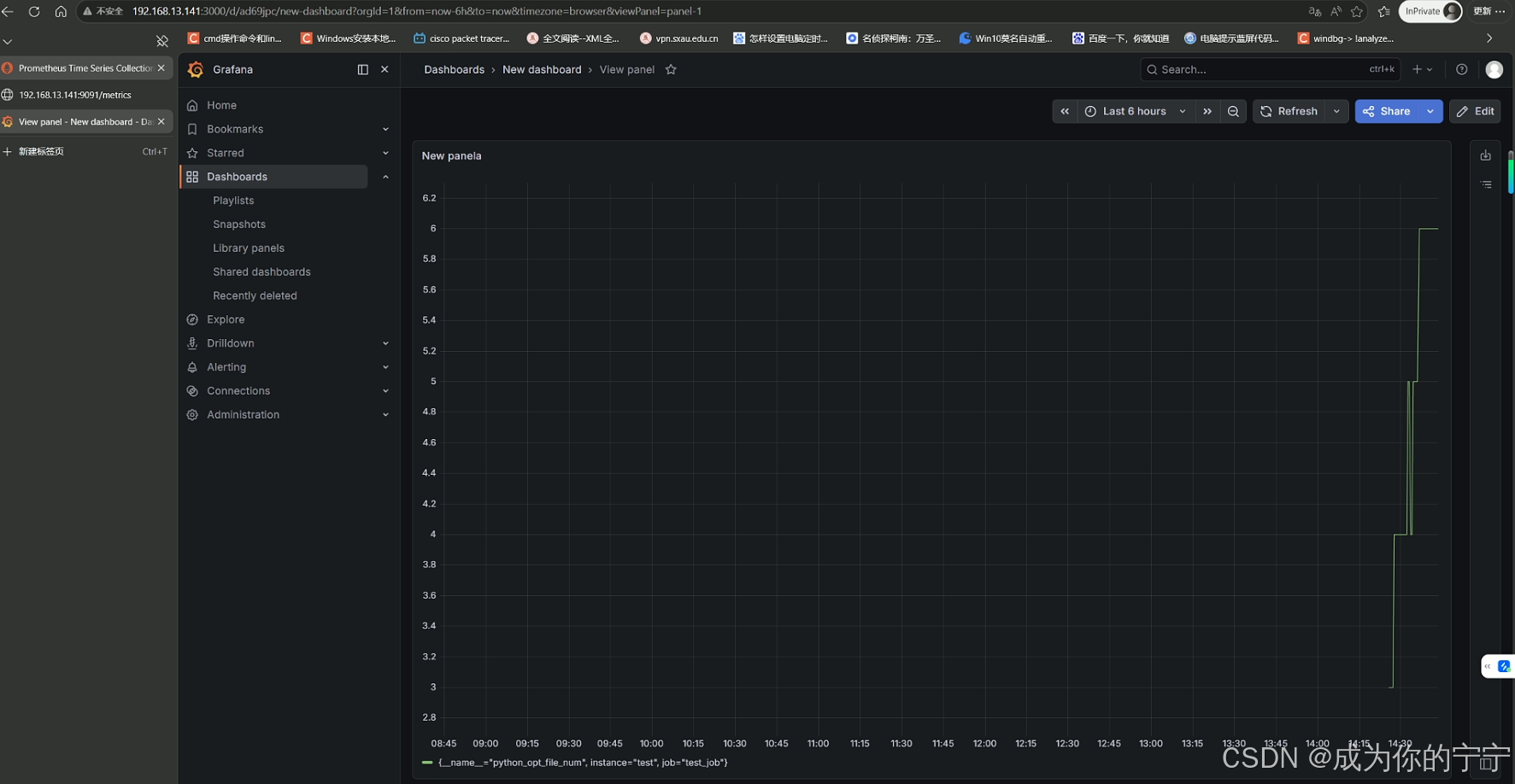
登录grafana,给刚才的指标添加一个dashboard
注:
文中若有疏漏,欢迎大家指正赐教。
本文为100%原创,转载请务必标注原创作者,尊重劳动成果。
求赞、求关注、求评论!你的支持是我更新的最大动力,评论区等你~