统计数据是基于图形化报表技术来展示的
数据统计:最重要为SQL语句
Apache ECharts(前端技术)
知道使用套路和方法即可
1.介绍
Apache ECharts (数据可视化技术)
是一款基于 Javascript 的数据可视化图表库,提供直观,生动,可交互,可个性化定制的数据可视化图表。
官网地址:https://echarts.apache.org/zh/index.html
图表形式:
柱形图
饼状图
折线图
这些图型本质是:数据的可视化展示
2.入门案例
Apache Echarts官方提供的快速入门:https://echarts.apache.org/handbook/zh/get-started/
3.注意
总结:使用Echarts,重点在于研究当前图表所需的**数据格式** 。通常是需要后端提供符合格式要求的**动态数据**,然后响应给前端来展示图表。
1.营业额统计
1.需求分析和设计
产品原型:
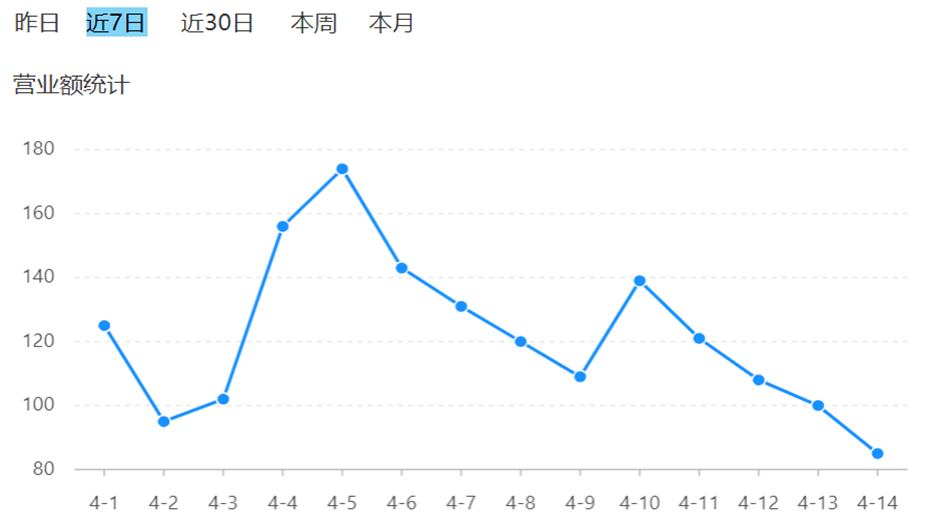
业务规则:
•营业额指订单状态为已完成的订单金额合计
•基于可视化报表的折线图 展示营业额数据,X轴 为日期,Y轴为营业额
•根据时间选择区间,展示每天的营业额数据(横坐标的日期是由上面的时间选择器决定的)
接口请求方式:
get
因为统计本质就是查询操作
接口传入参数:
1.具体是哪个时间段内?通过参数传递(然后后端通过传入的时间去查询这个时间段内的数据即可)
(比如传入开始时间和结束时间)
接口返回参数:
data:
日期列表和营业额列表
2.代码开发
1.ReportController.java
因为日期类型有对应的格式,所以使用注解
/**
* 营业额统计
* @param begin
* @param end
* @return
*/
@GetMapping("/turnoverStatistics")
@ApiOperation("营业额统计")
public Result<TurnoverReportVO> turnoverStatistics(
@DateTimeFormat(pattern = "yyyy-MM-dd") LocalDate begin,
@DateTimeFormat(pattern = "yyyy-MM-dd") LocalDate end){
return Result.success(reportService.getTurnoverStatistics(begin,end));
}2.ReportService.java
public interface ReportService {
    /**
     * 营业额统计
     * @param begin
     * @param end
     * @return
     */
    TurnoverReportVO getTurnoverStatistics(LocalDate begin, LocalDate end);
3.ReportServiceImpl.java
@Autowired
private OrderMapper orderMapper;
/**
* 营业额统计
* @param begin
* @param end
* @return
*/
@Override
public TurnoverReportVO getTurnoverStatistics(LocalDate begin, LocalDate end) {
//1.当前集合由于存放begin到end之间所有的日期
List<LocalDate> dateList = new ArrayList<>();
dateList.add(begin);
while (!begin.equals(end)) {
//日期计算,计算指定日期的后一天对应的日期
begin = begin.plusDays(1);
dateList.add(begin);
}
//2.查询dateList集合中的日期对应的营业额数据,封装到turnoverList集合中
List<Double> turnoverList = new ArrayList<>();
for (LocalDate date : dateList) {
//获取指定日期当天
LocalDateTime beginTime = LocalDateTime.of(date, LocalTime.MIN);
LocalDateTime endTime = LocalDateTime.of(date, LocalTime.MAX);
//select sum(amount) from orders where order_time >= beginTime and order_time < endTime and status =5
//将查询数据封装到Map集合中
Map map = new HashMap();
map.put("begin", beginTime);
map.put("end", endTime);
map.put("status", Orders.COMPLETED);
Double turnover = orderMapper.sumByMap(map);
turnover = turnover == null ? 0.0 : turnover;
turnoverList.add(turnover);
}
//lang3这个包下,StringUtils类,使用join(连接的意思)方法将集合中的元素用逗号拼接成 字符串
String join = StringUtils.join(dateList, ",");
String join1 = StringUtils.join(turnoverList, ",");
//封装返回结果
return TurnoverReportVO
.builder()
.dateList(join)
.turnoverList(join1)
.build();
}注意:
1.这里用Map封装查询数据,可以实现动态传参
2.小细节:
统计这天的营业额,如果没有订单,统计出来并不是0,为空(相当于把空那个字符串拼接进去了)【不合理】
所以要转成0.0(double类型)【三目计算符】
4.OrderMapper.java
/**
 * 根据动态条件统计营业额数据
 * @param map
 * @return
 */
Double sumByMap(Map map);
5.OrderMapper.xml
<select id="sumByMap" resultType="java.lang.Double">
select sum(amount) from orders
<where>
<if test="begin != null">
and order_time > #{begin}
</if>
<if test="end != null">
and order_time < #{end}
</if>
<if test="status != null">
and status = #{status}
</if>
</where>
</select>注意:
1.要和map集合里面的键名保持一致(否则无法从集合里面取出)
这里:我就是没有把#{}里面的值和map集合里面的键值对应好,导致数据不显示
2.并且大于号和小于号最好使用转义字符(规范)
3.功能测试
2.用户统计
1.需求分析与设计
业务规则:
•基于可视化报表的折线图展示用户数据,X轴为日期,Y轴为用户数
•根据时间选择区间,展示每天的用户总量和新增用户量数据
时间选择器是在左上角的位置,为总时间选择器
返回数据思路:
时间:x轴日期拼接成字符串,中间以逗号分隔(和上面一样)
展示每天数据:用户总量数据,每天新增数据【这里还需要2个数据,即两个字符串,将这些数字给串成串,中间以逗号分隔(这个是由前端的数据格式决定的)】
2.代码开发
1.ReportController.java
/**
 * 用户统计
 * @param begin
 * @param end
 * @return
 */
@GetMapping("/userStatistics")
@ApiOperation("用户统计")
public Result userStatistics(
        @DateTimeFormat(pattern = "yyyy-MM-dd") LocalDate begin,
        @DateTimeFormat(pattern = "yyyy-MM-dd") LocalDate end){
    log.info("用户数据统计:{}到{}",begin,end);
    return Result.success(reportService.getUserStatistics(begin,end));
}
2.ReportService.java
/**
 * 统计指定时间区间内的用户数据
 * @param begin
 * @param end
 * @return
 */
Object getUserStatistics(LocalDate begin, LocalDate end);
3.ReportServiceImpl.java
/**
* 统计指定时间区间内的用户数据(总量和新增量)
* @param begin
* @param end
* @return
*/
@Override
public Object getUserStatistics(LocalDate begin, LocalDate end) {
//1.存放从begin到end之间的每天对应的日期
List<LocalDate> dateList = new ArrayList<>();
dateList.add(begin);
while (!begin.equals(end)) {
//日期计算,计算指定日期的后一天对应的日期
begin = begin.plusDays(1);
dateList.add(begin);
}
//2.统计每天新增的用户数量
List<Integer> newUserList = new ArrayList<>();
//3.存放每天的总用户数量
List<Integer> totalUserList = new ArrayList<>();
//统计数据,查表SQL
for (LocalDate date : dateList){
LocalDateTime beginTime = LocalDateTime.of(date, LocalTime.MIN);
LocalDateTime endTime = LocalDateTime.of(date, LocalTime.MAX);
Map map = new HashMap();
map.put("end", endTime);
//先总用户数量
Integer totalCount =userMapper.countByMap(map);
//再新增用户数量
map.put("begin", beginTime);
Integer newUserCount = userMapper.countByMap(map);
//数据处理,如果为null,则设置为0
totalCount = totalCount == null ? 0 : totalCount;
newUserCount = newUserCount == null ? 0 : newUserCount;
totalUserList.add(totalCount);
newUserList.add(newUserCount);
}
return UserReportVO
.builder()
.dateList(StringUtils.join(dateList, ","))
.totalUserList(StringUtils.join(totalUserList, ","))
.newUserList(StringUtils.join(newUserList, ","))
.build();
}注意:小技巧
建议先查总用户数量
因为查总用户数量,查询条件只需要卡end(截至到某个时刻总的用户数量)
所以在map集合里面先put一个end,就可以把用户总的数量查出来
然后还使用这map,再把这begin放进去.然后再去查为我们这个新增用户数量
4.UserMapper.java
/**
 * 根据动态条件统计用户数量
 * @param map
 * @return
 */
Integer countByMap(Map map);
5.UserMapper.xml
<select id="countByMap" resultType="java.lang.Integer">
select count(id) from user
<where>
<if test="begin != null">
and create_time > #{begin}
</if>
<if test="end != null">
and create_time < #{end}
</if>
</where>
</select>3.功能测试
3.订单统计
1.需求分析与设计
业务规则:
•有效订单指状态为 "已完成" 的订单
•基于可视化报表的折线图展示订单数据,X轴为日期,Y轴为订单数量
•根据时间选择区间,展示每天的订单总数和有效订单数
•展示所选时间区间内的有效订单数、总订单数、订单完成率,订单完成率 = 有效订单数 / 总订单数 * 100%
2.代码开发
1.ReportController.java
/**
 * 订单统计
 *
 * @param begin
 * @param end
 * @return
 */
@GetMapping("/ordersStatistics")
@ApiOperation("订单统计")
public Result<OrderReportVO> ordersStatistics(
        @DateTimeFormat(pattern = "yyyy-MM-dd") LocalDate begin,
        @DateTimeFormat(pattern = "yyyy-MM-dd") LocalDate end) {
    log.info("订单数据统计:{}到{}", begin, end);
    return Result.success(reportService.getOrdersStatistics(begin, end));
}
2.ReportService.java
/**
 * 统计指定时间区间内的订单数据
 * @param begin
 * @param end
 * @return
 */
OrderReportVO getOrdersStatistics(LocalDate begin, LocalDate end)
3.ReportServiceImpl.java
/**
 * 统计指定时间区间内的订单数据
 * @param begin
 * @param end
 * @return
 */
@Override
public OrderReportVO getOrdersStatistics(LocalDate begin, LocalDate end) {
    //1.存放从begin到end之间的每天对应的日期
    List<LocalDate> dateList = new ArrayList<>();
    dateList.add(begin);
    while (!begin.equals(end)) {
        begin = begin.plusDays(1);
        dateList.add(begin);
    }

    //存放每天的订单总数和有效订单数
    List<Integer> orderCountList = new ArrayList<>();
    List<Integer> validOrderCountList = new ArrayList<>();

    //2.遍历dateList集合,查询每天的有效订单数和订单总数
    for (LocalDate date : dateList){
        //查询每天的订单总数,select count(id) from orders where order_time >= beginTime and order_time < endTime
        LocalDateTime beginTime = LocalDateTime.of(date, LocalTime.MIN);
        LocalDateTime endTime = LocalDateTime.of(date, LocalTime.MAX);
        Integer orderCount = getOrderCount(beginTime, endTime, null);

        //查询每天的有效订单数,select count(id) from orders where order_time >= beginTime and order_time < endTime and status =5
        Integer validOrderCount = getOrderCount(beginTime, endTime, Orders.COMPLETED);

        //将查询出来的数据添加到对应的集合中
        orderCountList.add(orderCount);
        validOrderCountList.add(validOrderCount);
    }

    //3.不查询数据库,遍历时间区间内的订单数量,这里使用Stream流,将集合里面的所有元素累加到一起
    //3.1计算时间区间内的订单总数
    Integer totalOrderCount = orderCountList.stream().reduce(Integer::sum).get();
    //3.2计算时间区间内的有效订单数量
    Integer validOrderCount = validOrderCountList.stream().reduce(Integer::sum).get();

    //4.计算订单完成率
    Double orderCompletionRate = 0.0;
    if (totalOrderCount != 0) {
        orderCompletionRate = validOrderCount.doubleValue() / totalOrderCount;
    }
    return OrderReportVO
            .builder()
            .dateList(StringUtils.join(dateList, ","))
            .orderCountList(StringUtils.join(orderCountList, ","))
            .validOrderCountList(StringUtils.join(validOrderCountList, ","))
            .totalOrderCount(totalOrderCount)
            .validOrderCount(validOrderCount)
            .orderCompletionRate(orderCompletionRate)
            .build();
}
//根据条件统计订单数量
private Integer getOrderCount(LocalDateTime begin, LocalDateTime end, Integer status) {
    Map map = new HashMap();
    map.put("begin", begin);
    map.put("end", end);
    map.put("status", status);

    return orderMapper.countByMap(map);
}
注意
1.方法引用
orderCountList.stream()获取流对象
reduce就是合并,合并的时候选择求和
::为后面使用什么计算
然后get,就可以获取计算出来的值
2.类型转换
int转为double
4.OrderMapper.java
/**
 * 根据动态条件统计数据数量
 * @param map
 * @return
 */
Integer countByMap(Map map);
5.OrderMapper.xml
<select id="countByMap" resultType="java.lang.Integer">
select count(id) from orders
<where>
<if test="begin != null">
and order_time > #{begin}
</if>
<if test="end != null">
and order_time < #{end}
</if>
<if test="status != null">
and status = #{status}
</if>
</where>
</select>3.功能测试
4.销量排名统计
1.需求分析与设计
业务规则:
•根据时间选择区间,展示销量前10的商品(包括菜品 和套餐)
•基于可视化报表的柱状图降序展示商品销量
•此处的销量为商品销售的份数
2.代码开发
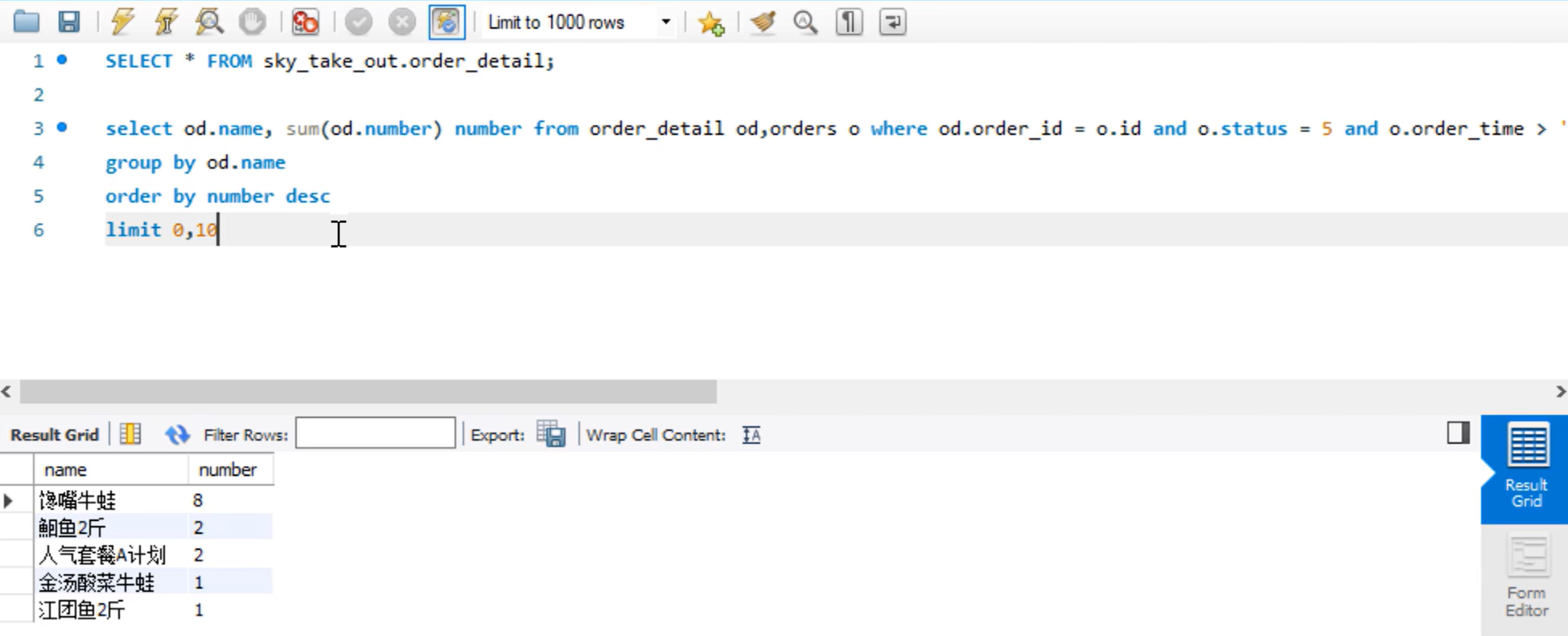
订单详情表:某个商品销售了多少份,通过number字段来体现
还要查另一个表
订单表:查订单状态为已完成(为5)
1.ReportController.java
/**
 * 销量排名
 *
 * @param begin
 * @param end
 * @return
 */
@GetMapping("/top10")
@ApiOperation("销量排名top10")
public Result<SalesTop10ReportVO> top10(
        @DateTimeFormat(pattern = "yyyy-MM-dd") LocalDate begin,
        @DateTimeFormat(pattern = "yyyy-MM-dd") LocalDate end) {
    log.info("销量排名:{}到{}", begin, end);
    return Result.success(reportService.getSalesTop10(begin, end));
}
2.ReportService.java
/**
 * 统计指定时间区间内的销量排名top10
 * @param begin
 * @param end
 * @return
 */
SalesTop10ReportVO getSalesTop10(LocalDate begin, LocalDate end);
3.ReportServiceImpl.java
/**
 * 统计指定时间区间内的销量排名top10
 * @param begin
 * @param end
 * @return
 */
@Override
public SalesTop10ReportVO getSalesTop10(LocalDate begin, LocalDate end) {
    LocalDateTime beginTime = LocalDateTime.of(begin, LocalTime.MIN);
    LocalDateTime endTime = LocalDateTime.of(end, LocalTime.MAX);

    List<GoodsSalesDTO> salesTop10 = orderMapper.getSalesTop10(beginTime, endTime);

    //将List集合(DTO)处理为VO类型,通过Stream流进行转换
    //1.将DTO的name属性值取出来,组成一个新的List集合
    List<String> names = salesTop10.stream().map(GoodsSalesDTO::getName).collect(Collectors.toList());
    //转化为字符串,用逗号分隔
    String nameList = StringUtils.join(names, ",");
    //2.将DTO的number属性值取出来,组成一个新的List集合
    List<Integer> numbers = salesTop10.stream().map(GoodsSalesDTO::getNumber).collect(Collectors.toList());
    //转化为字符串,用逗号分隔
    String numberList = StringUtils.join(numbers, ",");

    //封装VO对象并返回
    return SalesTop10ReportVO
            .builder()
            .nameList(nameList)
            .numberList(numberList)
            .build();
}
获取流对象
salesTop10.stream()取到每个name
map(GoodsSalesDTO::getName)将这些name组装成为一个集合对象
collect(Collectors.toList())4.OrderMapper.java
/**
 * 统计指定时间区间内的销量排名top10
 * @param begin
 * @param end
 * @return
 */
List<GoodsSalesDTO> getSalesTop10(LocalDateTime begin, LocalDateTime end);
5.OrderMapper.xml
<select id="getSalesTop10" resultType="com.sky.dto.GoodsSalesDTO">
select
od.name,
sum(od.number) as number
from order_detail od,orders o
where od.order_id = o.id and o.status = 5
<if test="begin != null">
and o.order_time > #{begin}
</if>
<if test="end != null">
and o.order_time < #{end}
</if>
group by od.name
order by number desc
limit 0,10
</select>3.功能测试
SQL语句