Pygame 小游戏------打砖块
项目概述
Pygame 是 Python 中一个功能强大的 2D 游戏开发库,它提供了处理图形、声音、输入和事件循环的完整工具集。本文通过 Pygame 实现一个经典打砖块游戏(Breakout)。
在这个游戏中,玩家控制屏幕底部的挡板,弹射小球击碎上方所有砖块。每块砖拥有独立的生命值,颜色随血量变化而加深,击中即扣血,归零后砖块消失并触发粒子爆炸效果,目标是在不失去所有球命的情况下清空全部砖块。其中:
- 移动挡板:左右方向键 / A、D 键水平移动挡板;挡板击球时,根据球撞击挡板的偏移位置改变出球角度,越靠近两端反弹角度越大。
- 发球:按空格键发球,发球方向在竖直向上的基础上加入随机偏角(±0.5 弧度),每局可多次发球(失球不扣关卡)。
- 砖块血量:不同行的砖块初始血量不同(最高行血量最高),每次被球击中扣 1 点血;血量 > 0 时砖块上显示剩余血量数字,血量归零后砖块消失。
- 关卡递进:清空全部砖块后自动进入下一关,球速随关卡提升(上限 9.0);当前关卡、得分和最高分实时显示在 HUD 栏。
- 键盘操作:SPACE:发球;R:重新开始;P:暂停/继续。
- 胜利/失败条件:球掉落到屏幕底部扣一条命;命数归零 = 游戏失败;清空所有砖块 = 过关(自动进入下一关,无上限)。
游戏实现
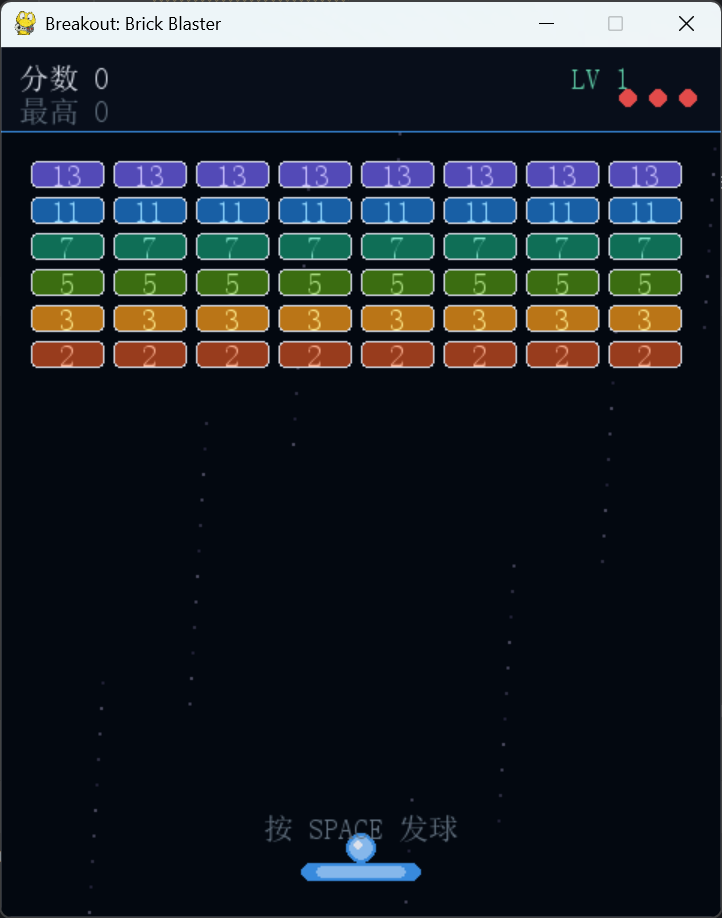
初始化与基础设置
游戏启动时初始化 Pygame 并定义屏幕尺寸、HUD 高度、颜色常量和砖块布局参数。
python
pygame.init()

WIDTH, HEIGHT = 480, 580
HUD_H = 56

screen = pygame.display.set_mode((WIDTH, HEIGHT))
pygame.display.set_caption("Breakout: Brick Blaster")
clock = pygame.time.Clock()
颜色定义
python
DARK_BG = (3,   8,  16)   # 全局深色背景
BLUE1   = (56, 138, 221)   # 挡板主色 / 球外圈
BLUE2   = (133,183, 235)   # 挡板高光 / 球内圈
WHITE   = (220, 225, 235)  # 文字 / 球高光
GRAY    = (100, 115, 130)  # 次要文字
RED     = (226,  75,  74)  # 生命指示圆 / 游戏结束文字
GOLD    = (250, 199, 117)  # 暂停文字
GREEN   = (93,  202, 165)  # 关卡文字
砖块颜色与布局
python
BRICK_COLORS = [
    (83,  74, 183),   # 紫色  第 0 行(最高血量)
    (24,  95, 165),   # 蓝色  第 1 行
    (15, 110,  86),   # 青色  第 2 行
    (59, 109,  17),   # 绿色  第 3 行
    (186,117,  23),   # 琥珀  第 4 行
    (152,  60,  29),  # 珊瑚  第 5 行(最低血量)
]

PAD_W, PAD_H = 80, 12     # 挡板宽高
BALL_R = 8                 # 小球半径
COLS, ROWS_BRICKS = 8, 6   # 砖块列数、行数
B_GAP  = 6                 # 砖块间距
BW = (WIDTH - 40 - (COLS - 1) * B_GAP) // COLS  # 单块宽度
BH = 18                    # 单块高度
``

### 字体加载

```python
CHINESE_FONT_PATH = r"C:/Windows/Fonts/simsun.ttc"

font_sm  = pygame.font.Font(CHINESE_FONT_PATH, 20)
font_md  = pygame.font.Font(CHINESE_FONT_PATH, 28)
font_big = pygame.font.Font(CHINESE_FONT_PATH, 52)
直接加载系统中文字体文件,保证中文 HUD 文字正常显示。跨平台时可替换为 pygame.font.SysFont(None, size)。
核心类设计
1. 挡板类(Paddle)
Paddle 类封装挡板的位置、移动逻辑和绘制方法。
构造函数 __init__:
python
def __init__(self):
    self.x = WIDTH // 2   # 水平中心位置(以挡板中心为基准)
    self.y = HEIGHT - 36  # 固定在屏幕底部附近
    self.speed = 7        # 每帧移动像素数
移动方法 move:
python
def move(self, dx):
    self.x = max(PAD_W // 2, min(WIDTH - PAD_W // 2, self.x + dx))
通过 max/min 将挡板限制在屏幕边界内,防止超出屏幕。
矩形区域 rect:
python
def rect(self):
    return pygame.Rect(self.x - PAD_W // 2, self.y, PAD_W, PAD_H)
以 self.x 为中心计算左边界,便于后续碰撞检测复用。
绘制方法 draw:
python
def draw(self, surf):
    r = self.rect()
    pygame.draw.rect(surf, BLUE1, r, border_radius=6)               # 底层主色
    pygame.draw.rect(surf, BLUE2, r.inflate(-20, -4), border_radius=4)  # 高光条
用两层矩形叠加实现简洁的高光立体感:外层为深蓝主色,内层收缩后绘制浅蓝高光条。
2. 小球类(Ball)
Ball 类管理小球的物理运动、边界反弹和出屏检测。
构造函数 __init__:
python
def __init__(self, px, py):
    self.x = float(px)
    self.y = float(py - BALL_R - 2)   # 初始贴在挡板上方
    self.vx = 0.0
    self.vy = 0.0
    self.launched = False              # 是否已发球
    self.radius = BALL_R
未发球时小球跟随挡板水平移动,按空格后才获得速度。
发球方法 launch:
python
def launch(self, speed):
    ang = -math.pi / 2 + random.uniform(-0.5, 0.5)   # 在竖直向上基础上随机偏角
    self.vx = speed * math.cos(ang)
    self.vy = speed * math.sin(ang)
self.launched = True使用极坐标分解速度,random.uniform(-0.5, 0.5) 约 ±28.6°的随机偏角让每局发球方向各不相同,增加趣味性。
更新方法 update:
python
def update(self, pad_x):
    if not self.launched:
        self.x = float(pad_x)   # 未发球时跟随挡板
        return
    self.x += self.vx
    self.y += self.vy
    # 左右边界反弹
    if self.x - self.radius < 0:
        self.x = float(self.radius); self.vx = abs(self.vx)
    if self.x + self.radius > WIDTH:
        self.x = float(WIDTH - self.radius); self.vx = -abs(self.vx)
    # 顶部边界反弹(HUD 下沿)
    if self.y - self.radius < HUD_H:
        self.y = float(HUD_H + self.radius); self.vy = abs(self.vy)
三面墙反弹均使用 abs() 强制方向,避免因浮点误差导致球"穿墙"后速度方向错误的情况。
出屏检测 off_screen:
python
def off_screen(self):
    return self.y - self.radius > HEIGHT
绘制方法 draw:
python
def draw(self, surf):
    ix, iy = int(self.x), int(self.y)
    pygame.draw.circle(surf, BLUE1, (ix, iy), self.radius + 2)  # 外发光圈
    pygame.draw.circle(surf, BLUE2, (ix, iy), self.radius)       # 主球体
    pygame.draw.circle(surf, WHITE, (ix - 2, iy - 2), 3)         # 高光点
三层圆形叠绘:外层比主球半径大 2px 的深蓝光晕,中层浅蓝主体,右上角白色高光点,使球体具有立体感。
3. 砖块类(Brick)
Brick 类封装单块砖的状态、血量和带渐变的绘制逻辑。
构造函数 __init__:
python
def __init__(self, col, row, hp):
    self.col    = col
    self.row    = row
    self.hp     = hp        # 当前血量
    self.max_hp = hp        # 初始最大血量(用于计算颜色渐变比例)
    self.alive  = True
    self.x = 20 + col * (BW + B_GAP)          # 像素坐标(左上角)
    self.y = HUD_H + 20 + row * (BH + B_GAP)
绘制方法 draw:
python
def draw(self, surf):
    if not self.alive:
        return
    frac  = self.hp / self.max_hp                       # 血量比例 0.0~1.0
    base  = BRICK_COLORS[self.row % len(BRICK_COLORS)]
    color = tuple(int(c * (0.4 + 0.6 * frac)) for c in base)  # 血量越少颜色越暗
    r = self.rect()
    pygame.draw.rect(surf, color, r, border_radius=4)
    border_a = int(80 * frac)                           # 边框透明度随血量变化
    pygame.draw.rect(surf, (*WHITE[:3], border_a), r, width=1, border_radius=4)
    if self.max_hp > 1:
        label = font_sm.render(str(self.hp), True,
                               tuple(min(255, c + 120) for c in color))
        surf.blit(label, (r.centerx - label.get_width()  // 2,
                          r.centery - label.get_height() // 2))
该方法实现了三层视觉反馈:
- 颜色变暗 :
0.4 + 0.6 * frac将血量映射到亮度,满血时最亮,濒死时保留 40% 亮度(不完全变黑)。 - 边框渐隐:白色边框透明度随血量同步减弱,强化"受损"的视觉感。
- 血量数字:血量 > 1 的砖块在中心绘制剩余血量,文字色在砖块底色基础上提亮 120,保证可读性。
4. 粒子类(Particle)
Particle 类实现击砖时的粒子爆炸效果,模拟带重力的碎片运动。
构造函数 __init__:
python
def __init__(self, x, y, color):
    self.x    = float(x)
    self.y    = float(y)
    self.vx   = random.uniform(-3, 3)    # 水平随机速度
    self.vy   = random.uniform(-4, 0.5)  # 初始向上(含少量向下)
    self.life = 28                        # 生命帧数
    self.color = color
更新方法 update:
python
def update(self):
    self.x  += self.vx
    self.y  += self.vy
    self.vy += 0.2     # 模拟重力加速度
    self.life -= 1
每帧对 vy 施加 0.2 的向下加速度,模拟重力抛物线轨迹。
绘制方法 draw:
python
def draw(self, surf):
    if self.life <= 0:
        return
    a = min(255, self.life * 9)          # 透明度随生命衰减
    s = pygame.Surface((5, 5), pygame.SRCALPHA)
    s.fill((*self.color[:3], a))
    surf.blit(s, (int(self.x), int(self.y)))
使用 SRCALPHA 透明 Surface 绘制带 Alpha 通道的小方块,life * 9 使粒子在约 28 帧内从不透明线性淡出至消失。
5. 游戏主类(Game)
Game 类统筹所有子系统,负责关卡管理、碰撞检测、状态更新和画面渲染。
构造函数 __init__:
python
def __init__(self):
    self.best = 0
    self.hp_values = [13, 11, 7, 5, 3, 2]   # 各行砖块初始血量(由上至下递减)
    self.reset()
hp_values 列表决定每行砖块的初始生命值,第 0 行(最上方)最厚实,第 5 行(最下方)最薄,鼓励玩家优先击打下方砖块。
关卡初始化 _init_level:
python
def _init_level(self):
    self.paddle = Paddle()
    self.ball   = Ball(self.paddle.x, self.paddle.y)
    self.bricks = [
        Brick(c, r, self.hp_values[r])
        for r in range(ROWS_BRICKS)
        for c in range(COLS)
    ]
使用列表推导式快速生成 6×8 共 48 块砖,每行血量由 hp_values[r] 统一控制。
事件处理 handle_events:
python
def handle_events(self):
    for event in pygame.event.get():
        if event.type == pygame.QUIT:
            pygame.quit(); sys.exit()
        if event.type == pygame.KEYDOWN:
            if event.key == pygame.K_r:
                self.reset()
            if event.key == pygame.K_p:
                self.paused = not self.paused
            if event.key == pygame.K_SPACE and not self.ball.launched:
                self.ball.launch(self.ball_speed)
核心更新 update:
update 方法集中处理三段碰撞检测逻辑:
python
def update(self):
    if self.paused or self.game_over or self.win:
        return

    # ① 挡板移动
    keys = pygame.key.get_pressed()
    if keys[pygame.K_LEFT]  or keys[pygame.K_a]: self.paddle.move(-self.paddle.speed)
    if keys[pygame.K_RIGHT] or keys[pygame.K_d]: self.paddle.move(self.paddle.speed)

    self.ball.update(self.paddle.x)

    # ② 球出屏 → 扣命
    if self.ball.off_screen():
        self.lives -= 1
        if self.lives <= 0:
            self.game_over = True
            if self.score > self.best: self.best = self.score
        else:
            self.ball = Ball(self.paddle.x, self.paddle.y)
        return

    # ③ 球 vs 挡板
    pr = self.paddle.rect()
    b  = self.ball
    if (b.vy > 0 and
            pr.left - b.radius <= b.x <= pr.right + b.radius and
            pr.top  - b.radius <= b.y <= pr.bottom):
        b.vy = -abs(b.vy)
        offset = (b.x - self.paddle.x) / (PAD_W / 2)   # -1.0 ~ +1.0
        b.vx   = offset * abs(b.vy) * 1.4               # 偏移越大,水平速度越强
        spd    = math.hypot(b.vx, b.vy)
        cap    = self.ball_speed * 1.5
        if spd > cap:
            b.vx *= cap / spd; b.vy *= cap / spd        # 限速,防止球速失控
        b.y = float(pr.top - b.radius - 1)              # 防止球嵌入挡板

    # ④ 球 vs 砖块
    for brick in self.bricks:
        if not brick.alive: continue
        br = brick.rect()
        if not (b.x + b.radius > br.left  and b.x - b.radius < br.right and
                b.y + b.radius > br.top   and b.y - b.radius < br.bottom):
            continue
        # 判断从哪个方向击中(水平穿透量 vs 垂直穿透量)
        ol   = abs(b.x + b.radius - br.left)
        or_  = abs(br.right  - (b.x - b.radius))
        ot   = abs(b.y + b.radius - br.top)
        ob   = abs(br.bottom - (b.y - b.radius))
        minH = min(ol, or_)
        minV = min(ot, ob)
        if minH < minV: b.vx = -b.vx    # 从侧面击中,反转水平速度
        else:           b.vy = -b.vy    # 从上/下击中,反转垂直速度
        brick.hp -= 1
        self.score += brick.max_hp * 10 * self.level
        if self.score > self.best: self.best = self.score
        for _ in range(12):              # 生成粒子
            self.particles.append(Particle(br.centerx, br.centery,
                                           BRICK_COLORS[brick.row % len(BRICK_COLORS)]))
        if brick.hp <= 0: brick.alive = False
        break                            # 每帧只处理一块砖,防止多重碰撞

    # ⑤ 粒子更新
    for p in self.particles[:]:
        p.update()
        if p.life <= 0: self.particles.remove(p)

    # ⑥ 过关检测
    if all(not br.alive for br in self.bricks):
        self.level     += 1
        self.ball_speed = min(4.5 + self.level * 0.4, 9.0)
self._init_level()碰撞检测的核心思路:通过比较球在四个方向上的穿透深度(overlap),取最小值判断实际接触面:水平穿透浅 → 从侧面撞;垂直穿透浅 → 从上/下撞。这种方法比复杂的几何求交更简洁,适合 AABB 碰撞场景。
绘制方法 draw:
python
def draw(self):
    screen.fill(DARK_BG)

    # 星空背景(固定点阵,无需每帧随机)
    for i in range(80):
        sx = (i * 137) % WIDTH
        sy = (i * 251) % HEIGHT
        b  = 30 + (i % 4) * 15
        pygame.draw.circle(screen, (b, b, b + 20), (sx, sy), 1)

    # HUD 信息栏
    pygame.draw.rect(screen, (8, 14, 26), (0, 0, WIDTH, HUD_H))
    pygame.draw.line(screen, BLUE1, (0, HUD_H), (WIDTH, HUD_H), 1)
    screen.blit(font_sm.render(f"分数 {self.score}", True, WHITE), (12, 10))
    screen.blit(font_sm.render(f"最高 {self.best}",  True, GRAY),  (12, 32))
    screen.blit(font_sm.render(f"LV {self.level}",  True, GREEN), (WIDTH - 100, 10))
    for li in range(self.lives):                           # 生命圆点
        pygame.draw.circle(screen, RED, (WIDTH - 22 - li * 20, 34), 6)

    # 游戏对象
    for br in self.bricks:   br.draw(screen)
    for p  in self.particles: p.draw(screen)
    self.paddle.draw(screen)
    self.ball.draw(screen)

    # 提示 / 暂停 / 游戏结束遮罩
    if not self.ball.launched and not self.game_over and not self.win:
        hint = font_sm.render("按 SPACE 发球", True, GRAY)
        screen.blit(hint, (WIDTH // 2 - hint.get_width() // 2, HEIGHT - 70))

    if self.paused:
        overlay = pygame.Surface((WIDTH, HEIGHT - HUD_H), pygame.SRCALPHA)
        overlay.fill((3, 8, 16, 160))
        screen.blit(overlay, (0, HUD_H))
        t = font_big.render("PAUSED", True, GOLD)
        screen.blit(t, (WIDTH // 2 - t.get_width() // 2, HEIGHT // 2 - 30))

    if self.game_over:
        overlay = pygame.Surface((WIDTH, HEIGHT - HUD_H), pygame.SRCALPHA)
        overlay.fill((3, 8, 16, 190))
        screen.blit(overlay, (0, HUD_H))
        t1 = font_big.render("GAME OVER", True, RED)
        t2 = font_sm.render(f"得分 {self.score}  最高 {self.best}", True, WHITE)
        t3 = font_sm.render("按 R 重新开始", True, GRAY)
        screen.blit(t1, (WIDTH // 2 - t1.get_width() // 2, HEIGHT // 2 - 60))
        screen.blit(t2, (WIDTH // 2 - t2.get_width() // 2, HEIGHT // 2 + 10))
        screen.blit(t3, (WIDTH // 2 - t3.get_width() // 2, HEIGHT // 2 + 44))

    pygame.display.flip()
绘制顺序为:背景 → 星空 → HUD → 砖块 → 粒子 → 挡板 → 球 → 叠加遮罩,严格保证层次正确。
主循环 run:
python
def run(self):
    while True:
        self.handle_events()
        self.update()
        self.draw()
        clock.tick(60)
固定 60 FPS,保证物理运动和动画在不同性能机器上表现一致。
全部代码
python
import pygame
import sys
import math
import random

pygame.init()

WIDTH, HEIGHT = 480, 580
HUD_H = 56

screen = pygame.display.set_mode((WIDTH, HEIGHT))
pygame.display.set_caption("Breakout: Brick Blaster")
clock = pygame.time.Clock()

DARK_BG  = (3, 8, 16)
BLUE1    = (56, 138, 221)
BLUE2    = (133, 183, 235)
WHITE    = (220, 225, 235)
GRAY     = (100, 115, 130)
RED      = (226, 75, 74)
GOLD     = (250, 199, 117)
GREEN    = (93, 202, 165)

BRICK_COLORS = [
    (83,  74, 183),   # purple   row 0
    (24,  95, 165),   # blue     row 1
    (15, 110,  86),   # teal     row 2
    (59, 109,  17),   # green    row 3
    (186,117,  23),   # amber    row 4
    (152,  60,  29),  # coral    row 5
]

CHINESE_FONT_PATH = r"C:/Windows/Fonts/simsun.ttc"

font_sm  = pygame.font.Font(CHINESE_FONT_PATH, 20)
font_md  = pygame.font.Font(CHINESE_FONT_PATH, 28)
font_big = pygame.font.Font(CHINESE_FONT_PATH, 52)

PAD_W, PAD_H = 80, 12
BALL_R = 8
COLS, ROWS_BRICKS = 8, 6
B_GAP  = 6
BW = (WIDTH - 40 - (COLS - 1) * B_GAP) // COLS
BH = 18


class Paddle:
    def __init__(self):
        self.x = WIDTH // 2
        self.y = HEIGHT - 36
        self.speed = 7

    def move(self, dx):
        self.x = max(PAD_W // 2, min(WIDTH - PAD_W // 2, self.x + dx))

    def rect(self):
        return pygame.Rect(self.x - PAD_W // 2, self.y, PAD_W, PAD_H)

    def draw(self, surf):
        r = self.rect()
        pygame.draw.rect(surf, BLUE1, r, border_radius=6)
        pygame.draw.rect(surf, BLUE2, r.inflate(-20, -4).move(0, 0), border_radius=4)


class Ball:
    def __init__(self, px, py):
        self.x = float(px)
        self.y = float(py - BALL_R - 2)
        self.vx = 0.0
        self.vy = 0.0
        self.launched = False
        self.radius = BALL_R

    def launch(self, speed):
        ang = -math.pi / 2 + random.uniform(-0.5, 0.5)
        self.vx = speed * math.cos(ang)
        self.vy = speed * math.sin(ang)
        self.launched = True

    def update(self, pad_x):
        if not self.launched:
            self.x = float(pad_x)
            return
        self.x += self.vx
        self.y += self.vy
        if self.x - self.radius < 0:
            self.x = float(self.radius); self.vx = abs(self.vx)
        if self.x + self.radius > WIDTH:
            self.x = float(WIDTH - self.radius); self.vx = -abs(self.vx)
        if self.y - self.radius < HUD_H:
            self.y = float(HUD_H + self.radius); self.vy = abs(self.vy)

    def off_screen(self):
        return self.y - self.radius > HEIGHT

    def draw(self, surf):
        ix, iy = int(self.x), int(self.y)
        pygame.draw.circle(surf, BLUE1, (ix, iy), self.radius + 2)
        pygame.draw.circle(surf, BLUE2, (ix, iy), self.radius)
        pygame.draw.circle(surf, WHITE, (ix - 2, iy - 2), 3)


class Brick:
    def __init__(self, col, row, hp):
        self.col = col
        self.row = row
        self.hp  = hp
        self.max_hp = hp
        self.alive = True
        self.x = 20 + col * (BW + B_GAP)
        self.y = HUD_H + 20 + row * (BH + B_GAP)

    def rect(self):
        return pygame.Rect(self.x, self.y, BW, BH)

    def draw(self, surf):
        if not self.alive:
            return
        frac  = self.hp / self.max_hp
        base  = BRICK_COLORS[self.row % len(BRICK_COLORS)]
        color = tuple(int(c * (0.4 + 0.6 * frac)) for c in base)
        r = self.rect()
        pygame.draw.rect(surf, color, r, border_radius=4)
        border_a = int(80 * frac)
        pygame.draw.rect(surf, (*WHITE[:3], border_a), r, width=1, border_radius=4)
        if self.max_hp > 1:
            label = font_sm.render(str(self.hp), True,
                                   tuple(min(255, c + 120) for c in color))
            surf.blit(label, (r.centerx - label.get_width() // 2,
                              r.centery - label.get_height() // 2))


class Particle:
    def __init__(self, x, y, color):
        self.x  = float(x)
        self.y  = float(y)
        self.vx = random.uniform(-3, 3)
        self.vy = random.uniform(-4, 0.5)
        self.life = 28
        self.color = color

    def update(self):
        self.x  += self.vx
        self.y  += self.vy
        self.vy += 0.2
        self.life -= 1

    def draw(self, surf):
        if self.life <= 0:
            return
        a = min(255, self.life * 9)
        s = pygame.Surface((5, 5), pygame.SRCALPHA)
        s.fill((*self.color[:3], a))
        surf.blit(s, (int(self.x), int(self.y)))


class Game:
    def __init__(self):
        self.best = 0
        self.hp_values = [13, 11, 7, 5, 3, 2]
        self.reset()


    def reset(self):
        self.score      = 0
        self.lives      = 3
        self.level      = 1
        self.ball_speed = 4.5
        self.paused     = False
        self.game_over  = False
        self.win        = False
        self.particles  = []
        self._init_level()

    def _init_level(self):
        self.paddle = Paddle()
        self.ball   = Ball(self.paddle.x, self.paddle.y)
        self.bricks = [
            Brick(c, r, self.hp_values[r])
            # Brick(c, r, random.randint(1, 10))
            for r in range(ROWS_BRICKS)
            for c in range(COLS)
        ]

    def handle_events(self):
        for event in pygame.event.get():
            if event.type == pygame.QUIT:
                pygame.quit(); sys.exit()
            if event.type == pygame.KEYDOWN:
                if event.key == pygame.K_r:
                    self.reset()
                if event.key == pygame.K_p:
                    self.paused = not self.paused
                if event.key == pygame.K_SPACE and not self.ball.launched:
                    self.ball.launch(self.ball_speed)

    def update(self):
        if self.paused or self.game_over or self.win:
            return
        keys = pygame.key.get_pressed()
        if keys[pygame.K_LEFT]  or keys[pygame.K_a]:
            self.paddle.move(-self.paddle.speed)
        if keys[pygame.K_RIGHT] or keys[pygame.K_d]:
            self.paddle.move(self.paddle.speed)

        self.ball.update(self.paddle.x)

        # Ball lost
        if self.ball.off_screen():
            self.lives -= 1
            if self.lives <= 0:
                self.game_over = True
                if self.score > self.best:
                    self.best = self.score
            else:
                self.ball = Ball(self.paddle.x, self.paddle.y)
            return

        # Ball vs paddle
        pr = self.paddle.rect()
        b  = self.ball
        if (b.vy > 0 and
                pr.left - b.radius <= b.x <= pr.right + b.radius and
                pr.top  - b.radius <= b.y <= pr.bottom):
            b.vy = -abs(b.vy)
            offset = (b.x - self.paddle.x) / (PAD_W / 2)
            b.vx   = offset * abs(b.vy) * 1.4
            spd    = math.hypot(b.vx, b.vy)
            cap    = self.ball_speed * 1.5
            if spd > cap:
                b.vx *= cap / spd; b.vy *= cap / spd
            b.y = float(pr.top - b.radius - 1)

        # Ball vs bricks
        for brick in self.bricks:
            if not brick.alive:
                continue
            br = brick.rect()
            if not (b.x + b.radius > br.left  and b.x - b.radius < br.right and
                    b.y + b.radius > br.top    and b.y - b.radius < br.bottom):
                continue
            ol = abs(b.x + b.radius - br.left)
            or_ = abs(br.right  - (b.x - b.radius))
            ot = abs(b.y + b.radius - br.top)
            ob = abs(br.bottom - (b.y - b.radius))
            minH = min(ol, or_)
            minV = min(ot, ob)
            if minH < minV:
                b.vx = -b.vx
            else:
                b.vy = -b.vy
            brick.hp -= 1
            pts = brick.max_hp * 10 * self.level
            self.score += pts
            if self.score > self.best:
                self.best = self.score
            color = BRICK_COLORS[brick.row % len(BRICK_COLORS)]
            for _ in range(12):
                self.particles.append(Particle(br.centerx, br.centery, color))
            if brick.hp <= 0:
                brick.alive = False
            break

        # Update particles
        for p in self.particles[:]:
            p.update()
            if p.life <= 0:
                self.particles.remove(p)

        # Level clear?
        if all(not br.alive for br in self.bricks):
            self.level      += 1
            self.ball_speed  = min(4.5 + self.level * 0.4, 9.0)
            self._init_level()

    def draw(self):
        screen.fill(DARK_BG)

        # subtle star dots
        for i in range(80):
            sx = (i * 137) % WIDTH
            sy = (i * 251) % HEIGHT
            b  = 30 + (i % 4) * 15
            pygame.draw.circle(screen, (b, b, b + 20), (sx, sy), 1)

        # HUD
        pygame.draw.rect(screen, (8, 14, 26), (0, 0, WIDTH, HUD_H))
        pygame.draw.line(screen, BLUE1, (0, HUD_H), (WIDTH, HUD_H), 1)
        screen.blit(font_sm.render(f"分数 {self.score}", True, WHITE),  (12, 10))
        screen.blit(font_sm.render(f"最高 {self.best}",  True, GRAY),   (12, 32))
        screen.blit(font_sm.render(f"LV {self.level}",  True, GREEN),  (WIDTH - 100, 10))
        # lives
        for li in range(self.lives):
            pygame.draw.circle(screen, RED, (WIDTH - 22 - li * 20, 34), 6)

        for br in self.bricks:
            br.draw(screen)
        for p in self.particles:
            p.draw(screen)
        self.paddle.draw(screen)
        self.ball.draw(screen)

        if not self.ball.launched and not self.game_over and not self.win:
            hint = font_sm.render("按 SPACE 发球", True, GRAY)
            screen.blit(hint, (WIDTH // 2 - hint.get_width() // 2, HEIGHT - 70))

        if self.paused:
            overlay = pygame.Surface((WIDTH, HEIGHT - HUD_H), pygame.SRCALPHA)
            overlay.fill((3, 8, 16, 160))
            screen.blit(overlay, (0, HUD_H))
            t = font_big.render("PAUSED", True, GOLD)
            screen.blit(t, (WIDTH // 2 - t.get_width() // 2, HEIGHT // 2 - 30))

        if self.game_over:
            overlay = pygame.Surface((WIDTH, HEIGHT - HUD_H), pygame.SRCALPHA)
            overlay.fill((3, 8, 16, 190))
            screen.blit(overlay, (0, HUD_H))
            t1 = font_big.render("GAME OVER", True, RED)
            t2 = font_sm.render(f"得分 {self.score}  最高 {self.best}", True, WHITE)
            t3 = font_sm.render("按 R 重新开始", True, GRAY)
            screen.blit(t1, (WIDTH // 2 - t1.get_width() // 2, HEIGHT // 2 - 60))
            screen.blit(t2, (WIDTH // 2 - t2.get_width() // 2, HEIGHT // 2 + 10))
            screen.blit(t3, (WIDTH // 2 - t3.get_width() // 2, HEIGHT // 2 + 44))

        pygame.display.flip()

    def run(self):
        while True:
            self.handle_events()
            self.update()
            self.draw()
            clock.tick(60)


if __name__ == "__main__":
    Game().run()
附:文章说明
本文仅为个人理解,若有不当之处,欢迎指正~