TensorRT Engine Explorer (trex) 使用指南
概述
trex 是基于 TensorRT 导出 JSON 文件的分析工具。
工作流程:
ONNX模型 → trtexec 构建引擎 → 导出 JSON → trex 分析引擎核心文件
trex 分析依赖三个 JSON 文件:
| 文件 | 内容 | 生成方式 |
|---|---|---|
.graph.json |
层的连接关系、类型、输入输出维度、权重信息 | trtexec --exportLayerInfo=<path> |
.profile.json |
各层的执行时间、迭代次数、调用次数、显存占用等原始性能数据 | trtexec --exportProfile=<path> |
.profile.metadata.json |
从日志解析的汇总信息(引擎延迟的 min/max/avg/median/p99、吞吐量 IPS、推理选项、设备信息等) | parse_trtexec_log.py 解析 trtexec 日志 |
数据来源说明:
- 分别 profiling 各层 → 提供每层延迟信息
- 整个引擎 profiling → 提供更准确的延迟和推理吞吐量值
关键指标解释:
- 平均时间:分别 profiling 各层时,层延迟的总和
- 延迟:引擎延迟测量的 最小、最大、平均、中位数、99百分位
- 吞吐量:每秒推理次数(IPS)
TensorRT 层类型
| 类型 | 功能 |
|---|---|
| Convolution | 卷积运算(卷积核滑动计算) |
| Pooling | 池化操作(MaxPool / AvgPool) |
| Reformat | 格式重排(FP32↔FP16/INT8、CHW↔HWC、GPU↔CPU) |
| MatrixMultiply | 矩阵乘法(GEMM) |
| FullyConnected | 全连接层(InnerProduct / Dense) |
| ElementWise | 逐元素运算(Add / Mul / Sub / Div 等) |
| Activation | 激活函数(ReLU / Sigmoid / Tanh 等) |
| SoftMax | Softmax 归一化指数函数 |
| Reduce | 降维操作(Sum / Max / Avg / Prod) |
| Concatenation | 张量拼接 |
| Slice | 张量切片/截取 |
| Reshape | 张量形状变换 |
| Shuffle | 重排维度 + reshape |
| TopK | 取最大/最小的 K 个值 |
| Gather | 索引收集张量元素 |
| Identity | 恒等变换(直接传递,不做计算) |
| Plugin | 自定义插件层(用户扩展) |
| Scale | 仿射变换(scale * x + shift) |
| Unary | 一元运算(Exp / Log / Sin / Cos / Sqrt / Abs 等) |
| BatchNorm | 批归一化(通常融合到 Conv 中) |
| Padding | 填充操作 |
| RNN | 循环神经网络(LSTM / GRU) |
| QuantizeLinear | FP32 → INT8 量化 |
| DequantizeLinear | INT8 → FP32 反量化 |
| DetectionOutput | 目标检测后处理(YOLO / SSD 等) |
| Normalize | L2 / L1 归一化 |
| Split | 张量分割成多个输出 |
| Squeeze | 移除维度为 1 的轴 |
| Expand | 广播扩展维度 |
Python API 使用
加载引擎
python
import trex
import trex.notebook
import trex.plotting
import trex.graphing
import trex.df_preprocessing

# 配置宽屏显示
trex.notebook.set_wide_display()

# 加载引擎
engine_name = "../tests/inputs/mobilenet_v2_residuals.qat.onnx.engine"
plan = trex.EnginePlan(
    f'{engine_name}.graph.json',
    f'{engine_name}.profile.json',
    f'{engine_name}.profile.metadata.json'
)
print(f"Summary for {plan.name}:")
plan.summary()
查看数据
python
# 查看 DataFrame 内容
trex.notebook.display_df(plan.df)

# 统计各层类型数量
layer_types = trex.group_count(plan.df, 'type')
trex.notebook.display_df(layer_types)

# 获取特定类型的所有层
convs = plan.get_layers_by_type('Convolution')
trex.notebook.display_df(convs)
输出示例
Summary for mobilenet_v2_residuals.qat.onnx.engine.graph.json:
Model:
    Inputs: inputs.1: [1, 3, 224, 224]xFP32 NCHW
    Outputs: 1304: [1, 1000]xFP32 NCHW
    Average time: 0.356 ms
    Layers: 57
    Weights: 3.3 MB
    Activations: 14.2 MB
Device Properties:
    Selected Device: NVIDIA TITAN RTX
    Compute Capability: 7.5
    SMs: 72.0
    Compute Clock Rate: 1.77
    Device Global Memory: 24217 MiB
Performance Summary:
    Throughput: 3765.71
    Latency: [0.255981, 0.901474, 0.263917, 0.25824, 0.26123, 0.278473, 0.38501]
可视化分析
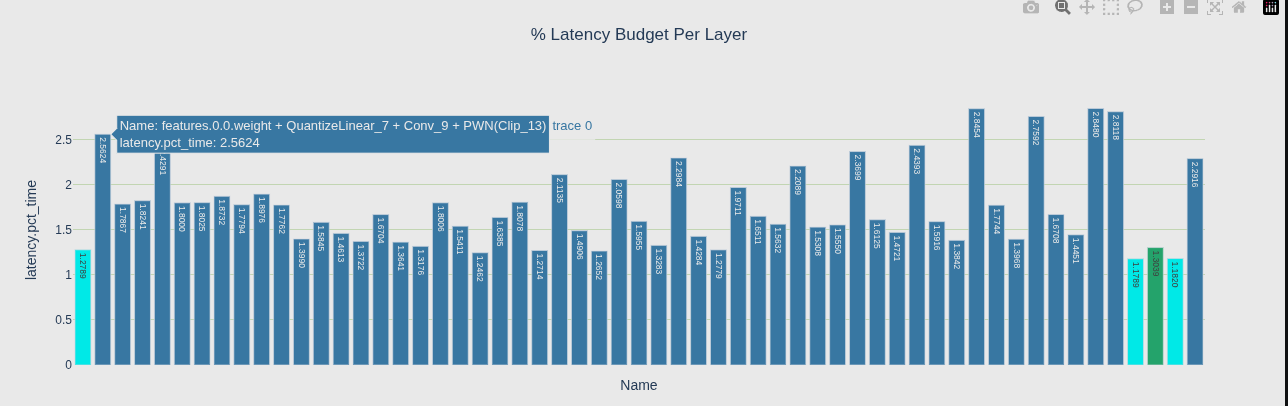
1. 层延迟视图
2. 层延迟树状矩形图
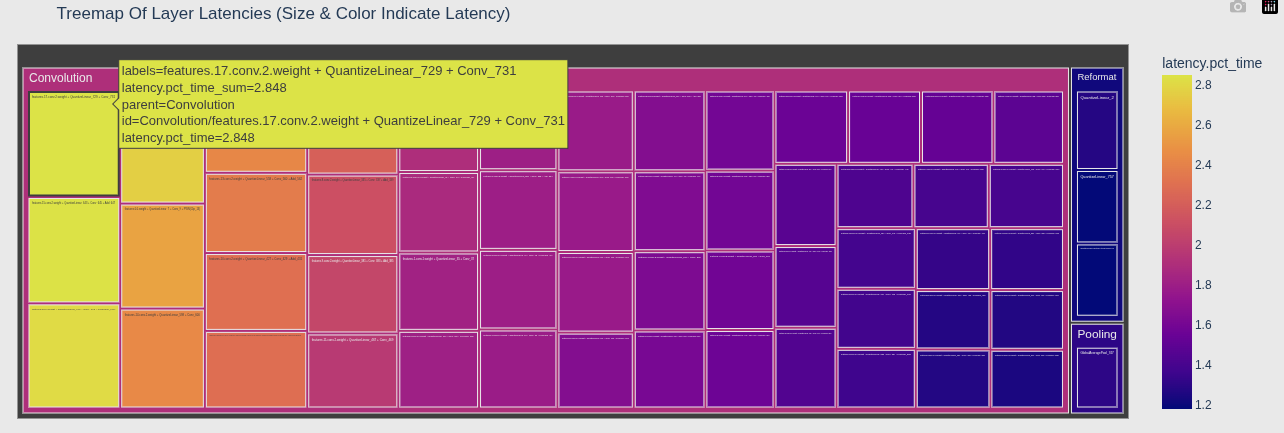
| 元素 | 含义 |
|---|---|
| 矩形大小 | 由 values='latency.pct_time' 决定 --- 矩形越大,该层占总延迟百分比越高 |
| 矩形颜色 | 由 color='latency.pct_time' 决定 --- 颜色越深/暖,延迟越高 |
| 层级结构 | path=['type', 'Name'] --- 外层是 type,内层是具体层名 |
3. 内存分析
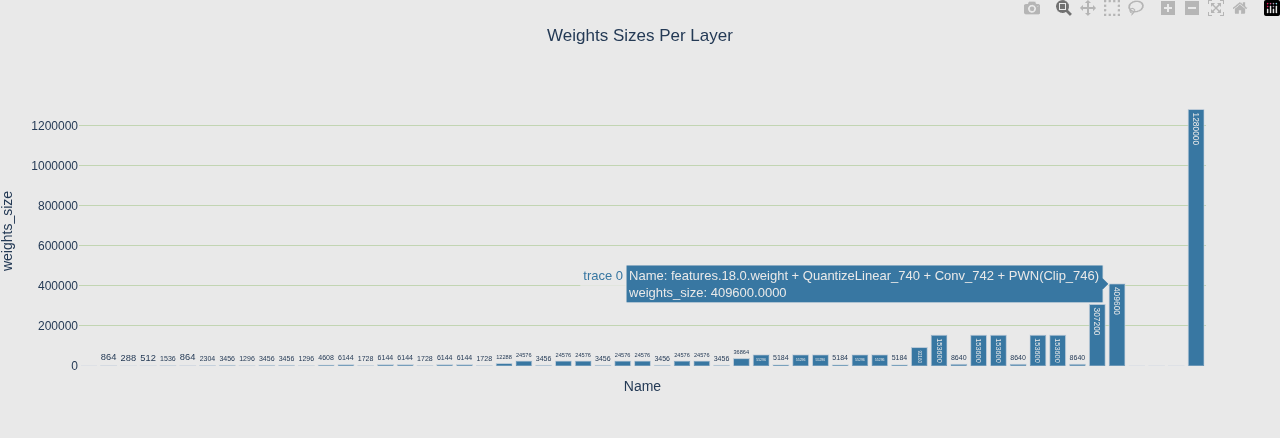
Weights 视图 - 静态权重谁最大(构建时就固定)
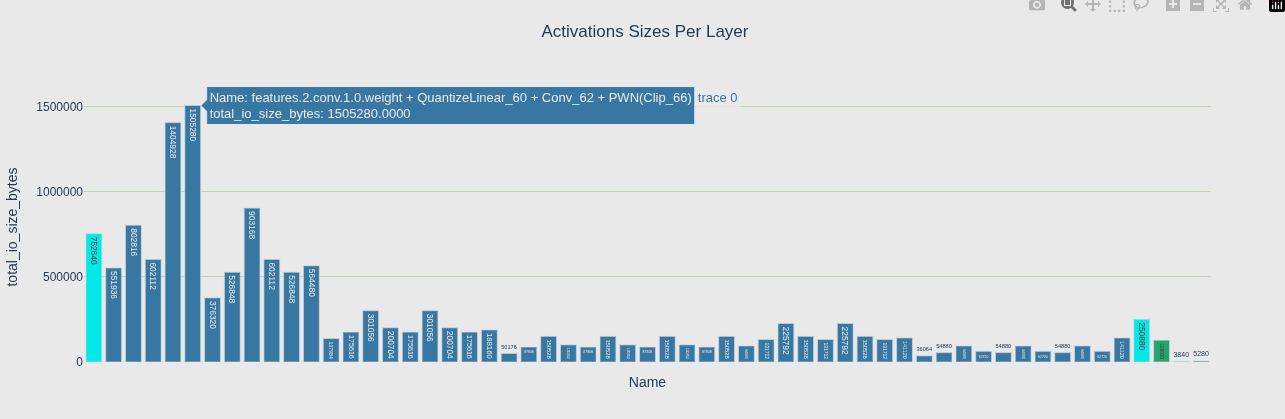
Activations 视图 - 动态中间结果谁最大(推理时临时分配)
Histogram 视图 - 整体分布,有没有离谱的 outlier
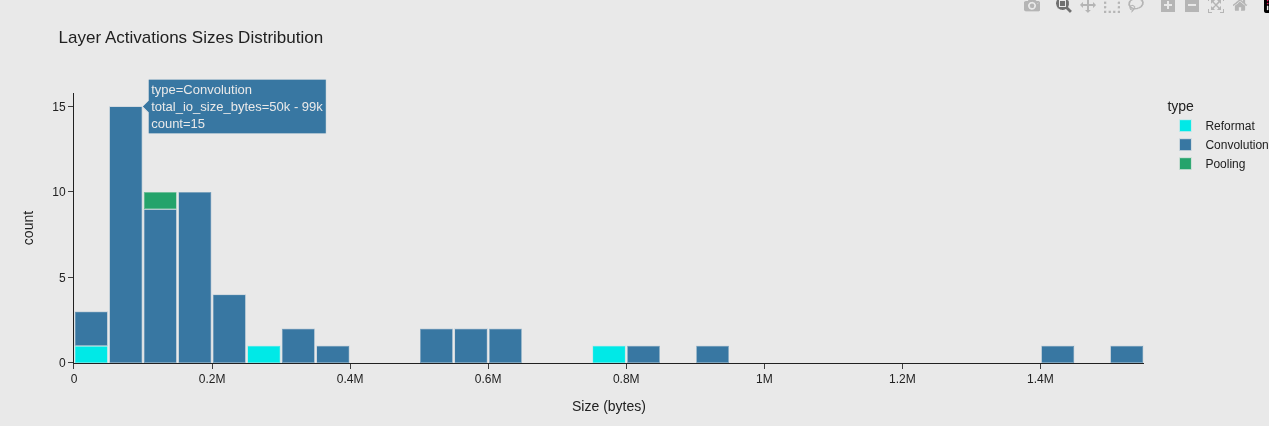
| 图 | 告诉你的问题 |
|---|---|
| Weights | 静态权重谁最大(构建时就固定) |
| Activations | 动态中间结果谁最大(推理时临时分配) |
| Histogram | 整体分布,有没有离谱的 outlier |
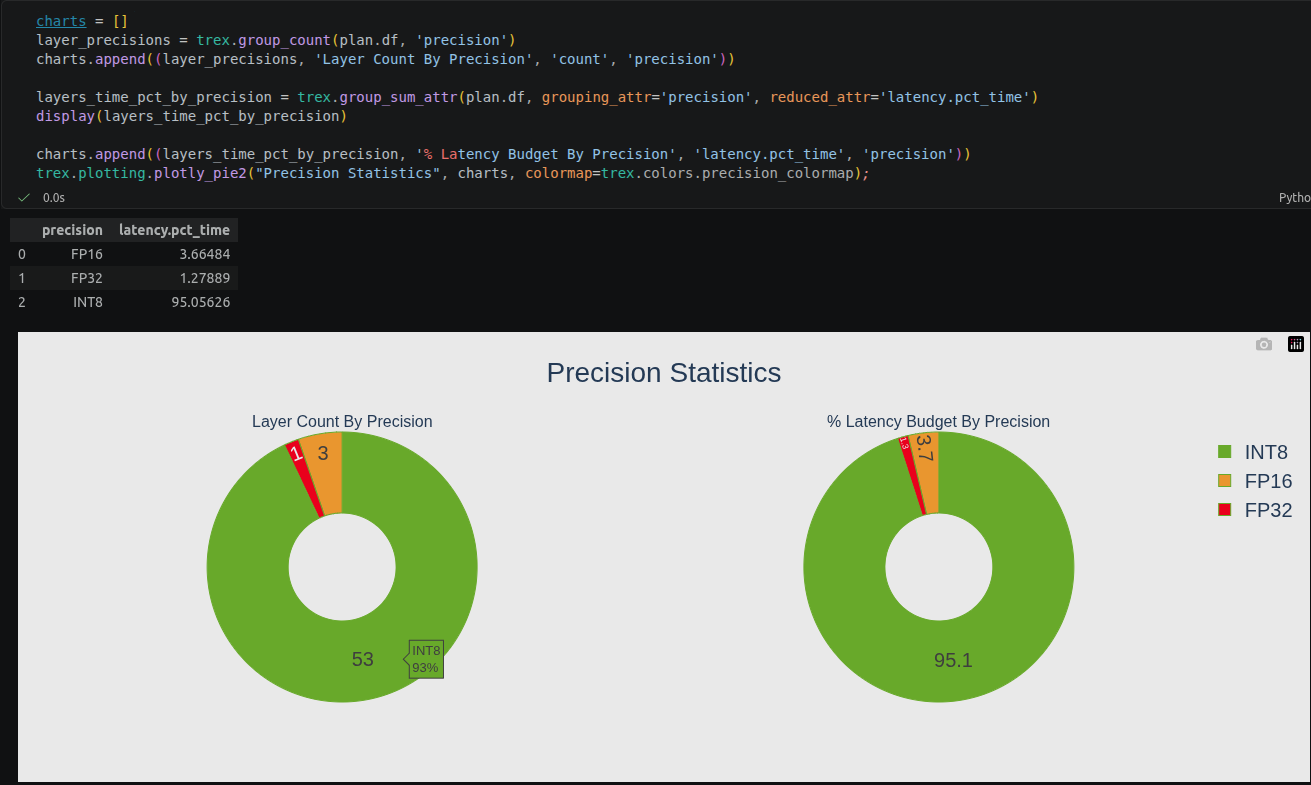
4. 层精度占比
展示各层使用的精度分布(FP32/FP16/INT8)。
5. 计算图可视化
python
formatter = trex.graphing.layer_type_formatter if True else trex.graphing.precision_formatter
graph = trex.graphing.to_dot(plan, formatter)
svg_name = trex.graphing.render_dot(graph, engine_name, 'svg')
计算图的样子,类似netron
卷积层详细分析
python
convs = plan.get_layers_by_type('Convolution')
trex.notebook.display_df(convs)

# 按精度着色的延迟图
trex.plotting.plotly_bar2(
    convs,
    "Latency Per Layer (%)<BR>(bar color indicates precision)",
    "attr.arithmetic_intensity", "Name",
    color='precision',
    colormap=trex.colors.precision_colormap)

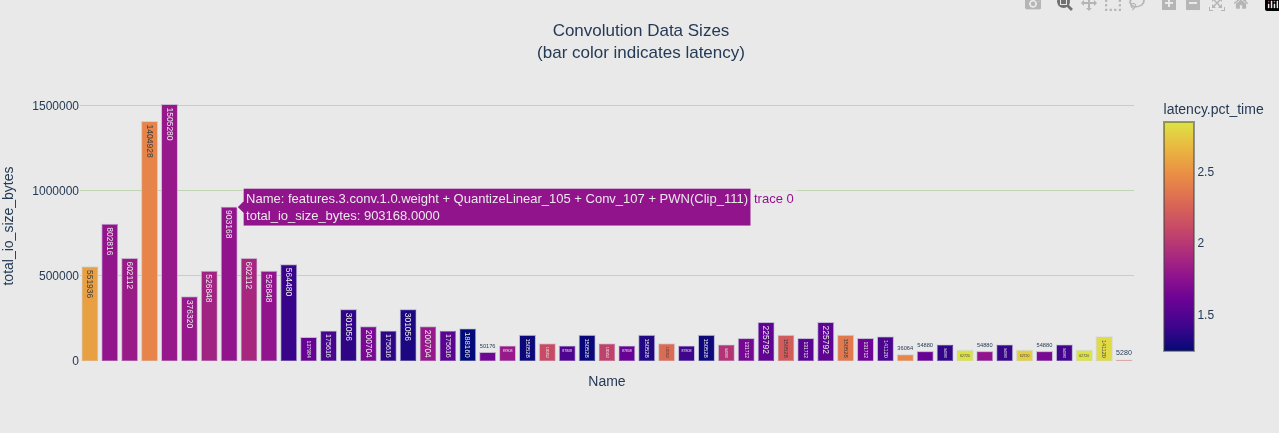
# 按延迟着色的数据大小图
trex.plotting.plotly_bar2(
    convs,
    "Convolution Data Sizes<BR>(bar color indicates latency)",
    "total_io_size_bytes",
    "Name",
    color='latency.pct_time')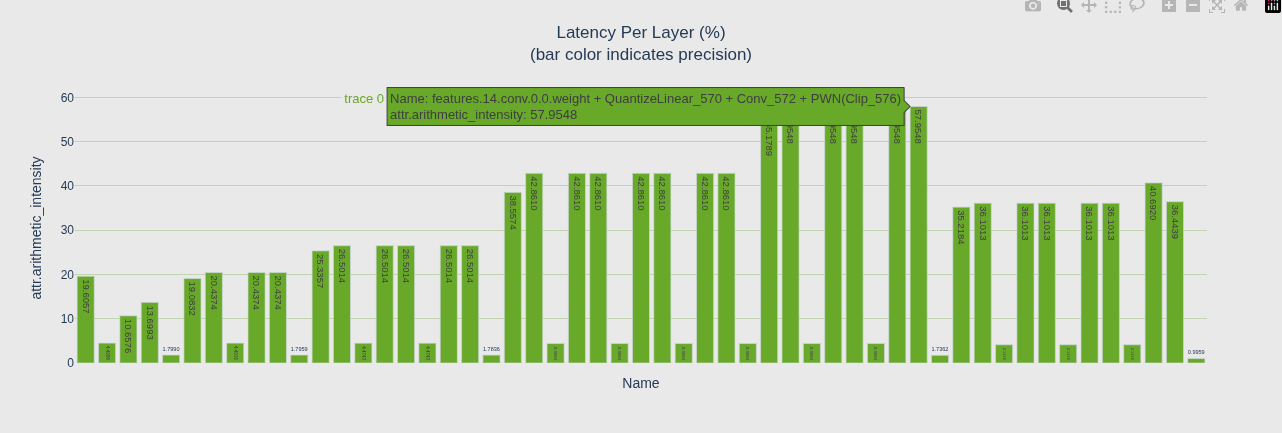
性能指标详解
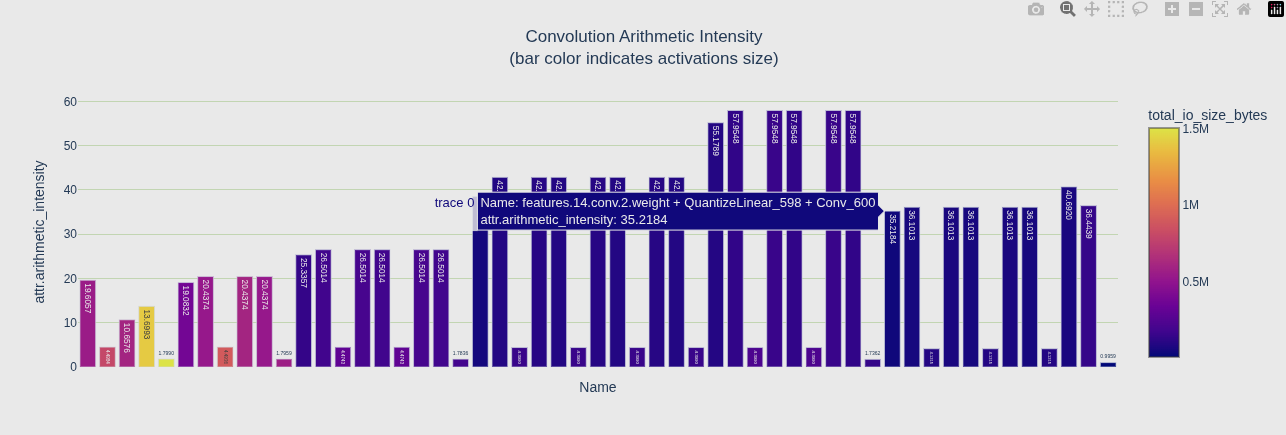
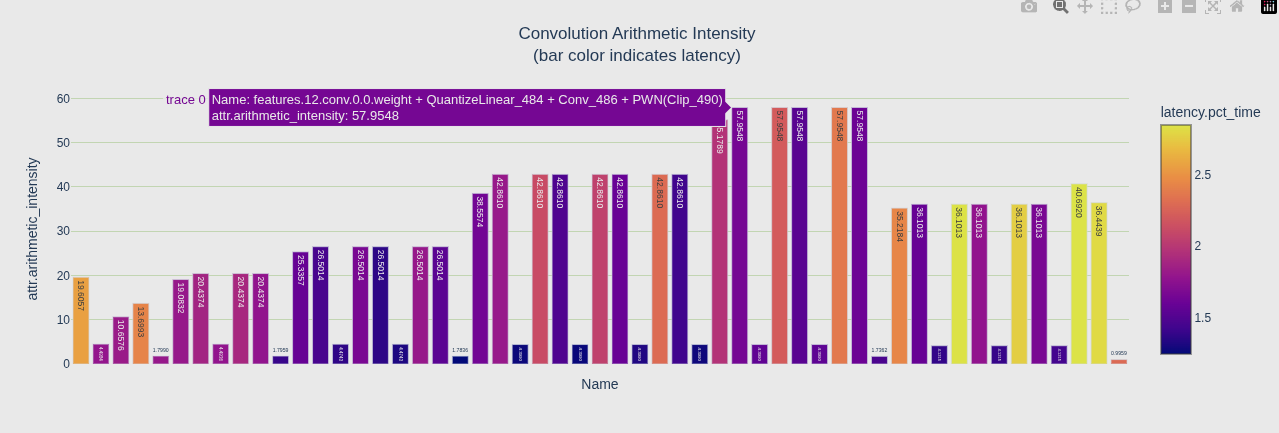
算术强度(Arithmetic Intensity)
- 定义:计算量 / 内存访问量(FLOPs / bytes)
- 含义:每访问一个字节能做多少计算
- 判断 :
- 值越高 → 计算密度越大 → 容易被 GPU 算力瓶颈
- 值越低 → 瓶颈在内存带宽
| 图 | 颜色映射 | 回答的问题 |
|---|---|---|
| 第一个 | color='total_io_size_bytes' |
激活值大的卷积颜色深 |
| 第二个 | color='latency.pct_time' |
延迟高的卷积颜色深 |
内存效率(Memory Efficiency)
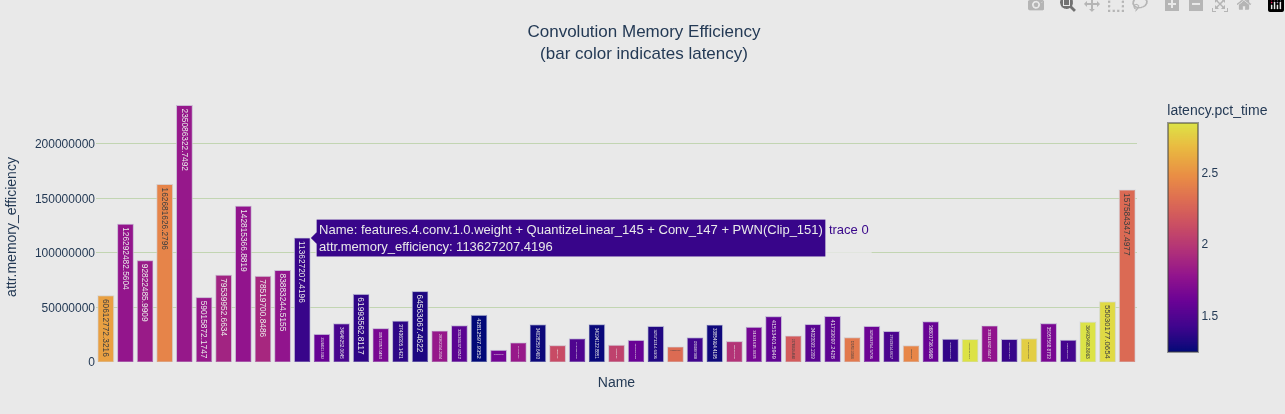
- 定义:实际内存访问量 / 每毫秒可达到的内存带宽
- 公式 :
memory_efficiency = 实际内存访问(bytes) / (内存带宽(bytes/ms) × 执行时间(ms)) - 越高越好:说明充分利用了内存带宽
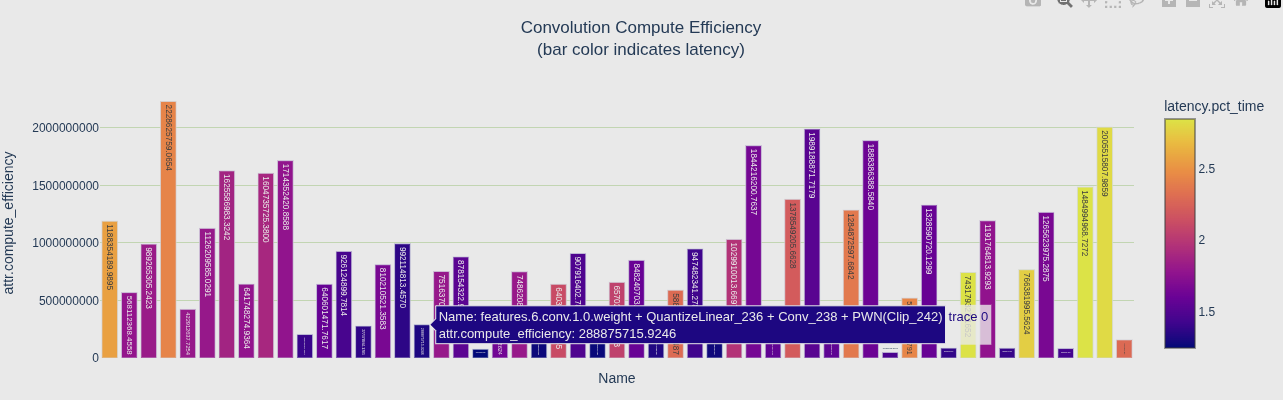
计算效率(Compute Efficiency)
- 定义:实际计算量 / 每毫秒可达到的峰值算力
- 公式 :
compute_efficiency = 实际FLOPs / (峰值算力(FLOPs/ms) × 执行时间(ms)) - 越高越好:说明充分利用了 GPU 算力
瓶颈判断
| 组合 | 结论 |
|---|---|
| Memory 低、Compute 高 | 内存带宽瓶颈 --- 瓶颈在显存读写 |
| Memory 高、Compute 低 | 计算瓶颈 --- 瓶颈在 GPU 算力 |
| 两者都高 | 正常,两边都被吃满了 |
图怎么看
- 颜色深(latency 高)= 该层延迟大,可能是瓶颈层
- 高延迟层 + Memory Efficiency 低 → 优化方向:减少内存访问或提高带宽
- 高延迟层 + Compute Efficiency 低 → 优化方向:提高计算密度或降低计算量
参考
deepseek
Tensorrt git 仓库