Claude Code 技术深度解析:一个活在终端里的 AI 编程助手
一、什么是 Claude Code?
Claude Code 是 Anthropic 推出的一款终端原生的 AI 编程工具 。它不是一个简单的代码补全插件,而是一个能够理解整个代码库、通过自然语言指令执行复杂开发任务的自主 Agent 系统。
"Claude Code is an agentic coding tool that lives in your terminal, understands your codebase, and helps you code faster by executing routine tasks, explaining complex code, and handling git workflows --- all through natural language commands." 1
它的核心设计哲学是:将 LLM 的推理能力与对系统的直接访问权限结合,通过一套结构化的**工具系统(Tool System)**来完成真实的工程任务。
二、快速安装
Claude Code 支持跨平台安装:
bash
# macOS / Linux(推荐)
curl -fsSL https://claude.ai/install.sh | bash

# Homebrew
brew install --cask claude-code

# Windows(PowerShell)
irm https://claude.ai/install.ps1 | iex

# WinGet
winget install Anthropic.ClaudeCode
安装完成后,进入项目目录执行 claude 即可启动交互式会话。
三、系统架构总览
Claude Code 的整体架构分为五个层次:
#mermaid-svg-FpFBdzhzaGheukvn{font-family:"trebuchet ms",verdana,arial,sans-serif;font-size:16px;fill:#333;}@keyframes edge-animation-frame{from{stroke-dashoffset:0;}}@keyframes dash{to{stroke-dashoffset:0;}}#mermaid-svg-FpFBdzhzaGheukvn .edge-animation-slow{stroke-dasharray:9,5!important;stroke-dashoffset:900;animation:dash 50s linear infinite;stroke-linecap:round;}#mermaid-svg-FpFBdzhzaGheukvn .edge-animation-fast{stroke-dasharray:9,5!important;stroke-dashoffset:900;animation:dash 20s linear infinite;stroke-linecap:round;}#mermaid-svg-FpFBdzhzaGheukvn .error-icon{fill:#552222;}#mermaid-svg-FpFBdzhzaGheukvn .error-text{fill:#552222;stroke:#552222;}#mermaid-svg-FpFBdzhzaGheukvn .edge-thickness-normal{stroke-width:1px;}#mermaid-svg-FpFBdzhzaGheukvn .edge-thickness-thick{stroke-width:3.5px;}#mermaid-svg-FpFBdzhzaGheukvn .edge-pattern-solid{stroke-dasharray:0;}#mermaid-svg-FpFBdzhzaGheukvn .edge-thickness-invisible{stroke-width:0;fill:none;}#mermaid-svg-FpFBdzhzaGheukvn .edge-pattern-dashed{stroke-dasharray:3;}#mermaid-svg-FpFBdzhzaGheukvn .edge-pattern-dotted{stroke-dasharray:2;}#mermaid-svg-FpFBdzhzaGheukvn .marker{fill:#333333;stroke:#333333;}#mermaid-svg-FpFBdzhzaGheukvn .marker.cross{stroke:#333333;}#mermaid-svg-FpFBdzhzaGheukvn svg{font-family:"trebuchet ms",verdana,arial,sans-serif;font-size:16px;}#mermaid-svg-FpFBdzhzaGheukvn p{margin:0;}#mermaid-svg-FpFBdzhzaGheukvn .label{font-family:"trebuchet ms",verdana,arial,sans-serif;color:#333;}#mermaid-svg-FpFBdzhzaGheukvn .cluster-label text{fill:#333;}#mermaid-svg-FpFBdzhzaGheukvn .cluster-label span{color:#333;}#mermaid-svg-FpFBdzhzaGheukvn .cluster-label span p{background-color:transparent;}#mermaid-svg-FpFBdzhzaGheukvn .label text,#mermaid-svg-FpFBdzhzaGheukvn span{fill:#333;color:#333;}#mermaid-svg-FpFBdzhzaGheukvn .node rect,#mermaid-svg-FpFBdzhzaGheukvn .node circle,#mermaid-svg-FpFBdzhzaGheukvn .node ellipse,#mermaid-svg-FpFBdzhzaGheukvn .node polygon,#mermaid-svg-FpFBdzhzaGheukvn .node path{fill:#ECECFF;stroke:#9370DB;stroke-width:1px;}#mermaid-svg-FpFBdzhzaGheukvn .rough-node .label text,#mermaid-svg-FpFBdzhzaGheukvn .node .label text,#mermaid-svg-FpFBdzhzaGheukvn .image-shape .label,#mermaid-svg-FpFBdzhzaGheukvn .icon-shape .label{text-anchor:middle;}#mermaid-svg-FpFBdzhzaGheukvn .node .katex path{fill:#000;stroke:#000;stroke-width:1px;}#mermaid-svg-FpFBdzhzaGheukvn .rough-node .label,#mermaid-svg-FpFBdzhzaGheukvn .node .label,#mermaid-svg-FpFBdzhzaGheukvn .image-shape .label,#mermaid-svg-FpFBdzhzaGheukvn .icon-shape .label{text-align:center;}#mermaid-svg-FpFBdzhzaGheukvn .node.clickable{cursor:pointer;}#mermaid-svg-FpFBdzhzaGheukvn .root .anchor path{fill:#333333!important;stroke-width:0;stroke:#333333;}#mermaid-svg-FpFBdzhzaGheukvn .arrowheadPath{fill:#333333;}#mermaid-svg-FpFBdzhzaGheukvn .edgePath .path{stroke:#333333;stroke-width:2.0px;}#mermaid-svg-FpFBdzhzaGheukvn .flowchart-link{stroke:#333333;fill:none;}#mermaid-svg-FpFBdzhzaGheukvn .edgeLabel{background-color:rgba(232,232,232, 0.8);text-align:center;}#mermaid-svg-FpFBdzhzaGheukvn .edgeLabel p{background-color:rgba(232,232,232, 0.8);}#mermaid-svg-FpFBdzhzaGheukvn .edgeLabel rect{opacity:0.5;background-color:rgba(232,232,232, 0.8);fill:rgba(232,232,232, 0.8);}#mermaid-svg-FpFBdzhzaGheukvn .labelBkg{background-color:rgba(232, 232, 232, 0.5);}#mermaid-svg-FpFBdzhzaGheukvn .cluster rect{fill:#ffffde;stroke:#aaaa33;stroke-width:1px;}#mermaid-svg-FpFBdzhzaGheukvn .cluster text{fill:#333;}#mermaid-svg-FpFBdzhzaGheukvn .cluster span{color:#333;}#mermaid-svg-FpFBdzhzaGheukvn div.mermaidTooltip{position:absolute;text-align:center;max-width:200px;padding:2px;font-family:"trebuchet ms",verdana,arial,sans-serif;font-size:12px;background:hsl(80, 100%, 96.2745098039%);border:1px solid #aaaa33;border-radius:2px;pointer-events:none;z-index:100;}#mermaid-svg-FpFBdzhzaGheukvn .flowchartTitleText{text-anchor:middle;font-size:18px;fill:#333;}#mermaid-svg-FpFBdzhzaGheukvn rect.text{fill:none;stroke-width:0;}#mermaid-svg-FpFBdzhzaGheukvn .icon-shape,#mermaid-svg-FpFBdzhzaGheukvn .image-shape{background-color:rgba(232,232,232, 0.8);text-align:center;}#mermaid-svg-FpFBdzhzaGheukvn .icon-shape p,#mermaid-svg-FpFBdzhzaGheukvn .image-shape p{background-color:rgba(232,232,232, 0.8);padding:2px;}#mermaid-svg-FpFBdzhzaGheukvn .icon-shape .label rect,#mermaid-svg-FpFBdzhzaGheukvn .image-shape .label rect{opacity:0.5;background-color:rgba(232,232,232, 0.8);fill:rgba(232,232,232, 0.8);}#mermaid-svg-FpFBdzhzaGheukvn .label-icon{display:inline-block;height:1em;overflow:visible;vertical-align:-0.125em;}#mermaid-svg-FpFBdzhzaGheukvn .node .label-icon path{fill:currentColor;stroke:revert;stroke-width:revert;}#mermaid-svg-FpFBdzhzaGheukvn :root{--mermaid-font-family:"trebuchet ms",verdana,arial,sans-serif;} 扩展层 Extension Layer
工具系统 Tool System
Agent 核心 Agent Core
会话层 Session Layer
入口层 Entry Layer
claude 命令行入口
子命令: auth / mcp / plugin / doctor
Session Manager
~/.claude/sessions/ 持久化存储
/resume 会话恢复
主 Agent (Sonnet/Opus)
子 Agent (Task Tool 派生)
上下文压缩 Auto-Compaction
BashTool
FileRead/Write/Edit
WebFetch/WebSearch
TaskTool (子 Agent 派生)
MCP Tool Wrapper
Plugin System
Hook System
Skill System
MCP Server Manager
四、工具系统(Tool System)
工具是 Claude Code 与外部世界交互的唯一通道。每次 Agent 想要执行操作,都必须通过工具系统,并经过权限层的校验。
4.1 核心工具类型
| 工具类 | 功能 | 关键特性 |
|---|---|---|
FileReadTool |
读取文件内容 | 超出 token 限制时返回 "PARTIAL view" 截断提示,而非报错 |
FileWriteTool |
创建/覆盖文件 | 路径安全校验 + 符号链接检查 |
FileEditTool |
行级编辑 | 包含 diff 逻辑,精确报告截断行 |
BashTool |
执行 Shell 命令 | 跨平台,支持 bash/zsh/pwsh |
WebFetchTool |
抓取 URL 内容 | 可通过权限规则禁用 |
TaskTool |
派生子 Agent | 支持 worktree 隔离模式 |
4.2 权限系统(Permission System)
工具执行前必须经过三级权限校验:
#mermaid-svg-KP9sAfcmMY8nEw6s{font-family:"trebuchet ms",verdana,arial,sans-serif;font-size:16px;fill:#333;}@keyframes edge-animation-frame{from{stroke-dashoffset:0;}}@keyframes dash{to{stroke-dashoffset:0;}}#mermaid-svg-KP9sAfcmMY8nEw6s .edge-animation-slow{stroke-dasharray:9,5!important;stroke-dashoffset:900;animation:dash 50s linear infinite;stroke-linecap:round;}#mermaid-svg-KP9sAfcmMY8nEw6s .edge-animation-fast{stroke-dasharray:9,5!important;stroke-dashoffset:900;animation:dash 20s linear infinite;stroke-linecap:round;}#mermaid-svg-KP9sAfcmMY8nEw6s .error-icon{fill:#552222;}#mermaid-svg-KP9sAfcmMY8nEw6s .error-text{fill:#552222;stroke:#552222;}#mermaid-svg-KP9sAfcmMY8nEw6s .edge-thickness-normal{stroke-width:1px;}#mermaid-svg-KP9sAfcmMY8nEw6s .edge-thickness-thick{stroke-width:3.5px;}#mermaid-svg-KP9sAfcmMY8nEw6s .edge-pattern-solid{stroke-dasharray:0;}#mermaid-svg-KP9sAfcmMY8nEw6s .edge-thickness-invisible{stroke-width:0;fill:none;}#mermaid-svg-KP9sAfcmMY8nEw6s .edge-pattern-dashed{stroke-dasharray:3;}#mermaid-svg-KP9sAfcmMY8nEw6s .edge-pattern-dotted{stroke-dasharray:2;}#mermaid-svg-KP9sAfcmMY8nEw6s .marker{fill:#333333;stroke:#333333;}#mermaid-svg-KP9sAfcmMY8nEw6s .marker.cross{stroke:#333333;}#mermaid-svg-KP9sAfcmMY8nEw6s svg{font-family:"trebuchet ms",verdana,arial,sans-serif;font-size:16px;}#mermaid-svg-KP9sAfcmMY8nEw6s p{margin:0;}#mermaid-svg-KP9sAfcmMY8nEw6s .label{font-family:"trebuchet ms",verdana,arial,sans-serif;color:#333;}#mermaid-svg-KP9sAfcmMY8nEw6s .cluster-label text{fill:#333;}#mermaid-svg-KP9sAfcmMY8nEw6s .cluster-label span{color:#333;}#mermaid-svg-KP9sAfcmMY8nEw6s .cluster-label span p{background-color:transparent;}#mermaid-svg-KP9sAfcmMY8nEw6s .label text,#mermaid-svg-KP9sAfcmMY8nEw6s span{fill:#333;color:#333;}#mermaid-svg-KP9sAfcmMY8nEw6s .node rect,#mermaid-svg-KP9sAfcmMY8nEw6s .node circle,#mermaid-svg-KP9sAfcmMY8nEw6s .node ellipse,#mermaid-svg-KP9sAfcmMY8nEw6s .node polygon,#mermaid-svg-KP9sAfcmMY8nEw6s .node path{fill:#ECECFF;stroke:#9370DB;stroke-width:1px;}#mermaid-svg-KP9sAfcmMY8nEw6s .rough-node .label text,#mermaid-svg-KP9sAfcmMY8nEw6s .node .label text,#mermaid-svg-KP9sAfcmMY8nEw6s .image-shape .label,#mermaid-svg-KP9sAfcmMY8nEw6s .icon-shape .label{text-anchor:middle;}#mermaid-svg-KP9sAfcmMY8nEw6s .node .katex path{fill:#000;stroke:#000;stroke-width:1px;}#mermaid-svg-KP9sAfcmMY8nEw6s .rough-node .label,#mermaid-svg-KP9sAfcmMY8nEw6s .node .label,#mermaid-svg-KP9sAfcmMY8nEw6s .image-shape .label,#mermaid-svg-KP9sAfcmMY8nEw6s .icon-shape .label{text-align:center;}#mermaid-svg-KP9sAfcmMY8nEw6s .node.clickable{cursor:pointer;}#mermaid-svg-KP9sAfcmMY8nEw6s .root .anchor path{fill:#333333!important;stroke-width:0;stroke:#333333;}#mermaid-svg-KP9sAfcmMY8nEw6s .arrowheadPath{fill:#333333;}#mermaid-svg-KP9sAfcmMY8nEw6s .edgePath .path{stroke:#333333;stroke-width:2.0px;}#mermaid-svg-KP9sAfcmMY8nEw6s .flowchart-link{stroke:#333333;fill:none;}#mermaid-svg-KP9sAfcmMY8nEw6s .edgeLabel{background-color:rgba(232,232,232, 0.8);text-align:center;}#mermaid-svg-KP9sAfcmMY8nEw6s .edgeLabel p{background-color:rgba(232,232,232, 0.8);}#mermaid-svg-KP9sAfcmMY8nEw6s .edgeLabel rect{opacity:0.5;background-color:rgba(232,232,232, 0.8);fill:rgba(232,232,232, 0.8);}#mermaid-svg-KP9sAfcmMY8nEw6s .labelBkg{background-color:rgba(232, 232, 232, 0.5);}#mermaid-svg-KP9sAfcmMY8nEw6s .cluster rect{fill:#ffffde;stroke:#aaaa33;stroke-width:1px;}#mermaid-svg-KP9sAfcmMY8nEw6s .cluster text{fill:#333;}#mermaid-svg-KP9sAfcmMY8nEw6s .cluster span{color:#333;}#mermaid-svg-KP9sAfcmMY8nEw6s div.mermaidTooltip{position:absolute;text-align:center;max-width:200px;padding:2px;font-family:"trebuchet ms",verdana,arial,sans-serif;font-size:12px;background:hsl(80, 100%, 96.2745098039%);border:1px solid #aaaa33;border-radius:2px;pointer-events:none;z-index:100;}#mermaid-svg-KP9sAfcmMY8nEw6s .flowchartTitleText{text-anchor:middle;font-size:18px;fill:#333;}#mermaid-svg-KP9sAfcmMY8nEw6s rect.text{fill:none;stroke-width:0;}#mermaid-svg-KP9sAfcmMY8nEw6s .icon-shape,#mermaid-svg-KP9sAfcmMY8nEw6s .image-shape{background-color:rgba(232,232,232, 0.8);text-align:center;}#mermaid-svg-KP9sAfcmMY8nEw6s .icon-shape p,#mermaid-svg-KP9sAfcmMY8nEw6s .image-shape p{background-color:rgba(232,232,232, 0.8);padding:2px;}#mermaid-svg-KP9sAfcmMY8nEw6s .icon-shape .label rect,#mermaid-svg-KP9sAfcmMY8nEw6s .image-shape .label rect{opacity:0.5;background-color:rgba(232,232,232, 0.8);fill:rgba(232,232,232, 0.8);}#mermaid-svg-KP9sAfcmMY8nEw6s .label-icon{display:inline-block;height:1em;overflow:visible;vertical-align:-0.125em;}#mermaid-svg-KP9sAfcmMY8nEw6s .node .label-icon path{fill:currentColor;stroke:revert;stroke-width:revert;}#mermaid-svg-KP9sAfcmMY8nEw6s :root{--mermaid-font-family:"trebuchet ms",verdana,arial,sans-serif;} Deny
Allow
无规则
匹配规则
无匹配
工具调用请求
检查 managed-settings.json
(企业级策略,最高优先级)
拒绝执行
执行工具
检查 settings.json
(用户/项目级)
交互式询问用户
仅此一次允许
始终允许 (写入 settings.json)
拒绝
安全加固点:
- 裸变量赋值(如
FOO=bar)现在需要显式权限,防止绕过环境变量保护 allowManagedPermissionRulesOnly: true可防止用户/项目覆盖组织安全策略--dangerously-skip-permissions可通过disableBypassPermissionsMode: "disable"全局禁用
五、Agent 系统与子 Agent
Claude Code 实现了层级化的 Agent 架构 ,主 Agent 可以通过 Task 工具派生独立的子 Agent 来并行执行任务。
5.1 架构图
渲染错误: Mermaid 渲染失败: Parse error on line 22: ...DATE --> MAIN```7(#0-6) ### 5.2 Age ----------------------^ Expecting 'SEMI', 'NEWLINE', 'SPACE', 'EOF', 'SHAPE_DATA', 'STYLE_SEPARATOR', 'START_LINK', 'LINK', 'LINK_ID', got 'PS'
frontmatter 关键字段:
| 字段 | 说明 |
|---|---|
model |
指定使用的模型 |
tools |
限制可用工具集 |
isolation |
worktree 表示在独立 Git worktree 中运行 |
background |
true 表示始终后台运行 |
memory |
持久化记忆范围:user / project / local |
mcpServers |
为该 Agent 加载的 MCP 服务器 |
5.3 多 Agent 协作示例:Feature Dev 插件
feature-dev 插件展示了一个典型的多 Agent 协作工作流,分 7 个阶段,并行派生专业子 Agent:
#mermaid-svg-K1TAdaeF9htTFsex{font-family:"trebuchet ms",verdana,arial,sans-serif;font-size:16px;fill:#333;}@keyframes edge-animation-frame{from{stroke-dashoffset:0;}}@keyframes dash{to{stroke-dashoffset:0;}}#mermaid-svg-K1TAdaeF9htTFsex .edge-animation-slow{stroke-dasharray:9,5!important;stroke-dashoffset:900;animation:dash 50s linear infinite;stroke-linecap:round;}#mermaid-svg-K1TAdaeF9htTFsex .edge-animation-fast{stroke-dasharray:9,5!important;stroke-dashoffset:900;animation:dash 20s linear infinite;stroke-linecap:round;}#mermaid-svg-K1TAdaeF9htTFsex .error-icon{fill:#552222;}#mermaid-svg-K1TAdaeF9htTFsex .error-text{fill:#552222;stroke:#552222;}#mermaid-svg-K1TAdaeF9htTFsex .edge-thickness-normal{stroke-width:1px;}#mermaid-svg-K1TAdaeF9htTFsex .edge-thickness-thick{stroke-width:3.5px;}#mermaid-svg-K1TAdaeF9htTFsex .edge-pattern-solid{stroke-dasharray:0;}#mermaid-svg-K1TAdaeF9htTFsex .edge-thickness-invisible{stroke-width:0;fill:none;}#mermaid-svg-K1TAdaeF9htTFsex .edge-pattern-dashed{stroke-dasharray:3;}#mermaid-svg-K1TAdaeF9htTFsex .edge-pattern-dotted{stroke-dasharray:2;}#mermaid-svg-K1TAdaeF9htTFsex .marker{fill:#333333;stroke:#333333;}#mermaid-svg-K1TAdaeF9htTFsex .marker.cross{stroke:#333333;}#mermaid-svg-K1TAdaeF9htTFsex svg{font-family:"trebuchet ms",verdana,arial,sans-serif;font-size:16px;}#mermaid-svg-K1TAdaeF9htTFsex p{margin:0;}#mermaid-svg-K1TAdaeF9htTFsex .label{font-family:"trebuchet ms",verdana,arial,sans-serif;color:#333;}#mermaid-svg-K1TAdaeF9htTFsex .cluster-label text{fill:#333;}#mermaid-svg-K1TAdaeF9htTFsex .cluster-label span{color:#333;}#mermaid-svg-K1TAdaeF9htTFsex .cluster-label span p{background-color:transparent;}#mermaid-svg-K1TAdaeF9htTFsex .label text,#mermaid-svg-K1TAdaeF9htTFsex span{fill:#333;color:#333;}#mermaid-svg-K1TAdaeF9htTFsex .node rect,#mermaid-svg-K1TAdaeF9htTFsex .node circle,#mermaid-svg-K1TAdaeF9htTFsex .node ellipse,#mermaid-svg-K1TAdaeF9htTFsex .node polygon,#mermaid-svg-K1TAdaeF9htTFsex .node path{fill:#ECECFF;stroke:#9370DB;stroke-width:1px;}#mermaid-svg-K1TAdaeF9htTFsex .rough-node .label text,#mermaid-svg-K1TAdaeF9htTFsex .node .label text,#mermaid-svg-K1TAdaeF9htTFsex .image-shape .label,#mermaid-svg-K1TAdaeF9htTFsex .icon-shape .label{text-anchor:middle;}#mermaid-svg-K1TAdaeF9htTFsex .node .katex path{fill:#000;stroke:#000;stroke-width:1px;}#mermaid-svg-K1TAdaeF9htTFsex .rough-node .label,#mermaid-svg-K1TAdaeF9htTFsex .node .label,#mermaid-svg-K1TAdaeF9htTFsex .image-shape .label,#mermaid-svg-K1TAdaeF9htTFsex .icon-shape .label{text-align:center;}#mermaid-svg-K1TAdaeF9htTFsex .node.clickable{cursor:pointer;}#mermaid-svg-K1TAdaeF9htTFsex .root .anchor path{fill:#333333!important;stroke-width:0;stroke:#333333;}#mermaid-svg-K1TAdaeF9htTFsex .arrowheadPath{fill:#333333;}#mermaid-svg-K1TAdaeF9htTFsex .edgePath .path{stroke:#333333;stroke-width:2.0px;}#mermaid-svg-K1TAdaeF9htTFsex .flowchart-link{stroke:#333333;fill:none;}#mermaid-svg-K1TAdaeF9htTFsex .edgeLabel{background-color:rgba(232,232,232, 0.8);text-align:center;}#mermaid-svg-K1TAdaeF9htTFsex .edgeLabel p{background-color:rgba(232,232,232, 0.8);}#mermaid-svg-K1TAdaeF9htTFsex .edgeLabel rect{opacity:0.5;background-color:rgba(232,232,232, 0.8);fill:rgba(232,232,232, 0.8);}#mermaid-svg-K1TAdaeF9htTFsex .labelBkg{background-color:rgba(232, 232, 232, 0.5);}#mermaid-svg-K1TAdaeF9htTFsex .cluster rect{fill:#ffffde;stroke:#aaaa33;stroke-width:1px;}#mermaid-svg-K1TAdaeF9htTFsex .cluster text{fill:#333;}#mermaid-svg-K1TAdaeF9htTFsex .cluster span{color:#333;}#mermaid-svg-K1TAdaeF9htTFsex div.mermaidTooltip{position:absolute;text-align:center;max-width:200px;padding:2px;font-family:"trebuchet ms",verdana,arial,sans-serif;font-size:12px;background:hsl(80, 100%, 96.2745098039%);border:1px solid #aaaa33;border-radius:2px;pointer-events:none;z-index:100;}#mermaid-svg-K1TAdaeF9htTFsex .flowchartTitleText{text-anchor:middle;font-size:18px;fill:#333;}#mermaid-svg-K1TAdaeF9htTFsex rect.text{fill:none;stroke-width:0;}#mermaid-svg-K1TAdaeF9htTFsex .icon-shape,#mermaid-svg-K1TAdaeF9htTFsex .image-shape{background-color:rgba(232,232,232, 0.8);text-align:center;}#mermaid-svg-K1TAdaeF9htTFsex .icon-shape p,#mermaid-svg-K1TAdaeF9htTFsex .image-shape p{background-color:rgba(232,232,232, 0.8);padding:2px;}#mermaid-svg-K1TAdaeF9htTFsex .icon-shape .label rect,#mermaid-svg-K1TAdaeF9htTFsex .image-shape .label rect{opacity:0.5;background-color:rgba(232,232,232, 0.8);fill:rgba(232,232,232, 0.8);}#mermaid-svg-K1TAdaeF9htTFsex .label-icon{display:inline-block;height:1em;overflow:visible;vertical-align:-0.125em;}#mermaid-svg-K1TAdaeF9htTFsex .node .label-icon path{fill:currentColor;stroke:revert;stroke-width:revert;}#mermaid-svg-K1TAdaeF9htTFsex :root{--mermaid-font-family:"trebuchet ms",verdana,arial,sans-serif;} 阶段6: 质量审查
阶段4: 架构设计
阶段2: 代码探索
并行派生
并行派生
并行派生
并行派生
并行派生
并行派生
主编排 Agent
(feature-dev.md)
code-explorer #1
code-explorer #2
code-architect #1
(最小化方案)
code-architect #2
(整洁方案)
code-reviewer #1
(简洁性)
code-reviewer #2
(Bug 检测)
六、上下文窗口与压缩(Context Window & Compaction)
长时间运行的会话面临 token 耗尽的问题。Claude Code 实现了一套完整的上下文管理机制。
6.1 自动压缩触发逻辑
#mermaid-svg-djNzdERWB8Nq4WGL{font-family:"trebuchet ms",verdana,arial,sans-serif;font-size:16px;fill:#333;}@keyframes edge-animation-frame{from{stroke-dashoffset:0;}}@keyframes dash{to{stroke-dashoffset:0;}}#mermaid-svg-djNzdERWB8Nq4WGL .edge-animation-slow{stroke-dasharray:9,5!important;stroke-dashoffset:900;animation:dash 50s linear infinite;stroke-linecap:round;}#mermaid-svg-djNzdERWB8Nq4WGL .edge-animation-fast{stroke-dasharray:9,5!important;stroke-dashoffset:900;animation:dash 20s linear infinite;stroke-linecap:round;}#mermaid-svg-djNzdERWB8Nq4WGL .error-icon{fill:#552222;}#mermaid-svg-djNzdERWB8Nq4WGL .error-text{fill:#552222;stroke:#552222;}#mermaid-svg-djNzdERWB8Nq4WGL .edge-thickness-normal{stroke-width:1px;}#mermaid-svg-djNzdERWB8Nq4WGL .edge-thickness-thick{stroke-width:3.5px;}#mermaid-svg-djNzdERWB8Nq4WGL .edge-pattern-solid{stroke-dasharray:0;}#mermaid-svg-djNzdERWB8Nq4WGL .edge-thickness-invisible{stroke-width:0;fill:none;}#mermaid-svg-djNzdERWB8Nq4WGL .edge-pattern-dashed{stroke-dasharray:3;}#mermaid-svg-djNzdERWB8Nq4WGL .edge-pattern-dotted{stroke-dasharray:2;}#mermaid-svg-djNzdERWB8Nq4WGL .marker{fill:#333333;stroke:#333333;}#mermaid-svg-djNzdERWB8Nq4WGL .marker.cross{stroke:#333333;}#mermaid-svg-djNzdERWB8Nq4WGL svg{font-family:"trebuchet ms",verdana,arial,sans-serif;font-size:16px;}#mermaid-svg-djNzdERWB8Nq4WGL p{margin:0;}#mermaid-svg-djNzdERWB8Nq4WGL .label{font-family:"trebuchet ms",verdana,arial,sans-serif;color:#333;}#mermaid-svg-djNzdERWB8Nq4WGL .cluster-label text{fill:#333;}#mermaid-svg-djNzdERWB8Nq4WGL .cluster-label span{color:#333;}#mermaid-svg-djNzdERWB8Nq4WGL .cluster-label span p{background-color:transparent;}#mermaid-svg-djNzdERWB8Nq4WGL .label text,#mermaid-svg-djNzdERWB8Nq4WGL span{fill:#333;color:#333;}#mermaid-svg-djNzdERWB8Nq4WGL .node rect,#mermaid-svg-djNzdERWB8Nq4WGL .node circle,#mermaid-svg-djNzdERWB8Nq4WGL .node ellipse,#mermaid-svg-djNzdERWB8Nq4WGL .node polygon,#mermaid-svg-djNzdERWB8Nq4WGL .node path{fill:#ECECFF;stroke:#9370DB;stroke-width:1px;}#mermaid-svg-djNzdERWB8Nq4WGL .rough-node .label text,#mermaid-svg-djNzdERWB8Nq4WGL .node .label text,#mermaid-svg-djNzdERWB8Nq4WGL .image-shape .label,#mermaid-svg-djNzdERWB8Nq4WGL .icon-shape .label{text-anchor:middle;}#mermaid-svg-djNzdERWB8Nq4WGL .node .katex path{fill:#000;stroke:#000;stroke-width:1px;}#mermaid-svg-djNzdERWB8Nq4WGL .rough-node .label,#mermaid-svg-djNzdERWB8Nq4WGL .node .label,#mermaid-svg-djNzdERWB8Nq4WGL .image-shape .label,#mermaid-svg-djNzdERWB8Nq4WGL .icon-shape .label{text-align:center;}#mermaid-svg-djNzdERWB8Nq4WGL .node.clickable{cursor:pointer;}#mermaid-svg-djNzdERWB8Nq4WGL .root .anchor path{fill:#333333!important;stroke-width:0;stroke:#333333;}#mermaid-svg-djNzdERWB8Nq4WGL .arrowheadPath{fill:#333333;}#mermaid-svg-djNzdERWB8Nq4WGL .edgePath .path{stroke:#333333;stroke-width:2.0px;}#mermaid-svg-djNzdERWB8Nq4WGL .flowchart-link{stroke:#333333;fill:none;}#mermaid-svg-djNzdERWB8Nq4WGL .edgeLabel{background-color:rgba(232,232,232, 0.8);text-align:center;}#mermaid-svg-djNzdERWB8Nq4WGL .edgeLabel p{background-color:rgba(232,232,232, 0.8);}#mermaid-svg-djNzdERWB8Nq4WGL .edgeLabel rect{opacity:0.5;background-color:rgba(232,232,232, 0.8);fill:rgba(232,232,232, 0.8);}#mermaid-svg-djNzdERWB8Nq4WGL .labelBkg{background-color:rgba(232, 232, 232, 0.5);}#mermaid-svg-djNzdERWB8Nq4WGL .cluster rect{fill:#ffffde;stroke:#aaaa33;stroke-width:1px;}#mermaid-svg-djNzdERWB8Nq4WGL .cluster text{fill:#333;}#mermaid-svg-djNzdERWB8Nq4WGL .cluster span{color:#333;}#mermaid-svg-djNzdERWB8Nq4WGL div.mermaidTooltip{position:absolute;text-align:center;max-width:200px;padding:2px;font-family:"trebuchet ms",verdana,arial,sans-serif;font-size:12px;background:hsl(80, 100%, 96.2745098039%);border:1px solid #aaaa33;border-radius:2px;pointer-events:none;z-index:100;}#mermaid-svg-djNzdERWB8Nq4WGL .flowchartTitleText{text-anchor:middle;font-size:18px;fill:#333;}#mermaid-svg-djNzdERWB8Nq4WGL rect.text{fill:none;stroke-width:0;}#mermaid-svg-djNzdERWB8Nq4WGL .icon-shape,#mermaid-svg-djNzdERWB8Nq4WGL .image-shape{background-color:rgba(232,232,232, 0.8);text-align:center;}#mermaid-svg-djNzdERWB8Nq4WGL .icon-shape p,#mermaid-svg-djNzdERWB8Nq4WGL .image-shape p{background-color:rgba(232,232,232, 0.8);padding:2px;}#mermaid-svg-djNzdERWB8Nq4WGL .icon-shape .label rect,#mermaid-svg-djNzdERWB8Nq4WGL .image-shape .label rect{opacity:0.5;background-color:rgba(232,232,232, 0.8);fill:rgba(232,232,232, 0.8);}#mermaid-svg-djNzdERWB8Nq4WGL .label-icon{display:inline-block;height:1em;overflow:visible;vertical-align:-0.125em;}#mermaid-svg-djNzdERWB8Nq4WGL .node .label-icon path{fill:currentColor;stroke:revert;stroke-width:revert;}#mermaid-svg-djNzdERWB8Nq4WGL :root{--mermaid-font-family:"trebuchet ms",verdana,arial,sans-serif;} 当前 Token 用量
计算使用百分比
当前 / 有效窗口
触发点: ~98%
预处理
剥离图片/PDF
调用 Compaction API
合并摘要
替换历史记录
6.2 上下文组成与优化策略
| 上下文来源 | Token 影响 | 优化策略 |
|---|---|---|
| 系统提示 | 固定开销 | 将日期移出以提升缓存命中率 |
| 工具结果 (Read) | 可变,可能很大 | 超限时返回 "PARTIAL view" 截断 |
| 图片 | 高 | 压缩前剥离;不支持的 MIME 类型存盘引用 |
| MCP 工具描述 | 随服务器增长 | 超过 10% 时自动延迟加载 |
| Skill 描述 | 有上限 | 描述字符数上限,随上下文窗口比例缩放 |
用户也可以手动执行 /compact 命令触发压缩,或通过 /usage-credits 查看详细的 token 和算力消耗。
七、Hook 系统(Hook System)
Hook 系统是 Claude Code 的生命周期扩展点,允许在特定事件发生时注入自定义行为。
7.1 Hook 执行流程
#mermaid-svg-wi0QETTXcLufPxcI{font-family:"trebuchet ms",verdana,arial,sans-serif;font-size:16px;fill:#333;}@keyframes edge-animation-frame{from{stroke-dashoffset:0;}}@keyframes dash{to{stroke-dashoffset:0;}}#mermaid-svg-wi0QETTXcLufPxcI .edge-animation-slow{stroke-dasharray:9,5!important;stroke-dashoffset:900;animation:dash 50s linear infinite;stroke-linecap:round;}#mermaid-svg-wi0QETTXcLufPxcI .edge-animation-fast{stroke-dasharray:9,5!important;stroke-dashoffset:900;animation:dash 20s linear infinite;stroke-linecap:round;}#mermaid-svg-wi0QETTXcLufPxcI .error-icon{fill:#552222;}#mermaid-svg-wi0QETTXcLufPxcI .error-text{fill:#552222;stroke:#552222;}#mermaid-svg-wi0QETTXcLufPxcI .edge-thickness-normal{stroke-width:1px;}#mermaid-svg-wi0QETTXcLufPxcI .edge-thickness-thick{stroke-width:3.5px;}#mermaid-svg-wi0QETTXcLufPxcI .edge-pattern-solid{stroke-dasharray:0;}#mermaid-svg-wi0QETTXcLufPxcI .edge-thickness-invisible{stroke-width:0;fill:none;}#mermaid-svg-wi0QETTXcLufPxcI .edge-pattern-dashed{stroke-dasharray:3;}#mermaid-svg-wi0QETTXcLufPxcI .edge-pattern-dotted{stroke-dasharray:2;}#mermaid-svg-wi0QETTXcLufPxcI .marker{fill:#333333;stroke:#333333;}#mermaid-svg-wi0QETTXcLufPxcI .marker.cross{stroke:#333333;}#mermaid-svg-wi0QETTXcLufPxcI svg{font-family:"trebuchet ms",verdana,arial,sans-serif;font-size:16px;}#mermaid-svg-wi0QETTXcLufPxcI p{margin:0;}#mermaid-svg-wi0QETTXcLufPxcI .label{font-family:"trebuchet ms",verdana,arial,sans-serif;color:#333;}#mermaid-svg-wi0QETTXcLufPxcI .cluster-label text{fill:#333;}#mermaid-svg-wi0QETTXcLufPxcI .cluster-label span{color:#333;}#mermaid-svg-wi0QETTXcLufPxcI .cluster-label span p{background-color:transparent;}#mermaid-svg-wi0QETTXcLufPxcI .label text,#mermaid-svg-wi0QETTXcLufPxcI span{fill:#333;color:#333;}#mermaid-svg-wi0QETTXcLufPxcI .node rect,#mermaid-svg-wi0QETTXcLufPxcI .node circle,#mermaid-svg-wi0QETTXcLufPxcI .node ellipse,#mermaid-svg-wi0QETTXcLufPxcI .node polygon,#mermaid-svg-wi0QETTXcLufPxcI .node path{fill:#ECECFF;stroke:#9370DB;stroke-width:1px;}#mermaid-svg-wi0QETTXcLufPxcI .rough-node .label text,#mermaid-svg-wi0QETTXcLufPxcI .node .label text,#mermaid-svg-wi0QETTXcLufPxcI .image-shape .label,#mermaid-svg-wi0QETTXcLufPxcI .icon-shape .label{text-anchor:middle;}#mermaid-svg-wi0QETTXcLufPxcI .node .katex path{fill:#000;stroke:#000;stroke-width:1px;}#mermaid-svg-wi0QETTXcLufPxcI .rough-node .label,#mermaid-svg-wi0QETTXcLufPxcI .node .label,#mermaid-svg-wi0QETTXcLufPxcI .image-shape .label,#mermaid-svg-wi0QETTXcLufPxcI .icon-shape .label{text-align:center;}#mermaid-svg-wi0QETTXcLufPxcI .node.clickable{cursor:pointer;}#mermaid-svg-wi0QETTXcLufPxcI .root .anchor path{fill:#333333!important;stroke-width:0;stroke:#333333;}#mermaid-svg-wi0QETTXcLufPxcI .arrowheadPath{fill:#333333;}#mermaid-svg-wi0QETTXcLufPxcI .edgePath .path{stroke:#333333;stroke-width:2.0px;}#mermaid-svg-wi0QETTXcLufPxcI .flowchart-link{stroke:#333333;fill:none;}#mermaid-svg-wi0QETTXcLufPxcI .edgeLabel{background-color:rgba(232,232,232, 0.8);text-align:center;}#mermaid-svg-wi0QETTXcLufPxcI .edgeLabel p{background-color:rgba(232,232,232, 0.8);}#mermaid-svg-wi0QETTXcLufPxcI .edgeLabel rect{opacity:0.5;background-color:rgba(232,232,232, 0.8);fill:rgba(232,232,232, 0.8);}#mermaid-svg-wi0QETTXcLufPxcI .labelBkg{background-color:rgba(232, 232, 232, 0.5);}#mermaid-svg-wi0QETTXcLufPxcI .cluster rect{fill:#ffffde;stroke:#aaaa33;stroke-width:1px;}#mermaid-svg-wi0QETTXcLufPxcI .cluster text{fill:#333;}#mermaid-svg-wi0QETTXcLufPxcI .cluster span{color:#333;}#mermaid-svg-wi0QETTXcLufPxcI div.mermaidTooltip{position:absolute;text-align:center;max-width:200px;padding:2px;font-family:"trebuchet ms",verdana,arial,sans-serif;font-size:12px;background:hsl(80, 100%, 96.2745098039%);border:1px solid #aaaa33;border-radius:2px;pointer-events:none;z-index:100;}#mermaid-svg-wi0QETTXcLufPxcI .flowchartTitleText{text-anchor:middle;font-size:18px;fill:#333;}#mermaid-svg-wi0QETTXcLufPxcI rect.text{fill:none;stroke-width:0;}#mermaid-svg-wi0QETTXcLufPxcI .icon-shape,#mermaid-svg-wi0QETTXcLufPxcI .image-shape{background-color:rgba(232,232,232, 0.8);text-align:center;}#mermaid-svg-wi0QETTXcLufPxcI .icon-shape p,#mermaid-svg-wi0QETTXcLufPxcI .image-shape p{background-color:rgba(232,232,232, 0.8);padding:2px;}#mermaid-svg-wi0QETTXcLufPxcI .icon-shape .label rect,#mermaid-svg-wi0QETTXcLufPxcI .image-shape .label rect{opacity:0.5;background-color:rgba(232,232,232, 0.8);fill:rgba(232,232,232, 0.8);}#mermaid-svg-wi0QETTXcLufPxcI .label-icon{display:inline-block;height:1em;overflow:visible;vertical-align:-0.125em;}#mermaid-svg-wi0QETTXcLufPxcI .node .label-icon path{fill:currentColor;stroke:revert;stroke-width:revert;}#mermaid-svg-wi0QETTXcLufPxcI :root{--mermaid-font-family:"trebuchet ms",verdana,arial,sans-serif;} Exit 0: 允许
Exit 2: 拦截
SessionStart Hook
(注入初始上下文)
用户提示
模型推理
PreToolUse Hook
(校验/拦截工具调用)
工具执行
PostToolUse Hook
(日志/验证)
Stop Hook
(任务完成验证)
7.2 Hook 类型一览
| Hook 事件 | 触发时机 | 典型用途 |
|---|---|---|
SessionStart |
会话开始前 | 注入教学提示、设置环境变量 |
PreToolUse |
工具执行前 | 安全校验、命令重写 |
PostToolUse |
工具执行后 | 日志记录、结果验证 |
Stop |
主 Agent 准备停止时 | 运行测试、验证任务完成 |
SubagentStop |
子 Agent 停止时 | 子任务完成确认 |
PreCompact |
上下文压缩前 | 保留关键信息到摘要 |
WorktreeCreate |
创建 worktree 时 | 环境初始化 |
TeammateIdle |
团队 Agent 空闲时 | 任务调度与交接 |
7.3 Hook 实现协议
Hook 通过 stdin/stdout + 退出码 与 Claude Code 通信:
python
# 示例:PreToolUse Hook - Bash 命令校验器
import json, sys, re

data = json.load(sys.stdin)
if data.get("tool_name") != "Bash":
    sys.exit(0)  # 非 Bash 工具,放行

command = data.get("tool_input", {}).get("command", "")
if re.search(r'\bgrep\b', command):
    # Exit 2: 拦截,stderr 内容作为工具结果反馈给 Claude
    print("请使用 rg (ripgrep) 替代 grep 以获得更好性能", file=sys.stderr)
    sys.exit(2)

sys.exit(0)  # 放行
八、MCP 集成(Model Context Protocol)
MCP(Model Context Protocol)是 Claude Code 连接外部服务的标准化协议,支持 GitHub、数据库、Slack 等各类外部系统。
8.1 MCP 架构
#mermaid-svg-NjTWoXGnP5sWAaWU{font-family:"trebuchet ms",verdana,arial,sans-serif;font-size:16px;fill:#333;}@keyframes edge-animation-frame{from{stroke-dashoffset:0;}}@keyframes dash{to{stroke-dashoffset:0;}}#mermaid-svg-NjTWoXGnP5sWAaWU .edge-animation-slow{stroke-dasharray:9,5!important;stroke-dashoffset:900;animation:dash 50s linear infinite;stroke-linecap:round;}#mermaid-svg-NjTWoXGnP5sWAaWU .edge-animation-fast{stroke-dasharray:9,5!important;stroke-dashoffset:900;animation:dash 20s linear infinite;stroke-linecap:round;}#mermaid-svg-NjTWoXGnP5sWAaWU .error-icon{fill:#552222;}#mermaid-svg-NjTWoXGnP5sWAaWU .error-text{fill:#552222;stroke:#552222;}#mermaid-svg-NjTWoXGnP5sWAaWU .edge-thickness-normal{stroke-width:1px;}#mermaid-svg-NjTWoXGnP5sWAaWU .edge-thickness-thick{stroke-width:3.5px;}#mermaid-svg-NjTWoXGnP5sWAaWU .edge-pattern-solid{stroke-dasharray:0;}#mermaid-svg-NjTWoXGnP5sWAaWU .edge-thickness-invisible{stroke-width:0;fill:none;}#mermaid-svg-NjTWoXGnP5sWAaWU .edge-pattern-dashed{stroke-dasharray:3;}#mermaid-svg-NjTWoXGnP5sWAaWU .edge-pattern-dotted{stroke-dasharray:2;}#mermaid-svg-NjTWoXGnP5sWAaWU .marker{fill:#333333;stroke:#333333;}#mermaid-svg-NjTWoXGnP5sWAaWU .marker.cross{stroke:#333333;}#mermaid-svg-NjTWoXGnP5sWAaWU svg{font-family:"trebuchet ms",verdana,arial,sans-serif;font-size:16px;}#mermaid-svg-NjTWoXGnP5sWAaWU p{margin:0;}#mermaid-svg-NjTWoXGnP5sWAaWU .label{font-family:"trebuchet ms",verdana,arial,sans-serif;color:#333;}#mermaid-svg-NjTWoXGnP5sWAaWU .cluster-label text{fill:#333;}#mermaid-svg-NjTWoXGnP5sWAaWU .cluster-label span{color:#333;}#mermaid-svg-NjTWoXGnP5sWAaWU .cluster-label span p{background-color:transparent;}#mermaid-svg-NjTWoXGnP5sWAaWU .label text,#mermaid-svg-NjTWoXGnP5sWAaWU span{fill:#333;color:#333;}#mermaid-svg-NjTWoXGnP5sWAaWU .node rect,#mermaid-svg-NjTWoXGnP5sWAaWU .node circle,#mermaid-svg-NjTWoXGnP5sWAaWU .node ellipse,#mermaid-svg-NjTWoXGnP5sWAaWU .node polygon,#mermaid-svg-NjTWoXGnP5sWAaWU .node path{fill:#ECECFF;stroke:#9370DB;stroke-width:1px;}#mermaid-svg-NjTWoXGnP5sWAaWU .rough-node .label text,#mermaid-svg-NjTWoXGnP5sWAaWU .node .label text,#mermaid-svg-NjTWoXGnP5sWAaWU .image-shape .label,#mermaid-svg-NjTWoXGnP5sWAaWU .icon-shape .label{text-anchor:middle;}#mermaid-svg-NjTWoXGnP5sWAaWU .node .katex path{fill:#000;stroke:#000;stroke-width:1px;}#mermaid-svg-NjTWoXGnP5sWAaWU .rough-node .label,#mermaid-svg-NjTWoXGnP5sWAaWU .node .label,#mermaid-svg-NjTWoXGnP5sWAaWU .image-shape .label,#mermaid-svg-NjTWoXGnP5sWAaWU .icon-shape .label{text-align:center;}#mermaid-svg-NjTWoXGnP5sWAaWU .node.clickable{cursor:pointer;}#mermaid-svg-NjTWoXGnP5sWAaWU .root .anchor path{fill:#333333!important;stroke-width:0;stroke:#333333;}#mermaid-svg-NjTWoXGnP5sWAaWU .arrowheadPath{fill:#333333;}#mermaid-svg-NjTWoXGnP5sWAaWU .edgePath .path{stroke:#333333;stroke-width:2.0px;}#mermaid-svg-NjTWoXGnP5sWAaWU .flowchart-link{stroke:#333333;fill:none;}#mermaid-svg-NjTWoXGnP5sWAaWU .edgeLabel{background-color:rgba(232,232,232, 0.8);text-align:center;}#mermaid-svg-NjTWoXGnP5sWAaWU .edgeLabel p{background-color:rgba(232,232,232, 0.8);}#mermaid-svg-NjTWoXGnP5sWAaWU .edgeLabel rect{opacity:0.5;background-color:rgba(232,232,232, 0.8);fill:rgba(232,232,232, 0.8);}#mermaid-svg-NjTWoXGnP5sWAaWU .labelBkg{background-color:rgba(232, 232, 232, 0.5);}#mermaid-svg-NjTWoXGnP5sWAaWU .cluster rect{fill:#ffffde;stroke:#aaaa33;stroke-width:1px;}#mermaid-svg-NjTWoXGnP5sWAaWU .cluster text{fill:#333;}#mermaid-svg-NjTWoXGnP5sWAaWU .cluster span{color:#333;}#mermaid-svg-NjTWoXGnP5sWAaWU div.mermaidTooltip{position:absolute;text-align:center;max-width:200px;padding:2px;font-family:"trebuchet ms",verdana,arial,sans-serif;font-size:12px;background:hsl(80, 100%, 96.2745098039%);border:1px solid #aaaa33;border-radius:2px;pointer-events:none;z-index:100;}#mermaid-svg-NjTWoXGnP5sWAaWU .flowchartTitleText{text-anchor:middle;font-size:18px;fill:#333;}#mermaid-svg-NjTWoXGnP5sWAaWU rect.text{fill:none;stroke-width:0;}#mermaid-svg-NjTWoXGnP5sWAaWU .icon-shape,#mermaid-svg-NjTWoXGnP5sWAaWU .image-shape{background-color:rgba(232,232,232, 0.8);text-align:center;}#mermaid-svg-NjTWoXGnP5sWAaWU .icon-shape p,#mermaid-svg-NjTWoXGnP5sWAaWU .image-shape p{background-color:rgba(232,232,232, 0.8);padding:2px;}#mermaid-svg-NjTWoXGnP5sWAaWU .icon-shape .label rect,#mermaid-svg-NjTWoXGnP5sWAaWU .image-shape .label rect{opacity:0.5;background-color:rgba(232,232,232, 0.8);fill:rgba(232,232,232, 0.8);}#mermaid-svg-NjTWoXGnP5sWAaWU .label-icon{display:inline-block;height:1em;overflow:visible;vertical-align:-0.125em;}#mermaid-svg-NjTWoXGnP5sWAaWU .node .label-icon path{fill:currentColor;stroke:revert;stroke-width:revert;}#mermaid-svg-NjTWoXGnP5sWAaWU :root{--mermaid-font-family:"trebuchet ms",verdana,arial,sans-serif;} 传输层
Agent 系统
工具执行管道
权限分类器
MCP 连接管理器
stdio
本地子进程
SSE
云服务 + OAuth
HTTP
REST API
WebSocket
实时双向
GitHub MCP Server
Slack MCP Server
自定义 API 服务
8.2 工具命名规范
MCP 工具自动添加命名空间前缀,避免冲突:
mcp__plugin_<plugin-name>_<server-name>__<tool-name>例如:mcp__plugin_github_github__create_pull_request
8.3 配置示例
json
// .claude/mcp-servers.json
{
  "github": {
    "command": "npx",
    "args": ["-y", "@modelcontextprotocol/server-github"],
    "env": { "GITHUB_TOKEN": "${GITHUB_TOKEN}" }
  },
  "slack": {
    "type": "sse",
    "url": "https://mcp.slack.com/sse"
  }
}
九、插件系统(Plugin System)
插件是 Claude Code 的功能扩展单元,可以贡献斜杠命令、自定义 Agent、生命周期 Hook、MCP 服务器配置和 Skill 文件。
9.1 插件目录结构
my-plugin/
├── .claude-plugin/
│   └── plugin.json          # 插件元数据(必须)
├── commands/                # 斜杠命令 (.md 文件)
├── agents/                  # 专用 Agent 定义
├── skills/                  # Skill 指导文件 (SKILL.md)
├── hooks/
│   └── hooks.json           # 生命周期 Hook 配置
├── .mcp.json                # MCP 服务器配置
└── README.md
9.2 插件加载优先级
#mermaid-svg-Cn3dq2fz8ajhPCza{font-family:"trebuchet ms",verdana,arial,sans-serif;font-size:16px;fill:#333;}@keyframes edge-animation-frame{from{stroke-dashoffset:0;}}@keyframes dash{to{stroke-dashoffset:0;}}#mermaid-svg-Cn3dq2fz8ajhPCza .edge-animation-slow{stroke-dasharray:9,5!important;stroke-dashoffset:900;animation:dash 50s linear infinite;stroke-linecap:round;}#mermaid-svg-Cn3dq2fz8ajhPCza .edge-animation-fast{stroke-dasharray:9,5!important;stroke-dashoffset:900;animation:dash 20s linear infinite;stroke-linecap:round;}#mermaid-svg-Cn3dq2fz8ajhPCza .error-icon{fill:#552222;}#mermaid-svg-Cn3dq2fz8ajhPCza .error-text{fill:#552222;stroke:#552222;}#mermaid-svg-Cn3dq2fz8ajhPCza .edge-thickness-normal{stroke-width:1px;}#mermaid-svg-Cn3dq2fz8ajhPCza .edge-thickness-thick{stroke-width:3.5px;}#mermaid-svg-Cn3dq2fz8ajhPCza .edge-pattern-solid{stroke-dasharray:0;}#mermaid-svg-Cn3dq2fz8ajhPCza .edge-thickness-invisible{stroke-width:0;fill:none;}#mermaid-svg-Cn3dq2fz8ajhPCza .edge-pattern-dashed{stroke-dasharray:3;}#mermaid-svg-Cn3dq2fz8ajhPCza .edge-pattern-dotted{stroke-dasharray:2;}#mermaid-svg-Cn3dq2fz8ajhPCza .marker{fill:#333333;stroke:#333333;}#mermaid-svg-Cn3dq2fz8ajhPCza .marker.cross{stroke:#333333;}#mermaid-svg-Cn3dq2fz8ajhPCza svg{font-family:"trebuchet ms",verdana,arial,sans-serif;font-size:16px;}#mermaid-svg-Cn3dq2fz8ajhPCza p{margin:0;}#mermaid-svg-Cn3dq2fz8ajhPCza .label{font-family:"trebuchet ms",verdana,arial,sans-serif;color:#333;}#mermaid-svg-Cn3dq2fz8ajhPCza .cluster-label text{fill:#333;}#mermaid-svg-Cn3dq2fz8ajhPCza .cluster-label span{color:#333;}#mermaid-svg-Cn3dq2fz8ajhPCza .cluster-label span p{background-color:transparent;}#mermaid-svg-Cn3dq2fz8ajhPCza .label text,#mermaid-svg-Cn3dq2fz8ajhPCza span{fill:#333;color:#333;}#mermaid-svg-Cn3dq2fz8ajhPCza .node rect,#mermaid-svg-Cn3dq2fz8ajhPCza .node circle,#mermaid-svg-Cn3dq2fz8ajhPCza .node ellipse,#mermaid-svg-Cn3dq2fz8ajhPCza .node polygon,#mermaid-svg-Cn3dq2fz8ajhPCza .node path{fill:#ECECFF;stroke:#9370DB;stroke-width:1px;}#mermaid-svg-Cn3dq2fz8ajhPCza .rough-node .label text,#mermaid-svg-Cn3dq2fz8ajhPCza .node .label text,#mermaid-svg-Cn3dq2fz8ajhPCza .image-shape .label,#mermaid-svg-Cn3dq2fz8ajhPCza .icon-shape .label{text-anchor:middle;}#mermaid-svg-Cn3dq2fz8ajhPCza .node .katex path{fill:#000;stroke:#000;stroke-width:1px;}#mermaid-svg-Cn3dq2fz8ajhPCza .rough-node .label,#mermaid-svg-Cn3dq2fz8ajhPCza .node .label,#mermaid-svg-Cn3dq2fz8ajhPCza .image-shape .label,#mermaid-svg-Cn3dq2fz8ajhPCza .icon-shape .label{text-align:center;}#mermaid-svg-Cn3dq2fz8ajhPCza .node.clickable{cursor:pointer;}#mermaid-svg-Cn3dq2fz8ajhPCza .root .anchor path{fill:#333333!important;stroke-width:0;stroke:#333333;}#mermaid-svg-Cn3dq2fz8ajhPCza .arrowheadPath{fill:#333333;}#mermaid-svg-Cn3dq2fz8ajhPCza .edgePath .path{stroke:#333333;stroke-width:2.0px;}#mermaid-svg-Cn3dq2fz8ajhPCza .flowchart-link{stroke:#333333;fill:none;}#mermaid-svg-Cn3dq2fz8ajhPCza .edgeLabel{background-color:rgba(232,232,232, 0.8);text-align:center;}#mermaid-svg-Cn3dq2fz8ajhPCza .edgeLabel p{background-color:rgba(232,232,232, 0.8);}#mermaid-svg-Cn3dq2fz8ajhPCza .edgeLabel rect{opacity:0.5;background-color:rgba(232,232,232, 0.8);fill:rgba(232,232,232, 0.8);}#mermaid-svg-Cn3dq2fz8ajhPCza .labelBkg{background-color:rgba(232, 232, 232, 0.5);}#mermaid-svg-Cn3dq2fz8ajhPCza .cluster rect{fill:#ffffde;stroke:#aaaa33;stroke-width:1px;}#mermaid-svg-Cn3dq2fz8ajhPCza .cluster text{fill:#333;}#mermaid-svg-Cn3dq2fz8ajhPCza .cluster span{color:#333;}#mermaid-svg-Cn3dq2fz8ajhPCza div.mermaidTooltip{position:absolute;text-align:center;max-width:200px;padding:2px;font-family:"trebuchet ms",verdana,arial,sans-serif;font-size:12px;background:hsl(80, 100%, 96.2745098039%);border:1px solid #aaaa33;border-radius:2px;pointer-events:none;z-index:100;}#mermaid-svg-Cn3dq2fz8ajhPCza .flowchartTitleText{text-anchor:middle;font-size:18px;fill:#333;}#mermaid-svg-Cn3dq2fz8ajhPCza rect.text{fill:none;stroke-width:0;}#mermaid-svg-Cn3dq2fz8ajhPCza .icon-shape,#mermaid-svg-Cn3dq2fz8ajhPCza .image-shape{background-color:rgba(232,232,232, 0.8);text-align:center;}#mermaid-svg-Cn3dq2fz8ajhPCza .icon-shape p,#mermaid-svg-Cn3dq2fz8ajhPCza .image-shape p{background-color:rgba(232,232,232, 0.8);padding:2px;}#mermaid-svg-Cn3dq2fz8ajhPCza .icon-shape .label rect,#mermaid-svg-Cn3dq2fz8ajhPCza .image-shape .label rect{opacity:0.5;background-color:rgba(232,232,232, 0.8);fill:rgba(232,232,232, 0.8);}#mermaid-svg-Cn3dq2fz8ajhPCza .label-icon{display:inline-block;height:1em;overflow:visible;vertical-align:-0.125em;}#mermaid-svg-Cn3dq2fz8ajhPCza .node .label-icon path{fill:currentColor;stroke:revert;stroke-width:revert;}#mermaid-svg-Cn3dq2fz8ajhPCza :root{--mermaid-font-family:"trebuchet ms",verdana,arial,sans-serif;} .claude-plugin/marketplace.json
(内置插件,最高优先级)
.claude/plugins/
(项目级插件)
~/.claude/plugins/
(用户级插件,最低优先级)
9.3 官方内置插件
| 插件名 | 功能 |
|---|---|
code-review |
多 Agent 并行 PR 审查,置信度评分过滤误报 |
feature-dev |
7 阶段功能开发工作流(探索→架构→实现→审查) |
commit-commands |
Git 提交/推送/PR 创建自动化 |
hookify |
通过对话分析自动生成 Hook 规则 |
security-guidance |
文件编辑时的安全模式检测(命令注入、XSS 等) |
plugin-dev |
插件开发工具包,含 7 个专家 Skill |
十、沙箱安全环境(Sandbox)
沙箱专门针对 BashTool 提供隔离执行环境,防止恶意或意外命令访问未授权资源。
10.1 沙箱执行流程
Shell "沙箱运行时" "权限系统" BashTool Agent Shell "沙箱运行时" "权限系统" BashTool Agent #mermaid-svg-x3b0jDe1bDECeunN{font-family:"trebuchet ms",verdana,arial,sans-serif;font-size:16px;fill:#333;}@keyframes edge-animation-frame{from{stroke-dashoffset:0;}}@keyframes dash{to{stroke-dashoffset:0;}}#mermaid-svg-x3b0jDe1bDECeunN .edge-animation-slow{stroke-dasharray:9,5!important;stroke-dashoffset:900;animation:dash 50s linear infinite;stroke-linecap:round;}#mermaid-svg-x3b0jDe1bDECeunN .edge-animation-fast{stroke-dasharray:9,5!important;stroke-dashoffset:900;animation:dash 20s linear infinite;stroke-linecap:round;}#mermaid-svg-x3b0jDe1bDECeunN .error-icon{fill:#552222;}#mermaid-svg-x3b0jDe1bDECeunN .error-text{fill:#552222;stroke:#552222;}#mermaid-svg-x3b0jDe1bDECeunN .edge-thickness-normal{stroke-width:1px;}#mermaid-svg-x3b0jDe1bDECeunN .edge-thickness-thick{stroke-width:3.5px;}#mermaid-svg-x3b0jDe1bDECeunN .edge-pattern-solid{stroke-dasharray:0;}#mermaid-svg-x3b0jDe1bDECeunN .edge-thickness-invisible{stroke-width:0;fill:none;}#mermaid-svg-x3b0jDe1bDECeunN .edge-pattern-dashed{stroke-dasharray:3;}#mermaid-svg-x3b0jDe1bDECeunN .edge-pattern-dotted{stroke-dasharray:2;}#mermaid-svg-x3b0jDe1bDECeunN .marker{fill:#333333;stroke:#333333;}#mermaid-svg-x3b0jDe1bDECeunN .marker.cross{stroke:#333333;}#mermaid-svg-x3b0jDe1bDECeunN svg{font-family:"trebuchet ms",verdana,arial,sans-serif;font-size:16px;}#mermaid-svg-x3b0jDe1bDECeunN p{margin:0;}#mermaid-svg-x3b0jDe1bDECeunN .actor{stroke:hsl(259.6261682243, 59.7765363128%, 87.9019607843%);fill:#ECECFF;}#mermaid-svg-x3b0jDe1bDECeunN text.actor>tspan{fill:black;stroke:none;}#mermaid-svg-x3b0jDe1bDECeunN .actor-line{stroke:hsl(259.6261682243, 59.7765363128%, 87.9019607843%);}#mermaid-svg-x3b0jDe1bDECeunN .innerArc{stroke-width:1.5;stroke-dasharray:none;}#mermaid-svg-x3b0jDe1bDECeunN .messageLine0{stroke-width:1.5;stroke-dasharray:none;stroke:#333;}#mermaid-svg-x3b0jDe1bDECeunN .messageLine1{stroke-width:1.5;stroke-dasharray:2,2;stroke:#333;}#mermaid-svg-x3b0jDe1bDECeunN #arrowhead path{fill:#333;stroke:#333;}#mermaid-svg-x3b0jDe1bDECeunN .sequenceNumber{fill:white;}#mermaid-svg-x3b0jDe1bDECeunN #sequencenumber{fill:#333;}#mermaid-svg-x3b0jDe1bDECeunN #crosshead path{fill:#333;stroke:#333;}#mermaid-svg-x3b0jDe1bDECeunN .messageText{fill:#333;stroke:none;}#mermaid-svg-x3b0jDe1bDECeunN .labelBox{stroke:hsl(259.6261682243, 59.7765363128%, 87.9019607843%);fill:#ECECFF;}#mermaid-svg-x3b0jDe1bDECeunN .labelText,#mermaid-svg-x3b0jDe1bDECeunN .labelText>tspan{fill:black;stroke:none;}#mermaid-svg-x3b0jDe1bDECeunN .loopText,#mermaid-svg-x3b0jDe1bDECeunN .loopText>tspan{fill:black;stroke:none;}#mermaid-svg-x3b0jDe1bDECeunN .loopLine{stroke-width:2px;stroke-dasharray:2,2;stroke:hsl(259.6261682243, 59.7765363128%, 87.9019607843%);fill:hsl(259.6261682243, 59.7765363128%, 87.9019607843%);}#mermaid-svg-x3b0jDe1bDECeunN .note{stroke:#aaaa33;fill:#fff5ad;}#mermaid-svg-x3b0jDe1bDECeunN .noteText,#mermaid-svg-x3b0jDe1bDECeunN .noteText>tspan{fill:black;stroke:none;}#mermaid-svg-x3b0jDe1bDECeunN .activation0{fill:#f4f4f4;stroke:#666;}#mermaid-svg-x3b0jDe1bDECeunN .activation1{fill:#f4f4f4;stroke:#666;}#mermaid-svg-x3b0jDe1bDECeunN .activation2{fill:#f4f4f4;stroke:#666;}#mermaid-svg-x3b0jDe1bDECeunN .actorPopupMenu{position:absolute;}#mermaid-svg-x3b0jDe1bDECeunN .actorPopupMenuPanel{position:absolute;fill:#ECECFF;box-shadow:0px 8px 16px 0px rgba(0,0,0,0.2);filter:drop-shadow(3px 5px 2px rgb(0 0 0 / 0.4));}#mermaid-svg-x3b0jDe1bDECeunN .actor-man line{stroke:hsl(259.6261682243, 59.7765363128%, 87.9019607843%);fill:#ECECFF;}#mermaid-svg-x3b0jDe1bDECeunN .actor-man circle,#mermaid-svg-x3b0jDe1bDECeunN line{stroke:hsl(259.6261682243, 59.7765363128%, 87.9019607843%);fill:#ECECFF;stroke-width:2px;}#mermaid-svg-x3b0jDe1bDECeunN :root{--mermaid-font-family:"trebuchet ms",verdana,arial,sans-serif;} alt autoAllowBashIfSandboxed=true alt 命令在排除列表 执行命令 checkPermission("Bash", cmd) 自动允许 请求用户确认 execute(cmd) 检查 excludedCommands 直接执行(无限制) 应用网络规则 allowedDomains 在沙箱内执行
10.2 典型配置
企业严格模式:
json
{
  "permissions": {
    "ask": ["Bash"],
    "deny": ["WebSearch", "WebFetch"]
  },
  "allowManagedPermissionRulesOnly": true,
  "sandbox": {
    "enabled": true,
    "autoAllowBashIfSandboxed": false,
    "network": { "allowedDomains": [] }
  }
}
开发加速模式:
json
{
  "sandbox": {
    "enabled": true,
    "autoAllowBashIfSandboxed": true,
    "network": {
      "allowedDomains": ["*.github.com", "*.npmjs.org"]
    }
  }
}
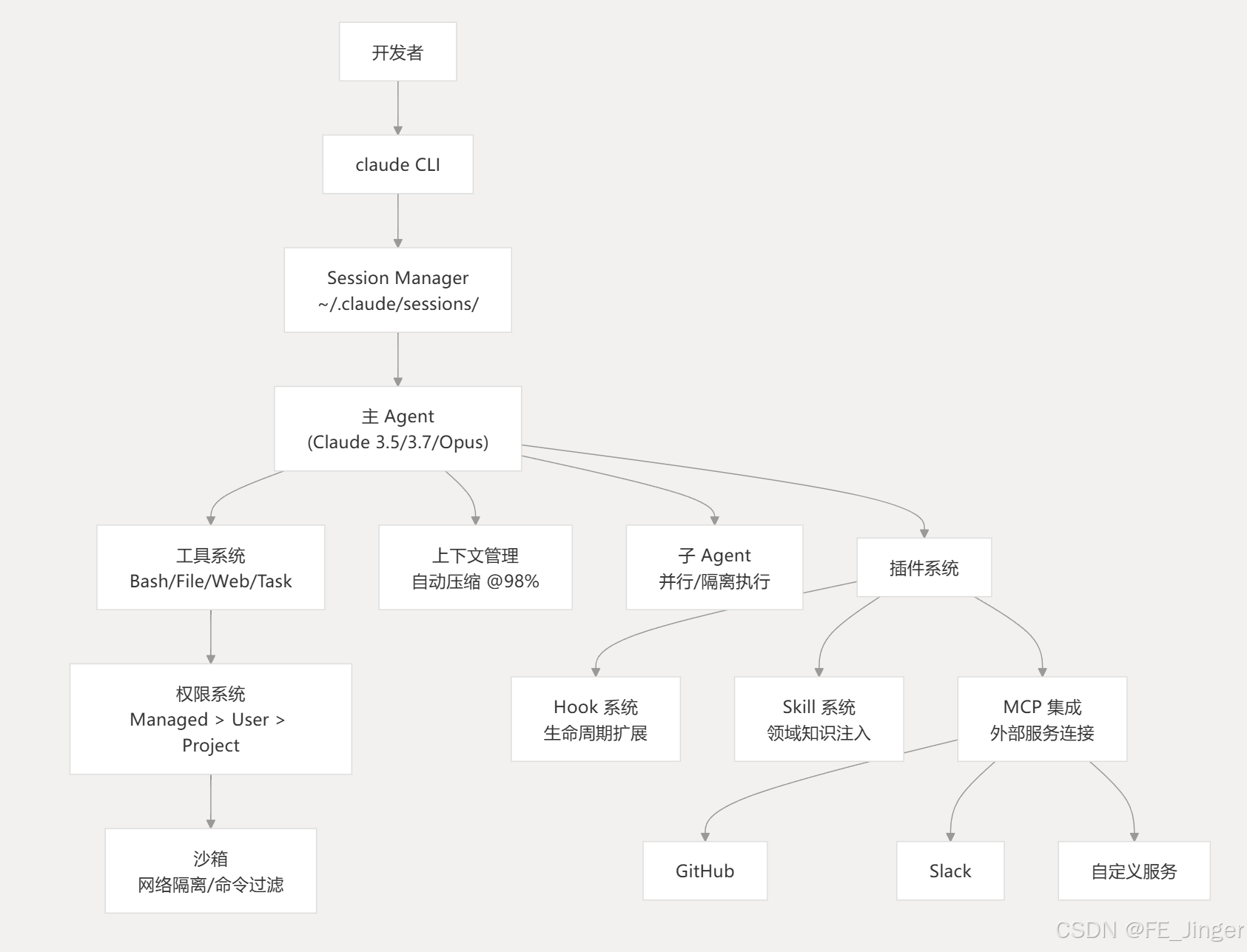
十一、核心系统关系总结
十二、总结
Claude Code 的核心设计可以归纳为以下几点:
-
工具驱动:所有与系统的交互都通过类型化的工具完成,权限系统在每次调用前进行校验,确保安全可控。
-
层级化 Agent:主 Agent 可以派生具有独立上下文窗口的子 Agent,支持并行执行和 Git worktree 隔离,适合复杂的多步骤工程任务。
-
上下文感知:实时监控 token 用量,在接近限制时自动压缩历史记录,同时保留关键的会话状态(计划模式、模型选择、Hook 上下文等)。
-
可扩展架构:通过 Hook 系统、Plugin 系统和 MCP 协议,开发者可以在不修改核心代码的情况下扩展 Claude Code 的能力,接入任意外部服务。
-
安全优先 :沙箱环境、三级权限体系、企业级托管策略,确保在自动化程度提升的同时不牺牲安全性。 23
Citations
File: README.md (L7-7)
markdown
Claude Code is an agentic coding tool that lives in your terminal, understands your codebase, and helps you code faster by executing routine tasks, explaining complex code, and handling git workflows -- all through natural language commands. Use it in your terminal, IDE, or tag @claude on Github.File: README.md (L19-44)
markdown
1. Install Claude Code:

    **MacOS/Linux (Recommended):**
    ```bash
    curl -fsSL https://claude.ai/install.sh | bash
    ```

    **Homebrew (MacOS/Linux):**
    ```bash
    brew install --cask claude-code
    ```

    **Windows (Recommended):**
    ```powershell
    irm https://claude.ai/install.ps1 | iex
    ```

    **WinGet (Windows):**
    ```powershell
    winget install Anthropic.ClaudeCode
    ```

    **NPM (Deprecated):**
    ```bash
    npm install -g @anthropic-ai/claude-code
    ```
File: README.md (L60-72)
markdown
## Data collection, usage, and retention

When you use Claude Code, we collect feedback, which includes usage data (such as code acceptance or rejections), associated conversation data, and user feedback submitted via the `/bug` command.

### How we use your data

See our [data usage policies](https://code.claude.com/docs/en/data-usage).

### Privacy safeguards

We have implemented several safeguards to protect your data, including limited retention periods for sensitive information, restricted access to user session data, and clear policies against using feedback for model training.

For full details, please review our [Commercial Terms of Service](https://www.anthropic.com/legal/commercial-terms) and [Privacy Policy](https://www.anthropic.com/legal/privacy).
File: CHANGELOG.md (L3-70)
markdown
## 2.1.146

- Renamed `/simplify` to `/code-review` with an optional effort level (e.g. `/code-review high`)
- Auto mode no longer suppresses `AskUserQuestion` when the user or a skill explicitly relies on it
- Fixed Windows PowerShell tool failing with "command line is invalid" when `pwsh` is installed via winget or the Microsoft Store (regression in v2.1.124)
- Fixed MCP `resources/list`, `resources/templates/list`, and `prompts/list` dropping items past page 1 on paginating servers
- Fixed full-screen strobing in attached background sessions on Windows Terminal while Claude is streaming
- Fixed the auto-updater status line not showing your current version when an update fails
- Fixed on Windows, removing a background-job worktree no longer follows NTFS junctions into the main repo
- Fixed `/background` refusing sessions whose only typed input was a skill or custom slash command
- Fixed backgrounded sessions re-prompting for tool permissions you already granted with "don't ask again"
- Fixed `/theme` color editor and "New custom theme" dialogs not responding to Esc
- Fixed an uncaught exception at the end of streaming sessions when running via the Agent SDK
- Fixed `forceLoginOrgUUID` and `forceLoginMethod` managed-settings policies not being enforced against third-party-provider and API-key sessions
- Fixed GNOME Terminal right-click and middle-click paste not inserting text
- Fixed `CLAUDE_CODE_SUBAGENT_MODEL` not being forwarded to child processes in multi-agent sessions
- Improved auto-updater reliability: native version checks and downloads now retry transient network failures instead of failing immediately
- Improved diff rendering performance for large file edits

## 2.1.145

- Added `claude agents --json` to list live Claude sessions as JSON for scripting (tmux-resurrect, status bars, session pickers)
- Added `agent_id` and `parent_agent_id` attributes to `claude_code.tool` OTEL spans, and fixed trace parenting so background subagent spans nest under the dispatching Agent tool span
- Status line JSON input now includes GitHub repo and PR information when detected
- `/plugin` Discover and Browse screens now show a plugin's commands, agents, skills, hooks, and MCP/LSP servers before installation
- `claude agents` terminal tab title now shows the awaiting-input count so an alt-tabbed window tells you when an agent needs attention
- Slash command and @-mention suggestion list now supports mouse hover and click in fullscreen mode
- Stop and SubagentStop hook input now includes `background_tasks` and `session_crons` fields
- Fixed a permission-prompt bypass where bare variable assignments to non-allowlisted environment variables in Bash commands were auto-approved
- Fixed MCP prompt slash commands showing raw server validation errors when a required argument is omitted --- the error now names the missing argument and shows expected usage
- Fixed the spinner and elapsed-time display freezing until a keypress after the terminal was resized or refocused
- Fixed the cross-project resume hint failing in default Windows PowerShell 5.1 --- Windows now uses `;` as the command separator
- Fixed voice push-to-talk not working in the agent view's reply pane
- Fixed task lists rendering in random order when several tasks are created at once
- Fixed stale "Failed to install Anthropic marketplace" banner showing when the marketplace is already installed
- Fixed the PR badge in the footer not updating immediately after `gh pr create` and other PR-state-changing commands run in-session
- Fixed Agent Teams teammates with non-ASCII names failing every API call due to invalid header encoding
- Fixed `/review` using a deprecated `projectCards` GraphQL query that errored on repos with Classic Projects
- Fixed `claude plugin validate` not flagging `skills:` entries that point at a file instead of a directory --- the error now suggests the parent directory
- Fixed an infinite loop where a skill using `context: fork` could repeatedly re-invoke itself instead of running
- Improved the Read tool to return a truncated first page with a "PARTIAL view" notice instead of a hard error when a whole-file read exceeds the token limit

## 2.1.144

- Added `/resume` support for background sessions --- sessions started via `claude --bg` or agent view now appear alongside interactive ones, marked with `bg`
- Added elapsed duration to background subagent completion notifications (e.g. "Agent completed · 3h 2m 5s")
- The `/plugin` browse and discover panes now show when a plugin was last updated
- `/model` now changes the model for the current session only; press `d` in the model picker to set a default for new sessions
- Renamed "extra usage" to "usage credits" across CLI copy; `/extra-usage` is now `/usage-credits` (old name still works)
- Fixed startup hanging up to 75s when `api.anthropic.com` is unreachable (captive portal, firewall, VPN issues) --- side-channel API calls now time out after 15s
- Fixed garbled terminal output after a missed window-resize event (e.g. dragging a VS Code split-pane divider) --- now self-heals on the next frame instead of requiring Ctrl+L
- Fixed progressive terminal display corruption (stale/garbled glyphs) that could appear in very long sessions and only cleared on terminal resize or restart
- Reduced terminal rendering glitches in VS Code by reducing spinner animation color count
- Fixed macOS background sessions crashing with "exit 1 before init" when the project lives under a Full Disk Access-protected folder (regression in 2.1.143)
- Fixed an unrecoverable conversation when reading a file whose image extension doesn't match its contents (e.g. HTML saved as .png) --- now falls back to text
- Fewer spurious tool errors during search: `head`/`tail` file views now satisfy the read-before-edit check, and a "no matches" result (exit code 1) from `egrep`, `fgrep`, `git grep`, or `git diff` is no longer reported as a command failure
- Fixed `/branch` failing with "No conversation to branch" after entering a worktree or in some background sessions
- Fixed pressing Escape in the AskUserQuestion notes field aborting the turn instead of returning to answer selection
- Fixed model selection not applying when changed via the IDE model picker or `applyFlagSettings` after startup
- Resumed sessions now keep the model they were using instead of picking up another session's `/model` choice
- Fixed Bedrock and Vertex users unable to select "Opus (1M context)" from the `/model` picker (regression in v2.1.129)
- Fixed remote-session login failing with "Can't access this organization" for users with `forceLoginMethod` and `forceLoginOrgUUID` set
- Fixed MCP servers with paginated `tools/list` responses only returning the first page, silently dropping tools
- Fixed MCP images with unsupported MIME types (e.g. SVG) breaking the conversation --- now saved to disk and referenced in the tool result
- Fixed file descriptor exhaustion when a build runs inside a skill directory --- non-`.md` files no longer trigger skill reloads
- Fixed session title being generated from plugin monitor output instead of the user's first prompt
- Fixed Skill tool failing with permission error in headless mode (regression in v2.1.141)
- Fixed plugins enabled in your own settings showing "not cached" errors after first load on a fresh machine; plugins enabled only by a project's `.claude/settings.json` now show an actionable `claude plugin install` hint
File: CHANGELOG.md (L218-219)
markdown
- Bedrock: `awsCredentialExport` now always runs when configured instead of being skipped when ambient AWS credentials resolve, fixing auth for cross-account access
- [VSCode] Fixed in-chat mic showing no feedback when the microphone produced only silence --- now shows "No audio detected"
File: CHANGELOG.md (L439-441)
markdown
- Fixed `deniedMcpServers` patterns with a `*://` scheme wildcard not matching mixed-case hostnames
- Fixed harmless WebSocket warning being logged as an error in `--debug` during voice mode
- [VSCode] Fixed `/clear` not clearing the conversation context and displayed transcript
File: examples/settings/README.md (L1-32)
markdown
# Settings Examples

Example Claude Code settings files, primarily intended for organization-wide deployments. Use these as starting points --- adjust them to fit your needs.

These may be applied at any level of the [settings hierarchy](https://code.claude.com/docs/en/settings#settings-files), though certain properties only take effect if specified in enterprise settings (e.g. `strictKnownMarketplaces`, `allowManagedHooksOnly`, `allowManagedPermissionRulesOnly`).


## Configuration Examples

> [!WARNING]
> These examples are community-maintained snippets which may be unsupported or incorrect. You are responsible for the correctness of your own settings configuration.

| Setting | [`settings-lax.json`](./settings-lax.json) | [`settings-strict.json`](./settings-strict.json) | [`settings-bash-sandbox.json`](./settings-bash-sandbox.json) |
|---------|:---:|:---:|:---:|
| Disable `--dangerously-skip-permissions` | ✅ | ✅ | |
| Block plugin marketplaces | ✅ | ✅ | |
| Block user and project-defined permission `allow` / `ask` / `deny` | | ✅ | ✅ |
| Block user and project-defined hooks | | ✅ | |
| Deny web fetch and search tools | | ✅ | |
| Bash tool requires approval | | ✅ | |
| Bash tool must run inside of sandbox | | | ✅ |

## Tips
- Consider merging snippets of the above examples to reach your desired configuration
- Settings files must be valid JSON
- Before deploying configuration files to your organization, test them locally by applying to `managed-settings.json`, `settings.json` or `settings.local.json`
- The `sandbox` property only applies to the `Bash` tool; it does not apply to other tools (like Read, Write, WebSearch, WebFetch, MCPs), hooks, or internal commands

## Deploying via MDM

To distribute these settings as enterprise-managed policy through Jamf, Iru (Kandji), Intune, or Group Policy, see the deployment templates in [`../mdm`](../mdm).
File: plugins/feature-dev/agents/code-explorer.md (L1-7)
markdown
---
name: code-explorer
description: Deeply analyzes existing codebase features by tracing execution paths, mapping architecture layers, understanding patterns and abstractions, and documenting dependencies to inform new development
tools: Glob, Grep, LS, Read, NotebookRead, WebFetch, TodoWrite, WebSearch, KillShell, BashOutput
model: sonnet
color: yellow
---
File: plugins/feature-dev/agents/code-architect.md (L1-7)
markdown
---
name: code-architect
description: Designs feature architectures by analyzing existing codebase patterns and conventions, then providing comprehensive implementation blueprints with specific files to create/modify, component designs, data flows, and build sequences
tools: Glob, Grep, LS, Read, NotebookRead, WebFetch, TodoWrite, WebSearch, KillShell, BashOutput
model: sonnet
color: green
---
File: examples/hooks/bash_command_validator_example.py (L56-83)
python
def main():
    try:
        input_data = json.load(sys.stdin)
    except json.JSONDecodeError as e:
        print(f"Error: Invalid JSON input: {e}", file=sys.stderr)
        # Exit code 1 shows stderr to the user but not to Claude
        sys.exit(1)

    tool_name = input_data.get("tool_name", "")
    if tool_name != "Bash":
        sys.exit(0)

    tool_input = input_data.get("tool_input", {})
    command = tool_input.get("command", "")

    if not command:
        sys.exit(0)

    issues = _validate_command(command)
    if issues:
        for message in issues:
            print(f"• {message}", file=sys.stderr)
        # Exit code 2 blocks tool call and shows stderr to Claude
        sys.exit(2)


if __name__ == "__main__":
    main()
File: plugins/plugin-dev/skills/mcp-integration/SKILL.md (L65-166)
markdown
## MCP Server Types

### stdio (Local Process)

Execute local MCP servers as child processes. Best for local tools and custom servers.

**Configuration:**
```json
{
  "filesystem": {
    "command": "npx",
    "args": ["-y", "@modelcontextprotocol/server-filesystem", "/allowed/path"],
    "env": {
      "LOG_LEVEL": "debug"
    }
  }
}
Use cases:
- File system access
- Local database connections
- Custom MCP servers
- NPM-packaged MCP servers
Process management:
- Claude Code spawns and manages the process
- Communicates via stdin/stdout
- Terminates when Claude Code exits
SSE (Server-Sent Events)
Connect to hosted MCP servers with OAuth support. Best for cloud services.
Configuration:
json
{
  "asana": {
    "type": "sse",
    "url": "https://mcp.asana.com/sse"
  }
}
Use cases:
- Official hosted MCP servers (Asana, GitHub, etc.)
- Cloud services with MCP endpoints
- OAuth-based authentication
- No local installation needed
Authentication:
- OAuth flows handled automatically
- User prompted on first use
- Tokens managed by Claude Code
HTTP (REST API)
Connect to RESTful MCP servers with token authentication.
Configuration:
json
{
  "api-service": {
    "type": "http",
    "url": "https://api.example.com/mcp",
    "headers": {
      "Authorization": "Bearer ${API_TOKEN}",
      "X-Custom-Header": "value"
    }
  }
}
Use cases:
- REST API-based MCP servers
- Token-based authentication
- Custom API backends
- Stateless interactions
WebSocket (Real-time)
Connect to WebSocket MCP servers for real-time bidirectional communication.
Configuration:
json
{
  "realtime-service": {
    "type": "ws",
    "url": "wss://mcp.example.com/ws",
    "headers": {
      "Authorization": "Bearer ${TOKEN}"
    }
  }
}
Use cases:
-
Real-time data streaming
-
Persistent connections
-
Push notifications from server
-
Low-latency requirements
File: plugins/plugin-dev/skills/mcp-integration/SKILL.md (L194-200)
markdown**Format:** `mcp__plugin_<plugin-name>_<server-name>__<tool-name>` **Example:** - Plugin: `asana` - Server: `asana` - Tool: `create_task` - **Full name:** `mcp__plugin_asana_asana__asana_create_task`
File: plugins/README.md (L13-28)
markdown
| Name | Description | Contents |
|------|-------------|----------|
| [agent-sdk-dev](./agent-sdk-dev/) | Development kit for working with the Claude Agent SDK | **Command:** `/new-sdk-app` - Interactive setup for new Agent SDK projects<br>**Agents:** `agent-sdk-verifier-py`, `agent-sdk-verifier-ts` - Validate SDK applications against best practices |
| [claude-opus-4-5-migration](./claude-opus-4-5-migration/) | Migrate code and prompts from Sonnet 4.x and Opus 4.1 to Opus 4.5 | **Skill:** `claude-opus-4-5-migration` - Automated migration of model strings, beta headers, and prompt adjustments |
| [code-review](./code-review/) | Automated PR code review using multiple specialized agents with confidence-based scoring to filter false positives | **Command:** `/code-review` - Automated PR review workflow<br>**Agents:** 5 parallel Sonnet agents for CLAUDE.md compliance, bug detection, historical context, PR history, and code comments |
| [commit-commands](./commit-commands/) | Git workflow automation for committing, pushing, and creating pull requests | **Commands:** `/commit`, `/commit-push-pr`, `/clean_gone` - Streamlined git operations |
| [explanatory-output-style](./explanatory-output-style/) | Adds educational insights about implementation choices and codebase patterns (mimics the deprecated Explanatory output style) | **Hook:** SessionStart - Injects educational context at the start of each session |
| [feature-dev](./feature-dev/) | Comprehensive feature development workflow with a structured 7-phase approach | **Command:** `/feature-dev` - Guided feature development workflow<br>**Agents:** `code-explorer`, `code-architect`, `code-reviewer` - For codebase analysis, architecture design, and quality review |
| [frontend-design](./frontend-design/) | Create distinctive, production-grade frontend interfaces that avoid generic AI aesthetics | **Skill:** `frontend-design` - Auto-invoked for frontend work, providing guidance on bold design choices, typography, animations, and visual details |
| [hookify](./hookify/) | Easily create custom hooks to prevent unwanted behaviors by analyzing conversation patterns or explicit instructions | **Commands:** `/hookify`, `/hookify:list`, `/hookify:configure`, `/hookify:help`<br>**Agent:** `conversation-analyzer` - Analyzes conversations for problematic behaviors<br>**Skill:** `writing-rules` - Guidance on hookify rule syntax |
| [learning-output-style](./learning-output-style/) | Interactive learning mode that requests meaningful code contributions at decision points (mimics the unshipped Learning output style) | **Hook:** SessionStart - Encourages users to write meaningful code (5-10 lines) at decision points while receiving educational insights |
| [plugin-dev](./plugin-dev/) | Comprehensive toolkit for developing Claude Code plugins with 7 expert skills and AI-assisted creation | **Command:** `/plugin-dev:create-plugin` - 8-phase guided workflow for building plugins<br>**Agents:** `agent-creator`, `plugin-validator`, `skill-reviewer`<br>**Skills:** Hook development, MCP integration, plugin structure, settings, commands, agents, and skill development |
| [pr-review-toolkit](./pr-review-toolkit/) | Comprehensive PR review agents specializing in comments, tests, error handling, type design, code quality, and code simplification | **Command:** `/pr-review-toolkit:review-pr` - Run with optional review aspects (comments, tests, errors, types, code, simplify, all)<br>**Agents:** `comment-analyzer`, `pr-test-analyzer`, `silent-failure-hunter`, `type-design-analyzer`, `code-reviewer`, `code-simplifier` |
| [ralph-wiggum](./ralph-wiggum/) | Interactive self-referential AI loops for iterative development. Claude works on the same task repeatedly until completion | **Commands:** `/ralph-loop`, `/cancel-ralph` - Start/stop autonomous iteration loops<br>**Hook:** Stop - Intercepts exit attempts to continue iteration |
| [security-guidance](./security-guidance/) | Security reminder hook that warns about potential security issues when editing files | **Hook:** PreToolUse - Monitors 9 security patterns including command injection, XSS, eval usage, dangerous HTML, pickle deserialization, and os.system calls |
File: plugins/README.md (L49-61)
markdown
Each plugin follows the standard Claude Code plugin structure:plugin-name/
├── .claude-plugin/
│ └── plugin.json # Plugin metadata
├── commands/ # Slash commands (optional)
├── agents/ # Specialized agents (optional)
├── skills/ # Agent Skills (optional)
├── hooks/ # Event handlers (optional)
├── .mcp.json # External tool configuration (optional)
└── README.md # Plugin documentation
File: plugins/plugin-dev/skills/plugin-structure/SKILL.md (L9-18)
markdown
## Overview

Claude Code plugins follow a standardized directory structure with automatic component discovery. Understanding this structure enables creating well-organized, maintainable plugins that integrate seamlessly with Claude Code.

**Key concepts:**
- Conventional directory layout for automatic discovery
- Manifest-driven configuration in `.claude-plugin/plugin.json`
- Component-based organization (commands, agents, skills, hooks)
- Portable path references using `${CLAUDE_PLUGIN_ROOT}`
- Explicit vs. auto-discovered component loading
File: examples/settings/settings-bash-sandbox.json (L1-18)
json
{
  "allowManagedPermissionRulesOnly": true,
  "sandbox": {
    "enabled": true,
    "autoAllowBashIfSandboxed": false,
    "allowUnsandboxedCommands": false,
    "excludedCommands": [],
    "network": {
      "allowUnixSockets": [],
      "allowAllUnixSockets": false,
      "allowLocalBinding": false,
      "allowedDomains": [],
      "httpProxyPort": null,
      "socksProxyPort": null
    },
    "enableWeakerNestedSandbox": false
  }
}
File: examples/settings/settings-strict.json (L1-28)
json
{
  "permissions": {
    "disableBypassPermissionsMode": "disable",
    "ask": [
      "Bash"
    ],
    "deny": [
      "WebSearch",
      "WebFetch"
    ]
  },
  "allowManagedPermissionRulesOnly": true,
  "allowManagedHooksOnly": true,
  "strictKnownMarketplaces": [],
  "sandbox": {
    "autoAllowBashIfSandboxed": false,
    "excludedCommands": [],
    "network": {
      "allowUnixSockets": [],
      "allowAllUnixSockets": false,
      "allowLocalBinding": false,
      "allowedDomains": [],
      "httpProxyPort": null,
      "socksProxyPort": null
    },
    "enableWeakerNestedSandbox": false
  }
}