文章目录
- [1. 概述](#1. 概述)
-
- [1.1 短期记忆(Short-Term Memory, STM)](#1.1 短期记忆(Short-Term Memory, STM))
- [1.2 长期记忆(Long-Term Memory, LTM)](#1.2 长期记忆(Long-Term Memory, LTM))
- [1.3 Spring AI Alibaba 记忆架构](#1.3 Spring AI Alibaba 记忆架构)
- [2. Store 存储层](#2. Store 存储层)
-
- [2.1 Store 接口](#2.1 Store 接口)
- [2.2 BaseStore 抽象类](#2.2 BaseStore 抽象类)
- [2.3 Store 实现类](#2.3 Store 实现类)
- [2.4 StoreItem](#2.4 StoreItem)
- [3. ReactAgent 集成案例](#3. ReactAgent 集成案例)
-
- [3.1 存储配置](#3.1 存储配置)
- [3.2 方式一:通过记忆工具实现](#3.2 方式一:通过记忆工具实现)
-
- [3.2.1 获取记忆工具](#3.2.1 获取记忆工具)
- [3.2.2 搜索记忆](#3.2.2 搜索记忆)
- [3.2.3 保存记忆](#3.2.3 保存记忆)
- [3.2.4 删除记忆](#3.2.4 删除记忆)
- [3.2.5 构建 Agent](#3.2.5 构建 Agent)
- [3.2.6 单元测试](#3.2.6 单元测试)
- [3.3 方式二:通过 Hook 自动管理记忆](#3.3 方式二:通过 Hook 自动管理记忆)
-
- [3.3.1 实现 Hook](#3.3.1 实现 Hook)
- [3.3.2 构建 Agent](#3.3.2 构建 Agent)
- [3.3.3 单元测试](#3.3.3 单元测试)
- [3.4 结合【短期记忆 + 长期记忆 】](#3.4 结合【短期记忆 + 长期记忆 】)
- [3.5 跨会话记忆共享](#3.5 跨会话记忆共享)
- [3.6 用户偏好自动学习](#3.6 用户偏好自动学习)
1. 概述
智能体(Agent)用的记忆系统 可以让 AI 能像人一样:
- 记得刚聊过什么(短期记忆)
- 记住用户长期习惯、偏好(长期记忆)
1.1 短期记忆(Short-Term Memory, STM)
短期记忆 是智能体在处理当前任务 /单一会话周期内保持的信息,核心是保障当前交互的连贯性与实时推理能力。例如,开启一个会话中的对话历史、系统指令、中间推理步骤、工具返回结果等。
在很早之前,我们介绍过 Spring AI Alibaba 通过 CheckpointSaver 实现短期记忆 持久化,提供 Memory、MySQL、Redis、Mongo、Postgres、Oracle、文件等存储,同时支持支持在工具、Hook、模型拦截器中读写会话记忆、裁剪消息、过滤敏感内容、动态修改提示词,灵活定制 Agent 会话行为。
1.2 长期记忆(Long-Term Memory, LTM)
长期记忆是智能体跨会话、跨时间、永久持久化保存的信息,核心是实现个性化和持续学习,如用户偏好、重要事实、学习到的经验等。
常用技术架构:
- 向量数据库 +
RAG:文本向量化存储,语义检索召回 - 知识图谱:结构化存储实体与关系,支持复杂关联推理
1.3 Spring AI Alibaba 记忆架构
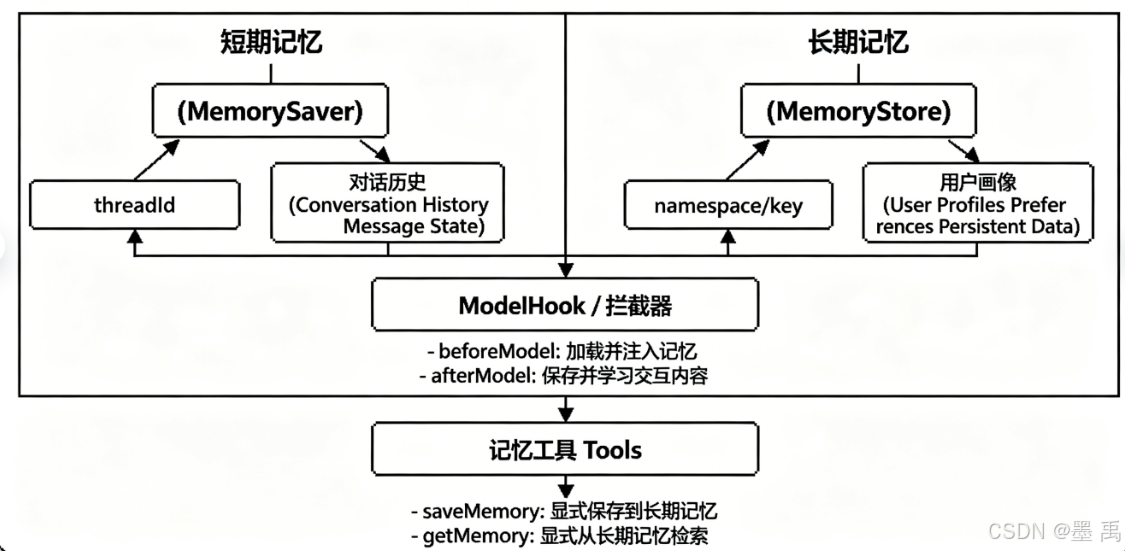
两大记忆核心:
- 短期记忆 :按
threadId(对话线程ID)管理,存储对话历史、消息状态、上下文 - 长期记忆 :按
namespace/key(命名空间 + 键)存储,存储用户画像、偏好、习惯、持久化数据
ModelHook / 拦截器自动化机制:
beforeModel:调用AI前,自动从短期 + 长期记忆里读取内容,把记忆注入到提示词afterModel:AI回答后,自动把新的对话内容学习并保存,更新短期记忆,重要信息自动沉淀到长期记忆
记忆工具:
saveMemory:主动把内容存到长期记忆getMemory:主动从长期记忆读取内容
2. Store 存储层
Spring AI Alibaba 长期记忆以 JSON 文档结构 存入 Store 存储层。
存储结构设计:
- namespace :命名空间,类比文件夹,可按用户
ID、组织ID、业务场景做层级隔离 - key:记忆唯一标识,类比文件名
- 支持层次化记忆组织 ,可通过内容过滤器实现跨命名空间检索
依赖核心类:
Store:记忆存储StoreItem:记忆数据载体
2.1 Store 接口
多智能体系统中长期记忆存储的接口,提供持久化、跨会话的管理能力,支持分层命名空间和结构化数据存储。这与专注于短期图状态持久化的 CheckpointSaver(检查点保存器)不同。
核心特性:
- 分层命名空间:使用嵌套命名空间组织数据
- 结构化数据 :存储基于
Map的复杂数据结构 - 搜索与过滤:按命名空间、键模式和内容查询数据
- 分页:支持通过偏移量/限制处理大型结果集
- 跨会话:数据在不同执行会话间持久化
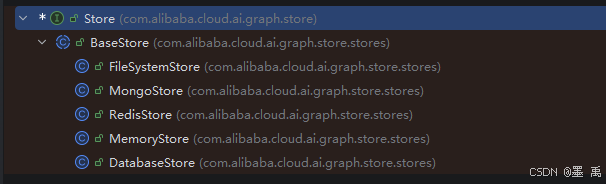
子类:
Store 接口方法说明表:
| 方法名 | 作用描述 | 入参说明 | 返回值 | 异常说明 |
|---|---|---|---|---|
| putItem | 在指定命名空间存储数据项,存在同命名空间+同Key则覆盖更新 | StoreItem:待存储的数据项 | void | 入参为 null 或非法时抛出 IllegalArgumentException |
| getItem | 根据分层命名空间与Key查询数据项 | List<String> namespace:分层命名空间路径 String key:数据项唯一键 | Optional<StoreItem>:存在则返回数据项,不存在返回空Optional | 命名空间/Key 为 null 或非法时抛出 IllegalArgumentException |
| deleteItem | 根据命名空间与Key删除指定数据项 | List<String> namespace:分层命名空间路径 String key:数据项唯一键 | boolean:删除成功返回true,数据不存在返回false | 命名空间/Key 为 null 或非法时抛出 IllegalArgumentException |
| searchItems | 按自定义条件检索存储的数据项 | StoreSearchRequest:搜索条件请求对象 | StoreSearchResult:匹配的搜索结果集 | 搜索请求对象为 null 时抛出 IllegalArgumentException |
| listNamespaces | 按条件查询所有可用命名空间列表 | NamespaceListRequest:命名空间查询请求参数 | List<String>:命名空间路径集合 | 请求参数为 null 时抛出 IllegalArgumentException |
| clear | 清空存储中所有数据,操作不可逆 | 无 | void | 无 |
| size | 获取当前存储内数据项总数量 | 无 | long:数据条目总数 | 无 |
| isEmpty | 判断当前存储是否为空 | 无 | boolean:为空返回true,否则返回false | 无 |
在指定命名空间中使用给定键存储一个数据项:
java
	/**
	 * 在指定命名空间中使用给定键存储一个数据项。
	 * 如果具有相同命名空间和键的数据项已存在,则会进行更新。
	 * @param item 要存储的数据项
	 * @throws IllegalArgumentException 当数据项为 null 或无效时抛出
	 */
	void putItem(StoreItem item);
从指定命名空间中根据键删除数据项:
java
	/**
	 * 从指定命名空间中根据键删除数据项。
	 * @param namespace 分层命名空间路径
	 * @param key 数据项键
	 * @return 如果数据项被删除则返回 true,如果不存在则返回 false
	 * @throws IllegalArgumentException 当命名空间或键为 null/无效时抛出
	 */
	boolean deleteItem(List<String> namespace, String key);
从指定命名空间中根据键获取数据项:
java
	/**
	 * 从指定命名空间中根据键获取数据项。
	 * @param namespace 分层命名空间路径
	 * @param key 数据项键
	 * @return 如果找到数据项则返回包含该数据项的 Optional 对象,否则返回空
	 * @throws IllegalArgumentException 当命名空间或键为 null/无效时抛出
	 */
	Optional<StoreItem> getItem(List<String> namespace, String key);
根据提供的搜索条件搜索数据项:
java
	/**
	 * 根据提供的搜索条件搜索数据项。
	 * @param searchRequest 搜索参数
	 * @return 包含匹配数据项的搜索结果
	 * @throws IllegalArgumentException 当搜索请求为 null 时抛出
	 */
	StoreSearchResult searchItems(StoreSearchRequest searchRequest);
根据提供的条件列出可用的命名空间:
java
	/**
	 * 根据提供的条件列出可用的命名空间。
	 * @param namespaceRequest 命名空间列表查询参数
	 * @return 命名空间路径列表
	 * @throws IllegalArgumentException 当命名空间请求为 null 时抛出
	 */
	List<String> listNamespaces(NamespaceListRequest namespaceRequest);
清空存储库中的所有数据项:
java
	/**
	 * 清空存储库中的所有数据项。
	 * <p>
	 * <strong>警告:</strong>此操作不可撤销,将删除所有已存储的数据。
	 * </p>
	 */
	void clear();
获取存储库中的数据项总数:
java
	/**
	 * 获取存储库中的数据项总数。
	 * @return 已存储的数据项数量
	 */
	long size();
检查存储库是否为空:
java
	/**
	 * 检查存储库是否为空。
	 * @return 如果存储库不包含任何数据项则返回 true,否则返回 false
	 */
	boolean isEmpty();
使用示例:
java
// 存储用户偏好
StoreItem preferences = StoreItem.of(
    List.of("users", "user123", "preferences"),
    "ui_settings",
    Map.of("theme", "dark", "language", "en-US")
);
store.putItem(preferences);

// 获取数据
Optional<StoreItem> item = store.getItem(
    List.of("users", "user123", "preferences"),
    "ui_settings"
);

// 搜索
StoreSearchRequest searchRequest = StoreSearchRequest.builder()
    .namespace("users")
    .query("preferences")
    .limit(10)
    .build();
StoreSearchResult result = store.searchItems(searchRequest);
2.2 BaseStore 抽象类
Store 接口实现的抽象基类,提供通用的参数校验与工具方法。该类为 Store 接口的具体实现类提供基础支撑,保证统一的参数校验行为和通用工具方法,减少重复代码。
参数校验方法:
| 方法名称 | 访问权限 | 功能说明 | 校验规则 |
|---|---|---|---|
| validatePutItem | protected | 校验存储数据项入参合法性 | 校验 StoreItem 非空、命名空间非空、Key 非空且非空白 |
| validateGetItem | protected | 校验查询数据项入参合法性 | 校验命名空间非空、Key 非空且非空白 |
| validateDeleteItem | protected | 校验删除数据项入参合法性 | 校验命名空间非空、Key 非空且非空白 |
| validateSearchItems | protected | 校验搜索数据项入参合法性 | 校验搜索请求对象 StoreSearchRequest 非空 |
| validateListNamespaces | protected | 校验查询命名空间入参合法性 | 校验命名空间查询请求对象 NamespaceListRequest 非空 |
Key 编解码工具方法:
| 方法名称 | 访问权限 | 功能说明 | 实现逻辑 |
|---|---|---|---|
| createStoreKey | protected | 拼接命名空间+Key,生成 Base64 编码全局唯一存储键 | 封装 namespace、key 为 Map → JSON 序列化 → Base64 编码 |
| parseStoreKey | protected | 解析 Base64 存储键,还原命名空间与 Key | Base64 解码 → JSON 反序列 → 拆分出命名空间和键 |
命名空间匹配工具方法:
| 方法名称 | 访问权限 | 功能说明 |
|---|---|---|
| startsWithPrefix | protected | 判断目标命名空间是否匹配指定前缀命名空间层级 |
搜索过滤与匹配方法:
| 方法名称 | 访问权限 | 功能说明 |
|---|---|---|
| matchesSearchCriteria | protected | 综合匹配:命名空间前缀、文本关键词、自定义过滤条件,判断数据项是否符合搜索规则 |
排序比较工具方法:
| 方法名称 | 访问权限 | 功能说明 |
|---|---|---|
| createComparator | protected | 根据搜索请求的排序字段、升降序,构建 StoreItem 比较器 |
| compareByField | private | 按指定字段(创建时间/更新时间/Key/命名空间/自定义字段)对比两条数据项大小 |
校验 putItem 方法的参数合法性:
java
	/**
	 * 校验 putItem 方法的参数合法性
	 * @param item 待校验的数据项
	 */
	protected void validatePutItem(StoreItem item) {
		if (item == null) {
			throw new IllegalArgumentException("数据项不能为空");
		}
		if (item.getNamespace() == null) {
			throw new IllegalArgumentException("命名空间不能为空");
		}
		if (item.getKey() == null || item.getKey().trim().isEmpty()) {
			throw new IllegalArgumentException("键名不能为 null 或空字符串");
		}
	}
校验 getItem 方法的参数合法性:
java
	/**
	 * 校验 getItem 方法的参数合法性
	 * @param namespace 命名空间
	 * @param key 数据项键
	 */
	protected void validateGetItem(List<String> namespace, String key) {
		if (namespace == null) {
			throw new IllegalArgumentException("命名空间不能为空");
		}
		if (key == null) {
			throw new IllegalArgumentException("键名不能为 null");
		}
		if (key.trim().isEmpty()) {
			throw new IllegalArgumentException("键名不能为空字符串");
		}
	}
2.3 Store 实现类
Store 接口所有实现类:
| 实现类名称 | 存储介质 | 核心实现原理 | 适用场景 | 持久化能力 | 生产可用 | 特点说明 |
|---|---|---|---|---|---|---|
FileSystemStore |
本地文件系统 | 按分层命名空间映射为目录结构,数据序列化为 JSON 文件 存储;加读写锁保证线程安全 | 单机部署、无中间件、本地持久化、开发/小型项目 | 支持磁盘持久化,重启数据不丢失 | 可用 | 无需额外数据库/中间件,跨会话持久化,兼容分层命名空间,自动清理空目录 |
DatabaseStore |
关系型数据库 | 基于 JDBC 通用数据源,自建数据表;命名空间/结构数据序列化为 JSON 存入字段,兼容 MySQL、PostgreSQL、H2 | 企业级项目、需要 ACID 事务、多实例共享存储 | 数据库持久化,重启数据不丢失 | 推荐 | 标准 SQL 实现,自动建表,兼容多数据库,支持事务、高可靠可集群部署 |
InMemoryStore |
内存 | 基于 ConcurrentHashMap 纯内存缓存存储 |
单元测试、本地开发、临时轻量应用、无需持久化 | 无,应用重启数据全部丢失 | 不推荐 | 无依赖、性能极高、开箱即用,只适合临时会话与测试 |
MongoLikeInMemoryStore |
内存(模拟MongoDB) | 用 ConcurrentHashMap 模拟 MongoDB 文档型存储行为 |
开发测试、不想引入 MongoDB 依赖、适配Mongo风格业务 | 无,重启数据丢失 | 不推荐 | 接口行为对齐 MongoDB,仅本地模拟,生产需替换为真实 MongoDB 客户端 |
RedisLikeInMemoryStore |
内存(模拟Redis) | 用 ConcurrentHashMap 模拟 Redis KV 缓存行为 |
开发测试、本地调试、暂不部署 Redis 环境 | 无,重启数据丢失 | 不推荐 | 模拟 Redis 读写语义,轻量化无依赖,生产需替换为真实 Redis 客户端 |
2.4 StoreItem
StoreItem 表示存储在 Store 中的数据项,支持分层命名空间。每个 StoreItem 包含命名空间路径、键、值以及创建和最后更新的时间戳。命名空间用于对数据进行分层组织,而键则是该命名空间内的唯一标识。
字段说明:
| 字段名 | 类型 | 中文说明 | 示例 |
|---|---|---|---|
| namespace | List<String> |
分层命名空间路径,用于层级化组织数据 | ["users", "user123", "preferences"] |
| key | String |
同一命名空间下的唯一键 | profile、theme |
| value | Map<String, Object> |
数据项内容,结构化键值对格式 | {name:John, mode:dark} |
| createdAt | long |
数据创建时间戳(毫秒) | 1735689600000 |
| updatedAt | long |
数据最后更新时间戳(毫秒) | 1735689900000 |
使用示例:
java
public class StoreItemExample {
    public static void main(String[] args) {
        // 创建一个简单数据项
        StoreItem item = StoreItem.of(
            List.of("users", "user123"),
            "profile",
            Map.of("name", "John Doe", "email", "john@example.com")
        );

        // 创建带有嵌套命名空间的数据项
        StoreItem preferences = StoreItem.of(
            List.of("users", "user123", "settings", "ui"),
            "theme",
            Map.of("mode", "dark", "fontSize", 14)
        );

        // 打印结果
        System.out.println("简单数据项:");
        System.out.println(item);

        System.out.println("\n嵌套命名空间数据项:");
        System.out.println(preferences);
    }
}
3. ReactAgent 集成案例
3.1 存储配置
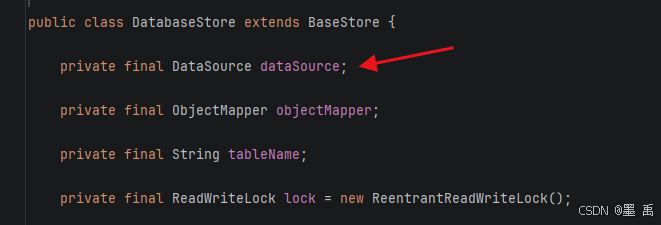
这里使用 MySQL 数据库存储长期记忆,需要使用 DatabaseStore 在源码中可以看到它依赖于 DataSource:
建表语句:
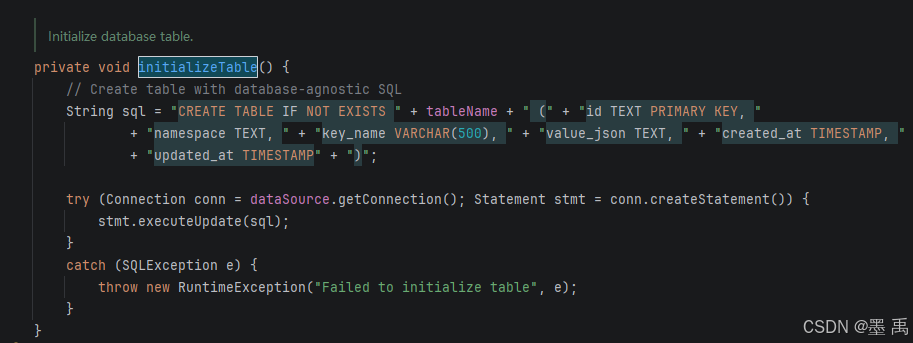
MySQL 建表 SQL :
sql
  CREATE TABLE IF NOT EXISTS ai_memory_store (
    id VARCHAR(255) PRIMARY KEY,
    namespace TEXT,
    key_name VARCHAR(500),
    value_json TEXT,
    created_at DATETIME,
    updated_at DATETIME
  ) ENGINE=InnoDB DEFAULT CHARSET=utf8mb4
项目集成 MySQL 就不赘述了,直接配置一个 DatabaseStore :
java
@Configuration
public class MemoryConfig {

    @Bean
    public Store memoryStore(DataSource dataSource) {
        return new DatabaseStore(dataSource, "ai_memory_store");
    }
}
3.2 方式一:通过记忆工具实现
Agent 通过工具显式调用 Store 完成记忆的保存和读取。LLM 根据用户意图自主决定何时调用记忆工具。
3.2.1 获取记忆工具
从长期记忆存储中检索已保存的信息。Agent 使用此工具获取用户画像、偏好、历史对话等持久化数据。
java
@Component
public class GetMemoryTool {

    /**
     * 获取记忆请求参数
     *
     * @param namespace 命名空间列表,层次化组织数据
     * @param key       数据项的唯一键名
     */
    public record Request(List<String> namespace, String key) {}

    /**
     * 获取记忆响应结果
     *
     * @param message 操作结果消息(成功/失败描述)
     * @param value   检索到的数据,未找到时为空Map
     */
    public record Response(String message, Map<String, Object> value) {}

    /**
     * 创建获取记忆工具的ToolCallback实例
     *
     * <p>工具执行流程:</p>
     * <ol>
     *   <li>从ToolContext获取RunnableConfig</li>
     *   <li>从RunnableConfig获取Store实例</li>
     *   <li>调用Store.getItem检索数据</li>
     *   <li>返回检索结果或失败消息</li>
     * </ol>
     *
     * @return 配置好的ToolCallback实例,可被Agent直接调用
     */
    public ToolCallback toolCallback() {
        BiFunction<Request, ToolContext, Response> function = (request, context) -> {
            // 从工具上下文获取运行配置
            Optional<RunnableConfig> configOpt = ToolContextHelper.getConfig(context);
            if (configOpt.isEmpty()) {
                return new Response("无法获取配置,获取失败", Map.of());
            }

            // 从配置中获取存储实例
            Store store = configOpt.get().store();
            if (store == null) {
                return new Response("未配置记忆存储,获取失败", Map.of());
            }

            // 从存储中检索数据项
            Optional<StoreItem> itemOpt = store.getItem(request.namespace(), request.key());
            if (itemOpt.isPresent()) {
                Map<String, Object> value = itemOpt.get().getValue();
                return new Response("找到记忆", value);
            }

            return new Response("未找到记忆", Map.of());
        };

        // 构建并返回工具回调
        return FunctionToolCallback.builder("getMemory", function)
                .description("从长期记忆中获取信息。参数:namespace=命名空间列表,key=键名")
                .inputType(Request.class)
                .build();
    }
3.2.2 搜索记忆
在长期记忆存储中搜索匹配的信息。Agent 使用此工具模糊查找相关记忆,支持关键词搜索和命名空间过滤。
java
@Component
public class SearchMemoryTool {

    /**
     * 搜索记忆请求参数
     *
     * @param namespace 命名空间列表,限制搜索范围
     * @param query     搜索关键词,用于模糊匹配
     * @param limit     返回结果数量限制,默认10
     */
    public record Request(List<String> namespace, String query, int limit) {}

    /**
     * 搜索记忆响应结果
     *
     * @param message 操作结果消息,包含找到的记忆数量
     * @param results 搜索结果列表,每个元素为一条记忆的value
     */
    public record Response(String message, List<Map<String, Object>> results) {}

    /**
     * 创建搜索记忆工具的ToolCallback实例
     *
     * <p>工具执行流程:</p>
     * <ol>
     *   <li>从ToolContext获取RunnableConfig</li>
     *   <li>从RunnableConfig获取Store实例</li>
     *   <li>构建StoreSearchRequest并调用Store.searchItems</li>
     *   <li>提取所有匹配项的value并返回结果列表</li>
     * </ol>
     *
     * @return 配置好的ToolCallback实例,可被Agent直接调用
     */
    public ToolCallback toolCallback() {
        BiFunction<Request, ToolContext, Response> function = (request, context) -> {
            // 从工具上下文获取运行配置
            Optional<RunnableConfig> configOpt = ToolContextHelper.getConfig(context);
            if (configOpt.isEmpty()) {
                return new Response("无法获取配置,搜索失败", List.of());
            }

            // 从配置中获取存储实例
            Store store = configOpt.get().store();
            if (store == null) {
                return new Response("未配置记忆存储,搜索失败", List.of());
            }

            // 构建搜索请求并执行搜索
            List<StoreItem> items = store.searchItems(
                    StoreSearchRequest.builder()
                            .namespace(request.namespace())
                            .query(request.query())
                            .limit(request.limit() > 0 ? request.limit() : 10)
                            .build()
            ).getItems();

            // 提取匹配项的value
            List<Map<String, Object>> results = items.stream()
                    .map(StoreItem::getValue)
                    .toList();

            return new Response("搜索完成,找到 " + results.size() + " 条记忆", results);
        };

        // 构建并返回工具回调
        return FunctionToolCallback.builder("searchMemory", function)
                .description("搜索长期记忆。参数:namespace=命名空间列表,query=搜索关键词,limit=返回数量限制")
                .inputType(Request.class)
                .build();
    }
}
3.2.3 保存记忆
将信息持久化保存到长期记忆存储中。Agent 使用此工具保存用户画像、偏好、重要对话等需要跨会话保留的数据。
java
@Component
public class SaveMemoryTool {

    /**
     * 保存记忆请求参数
     *
     * @param namespace 命名空间列表,层次化组织数据
     * @param key       数据项的唯一键名
     * @param value     要保存的数据内容,Map结构
     */
    public record Request(List<String> namespace, String key, Map<String, Object> value) {}

    /**
     * 保存记忆响应结果
     *
     * @param message 操作结果消息(成功/失败描述)
     * @param value   已保存的数据内容
     */
    public record Response(String message, Map<String, Object> value) {}

    /**
     * 创建保存记忆工具的ToolCallback实例
     *
     * <p>工具执行流程:</p>
     * <ol>
     *   <li>从ToolContext获取RunnableConfig</li>
     *   <li>从RunnableConfig获取Store实例</li>
     *   <li>构建StoreItem并调用Store.putItem保存</li>
     *   <li>返回保存结果或失败消息</li>
     * </ol>
     *
     * @return 配置好的ToolCallback实例,可被Agent直接调用
     */
    public ToolCallback toolCallback() {
        BiFunction<Request, ToolContext, Response> function = (request, context) -> {
            // 从工具上下文获取运行配置
            Optional<RunnableConfig> configOpt = ToolContextHelper.getConfig(context);
            if (configOpt.isEmpty()) {
                return new Response("无法获取配置,保存失败", Map.of());
            }

            // 从配置中获取存储实例
            Store store = configOpt.get().store();
            if (store == null) {
                return new Response("未配置记忆存储,保存失败", Map.of());
            }

            // 构建存储项并保存到数据库
            StoreItem item = StoreItem.of(request.namespace(), request.key(), request.value());
            store.putItem(item);

            return new Response("成功保存到长期记忆", request.value());
        };

        // 构建并返回工具回调
        return FunctionToolCallback.builder("saveMemory", function)
                .description("保存信息到长期记忆。参数:namespace=命名空间列表,key=键名,value=要保存的数据")
                .inputType(Request.class)
                .build();
    }
}
3.2.4 删除记忆
从长期记忆存储中移除已保存的信息。Agent 使用此工具清理过期数据、纠正错误记忆或删除敏感信息。
java
Component
public class DeleteMemoryTool {

    /**
     * 删除记忆请求参数
     *
     * @param namespace 命名空间列表,定位数据存储位置
     * @param key       要删除的数据项的唯一键名
     */
    public record Request(List<String> namespace, String key) {}

    /**
     * 删除记忆响应结果
     *
     * @param message 操作结果消息(成功删除/未找到/失败)
     * @param value   空Map,删除操作不返回数据
     */
    public record Response(String message, Map<String, Object> value) {}

    /**
     * 创建删除记忆工具的ToolCallback实例
     *
     * <p>工具执行流程:</p>
     * <ol>
     *   <li>从ToolContext获取RunnableConfig</li>
     *   <li>从RunnableConfig获取Store实例</li>
     *   <li>调用Store.deleteItem删除指定数据项</li>
     *   <li>返回删除结果(成功/未找到)</li>
     * </ol>
     *
     * @return 配置好的ToolCallback实例,可被Agent直接调用
     */
    public ToolCallback toolCallback() {
        BiFunction<Request, ToolContext, Response> function = (request, context) -> {
            // 从工具上下文获取运行配置
            Optional<RunnableConfig> configOpt = ToolContextHelper.getConfig(context);
            if (configOpt.isEmpty()) {
                return new Response("无法获取配置,删除失败", Map.of());
            }

            // 从配置中获取存储实例
            Store store = configOpt.get().store();
            if (store == null) {
                return new Response("未配置记忆存储,删除失败", Map.of());
            }

            // 执行删除操作
            boolean deleted = store.deleteItem(request.namespace(), request.key());
            if (deleted) {
                return new Response("成功删除记忆", Map.of());
            }

            return new Response("未找到要删除的记忆", Map.of());
        };

        // 构建并返回工具回调
        return FunctionToolCallback.builder("deleteMemory", function)
                .description("从长期记忆中删除信息。参数:namespace=命名空间列表,key=键名")
                .inputType(Request.class)
                .build();
    }
}
3.2.5 构建 Agent
创建带记忆工具的 Agent :
java
@Configuration
public class MemoryAgentConfig {

    @Bean("memoryToolAgent")
    public ReactAgent memoryToolAgent(DashScopeChatModel dashScopeChatModel,
                                       SaveMemoryTool saveMemoryTool,
                                       GetMemoryTool getMemoryTool) {

        ToolCallback[] tools = new ToolCallback[]{
                saveMemoryTool.toolCallback(),
                getMemoryTool.toolCallback()
        };

        return ReactAgent.builder()
                .name("memory_tool_agent")
                .description("带长期记忆工具的智能助手")
                .systemPrompt("""
                        你是一个智能助手,具有长期记忆能力。
                        可用工具:
                        - saveMemory: 保存信息到长期记忆
                        - getMemory: 从长期记忆获取信息
                        """)
                .model(dashScopeChatModel)
                .tools(tools)
                .saver(new MemorySaver())
                .enableLogging(true)
                .build();
    }
}
3.2.6 单元测试
单元测试类:
java
    @Test
    void testMemoryTools() throws Exception {
        RunnableConfig config = RunnableConfig.builder()
                .threadId("test_tools_thread")
                .addMetadata("user_id", "user_001")
                .store(memoryStore)
                .build();

        // 保存记忆
        Optional<OverAllState> saveResult = memoryToolAgent.invoke(
                "请帮我记住:我最喜欢的颜色是蓝色。使用 saveMemory 工具保存,namespace=['user_preferences'], key='favorite_color', value={'color': '蓝色'}。",
                config
        );

        assertTrue(saveResult.isPresent());
        printLastMessage(saveResult.get());

        // 获取记忆
        Optional<OverAllState> getResult = memoryToolAgent.invoke(
                "我最喜欢的颜色是什么?使用 getMemory 工具获取,namespace=['user_preferences'], key='favorite_color'。",
                config
        );

        assertTrue(getResult.isPresent());
        AssistantMessage response = getLastAssistantMessage(getResult.get());
        System.out.println("获取记忆响应: " + response.getText());

        // 验证记忆已保存
        Optional<StoreItem> savedItem = memoryStore.getItem(List.of("user_preferences"), "favorite_color");
        assertTrue(savedItem.isPresent());
        assertEquals("蓝色", savedItem.get().getValue().get("color"));
    }
输出结果:
text
获取记忆响应: 你最喜欢的颜色是 **蓝色**! 😊数据库:

3.3 方式二:通过 Hook 自动管理记忆
Hook 拦截模型调用,自动加载画像注入消息、自动学习偏好保存存储,实现无感知的长期记忆。
3.3.1 实现 Hook
在模型调用前后自动加载和保存长期记忆:
beforeModel: 从长期记忆加载用户画像,注入到系统消息中afterModel: 从对话中提取用户偏好,保存到长期记忆
实现记忆管理 Hook :
java
@HookPositions({HookPosition.BEFORE_MODEL, HookPosition.AFTER_MODEL})
public class MemoryHook extends ModelHook {

    private static final String USER_PROFILES_NAMESPACE = "user_profiles";
    private static final String USER_PREFERENCES_NAMESPACE = "user_preferences";

    @Override
    public String getName() {
        return "memory_hook";
    }

    /**
     * 模型调用前:加载用户画像并注入到系统消息
     */
    @Override
    public CompletableFuture<Map<String, Object>> beforeModel(OverAllState state, RunnableConfig config) {
        Optional<Object> userIdOpt = config.metadata("user_id");
        if (userIdOpt.isEmpty()) {
            return CompletableFuture.completedFuture(Map.of());
        }

        String userId = (String) userIdOpt.get();
        Store store = config.store();

       if (store == null) {
            return CompletableFuture.completedFuture(Map.of());
        }

        // 加载用户画像
        Optional<StoreItem> profileOpt = store.getItem(List.of(USER_PROFILES_NAMESPACE), userId);
        if (profileOpt.isEmpty()) {
            return CompletableFuture.completedFuture(Map.of());
        }

        Map<String, Object> profile = profileOpt.get().getValue();
        String userContext = buildUserContext(profile);

        // 更新消息列表
        List<Message> messages = (List<Message>) state.value("messages").orElse(new ArrayList<>());
        List<Message> newMessages = injectUserContext(messages, userContext);

        return CompletableFuture.completedFuture(Map.of("messages", newMessages));
    }

    /**
     * 模型调用后:从对话中提取并保存用户偏好
     */
    @Override
    ublic CompletableFuture<Map<String, Object>> afterModel(OverAllState state, RunnableConfig config) {
        Optional<Object> userIdOpt = config.metadata("user_id");
        if (userIdOpt.isEmpty()) {
            return CompletableFuture.completedFuture(Map.of());
        }

        String userId = (String) userIdOpt.get();
        Store store = config.store();

        if (store == null) {
            return CompletableFuture.completedFuture(Map.of());
        }

        // 提取用户偏好
        List<Message> messages = (List<Message>) state.value("messages").orElse(new ArrayList<>());
        extractAndSavePreferences(messages, userId, store);

        return CompletableFuture.completedFuture(Map.of());
    }

    /**
     * 构建用户上下文信息
     */
    private String buildUserContext(Map<String, Object> profile) {
        StringBuilder sb = new StringBuilder("【用户信息】\n");

        if (profile.containsKey("name")) {
            sb.append("姓名: ").append(profile.get("name")).append("\n");
        }
        if (profile.containsKey("age")) {
            sb.append("年龄: ").append(profile.get("age")).append("\n");
        }
        if (profile.containsKey("occupation")) {
            sb.append("职业: ").append(profile.get("occupation")).append("\n");
        }
        if (profile.containsKey("email")) {
            sb.append("邮箱: ").append(profile.get("email")).append("\n");
        }
        if (profile.containsKey("preferences")) {
            Object prefs = profile.get("preferences");
            if (prefs instanceof List) {
                sb.append("偏好: ").append(String.join(", ", (List<String>) prefs)).append("\n");
            }
        }

        return sb.toString();
    }

    /**
     * 将用户上下文注入到消息列表中
     */
    private List<Message> injectUserContext(List<Message> messages, String userContext) {
        List<Message> newMessages = new ArrayList<>();

        // 查找是否已存在 SystemMessage
        SystemMessage existingSystemMessage = null;
        int systemMessageIndex = -1;

        for (int i = 0; i < messages.size(); i++) {
            Message msg = messages.get(i);
            if (msg instanceof SystemMessage) {
                existingSystemMessage = (SystemMessage) msg;
                systemMessageIndex = i;
                break;
            }
        }

        // 更新或创建 SystemMessage
        SystemMessage enhancedSystemMessage;
        if (existingSystemMessage != null) {
            enhancedSystemMessage = new SystemMessage(
                    existingSystemMessage.getText() + "\n\n" + userContext
            );
        } else {
            enhancedSystemMessage = new SystemMessage(userContext);
        }

        // 构建新的消息列表
        if (systemMessageIndex >= 0) {
            for (int i = 0; i < messages.size(); i++) {
                if (i == systemMessageIndex) {
                    newMessages.add(enhancedSystemMessage);
                } else {
                    newMessages.add(messages.get(i));
                }
            }
        } else {
            newMessages.add(enhancedSystemMessage);
            newMessages.addAll(messages);
        }

        return newMessages;
    }

    /**
     * 从对话中提取用户偏好并保存
     */
    private void extractAndSavePreferences(List<Message> messages, String userId, Store store) {
        // 加载现有偏好
        Optional<StoreItem> prefsOpt = store.getItem(
                List.of(USER_PREFERENCES_NAMESPACE), userId + "_learned"
        );

        List<String> preferences = new ArrayList<>();
        if (prefsOpt.isPresent()) {
            Map<String, Object> prefsData = prefsOpt.get().getValue();
            Object items = prefsData.getOrDefault("items", new ArrayList<>());
            if (items instanceof List) {
                preferences.addAll((List<String>) items);
            }
        }

        // 提取新偏好
        for (Message msg : messages) {
            String content = msg.getText();
            if (content.contains("喜欢") || content.contains("偏好") || content.contains("爱好")) {
                if (!preferences.contains(content)) {
                    preferences.add(content);

                    // 保存更新后的偏好
                    Map<String, Object> prefsData = new HashMap<>();
                    prefsData.put("items", preferences);
                    prefsData.put("updatedAt", System.currentTimeMillis());

                    StoreItem item = StoreItem.of(
                            List.of(USER_PREFERENCES_NAMESPACE),
                            userId + "_learned",
                            prefsData
                    );
                    store.putItem(item);
                }
            }
        }
    }
}
3.3.2 构建 Agent
创建带自动记忆管理的 Agent :
java
    @Bean("autoMemoryAgent")
    public ReactAgent autoMemoryAgent(DashScopeChatModel dashScopeChatModel) {

        ModelHook memoryHook = new MemoryHook();

        return ReactAgent.builder()
                .name("auto_memory_agent")
                .description("自动管理长期记忆的智能助手")
                .systemPrompt("你是一个智能助手,会自动记住用户的信息和偏好。")
                .model(dashScopeChatModel)
                .hooks(List.of(memoryHook))
                .saver(new MemorySaver())
                .enableLogging(true)
                .build();
    }
3.3.3 单元测试
自动加载用户画像测试:
java
    @Test
    void testAutoLoadUserProfile() throws Exception {
        RunnableConfig config = RunnableConfig.builder()
                .threadId("test_auto_load_thread")
                .addMetadata("user_id", "user_001")
                .store(memoryStore)
                .build();

        Optional<OverAllState> result = autoMemoryAgent.invoke(
                "请介绍一下我的个人信息。",
                config
        );

        assertTrue(result.isPresent());
        AssistantMessage response = getLastAssistantMessage(result.get());
        System.out.println("自动加载响应: " + response.getText());

        // 验证响应包含用户画像信息
        assertTrue(response.getText().contains("张三") ||
                   response.getText().contains("软件工程师") ||
                   response.getText().contains("28"),
                "Agent应该使用长期记忆中的用户信息");
    }
3.4 结合【短期记忆 + 长期记忆 】
组合使用:
- 短期记忆(MemorySaver):维护当前会话对话上下文
- 长期记忆(MemoryStore):持久化用户画像、职业、偏好等静态信息
- 通过
ModelHook统一拼接两类记忆注入提示词
核心效果:Agent 同时记得「本次聊天内容」+「用户永久资料」
协作流程:
                    短期+长期记忆协作流程

  第一次对话
  ─────────────
  用户: "我今天在做一个Spring项目"
         │
         ▼
  ┌─────────────┐
  │ MemorySaver │ ←── 短期记忆:记录对话内容
  │ (短期记忆)   │     messages=[用户:Spring项目, Agent:好的...]
  └─────────────┘

  第二次对话
  ─────────────
  用户: "根据我的职业和今天的工作,给我一些建议"
         │
         ▼
  ┌─────────────────────────────────────────────┐
  │         MemoryHook.beforeModel              │
  │  1. 从config获取user_id                     │
  │  2. 从MySQL加载用户画像(长期记忆)           │
  │     → {name="李工程师", occupation="软件工程"}│
  │  3. 注入到SystemMessage                     │
  └─────────────────────────────────────────────┘
         │
         ▼
  ┌─────────────────────────────────────────────┐
  │         LLM推理                              │
  │  输入包含:                                  │
  │  - SystemMessage: "用户李工程师,软件工程师"   │ ←长期记忆
  │  - 历史 Message: "今天做Spring项目"          │ ←短期记忆
  └─────────────────────────────────────────────┘
         │
         ▼
  Agent回复: "作为软件工程师做Spring项目,建议..."
            ↑
            同时使用了长期记忆(职业)和短期记忆(Spring项目)
Agent 配置(同时启用两种记忆):
java
ReactAgent agent = ReactAgent.builder()
    .saver(new MemorySaver())       // ← 短期记忆:保存对话历史
    .hooks(List.of(memoryHook))     // ← 长期记忆:Hook自动加载画像
    .store(databaseStore)           // ← 长期记忆:MySQL存储实例
.build();MemoryHook.beforeModel(加载长期记忆):
java
public CompletableFuture<Map<String, Object>> beforeModel(...) {
    // 1. 从长期记忆加载用户画像
    Store store = config.store();
    Optional<StoreItem> profileOpt = store.getItem(
        List.of("user_profiles"), userId);

    // 2. 注入到SystemMessage
    String userContext = "用户信息:姓名=" + profile.get("name");
    SystemMessage enhancedMessage = new SystemMessage(
        existingSystemMessage.getText() + "\n\n" + userContext);

    // 3. 返回更新后的消息列表
    return CompletableFuture.completedFuture(Map.of("messages", newMessages));
}
实际效果示例:
java
// 第一次对话
agent.invoke("我今天在做一个Spring项目", config);
// → 短期记忆保存: messages=[用户:Spring项目, Agent:好的]

// 第二次对话
agent.invoke("根据我的职业和工作给我建议", config);
// → Hook.beforeModel 加载长期记忆(职业=软件工程师)
// → MemorySaver 加载短期记忆(Spring项目)
// → LLM 综合两者回复: "作为软件工程师做Spring,建议..."
3.5 跨会话记忆共享
长期记忆与 threadId 会话解绑,同一用户不同会话可共享记忆:
- 不同
threadId绑定同一个user_id - 共用同一个
MemoryStore - 任意会话均可读取/写入该用户的长期记忆
长期记忆本身就是跨会话的,可以直接测试:
java
    @Test
    void testMemoryAcrossSessions() throws Exception {
        // 会话1:保存信息
        RunnableConfig session1 = RunnableConfig.builder()
                .threadId("session_morning")
                .addMetadata("user_id", "user_cross")
                .store(memoryStore)
                .build();

        memoryToolAgent.invoke(
                "记住我的密码是 secret123。使用 saveMemory 保存,namespace=['credentials'], key='user_cross_password', value={'password': 'secret123'}。",
                session1
        );

        // 会话2:不同线程,同一用户,获取信息
        RunnableConfig session2 = RunnableConfig.builder()
                .threadId("session_afternoon")
                .addMetadata("user_id", "user_cross")
                .store(memoryStore)
                .build();

        Optional<OverAllState> result = memoryToolAgent.invoke(
                "我的密码是什么?使用 getMemory 获取,namespace=['credentials'], key='user_cross_password'。",
                session2
        );

        assertTrue(result.isPresent());
        AssistantMessage response = getLastAssistantMessage(result.get());
        System.out.println("跨会话响应: " + response.getText());

        // 验证长期记忆在不同会话间持久化
        assertTrue(response.getText().contains("secret123"),
                "长期记忆应该在不同会话间持久化");
    }
3.6 用户偏好自动学习
基于 afterModel 钩子,监听对话内容,自动提取用户喜好并存入长期记忆:
- 截每轮对话结束后的消息
- 简单关键词/
NLP提取用户偏好 - 自动更新
MemoryStore用户偏好档案 - 后续对话自动加载偏好做个性化应答