Flashcard-app 单词卡应用开发教程
项目介绍
项目背景
单词卡应用是一个教育工具,旨在通过互动的卡片翻转机制帮助用户学习英语词汇。这种学习方法被称为"间隔重复"或"闪卡学习",已被证明是最有效的记忆新信息的技术之一。通过以问答格式呈现信息并允许用户标记他们的掌握程度,应用能够适应个人的学习模式。
语言学习需要持续的练习和接触新词汇。像死记硬背这样的传统方法可能既乏味又低效。单词卡应用将这个过程转变为引人入胜的互动体验,使词汇学习更加愉快和高效。
应用场景
-
英语学习:学习新词汇的定义、发音和例句。用户可以翻转卡片查看含义,并将单词标记为已掌握。
-
考试备考:复习托福、雅思或GRE等标准化考试的词汇。应用帮助用户专注于尚未掌握的单词。
-
日常词汇积累:通过每日练习扩展词汇量。用户可以设定学习目标并跟踪进度。
-
间隔重复:应用可以实现间隔重复算法,在最佳时间间隔显示单词,促进长期记忆。
功能特性
- 单词卡片:显示单词和释义的卡片。
- 卡片翻转:点击查看释义。
- 学习进度:统计已掌握和未掌握的单词数。
- 单词管理:添加和删除词汇单词。
- 掌握标记:将单词标记为已掌握或未掌握。
- 筛选选项:显示所有单词或仅显示未掌握的单词。
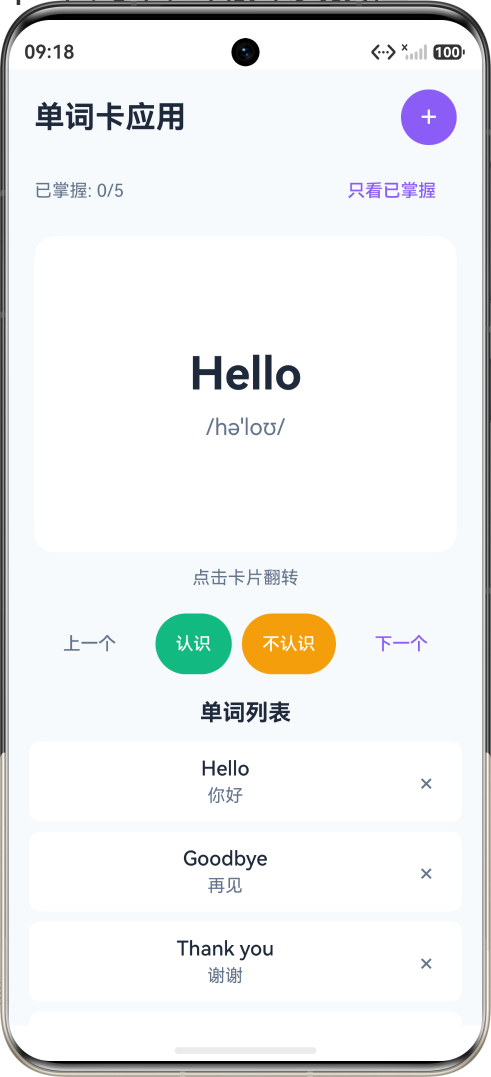
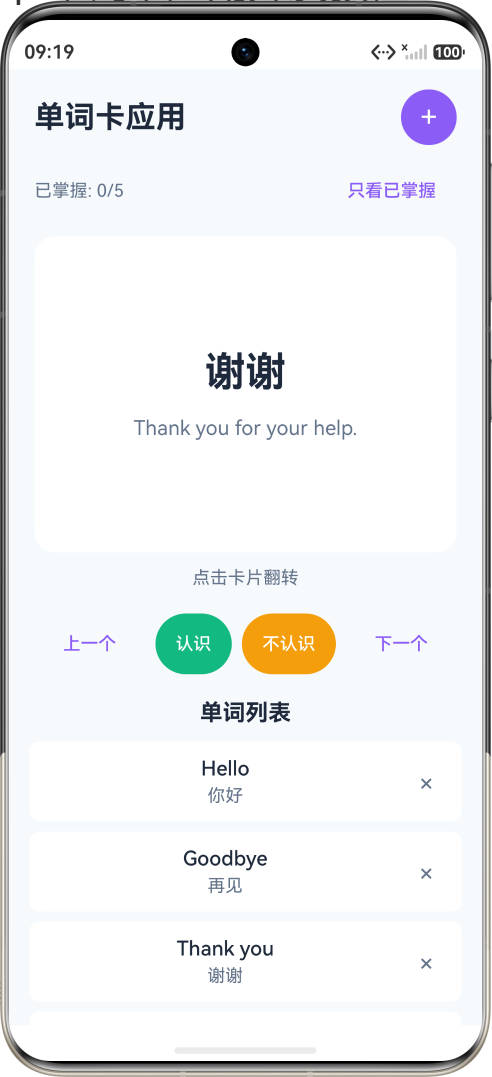
最终效果
应用采用紫色主题,唤起创造力和学习的感觉。主界面包含:
- 顶部导航栏,包含标题和添加按钮
- 学习进度统计
- 大型单词卡片,带翻转动画
- 导航和标记控制按钮
- 显示所有词汇的单词列表
技术栈
- 开发框架:HarmonyOS NEXT (API 20+)
- 编程语言:ArkTS
- UI框架:ArkUI 声明式 UI
- 核心组件:Column, Row, List, Button, TextInput
知识点讲解
1. 动画效果实现
通过随时间平滑改变组件属性来实现动画效果。
typescript
// 卡片正面
Column() {
  Text(this.getCurrentWord()!.word)
    .fontSize(36)
    .fontWeight(FontWeight.Bold)
    .fontColor('#1e293b')

  Text(this.getCurrentWord()!.phonetic)
    .fontSize(18)
    .fontColor('#64748b')
    .margin({ top: 8 })
}
.width('100%')
.height(250)
.justifyContent(FlexAlign.Center)
.backgroundColor('#ffffff')
.borderRadius(16)
.opacity(this.isFlipped ? 0 : 1)  // 翻转时透明

// 卡片背面
Column() {
  Text(this.getCurrentWord()!.meaning)
    .fontSize(32)
    .fontWeight(FontWeight.Bold)
    .fontColor('#8b5cf6')

  if (this.getCurrentWord()!.example !== '') {
    Text(this.getCurrentWord()!.example)
      .fontSize(16)
      .fontColor('#64748b')
      .margin({ top: 16 })
      .textAlign(TextAlign.Center)
  }
}
.width('100%')
.height(250)
.justifyContent(FlexAlign.Center)
.backgroundColor('#ffffff')
.borderRadius(16)
.opacity(this.isFlipped ? 1 : 0)  // 翻转时可见
2. 状态切换
使用布尔状态控制界面显示。
typescript
@State isFlipped: boolean = false

private flipCard() {
  this.isFlipped = !this.isFlipped  // 切换状态
}

// 在 build 方法中
Column() {
  if (this.isFlipped) {
    // 显示背面内容
    Text(this.getCurrentWord()!.meaning)
  } else {
    // 显示正面内容
    Text(this.getCurrentWord()!.word)
  }
}
3. 数组过滤
根据条件过滤单词列表。
typescript
private getFilteredWords(): Word[] {
  if (this.showMasteredOnly) {
    return this.words.filter(word => word.mastered)
  }
  return this.words
}

// 获取已掌握数量
private getMasteredCount(): number {
  return this.words.filter(word => word.mastered).length
}

// 获取进度百分比
private getProgress(): number {
  if (this.words.length === 0) return 0
  return Math.round((this.getMasteredCount() / this.words.length) * 100)
}
4. 数据统计
计算学习进度和统计数据。
typescript
@State currentIndex: number = 0
@State words: Word[] = []

// 获取当前单词
private getCurrentWord(): Word | null {
  const filteredWords = this.getFilteredWords()
  if (filteredWords.length === 0 || this.currentIndex >= filteredWords.length) {
    return null
  }
  return filteredWords[this.currentIndex]
}

// 导航到下一个单词
private nextWord() {
  const filteredWords = this.getFilteredWords()
  if (this.currentIndex < filteredWords.length - 1) {
    this.currentIndex++
    this.isFlipped = false
  }
}

// 导航到上一个单词
private prevWord() {
  if (this.currentIndex > 0) {
    this.currentIndex--
    this.isFlipped = false
  }
}
5. 条件样式
根据状态设置不同的样式。
typescript
Text(word.word)
  .fontSize(16)
  .fontWeight(index === this.currentWordIndex ? FontWeight.Bold : FontWeight.Normal)
  .fontColor(index === this.currentWordIndex ? '#8b5cf6' : '#1e293b')

// 掌握状态徽章
if (word.mastered) {
  Text('已掌握')
    .fontSize(12)
    .fontColor('#10b981')
    .backgroundColor('#ecfdf5')
    .borderRadius(4)
    .padding({ left: 8, right: 8, top: 2, bottom: 2 })
}
6. 列表项样式
创建美观的列表项,具有一致的样式。
typescript
Row() {
  // 单词信息
  Column() {
    Text(word.word)
      .fontSize(16)
      .fontWeight(FontWeight.Medium)
      .fontColor('#1e293b')

    Text(word.meaning)
      .fontSize(14)
      .fontColor('#64748b')
      .margin({ top: 4 })
  }
  .width('70%')

  // 掌握状态
  Column() {
    if (word.mastered) {
      Text('已掌握')
        .fontSize(12)
        .fontColor('#10b981')
        .backgroundColor('#ecfdf5')
        .borderRadius(4)
        .padding({ left: 8, right: 8, top: 2, bottom: 2 })
    }

    Button() {
      Text('×')
        .fontSize(20)
        .fontColor('#64748b')
    }
    .width(32)
    .height(32)
    .backgroundColor('transparent')
    .margin({ top: 4 })
    .onClick(() => {
      this.deleteWord(word.id)
    })
  }
  .width('30%')
  .alignItems(HorizontalAlign.End)
}
.width('100%')
.padding(12)
.backgroundColor('#ffffff')
.borderRadius(8)
.margin({ bottom: 8 })
7. 表单处理
处理添加新单词的表单数据。
typescript
@State newWord: string = ''
@State newPhonetic: string = ''
@State newMeaning: string = ''
@State newExample: string = ''

private addWord() {
  if (this.newWord.trim() === '' || this.newMeaning.trim() === '') {
    return
  }

  const newWord: Word = {
    id: Date.now(),
    word: this.newWord.trim(),
    phonetic: this.newPhonetic.trim(),
    meaning: this.newMeaning.trim(),
    example: this.newExample.trim(),
    mastered: false
  }

  this.words.push(newWord)
  this.clearAddForm()
  this.showAddForm = false
}

private clearAddForm() {
  this.newWord = ''
  this.newPhonetic = ''
  this.newMeaning = ''
  this.newExample = ''
}
8. 索引管理
正确管理当前单词索引。
typescript
private deleteWord(id: number) {
  this.words = this.words.filter(w => w.id !== id)
  // 调整当前索引
  if (this.currentIndex >= this.getFilteredWords().length) {
    this.currentIndex = Math.max(0, this.getFilteredWords().length - 1)
  }
}

private markAsMastered() {
  const currentWord = this.getCurrentWord()
  if (currentWord) {
    const index = this.words.findIndex(w => w.id === currentWord.id)
    if (index !== -1) {
      this.words[index].mastered = true
      this.nextWord()
    }
  }
}
9. 组件生命周期
typescript
@Component
struct FlashcardApp {
  aboutToAppear() {
    // 初始化数据
    this.loadWords()
  }

  aboutToDisappear() {
    // 保存数据
    this.saveWords()
  }

  build() {
    // 构建 UI
  }
}
10. 触摸事件处理
typescript
Column() {
  // 卡片内容
}
.onClick(() => {
  this.flipCard()
})
.onLongPress(() => {
  // 长按操作
  this.showContextMenu()
})
完整代码解析
页面结构
┌─────────────────────────────────┐
│  [单词卡应用]          [+]      │
├─────────────────────────────────┤
│  已掌握: 3/10   [显示已掌握]    │
├─────────────────────────────────┤
│  ┌───────────────────────────┐  │
│  │                           │  │
│  │        Hello              │  │
│  │      /həˈloʊ/             │  │
│  │                           │  │
│  │      点击卡片翻转          │  │
│  └───────────────────────────┘  │
│                                 │
│  [上一个] [认识] [不认识] [下一个]│
├─────────────────────────────────┤
│         单词列表                │
│  Hello          你好    [已掌握] │
│  Goodbye        再见             │
│  Thank you      谢谢             │
└─────────────────────────────────┘
核心方法
1. 翻转卡片
typescript
private flipCard() {
  this.isFlipped = !this.isFlipped
}
2. 标记为已掌握
typescript
private markAsMastered() {
  const currentWord = this.getCurrentWord()
  if (currentWord) {
    const index = this.words.findIndex(w => w.id === currentWord.id)
    if (index !== -1) {
      this.words[index].mastered = true
      this.nextWord()
    }
  }
}
3. 添加新单词
typescript
private addWord() {
  if (this.newWord.trim() === '' || this.newMeaning.trim() === '') {
    return
  }

  const newWord: Word = {
    id: Date.now(),
    word: this.newWord.trim(),
    phonetic: this.newPhonetic.trim(),
    meaning: this.newMeaning.trim(),
    example: this.newExample.trim(),
    mastered: false
  }

  this.words.push(newWord)
  this.clearAddForm()
  this.showAddForm = false
}
常见问题与解决方案
问题1:卡片翻转动画不流畅
解决方案:只改变 opacity 属性,避免同时改变多个属性。
问题2:单词索引越界
解决方案:
typescript
private getCurrentWord(): Word | null {
  const filteredWords = this.getFilteredWords()
  if (filteredWords.length === 0 || this.currentIndex >= filteredWords.length) {
    return null
  }
  return filteredWords[this.currentIndex]
}
问题3:删除单词后索引异常
解决方案:
typescript
private deleteWord(id: number) {
  this.words = this.words.filter(w => w.id !== id)
  if (this.currentIndex >= this.getFilteredWords().length) {
    this.currentIndex = Math.max(0, this.getFilteredWords().length - 1)
  }
}
扩展学习
- 发音功能:集成 TTS 朗读单词
- 测试模式:拼写测试
- 艾宾浩斯复习:根据遗忘曲线安排复习
- 词库导入:支持导入外部词库
- 学习统计:每日学习时长和单词数
总结
通过本教程,您学会了:
- 动画效果的实现方法
- 状态切换的控制逻辑
- 数组过滤和统计
- 条件样式的应用
- 表单数据处理