实现效果
先预览 Agent 实现的效果如下:
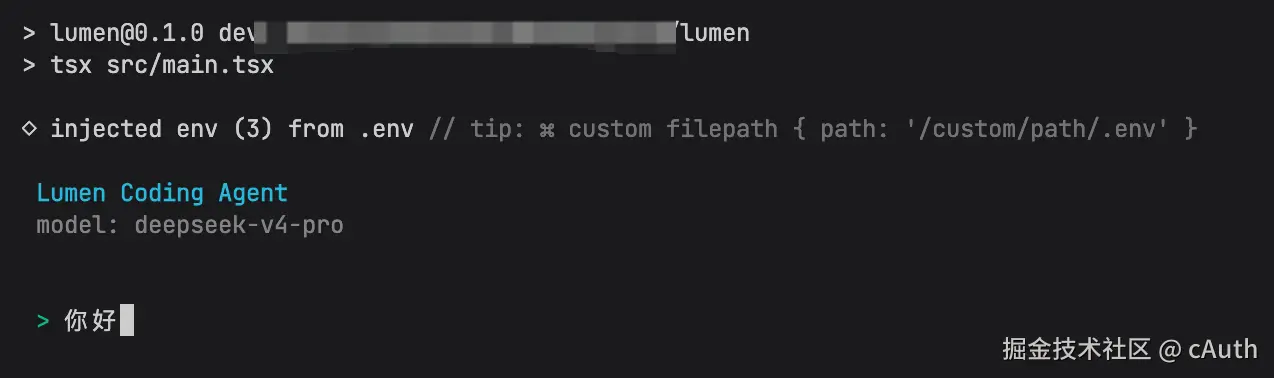
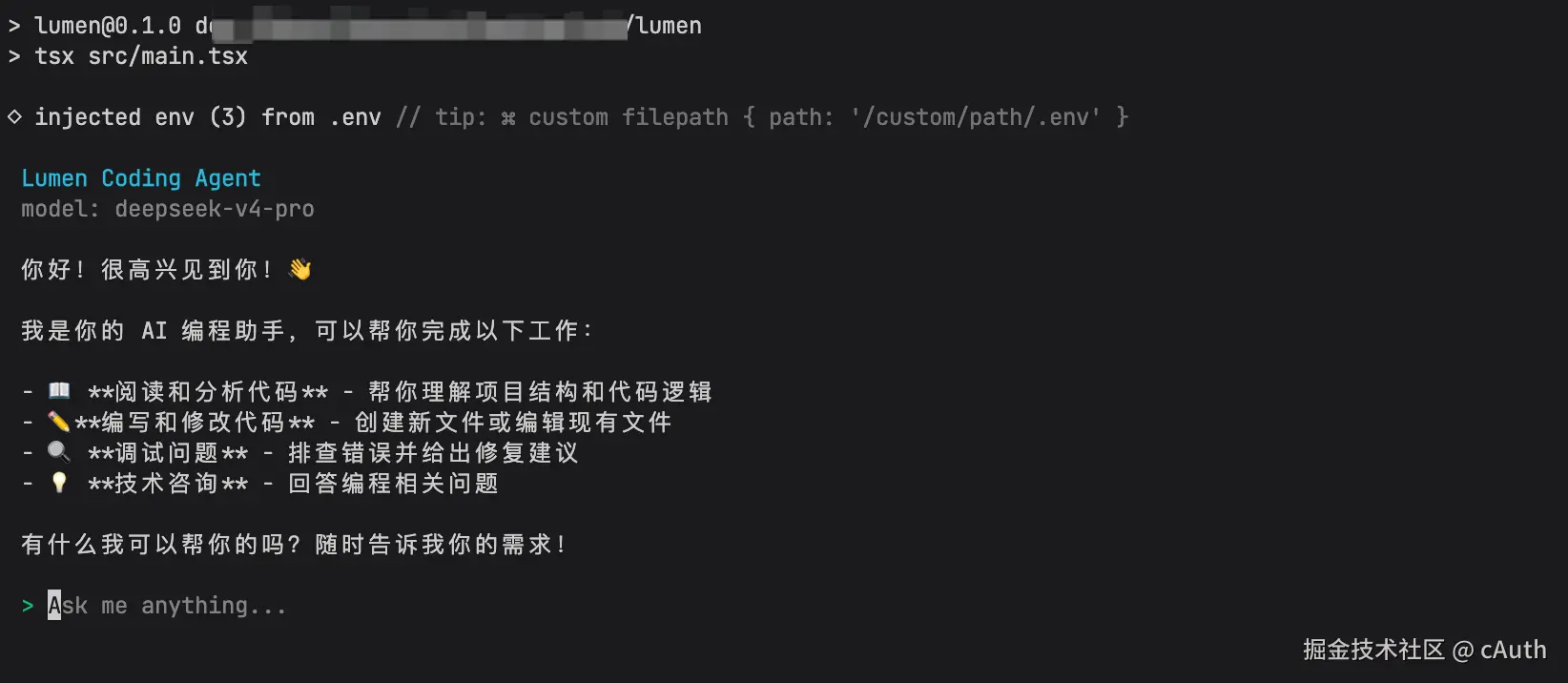 GitHub:github.com/CCZX/lumen/
从 Chatbot 到 Code Agent
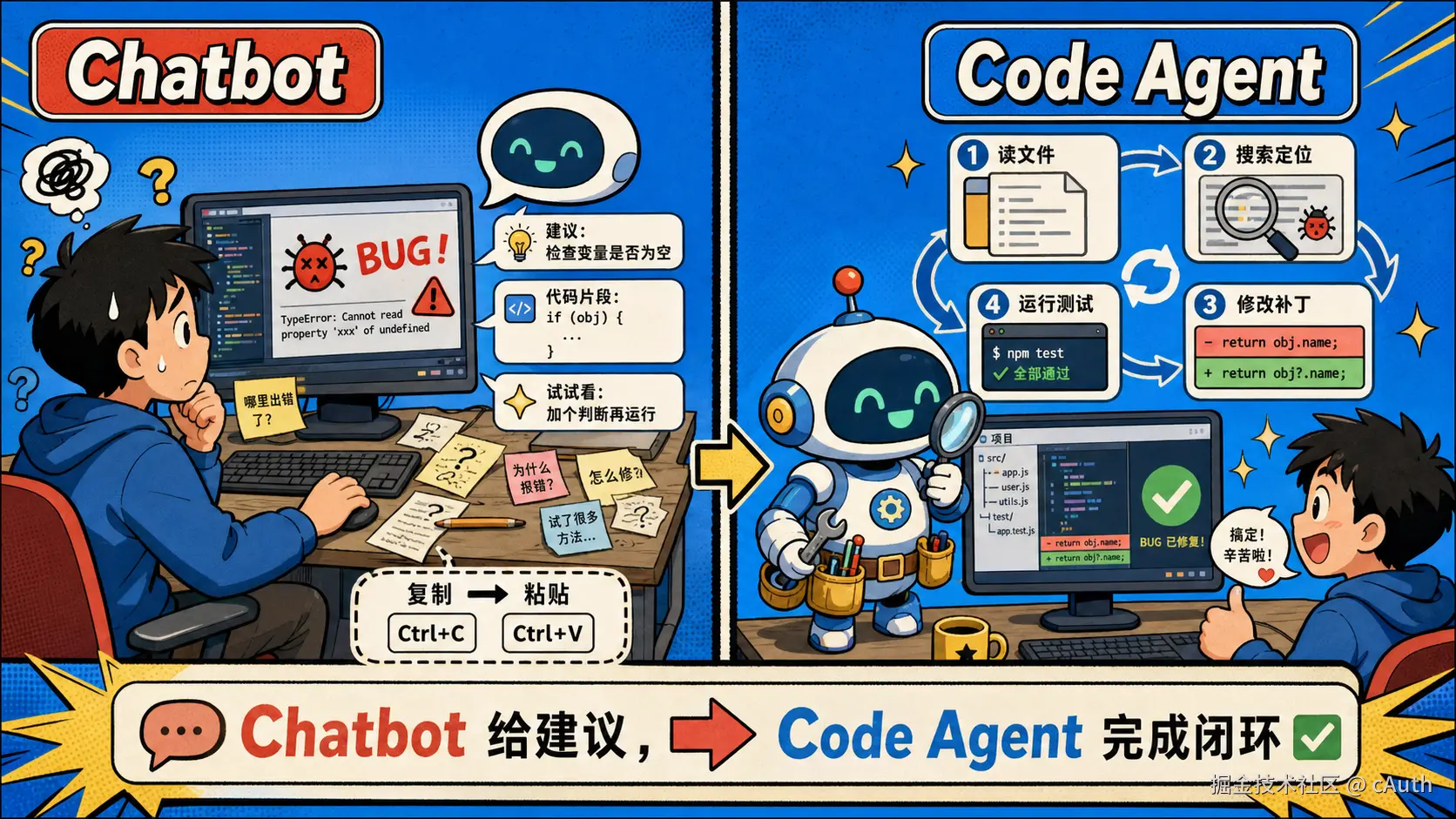
大模型最常见的产品形态是 Chatbot:用户输入一句话,模型返回一段回答。这个形态足够通用,也足够直观,但它天然更像"问答界面"。但是当我们想让模型真正参与软件开发时,仅有对话是不够的。写代码不是只生成一段文本,而是要读项目、理解约束、修改文件、运行命令、观察结果、修复错误,并在必要时继续迭代。
Code Agent 可以理解为把大模型放进一个受控的开发环境里,让它不只会"说",还会"做"。它背后多了一套执行系统:上下文管理、权限控制、工具调用、可持续循环的任务调度逻辑。
Code Agent 的核心变化
Code Agent 的关键变化不是"换一个更会写代码的模型",而是把模型放进一个可观察、可行动、可约束的循环里。
它的基本形态可以概括为:
diff
用户目标
-> 构建上下文
-> 模型决策
-> 调用工具
-> 观察结果
-> 更新计划
-> 继续执行或交付结果
这和普通 Chatbot 最大的差异在于:模型每一步都可以根据真实环境反馈继续调整。比如它可以先搜索相关代码,再读取文件,接着修改文件内容,运行测试,看到报错后回到对应文件继续修复。
一个 Code Agent 需要什么
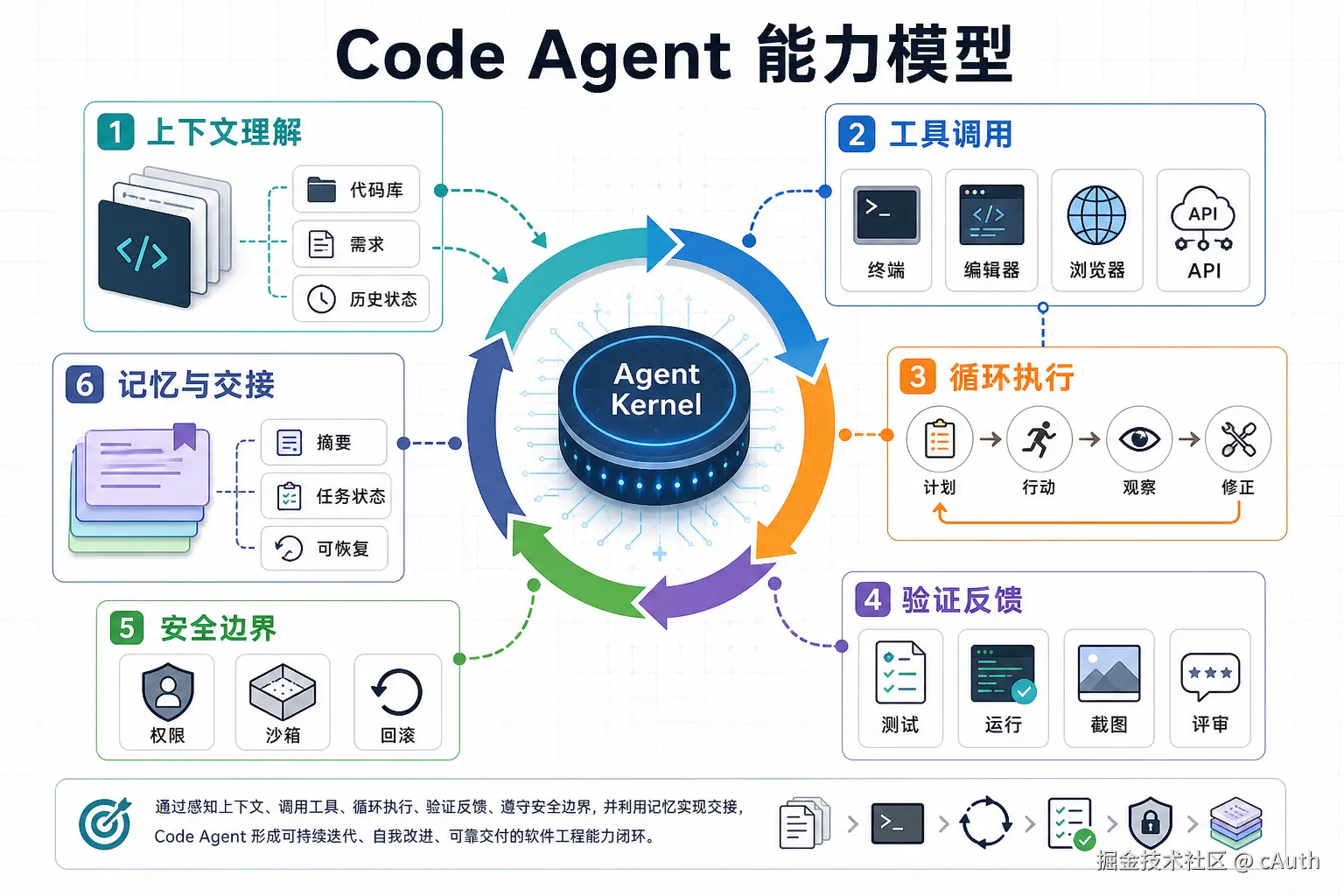
如果要实现一个自己的 Agent CLI,可以先把它拆成几层。
1. 对话层
对话层负责接收用户输入、展示模型输出,并维护消息历史。它看起来最像普通 Chatbot,但在 Agent CLI 里,对话层还需要支持流式输出、工具调用提示、权限确认、任务状态展示等能力。
这层要解决的问题包括:
- 如何收集用户目标。
- 如何把系统提示词、项目上下文和历史对话组织给模型。
- 如何展示中间步骤,让用户知道 Agent 正在做什么。
- 如何在需要高风险操作时暂停并请求确认。
2. 上下文层
模型不能一次性读完整个仓库,所以 Agent 必须主动选择上下文。上下文层的任务是帮助模型找到"此刻最相关的信息"。
常见上下文来源包括:
- 当前工作目录。
- 文件列表和目录结构。
- 用户点名的文件或代码片段。
- 项目说明文件,例如
README.md、AGENTS.md。
好的上下文管理不是把所有内容都塞给模型,而是逐步检索、逐步阅读、逐步收敛。Code Agent 的体验好坏,很大程度上取决于它能不能在有限上下文窗口里持续找到关键证据。
3. 工具层
工具层是 Agent 和真实环境互动的入口。没有工具,模型只能生成文本;有了工具,模型才能执行动作。
一个最小可用的 Agent CLI 通常需要这些工具:
list_files:查看项目文件。read_file:读取文件内容。search:全文搜索。apply_patch:以补丁方式修改文件。run_command:运行测试、构建、格式化等命令。get_diff:查看当前改动。
4. 规划与循环层
Agent 不是一次性生成答案,而是一个循环系统。它需要在每次观察后决定下一步:
- 还缺上下文吗?
- 是否已经定位问题?
- 是否需要修改文件?
比如在我们让 Agent 修复一个问题时, 对于的交互时序为
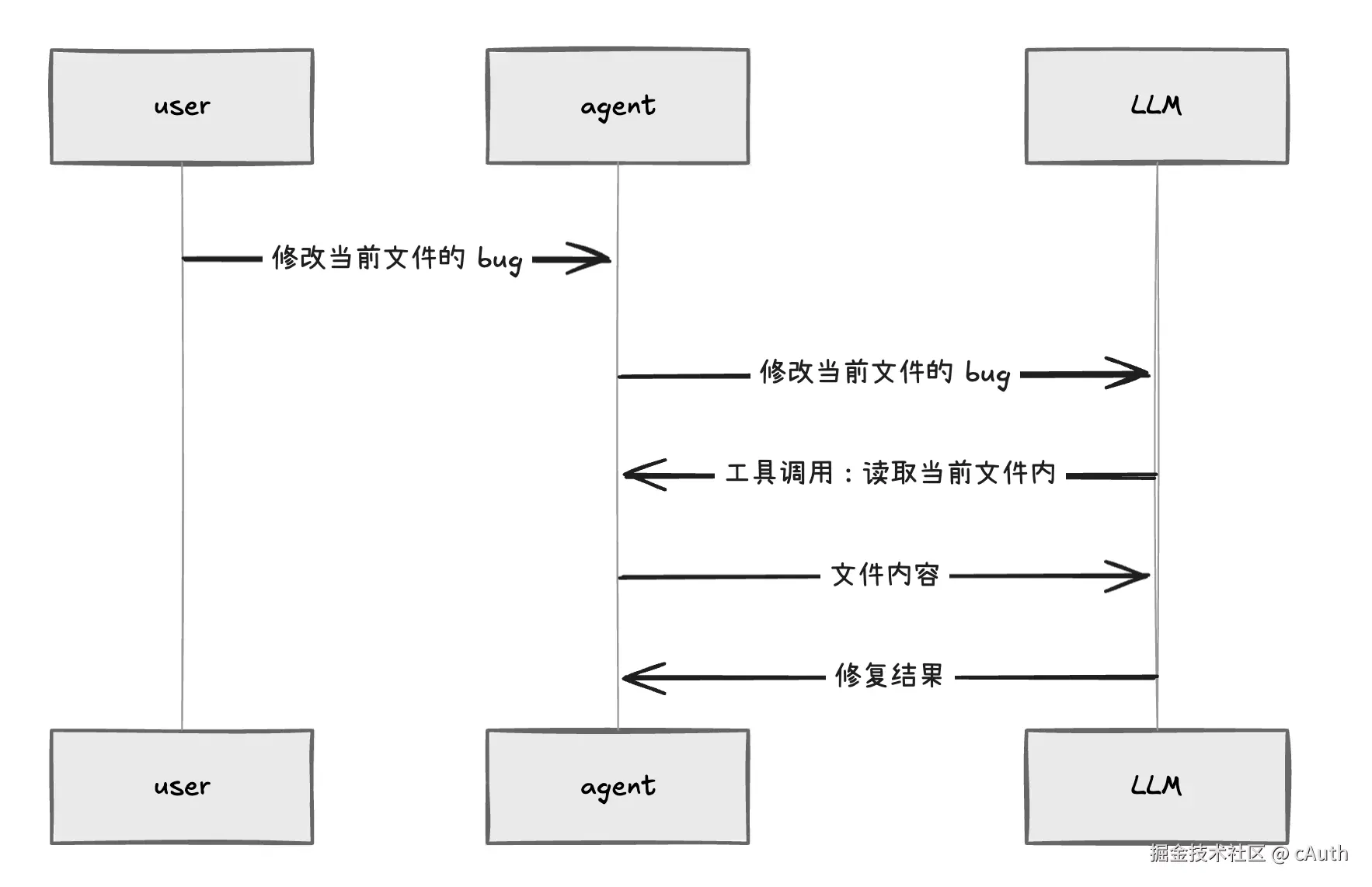
可以看见 Agent 并不是一开始就把文件内容交给 LLM,而是由 LLM 自行判断是否还缺失相关上下文。
一个简单的循环可以写成这样:
ts
while (taskNotDone) {
	const context = collectRelevantContext();
	const decision = model(messages, context, toolSpecs);

	// 调用工具
	if (decision.type === "tool_call") {
		const result = runTool(decision.tool, decision.args);
		messages.push(result);
		continue;
	}

	if (decision.type === "final_answer") {
		return decision.content;
	}
}
真实实现会更复杂:需要限制最大循环次数,压缩历史消息,处理工具失败,检测重复动作,管理权限,以及在用户中途插话时重新对齐目标。但这个循环已经体现了 Agent 的本质:模型不是只回答,而是在"决策 -> 行动 -> 观察"的闭环里推进任务。
5. 安全与权限层
由于 Agent 能够自动修改你本地文件,所以安全层不是附属功能,而是基础设施。
至少需要考虑这些边界:
- 文件边界:允许读写哪些目录。
- 命令边界:哪些命令可以直接执行,哪些必须确认。
- 网络边界:是否允许下载依赖、访问外部服务。
技术选型
由于 Agent 要同时做:流式 LLM 响应、Shell 执行、文件监听、用户输入、子 Agent 调度,属于 I/O 多路复用场景。所以 Node.js 的事件循环 + 非阻塞 I/O 非常适合用于开发 Agent
| 类型 | 技术 | 作用 |
|---|---|---|
| 语言 | TypeScript | 提供类型约束,适合构建复杂工程系统 |
| CLI UI | Ink | 用 React 组件构建终端界面 |
| LLM SDK | OpenAI | 接入 OpenAI 及兼容接口 |
| 参数校验 | Zod | 校验工具调用参数和配置 |
| 测试 | Vitest | 单元测试与集成测试 |
项目结构
bash
src/
├── agent/ # Agent 核心
├── config/ # 配置读取与校验
├── store/ # Zustand vanilla store
├── ui/ # Ink UI
├── tools/ # 后续工具系统扩展
├── context/ # 后续上下文管理扩展
├── services/ # 后续服务层扩展
├── mcp/ # 后续 MCP 协议扩展
├── prompts/ # 后续提示词管理扩展
├── logging/ # 后续日志系统扩展
└── main.tsx # CLI 入口
实现阶段
mvp
css
src/
├── main.tsx
├── agent.ts
│   └── agent.ts
└── ui/
    └── App.tsx
首先实现最简单的 MVP 版本,让 Agent 能够成功调用 LLM
main.tsx:
tsx
#!/usr/bin/env node
import { render } from "ink";
import yargs from "yargs";
import { hideBin } from "yargs/helpers";
import { App } from "./ui/App.js";

async function main() {
	const argv = await yargs(hideBin(process.argv))
		.scriptName("agent-mini")
		.usage("$0 [options]")
		.option("api-key", {
		type: "string",
		description: "API key",
		default: process.env.OPENAI_API_KEY,
	})
	.option("base-url", {
		type: "string",
		description: "OpenAI-compatible API base URL",
		default: process.env.OPENAI_BASE_URL,
	})
	.option("model", {
		type: "string",
		description: "Model name",
		default: process.env.OPENAI_MODEL ?? "gpt-4o-mini",
	})
	.help()
	.parse();

	if (!argv.apiKey) {
		console.error("Error: API key is required.");
		console.error("Set OPENAI_API_KEY or pass --api-key.");
		process.exit(1);
	}

	render(
		<App
		apiKey={argv.apiKey}
		baseURL={argv.baseUrl}
		model={argv.model}
		/>,
	);
}

main().catch((error: unknown) => {
	console.error(error);
	process.exit(1);
});
App.tsx
tsx
import { useMemo, useState } from "react";
import type { FC } from "react";
import { Box, Text } from "ink";
import Spinner from "ink-spinner";
import TextInput from "ink-text-input";
import { Agent } from "../agent/Agent.js";

interface AppProps {
	apiKey: string;
	baseURL?: string;
	model?: string;
}

export const App: FC<AppProps> = ({ apiKey, baseURL, model }) => {
	const [input, setInput] = useState("");
	const [question, setQuestion] = useState("");
	const [response, setResponse] = useState("");
	const [isLoading, setIsLoading] = useState(false);

	const agent = useMemo(
		() => new Agent({ apiKey, baseURL, model }),
		[apiKey, baseURL, model],
	);

	const handleSubmit = async (value: string) => {
		const message = value.trim();

		if (!message || isLoading) {
			return;
		}

		setIsLoading(true);
		setQuestion(message);
		setResponse("");
		setInput("");

		try {
			const result = await agent.chat(message);
			setResponse(result || "(empty response)");
		} catch (error) {
			setResponse(`Error: ${(error as Error).message}`);
		} finally {
			setIsLoading(false);
		}
	};

	return (
		<Box flexDirection="column" padding={1}>
			<Text bold color="cyan">
				Agent Mini
			</Text>

			{question && (
				<Box marginTop={1}>
					<Text color="gray">You: {question}</Text>
				</Box>
			)}

			<Box marginY={1}>
				{isLoading ? (
					<Box>
						<Spinner type="dots" />
						<Text> Thinking...</Text>
					</Box>
				) : (
					response && <Text>{response}</Text>
				)}
			</Box>

			<Box>
				<Text color="green">{"> "}</Text>
				<TextInput
					value={input}
					onChange={setInput}
					onSubmit={handleSubmit}
					placeholder="Ask me anything..."
				/>
			</Box>
		</Box>
	);
};
agent.ts
ts
import OpenAI from "openai";

export interface AgentConfig {
	apiKey: string;
	baseURL?: string;
	model?: string;
}

export class Agent {
	private readonly client: OpenAI;
	private readonly model: string;

	constructor(config: AgentConfig) {
		this.client = new OpenAI({
			apiKey: config.apiKey,
			baseURL: config.baseURL,
		});
		this.model = config.model ?? "gpt-4o-mini";
	}

	async chat(message: string): Promise<string> {
		const response = await this.client.chat.completions.create({
			model: this.model,
			messages: [
				{
					role: "system",
					content: "You are a helpful coding assistant.",
				},
				{
					role: "user",
					content: message,
				},
			],
		});
		return response.choices[0]?.message?.content ?? "";
	}
}
package.json
perl
{
	"name": "agent-mini",
	"version": "0.1.0",
	"private": true,
	"type": "module",
	"bin": {
		"agent-mini": "./dist/main.js"
	},
	"scripts": {
		"dev": "tsx src/main.tsx",
		"build": "tsc",
		"typecheck": "tsc --noEmit",
		"start": "node dist/main.js"
	},
	"dependencies": {
		"ink": "^6.4.0",
		"ink-spinner": "^5.0.0",
		"ink-text-input": "^6.0.0",
		"openai": "^6.2.0",
		"react": "^19.1.1",
		"yargs": "^18.0.0"
	},
	"devDependencies": {
		"@types/node": "^22.15.24",
		"@types/react": "^19.1.12",
		"@types/yargs": "^17.0.35",
		"tsx": "^4.22.4",
		"typescript": "^5.9.2"
	}
}
在完成上述代码后,启动 Agent 之前我们还需要购买大模型服务,购买成功后新建 api key 就可以启动我们的 Agent 了
输入以下命令
csharp
OPENAI_API_KEY=your-key npm run dev -- --base-url your-model-base-url --model your-model-name以购买 deepseek 为例,输入
bash
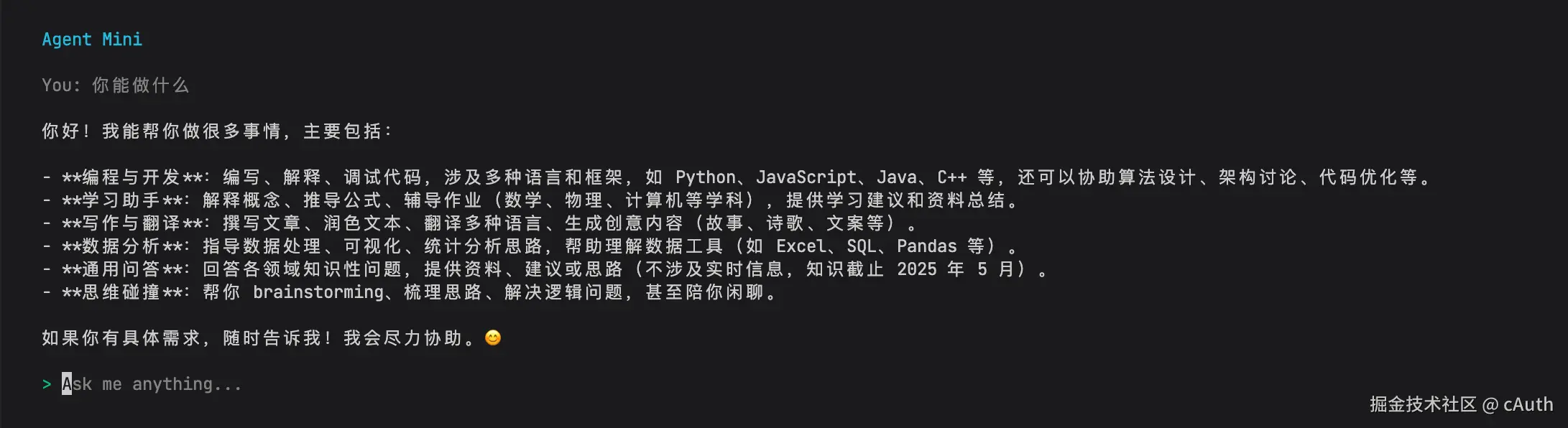
OPENAI_API_KEY=your-key npm run dev -- --base-url https://api.deepseek.com --model deepseek-v4-pro成功启动可以看到如下:
tools
bash
src/tools/
├── builtin/
│   ├── file/
│   ├── search/
│   ├── shell/
│   └── web/
├── registry/
└── types/
工具层是 Agent 和真实环境互动的入口。没有工具,模型只能生成文本;有了工具,模型才能执行动作。
我们先实现最基本的 read 和 write 工具,让 Agent 能够读写我们的文件
read
在 src/tools/types/index.ts 内声明类型定义
typescript
import type { FunctionParameters } from 'openai/resources/shared';

export interface AgentTool {
  name: string;
  description: string;
  parameters: FunctionParameters;
  execute: (args: unknown) => Promise<string>;
}
在 src/tools/builtin/file/readFileTool.ts 实现读文件的 tool
typescript
import { constants } from 'node:fs';
import { access, open, realpath, stat } from 'node:fs/promises';
import path from 'node:path';
import { z } from 'zod';
import type { AgentTool } from '../../types/index.js';

const DEFAULT_MAX_BYTES = 200_000;
const HARD_MAX_BYTES = 1_000_000;

const ReadFileInputSchema = z.object({
  path: z.string().min(1, 'path is required.'),
  max_bytes: z.number().int().positive().max(HARD_MAX_BYTES).optional(),
});

function isPathInside(parent: string, child: string): boolean {
  const relativePath = path.relative(parent, child);
  return relativePath === '' || (!relativePath.startsWith('..') && !path.isAbsolute(relativePath));
}

async function resolveWorkspacePath(inputPath: string): Promise<string> {
  const workspaceRoot = await realpath(process.cwd());
  const resolvedPath = path.resolve(workspaceRoot, inputPath);

  if (!isPathInside(workspaceRoot, resolvedPath)) {
    throw new Error(`Refusing to read outside workspace: ${inputPath}`);
  }

  return realpath(resolvedPath);
}

async function readFileContent(filePath: string, maxBytes: number): Promise<Buffer> {
  const fileHandle = await open(filePath, 'r');

  try {
    const buffer = Buffer.alloc(maxBytes);
    const { bytesRead } = await fileHandle.read(buffer, 0, maxBytes, 0);
    return buffer.subarray(0, bytesRead);
  } finally {
    await fileHandle.close();
  }
}

export const readFileTool: AgentTool = {
  name: 'read_file',
  description:
    'Read a UTF-8 text file from the current workspace. Use this before answering questions that require inspecting local source files.',
  parameters: {
    type: 'object',
    additionalProperties: false,
    properties: {
      path: {
        type: 'string',
        description:
          'Path to the file, relative to the current workspace. Absolute paths are only allowed when they still point inside the workspace.',
      },
      max_bytes: {
        type: 'integer',
        description: `Maximum bytes to read. Defaults to ${DEFAULT_MAX_BYTES}.`,
        minimum: 1,
        maximum: HARD_MAX_BYTES,
      },
    },
    required: ['path'],
  },
  async execute(args: unknown): Promise<string> {
    try {
      const input = ReadFileInputSchema.parse(args);
      const maxBytes = input.max_bytes ?? DEFAULT_MAX_BYTES;
      const filePath = await resolveWorkspacePath(input.path);

      if (!isPathInside(await realpath(process.cwd()), filePath)) {
        throw new Error(`Refusing to read outside workspace: ${input.path}`);
      }

      await access(filePath, constants.R_OK);

      const fileStat = await stat(filePath);
      if (!fileStat.isFile()) {
        throw new Error(`Not a file: ${input.path}`);
      }

      const content = await readFileContent(filePath, maxBytes);

      return JSON.stringify({
        path: path.relative(process.cwd(), filePath),
        bytes_read: content.length,
        truncated: fileStat.size > content.length,
        content: content.toString('utf8'),
      });
    } catch (error) {
      return JSON.stringify({
        error: (error as Error).message,
      });
    }
  },
};
在 src/tools/registry/index.ts 内获取 tool 的方法
javascript
import type { ChatCompletionTool } from 'openai/resources/chat/completions';
import { readFileTool } from '../builtin/file/index.js';
import type { AgentTool } from '../types/index.js';

const tools: AgentTool[] = [readFileTool];

export function getTools(): AgentTool[] {
  return tools;
}

export function getTool(name: string): AgentTool | undefined {
  return tools.find((tool) => tool.name === name);
}

export function getToolsAsChatCompletionTools(): ChatCompletionTool[] {
  return tools.map((tool) => ({
    type: 'function',
    function: {
      name: tool.name,
      description: tool.description,
      parameters: tool.parameters,
    },
  }));
}
在 Agent 内注册 tool
typescript
import OpenAI from 'openai';
import type {
  ChatCompletionMessage,
  ChatCompletionMessageParam,
  ChatCompletionMessageToolCall,
} from 'openai/resources/chat/completions';
import type { AgentConfig } from '../config/types.js';
import { getTool, getToolsAsChatCompletionTools } from '../tools/registry/index.js';

const MAX_TOOL_ROUNDS = 5;

type MessageWithReasoningContent = ChatCompletionMessage & {
  reasoning_content?: string | null;
};

export class Agent {
  private readonly client: OpenAI;
  private readonly model: string;

  constructor(config: AgentConfig) {
    if (!config.apiKey) {
      throw new Error('Agent config is missing apiKey.');
    }

    this.client = new OpenAI({
      apiKey: config.apiKey,
      baseURL: config.baseURL,
    });
    this.model = config.model;
  }

  async chat(message: string): Promise<string> {
    const messages: ChatCompletionMessageParam[] = [
      {
        role: 'system',
        content:
          'You are a helpful coding assistant. Use tools when you need to inspect local workspace files before answering.',
      },
      {
        role: 'user',
        content: message,
      },
    ];

    const tools = getToolsAsChatCompletionTools();

    for (let round = 0; round < MAX_TOOL_ROUNDS; round += 1) {
      const response = await this.client.chat.completions.create({
        model: this.model,
        messages,
        tools,
        tool_choice: 'auto',
      });

      const responseMessage = response.choices[0]?.message as
        | MessageWithReasoningContent
        | undefined;
      if (!responseMessage) {
        return '';
      }

      const toolCalls = responseMessage.tool_calls ?? [];
      if (toolCalls.length === 0) {
        return responseMessage.content ?? '';
      }

      messages.push(this.createAssistantToolCallMessage(responseMessage, toolCalls));

      for (const toolCall of toolCalls) {
        messages.push({
          role: 'tool',
          tool_call_id: toolCall.id,
          content: await this.executeToolCall(toolCall),
        });
      }
    }

    return 'Tool call limit reached before the model produced a final answer.';
  }

  private createAssistantToolCallMessage(
    message: MessageWithReasoningContent,
    toolCalls: ChatCompletionMessageToolCall[],
  ): ChatCompletionMessageParam {
    return {
      role: 'assistant',
      content: message.content ?? '',
      tool_calls: toolCalls,
      ...(message.reasoning_content ? { reasoning_content: message.reasoning_content } : {}),
    } as ChatCompletionMessageParam;
  }

  private async executeToolCall(toolCall: ChatCompletionMessageToolCall): Promise<string> {
    if (toolCall.type !== 'function') {
      return JSON.stringify({
        error: `Unsupported tool call type: ${toolCall.type}`,
      });
    }

    const tool = getTool(toolCall.function.name);
    if (!tool) {
      return JSON.stringify({
        error: `Unknown tool: ${toolCall.function.name}`,
      });
    }

    try {
      const args = JSON.parse(toolCall.function.arguments || '{}') as unknown;
      return await tool.execute(args);
    } catch (error) {
      return JSON.stringify({
        error: `Invalid arguments for ${toolCall.function.name}: ${(error as Error).message}`,
      });
    }
  }
}
这样 Agent 就可以读取我们的本地文件了
write
最后
后续内容会持续更新