一、背景需求
经常在公司里面会有添加自定义层级的一个窗口需求,比如公司里面要求你创建一个窗口属于系统的最顶层,或者创建一个窗口位于App之上,StatusBar之下等这样添窗口需求。
也是很多同学在framework系统开发窗口显示高级工程师的面试真题。
在 AOSP 14 窗口层级体系中新增两种窗口类型:
| 窗口类型 | Type 常量值 | 定位 | 目标 Policy Layer |
|---|---|---|---|
| TYPE_SYSTEM_TOP | 2042 | 最顶层,完全独立,不隶属于任何现有 Feature 分组 | 37 |
| TYPE_ABOVE_APPLICATION | 2043 | 应用窗口之上、StatusBar 之下 | 9 |
那么这些需求到底应该如何实现呢?
二、AOSP 窗口层级体系原理
这块其实在马哥的wms课程的中已经讲解。
- WindowManagerPolicy.getWindowLayerFromTypeLw(): 将每个 Window Type 映射为一个 policy layer(小整数)
- WindowManagerPolicy.getMaxWindowLayer(): 返回最大 layer 号,DisplayArea 为 0~max 每层分配一个 Leaf
三、代码修改详情(4 个文件)
3.1 WindowManager.java --- 窗口类型定义
core/java/android/view/WindowManager.java
新增两个窗口类型常量:
java
// --- 插入到 TYPE_STATUS_BAR_ADDITIONAL 之后 ---

/**
 * Window type: a window that displays at the very top of the window hierarchy,
 * above all other system windows (just below the rounded corner overlay).
 * This window type is positioned at the max layer of the current window hierarchy + 1.
 * In multiuser systems shows only on the owning user's screen.
 * @hide
 */
public static final int TYPE_SYSTEM_TOP = FIRST_SYSTEM_WINDOW + 42;  // 2042

/**
 * Window type: a window that displays between the application layer (desktop)
 * and the StatusBar. This window type is positioned at a specified layer,
 * e.g., layer 9, which sits above TYPE_SYSTEM_ALERT and below TYPE_STATUS_BAR.
 * In multiuser systems shows only on the owning user's screen.
 * @hide
 */
public static final int TYPE_ABOVE_APPLICATION = FIRST_SYSTEM_WINDOW + 43;  // 2043
注册到 @WindowType IntDef:
diff
              TYPE_STATUS_BAR_ADDITIONAL,
+             TYPE_SYSTEM_TOP,
+             TYPE_ABOVE_APPLICATION
      })
注册到 isSystemAlertWindowType():
diff
              case TYPE_VOLUME_OVERLAY:
+             case TYPE_SYSTEM_TOP:
+             case TYPE_ABOVE_APPLICATION:
                  return true;
3.2 WindowManagerPolicy.java --- Policy Layer 映射
services/core/java/com/android/server/policy/WindowManagerPolicy.java
添加 import:
diff
+ import static android.view.WindowManager.LayoutParams.TYPE_ABOVE_APPLICATION;
+ import static android.view.WindowManager.LayoutParams.TYPE_SYSTEM_TOP;
Layer 映射:
diff
              case TYPE_POINTER:
                  return  35;
+             case TYPE_SYSTEM_TOP:
+                 return  37;
+             case TYPE_ABOVE_APPLICATION:
+                 return  9;
Bump getMaxWindowLayer()(圆角覆盖层独占 38):
diff
      default int getMaxWindowLayer() {
-         return 37;
+         return 38;
      }
3.3 DisplayAreaPolicy.java --- Feature 层级修改
services/core/java/com/android/server/wm/DisplayAreaPolicy.java
添加 import:
diff
+ import static android.view.WindowManager.LayoutParams.TYPE_SYSTEM_TOP;HideDisplayCutout 排除 TYPE_SYSTEM_TOP:
diff
  .all()
  .except(TYPE_NAVIGATION_BAR, TYPE_NAVIGATION_BAR_PANEL, TYPE_STATUS_BAR,
-         TYPE_NOTIFICATION_SHADE)
+         TYPE_NOTIFICATION_SHADE, TYPE_SYSTEM_TOP)
3.4 PhoneWindowManager.java --- 权限豁免
services/core/java/com/android/server/policy/PhoneWindowManager.java
checkAddPermission() 中添加权限豁免,让新 type 只需 SYSTEM_ALERT_WINDOW(而不是 INTERNAL_SYSTEM_WINDOW 签名权限):
diff
- if (appInfo == null || (type != TYPE_APPLICATION_OVERLAY
-         && appInfo.targetSdkVersion >= O)) {
+ if (appInfo == null || ((type != TYPE_APPLICATION_OVERLAY && type != TYPE_SYSTEM_TOP
+         && type != TYPE_ABOVE_APPLICATION) && appInfo.targetSdkVersion >= O)) {
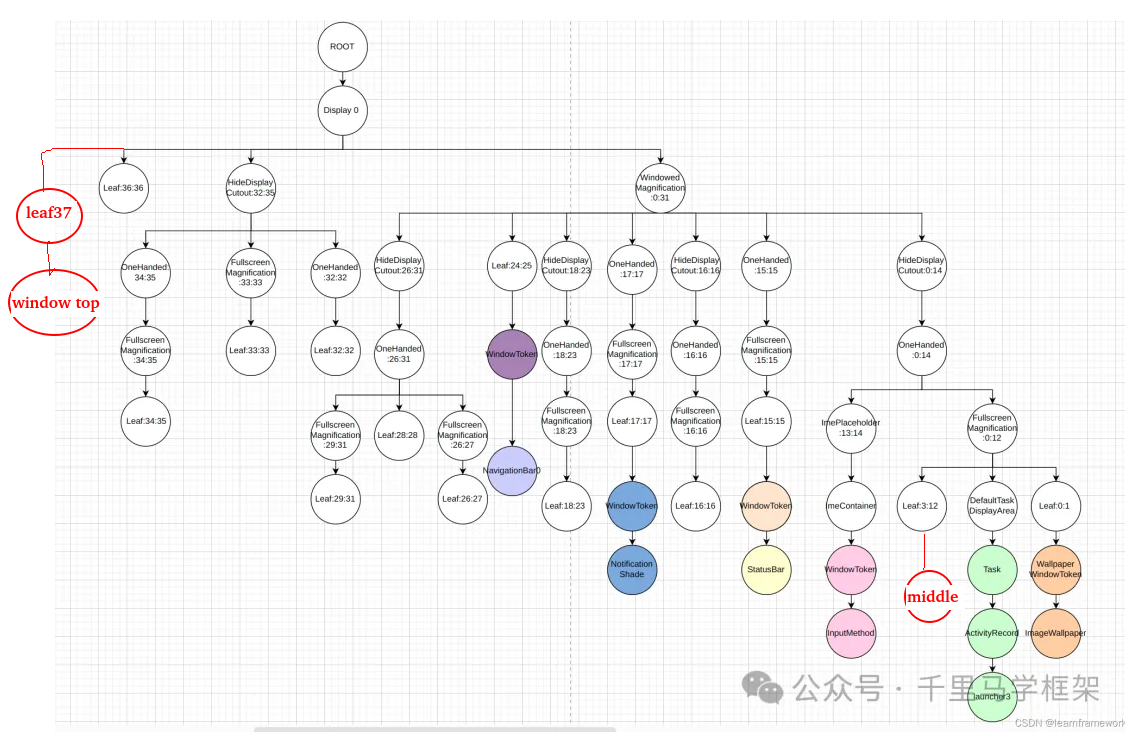
四、修改后的 DisplayArea 层级结构(来自实际 dumpsys)
最顶层的窗口层级结构树的情况
bash
ROOT type=undefined mode=fullscreen override-mode=undefined requested-bounds=[0,0][0,0] bounds=[0,0][1440,2960]
  #1 Display 0 name="Built-in Screen" type=undefined mode=fullscreen override-mode=fullscreen requested-bounds=[0,0][1440,2960] bounds=[0,0][1440,2960]
   #2 Leaf:37:38 type=undefined mode=fullscreen override-mode=undefined requested-bounds=[0,0][0,0] bounds=[0,0][1440,2960]
    #2 WindowToken{598e4e1 type=2024 android.os.BinderProxy@7d7e48} type=undefined mode=fullscreen override-mode=undefined requested-bounds=[0,0][0,0] bounds=[0,0][1440,2960]
     #0 1a350c7 ScreenDecorOverlayBottom type=undefined mode=fullscreen override-mode=undefined requested-bounds=[0,0][0,0] bounds=[0,0][1440,2960]
    #1 WindowToken{eb81f18 type=2024 android.os.BinderProxy@7fef2fb} type=undefined mode=fullscreen override-mode=undefined requested-bounds=[0,0][0,0] bounds=[0,0][1440,2960]
     #0 26ebd71 ScreenDecorOverlay type=undefined mode=fullscreen override-mode=undefined requested-bounds=[0,0][0,0] bounds=[0,0][1440,2960]
    #0 WindowToken{f6a3469 type=2042 android.os.BinderProxy@d5bb6f0} type=undefined mode=fullscreen override-mode=undefined requested-bounds=[0,0][0,0] bounds=[0,0][1440,2960]
     #0 e667eee DemoTopOverlay type=undefined mode=fullscreen override-mode=undefined requested-bounds=[0,0][0,0] bounds=[0,0][1440,2960]
在app上面的层级结构树情况
bash
#0 HideDisplayCutout:0:14 type=undefined mode=fullscreen override-mode=undefined requested-bounds=[0,0][0,0] bounds=[0,0][1440,2960]
     #0 OneHanded:0:14 type=undefined mode=fullscreen override-mode=undefined requested-bounds=[0,0][0,0] bounds=[0,0][1440,2960]
      #1 ImePlaceholder:13:14 type=undefined mode=fullscreen override-mode=undefined requested-bounds=[0,0][0,0] bounds=[0,0][1440,2960]
       #0 ImeContainer type=undefined mode=fullscreen override-mode=undefined requested-bounds=[0,0][0,0] bounds=[0,0][1440,2960]
        #0 WindowToken{94294b type=2011 android.os.Binder@a06ca1a} type=undefined mode=fullscreen override-mode=undefined requested-bounds=[0,0][0,0] bounds=[0,0][1440,2960]
         #0 daed721 InputMethod type=undefined mode=fullscreen override-mode=undefined requested-bounds=[0,0][0,0] bounds=[0,0][1440,2960]
      #0 FullscreenMagnification:0:12 type=undefined mode=fullscreen override-mode=undefined requested-bounds=[0,0][0,0] bounds=[0,0][1440,2960]
       #2 Leaf:3:12 type=undefined mode=fullscreen override-mode=undefined requested-bounds=[0,0][0,0] bounds=[0,0][1440,2960]
        #1 WindowToken{6dc97ed type=2038 android.os.BinderProxy@37a6a55} type=undefined mode=fullscreen override-mode=undefined requested-bounds=[0,0][0,0] bounds=[0,0][1440,2960]
         #0 e252696 ShellDropTarget type=undefined mode=fullscreen override-mode=undefined requested-bounds=[0,0][0,0] bounds=[0,0][1440,2960]
        #0 WindowToken{7f7ef38 type=2043 android.os.BinderProxy@9596f9b} type=undefined mode=fullscreen override-mode=undefined requested-bounds=[0,0][0,0] bounds=[0,0][1440,2960]
         #0 cc41b11 DemoMiddleOverlay type=undefined mode=fullscreen override-mode=undefined requested-bounds=[0,0][0,0] bounds=[0,0][1440,2960]
       #1 DefaultTaskDisplayArea type=undefined mode=fullscreen override-mode=fullscreen requested-bounds=[0,0][0,0] bounds=[0,0][1440,2960]
        #3 Task=1 type=home mode=fullscreen override-mode=undefined requested-bounds=[0,0][0,0] bounds=[0,0][1440,2960]
         #0 Task=29 type=home mode=fullscreen override-mode=undefined requested-bounds=[0,0][0,0] bounds=[0,0][1440,2960]
          #0 ActivityRecord{97232e6 u0 com.android.launcher3/.uioverrides.QuickstepLauncher t29} type=home mode=fullscreen override-mode=undefined requested-bounds=[0,0][0,0] bounds=[0,0][1440,2960]
           #0 1722cc4 com.android.launcher3/com.android.launcher3.uioverrides.QuickstepLauncher type=home mode=fullscreen override-mode=undefined requested-bounds=[0,0][0,0] bounds=[0,0][1440,2960]
关键点 :TYPE_SYSTEM_TOP (layer 37) 和圆角覆盖层 (layer 38) 合并到同一个 Leaf:37:38 中。这是因为 layer 37 被 3 个 Feature exclude 后,与 layer 38(max 层,同样不在任何 Feature 中)相邻,DisplayAreaPolicyBuilder 算法会自动合并连续的无 Feature 层为单个 Leaf。
五、 Demo App 关键点
Demo 使用原始 int 值
由于 @hide 类型无法在 SDK 中引用,demo 代码使用原始 int 值:
java
private static final int TYPE_SYSTEM_TOP = 2042;
private static final int TYPE_ABOVE_APPLICATION = 2043;
添加窗口
java
WindowManager.LayoutParams params = new WindowManager.LayoutParams(
        WindowManager.LayoutParams.MATCH_PARENT,
        200,  // height
        type,
        WindowManager.LayoutParams.FLAG_NOT_FOCUSABLE
                | WindowManager.LayoutParams.FLAG_NOT_TOUCH_MODAL
                | WindowManager.LayoutParams.FLAG_LAYOUT_IN_SCREEN
                | WindowManager.LayoutParams.FLAG_LAYOUT_NO_LIMITS,
        PixelFormat.TRANSLUCENT
);
params.gravity = Gravity.TOP;
params.y = yOffset;
windowManager.addView(overlayView, params);
Broadcast 触发
java
BroadcastReceiver receiver = new BroadcastReceiver() {
    @Override
    public void onReceive(Context context, Intent intent) {
        String action = intent.getAction();
        if ("com.example.testae.ADD_TOP".equals(action)) {
            addTopOverlay();
        } else if ("com.example.testae.ADD_MIDDLE".equals(action)) {
            addMiddleOverlay();
        }
    }
};
registerReceiver(receiver, filter, Context.RECEIVER_EXPORTED);
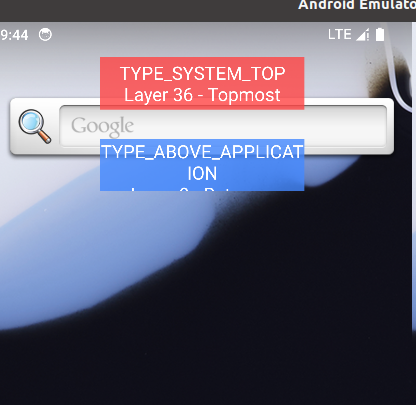
运行效果
可以看到两个窗口都位于App之上
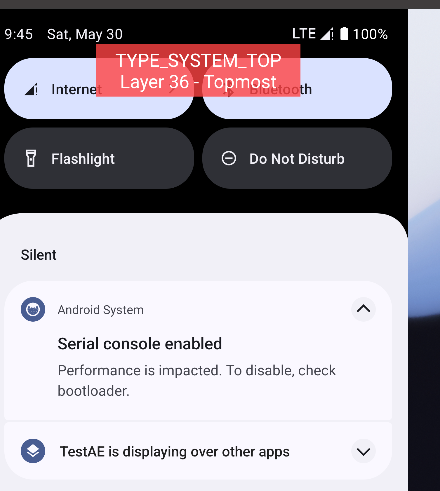
最顶层窗口看看是不是在最顶层,覆盖了通知锁屏栏,但是了一个窗口确实位于通知栏下面:
原文地址: