目录
- 前言
- 二、配置项目依赖
- 三、实现http基础服务
-
- 1.创建模块文件
- 2.注册模块(lib.rs)
- [3. 封装服务启动逻辑](#3. 封装服务启动逻辑)
- 四、封装全局统一响应结构体
- 五、实现PING健康检查接口
- 六、服务入口及运行测试
前言
本文基于 Rust + Axum 技术栈,从零完成 Agent 基础 HTTP 服务的搭建,涵盖项目初始化、依赖管理、Web 服务封装、统一响应体设计、健康检查接口实现与服务启动测试全流程。
本项目采用模块化规范开发,结构清晰、可直接作为 Agent 后端服务基础脚手架,可在此基础上扩展路由、业务逻辑、中间件、鉴权、日志等能力。
一、初始化Agent项目
提供两种创建方式,任选其一即可
方式一:快速命令创建
bash
cargo new agent方式二:手动目录初始化(适合有目录的情况)
toml
mkdir agent
cargo init ./agent
二、配置项目依赖
方式一:命令行快速添加依赖
bash
cargo add axum
cargo add anyhow
cargo add serde -F derive
cargo add serde_json
cargo add tower-http -F trace
cargo add tokio -F full方式二手动写入Cargo.toml
toml
[dependencies]
anyhow = "1.0.102"
axum = "0.8.9"
serde = { version = "1.0.228", features = ["derive"] }
serde_json = "1.0.150"
tokio = { version = "1.52.3", features = ["full"] }
tower-http = { version = "0.6.11", features = ["trace"] }
三、实现http基础服务
采用模块化拆分,将Web服务启动、路由管理统一封装至app模块,结构解耦,方便后续扩展。
1.创建模块文件
在
src目录新建文件lib.rs、app.rs
2.注册模块(lib.rs)
rust
/// http服务模块
pub mod app;
3. 封装服务启动逻辑
编辑src/app.rs,实现服务监听、启动、路由初始化基础能力:
rust
use anyhow::{Context, Result};
use axum::{Router, serve};
use tokio::net::TcpListener;

/// 启动web服务器
pub async fn start_web() -> Result<()> {
    // 初始化路由
    let app = init_router();
    // 启动服务监听
    let listener = TcpListener::bind("127.0.0.1:8888").await.context("监听端口失败")?;
    // 启动服务
    serve(listener, app).await.context("启动服务失败")
}


/// 初始化路由
fn init_router() -> Router {
    Router::new()
}
四、封装全局统一响应结构体
为保证前后端交互格式统一,封装通用HTTP响应体,支持成功、失败、自定义消息等多种返回场景。
1.创建数据模块
在src中新建文件data.rs,并在lib.rs中注册模块:
rust
/// http服务模块
pub mod app;
/// 数据模块
pub mod data;
2.实现通用响应结构体
编辑src/data.rs,完成标准化响应封装:
rust
use serde::{Deserialize, Serialize};
#[derive(Debug, Clone, PartialEq, Eq, Serialize, Deserialize)]
pub struct Resp<T> {
    pub code: u32,
    pub msg: String,
    pub data: Option<T>
}

impl <T> Resp<T> {
    /// 初始化一个响应
    pub fn new(code: u32, msg: String, data: Option<T>) -> Self {
        Self { code, msg, data }
    }
    /// 成功响应
    pub fn ok(data: Option<T>) -> Self {
        Self::new(200, "请求成功".to_string(), data)
    }
    /// 自定义消息的成功响应
    pub fn ok_with_msg(msg: String, data: Option<T>) -> Self {
        Self::new(200, msg, data)
    }
    /// 错误响应
    pub fn error(code: u32, msg: String) -> Self {
        Self::new(code, msg, None)
    }
    /// 带有数据的错误响应
    pub fn error_with_data(code: u32, msg: String, data: Option<T>) -> Self {
        Self::new(code, msg, data)
    }
}
五、实现PING健康检查接口
新增
ping接口,用于服务存活探测、健康状态校验。
修改src/app.rs,补充路由注册与接口逻辑:
rust
...
/// 初始化路由
fn init_router() -> Router {
    Router::new()
        .route("/ping", get(ping)) // 注册PING接口
}

/// PING接口
async fn ping() -> Json<Resp<String>> {
    Json(Resp::ok(Some("PONG".to_string())))
}
六、服务入口及运行测试
1.配置程序入口
编辑src/main.rs,统一程序启动入口:
rust
use agent::app::start_web;
use anyhow::Result;
use tokio::main;

/// 程序入口
#[main]
async fn main() -> Result<()> {
    start_web().await
}
2. 启动服务
bash
# debug模式启动
cargo run
# release模式启动
cargo run --release
3.效果验证
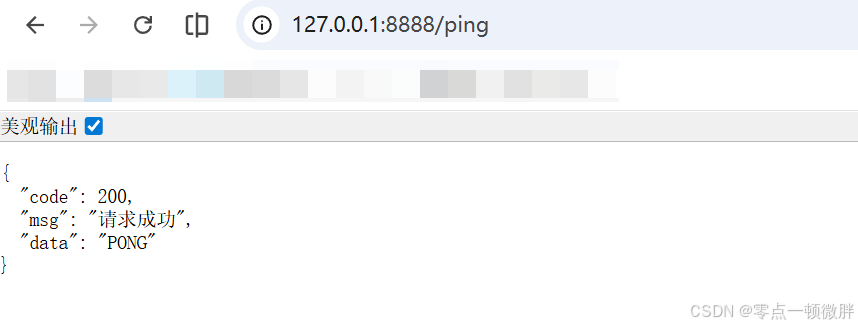
服务启动成功后,访问
http://127.0.0.1:8888/ping,可正常返回标准化JSON响应,代表基础服务搭建完成。