Exercise-tracker 运动记录应用开发教程
项目介绍
项目背景
运动记录应用是一个帮助用户记录和追踪运动数据的健康管理工具。随着人们对健康生活方式的重视,运动已经成为日常生活的重要组成部分。然而,很多人在运动时缺乏系统的记录和分析,导致无法准确了解自己的运动状况和进步情况。
运动记录应用通过数字化的方式,帮助用户记录每次运动的类型、时长、消耗的卡路里等数据,并提供统计分析功能,让用户能够清晰地看到自己的运动轨迹和成果。这种可视化的反馈机制能够有效激励用户坚持运动,养成健康的生活习惯。
应用场景
-
健身记录:记录每次运动的详细数据,包括运动类型、持续时间、消耗卡路里等。用户可以随时查看自己的运动历史。
-
数据分析:分析运动习惯和趋势,了解哪些运动类型最常进行,哪些时间段运动最频繁。
-
目标追踪:设定运动目标并追踪完成情况,如每周运动次数、每月运动时长等。
-
健康监测:长期记录运动数据,为健康管理提供参考依据。
功能特性
-
运动记录:记录运动类型、时长、消耗卡路里和备注信息。
-
类型选择:支持多种运动类型,如跑步、游泳、骑行、健身、瑜伽等。
-
数据统计:统计本周运动次数、总时长和总消耗卡路里。
-
历史记录:查看历史运动记录,支持删除操作。
-
图标显示:根据运动类型显示相应的图标,直观易识别。
最终效果
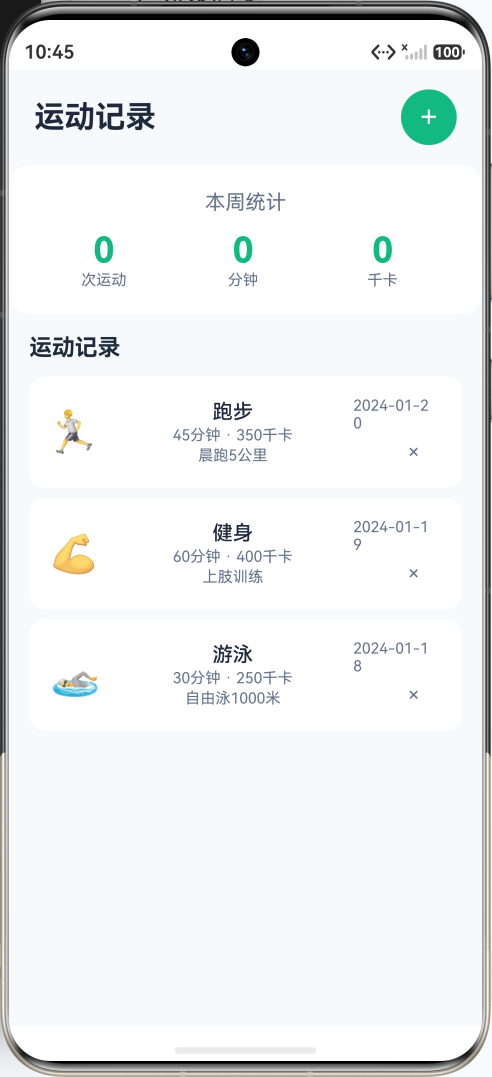
应用采用绿色主题,象征着健康和活力。主界面包含:
- 顶部标题栏和添加按钮
- 本周统计卡片,显示运动次数、总时长和总消耗
- 运动记录列表,显示每条记录的详情
技术栈
- 开发框架:HarmonyOS NEXT (API 20+)
- 编程语言:ArkTS
- UI框架:ArkUI 声明式 UI
- 核心组件:Column, Row, List, Button, TextInput, Select
知识点讲解
1. 数据统计
使用 reduce 方法进行数据统计,计算总和、平均值等。
typescript
// 计算本周统计数据
private getWeeklyStats() {
  const today = new Date()
  const weekAgo = new Date(today.getTime() - 7 * 24 * 60 * 60 * 1000)

  // 过滤本周的记录
  const weeklyRecords = this.records.filter(record => {
    const recordDate = new Date(record.date)
    return recordDate >= weekAgo && recordDate <= today
  })

  // 计算统计数据
  return {
    // 运动次数
    count: weeklyRecords.length,
    // 总时长(使用 reduce 累加)
    totalDuration: weeklyRecords.reduce((sum, record) => sum + record.duration, 0),
    // 总消耗卡路里
    totalCalories: weeklyRecords.reduce((sum, record) => sum + record.calories, 0)
  }
}
2. 图标映射
使用对象映射实现图标选择,根据运动类型返回对应的图标。
typescript
// 定义运动类型图标映射
private readonly typeIcons: Record<string, string> = {
  '跑步': '🏃',
  '游泳': '🏊',
  '骑行': '🚴',
  '健身': '💪',
  '瑜伽': '🧘',
  '跳绳': '⚡',
  '篮球': '🏀',
  '羽毛球': '🏸',
  '足球': '⚽',
  '网球': '🎾'
}

// 获取运动类型图标
private getTypeIcon(type: string): string {
  return this.typeIcons[type] || '🏃'  // 默认图标
}
3. 日期处理
获取和格式化日期,用于记录和筛选运动数据。
typescript
// 获取今天的日期字符串
private getTodayString(): string {
  const today = new Date()
  const year = today.getFullYear()
  const month = (today.getMonth() + 1).toString().padStart(2, '0')
  const day = today.getDate().toString().padStart(2, '0')
  return `${year}-${month}-${day}`
}

// 格式化日期显示
private formatDate(dateStr: string): string {
  const date = new Date(dateStr)
  const month = (date.getMonth() + 1).toString().padStart(2, '0')
  const day = date.getDate().toString().padStart(2, '0')
  return `${month}月${day}日`
}

// 计算相对日期
private getRelativeDate(dateStr: string): string {
  const today = this.getTodayString()
  if (dateStr === today) return '今天'

  const yesterday = new Date()
  yesterday.setDate(yesterday.getDate() - 1)
  if (dateStr === this.formatDateToString(yesterday)) return '昨天'

  return this.formatDate(dateStr)
}
4. 表单处理
处理添加运动记录的表单数据,包括输入验证和数据格式化。
typescript
// 表单状态
@State newType: string = '跑步'
@State newDuration: string = '30'
@State newCalories: string = '200'
@State newNotes: string = ''

// 添加运动记录
private addRecord() {
  // 验证输入
  const duration = parseInt(this.newDuration)
  const calories = parseInt(this.newCalories)

  if (isNaN(duration) || duration <= 0) {
    // 提示错误
    return
  }

  if (isNaN(calories) || calories <= 0) {
    // 提示错误
    return
  }

  // 创建新记录
  const newRecord: ExerciseRecord = {
    id: Date.now(),
    type: this.newType,
    duration: duration,
    calories: calories,
    date: this.getTodayString(),
    notes: this.newNotes.trim()
  }

  // 添加到列表
  this.records.unshift(newRecord)

  // 清空表单
  this.clearForm()

  // 关闭表单
  this.showAddRecord = false
}

// 清空表单
private clearForm() {
  this.newType = '跑步'
  this.newDuration = '30'
  this.newCalories = '200'
  this.newNotes = ''
}
5. 列表渲染
使用 List 和 ForEach 渲染运动记录列表。
typescript
List() {
  ForEach(this.records, (record: ExerciseRecord) => {
    ListItem() {
      Row() {
        // 运动类型图标
        Text(this.getTypeIcon(record.type))
          .fontSize(32)
          .margin({ right: 12 })

        // 记录信息
        Column() {
          Text(record.type)
            .fontSize(16)
            .fontWeight(FontWeight.Medium)
            .fontColor('#1e293b')

          Text(`${record.duration}分钟 · ${record.calories}千卡`)
            .fontSize(12)
            .fontColor('#64748b')
            .margin({ top: 2 })

          if (record.notes !== '') {
            Text(record.notes)
              .fontSize(12)
              .fontColor('#9ca3af')
              .margin({ top: 2 })
              .maxLines(1)
              .textOverflow({ overflow: TextOverflow.Ellipsis })
          }
        }
        .width('60%')

        // 日期和删除按钮
        Column() {
          Text(this.getRelativeDate(record.date))
            .fontSize(12)
            .fontColor('#64748b')

          Button() {
            Text('×')
              .fontSize(16)
              .fontColor('#9ca3af')
          }
          .width(24)
          .height(24)
          .backgroundColor('transparent')
          .margin({ top: 4 })
          .onClick(() => {
            this.deleteRecord(record.id)
          })
        }
        .width('20%')
        .alignItems(HorizontalAlign.End)
      }
      .width('100%')
      .padding(16)
      .backgroundColor('#ffffff')
      .borderRadius(12)
      .margin({ bottom: 8 })
    }
  })
}
.width('100%')
.layoutWeight(1)
6. 统计卡片
显示本周运动统计数据。
typescript
Column() {
  Text('本周统计')
    .fontSize(16)
    .fontColor('#64748b')
    .margin({ bottom: 12 })

  Row() {
    // 运动次数
    Column() {
      Text(`${this.getWeeklyStats().count}`)
        .fontSize(28)
        .fontWeight(FontWeight.Bold)
        .fontColor('#10b981')
      Text('次运动')
        .fontSize(12)
        .fontColor('#64748b')
    }
    .width('33%')
    .alignItems(HorizontalAlign.Center)

    // 总时长
    Column() {
      Text(`${this.getWeeklyStats().totalDuration}`)
        .fontSize(28)
        .fontWeight(FontWeight.Bold)
        .fontColor('#10b981')
      Text('分钟')
        .fontSize(12)
        .fontColor('#64748b')
    }
    .width('33%')
    .alignItems(HorizontalAlign.Center)

    // 总消耗
    Column() {
      Text(`${this.getWeeklyStats().totalCalories}`)
        .fontSize(28)
        .fontWeight(FontWeight.Bold)
        .fontColor('#10b981')
      Text('千卡')
        .fontSize(12)
        .fontColor('#64748b')
    }
    .width('33%')
    .alignItems(HorizontalAlign.Center)
  }
  .width('100%')
}
.width('100%')
.padding(20)
.backgroundColor('#ffffff')
.borderRadius(16)
.margin({ left: 16, right: 16, bottom: 16 })
7. 删除记录
删除不需要的运动记录。
typescript
private deleteRecord(id: number) {
  this.records = this.records.filter(record => record.id !== id)
}
8. 类型选择
使用 Select 组件选择运动类型。
typescript
Select(this.exerciseTypes.map(type => ({ value: type })))
  .value(this.newType)
  .width('100%')
  .height(44)
  .onSelect((index: number) => {
    this.newType = this.exerciseTypes[index]
  })
9. 输入验证
验证用户输入的数据是否有效。
typescript
private validateDuration(input: string): boolean {
  const duration = parseInt(input)
  return !isNaN(duration) && duration > 0 && duration <= 480  // 最大8小时
}

private validateCalories(input: string): boolean {
  const calories = parseInt(input)
  return !isNaN(calories) && calories > 0 && calories <= 5000  // 最大5000千卡
}
10. 数据格式化
格式化显示数据,使其更加易读。
typescript
// 格式化时长显示
private formatDuration(minutes: number): string {
  if (minutes < 60) {
    return `${minutes}分钟`
  }
  const hours = Math.floor(minutes / 60)
  const mins = minutes % 60
  return mins > 0 ? `${hours}小时${mins}分钟` : `${hours}小时`
}

// 格式化卡路里显示
private formatCalories(calories: number): string {
  if (calories >= 1000) {
    return `${(calories / 1000).toFixed(1)}千卡`
  }
  return `${calories}千卡`
}
完整代码解析
页面结构
┌─────────────────────────────────┐
│  [运动记录]            [+]      │
├─────────────────────────────────┤
│  ┌───────────────────────────┐  │
│  │       本周统计            │  │
│  │  3次运动  135分钟  1000千卡│  │
│  └───────────────────────────┘  │
├─────────────────────────────────┤
│  运动记录                       │
│  ┌───────────────────────────┐  │
│  │ 🏃 跑步                   │  │
│  │    45分钟 · 350千卡        │  │
│  │    晨跑5公里               │  │
│  │    今天            [×]    │  │
│  └───────────────────────────┘  │
│  ┌───────────────────────────┐  │
│  │ 💪 健身                   │  │
│  │    60分钟 · 400千卡        │  │
│  │    上肢训练                │  │
│  │    昨天            [×]    │  │
│  └───────────────────────────┘  │
│  ┌───────────────────────────┐  │
│  │ 🏊 游泳                   │  │
│  │    30分钟 · 250千卡        │  │
│  │    自由泳1000米            │  │
│  │    01月18日        [×]    │  │
│  └───────────────────────────┘  │
└─────────────────────────────────┘
核心方法
1. 添加记录
typescript
private addRecord() {
  const duration = parseInt(this.newDuration)
  const calories = parseInt(this.newCalories)

  if (isNaN(duration) || duration <= 0) {
    return
  }

  if (isNaN(calories) || calories <= 0) {
    return
  }

  const newRecord: ExerciseRecord = {
    id: Date.now(),
    type: this.newType,
    duration: duration,
    calories: calories,
    date: this.getTodayString(),
    notes: this.newNotes.trim()
  }

  this.records.unshift(newRecord)
  this.clearForm()
  this.showAddRecord = false
}
2. 获取本周统计
typescript
private getWeeklyStats() {
  const today = new Date()
  const weekAgo = new Date(today.getTime() - 7 * 24 * 60 * 60 * 1000)

  const weeklyRecords = this.records.filter(record => {
    const recordDate = new Date(record.date)
    return recordDate >= weekAgo && recordDate <= today
  })

  return {
    count: weeklyRecords.length,
    totalDuration: weeklyRecords.reduce((sum, record) => sum + record.duration, 0),
    totalCalories: weeklyRecords.reduce((sum, record) => sum + record.calories, 0)
  }
}
3. 删除记录
typescript
private deleteRecord(id: number) {
  this.records = this.records.filter(record => record.id !== id)
}
常见问题与解决方案
问题1:输入验证不严格
现象:可以输入负数或非数字字符。
解决方案:
typescript
const duration = parseInt(this.newDuration)
if (isNaN(duration) || duration <= 0) {
  // 显示错误提示
  return
}
问题2:日期过滤不准确
现象:本周统计包含了非本周的记录。
解决方案:
typescript
// 确保正确计算一周的时间范围
const weekAgo = new Date(today.getTime() - 7 * 24 * 60 * 60 * 1000)

// 使用日期对象进行比较
const weeklyRecords = this.records.filter(record => {
  const recordDate = new Date(record.date)
  return recordDate >= weekAgo && recordDate <= today
})
问题3:统计数据不更新
现象:添加或删除记录后,统计数据没有变化。
解决方案:
typescript
// 确保 getWeeklyStats() 方法在每次渲染时重新计算
// 不要缓存统计数据,而是每次调用时重新计算
private getWeeklyStats() {
  // 每次调用都重新计算
  // ...
}
扩展学习
可添加功能
-
GPS定位
- 记录运动轨迹
- 计算运动距离
- 显示运动路线地图
-
心率监测
- 连接心率设备
- 记录心率数据
- 心率区间分析
-
运动计划
- 制定运动计划
- 计划完成追踪
- 智能推荐运动
-
社交分享
- 分享运动成果
- 好友排行榜
- 运动挑战
-
数据分析
- 运动趋势图表
- 消耗卡路里分析
- 运动效果评估
总结
通过本教程,您学会了:
-
数据统计:如何使用 reduce 方法进行数据累加和统计。
-
图标映射:如何使用对象映射实现图标选择。
-
日期处理:如何获取、格式化和比较日期。
-
表单处理:如何处理用户输入和表单验证。
-
列表渲染:如何使用 List 和 ForEach 渲染数据列表。
-
数据格式化:如何格式化显示数据,使其更加易读。
这些知识点可以应用于各种数据记录和统计分析类应用的开发。