SpringAi 1.1更新
1.MCP 支持Streamable http传输方式
Streamable HTTP 传输允许MCP 服务器作为独立进程运行,可以使用 HTTP POST 和 GET 请求处理多个客户端连接,并可选用服务器发送事件 (SSE) 流来处理多个服务器消息。它取代了 SSE 传输。
服务端设置:
Properties
spring.ai.mcp.server.protocol=STREAMABLE客户端设置:

yaml
spring:
  ai:
    mcp:
      client:
        streamable-http:
          connections:
            server1:
              url: http://localhost:8080
            server2:
              url: http://otherserver:8081
              endpoint: /mcp
2.增加MCP注解
a.官方示例:
所有注释功能(客户端和服务器):https://github.com/spring-projects/spring-ai-examples/tree/main/model-context-protocol/mcp-annotations/
高级双向 AI(客户端和服务器):https://github.com/spring-projects/spring-ai-examples/tree/main/model-context-protocol/sampling/annotations/
完整教程源代码(客户端和服务器):https://github.com/tzolov/spring-ai-mcp-blogpost
客户端
@McpLogging
基本用法
java
@Component
public class LoggingHandler {

    @McpLogging(clients = "my-mcp-server")
    public void handleLoggingMessage(LoggingMessageNotification notification) {
        System.out.println("Received log: " + notification.level() +
                          " - " + notification.data());
    }
}
具有单独参数
java
@McpLogging(clients = "my-mcp-server")
public void handleLoggingWithParams(LoggingLevel level, String logger, String data) {
    System.out.println(String.format("[%s] %s: %s", level, logger, data));
}
@McpSampling
该@McpSampling注释处理来自 MCP 服务器的 LLM 初始化完成
同步实现
java
@Component
public class SamplingHandler {

    @McpSampling(clients = "llm-server")
    public CreateMessageResult handleSamplingRequest(CreateMessageRequest request) {
        // Process the request and generate a response
        String response = generateLLMResponse(request);

        return CreateMessageResult.builder()
            .role(Role.ASSISTANT)
            .content(new TextContent(response))
            .model("gpt-4")
            .build();
    }
}
异步实现
java
@Component
public class AsyncSamplingHandler {

    @McpSampling(clients = "llm-server")
    public Mono<CreateMessageResult> handleAsyncSampling(CreateMessageRequest request) {
        return Mono.fromCallable(() -> {
            String response = generateLLMResponse(request);

            return CreateMessageResult.builder()
                .role(Role.ASSISTANT)
                .content(new TextContent(response))
                .model("gpt-4")
                .build();
        }).subscribeOn(Schedulers.boundedElastic());
    }
}
@McpElicitation
注释@McpElicitation处理引出请求以从用户那里收集更多信息。
基本用法
java
@Component
public class ElicitationHandler {

    @McpElicitation(clients = "interactive-server")
    public ElicitResult handleElicitationRequest(ElicitRequest request) {
        // Present the request to the user and gather input
        Map<String, Object> userData = presentFormToUser(request.requestedSchema());

        if (userData != null) {
            return new ElicitResult(ElicitResult.Action.ACCEPT, userData);
        } else {
            return new ElicitResult(ElicitResult.Action.DECLINE, null);
        }
    }
}
与用户交互
java
@McpElicitation(clients = "interactive-server")
public ElicitResult handleInteractiveElicitation(ElicitRequest request) {
    Map<String, Object> schema = request.requestedSchema();
    Map<String, Object> userData = new HashMap<>();

    // Check what information is being requested
    if (schema != null && schema.containsKey("properties")) {
        Map<String, Object> properties = (Map<String, Object>) schema.get("properties");

        // Gather user input based on schema
        if (properties.containsKey("name")) {
            userData.put("name", promptUser("Enter your name:"));
        }
        if (properties.containsKey("email")) {
            userData.put("email", promptUser("Enter your email:"));
        }
        if (properties.containsKey("preferences")) {
            userData.put("preferences", gatherPreferences());
        }
    }

    return new ElicitResult(ElicitResult.Action.ACCEPT, userData);
}
异步引出
java
@McpElicitation(clients = "interactive-server")
public Mono<ElicitResult> handleAsyncElicitation(ElicitRequest request) {
    return Mono.fromCallable(() -> {
        // Async user interaction
        Map<String, Object> userData = asyncGatherUserInput(request);
        return new ElicitResult(ElicitResult.Action.ACCEPT, userData);
    }).timeout(Duration.ofSeconds(30))
      .onErrorReturn(new ElicitResult(ElicitResult.Action.CANCEL, null));
}
@McpProgress
该@McpProgress注释处理长时间运行的操作的进度通知。
基本用法
java
@Component
public class ProgressHandler {

    @McpProgress(clients = "my-mcp-server")
    public void handleProgressNotification(ProgressNotification notification) {
        double percentage = notification.progress() * 100;
        System.out.println(String.format("Progress: %.2f%% - %s",
            percentage, notification.message()));
    }
}
具有单独参数
java
@McpProgress(clients = "my-mcp-server")
public void handleProgressWithDetails(
        String progressToken,
        double progress,
        Double total,
        String message) {

    if (total != null) {
        System.out.println(String.format("[%s] %.0f/%.0f - %s",
            progressToken, progress, total, message));
    } else {
        System.out.println(String.format("[%s] %.2f%% - %s",
            progressToken, progress * 100, message));
    }

    // Update UI progress bar
    updateProgressBar(progressToken, progress);
}
客户特定进展
java
@McpProgress(clients = "long-running-server")
public void handleLongRunningProgress(ProgressNotification notification) {
    // Track progress for specific server
    progressTracker.update("long-running-server", notification);

    // Send notifications if needed
    if (notification.progress() >= 1.0) {
        notifyCompletion(notification.progressToken());
    }
}
@McpToolListChanged
@McpToolListChanged当服务器的工具列表发生变化时,注释会处理通知。
基本用法
java
@Component
public class ToolListChangedHandler {

    @McpToolListChanged(clients = "tool-server")
    public void handleToolListChanged(List<McpSchema.Tool> updatedTools) {
        System.out.println("Tool list updated: " + updatedTools.size() + " tools available");

        // Update local tool registry
        toolRegistry.updateTools(updatedTools);

        // Log new tools
        for (McpSchema.Tool tool : updatedTools) {
            System.out.println("  - " + tool.name() + ": " + tool.description());
        }
    }
}
异步处理
java
@McpToolListChanged(clients = "tool-server")
public Mono<Void> handleAsyncToolListChanged(List<McpSchema.Tool> updatedTools) {
    return Mono.fromRunnable(() -> {
        // Process tool list update asynchronously
        processToolListUpdate(updatedTools);

        // Notify interested components
        eventBus.publish(new ToolListUpdatedEvent(updatedTools));
    }).then();
}
客户端特定工具更新
java
@McpToolListChanged(clients = "dynamic-server")
public void handleDynamicServerToolUpdate(List<McpSchema.Tool> updatedTools) {
    // Handle tools from a specific server that frequently changes its tools
    dynamicToolManager.updateServerTools("dynamic-server", updatedTools);

    // Re-evaluate tool availability
    reevaluateToolCapabilities();
}
@McpResourceListChanged
@McpResourceListChanged当服务器的资源列表发生变化时,注释会处理通知。
基本用法
java
@Component
public class ResourceListChangedHandler {

    @McpResourceListChanged(clients = "resource-server")
    public void handleResourceListChanged(List<McpSchema.Resource> updatedResources) {
        System.out.println("Resources updated: " + updatedResources.size());

        // Update resource cache
        resourceCache.clear();
        for (McpSchema.Resource resource : updatedResources) {
            resourceCache.register(resource);
        }
    }
}
通过资源分析
java
@McpResourceListChanged(clients = "resource-server")
public void analyzeResourceChanges(List<McpSchema.Resource> updatedResources) {
    // Analyze what changed
    Set<String> newUris = updatedResources.stream()
        .map(McpSchema.Resource::uri)
        .collect(Collectors.toSet());

    Set<String> removedUris = previousUris.stream()
        .filter(uri -> !newUris.contains(uri))
        .collect(Collectors.toSet());

    if (!removedUris.isEmpty()) {
        handleRemovedResources(removedUris);
    }

    // Update tracking
    previousUris = newUris;
}
@McpPromptListChanged
@McpPromptListChanged当服务器的提示列表发生变化时,注释会处理通知。
基本用法
java
@Component
public class PromptListChangedHandler {

    @McpPromptListChanged(clients = "prompt-server")
    public void handlePromptListChanged(List<McpSchema.Prompt> updatedPrompts) {
        System.out.println("Prompts updated: " + updatedPrompts.size());

        // Update prompt catalog
        promptCatalog.updatePrompts(updatedPrompts);

        // Refresh UI if needed
        if (uiController != null) {
            uiController.refreshPromptList(updatedPrompts);
        }
    }
}
异步处理
java
@McpPromptListChanged(clients = "prompt-server")
public Mono<Void> handleAsyncPromptUpdate(List<McpSchema.Prompt> updatedPrompts) {
    return Flux.fromIterable(updatedPrompts)
        .flatMap(prompt -> validatePrompt(prompt))
        .collectList()
        .doOnNext(validPrompts -> {
            promptRepository.saveAll(validPrompts);
        })
        .then();
}
注解中的参数clients必须与配置中定义的连接名称匹配。在上面的示例中,有效clients值为:"my-server"、"tool-server"和"local-server"。
服务器注释
@McpTool
@McpTool替代了以前的@Tool 进行了区分
基本用法
java
@Component
public class CalculatorTools {

    @McpTool(name = "add", description = "Add two numbers together")
    public int add(
            @McpToolParam(description = "First number", required = true) int a,
            @McpToolParam(description = "Second number", required = true) int b) {
        return a + b;
    }
}
高级功能
java
@McpTool(name = "calculate-area",
         description = "Calculate the area of a rectangle",
         annotations = McpTool.McpAnnotations(
             title = "Rectangle Area Calculator",
             readOnlyHint = true,
             destructiveHint = false,
             idempotentHint = true
         ))
public AreaResult calculateRectangleArea(
        @McpToolParam(description = "Width", required = true) double width,
        @McpToolParam(description = "Height", required = true) double height) {

    return new AreaResult(width * height, "square units");
}
使用服务器交换
工具可以访问服务器交换以进行高级操作:
java
@McpTool(name = "process-data", description = "Process data with server context")
public String processData(
        McpSyncServerExchange exchange,
        @McpToolParam(description = "Data to process", required = true) String data) {

    // Send logging notification
    exchange.loggingNotification(LoggingMessageNotification.builder()
        .level(LoggingLevel.INFO)
        .data("Processing data: " + data)
        .build());

    // Send progress notification if progress token is available
    exchange.progressNotification(new ProgressNotification(
        progressToken, 0.5, 1.0, "Processing..."));

    return "Processed: " + data.toUpperCase();
}
动态模式支持
工具可以接受CallToolRequest运行时模式处理:
java
@McpTool(name = "flexible-tool", description = "Process dynamic schema")
public CallToolResult processDynamic(CallToolRequest request) {
    Map<String, Object> args = request.arguments();

    // Process based on runtime schema
    String result = "Processed " + args.size() + " arguments dynamically";

    return CallToolResult.builder()
        .addTextContent(result)
        .build();
}
进度追踪
工具可以接收进度令牌来跟踪长时间运行的操作:
java
@McpTool(name = "long-task", description = "Long-running task with progress")
public String performLongTask(
        @McpProgressToken String progressToken,
        @McpToolParam(description = "Task name", required = true) String taskName,
        McpSyncServerExchange exchange) {

    if (progressToken != null) {
        exchange.progressNotification(new ProgressNotification(
            progressToken, 0.0, 1.0, "Starting task"));

        // Perform work...

        exchange.progressNotification(new ProgressNotification(
            progressToken, 1.0, 1.0, "Task completed"));
    }

    return "Task " + taskName + " completed";
}
@McpResource
注释@McpResource通过 URI 模板提供对资源的访问。
基本用法
java
@Component
public class ResourceProvider {

    @McpResource(
        uri = "config://{key}",
        name = "Configuration",
        description = "Provides configuration data")
    public String getConfig(String key) {
        return configData.get(key);
    }
}
使用 ReadResourceResult
java
@McpResource(
    uri = "user-profile://{username}",
    name = "User Profile",
    description = "Provides user profile information")
public ReadResourceResult getUserProfile(String username) {
    String profileData = loadUserProfile(username);

    return new ReadResourceResult(List.of(
        new TextResourceContents(
            "user-profile://" + username,
            "application/json",
            profileData)
    ));
}
使用服务器交换
java
@McpResource(
    uri = "data://{id}",
    name = "Data Resource",
    description = "Resource with server context")
public ReadResourceResult getData(
        McpSyncServerExchange exchange,
        String id) {

    exchange.loggingNotification(LoggingMessageNotification.builder()
        .level(LoggingLevel.INFO)
        .data("Accessing resource: " + id)
        .build());

    String data = fetchData(id);

    return new ReadResourceResult(List.of(
        new TextResourceContents("data://" + id, "text/plain", data)
    ));
}
@McpPrompt
注释@McpPrompt会生成用于AI交互的提示信息。
基本用法
java
@Component
public class PromptProvider {

    @McpPrompt(
        name = "greeting",
        description = "Generate a greeting message")
    public GetPromptResult greeting(
            @McpArg(name = "name", description = "User's name", required = true)
            String name) {

        String message = "Hello, " + name + "! How can I help you today?";

        return new GetPromptResult(
            "Greeting",
            List.of(new PromptMessage(Role.ASSISTANT, new TextContent(message)))
        );
    }
}
带有可选参数
java
@McpPrompt(
    name = "personalized-message",
    description = "Generate a personalized message")
public GetPromptResult personalizedMessage(
        @McpArg(name = "name", required = true) String name,
        @McpArg(name = "age", required = false) Integer age,
        @McpArg(name = "interests", required = false) String interests) {

    StringBuilder message = new StringBuilder();
    message.append("Hello, ").append(name).append("!\n\n");

    if (age != null) {
        message.append("At ").append(age).append(" years old, ");
        // Add age-specific content
    }

    if (interests != null && !interests.isEmpty()) {
        message.append("Your interest in ").append(interests);
        // Add interest-specific content
    }

    return new GetPromptResult(
        "Personalized Message",
        List.of(new PromptMessage(Role.ASSISTANT, new TextContent(message.toString())))
    );
}
@McpComplete
注释@McpComplete为提示提供了自动完成功能。
基本用法
java
@Component
public class CompletionProvider {

    @McpComplete(prompt = "city-search")
    public List<String> completeCityName(String prefix) {
        return cities.stream()
            .filter(city -> city.toLowerCase().startsWith(prefix.toLowerCase()))
            .limit(10)
            .toList();
    }
}
使用 CompleteRequest.CompleteArgument
java
@McpComplete(prompt = "travel-planner")
public List<String> completeTravelDestination(CompleteRequest.CompleteArgument argument) {
    String prefix = argument.value().toLowerCase();
    String argumentName = argument.name();

    // Different completions based on argument name
    if ("city".equals(argumentName)) {
        return completeCities(prefix);
    } else if ("country".equals(argumentName)) {
        return completeCountries(prefix);
    }

    return List.of();
}
具有 CompleteResult
java
@McpComplete(prompt = "code-completion")
public CompleteResult completeCode(String prefix) {
    List<String> completions = generateCodeCompletions(prefix);

    return new CompleteResult(
        new CompleteResult.CompleteCompletion(
            completions,
            completions.size(),  // total
            hasMoreCompletions   // hasMore flag
        )
    );
}
无状态与有状态实现
● 有状态(使用 McpSyncServerExchange/McpAsyncServerExchange)
有状态的实现可以访问完整的服务器交换上下文:
java
@McpTool(name = "stateful-tool", description = "Tool with server exchange")
public String statefulTool(
        McpSyncServerExchange exchange,
        @McpToolParam(description = "Input", required = true) String input) {

    // Access server exchange features
    exchange.loggingNotification(...);
    exchange.progressNotification(...);
    exchange.ping();

    // Can call client methods
    CreateMessageResult result = exchange.createMessage(...);
    ElicitResult elicitResult = exchange.createElicitation(...);

    return "Processed with full context";
}
● 无状态(有或无 McpTransportContext)
无状态实现更简单,不需要服务器交换:
java
@McpTool(name = "stateless-tool", description = "Simple stateless tool")
public int simpleAdd(
        @McpToolParam(description = "First number", required = true) int a,
        @McpToolParam(description = "Second number", required = true) int b) {
    return a + b;
}

// With transport context if needed
@McpTool(name = "stateless-with-context", description = "Stateless with context")
public String withContext(
        McpTransportContext context,
        @McpToolParam(description = "Input", required = true) String input) {
    // Limited context access
    return "Processed: " + input;
}
异步支持
所有服务器注解都支持使用 Reactor 的异步实现:
java
@Component
public class AsyncTools {

    @McpTool(name = "async-fetch", description = "Fetch data asynchronously")
    public Mono<String> asyncFetch(
            @McpToolParam(description = "URL", required = true) String url) {

        return Mono.fromCallable(() -> {
            // Simulate async operation
            return fetchFromUrl(url);
        }).subscribeOn(Schedulers.boundedElastic());
    }

    @McpResource(uri = "async-data://{id}", name = "Async Data")
    public Mono<ReadResourceResult> asyncResource(String id) {
        return Mono.fromCallable(() -> {
            String data = loadData(id);
            return new ReadResourceResult(List.of(
                new TextResourceContents("async-data://" + id, "text/plain", data)
            ));
        }).delayElements(Duration.ofMillis(100));
    }
}
3.增加MCP 授权认证(1.0.3开发中...)
提供基于OAuth 2.0的授权认证安全实现
官方详细说明:
https://docs.spring.io/spring-ai/reference/1.1/api/mcp/mcp-security.html
示例代码:
4.支持MCP HTTP请求方式的定制
提供了McpAsyncHttpClientRequestCustomizer 允许您在 MCP 客户端发送 HTTP 请求之前对请求进行自定义修改,例如添加自定义请求头、修改请求参数等 。
以前想要设置请求头是不可以的。想要实现auth2非常艰难
java
@Bean
public McpAsyncHttpClientRequestCustomizer asyncHttpRequestCustomizer() {
    return (httpRequest, uri, method, headers, body) -> {
        // 添加自定义请求头
        headers.put("Authorization", List.of("Bearer your-token-here"));


        // 返回修改后的 HttpRequest
        return Mono.just(httpRequest);
    };
}
5.支持消息元数据
ChatClient 支持向用户消息和系统消息添加元数据。元数据提供了有关消息的额外上下文和信息,元数据对大模型没有作用, 只作为对话记忆进行后续检索用
您可以使用以下方法向用户消息添加元数据metadata():
java
// Adding individual metadata key-value pairs
String response = chatClient.prompt()
    .user(u -> u.text("What's the weather like?")
        .metadata("messageId", "msg-123")
        .metadata("userId", "user-456")
        .metadata("priority", "high"))
    .call()
    .content();

// Adding multiple metadata entries at once
Map<String, Object> userMetadata = Map.of(
    "messageId", "msg-123",
    "userId", "user-456",
    "timestamp", System.currentTimeMillis()
);

String response = chatClient.prompt()
    .user(u -> u.text("What's the weather like?")
        .metadata(userMetadata))
    .call()
    .content();
6.支持KeywordMetadataEnricher自定义模板
KeywordMetadataEnricher 用于RAG场景, 可以将文档进行关键字提取, 但是以前无法指定范围, 后续检索不不可控, 现在可以自定义了:
示例
java
ChatModel chatModel = // initialize your chat model
KeywordMetadataEnricher enricher = KeywordMetadataEnricher.builder(chatModel)
                .keywordCount(5)
                .build();

// Or use custom templates
KeywordMetadataEnricher enricher = KeywordMetadataEnricher.builder(chatModel)
                .keywordsTemplate(new PromptTemplate("Extract 5 important keywords from the following text and separate them with commas:\n{context_str}"))
                .build();
KeywordMetadataEnricher enricher = new KeywordMetadataEnricher(chatModel, 5);

Document doc = new Document("This is a document about artificial intelligence and its applications in modern technology.");

List<Document> enrichedDocs = enricher.apply(List.of(this.doc));

Document enrichedDoc = this.enrichedDocs.get(0);
String keywords = (String) this.enrichedDoc.getMetadata().get("excerpt_keywords");
System.out.println("Extracted keywords: " + keywords);
基于jdbc的Chat-memory提供了sql脚本
以前需要自己提供
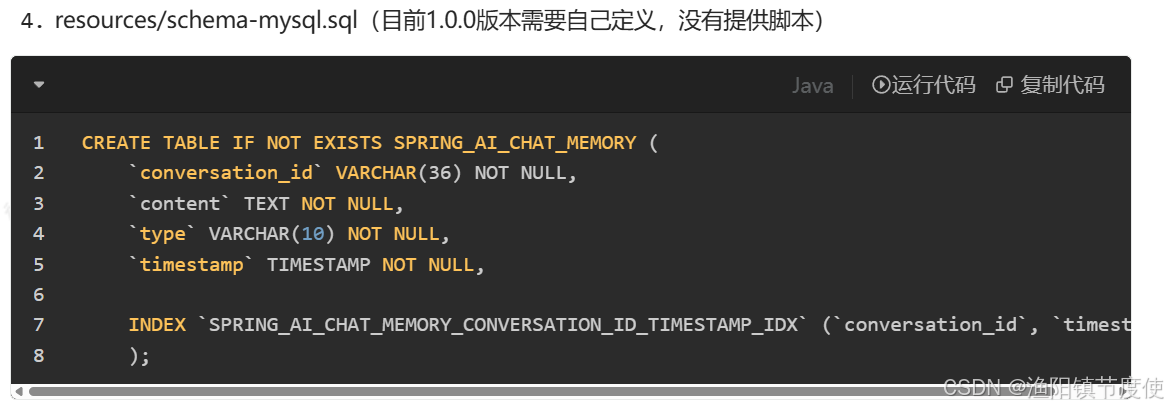
8.支持对Tool异常自定义处理
您可以使用`spring.ai.tools.throw-exception-on-error属性来控制 bean 的行为DefaultToolExecutionExceptionProcessor:
| Property | Description | Default |
|---|---|---|
| spring.ai.tools.throw-exception-on-error | 如果true,工具调用错误将作为异常抛出,供调用者处理。如果false,错误将转换为消息并发送回 AI 模型,使其能够处理并响应错误。 | false |
java
@Bean
ToolExecutionExceptionProcessor toolExecutionExceptionProcessor() {
    return new DefaultToolExecutionExceptionProcessor(true);
}
Ollama的Think模式居然还不支持关闭