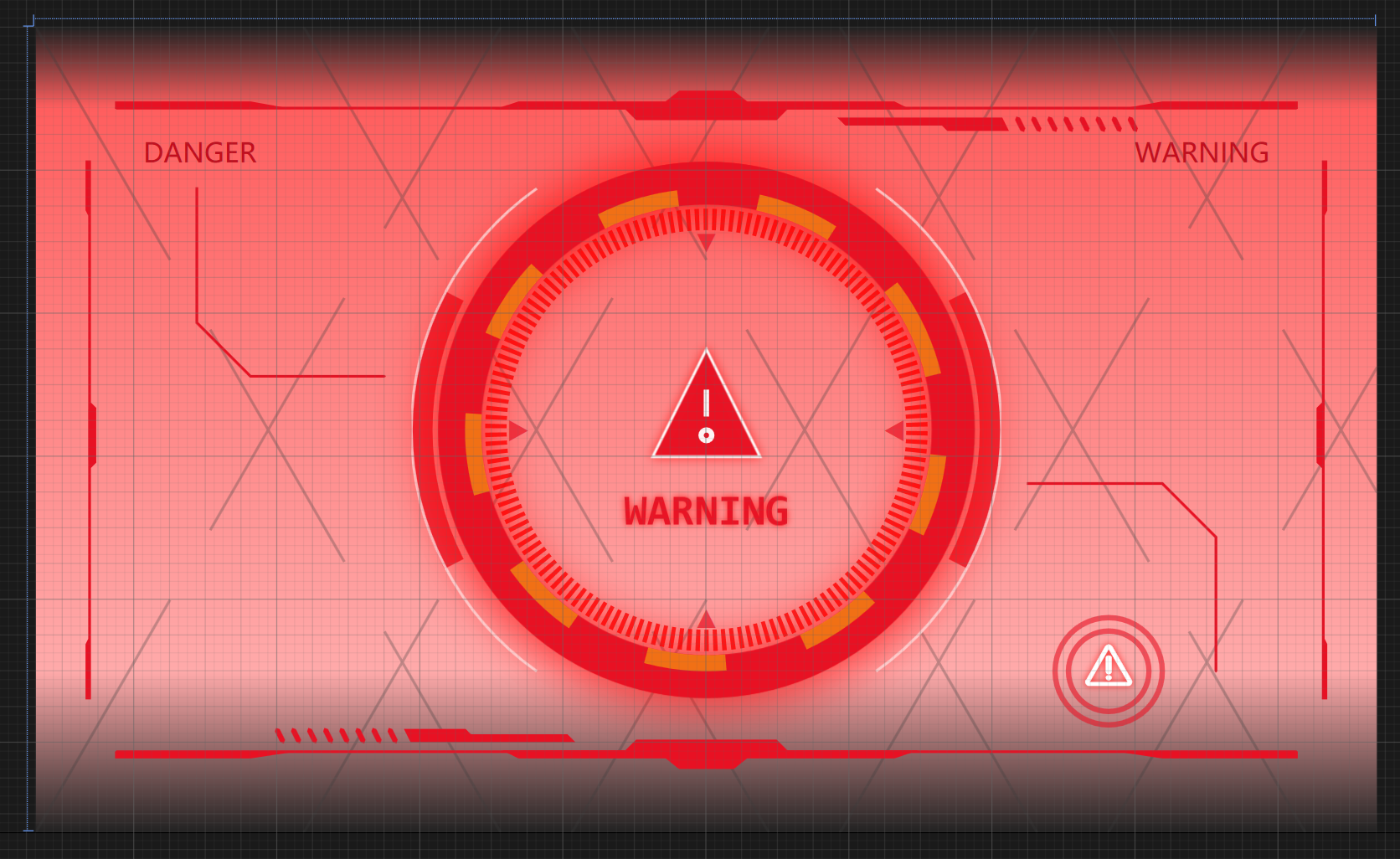
效果图
摘要 :本文详细展示了如何使用 WPF/XAML 创建一个具有科技感和动态效果的警告界面。核心内容包括:1) 使用
Ellipse和Path绘制多层旋转齿轮和刻度环;2) 实现红黄配色、渐变背景和发光效果的视觉设计;3) 通过ResourceDictionary定义旋转动画样式,使内外齿轮反向旋转;4) 添加方向箭头、三角警告符号、文本标签等装饰元素。所有代码均提供完整 XAML 实现,可直接运行查看动态效果。
前端代码
效果使用Ellipse和Path来实现。中间的刻度环和黄色的圆环是可以旋转的。
xml
    <Viewbox>
        <Grid Width="500" Height="300">
            <Grid.Background>
                <LinearGradientBrush StartPoint="0,0" EndPoint="0,1">
                    <GradientStop Offset="0" Color="#222222" />
                    <GradientStop Offset="0.1" Color="#FF5E5E" />
                    <GradientStop Offset="0.8" Color="#FFAAAA" />
                    <GradientStop Offset="1" Color="#222222" />
                </LinearGradientBrush>
            </Grid.Background>
            <!--  背景线  -->
            <Path Opacity="0.3"
                  Stroke="{StaticResource InteractiveSecondaryBrush}"
                  StrokeDashArray="100,30"
                  StrokeEndLineCap="Triangle" StrokeLineJoin="Miter"
                  StrokeStartLineCap="Square" StrokeThickness="1">
                <Path.Data>
                    M 0,300 L 173.2,0
                    M 100,300 L 273.2,0
                    M 200,300 L 373.2,0
                    M 300,300 L 473.2,0
                    M 400,300 L 500,126.8
                    M 0,0 L 173.2,300
                    M 100,0 L 273.2,300
                    M 200,0 L 373.2,300
                    M 300,0 L 473.2,300
                    M 400,0 L 500,173.2
                </Path.Data>
            </Path>
            <!--  第一层  -->
            <Path Width="220" Height="220"
                  HorizontalAlignment="Center"
                  VerticalAlignment="Center" Opacity="0.8"
                  Stroke="{StaticResource InteractiveDangerBrush}"
                  StrokeThickness="8">
                <Path.Data>
                    M 15.9,60 A 110,110 0 0 0 15.9,160
                    M 203.9,60 A 110,110 180 0 1 203.9,160
                </Path.Data>
            </Path>
            <Path Width="220" Height="220"
                  HorizontalAlignment="Center"
                  VerticalAlignment="Center" Opacity="0.8"
                  Stroke="White" StrokeThickness="1">
                <Path.Data>
                    M 46.75,20 A 110,110 0 0 0 46.75,200
                    M 173.25,20 A 110,110 180 0 1 173.25,200
                </Path.Data>
            </Path>
            <!--  第二层  -->
            <Ellipse Width="200 " Height="200"
                     Opacity="0.8" RenderTransformOrigin="0.5,0.5"
                     Stroke="{StaticResource InteractiveDangerBrush}"
                     StrokeThickness="8">
                <Ellipse.Effect>
                    <DropShadowEffect BlurRadius="20" Opacity="0.1"
                                      ShadowDepth="0" Color="Red" />
                </Ellipse.Effect>
            </Ellipse>
            <Ellipse Width="200 " Height="200"
                     RenderTransformOrigin="0.5,0.5"
                     Stroke="{StaticResource InteractiveDangerBrush}"
                     StrokeThickness="16">
                <Ellipse.Effect>
                    <DropShadowEffect BlurRadius="50" Opacity="1"
                                      ShadowDepth="0" Color="Red" />
                </Ellipse.Effect>
            </Ellipse>
            <!--  第三层  -->
            <Ellipse Width="180 " Height="180"
                     Opacity="0.4" Stroke="Yellow"
                     StrokeDashArray="5 5" StrokeThickness="6"
                     Style="{StaticResource InnerGearStyle}" />
            <!--  第四层  -->
            <Ellipse Width="165 " Height="165"
                     Opacity="0.8" RenderTransformOrigin="0.5,0.5"
                     Stroke="Red" StrokeDashArray="0.2 0.2"
                     StrokeThickness="8"
                     Style="{StaticResource OuterGearStyle}" />

            <!--  方向箭头  -->
            <TextBlock Margin="0,140,0,0" HorizontalAlignment="Center"
                       VerticalAlignment="Center" FontSize="10"
                       Foreground="{StaticResource InteractiveDangerBrush}"
                       Opacity="0.7" Text="▲" />
            <TextBlock Margin="0,0,0,140" HorizontalAlignment="Center"
                       VerticalAlignment="Center" FontSize="10"
                       Foreground="{StaticResource InteractiveDangerBrush}"
                       Opacity="0.7" Text="▼" />
            <TextBlock Margin="140,0,0,0" HorizontalAlignment="Center"
                       VerticalAlignment="Center" FontSize="10"
                       Foreground="{StaticResource InteractiveDangerBrush}"
                       Opacity="0.7" Text="◀" />
            <TextBlock Margin="0,0,140,0" HorizontalAlignment="Center"
                       VerticalAlignment="Center" FontSize="10"
                       Foreground="{StaticResource InteractiveDangerBrush}"
                       Opacity="0.7" Text="▶" />

            <!--  中心三角警告符号  -->
            <Path Width="60" Height="60"
                  HorizontalAlignment="Center"
                  VerticalAlignment="Center"
                  Fill="{StaticResource InteractiveDangerBrush}"
                  Opacity="0.95" Stroke="White"
                  StrokeThickness="1">
                <Path.Effect>
                    <DropShadowEffect BlurRadius="6" Opacity="0.7"
                                      ShadowDepth="0" Color="Red" />
                </Path.Effect>
                <Path.Data>
                    M 10,40 L 50,40 L 30,0 Z
                </Path.Data>
            </Path>
            <Path Width="60" Height="60"
                  HorizontalAlignment="Center"
                  VerticalAlignment="Center" Opacity="0.95"
                  Stroke="White" StrokeThickness="2">
                <Path.Data>
                    M 30,15 L 30,25
                    M 30,30 A 2,2 0 0 1 32,32 A 2,2 0 0 1 30,34 A 2,2 0 0 1 28,32 A 2,2 0 0 1 30,30
                </Path.Data>
            </Path>

            <TextBlock Margin="0,60,0,0" HorizontalAlignment="Center"
                       VerticalAlignment="Center" FontFamily="Consolas"
                       FontSize="16" FontWeight="Bold"
                       Foreground="{StaticResource InteractiveDangerBrush}"
                       Opacity="0.95" Text="WARNING">
                <TextBlock.Effect>
                    <DropShadowEffect BlurRadius="4" Opacity="0.8"
                                      ShadowDepth="0" Color="Red" />
                </TextBlock.Effect>
            </TextBlock>

            <!--  左右上角文本  -->
            <TextBlock Margin="40,40,0,0" HorizontalAlignment="Left"
                       VerticalAlignment="Top" FontSize="10"
                       Foreground="{StaticResource InteractiveDangerHoverBrush}"
                       Text="DANGER" />
            <TextBlock Margin="0,40,40,0" HorizontalAlignment="Right"
                       VerticalAlignment="Top" FontSize="10"
                       Foreground="{StaticResource InteractiveDangerHoverBrush}"
                       Text="WARNING" />

            <!--  右下角警告符号  -->
            <Path Opacity="0.6" Stroke="{StaticResource InteractiveDangerBrush}" StrokeThickness="2">
                <Path.Data>
                    M 380,240 A 20,20 0 1 1 420,240 A 20,20 0 1 1 380,240
                    M 385,240 A 15,15 0 1 1 415,240 A 15,15 0 1 1 385,240
                </Path.Data>
            </Path>
            <TextBlock Margin="0,0,89,53" HorizontalAlignment="Right"
                       VerticalAlignment="Bottom" FontFamily="Consolas"
                       FontSize="16" FontWeight="Bold"
                       Foreground="White" Text="⚠️">
                <TextBlock.Effect>
                    <DropShadowEffect BlurRadius="4" Opacity="0.8"
                                      ShadowDepth="0" Color="Red" />
                </TextBlock.Effect>
            </TextBlock>

            <Path Stroke="{StaticResource InteractiveDangerBrush}"
                  StrokeEndLineCap="Triangle" StrokeLineJoin="Miter"
                  StrokeStartLineCap="Triangle" StrokeThickness="1">
                <Path.Data>
                    <!--  上下横线  -->
                    M 30,30 H 470
                    M 30,270 H 470
                </Path.Data>
            </Path>
            <!--  装饰加粗线  -->
            <Path Fill="{StaticResource InteractiveDangerBrush}"
                  Stroke="{StaticResource InteractiveDangerBrush}"
                  StrokeEndLineCap="Triangle" StrokeLineJoin="Miter"
                  StrokeStartLineCap="Square" StrokeThickness="1">
                <Path.Data>
                    <!--  装饰加粗线---上  -->
                    M 30,28 H 80 L 90,29.8 H 30 Z
                    M 470,28 H 420 L 410,29.8 H 470 Z
                    M 174,30 L180,28 H235 L240,24 H260 L 265,28 H 320 L 324,30  H280 L276,34 H224 L220,30 Z
                    M 300,34 H360 L362,38 H 340 L338,36 H302 Z
                    <!--  装饰加粗线---下  -->
                    M 30,272 H 80 L 90,270.5 H 30 Z
                    M 470,272 H 420 L 410,270.5 H 470 Z
                    M 326,270 L 320,272 H 265 L 260,276 H 240 L 235,272 H 180 L 176,270 H 220 L 224,266 H 276 L 280,270 Z
                    M 200,266 H 140 L 138,262 H 160 L 162,264 H 198 Z
                </Path.Data>
            </Path>
            <Path Fill="{StaticResource InteractiveDangerBrush}"
                  Stroke="{StaticResource InteractiveDangerBrush}"
                  StrokeEndLineCap="Triangle"
                  StrokeStartLineCap="Triangle" StrokeThickness="2">
                <Path.Data>
                    <!--  装饰加粗线---上  -->
                    M 366,34 L368,38
                    M 372,34 L374,38
                    M 378,34 L380,38
                    M 384,34 L386,38
                    M 390,34 L392,38
                    M 396,34 L398,38
                    M 402,34 L404,38
                    M 408,34 L410,38
                    <!--  装饰加粗线---下  -->
                    M 134,266 L 132,262
                    M 128,266 L 126,262
                    M 122,266 L 120,262
                    M 116,266 L 114,262
                    M 110,266 L 108,262
                    M 104,266 L 102,262
                    M 98,266 L 96,262
                    M 92,266 L 90,262
                </Path.Data>
            </Path>
            <Path Fill="{StaticResource InteractiveDangerBrush}"
                  Stroke="{StaticResource InteractiveDangerBrush}"
                  StrokeEndLineCap="Triangle" StrokeLineJoin="Miter"
                  StrokeStartLineCap="Square" StrokeThickness="1">
                <Path.Data>
                    <!--  装饰加粗线---左  -->
                    M 20,50 V140 L22,142 V160 L22,162 L20,164 V250 H19 V230 L20,228 V70 L19,68 V50 Z
                    <!--  装饰加粗线---右  -->
                    M 480,50 V140 L478,142 V160 L478,162 L480,164 V250 H481 V230 L480,228 V70 L481,68 V50 Z
                </Path.Data>
            </Path>
            <Path Stroke="{StaticResource InteractiveDangerBrush}"
                  StrokeEndLineCap="Triangle" StrokeLineJoin="Miter"
                  StrokeStartLineCap="Square" StrokeThickness="1">
                <Path.Data>
                    <!--  装饰加粗线---左  -->
                    M 60,60 V110 L80,130 H130
                    <!--  装饰加粗线---右  -->
                    M 370,170 H420 L440,190 V240
                </Path.Data>
            </Path>
        </Grid>
    </Viewbox>
旋转样式
xml
<ResourceDictionary xmlns="http://schemas.microsoft.com/winfx/2006/xaml/presentation" xmlns:x="http://schemas.microsoft.com/winfx/2006/xaml">
    <SolidColorBrush x:Key="AccentBrush" Color="#00E5FF" />
    <SolidColorBrush x:Key="InteractiveDangerBrush" Color="#E81123" />

    <DropShadowEffect x:Key="BlueGlow" BlurRadius="15"
                      Opacity="0.8" ShadowDepth="0"
                      Color="#FF00D4FF" />
    <DropShadowEffect x:Key="PurpleGlow" BlurRadius="12"
                      Opacity="0.7" ShadowDepth="0"
                      Color="#FFFFBBAA" />

    <LinearGradientBrush x:Key="ProgressBrush" StartPoint="0,0.5" EndPoint="1,0.5">
        <GradientStop Offset="0" Color="#FF00D4FF" />
        <GradientStop Offset="0.5" Color="#FFFFFF" />
        <GradientStop Offset="1" Color="#FFFFAA00" />
    </LinearGradientBrush>

    <Storyboard x:Key="OuterRotateAnimation" x:Shared="False">
        <DoubleAnimation RepeatBehavior="Forever"
                         Storyboard.TargetProperty="(UIElement.RenderTransform).(RotateTransform.Angle)"
                         From="0" To="360"
                         Duration="0:0:10" />
    </Storyboard>
    <Storyboard x:Key="InnerRotateAnimation" x:Shared="False">
        <DoubleAnimation RepeatBehavior="Forever"
                         Storyboard.TargetProperty="(UIElement.RenderTransform).(RotateTransform.Angle)"
                         From="0" To="-360"
                         Duration="0:0:10" />
    </Storyboard>

    <Style x:Key="BaseGearStyle" TargetType="Ellipse">
        <Setter Property="RenderTransformOrigin" Value="0.5,0.5" />
        <Setter Property="Stroke" Value="{StaticResource AccentBrush}" />
        <Setter Property="StrokeDashArray" Value="1 0.9" />
        <Setter Property="StrokeThickness" Value="5" />
        <Setter Property="RenderTransform">
            <Setter.Value>
                <RotateTransform />
            </Setter.Value>
        </Setter>
    </Style>

    <Style x:Key="OuterGearStyle" BasedOn="{StaticResource BaseGearStyle}" TargetType="Ellipse">
        <Style.Triggers>
            <DataTrigger Binding="{Binding IsRunning, FallbackValue=True}" Value="True">
                <DataTrigger.EnterActions>
                    <BeginStoryboard Storyboard="{StaticResource OuterRotateAnimation}" />
                </DataTrigger.EnterActions>
                <DataTrigger.ExitActions>
                    <StopStoryboard BeginStoryboardName="OuterRotateAnimation" />
                </DataTrigger.ExitActions>
            </DataTrigger>
        </Style.Triggers>
    </Style>

    <Style x:Key="InnerGearStyle" BasedOn="{StaticResource BaseGearStyle}" TargetType="Ellipse">
        <Style.Triggers>
            <DataTrigger Binding="{Binding IsRunning, FallbackValue=True}" Value="True">
                <DataTrigger.EnterActions>
                    <BeginStoryboard Storyboard="{StaticResource InnerRotateAnimation}" />
                </DataTrigger.EnterActions>
                <DataTrigger.ExitActions>
                    <StopStoryboard BeginStoryboardName="InnerRotateAnimation" />
                </DataTrigger.ExitActions>
            </DataTrigger>
        </Style.Triggers>
    </Style>

</ResourceDictionary>