Spring Boot + Vue
前后端分离开发
由原来的单体架构(前后端一起)变为前后端分离的架构
前端一个服务:负责页面展示,用户交互,不需要进行业务逻辑处理,不需要访问数据库
后端一个服务:负责业务逻辑处理,访问数据库,不需要考虑页面展示,用户交互
前端开发工具:
HBuilder、VSCode、WebStorm、IDEA
一、VSCode创建vue项目
1.1 打开VSCode终端
切换到要创建项目的文件夹 ,创建项目(项目名:vue001)
java
PS D:\vue001> cd D:/
PS D:\> npm create vue@latest vue001
1.2 安装依赖并运行
java
  cd D:\vue001
  npm install
  npm run dev
创建的项目是Vue 3 + Vite,也是现在的主流。
Vue3的页面代码要卸载App.Vue中,Vue2的写在index.html中
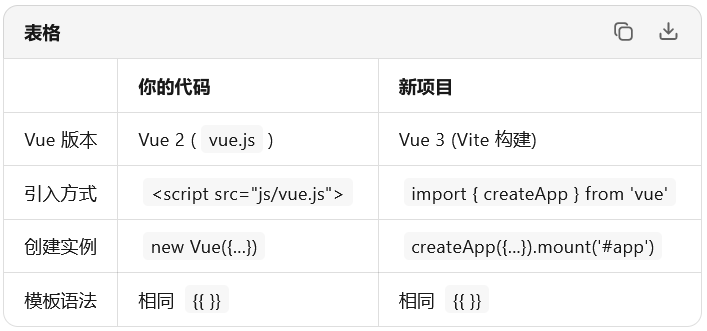
访问页面 http://localhost:5173/index
二、Vue学习
Vue本质上自动完成数据到视图的绑定
java
<template>
  <div id="app">
    <h1>{{ title }}</h1>
    <input v-model="title"/>  <!-- 会出现一个文本框,修改这里,h1中的title也会随之改变 -->
    <button @click="test">{{ name }}</button>
  </div>
</template>

<script>
export default {
  //数据
  data() {
    return {
      title: 'test',
      name:'测试按钮'
    }
  },
  //方法
  methods:{
    test(){
      // alert('test')
      this.title = 'abc'
    }
  },
  //初始化方法:页面加载之后会调用的默认方法
  created(){
    alert(0) //不能写成000,会识别成八进制,报错
  }
}
</script>
三、Element UI
Element UI是一个前端的UI组件,预先封装好了很多UI的标签,可以直接使用。
Element UI是为Vue2设计的,Vue3使用Element Plus。使用Vite。
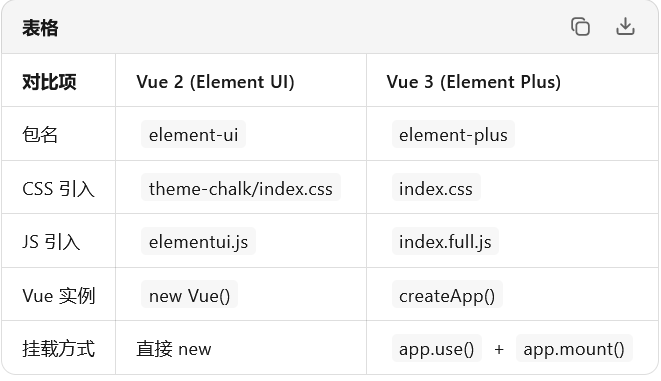
3.1 引入Element Plus的css、js
java
npm install element-plus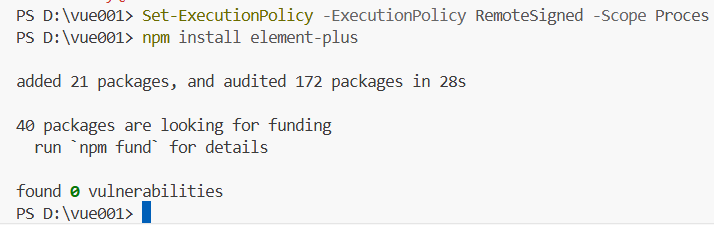
mian.ts中引入js和css
java
// 引入js
import ElementPlus from 'element-plus'
//引入css
import 'element-plus/dist/index.css'
java
createApp(App).use(ElementPlus)//注册组件 不能多次调用createApp(App)//
const app = createApp(App)
app.use(ElementPlus)   // 先注册
app.mount('#app')      // 再挂载
3.2 常用组件
<<template>
  <div id="app">
    <h1>{{ title }}</h1>
    <input v-model="title" />
    <button @click="test">{{ name }}</button>

    <el-button type="primary">
      <el-icon class="el-icon--left"><Notification /></el-icon>
      Primary
    </el-button>

    <el-link type="success">success</el-link>
  </div>

  <!-- radio单选框 -->
  <div class="mb-2 ml-4">
    <el-radio-group v-model="radio1">
      <el-radio value="1" size="large">Option 1</el-radio>
      <el-radio value="2" size="large">Option 2</el-radio>
    </el-radio-group>
  </div>

  <!-- Cascader级联选择器 -->
  <div>
    <p>Child options expand when clicked (default)</p>
    <el-cascader v-model="value" :options="options" @change="handleChange" />
  </div>
  <div>
    <p>Child options expand when hovered</p>
    <el-cascader
      v-model="value"
      :options="options"
      :props="props"
      @change="handleChange"
    />
  </div>

  <!-- 日期选择器(官网示例) -->
  <el-radio-group v-model="size" aria-label="size control" class="mb-4">
    <el-radio-button value="large">large</el-radio-button>
    <el-radio-button value="default">default</el-radio-button>
    <el-radio-button value="small">small</el-radio-button>
  </el-radio-group>
  <div class="demo-date-picker">
    <div class="block">
      <span class="demonstration">Default</span>
      <el-date-picker
        v-model="value1"
        type="date"
        placeholder="Pick a day"
        :size="size"
      />
    </div>
    <div class="block">
      <span class="demonstration">Picker with quick options</span>
      <el-date-picker
        v-model="value2"
        type="date"
        placeholder="Pick a day"
        :disabled-date="disabledDate"
        :shortcuts="shortcuts"
        :size="size"
      />
    </div>
  </div>
  <!-- input输入框 -->
   <el-input v-model="input" style="width: 240px" placeholder="Please input" />
   <!-- upload上传器 -->
   <el-upload
    v-model:file-list="fileList"
    class="upload-demo"
    action="https://run.mocky.io/v3/9d059bf9-4660-45f2-925d-ce80ad6c4d15"
    multiple
    :on-preview="handlePreview"
    :on-remove="handleRemove"
    :before-remove="beforeRemove"
    :limit="3"
    :on-exceed="handleExceed">
    <el-button type="primary">Click to upload</el-button>
    <template #tip>
      <div class="el-upload__tip">
        jpg/png files with a size less than 500KB.
      </div>
    </template>
  </el-upload>
  <!-- avator头像 -->
   <el-row class="demo-avatar demo-basic">
    <el-col :lg="12" :md="12">
      <div class="sub-title">circle</div>
      <div class="demo-basic--circle">
        <div class="block">
          <el-avatar :size="50" :src="circleUrl" />
        </div>
        <div v-for="size in sizeList" :key="size" class="block">
          <el-avatar :size="size" :src="circleUrl" />
        </div>
      </div>
    </el-col>
    </el-row>
    <!-- 带框table -->
     <el-table :data="tableData" border style="width: 100%">
    <el-table-column prop="date" label="Date" width="180" />
    <el-table-column prop="name" label="Name" width="180" />
    <el-table-column prop="address" label="Address" />
  </el-table>
</template>


<script setup lang="ts">
// table数据
const tableData = [
  {
    date: '2016-05-03',
    name: 'Tom',
    address: 'No. 189, Grove St, Los Angeles',
  },
  {
    date: '2016-05-02',
    name: 'Tom',
    address: 'No. 189, Grove St, Los Angeles',
  },
  {
    date: '2016-05-04',
    name: 'Tom',
    address: 'No. 189, Grove St, Los Angeles',
  },
  {
    date: '2016-05-01',
    name: 'Tom',
    address: 'No. 189, Grove St, Los Angeles',
  },
]
// avator头像
import { reactive, toRefs } from 'vue'

const state = reactive({
  circleUrl:
    'https://cube.elemecdn.com/3/7c/3ea6beec64369c2642b92c6726f1epng.png',
  squareUrl:
    'https://cube.elemecdn.com/9/c2/f0ee8a3c7c9638a54940382568c9dpng.png',
  sizeList: ['small', '', 'large'] as const,
})

const { circleUrl, squareUrl, sizeList } = toRefs(state)
import { ref } from 'vue'

// ========== 你的原有数据 ==========
const title = ref('test')
const name = ref('测试按钮')

const test = () => {
  title.value = 'abc'
}
const input = ref('')

// 初始化
alert(0)

// ========== radio ==========
const radio1 = ref('1')

// ========== Cascader ==========
const value = ref<string[]>([])
const props = {
  expandTrigger: 'hover' as const,
}
const handleChange = (value: string[]) => {
  console.log(value)
}

const options = [
  {
    value: 'guide',
    label: 'Guide',
    children: [
      {
        value: 'disciplines',
        label: 'Disciplines',
        children: [
          { value: 'consistency', label: 'Consistency' },
          { value: 'feedback', label: 'Feedback' },
          { value: 'efficiency', label: 'Efficiency' },
          { value: 'controllability', label: 'Controllability' },
        ],
      },
      {
        value: 'navigation',
        label: 'Navigation',
        children: [
          { value: 'side nav', label: 'Side Navigation' },
          { value: 'top nav', label: 'Top Navigation' },
        ],
      },
    ],
  },
  {
    value: 'component',
    label: 'Component',
    children: [
      {
        value: 'basic',
        label: 'Basic',
        children: [
          { value: 'layout', label: 'Layout' },
          { value: 'color', label: 'Color' },
          { value: 'typography', label: 'Typography' },
          { value: 'icon', label: 'Icon' },
          { value: 'button', label: 'Button' },
        ],
      },
      {
        value: 'form',
        label: 'Form',
        children: [
          { value: 'radio', label: 'Radio' },
          { value: 'checkbox', label: 'Checkbox' },
          { value: 'input', label: 'Input' },
          { value: 'input-number', label: 'InputNumber' },
          { value: 'select', label: 'Select' },
          { value: 'cascader', label: 'Cascader' },
          { value: 'switch', label: 'Switch' },
          { value: 'slider', label: 'Slider' },
          { value: 'time-picker', label: 'TimePicker' },
          { value: 'date-picker', label: 'DatePicker' },
          { value: 'datetime-picker', label: 'DateTimePicker' },
          { value: 'upload', label: 'Upload' },
          { value: 'rate', label: 'Rate' },
          { value: 'form', label: 'Form' },
        ],
      },
      {
        value: 'data',
        label: 'Data',
        children: [
          { value: 'table', label: 'Table' },
          { value: 'tag', label: 'Tag' },
          { value: 'progress', label: 'Progress' },
          { value: 'tree', label: 'Tree' },
          { value: 'pagination', label: 'Pagination' },
          { value: 'badge', label: 'Badge' },
        ],
      },
      {
        value: 'notice',
        label: 'Notice',
        children: [
          { value: 'alert', label: 'Alert' },
          { value: 'loading', label: 'Loading' },
          { value: 'message', label: 'Message' },
          { value: 'message-box', label: 'MessageBox' },
          { value: 'notification', label: 'Notification' },
        ],
      },
      {
        value: 'navigation',
        label: 'Navigation',
        children: [
          { value: 'menu', label: 'Menu' },
          { value: 'tabs', label: 'Tabs' },
          { value: 'breadcrumb', label: 'Breadcrumb' },
          { value: 'dropdown', label: 'Dropdown' },
          { value: 'steps', label: 'Steps' },
        ],
      },
      {
        value: 'others',
        label: 'Others',
        children: [
          { value: 'dialog', label: 'Dialog' },
          { value: 'tooltip', label: 'Tooltip' },
          { value: 'popover', label: 'Popover' },
          { value: 'card', label: 'Card' },
          { value: 'carousel', label: 'Carousel' },
          { value: 'collapse', label: 'Collapse' },
        ],
      },
    ],
  },
  {
    value: 'resource',
    label: 'Resource',
    children: [
      { value: 'axure', label: 'Axure Components' },
      { value: 'sketch', label: 'Sketch Templates' },
      { value: 'docs', label: 'Design Documentation' },
    ],
  },
]

// ========== 官网日期选择器示例 ==========
const size = ref<'default' | 'large' | 'small'>('default')
const value1 = ref('')
const value2 = ref('')

const shortcuts = [
  {
    text: 'Today',
    value: new Date(),
  },
  {
    text: 'Yesterday',
    value: () => {
      const date = new Date()
      date.setTime(date.getTime() - 3600 * 1000 * 24)
      return date
    },
  },
  {
    text: 'A week ago',
    value: () => {
      const date = new Date()
      date.setTime(date.getTime() - 3600 * 1000 * 24 * 7)
      return date
    },
  },
]

const disabledDate = (time: Date) => {
  return time.getTime() > Date.now()
}
// upload上传器
import { ElMessage, ElMessageBox } from 'element-plus'

import type { UploadProps, UploadUserFile } from 'element-plus'

const fileList = ref<UploadUserFile[]>([
  {
    name: 'element-plus-logo.svg',
    url: 'https://element-plus.org/images/element-plus-logo.svg',
  },
  {
    name: 'element-plus-logo2.svg',
    url: 'https://element-plus.org/images/element-plus-logo.svg',
  },
])

const handleRemove: UploadProps['onRemove'] = (file, uploadFiles) => {
  console.log(file, uploadFiles)
}

const handlePreview: UploadProps['onPreview'] = (uploadFile) => {
  console.log(uploadFile)
}

const handleExceed: UploadProps['onExceed'] = (files, uploadFiles) => {
  ElMessage.warning(
    `The limit is 3, you selected ${files.length} files this time, add up to ${
      files.length + uploadFiles.length
    } totally`
  )
}

const beforeRemove: UploadProps['beforeRemove'] = (uploadFile, uploadFiles) => {
  return ElMessageBox.confirm(
    `Cancel the transfer of ${uploadFile.name} ?`
  ).then(
    () => true,
    () => false
  )
}
</script>

<style scoped>
.demo-basic {
  text-align: center;
}
.demo-basic .sub-title {
  margin-bottom: 10px;
  font-size: 14px;
  color: var(--el-text-color-secondary);
}
.demo-basic .demo-basic--circle,
.demo-basic .demo-basic--square {
  display: flex;
  justify-content: space-between;
  align-items: center;
}
.demo-basic .block:not(:last-child) {
  border-right: 1px solid var(--el-border-color);
}
.demo-basic .block {
  flex: 1;
}
.demo-basic .el-col:not(:last-child) {
  border-right: 1px solid var(--el-border-color);
}
@media screen and (max-width: 992px) {
  .demo-basic .el-col:not(:last-child) {
    border-right: none;
  }
}
.el-link {
  margin-right: 8px;
}
.demo-date-picker {
  display: flex;
  width: 100%;
  padding: 0;
  flex-wrap: wrap;
}
.demo-date-picker .block {
  padding: 1.5rem 0;
  text-align: center;
  border-right: solid 1px var(--el-border-color);
  flex: 1;
  min-width: 300px;
}
.demo-date-picker .block:last-child {
  border-right: none;
}
.demo-date-picker .demonstration {
  display: block;
  color: var(--el-text-color-secondary);
  font-size: 14px;
  margin-bottom: 1rem;
}
@media screen and (max-width: 768px) {
  .demo-date-picker .block {
    flex: 0 0 100%;
    padding: 1rem 0;
    min-width: auto;
    border-right: none;
    border-bottom: solid 1px var(--el-border-color);
  }
  .demo-date-picker .block:last-child {
    border-bottom: none;
  }
}
</style>

import './assets/main.css'

import { createApp } from 'vue'
// 引入js
import ElementPlus from 'element-plus'
//引入css
import 'element-plus/dist/index.css'
//引入所有图标
import * as ElementPlusIconsVue from '@element-plus/icons-vue'
import App from './App.vue'

// createApp(App).mount('#app')
// createApp(App).use(ElementPlus)//注册组件  use必须在mount之前 先注册再挂载
const app = createApp(App)
// 循环注册所有图标
for (const [key, component] of Object.entries(ElementPlusIconsVue)) {
  app.component(key, component)
}
app.use(ElementPlus)   // 先注册
app.mount('#app')      // 再挂载
四、前后端分离实战
springboot 2.7.11+ JDK11
我使用的IDE工具是IDEA2025.2 ,IDEA 2025.2 默认只支持 Spring Boot 3.x(要求 Java 17+)
但是学习+工作常用的是JDK11+springboot2.x。
如果创建项目,选择的是JDK26+Java17,又想更改。需要修改以下几个地方,才能跑起来,不然就一直报错:java: java.lang.ExceptionInInitializerError com.sun.tools.javac.code.TypeTag :: UNKNOWN(JDK 版本过高(26)与 Spring Boot 2.7.x / 编译器不兼容)
|-----------------------------------------------------|--------|
| 检查项 | 内容 |
| pom.xml中的<java.version> | 11 |
| Project Structure ->Project->SDK | JDK 11 |
| Project Structure ->Project ->Language level | 11 |
| Project Structure->Modules->Module SDK | JDK 11 |
| Settings ->Java Compiler->Target bytecode version | 11 |
| Settings ->Maven ->Importing ->JDK for importer | JDK 11 |
| Settings->Maven->Runner->JRE | JDK 11 |
4.1 pom.xml
XML
<?xml version="1.0" encoding="UTF-8"?>
<project xmlns="http://maven.apache.org/POM/4.0.0" xmlns:xsi="http://www.w3.org/2001/XMLSchema-instance"
          xsi:schemaLocation="http://maven.apache.org/POM/4.0.0 https://maven.apache.org/xsd/maven-4.0.0.xsd">
<modelVersion>4.0.0</modelVersion>
<parent>
    <groupId>org.springframework.boot</groupId>
    <artifactId>spring-boot-starter-parent</artifactId>
    <version>2.7.11</version>
    <relativePath/>
</parent>
<groupId>com.dyz</groupId>
<artifactId>springboot03</artifactId>
<version>0.0.1-SNAPSHOT</version>
<name>springboot03</name>
<description>springboot03</description>

<properties>
    <java.version>11</java.version>
    <lombok.version>1.18.30</lombok.version>
</properties>

<dependencies>
    <!-- Thymeleaf 模板引擎 -->
    <dependency>
        <groupId>org.springframework.boot</groupId>
        <artifactId>spring-boot-starter-thymeleaf</artifactId>
    </dependency>

    <!-- Web 支持(注意:是 web,不是 webmvc) -->
    <dependency>
        <groupId>org.springframework.boot</groupId>
        <artifactId>spring-boot-starter-web</artifactId>
    </dependency>

    <!-- MySQL 驱动(2.7.x 用 mysql-connector-java,并指定版本) -->
    <dependency>
        <groupId>mysql</groupId>
        <artifactId>mysql-connector-java</artifactId>
        <version>8.0.33</version>
        <scope>runtime</scope>
    </dependency>

    <!-- Lombok -->
    <dependency>
        <groupId>org.projectlombok</groupId>
        <artifactId>lombok</artifactId>
        <optional>true</optional>
    </dependency>

    <!-- 测试依赖(统一用 starter-test) -->
    <dependency>
        <groupId>org.springframework.boot</groupId>
        <artifactId>spring-boot-starter-test</artifactId>
        <scope>test</scope>
    </dependency>

    <!-- MyBatis Plus -->
    <dependency>
        <groupId>com.baomidou</groupId>
        <artifactId>mybatis-plus-boot-starter</artifactId>
        <version>3.3.2</version>
    </dependency>
    <dependency>
        <groupId>com.baomidou</groupId>
        <artifactId>mybatis-plus-generator</artifactId>
        <version>3.3.2</version>
    </dependency>

    <!-- Velocity 模板(用于代码生成器) -->
    <dependency>
        <groupId>org.apache.velocity</groupId>
        <artifactId>velocity</artifactId>
        <version>1.7</version>
    </dependency>
</dependencies>

<build>
    <plugins>
        <plugin>
            <groupId>org.springframework.boot</groupId>
            <artifactId>spring-boot-maven-plugin</artifactId>
            <configuration>
                <excludes>
                    <exclude>
                        <groupId>org.projectlombok</groupId>
                        <artifactId>lombok</artifactId>
                    </exclude>
                </excludes>
            </configuration>
        </plugin>
    </plugins>
</build>
</project>
4.2 生成器代码
java
package com.dyz;


import com.baomidou.mybatisplus.annotation.DbType;
import com.baomidou.mybatisplus.generator.AutoGenerator;
import com.baomidou.mybatisplus.generator.config.DataSourceConfig;
import com.baomidou.mybatisplus.generator.config.PackageConfig;
import com.baomidou.mybatisplus.generator.config.GlobalConfig;
import com.baomidou.mybatisplus.generator.config.StrategyConfig;
import com.baomidou.mybatisplus.generator.config.rules.NamingStrategy;

public class Main {
    public static void main(String[] args) {
        AutoGenerator autoGenerator = new AutoGenerator();
        //配置数据源
        DataSourceConfig dataSourceConfig = new DataSourceConfig();
        dataSourceConfig.setDbType(DbType.MYSQL);
        dataSourceConfig.setDriverName("com.mysql.cj.jdbc.Driver");
        dataSourceConfig.setUrl("jdbc:mysql://localhost:3306/car_rental_separate?useUnicode=true&characterEncoding=UTF-8&serverTimezone=Asia/Shanghai&useSSL=false&allowPublicKeyRetrieval=true");
        dataSourceConfig.setUsername("root");
        dataSourceConfig.setPassword("123456");
        autoGenerator.setDataSource(dataSourceConfig);
        //全局配置
        GlobalConfig globalConfig = new GlobalConfig();
        globalConfig.setOpen(false);
        globalConfig.setOutputDir(System.getProperty("user.dir") + ("/src/main/java"));
        globalConfig.setServiceName("%sService"); //%s替换符,避免出现IService不规范的情况
        autoGenerator.setGlobalConfig(globalConfig);
        //配置包
        PackageConfig packageConfig = new PackageConfig();
        packageConfig.setParent("com.dyz");
        packageConfig.setEntity("entity");
        packageConfig.setController("controller");
        packageConfig.setMapper("mapper");
        packageConfig.setService("service");
        packageConfig.setServiceImpl("service.impl");
        autoGenerator.setPackageInfo(packageConfig);
        //生成策略
        StrategyConfig strategyConfig = new StrategyConfig();
        strategyConfig.setEntityLombokModel(true);
        strategyConfig.setInclude("sys_news");
        strategyConfig.setNaming(NamingStrategy.underline_to_camel);//下划线转驼峰 SysNew,不是Sys_news这样不规范
        autoGenerator.setStrategy(strategyConfig);
        //启动
        autoGenerator.execute();
    }
}
4.3 启动类
java
package com.dyz;

import org.mybatis.spring.annotation.MapperScan;
import org.springframework.boot.SpringApplication;
import org.springframework.boot.autoconfigure.SpringBootApplication;

@SpringBootApplication
@MapperScan("com.dyz.mapper") //添加这行
public class Springboot03Application {

    public static void main(String[] args) {
        SpringApplication.run(Springboot03Application.class, args);
    }

}
4.4 application.yml
java
spring:
  application:
    name: springboot03
  datasource:
    driver-class-name: com.mysql.cj.jdbc.Driver
    username: root
    password: 123456
#    url: jdbc:mysql://localhost:3306/sys
    url: jdbc:mysql://localhost:3306/car_rental_separate
4.5 controller实现方法
java
package com.dyz.controller;


import com.dyz.entity.SysNews;
import com.dyz.mapper.SysNewsMapper;
import com.dyz.service.SysNewsService;
import org.springframework.beans.factory.annotation.Autowired;
import org.springframework.web.bind.annotation.GetMapping;
import org.springframework.web.bind.annotation.RequestMapping;

import org.springframework.stereotype.Controller;
import org.springframework.web.bind.annotation.RestController;

import java.util.List;

/**
 * <p>
 *  前端控制器
 * </p>
 *
 * @author ${author}
 * @since 2026-06-02
 */
//@Controller
//@RequestMapping("//sysNews")
    @RestController
public class SysNewsController {
    @Autowired
   private SysNewsService sysNewsService;

    @GetMapping("/list")
    public List<SysNews> list(){
        return this.sysNewsService.list();
    }
}
4.6 浏览器访问
localhost:8080/list 是否拿到数据
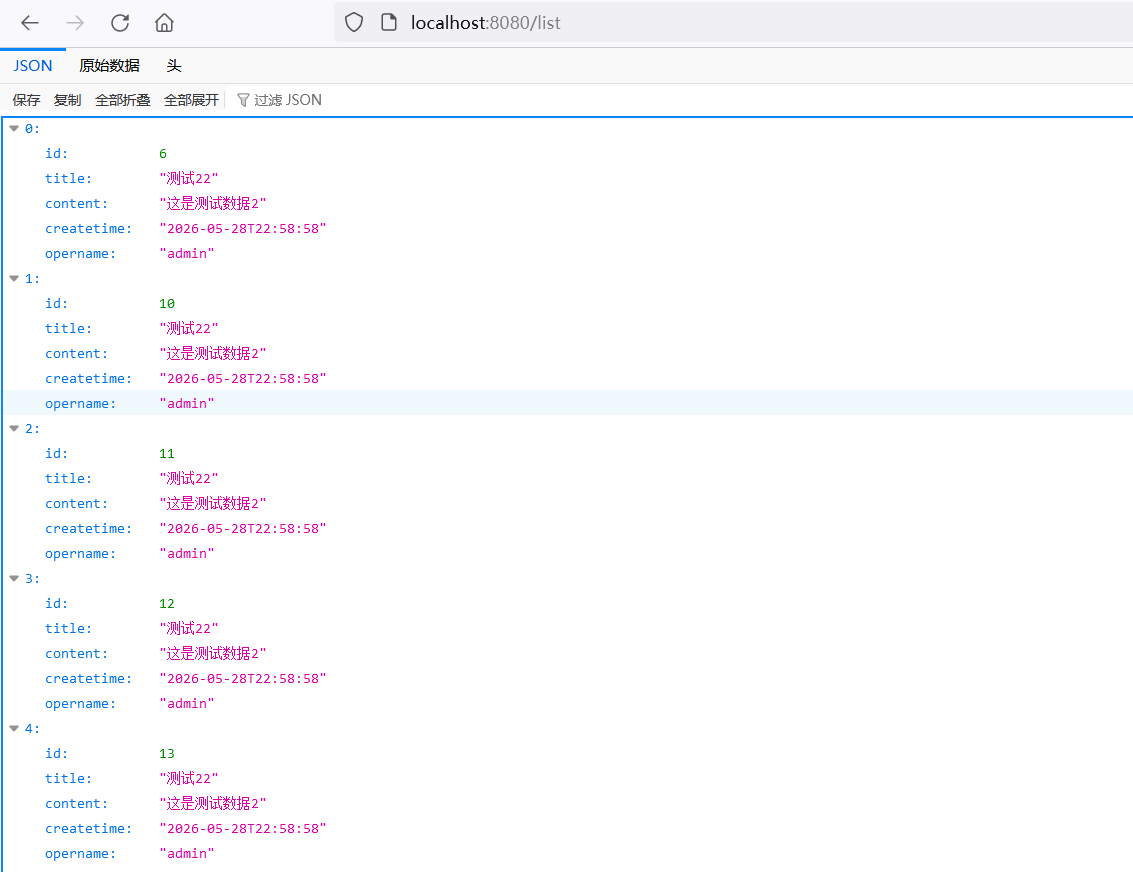
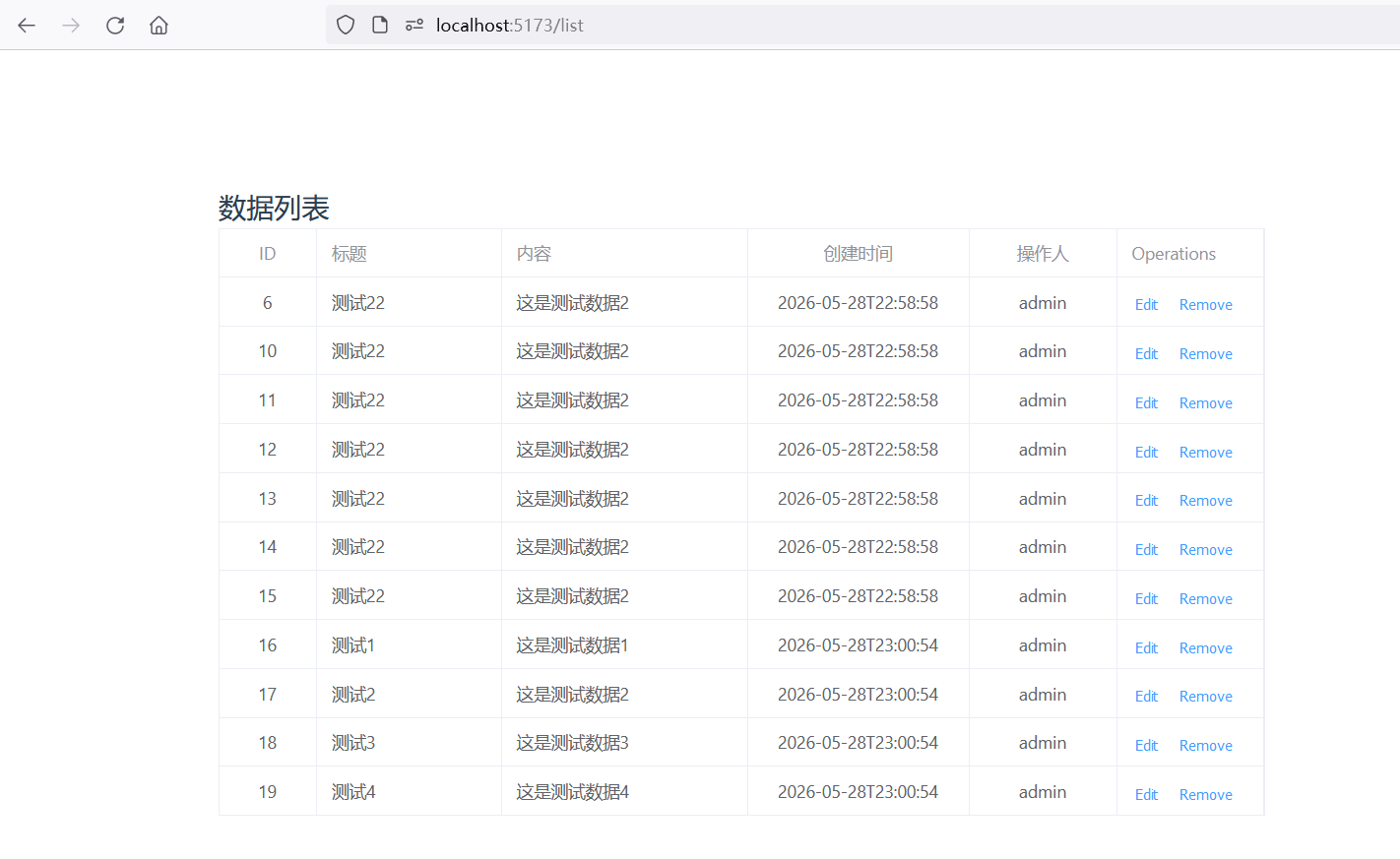
4.7 前端list.vue页面
- 安装路由和axios:
java
npm install vue-router@4 axios创建src/router/index.js
javascript
import { createRouter, createWebHistory } from 'vue-router'
import List from '../list.vue'

const routes = [
  {
    path: '/list',
    name: 'List',
    component: List
  },
  {
    path: '/',
    redirect: '/list'  // 默认跳转到 list 页面
  }
]

const router = createRouter({
  history: createWebHistory(),
  routes
})

export default router- 创建src/main.js文件,跳过路由
javascript
import './assets/main.css'
import { createApp } from 'vue'
import ElementPlus from 'element-plus'
import 'element-plus/dist/index.css'
import * as ElementPlusIconsVue from '@element-plus/icons-vue'
import App from './App.vue'
import router from './router'  // 引入路由

const app = createApp(App)

for (const [key, component] of Object.entries(ElementPlusIconsVue)) {
  app.component(key, component)
}

app.use(ElementPlus)
app.use(router)   // 使用路由
app.mount('#app')- 修改App.vue只保留路由出口
javascript
<<template>
  <router-view />
</template>

<script setup>
</script>- 创建src/list.vue页面
javascript
<<template>
  <div style="padding: 20px;">
    <h2>数据列表</h2>
    <p v-if="errorMsg" style="color: red;">{{ errorMsg }}</p>
    <el-table :data="tableData" border v-loading="loading" style="width: 100%">
      <el-table-column prop="id" label="ID" width="80" align="center" />
      <el-table-column prop="title" label="标题" min-width="150" />
      <el-table-column prop="content" label="内容" min-width="200" show-overflow-tooltip />
      <el-table-column prop="createtime" label="创建时间" width="180" align="center" />
      <el-table-column prop="opername" label="操作人" width="120" align="center" />
       <el-table-column fixed="right" label="Operations" min-width="120">
      <template #default>
        <el-button link type="primary" size="small">Edit</el-button>
        <el-button
          link
          type="primary"
          size="small"
          @click.prevent="deleteRow(scope.$index)"
        >
          Remove
        </el-button>
      </template>
    </el-table-column>
    </el-table>
  </div>
</template>

<script setup>
import { ref, onMounted } from 'vue'
import axios from 'axios'

const tableData = ref([])
const loading = ref(false)
const errorMsg = ref('')

const getList = () => {
  loading.value = true
  errorMsg.value = ''

  axios.get('http://localhost:8080/list')
    .then(res => {
      // 关键:打印看后端到底返回什么结构
      console.log('=== 后端返回的数据 ===')
      console.log(res.data)

      // 根据实际返回结构调整
      tableData.value = res.data.data || res.data || []
    })
    .catch(err => {
      console.error('请求失败:', err)
      errorMsg.value = '请求失败: ' + err.message
    })
    .finally(() => {
      loading.value = false
    })
}

onMounted(() => {
  getList()
})
</script>
4.8 后端配置类实现跨域
java
package com.dyz.configuration;

import org.springframework.beans.factory.annotation.Autowired;
import org.springframework.context.annotation.Configuration;
import org.springframework.web.servlet.config.annotation.CorsRegistry;
import org.springframework.web.servlet.config.annotation.WebMvcConfigurer;

//解决跨域问题
@Configuration
public class Corsconfiguration implements WebMvcConfigurer {
    @Override
    public void addCorsMappings(CorsRegistry registry){
        registry.addMapping("/**")
                .allowedOriginPatterns("*")
                .allowedMethods("GET","HEAD","POST","PUT","DELETE","OPTION")
                .allowCredentials(true)
                .maxAge(3600)
                .allowedHeaders("*");

    }
}
4.9 浏览器localhost:5173/list数据