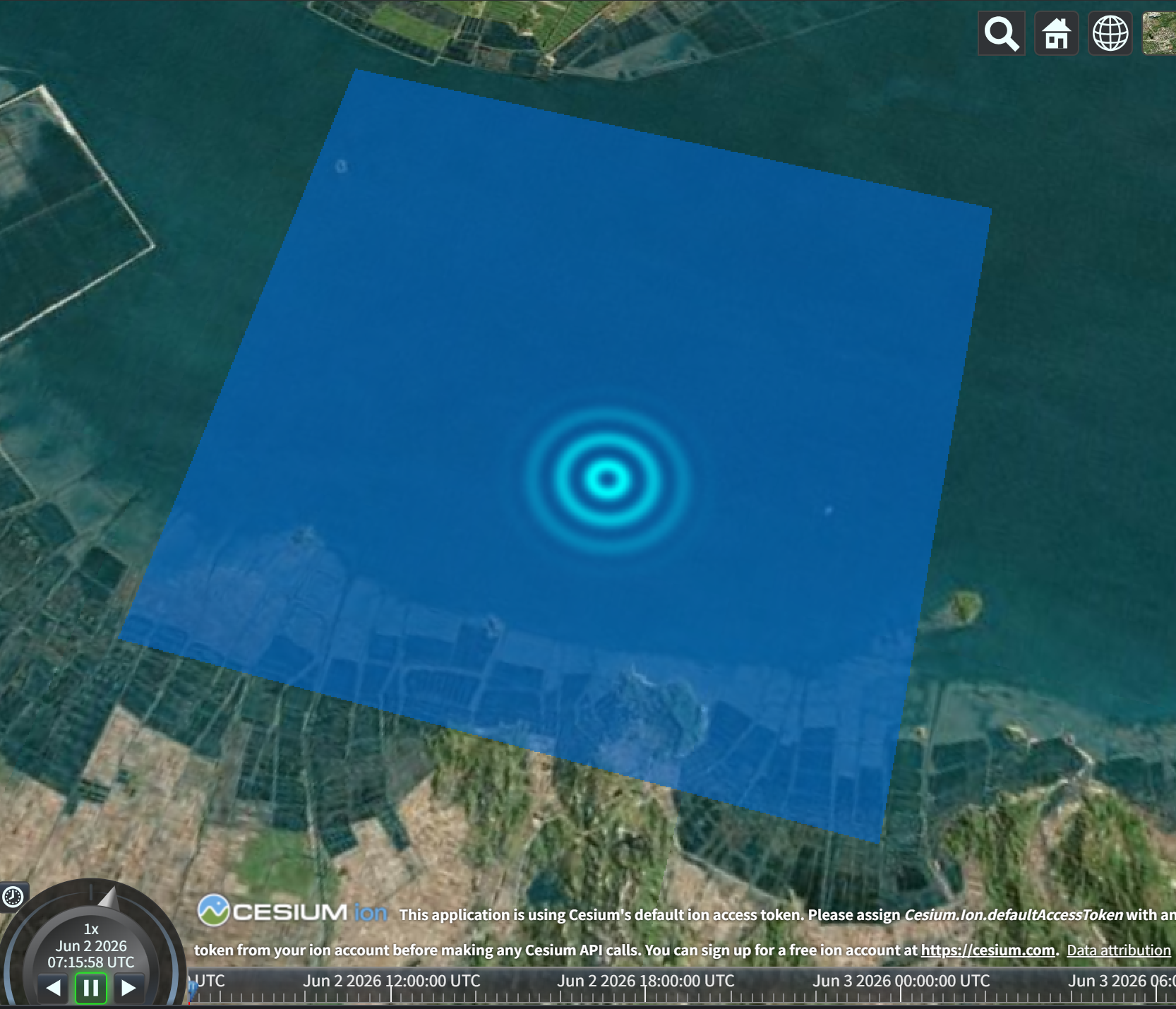
以上连接可以直接打开sandcastle直接运行。
方法展示**"如何将鼠标点击的 3D 坐标转化为 2D UV 坐标,并传递给着色器(Shader)实现动态水波扩散/水源添加效果",基于Cesium 1.140 API。本示例采用 自定义材质(Fabric Material)+ GLSL 着色器 的方式,完美复刻了交互式 GPGPU 的核心数据流:鼠标捕获 →经纬度转 UV →JS 传递 Uniforms →着色器渲染水波。
以下是完整代码:
javascript
import * as Cesium from "cesium";

const viewer = new Cesium.Viewer("cesiumContainer");

// 2. 定义我们的流体模拟/水面的经纬度边界
const bounds = {
    west: 113.0,
    south: 22.0,
    east: 113.1,
    north: 22.1
};
const rectangle = Cesium.Rectangle.fromDegrees(bounds.west, bounds.south, bounds.east, bounds.north);

// 3. 核心:基于 GLSL 编写的交互式着色器材质
const waterMaterial = new Cesium.Material({
    fabric: {
        type: 'WaterInteraction',
        uniforms: {
            u_clickUV: new Cesium.Cartesian2(-1.0, -1.0), // 鼠标所在的 UV 坐标
            u_radius: 0.0,                                // 水源扩散半径
            u_waterColor: new Cesium.Color(0.0, 0.4, 0.8, 0.6),  // 基础水面颜色
            u_sourceColor: new Cesium.Color(0.0, 1.0, 1.0, 1.0)  // 水源中心高亮颜色
        },
        source: `
            // 片元着色器 (Fragment Shader)
            czm_material czm_getMaterial(czm_materialInput materialInput) {
                czm_material material = czm_getDefaultMaterial(materialInput);

                // st 就是当前像素的 UV 坐标 (0.0~1.0)
                vec2 st = materialInput.st;

                // 1. 计算当前像素与鼠标点击中心点的距离
                float dist = distance(st, u_clickUV);

                // 2. 根据鼠标点击的状态 (u_radius) 计算影响范围
                float intensity = 0.0;
                if(dist < u_radius) {
                    // smoothstep 让中心最强,边缘平滑过渡到 0
                    intensity = smoothstep(u_radius, 0.0, dist);
                }

                // 3. 结合时间 (czm_frameNumber) 生成动态扩散的水波纹理理
                // sin 函数造波浪,乘上 intensity 让波浪只在鼠标点击的范围内显示
                float wave = sin(dist * 150.0 - czm_frameNumber * 0.2) * 0.5 + 0.5;
                intensity = intensity * wave;

                // 4. 将基础水色和水波颜色混合
                vec4 finalColor = mix(u_waterColor, u_sourceColor, intensity);

                material.diffuse = finalColor.rgb;
                material.alpha = finalColor.a;
                return material;
            }
        `
    }
});

// 4. 将水面几何体与着色器材质绑定到场景中
const waterPrimitive = viewer.scene.primitives.add(new Cesium.Primitive({
    geometryInstances: new Cesium.GeometryInstance({
        geometry: new Cesium.RectangleGeometry({
            rectangle: rectangle,
            vertexFormat: Cesium.EllipsoidSurfaceAppearance.VERTEX_FORMAT
        })
    }),
    appearance: new Cesium.EllipsoidSurfaceAppearance({
        material: waterMaterial
    })
}));

// ==========================================
// 5. JavaScript 事件交互:捕捉鼠标并传递数据到着色器
// ==========================================
const handler = new Cesium.ScreenSpaceEventHandler(viewer.scene.canvas);

// 用于记录交互状态的 JS 变量
let isClicking = false;
let currentUV = new Cesium.Cartesian2(-1.0, -1.0);

// 提取公共方法:将屏幕坐标转为 UV
function updateUVFromPosition(position) {
    const ray = viewer.camera.getPickRay(position);
    const cartesian = viewer.scene.globe.pick(ray, viewer.scene);

    if (cartesian) {
        // 3D 笛卡尔转经纬度 (弧度)
        const cartographic = Cesium.Cartographic.fromCartesian(cartesian);
        const lon = Cesium.Math.toDegrees(cartographic.longitude);
        const lat = Cesium.Math.toDegrees(cartographic.latitude);

        // 关键算法:将经纬度映射到水面的 UV 坐标 (0.0 ~ 1.0)
        const u = (lon - bounds.west) / (bounds.east - bounds.west);
        const v = (lat - bounds.south) / (bounds.north - bounds.south);

        // 确保点击在水面范围内
        if (u >= 0.0 && u <= 1.0 && v >= 0.0 && v <= 1.0) {
            currentUV.x = u;
            currentUV.y = v;
            return true;
        }
    }
    return false;
}

// 鼠标左键按下:开始注水
handler.setInputAction(function(movement) {
    if(updateUVFromPosition(movement.position)) {
        isClicking = true;
    }
}, Cesium.ScreenSpaceEventType.LEFT_DOWN);

// 鼠标移动(拖拽):移动水管位置
handler.setInputAction(function(movement) {
    if (!isClicking) return;
    updateUVFromPosition(movement.endPosition);
}, Cesium.ScreenSpaceEventType.MOUSE_MOVE);

// 鼠标左键抬起:停止注水
handler.setInputAction(function() {
    isClicking = false;
}, Cesium.ScreenSpaceEventType.LEFT_UP);

// ==========================================
// 6. 渲染循环回调:动态更新着色器变量 (Uniforms)
// ==========================================
let radius = 0.0;
viewer.scene.preUpdate.addEventListener(function() {
    const material = waterPrimitive.appearance.material;

    if (isClicking) {
        // 如果正在按住鼠标:慢慢扩大注水波纹半径(模拟水量累积),最大半径为 0.2 (UV单位)
        radius = Math.min(radius + 0.003, 0.2);

        // 将 JS 运算好的 UV 和 Radius 塞给 GLSL 的 Uniform 变量
        material.uniforms.u_clickUV = currentUV;
        material.uniforms.u_radius = radius;
    } else {
        // 松开鼠标后:波纹逐渐衰减消散
        radius = Math.max(radius - 0.005, 0.0);
        material.uniforms.u_radius = radius;
    }
});

// 7. 将相机飞到模拟水域的正上方
viewer.camera.flyTo({
    destination: Cesium.Cartesian3.fromDegrees(113.05, 21.95, 12000.0),
    orientation: {
        heading: Cesium.Math.toRadians(0.0),
        pitch: Cesium.Math.toRadians(-60.0) // 俯视视角
    }
});