Ceph 分布式存储 对象存储管理
对象存储是一个基于对象的存储服务, 提供海量、 安全、 高可靠、 低成本的数据存储能力
RADOS 网关介绍
RADOS GateWay,也称对象网关 (RGW),为客户端提供标准对象存储 API 来访问 Ceph 集群
守护进程 radosgw 在 librados 库的基础上构建
radosgw 是Ceph 存储的客户端,用于访问对象存储中对象
RADOS 网关架构
区域(zone),每个区域会关联一个或多个 RADOS 网关,这些网关关联Ceph 存储
区域组(zone group ),区域组是由一个或多个区域的集合。存储在区域组中某个区域中的数据会被复制到该区域组中的所有其他区域
域 (realm) ,代表所有对象和存储桶的全局命名空间
RADOS 网关部署
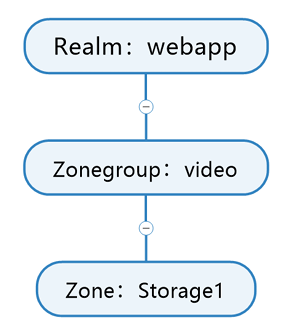
bash
# 创建 realm
[root@ceph1 ~]# radosgw-admin realm create --rgw-realm=webapp --default
[root@ceph1 ~]# radosgw-admin realm list
{
"default_info": "527e3bea-d51d-462e-92d7-79aaf422a89c",
"realms": [
"webapp"
]
}
# 创建master zone group
[root@ceph1 ~]# radosgw-admin zonegroup create --rgw-realm=webapp --rgw-zonegroup=video --master --default
[root@ceph1 ~]# radosgw-admin zonegroup list
{
[
"default_info": "0fdaf584-33ee-4be7-978c-fb2771181aee",
"zonegroups":
"video"
 ]
}
# 创建 zone,并将其设置为 master
[root@ceph1 ~]# radosgw-admin zone create --rgw-realm=webapp --rgw-zonegroup=video --rgw-zone=storage1 --master --default
[root@ceph1 ~]# radosgw-admin zone list
{
"default_info": "76366a48-2ab8-4830-9cf7-f9b2fe432c5a",
"zones": [
"storage1"
]
}
# 提交配置
[root@ceph1 ~]# radosgw-admin period update --rgw-realm=webapp --commit
# 查看配置
[root@ceph1 ~]# radosgw-admin zone get --rgw-zone=storage1
RADOS 网关部署-命令行
bash
# 创建 rgw,并和已创建的 realm webapp 进行关联,数量为 3
[root@ceph1 ~]# ceph orch apply rgw webapp --placement="3 ceph1.laogao.cloud
ceph2.laogao.cloud ceph3.laogao.cloud" --realm=webapp --zone=storage1 --port=8080
# 查看服务
[root@ceph1 ~]# ceph orch ls rgw
NAME
PORTS
rgw.webapp  ?:8080
RUNNING  REFRESHED  AGE  PLACEMENT
3/3  40s ago    45s
ceph1.laogao.cloud;ceph2.laogao.cloud;ceph3.laogao.cloud;count:3
# 查看进程
[root@ceph1 ~]# ceph orch ps --daemon-type rgw| awk '{print $1,$4}'
NAME STATUS
rgw.webapp.ceph1.luxaau running
rgw.webapp.ceph2.hrdzlb running
rgw.webapp.ceph3.pyfond running
验证对象存储是否可以访问
[root@ceph1 ~]# curl http://ceph1.laogao.cloud:8080
<?xml version="1.0" encoding="UTF-8"?><ListAllMyBucketsResult
xmlns="http://s3.amazonaws.com/doc/2006-03-01/"><Owner><ID>anonymous</ID>
<DisplayName></DisplayName></Owner><Buckets></Buckets></ListAllMyBucketsResult>
[root@ceph1 ~]# curl http://ceph2.laogao.cloud:8080
<?xml version="1.0" encoding="UTF-8"?><ListAllMyBucketsResult
xmlns="http://s3.amazonaws.com/doc/2006-03-01/"><Owner><ID>anonymous</ID>
<DisplayName></DisplayName></Owner><Buckets></Buckets></ListAllMyBucketsResult>
[root@ceph1 ~]# curl http://ceph3.laogao.cloud:8080
<?xml version="1.0" encoding="UTF-8"?><ListAllMyBucketsResult
xmlns="http://s3.amazonaws.com/doc/2006-03-01/"><Owner><ID>anonymous</ID>
<DisplayName></DisplayName></Owner><Buckets></Buckets></ListAllMyBucketsResult>
RADOS 网关删除
删除 RADOS 网关服务,将删除 RADOS 网关对应所有进程
bash
[root@ceph1 ~]# ceph orch rm rgw.webapp删除RADOS 网关,并不会删除池中数据
删除对象存储域
bash
# 删除 zone
[root@ceph1 ~]# radosgw-admin zone delete --rgw-zone=storage1
# 删除 zonegroup
[root@ceph1 ~]# radosgw-admin zonegroup delete --rgw-zonegroup=video
# 删除 realm
[root@ceph1 ~]# radosgw-admin realm delete --rgw-realm=webapp
管理对象网关用户
创建用户
使用 radosgw-admin user create 命令来创建 RADOS 网关用户
bash
[root@ceph1 ~]# radosgw-admin user create --uid="operator" --display-name="S3
Operator" --email="operator@example.com" --access-key="12345" --secret
key="67890"
{
"user_id": "operator",
"display_name": "S3 Operator",
"email": "operator@example.com",
"suspended": 0,
"max_buckets": 1000,
"subusers": [],
"keys": [
{
"user": "operator",
"access_key": "12345",
"secret_key": "67890"
}
],
......
[root@ceph1 ~]# radosgw-admin user list
[
"operator",
"dashboard"
]
[root@ceph1 ~]# radosgw-admin user info --uid=operator
{
"user_id": "operator",
"display_name": "S3 Operator",
"email": "operator@example.com",
 "suspended": 0,
    "max_buckets": 1000,
    "subusers": [],
    "keys": [
        {
            "user": "operator",
            "access_key": "12345",
            "secret_key": "67890"
        }
    ],
如果未指定访问密钥和机密密钥,则自动生成,并显示在输出中
重新生成密钥
仅重新生成现有用户的机密密钥
bash
[root@ceph1 ~]# radosgw-admin key create --uid=s3user --access
key="ZQI72JZZDTA8BRCQOLGK" --gen-secret
{
    "user_id": "s3user",
    "display_name": "Amazon S3 API user",
    "email": "",
    "suspended": 0,
    "max_buckets": 1000,
    "subusers": [],
    "keys": [
        {
            "user": "s3user",
            "access_key": "ZQI72JZZDTA8BRCQOLGK",
            "secret_key": "TJCcwo8rspE4xYyLAZHz4vapWA42YGB8hhrlPUnl"
        }
添加用户访问密钥
bash
[root@ceph1 ~]# radosgw-admin key create --uid=s3user --gen-access-key
{
    "user_id": "s3user",
    "display_name": "Amazon S3 API user",
    "email": "",
    "suspended": 0,
    "max_buckets": 1000,
    "subusers": [],
    "keys": [
        {
            "user": "s3user",
            "access_key": "6WBR1FL8CBFX26KVRPPA",
            "secret_key": "UsytqYCeSudSqHKWwVVYZGFDdcS24lPpkXBrD42G"
        },
        {
            "user": "s3user",
            "access_key": "ZQI72JZZDTA8BRCQOLGK",
            "secret_key": "TJCcwo8rspE4xYyLAZHz4vapWA42YGB8hhrlPUnl"
        }
    ],
......
删除用户密钥
bash
[root@ceph1 ~]# radosgw-admin key rm --uid=s3user --access
key=6WBR1FL8CBFX26KVRPPA
{
    "user_id": "s3user",
    "display_name": "Amazon S3 API user",
    "email": "",
    "suspended": 0,
    "max_buckets": 1000,
    "subusers": [],
    "keys": [
        {
            "user": "s3user",
            "access_key": "ZQI72JZZDTA8BRCQOLGK",
            "secret_key": "TJCcwo8rspE4xYyLAZHz4vapWA42YGB8hhrlPUnl"
        }
    ],
......
临时禁用对象网关用户
使用 radosgw-admin user suspend 命令可临时禁用 RADOS 网关用户,用户的子用户也会暂停,无法
与 RADOS 网关服务交互
bash
root@ceph1 ~]# radosgw-admin user suspend --uid=s3user
{
"user_id": "s3user",
"display_name": "Amazon S3 API user",
"email": "",
"suspended": 1,     <----看着变成了1
....
临时启用对象网关用户
使用 radosgw-admin user enable 命令可启用 RADOS 网关用户
bash
root@ceph1 ~]# radosgw-admin user enable --uid=s3user
{
"user_id": "s3user",
"display_name": "Amazon S3 API user",
"email": "",
"suspended": 0,
....
修改用户信息
bash
[root@ceph1 ~]# radosgw-admin user modify --uid=s3user --display-name=huitailang
[root@ceph1 ~]# radosgw-admin user modify --uid=s3user --access=full
删除用户
bash
[root@ceph1 ~]# radosgw-admin user list
[
"operator",
"dashboard",
"s3user"
]
[root@ceph1 ~]# radosgw-admin user rm --uid=s3user --purge-data
[root@ceph1 ~]# radosgw-admin user list
[
"operator",
"dashboard"
]
使用 Amazon S3 API 访问对象存储
安装 Amazon S3 API 客户端
bash
# 准备 aliyun 源 pip 仓库
[root@client ~]# mkdir .pip
[root@client ~]# cat > .pip/pip.conf << 'EOF'
[global]
index-url = http://mirrors.aliyun.com/pypi/simple/
[install]
trusted-host=mirrors.aliyun.com
EOF
# 安装软件包
[root@client ~]# pip3 install awscli
使用 Amazon S3 API 客户端
配置 AWS CLI 凭据
bash
[root@client ~]# aws configure
AWS Access Key ID [None]: 12345
AWS Secret Access Key [None]: 67890
Default region name [None]:
Default output format [None]:
配置信息保存在~/.aws目录。
bash
[root@client ~]# ls .aws
config  credentials
[root@client ~]# cat .aws/config
[default]
[root@client ~]# cat .aws/credentials
[default]
aws_access_key_id = 12345
aws_secret_access_key = 67890
创建存储桶
环境准备:
client:
bash
[root@client ~]# scp 192.168.108.11:/etc/hosts /etc/hosts可以通过选项 --profile 指定凭据,--endpoint 指定服务器位置
bash
[root@client ~]# aws --endpoint=http://ceph1.laogao.cloud:8080 s3 mb s3://webapp
make_bucket: webapp
查看存储桶清单
bash
[root@client ~]# aws --endpoint=http://ceph1.laogao.cloud:8080 s3 ls
2025-08-25 17:14:05 webapp
或者
bash
[root@ceph1 ~]# radosgw-admin buckets list
[
"webapp"
]
上传对象到存储桶
bash
[root@client ~]# echo Hello World > Welcome-pub.html
[root@client ~]# echo Hello laogao > Welcome-pri.html
[root@client ~]# aws --endpoint=http://ceph1.laogao.cloud:8080 s3 cp Welcome
pub.html s3://webapp/ --acl=public-read-write
upload: ./Welcome-pub.html to s3://webapp/Welcome-pub.html
[root@client ~]# aws s3 cp Welcome-pri.html s3://webapp --
endpoint=http://ceph1.laogao.cloud:8080
upload: ./Welcome-pri.html to s3://webapp/Welcome-pri.html
查看存储桶中对象
bash
[root@client ~]# aws s3 ls s3://webapp --endpoint=http://ceph1.laogao.cloud:8080
2025-08-25 17:23:35    13 Welcome-pri.html
2025-08-25 17:22:18    12 Welcome-pub.html
下载存储桶中对象
bash
# 下载单个
[root@client ~]# aws s3 cp s3://webapp/Welcome-pri.html /tmp --
endpoint=http://ceph1.laogao.cloud:8080
download: s3://webapp/Welcome-pri.html to ../tmp/Welcome-pri.html
[root@client ~]# ls /tmp/Welcome-pri.html
/tmp/Welcome-pri.html
# 使用选项 --recursive 递归下载bucket中所有对象
[root@client ~]# aws s3 cp s3://webapp /tmp --recursive --
endpoint=http://ceph1.laogao.cloud:8080
download: s3://webapp/Welcome-pri.html to ../tmp/Welcome-pri.html
download: s3://webapp/Welcome-pub.html to ../tmp/Welcome-pub.html
# 使用wget或者curl下载
[root@client ~]# wget http://ceph1.laogao.cloud:8080/webapp/Welcome-pub.html   # Welcome-pub.html可以正常下载
[root@client ~]# wget http://ceph1.laogao.cloud:8080/webapp/Welcome-pri.html   # Welcome-pri.html不可以下载,因为权限不允许--2025-08-25 17:36:http://ceph1.laogao.cloud:8080/webapp/Welcome-pri.html
Resolving ceph1.laogao.cloud (ceph1.laogao.cloud)... 192.168.108.11
Connecting to ceph1.laogao.cloud (ceph1.laogao.cloud)|192.168.108.11|:8080...
connected.
HTTP request sent, awaiting response... 403 Forbidden
2025-08-25 17:36:59 ERROR 403: Forbidden.
删除存储桶中对象
bash
[root@client ~]# aws s3 rm s3://webapp/Welcome-pri.html --
endpoint=http://ceph1.laogao.cloud:8080
delete: s3://webapp/Welcome-pri.html
[root@client ~]# aws s3 ls s3://webapp --endpoint=http://ceph1.laogao.cloud:8080
2025-08-25 17:22:18         12 Welcome-pub.html
删除存储桶
bash
# 非空的存储桶不能删除
[root@client ~]# aws s3 rb s3://webapp --endpoint=http://ceph1.laogao.cloud:8080
remove_bucket failed: s3://webapp argument of type 'NoneType' is not iterable
# 清空存储桶,再次删除
[root@client ~]# aws s3 rm s3://webapp --recursive --include "Welcome-*" --
endpoint=http://ceph1.laogao.cloud:8080
delete: s3://webapp/Welcome-pub.html
[root@client ~]# aws s3 rb s3://webapp --endpoint=http://ceph1.laogao.cloud:8080
remove_bucket: webapp
用户配额管理
设置配额可限制用户或存储桶可消耗的存储量
user 级别
bash
[root@ceph1 ~]# radosgw-admin quota enable --quota-scope=user --uid=operator
[root@ceph1 ~]# radosgw-admin quota set --quota-scope=user --uid=operator --max
objects=1024
# 查看用户配额
[root@ceph1 ~]# radosgw-admin user info --uid=operator
{
    "user_id": "operator",
    "display_name": "S3 Operator",
    "email": "operator@example.com",
    "suspended": 0,
    "max_buckets": 1000,
    "subusers": [],
    "keys": [
        {
            "user": "operator",
            "access_key": "12345",
            "secret_key": "67890"
        }
    ],
    "swift_keys": [],
    "caps": [],
    "op_mask": "read, write, delete",
    "default_placement": "",
    "default_storage_class": "",
    "placement_tags": [],
    "bucket_quota": {
        "enabled": false,
        "check_on_raw": false,
        "max_size": -1,
        "max_size_kb": 0,
        "max_objects": -1
    },
    "user_quota": {
        "enabled": true,
        "check_on_raw": false,
        "max_size": -1,
        "max_size_kb": 0,
        "max_objects": 1024
    },
    "temp_url_keys": [],
    "type": "rgw",
    "mfa_ids": []
}
# 查看空间使用情况
[root@ceph1 ~]# radosgw-admin user stats --uid=operator
{
}
"stats": {
"size": 0,
"size_actual": 0,
"size_kb": 0,
"size_kb_actual": 0,
"num_objects": 0
},
"last_stats_sync": "0.000000",
"last_stats_update": "2025-08-25T09:44:36.609841Z"
# 测试
[root@client ~]# aws --endpoint=http://ceph1.laogao.cloud:8080 s3 mb s3://webapp
make_bucket: webapp
[root@client ~]# aws --endpoint=http://ceph1.laogao.cloud:8080 s3 ls s3://webapp
#先看下webapp桶有多少文件,现在没有
# 传3各文件试下
[root@client ~]# touch file1 file2 file3 file4
[root@client ~]# aws --endpoint=http://ceph1.laogao.cloud:8080 s3 cp file1
s3://webapp
upload: ./file1 to s3://webapp/file1
[root@client ~]# aws --endpoint=http://ceph1.laogao.cloud:8080 s3 cp file2
s3://webapp
upload: ./file2 to s3://webapp/file2
[root@client ~]# aws --endpoint=http://ceph1.laogao.cloud:8080 s3 cp file3
s3://webapp
upload: ./file3 to s3://webapp/file3
[root@client ~]# aws --endpoint=http://ceph1.laogao.cloud:8080 s3 ls s3://webapp
2026-06-02 09:44:58       0 file1
2026-06-02 09:45:05       0 file2
2026-06-02 09:45:10       0 file3
[root@ceph1 ~]# radosgw-admin user stats --uid=operator
{
"stats": {
"size": 0,
"size_actual": 0,
"size_kb": 0,
"size_kb_actual": 0,
"num_objects": 3
#已经达到最大3个
},
"last_stats_sync": "2026-06-02T01:17:04.891186Z",
"last_stats_update": "2026-06-02T01:47:04.831294Z"
}
# 第四个文件无法上传
[root@client ~]# aws --endpoint=http://ceph1.laogao.cloud:8080 s3 cp file4
s3://webapp
upload failed: ./file4 to s3://webapp/file4 argument of type 'NoneType' is not
iterable
禁用用户配额
示例:禁用operator用户配额
bash
[root@ceph1 ~]# radosgw-admin quota set --quota-scope=user --uid=operator --max
objects=-1
[root@ceph1 ~]# radosgw-admin quota disable --quota-scope=user --uid=operator
[root@ceph1 ~]# radosgw-admin user info --uid=operator
{
    "user_id": "operator",
    "display_name": "S3 Operator",
    "email": "operator@example.com",
    "suspended": 0,
    "max_buckets": 1000,
    "subusers": [],
    "keys": [
        {
            "user": "operator",
            "access_key": "12345",
            "secret_key": "67890"
        }
    ],
    "swift_keys": [],
    "caps": [],
    "op_mask": "read, write, delete",
    "default_placement": "",
    "default_storage_class": "",
    "placement_tags": [],
    "bucket_quota": {
        "enabled": false,
        "check_on_raw": false,
        "max_size": -1,
        "max_size_kb": 0,
        "max_objects": -1
    },
    "user_quota": {
        "enabled": false,
        "check_on_raw": false,
        "max_size": -1,
        "max_size_kb": 0,
        "max_objects": -1
    },
    "temp_url_keys": [],
    "type": "rgw",
    "mfa_ids": []
}
# 再次上传第四个文件测试
[root@client ~]# aws --endpoint=http://ceph1.laogao.cloud:8080 s3 cp file4
s3://webapp
upload: ./file4 to s3://webapp/file4
bucket 级别
:webapp 存储桶被设置为最多 1024 个对象
bash
[root@client ~]# aws --endpoint=http://ceph1.laogao.cloud:8080 s3 mb s3://webapp
make_bucket: webapp
[root@ceph1 ~]# radosgw-admin quota enable --quota-scope=bucket --bucket=webapp
[root@ceph1 ~]# radosgw-admin quota set --quota-scope=bucket --bucket=webapp --
max-objects=1024
# 查看 bucket 配额
[root@ceph1 ~]# radosgw-admin bucket stats --bucket=webapp
{
"bucket": "webapp",
"num_shards": 11,
"tenant": "",
"zonegroup": "0fdaf584-33ee-4be7-978c-fb2771181aee",
"placement_rule": "default-placement",
"explicit_placement": {
"data_pool": "",
"data_extra_pool": "",
"index_pool": ""
},
"id": "76366a48-2ab8-4830-9cf7-f9b2fe432c5a.44325.2",
"marker": "76366a48-2ab8-4830-9cf7-f9b2fe432c5a.44325.2",
"index_type": "Normal",
"owner": "operator",
"ver": "0#1,1#1,2#1,3#1,4#1,5#1,6#1,7#1,8#1,9#1,10#1",
"master_ver": "0#0,1#0,2#0,3#0,4#0,5#0,6#0,7#0,8#0,9#0,10#0",
"mtime": "2025-08-25T10:12:11.164221Z",
"creation_time": "2025-08-25T10:09:12.571418Z",
"max_marker": "0#,1#,2#,3#,4#,5#,6#,7#,8#,9#,10#",
"usage": {},
"bucket_quota": {
"enabled": true,
"check_on_raw": false,
"max_size": -1,
"max_size_kb": 0,
"max_objects": 1024
}
}
禁用 bucket 配额
bash
[root@ceph1 ~]# radosgw-admin quota set --quota-scope=bucket --bucket=webapp --max-objects=-1
[root@ceph1 ~]# radosgw-admin quota disable --quota-scope=bucket --bucket=webapp
global 级别
bash
[root@ceph1 ~]# radosgw-admin global quota set --quota-scope user --max-objects
2048
Global quota changes saved. Use 'period update' to apply them to the staging
period, and 'period commit' to commit the new period.
{
    "user quota": {
        "enabled": false,
        "check_on_raw": false,
        "max_size": -1,
        "max_size_kb": 0,
        "max_objects": 2048
    }
}
[root@ceph1 ~]# radosgw-admin global quota enable --quota-scope user
Global quota changes saved. Use 'period update' to apply them to the staging
period, and 'period commit' to commit the new period.
{
"user quota": {
"enabled": true,
"check_on_raw": false,
"max_size": -1,
"max_size_kb": 0,
"max_objects": 2048
}
}
# 查看配额
[root@ceph1 ~]# radosgw-admin global quota get --quota-scope user
{
"user quota": {
"enabled": true,
"check_on_raw": false,
"max_size": -1,
"max_size_kb": 0,
"max_objects": 2048
}
}
[root@ceph1 ~]# radosgw-admin period update --commit
针对所有bucket配额
bash
[root@ceph1 ~]# radosgw-admin global quota set --quota-scope bucket --max-objects
2048
Global quota changes saved. Use 'period update' to apply them to the staging
period, and 'period commit' to commit the new period.
{
"bucket quota": {
"enabled": false,
"check_on_raw": false,
"max_size": -1,
"max_size_kb": 0,
"max_objects": 2048
}
}
[root@ceph1 ~]# radosgw-admin global quota enable --quota-scope bucket
Global quota changes saved. Use 'period update' to apply them to the staging
period, and 'period commit' to commit the new period.
{
"bucket quota": {
"enabled": true,
"check_on_raw": false,
"max_size": -1,
"max_size_kb": 0,
"max_objects": 2048
}
}
# 查看配额
[root@ceph1 ~]# radosgw-admin global quota get --quota-scope bucket
{
"bucket quota": {
"enabled": true,
"check_on_raw": false,
"max_size": -1,
"max_size_kb": 0,
"max_objects": 2048
}
}
[root@ceph1 ~]# radosgw-admin period update --commit