今天你会学到这些关键词
| 关键词 | 解释 | | :-- | :-- | | styleText | Node.js 21.7.0+ 内置的彩色文字输出函数,1行代码搞定 | | Bun.color | Bun 运行时提供的颜色格式转换工具,支持 hex/rgb/hsl | | ANSI | 终端的"遥控器指令",比如 \x1b[31m 就是让文字变红的控制码,所有彩色文字的底层都是它 | | chalk | 周下载3亿次的 Node.js 颜色库 |
1行代码 vs 几十行代码
只要你用 Node.js 开发,就一定安装过 chalk。不信你用 npm why chalk 看下你的项目。
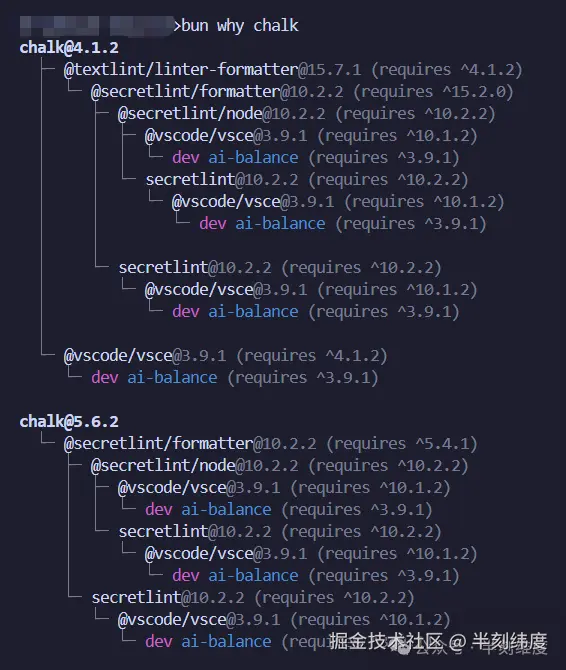
这个看似不起眼的动作背后,是一个周下载量超过 3 亿次的 npm 包。仅仅为了让控制台输出几个带颜色的字,整个生态重复了几十亿次"装包-引入-使用"的流程。
直到 Node.js 21.7.0 内置了 util.styleText()
bash
import { styleText } from 'node:util';
console.log(styleText('red', '我是红色,构建失败!'));
一行代码。 不需要装包。不需要 require。红色文字直接输出。

对于"错误标红、警告标黄"这类日常需求,它完全可以替代 chalk。简单、直接、零依赖。
styleText 有多简单?
上面的代码已经展示了最简用法。不需要思考 ANSI 转义序列,不需要处理 NO_COLOR 环境变量,不需要关心终端色域------Node.js 帮你把一切都封装好了。
它的能力边界也很清晰:
-
• ✅ 支持颜色名称:
red,green,yellow,blue... -
• ❌ 不支持 hex:
[#ff8800](javascript:;) -
• ❌ 不支持 rgb:
rgb(255,0,0) -
• ❌ 不支持渐变色
-
• ✅ 支持背景色、粗体、下划线等组合(通过数组格式)
对于"日志分级"这种刚需------红色错误、黄色警告、绿色成功------styleText 完全够用了,而且比 chalk 更短、更直接。
但问题在于:如果你需要 hex 色、渐变色、背景色组合呢?
Node.js 没有给你选择。要么回到 chalk,要么手动拼 ANSI 序列。
而 Bun,选择了另一条路。
Bun.color
Bun 是兼容这行代码的:
bash
import { styleText } from 'node:util';
console.log(styleText('red', '我是红色,构建失败!'));
此外 ,Bun 还提供了 Bun.color(),一个颜色格式转换工具,能把 hex、rgb、hsl 转成 ANSI 转义序列,但输出得你自己写。
想要和 styleText 同等的效果?你得先封装:
bash
/**
 * 带颜色输出文字到终端
 * @param text    - 要输出的文字内容
 * @param color   - 文字颜色,支持 hex 字符串(如 "#ff0000")或原生 ANSI 转义序列(如 "\x1b[30m")
 * @param bgColor - 背景颜色,支持 hex 字符串
 * @param reset   - 是否在末尾追加重置样式(\x1b[0m),默认 true。设为 false 可用于串联多个不同颜色的输出
 */
function cPrint({ text, color, bgColor, reset = true }) {
  // 前景色:若已是 ANSI 转义序列则直接使用,否则通过 Bun.color 将 hex 转为 ANSI
  const ansiFg = color ? (color.startsWith("\x1b") ? color : Bun.color(color, "ansi")) : "";
  // 背景色:将 hex 转为 ANSI 前景码后,把 38(前景)替换为 48(背景)
  const ansiBg = bgColor ? Bun.color(bgColor, "ansi").replace("38", "48") : "";
  // 按序拼接:背景码 → 前景码 → 文字内容 →(可选)重置样式
  process.stdout.write(ansiBg + ansiFg + text + (reset ? "\x1b[0m" : ""));
}

// 示例:输出红色文字
cPrint({ text: "红色文字", color: "#f00" });
甚至可以封装一个渐变函数
bash
/**
 * 渐变输出文字到终端
 * @param text       - 要输出的文字
 * @param startColor - 起始颜色 hex(如 "#ff0000")
 * @param endColor   - 结束颜色 hex(如 "#0000ff")
 */
function gradientPrint(text, startColor, endColor) {
  const chars = [...text];
  const len = chars.length;
  if (len === 0) return;

  const sr = parseInt(startColor.slice(1, 3), 16);
  const sg = parseInt(startColor.slice(3, 5), 16);
  const sb = parseInt(startColor.slice(5, 7), 16);
  const er = parseInt(endColor.slice(1, 3), 16);
  const eg = parseInt(endColor.slice(3, 5), 16);
  const eb = parseInt(endColor.slice(5, 7), 16);

  for (let i = 0; i < len; i++) {
    const t = len > 1 ? i / (len - 1) : 0;
    const r = Math.round(sr + (er - sr) * t);
    const g = Math.round(sg + (eg - sg) * t);
    const b = Math.round(sb + (eb - sb) * t);
    const interpHex = "#" + [r, g, b].map(c => c.toString(16).padStart(2, "0")).join("");
    process.stdout.write(Bun.color(interpHex, "ansi") + chars[i]);
  }
  process.stdout.write("\x1b[0m");
}
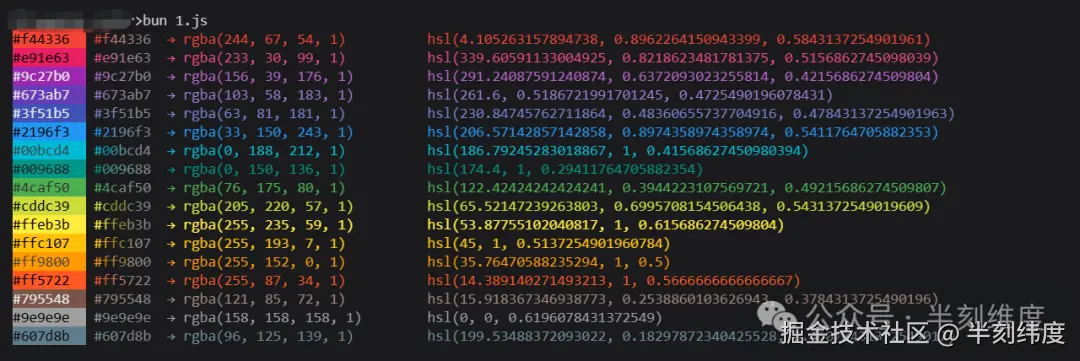
代码虽然长,但它实现了 styleText 做不到的事:hex 背景色、渐变色输出。这些都是 Bun 原生支持的,chalk都不支持渐变色。
两者使用场景
因为 styleText Bun 也支持,所以 Bun 中也是 styleText 配合 Bun.color 组合使用。
-
• 简单场景 (日志分级、基础颜色):
styleText完胜。1 行代码搞定,chalk已经不需要。 -
• 复杂场景(hex 品牌色、渐变色、背景组合):Bun 完胜。Node.js 要么回到 chalk,要么手动拼 ANSI。
完整代码
封面图中效果的代码:
bash
/**
 * 带颜色输出文字到终端
 * @param text    - 要输出的文字内容
 * @param color   - 文字颜色,支持 hex 字符串(如 "#ff0000")或原生 ANSI 转义序列(如 "\x1b[30m")
 * @param bgColor - 背景颜色,支持 hex 字符串
 * @param reset   - 是否在末尾追加重置样式(\x1b[0m),默认 true。设为 false 可用于串联多个不同颜色的输出
 */
function cPrint({ text, color, bgColor, reset = true }) {
  // 前景色:若已是 ANSI 转义序列则直接使用,否则通过 Bun.color 将 hex 转为 ANSI
  const ansiFg = color ? (color.startsWith("\x1b") ? color : Bun.color(color, "ansi")) : "";
  // 背景色:将 hex 转为 ANSI 前景码后,把 38(前景)替换为 48(背景)
  const ansiBg = bgColor ? Bun.color(bgColor, "ansi").replace("38", "48") : "";
  // 按序拼接:背景码 → 前景码 → 文字内容 →(可选)重置样式
  process.stdout.write(ansiBg + ansiFg + text + (reset ? "\x1b[0m" : ""));
}

/**
 * 渐变输出文字到终端
 * @param text       - 要输出的文字
 * @param startColor - 起始颜色 hex(如 "#ff0000")
 * @param endColor   - 结束颜色 hex(如 "#0000ff")
 */
function gradientPrint(text, startColor, endColor) {
  const chars = [...text];
  const len = chars.length;
  if (len === 0) return;

  const sr = parseInt(startColor.slice(1, 3), 16);
  const sg = parseInt(startColor.slice(3, 5), 16);
  const sb = parseInt(startColor.slice(5, 7), 16);
  const er = parseInt(endColor.slice(1, 3), 16);
  const eg = parseInt(endColor.slice(3, 5), 16);
  const eb = parseInt(endColor.slice(5, 7), 16);

  for (let i = 0; i < len; i++) {
    const t = len > 1 ? i / (len - 1) : 0;
    const r = Math.round(sr + (er - sr) * t);
    const g = Math.round(sg + (eg - sg) * t);
    const b = Math.round(sb + (eb - sb) * t);
    const interpHex = "#" + [r, g, b].map(c => c.toString(16).padStart(2, "0")).join("");
    process.stdout.write(Bun.color(interpHex, "ansi") + chars[i]);
  }
  process.stdout.write("\x1b[0m");
}


const colors = [
  "#f44336",
  "#e91e63",
  "#9c27b0",
  "#673ab7",
  "#3f51b5",
  "#2196f3",
  "#00bcd4",
  "#009688",
  "#4caf50",
  "#cddc39",
  "#ffeb3b",
  "#ffc107",
  "#ff9800",
  "#ff5722",
  "#795548",
  "#9e9e9e",
  "#607d8b",
];
for (const hex of colors) {
  const r = parseInt(hex.slice(1, 3), 16);
  const g = parseInt(hex.slice(3, 5), 16);
  const b = parseInt(hex.slice(5, 7), 16);

  const rgba = `rgba(${r}, ${g}, ${b}, 1)`;

  const rr = r / 255;
  const gg = g / 255;
  const bb = b / 255;
  const max = Math.max(rr, gg, bb);
  const min = Math.min(rr, gg, bb);
  const l = (max + min) / 2;
  let h = 0, s = 0;
  if (max !== min) {
    const d = max - min;
    s = l > 0.5 ? d / (2 - max - min) : d / (max + min);
    if (max === rr) h = ((gg - bb) / d + (gg < bb ? 6 : 0)) * 60;
    else if (max === gg) h = ((bb - rr) / d + 2) * 60;
    else h = ((rr - gg) / d + 4) * 60;
  }
  const hsl = `hsl(${h}, ${s}, ${l})`;

  const contrast = l > 0.5 ? "\x1b[30m" : "\x1b[37m";

  cPrint({ text: hex.padEnd(9), color: contrast, bgColor: hex, reset: false });
  process.stdout.write("\x1b[0m");
  process.stdout.write(" ");
  gradientPrint(hex, hex, "#000000");
  cPrint({ text: "  → " + rgba.padEnd(30) + hsl + "\n", color: hex });
}