想实现 RAG,⾸先就需要从源中获取数据,即加载数据或⽂档。这是通过 LangChain 的⽂档加载器完成的
1.Document类
LangChain ⽂档加载器可以将各种数据源加载成⼀系列的⽂档对象 Document
定义了⼀个 documents ⽂档列表,其内包含了两个 Document ⽂档对象。通常,单个
Document对象表⽰较⼤⽂档的⼀个块/⻚。每个 Document 对象,包含了以下参数:
•
id :可选的⽂档标识符。理想情况下,这应该在整个⽂档集合中是唯⼀的,并格式化为
UUID,但不会强制执⾏。
•
page_content :字符串⽂本
•
metadata :与内容关联的任意元数据。类型为 dict Optional
python
from langchain_core.documents import Document
documents = [
    # 单个Document对象通常表⽰较⼤⽂档的⼀个块
    Document(
        # 内容字符串
        page_content="狗是很好的伴侣,以忠诚和友好⽽闻名。",
        # 元数据字典
        # 元数据属性可以捕获有关⽂档源、与其他⽂档的关系以及其他信息的信息。
        metadata={"source": "mammal-pets-doc"},
    ),
    Document(
        page_content="猫是独⽴的宠物,经常享受⾃⼰的空间。",
        metadata={"source": "mammal-pets-doc"},
    ),
]
2.PDF文档
将本地的 PDF ⽂档加载到 LangChain 中,其实就是将 PDF ⽂档转换为⼀个个 Document 对象。这时就需要我们使⽤ PyPDFLoader ⽂档加载器完成这⼀功能
class langchain_community.document_loaders.pdf.PyPDFLoader 类,有以下关键函数:
•
init() 初始化函数,⼊参 file_path ,表⽰要加载的 PDF ⽂件的路径。
•
load() → listDocument :将数据加载到⽂档对象中。返回⽂档对象列表。
python
from langchain_community.document_loaders import PyPDFLoader
file_path = "../Docs/PDF/脚⼿架级微服务租房平台Q&A.pdf"
loader = PyPDFLoader(file_path)
# 将 PDF ⽂件的每⼀⻚转换为⼀个独⽴的 Document 对象,并存储在列表 docs 中。
docs = loader.load()

print(f"问:PDF ⽂件的总⻚数为:\n{len(docs)}\n")
print(f"问:第⼀⻚⽂本内容的前200个字符是:\n{docs[0].page_content[:200]}\n")
print(f"问:第⼀⻚元数据:\n{docs[0].metadata}")
现在许多 LLM ⽀持对多模态输⼊(例如图像)进⾏推理。在某些应⽤程序中,例如对具有复杂布局、图表或扫描的 PDF 进⾏问答,可以跳过 PDF 解析,直接将 PDF ⻚⾯转换为图像并将其直接传递给模型可能是更准确的
3.MarkDown
将本地的 Markdown ⽂档加载到 LangChain 中,需要我们使⽤
UnstructuredMarkdownLoader ⽂档加载器完成这⼀功能
class
langchain_community.document_loaders.markdown.UnstructuredMarkdownLoade
r 类,有以下关键函数:
•
init() 初始化函数,所需参数:
◦
file_path :表⽰要加载的 Markdown ⽂件的路径。
◦
mode :加载⽂件时要使⽤的模式。可以是 single 或 elements。默认为 single。
▪
single:⽂档将作为单个 Document 对象返回
▪
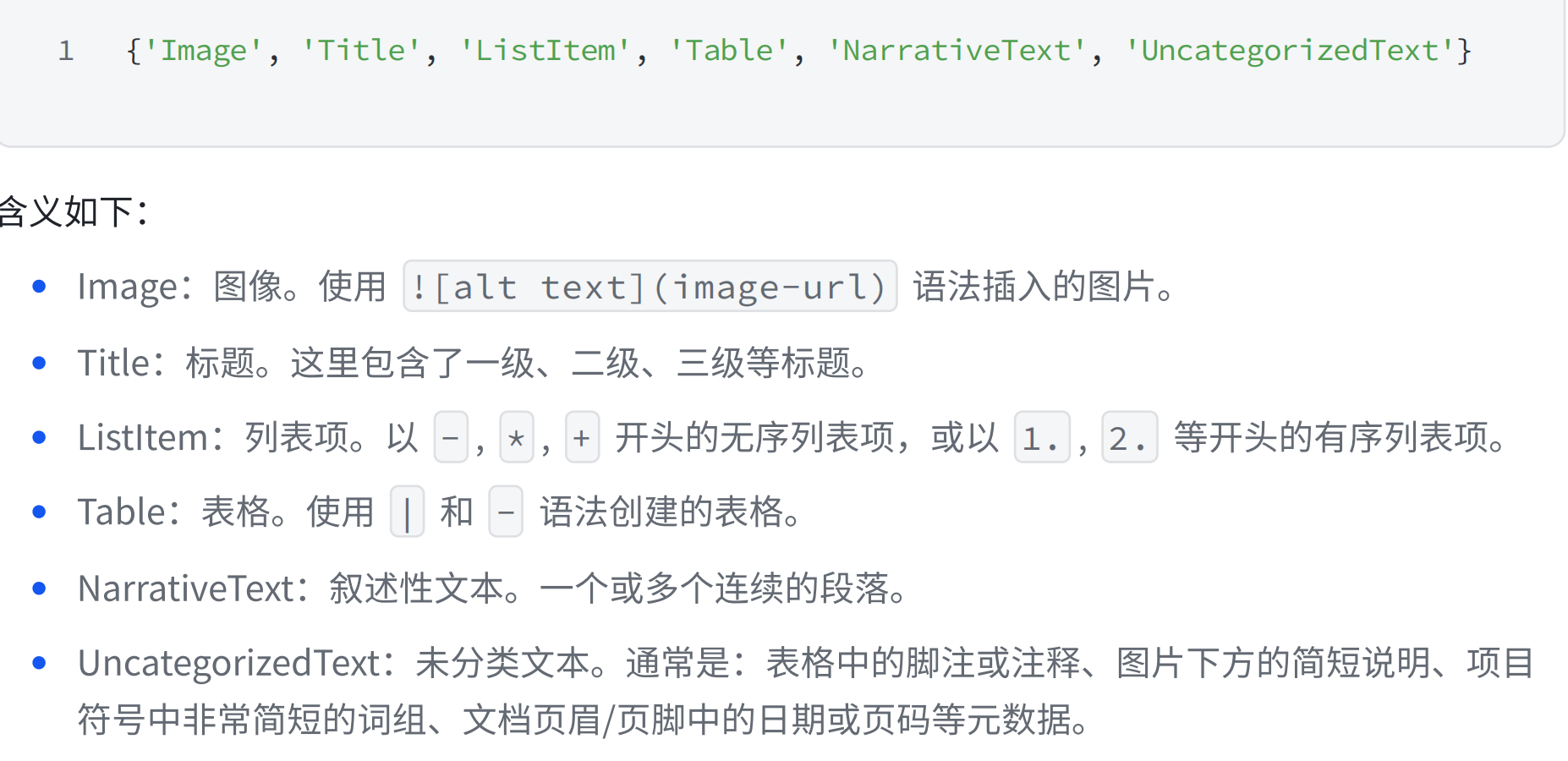
elements:会将⽂档拆分为 Title 和 NarrativeText 等不同类型的元素。
•
load() → listDocument :将数据加载到⽂档对象中。返回⽂档对象列表。
LangChain 实现的 UnstructuredMarkdownLoader 需要依赖 Unstructured 包。因此在使⽤前我们需要先安装它:
pip install "unstructuredmd" nltk
我们使⽤ single 模式加载⼀个本地 Markdown
python
from langchain_community.document_loaders import UnstructuredMarkdownLoader
from langchain_core.documents import Document
markdown_path = "../Docs/Markdown/脚⼿架级微服务租房平台Q&A.md"
# single 模式,加载后,默认只有⼀个 Document 对象
loader = UnstructuredMarkdownLoader(markdown_path)
data = loader.load()
assert len(data) == 1
assert isinstance(data[0], Document)
print(data[0].page_content[:200])
print(data[0].metadata)
elements 模式下加载本地 Markdown ⽂档的效果
python
from langchain_community.document_loaders import UnstructuredMarkdownLoader
from langchain_core.documents import Document
markdown_path = "../Docs/Markdown/脚⼿架级微服务租房平台Q&A.md"
# single 模式,加载后,默认只有⼀个 Document 对象
loader = UnstructuredMarkdownLoader(markdown_path, mode="elements")
data = loader.load()
print(f"问:⽂档个数为:\n{len(data)}\n")
print("问:前三个⽂档数据:")
for document in data[:3]:
print(f"{document}\n")
Markdown文档类型:
python
print(set(document.metadata["category"] for document in data))