1. 创建.net framework类型的C#控制台应用程序
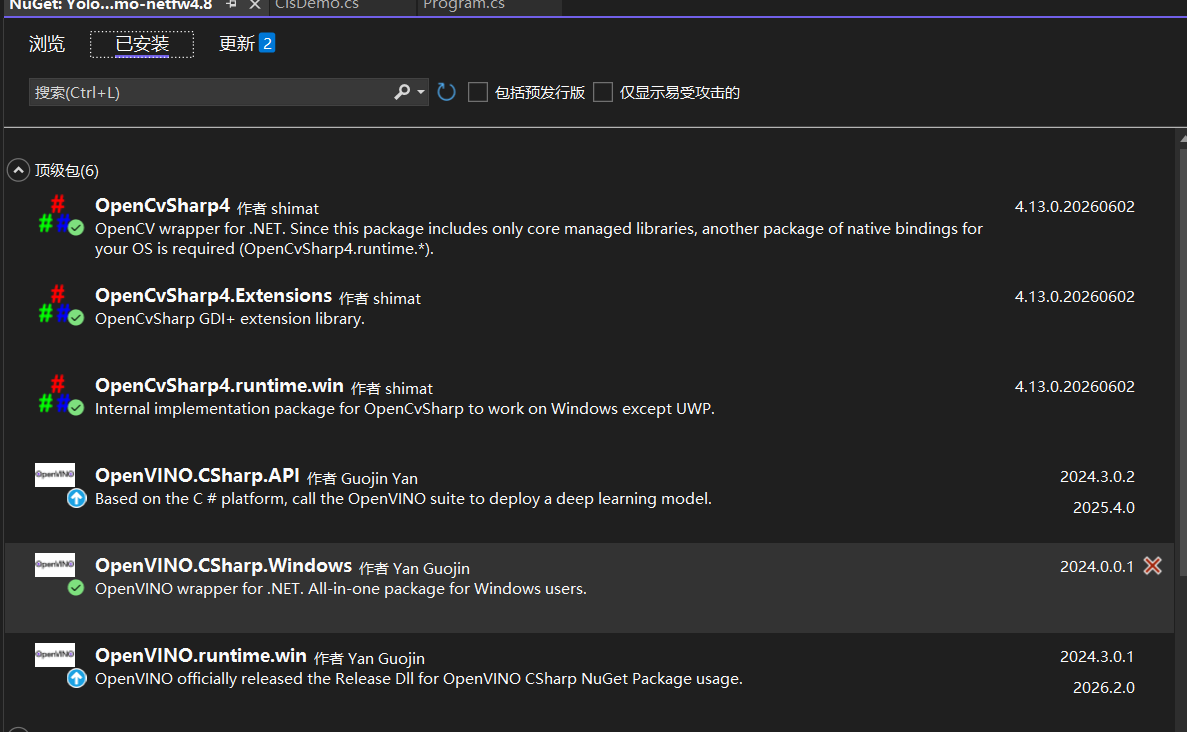
2. 使用NuGet包管理器,安装如下依赖:
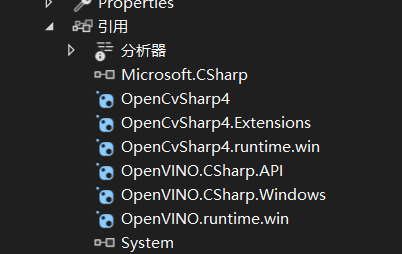
3. 配置项目属性:
- 右键项目 → 属性 → 生成 → 目标平台 选择 x64。
4. 拷贝原生库
找到 NuGet 包缓存目录,路径通常为:C:\Users\你的用户名\.nuget\packages\openvino.runtime.win\2024.3.0.1\runtimes\win-x64\native\
将 native 文件夹下的 所有 .dll 文件 (包括 openvino_c.dll)复制到你的项目输出目录 bin\Debug\ 或 bin\x64\Debug\ 下。
(2024.3.0.1为你安装的依赖的版本,可以在第一张图已安装的NuGet包查看)
5. 添加ClsDemo.cs类,并输入如下代码:
cs
using System;
using System.Collections.Generic;
using System.Linq;
using System.Diagnostics;
using System.IO;
using OpenCvSharp;
using OpenVinoSharp;

namespace YOLOv26Demo
{
    public  class ClsDemo
    {
        public static void Run()
        {
            // ========== 1. 配置参数 ==========
            string modelPath = @"E:\Yolo\ModelTest\yolo26n-cls.onnx";   // 支持 .onnx 或 .xml
            string imagePath = @"E:\Yolo\ModelTest\demo_4.jpg";
            string device = "CPU";

            // 验证文件存在性
            if (!File.Exists(modelPath))
            {
                Console.WriteLine($"错误:模型文件不存在!{modelPath}");
                Console.ReadKey();
                return;
            }
            if (!File.Exists(imagePath))
            {
                Console.WriteLine($"错误:图片文件不存在!{imagePath}");
                Console.ReadKey();
                return;
            }

            // ========== 2. 初始化 OpenVINO ==========
            Console.WriteLine("初始化 OpenVINO Runtime...");
            Core core = null;
            Model model = null;
            CompiledModel compiledModel = null;
            InferRequest inferRequest = null;

            try
            {
                core = new Core();
                Console.WriteLine($"可用设备: {string.Join(", ", core.get_available_devices())}");

                // ========== 3. 加载模型 ==========
                Console.WriteLine($"加载模型: {modelPath}");
                model = core.read_model(modelPath);
                compiledModel = core.compile_model(model, device);
                Console.WriteLine($"模型已编译到: {device}");

                // 创建推理请求
                inferRequest = compiledModel.create_infer_request();

                // ========== 4. 获取模型输入信息(修正类型转换) ==========
                Tensor inputTensor = inferRequest.get_input_tensor();
                Shape inputShape = inputTensor.get_shape();

                // 正确获取各维度值(使用索引器直接获取 long 类型)
                long batchSize = inputShape[0];      // Batch 大小,通常为 1
                long channels = inputShape[1];       // 通道数,通常为 3 (RGB)
                long modelHeight = inputShape[2];    // 高度
                long modelWidth = inputShape[3];     // 宽度

                Console.WriteLine($"输入形状: [Batch={batchSize}, Channels={channels}, Height={modelHeight}, Width={modelWidth}]");

                // 转换为 int 类型用于后续操作(OpenCvSharp 使用 int)
                int height = (int)modelHeight;
                int width = (int)modelWidth;

                // ========== 5. 读取并预处理图片 ==========
                Console.WriteLine($"读取图像: {imagePath}");
                Mat image = Cv2.ImRead(imagePath);
                if (image.Empty())
                {
                    Console.WriteLine("错误:无法读取图片!");
                    return;
                }

                // 预处理:BGR → RGB → Resize → 归一化 → CHW 格式
                Mat rgbImage = new Mat();
                Cv2.CvtColor(image, rgbImage, ColorConversionCodes.BGR2RGB);

                Mat resizedImage = new Mat();
                Cv2.Resize(rgbImage, resizedImage, new Size(width, height));

                Mat normalizedImage = new Mat();
                resizedImage.ConvertTo(normalizedImage, MatType.CV_32F, 1.0 / 255.0);

                // 构建 CHW 格式的一维数组
                float[] inputData = new float[channels * height * width];
                int index = 0;
                for (int c = 0; c < channels; c++)
                {
                    for (int h = 0; h < height; h++)
                    {
                        for (int w = 0; w < width; w++)
                        {
                            Vec3f pixel = normalizedImage.At<Vec3f>(h, w);
                            inputData[index++] = pixel[c];
                        }
                    }
                }

                // ========== 6. 设置输入并推理 ==========
                inputTensor.set_data(inputData);

                Console.WriteLine("执行推理...");
                Stopwatch sw = Stopwatch.StartNew();
                inferRequest.infer();
                sw.Stop();
                Console.WriteLine($"推理耗时: {sw.ElapsedMilliseconds} ms");

                // ========== 7. 获取输出结果 ==========
                Tensor outputTensor = inferRequest.get_output_tensor();
                Shape outputShape = outputTensor.get_shape();

                long numClasses = outputShape[1];
                Console.WriteLine($"输出形状: {outputShape.to_string()}, 类别数: {numClasses}");

                ulong totalSize = outputTensor.get_size();
                float[] scores = outputTensor.get_data<float>((int)totalSize);

                // ========== 8. Top-5 结果 ==========
                var results = scores
                    .Select((score, idx) => new { ClassId = idx, Score = score })
                    .OrderByDescending(x => x.Score)
                    .Take(5)
                    .ToList();

                Console.WriteLine("\n========== Top-5 分类结果 ==========");
                Console.WriteLine("排名\t类别ID\t置信度");
                for (int i = 0; i < results.Count; i++)
                {
                    Console.WriteLine($"{i + 1}\t{results[i].ClassId}\t{results[i].Score:F6}");
                }

                // ========== 9. 显示结果图片 ==========
                string top1Label = $"Class {results[0].ClassId}: {results[0].Score:P1}";
                Cv2.PutText(image, top1Label, new Point(10, 40), HersheyFonts.HersheySimplex,
                    1.2, new Scalar(0, 255, 0), 2);
                Cv2.ImShow("YOLOv26 Classification Result", image);
                Cv2.WaitKey(0);
                Cv2.DestroyAllWindows();

                // 释放资源
                outputTensor.Dispose();
                inputTensor.Dispose();
                inferRequest.Dispose();
                compiledModel.Dispose();
                model.Dispose();
                core.Dispose();

                Console.WriteLine("\n推理完成!");
            }
            catch (Exception ex)
            {
                Console.WriteLine($"错误: {ex.Message}");
                Console.WriteLine($"堆栈: {ex.StackTrace}");
            }
            finally
            {
                inferRequest?.Dispose();
                compiledModel?.Dispose();
                model?.Dispose();
                core?.Dispose();
            }

            Console.WriteLine("\n按任意键退出...");
            Console.ReadKey();
        }
    }
}
(注意模型路径更改为自己的路径)
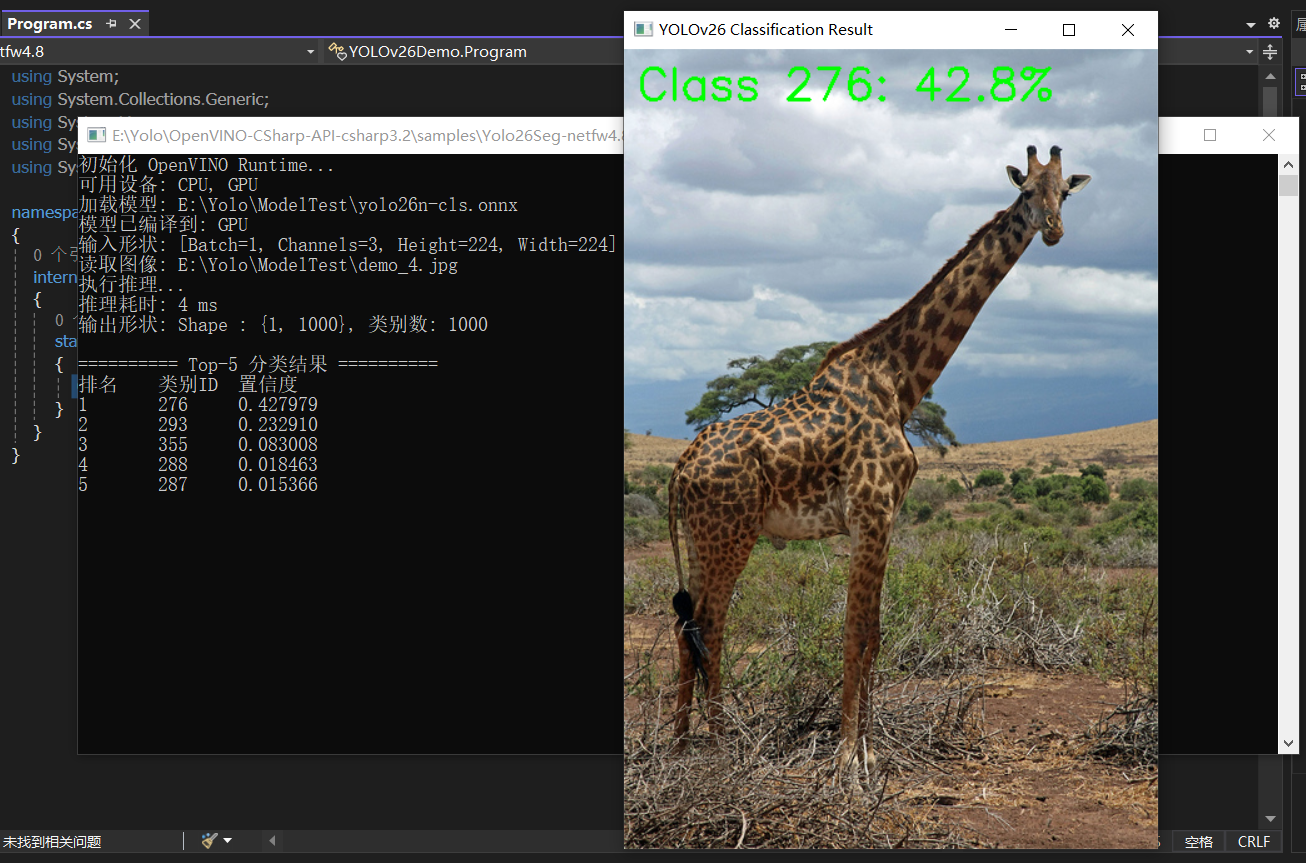
6. 调用 ClsDemo.Run();运行程序
7. 运行结果: