标签 :#亚马逊爬虫 #Python #电商数据 #API开发 #价格监控
前言
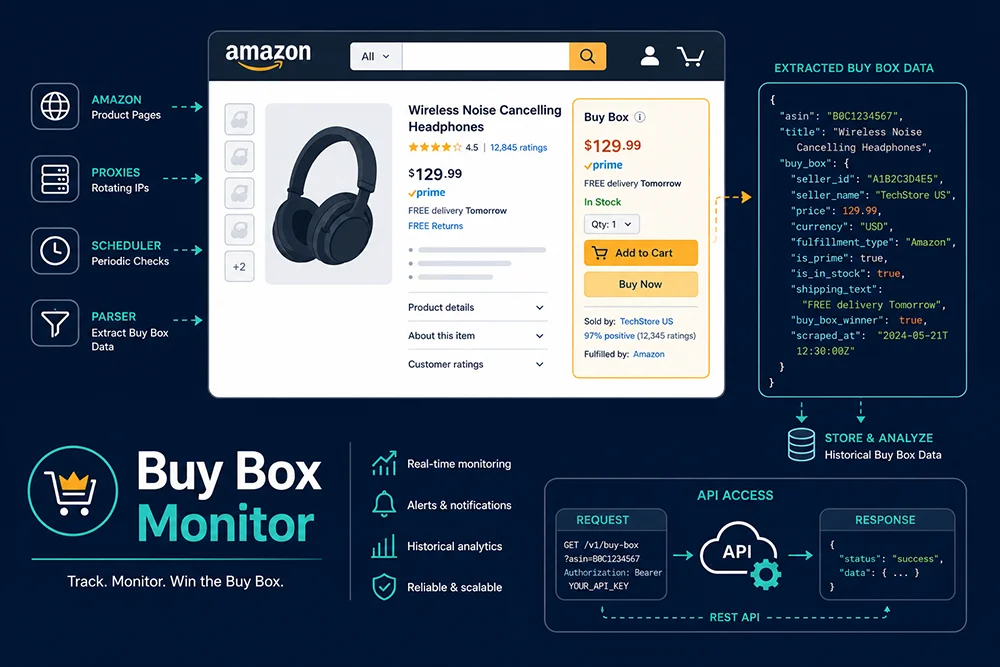
亚马逊 Buy Box(黄金购物车)的数据采集是构建自动补价工具、品牌授权监控系统和跨境电商竞品分析平台的核心需求。根据 Jungle Scout 2025 年数据,82% 的亚马逊销售额经由 Buy Box 完成,且 Buy Box 归属每 15--30 分钟可能因竞品调价而发生变更。
本文系统讲解亚马逊 Buy Box 信息采集的技术原理、主流方案对比,以及基于 Pangolinfo Scrape API 的生产级 Python 实现,包含完整可运行代码和常见问题排查。
技术原理详解
为什么 Buy Box 采集比普通商品页难?
亚马逊商品详情页采用服务端渲染 + 客户端异步注入 的混合架构。Buy Box 区域(#buybox DOM 节点)的核心字段通过 JavaScript 异步加载:
HTML Shell (服务端返回)
    ↓
JavaScript 执行(约 800ms--2s)
    ↓
Buy Box DOM 注入(seller_name, price, fulfillment_type 等字段出现)
这意味着:
requests/httpx直接请求 → 拿到空#buybox容器,字段全部为空selenium/playwrightheadless 渲染 → 可以拿到字段,但会被行为分析识别- TLS 指纹检测(JA3 Hash):2024 年后亚马逊对非标准浏览器指纹的 TLS 握手特征进行主动检测,Playwright 默认配置的 fingerprint 已被标记
反爬机制分层
| 层次 | 机制 | 绕过难度 |
|---|---|---|
| IP 层 | 高频 IP 封锁、ASN 黑名单 | 中(住宅代理可绕) |
| TLS 层 | JA3 指纹检测 | 高(需要 MITM 或 uTLS) |
| 行为层 | 鼠标轨迹、点击间隔分析 | 高(需要完整 headful 模拟) |
| Session 层 | Cookie 追踪、账号关联 | 中高 |
| CAPTCHA 层 | 图像 CAPTCHA + 文字识别 | 需要第三方识别服务 |
在没有专业反检测方案的情况下,高频采集成功率通常低于 35%(来源:多个开源爬虫社区实测,2025 Q3)。
方案对比
方案一:自建爬虫(Playwright + 住宅代理)
python
# 基础示例:不推荐生产使用,成功率不稳定
from playwright.sync_api import sync_playwright
import time

def scrape_buybox_basic(asin: str) -> dict:
    with sync_playwright() as p:
        browser = p.chromium.launch(
            headless=True,
            args=['--disable-blink-features=AutomationControlled']
        )

        context = browser.new_context(
            proxy={"server": "http://your_proxy:port"},
            user_agent="Mozilla/5.0 (Windows NT 10.0; Win64; x64) AppleWebKit/537.36"
        )

        page = context.new_page()

        try:
            page.goto(f"https://www.amazon.com/dp/{asin}", timeout=30000)
            page.wait_for_selector("#buybox", timeout=15000)

            # 提取 Buy Box 价格(此 selector 可能因页面更新而失效)
            price_el = page.query_selector("#corePriceDisplay_desktop_feature_div .a-price-whole")
            price = price_el.text_content() if price_el else None

            # 提取卖家名称
            seller_el = page.query_selector("#sellerProfileTriggerId")
            seller = seller_el.text_content() if seller_el else "Amazon"

            return {"asin": asin, "price": price, "seller": seller}

        except Exception as e:
            print(f"采集失败: {e}")
            return {}
        finally:
browser.close()已知问题:
- 2026 年 selector
#corePriceDisplay_desktop_feature_div .a-price-whole在 A/B 测试中可能失效 - headless 模式 TLS 指纹被检测概率约 40%
- 代理费 + 解析维护成本高,不适合生产环境
方案二:Pangolinfo Scrape API(推荐)
python
import requests
import json
from dataclasses import dataclass
from typing import Optional, List
from datetime import datetime

@dataclass
class BuyBoxData:
    seller_id: str
    seller_name: str
    seller_rating: float
    price: float
    shipping: float
    total_price: float
    fulfillment_type: str  # "FBA" / "FBM"
    is_prime: bool
    availability: str      # "in_stock" / "out_of_stock" / "limited"
    condition: str
    scraped_at: datetime

@dataclass
class SellerOffer:
    seller_id: str
    seller_name: str
    price: float
    fulfillment_type: str
    is_prime: bool

class BuyBoxScraper:
    """
    亚马逊 Buy Box 信息采集客户端
    基于 Pangolinfo Scrape API
    """

    def __init__(self, api_key: str):
        self.api_key = api_key
        self.base_url = "https://api.pangolinfo.com/v1/scrape"
        self.session = requests.Session()
        self.session.headers.update({
            "Authorization": f"Bearer {api_key}",
            "Content-Type": "application/json"
        })

    def get_buybox(
        self,
        asin: str,
        marketplace: str = "US"
    ) -> Optional[dict]:
        """
        采集指定 ASIN 的 Buy Box 数据

        Args:
            asin: 商品 ASIN
            marketplace: 站点代码(US/UK/DE/JP/CA/ES/IT/FR/AU)

        Returns:
            包含 buy_box 和 other_sellers 字段的完整响应字典
        """
        payload = {
            "url": f"https://www.amazon.com/dp/{asin}",
            "marketplace": marketplace,
            "parse_type": "product_detail",
            "include_buybox": True,
            "include_offers": True
        }

        resp = self.session.post(
            self.base_url,
            json=payload,
            timeout=30
        )
        resp.raise_for_status()
        return resp.json()

    def parse_buybox_data(self, raw: dict) -> tuple[BuyBoxData, List[SellerOffer]]:
        """解析 API 返回数据为结构化对象"""
        bb = raw["buy_box"]

        buybox_data = BuyBoxData(
            seller_id=bb.get("seller_id", ""),
            seller_name=bb.get("seller_name", ""),
            seller_rating=float(bb.get("seller_rating", 0)),
            price=float(bb.get("price", 0)),
            shipping=float(bb.get("shipping", 0)),
            total_price=float(bb.get("total_price", 0)),
            fulfillment_type=bb.get("fulfillment_type", "UNKNOWN"),
            is_prime=bool(bb.get("is_prime", False)),
            availability=bb.get("availability", "unknown"),
            condition=bb.get("condition", "New"),
            scraped_at=datetime.fromisoformat(raw.get("scraped_at", "").replace("Z", "+00:00"))
        )

        other_sellers = [
            SellerOffer(
                seller_id=s.get("seller_id", ""),
                seller_name=s.get("seller_name", ""),
                price=float(s.get("price", 0)),
                fulfillment_type=s.get("fulfillment_type", "FBM"),
                is_prime=bool(s.get("is_prime", False))
            )
            for s in raw.get("other_sellers", [])
        ]

        return buybox_data, other_sellers

    def batch_scrape(self, asin_list: list, marketplace: str = "US") -> list:
        """
        批量采集(异步提交模式)
        适合大量 ASIN 的定时任务场景
        """
        payload = {
            "batch": [
                {
                    "url": f"https://www.amazon.com/dp/{asin}",
                    "marketplace": marketplace,
                    "parse_type": "product_detail",
                    "include_buybox": True
                }
                for asin in asin_list
            ],
            "callback_url": "https://your-domain.com/webhook/buybox"
        }

        resp = self.session.post(
            f"{self.base_url}/batch",
            json=payload,
            timeout=30
        )
        resp.raise_for_status()
        return resp.json()  # 返回 batch_id,结果通过 webhook 回调


# 使用示例
if __name__ == "__main__":
    scraper = BuyBoxScraper(api_key="your_pangolinfo_api_key")

    # 单次采集
    raw = scraper.get_buybox("B0CXXX1234", "US")
    buybox, sellers = scraper.parse_buybox_data(raw)

    print(f"Buy Box 持有者: {buybox.seller_name}")
    print(f"价格: ${buybox.price} ({buybox.fulfillment_type})")
    print(f"库存状态: {buybox.availability}")
    print(f"Prime: {buybox.is_prime}")
    print(f"\n竞争卖家数: {len(sellers)}")
    for s in sellers[:3]:
        print(f"  {s.seller_name}: ${s.price} [{s.fulfillment_type}]")
动态定价决策引擎(完整实现)
python
from enum import Enum
from dataclasses import dataclass

class RepricingAction(Enum):
    HOLD = "hold"
    REPRICE = "reprice"
    WAIT = "wait"
    RAISE = "raise"

@dataclass
class RepricingDecision:
    action: RepricingAction
    target_price: Optional[float]
    reason: str
    current_buybox_price: float

class BuyBoxRepricingEngine:
    """
    基于实时 Buy Box 数据的动态定价决策引擎
    """

    def __init__(
        self,
        scraper: BuyBoxScraper,
        my_seller_id: str,
        price_floor: float,     # 最低可接受价格(成本 + 费用)
        price_ceiling: float    # 最高标价
    ):
        self.scraper = scraper
        self.my_seller_id = my_seller_id
        self.price_floor = price_floor
        self.price_ceiling = price_ceiling

    def evaluate(self, asin: str) -> RepricingDecision:
        raw = self.scraper.get_buybox(asin)
        buybox, _ = self.scraper.parse_buybox_data(raw)

        # Case 1: 自己持有 Buy Box → 考虑是否有涨价空间
        if buybox.seller_id == self.my_seller_id:
            if buybox.price < self.price_ceiling * 0.95:
                return RepricingDecision(
                    action=RepricingAction.RAISE,
                    target_price=min(buybox.price * 1.03, self.price_ceiling),
                    reason="持有 Buy Box,尝试小幅涨价测试市场",
                    current_buybox_price=buybox.price
                )
            return RepricingDecision(
                action=RepricingAction.HOLD,
                target_price=None,
                reason="持有 Buy Box 且价格已接近上限,维持现价",
                current_buybox_price=buybox.price
            )

        # Case 2: 竞品缺货 → 等待自然回流
        if buybox.availability == "out_of_stock":
            return RepricingDecision(
                action=RepricingAction.WAIT,
                target_price=None,
                reason="竞品库存告急,等待 Buy Box 自然回流",
                current_buybox_price=buybox.price
            )

        # Case 3: 竞品是 FBM → 价格持平即可(FBA 算法优势)
        if buybox.fulfillment_type == "FBM":
            target = buybox.price
            if target >= self.price_floor:
                return RepricingDecision(
                    action=RepricingAction.REPRICE,
                    target_price=target,
                    reason="FBM 竞品,价格持平即可借助 FBA 算法优势赢回 Buy Box",
                    current_buybox_price=buybox.price
                )

        # Case 4: FBA 竞品 → 最小幅度跟价
        target = round(buybox.price - 0.01, 2)
        if target < self.price_floor:
            return RepricingDecision(
                action=RepricingAction.HOLD,
                target_price=None,
                reason=f"竞品价格 ${buybox.price} 已低于成本地板线 ${self.price_floor},拒绝跟价",
                current_buybox_price=buybox.price
            )

        return RepricingDecision(
            action=RepricingAction.REPRICE,
            target_price=target,
            reason=f"FBA 竞品,最小幅度跟价至 ${target}",
            current_buybox_price=buybox.price
        )
常见问题与解决方案
Q: API 返回 buy_box: null,是什么原因?
A: 通常有三种情况:①该 ASIN 当前无库存(包括所有卖家);②该商品是 Variations 父 ASIN,需要请求子 ASIN;③该 ASIN 被限制购买(Region restriction)。可以检查返回的 status 字段和 availability 字段加以区分。
Q: 不同站点的 Buy Box 逻辑一样吗?
A: 整体逻辑相同,但细节不同。DE、IT、ES 等欧洲站点的 VAT 税率会被包含在 Buy Box 价格中;JP 站点有时会显示多个 Buy Box 卖家;AU 站点亚马逊自营比例较高。Pangolinfo Scrape API 的 marketplace 参数处理了这些差异,返回数据已标准化。
Q: 批量采集时如何处理速率限制?
A: API 默认限制每秒 10 请求。对于大批量任务,建议使用异步批量提交接口(/v1/scrape/batch),一次提交最多 500 个 ASIN,通过 webhook 接收结果,避免客户端侧的并发管理复杂度。
总结
| 维度 | 自建爬虫 | Pangolinfo Scrape API |
|---|---|---|
| 初始开发成本 | 高 | 低 |
| 规模化运维成本 | 高(随量线性增长) | 低(按量计费) |
| 成功率(10 万次/日) | 55--75% | >95% |
| 数据延迟 | 不稳定 | 5--15 分钟 |
| 多站点支持 | 需分别维护 | 单参数切换 |
对于核心是定价逻辑和业务策略的团队,把亚马逊 Buy Box 信息采集外包给专业 API 是目前性价比最高的路径。