二、APK取证
1.请分析韦明辉手机,笔记应用的用户密码是?答案格式:Abc123456
这题其实隐含着这个笔记应用需要写账密的意思
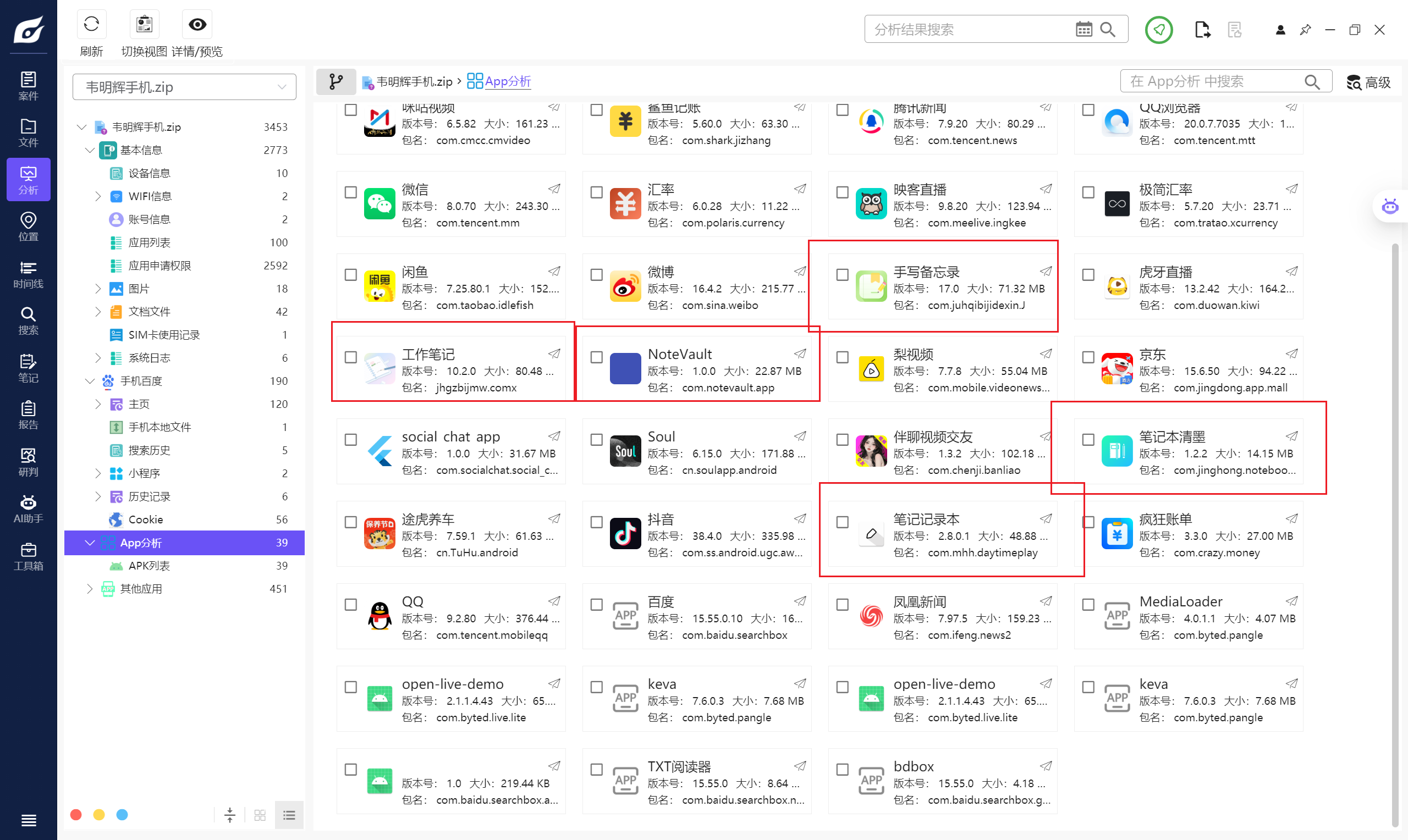
因此我们可以从这一大堆的笔记软件中锁定这题说的到底是哪一个
因为别的打开仿真完基本上都能直接看见内容,工作笔记有一个加密部分但是不存在账密这一说
于是我们最终锁定这个应用NoteVault
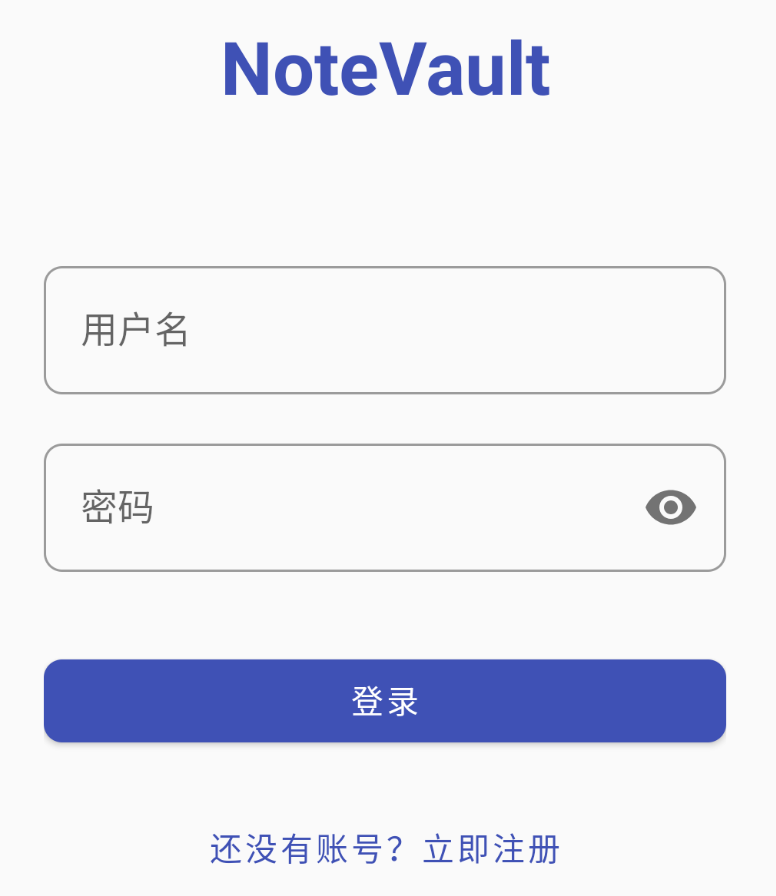
然后就是找账密了,其实不难找,但是难爆破
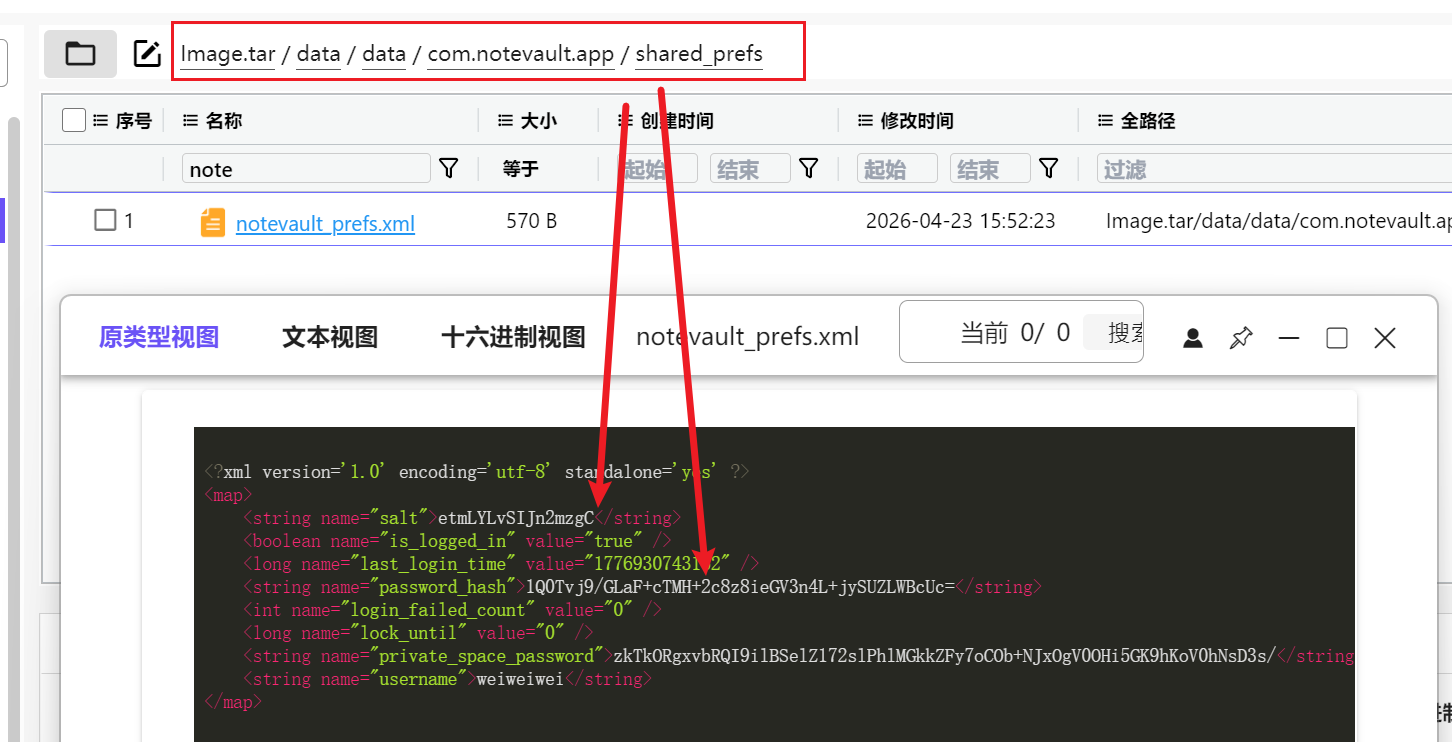
我们在配置文件轻松找到盐和密码的哈希,用户名是weiweiwei,但是密码是什么呢,显然没有,需要我们爆破
这边比赛确实没爆出来,数字都尝试过了,最后发现是和参考格式一样的1大写+2小写+6数字
hashcat -m 1410 -a 3 hash.txt ?u?l?l?d?d?d?d?d?d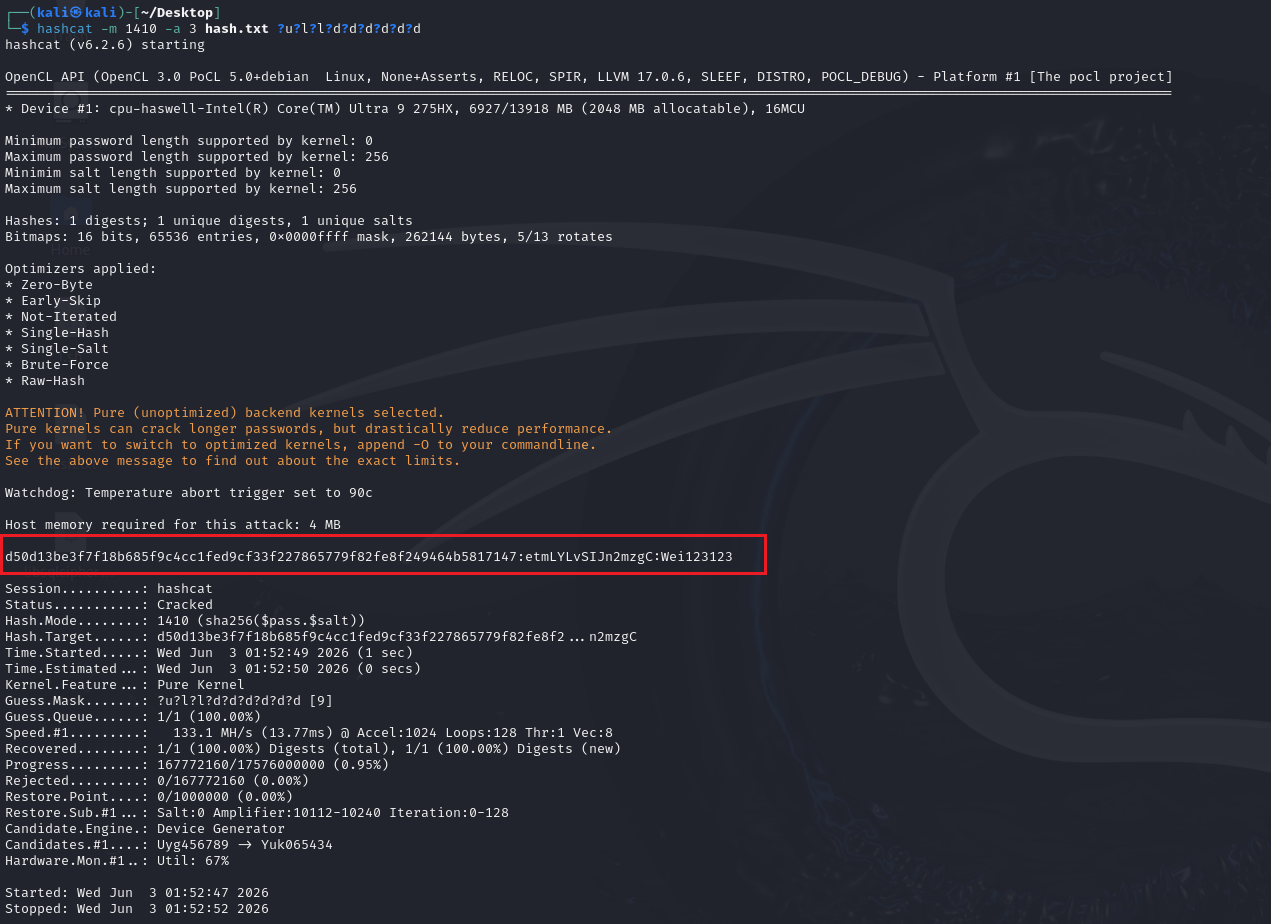
得到密码是Wei123123
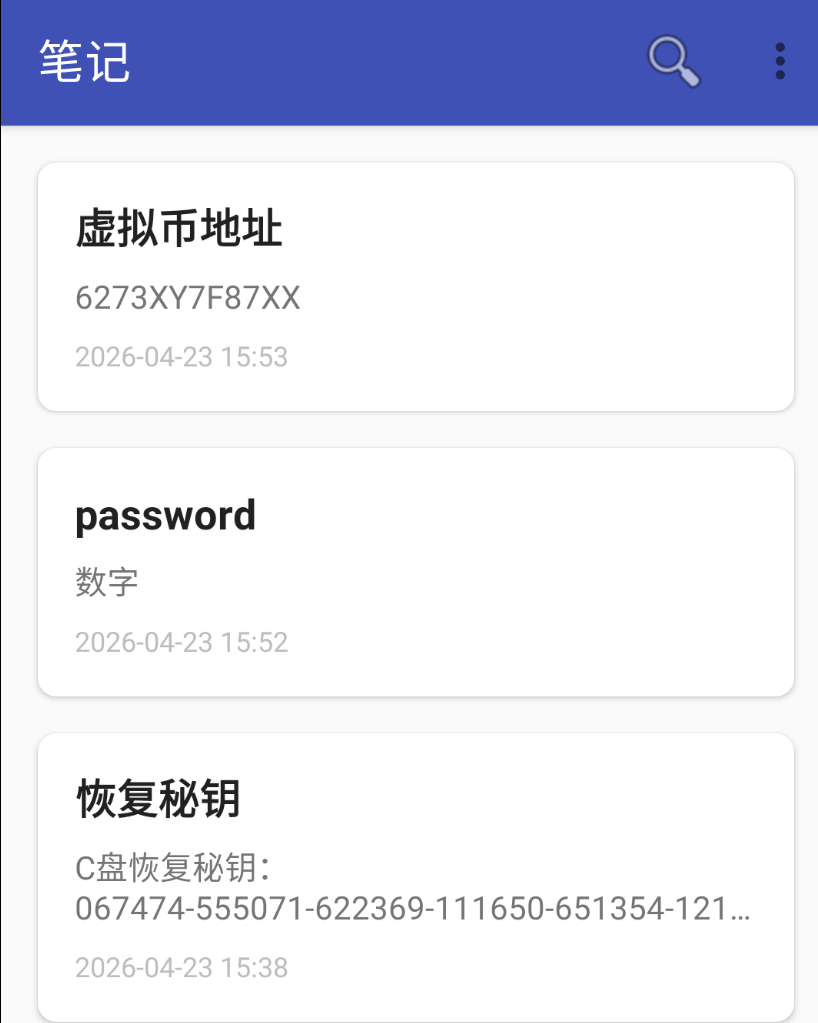
直接仿真后登录即可,所以本题答案是Wei123123
2.请分析韦明辉手机,笔记应用中,公共笔记有几条?答案格式:1
要是前边爆破了的话,直接看看就直接知道了
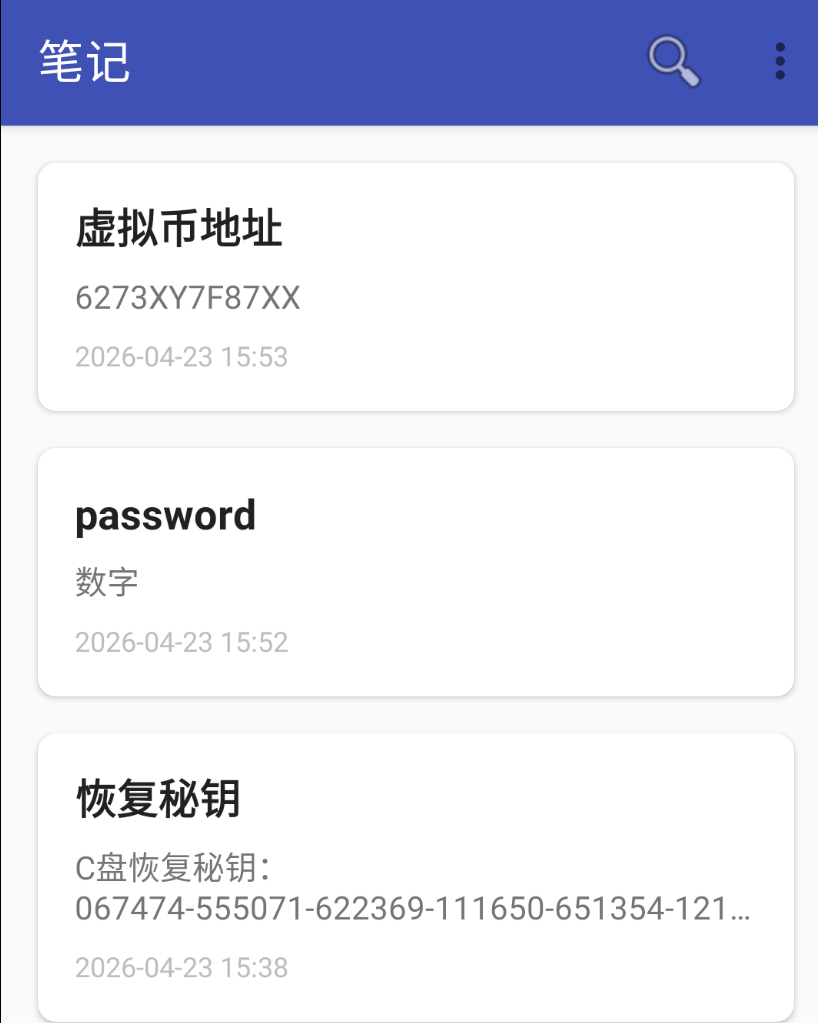
显然是3条
但是我们还是以没有成功看一遍
先分析该应用,刚刚已经定位了,我们直接去文件夹看看,发现存在database数据库
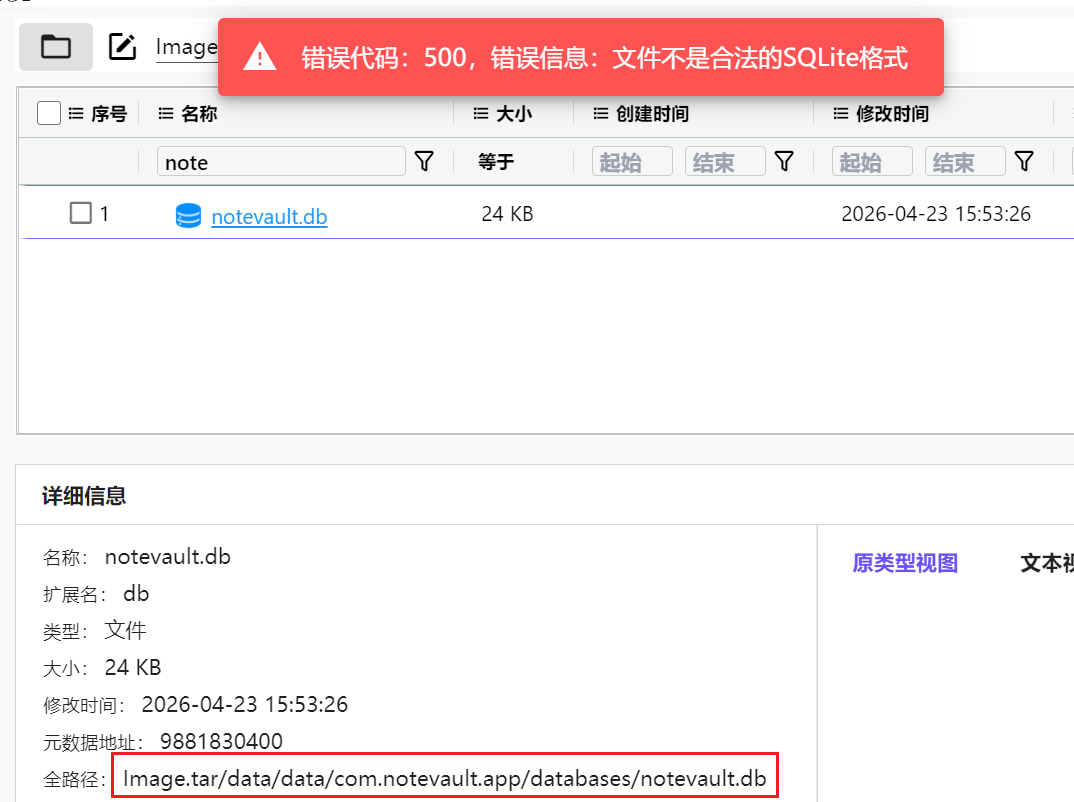
但是是加密数据库,我们也找不到更多的信息,只能先去Jadx进行分析

直接搜索文件名,可以定位到SqliteDbManager
信息量很大这个地方
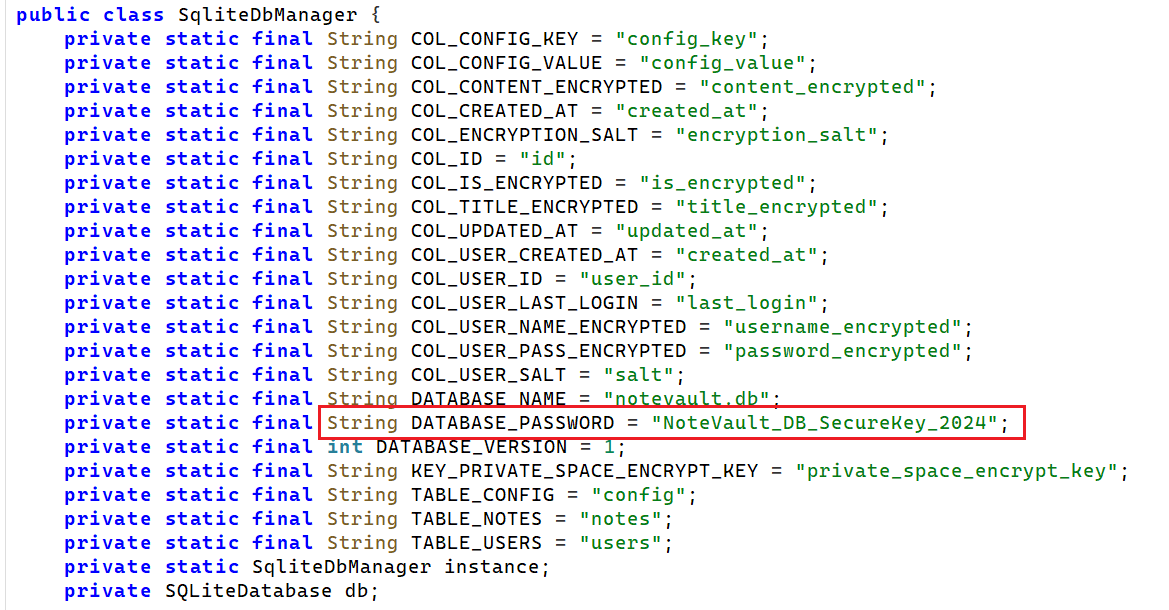
这直接把数据库密码明文标注出来了,那我们解密试试看NoteVault_DB_SecureKey_2024
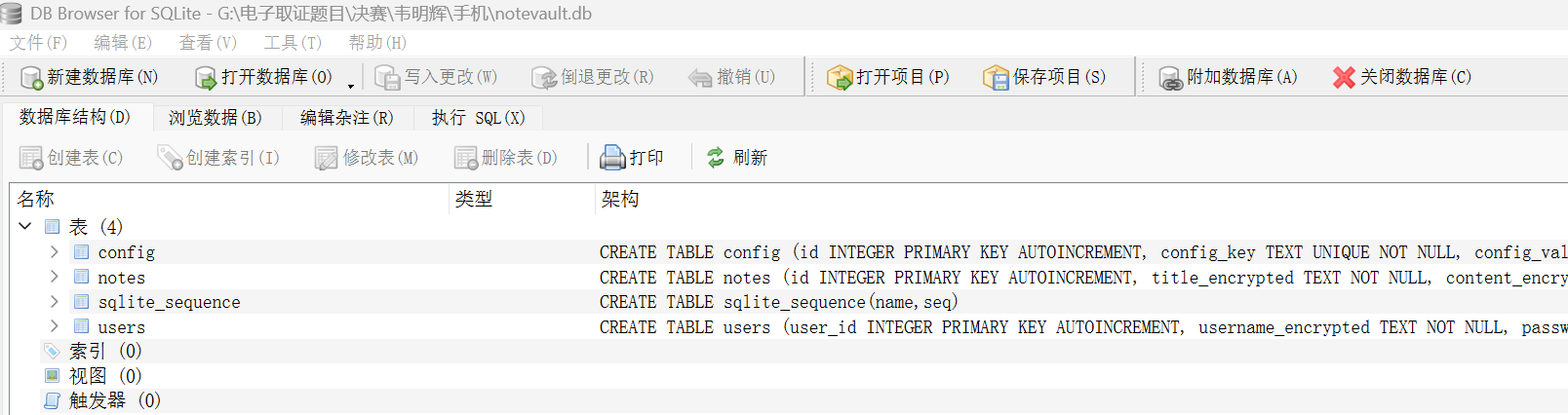
成功解密,所以这边我们只要看看有几条就好了
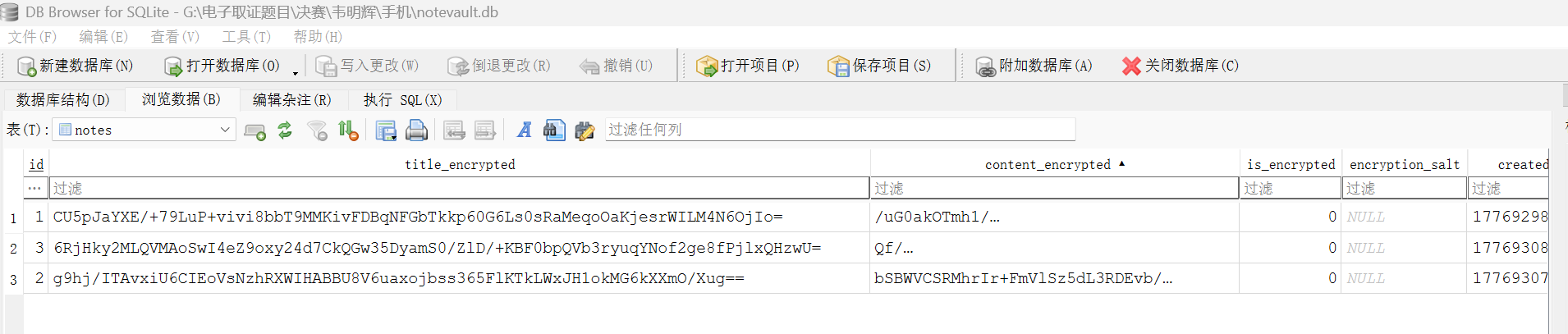
明显是3条,答案为3
3.请分析韦明辉手机,笔记应用公共笔记数据库名称是?答案格式:adb.db
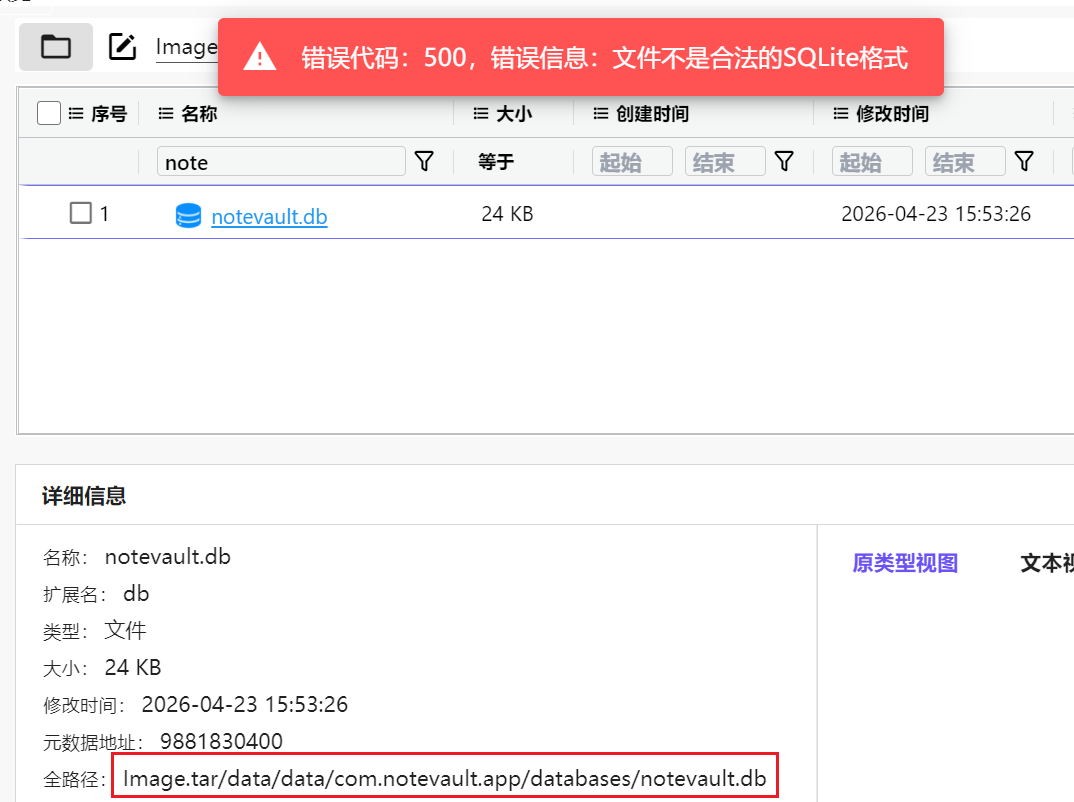
上一题已经确定了数据库名字是notevault.db了
4.请分析韦明辉手机,存储公开笔记的数据库密码是?答案格式:Abc_ABC_1234
第二题也分析过了,就明文写在Jadx里边
而且我们试过的确可以解密,所以密码就是NoteVault_DB_SecureKey_2024
5.分析韦明辉手机中笔记应用,给出电脑c盘的恢复秘钥的前6位?答案格式:1234565
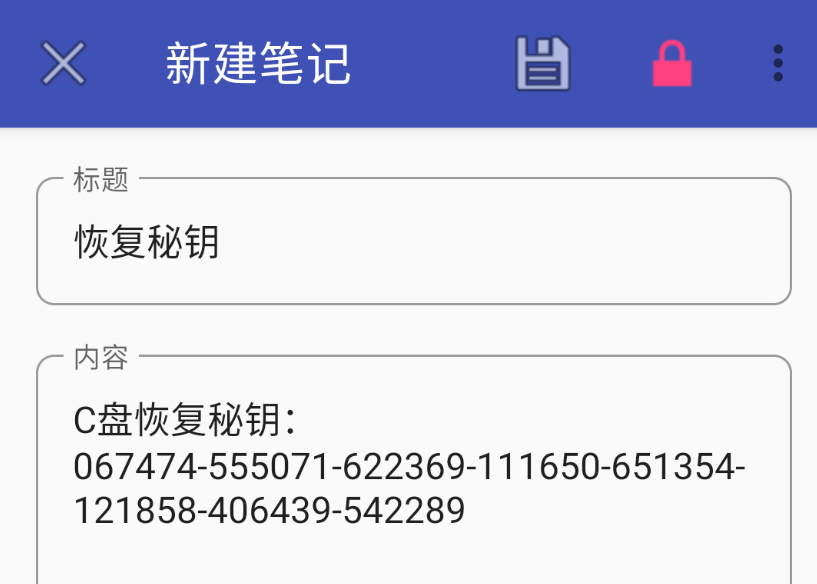
笔记直接写了
但是万一没有爆破成功呢?我们看看没爆破出来的做法
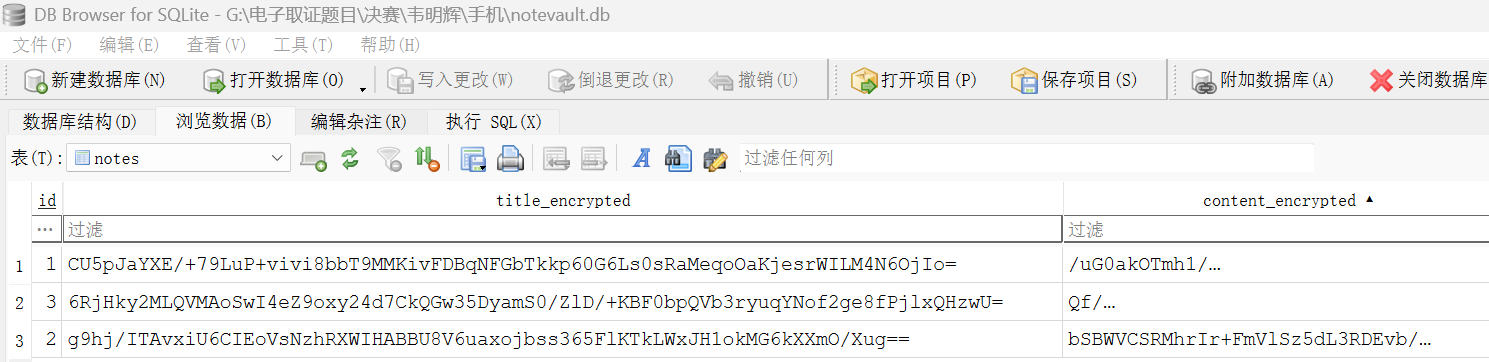
根据题目意思,明显就是数据库内容,不难发现笔记内容都被加密了,我们先解密
根据数据库里边的内容其实有点怀疑是AES加密,像是AES-GCM,我们直接搜索看看(其实软件打开写了是AES加密)
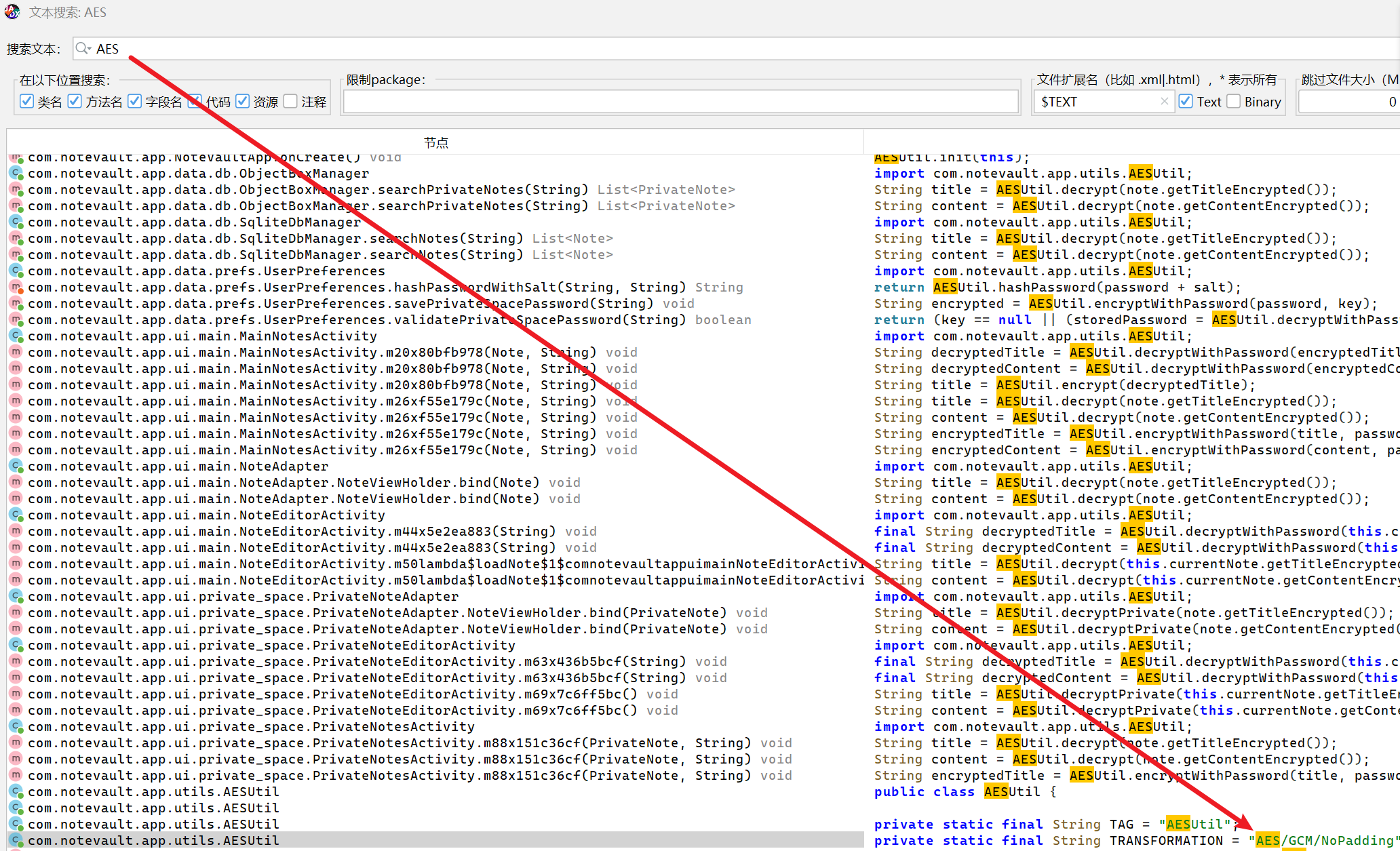
定位到主要的加密逻辑类AESUtil
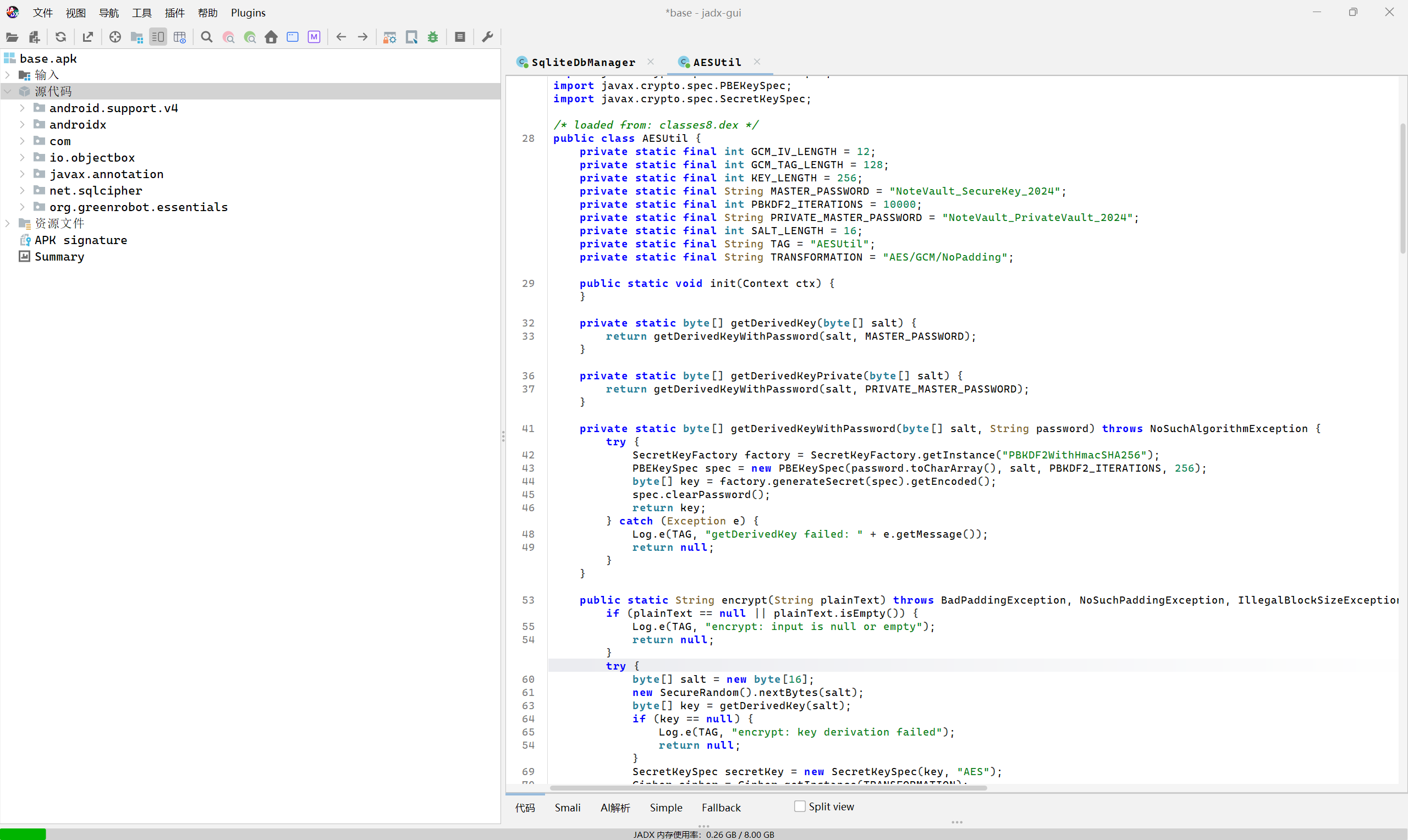
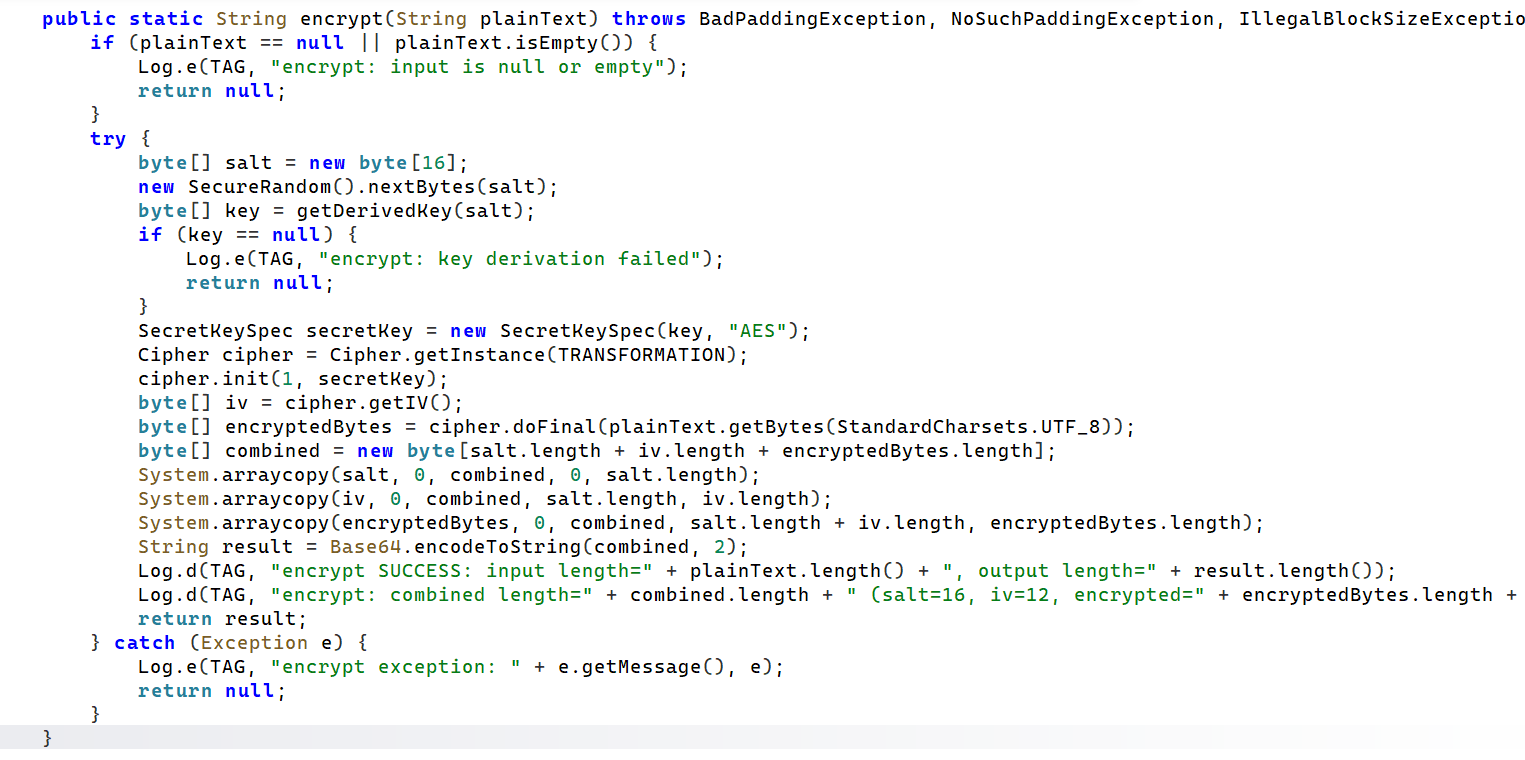
在这边我们可以看到加密的过程,确实是AES-GCM,看上边这张图片就可以发现密文其实是salt + iv + encryptedBytes的base64这样子存起来的
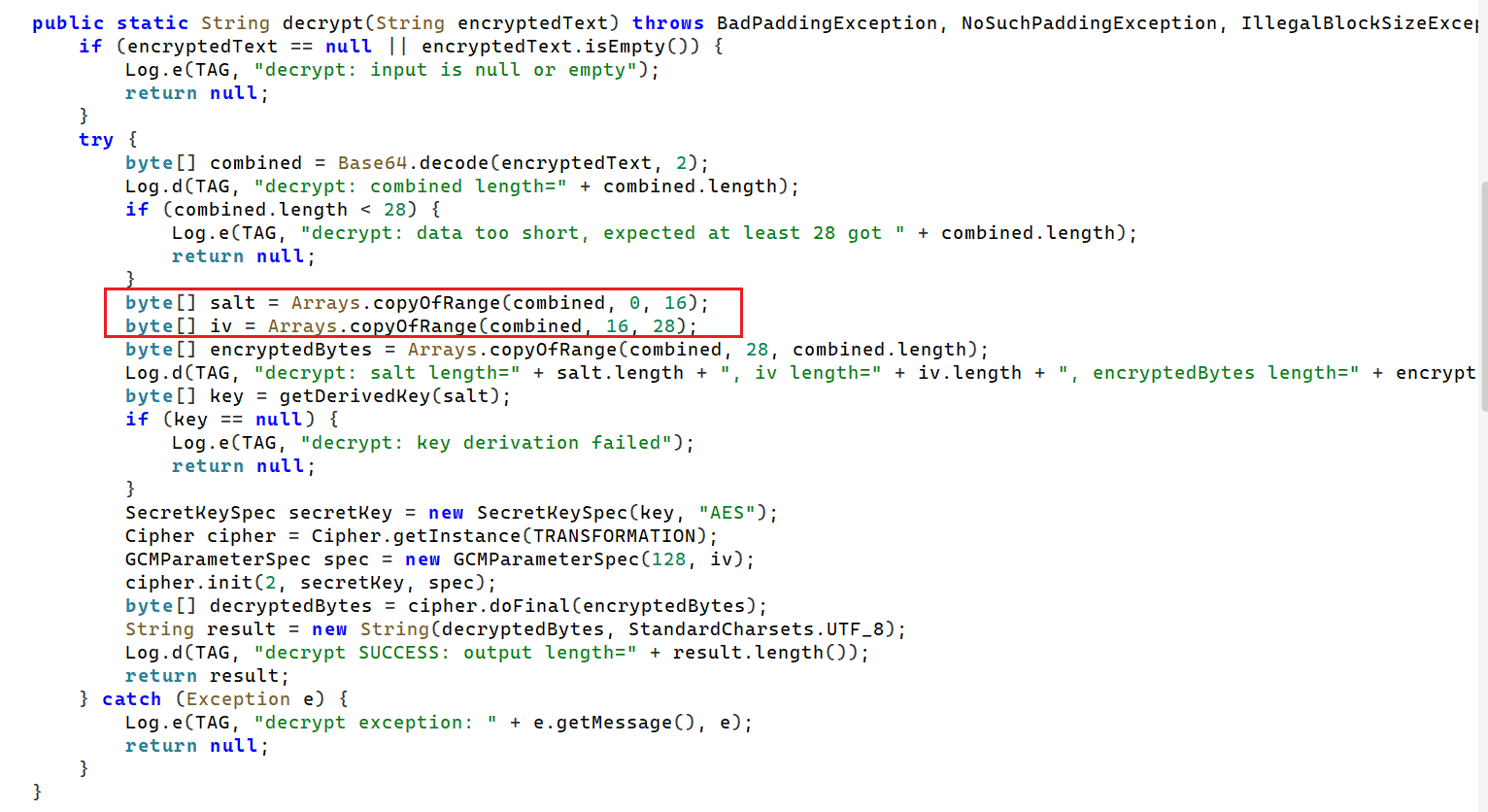
decrypt写的很清楚了需要切片
salt = raw[:16]
iv = raw[16:28]
ciphertext_tag = raw[28:]
所以我们大概解密的流程就是
数据库字段密文
↓
Base64 解码
↓
前 16 字节 = salt
↓
第 16 到 28 字节 = iv
↓
第 28 字节到最后 = ciphertext + GCM tag
↓
用 NoteVault_SecureKey_2024 + salt
↓
PBKDF2WithHmacSHA256 迭代 10000 次
↓
生成 256 bit AES key
↓
AES/GCM/NoPadding 解密
↓
得到 UTF-8 明文
由此写得脚本
#!/usr/bin/env python3
# -*- coding: utf-8 -*-
"""
NoteVault DB + AES-GCM encrypted-field batch decryptor.

For this sample:
  DB password      = NoteVault_DB_SecureKey_2024
  field master key = NoteVault_SecureKey_2024

It first decrypts the SQLCipher-v4 database into a temporary normal SQLite DB,
then decrypts TEXT columns whose names end with '_encrypted'.
"""

import argparse
import base64
import csv
import json
import os
import sqlite3
import tempfile
from pathlib import Path
from typing import Dict, List, Any

from cryptography.hazmat.backends import default_backend
from cryptography.hazmat.primitives import hashes
from cryptography.hazmat.primitives.ciphers import Cipher, algorithms, modes
from cryptography.hazmat.primitives.ciphers.aead import AESGCM
from cryptography.hazmat.primitives.kdf.pbkdf2 import PBKDF2HMAC


def pbkdf2(password: bytes, salt: bytes, iterations: int, length: int, algorithm) -> bytes:
    return PBKDF2HMAC(
        algorithm=algorithm,
        length=length,
        salt=salt,
        iterations=iterations,
        backend=default_backend(),
    ).derive(password)


def decrypt_sqlcipher_v4(
    encrypted_db: str,
    db_password: str,
    out_db: str,
    page_size: int = 4096,
    reserve: int = 80,
    kdf_iter: int = 256000,
) -> None:
    """
    Pure-Python SQLCipher v4 default decrypt.

    Defaults used by SQLCipher 4:
      KDF: PBKDF2-HMAC-SHA512, 256000 iterations, 32-byte key
      Cipher: AES-256-CBC
      page reserve: 80 bytes, 16-byte IV at the page trailer

    The first 16 bytes of page 1 are the SQLCipher salt. The normal SQLite
    header 'SQLite format 3\0' is restored after decryption.
    """
    data = Path(encrypted_db).read_bytes()
    if len(data) < page_size or len(data) % page_size != 0:
        raise ValueError(f"File size {len(data)} is not a multiple of page_size={page_size}")

    salt = data[:16]
    key = pbkdf2(
        db_password.encode("utf-8"),
        salt,
        kdf_iter,
        32,
        hashes.SHA512(),
    )

    out = bytearray()
    for pgno, off in enumerate(range(0, len(data), page_size), start=1):
        page = data[off : off + page_size]

        if pgno == 1:
            enc_offset = 16
            prefix = b"SQLite format 3\x00"
            enc_len = page_size - 16 - reserve
        else:
            enc_offset = 0
            prefix = b""
            enc_len = page_size - reserve

        if enc_len <= 0 or enc_len % 16 != 0:
            raise ValueError("Invalid encrypted page length; check page_size/reserve")

        ciphertext = page[enc_offset : enc_offset + enc_len]
        iv = page[enc_offset + enc_len : enc_offset + enc_len + 16]

        decryptor = Cipher(
            algorithms.AES(key),
            modes.CBC(iv),
            backend=default_backend(),
        ).decryptor()
        plaintext_part = decryptor.update(ciphertext) + decryptor.finalize()

        plain_page = prefix + plaintext_part + bytes(reserve)
        if len(plain_page) != page_size:
            raise RuntimeError(f"Bad page length at page {pgno}: {len(plain_page)}")
        out.extend(plain_page)

    Path(out_db).write_bytes(out)

    # Verify the result is a readable SQLite database.
    con = sqlite3.connect(out_db)
    try:
        result = con.execute("PRAGMA integrity_check").fetchone()[0]
        if result.lower() != "ok":
            raise ValueError(f"SQLite integrity_check failed: {result}")
    finally:
        con.close()


def decrypt_field_aes_gcm(value: str, master_password: str) -> str:
    """
    Field format:
      base64( salt[0:16] || iv[16:28] || ciphertext+tag[28:] )
    KDF:
      PBKDF2WithHmacSHA256, iterations=10000, key length=256 bits
    Cipher:
      AES/GCM/NoPadding
    """
    raw = base64.b64decode(value)
    if len(raw) < 16 + 12 + 16:
        raise ValueError("ciphertext too short")

    salt = raw[:16]
    iv = raw[16:28]
    ciphertext_and_tag = raw[28:]

    key = pbkdf2(
        master_password.encode("utf-8"),
        salt,
        10000,
        32,
        hashes.SHA256(),
    )
    plaintext = AESGCM(key).decrypt(iv, ciphertext_and_tag, None)
    return plaintext.decode("utf-8", errors="replace")


def get_tables(con: sqlite3.Connection) -> List[str]:
    rows = con.execute(
        "SELECT name FROM sqlite_master WHERE type='table' AND name NOT LIKE 'sqlite_%' ORDER BY name"
    ).fetchall()
    return [r[0] for r in rows]


def batch_decrypt(sqlite_db: str, master_password: str) -> List[Dict[str, Any]]:
    con = sqlite3.connect(sqlite_db)
    con.row_factory = sqlite3.Row
    output: List[Dict[str, Any]] = []

    try:
        for table in get_tables(con):
            info = list(con.execute(f'PRAGMA table_info("{table}")'))
            columns = [row[1] for row in info]
            col_types = {row[1]: (row[2] or "").upper() for row in info}
            encrypted_cols = [
                c for c in columns
                if c.endswith("_encrypted") and ("TEXT" in col_types.get(c, "") or "CHAR" in col_types.get(c, ""))
            ]
            if not encrypted_cols:
                continue

            for row in con.execute(f'SELECT * FROM "{table}"'):
                item: Dict[str, Any] = {"table": table}
                for c in columns:
                    item[c] = row[c]

                for c in encrypted_cols:
                    plain_name = c[: -len("_encrypted")]
                    if not isinstance(row[c], str):
                        continue
                    try:
                        item[plain_name] = decrypt_field_aes_gcm(row[c], master_password)
                    except Exception as e:
                        item[plain_name] = f"<DECRYPT_FAILED: {type(e).__name__}: {e}>"

                output.append(item)
    finally:
        con.close()

    return output


def write_csv(rows: List[Dict[str, Any]], csv_path: str) -> None:
    fieldnames: List[str] = []
    for row in rows:
        for key in row.keys():
            if key not in fieldnames:
                fieldnames.append(key)

    with open(csv_path, "w", newline="", encoding="utf-8-sig") as f:
        writer = csv.DictWriter(f, fieldnames=fieldnames)
        writer.writeheader()
        writer.writerows(rows)


def main() -> None:
    parser = argparse.ArgumentParser(description="Decrypt NoteVault SQLCipher DB and AES-GCM fields")
    parser.add_argument("db", help="encrypted notevault.db path")
    parser.add_argument("--db-pass", default="NoteVault_DB_SecureKey_2024", help="SQLCipher database password")
    parser.add_argument("--master-pass", default="NoteVault_SecureKey_2024", help="AES-GCM field master password")
    parser.add_argument("--plain-db", default="notevault_plain.db", help="output decrypted SQLite database path")
    parser.add_argument("--csv", default="notevault_decrypted.csv", help="output CSV path")
    parser.add_argument("--json", default="notevault_decrypted.json", help="output JSON path")
    args = parser.parse_args()

    decrypt_sqlcipher_v4(args.db, args.db_pass, args.plain_db)
    rows = batch_decrypt(args.plain_db, args.master_pass)

    write_csv(rows, args.csv)
    Path(args.json).write_text(json.dumps(rows, ensure_ascii=False, indent=2), encoding="utf-8")

    print(f"[+] decrypted sqlite: {args.plain_db}")
    print(f"[+] decrypted csv:    {args.csv}")
    print(f"[+] decrypted json:   {args.json}")
    print(json.dumps(rows, ensure_ascii=False, indent=2))


if __name__ == "__main__":
    main()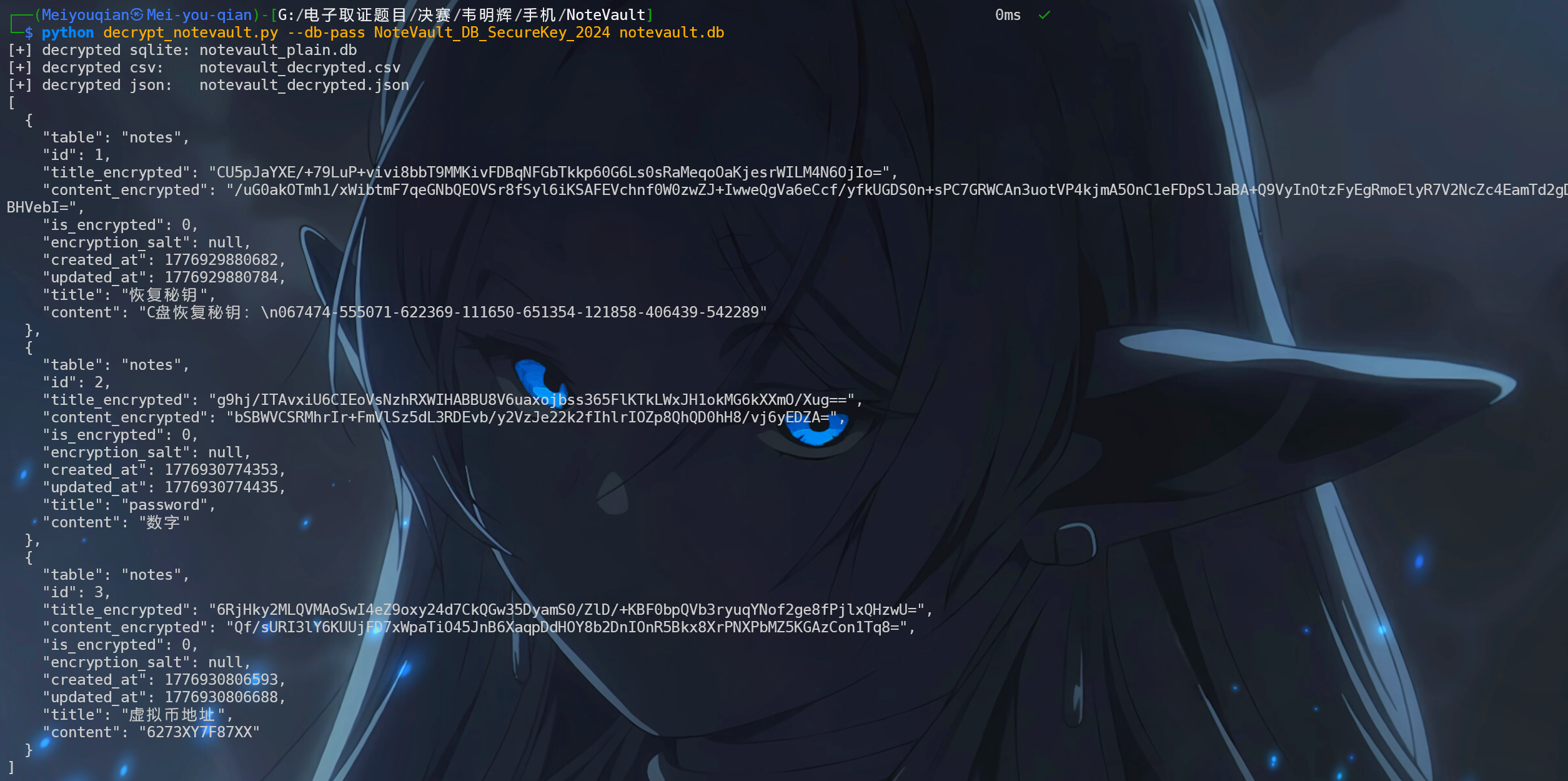
解密得到三条公开笔记的内容
恢复秘钥:C盘恢复秘钥:067474-555071-622369-111650-651354-121858-406439-542289
password:数字
虚拟币地址:6273XY7F87XX
所以这题答案就是067474
6.请分析韦明辉手机,笔记应用隐私空间的密码是?答案格式:123456
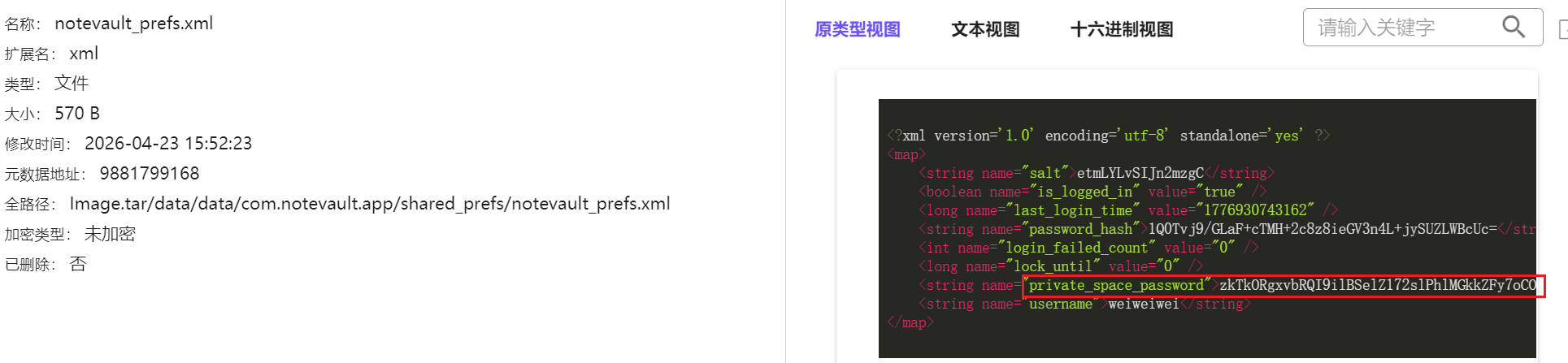
其实私密空间密码在配置文件里边直接就能看见一个字符串,但是显然不会那么简单

直接搜索发现在UserPreference

进来发现是走的AESUtil
也就是说我们在刚刚的类AESUtil往下划,直接就能看见对于隐私空间的加解密
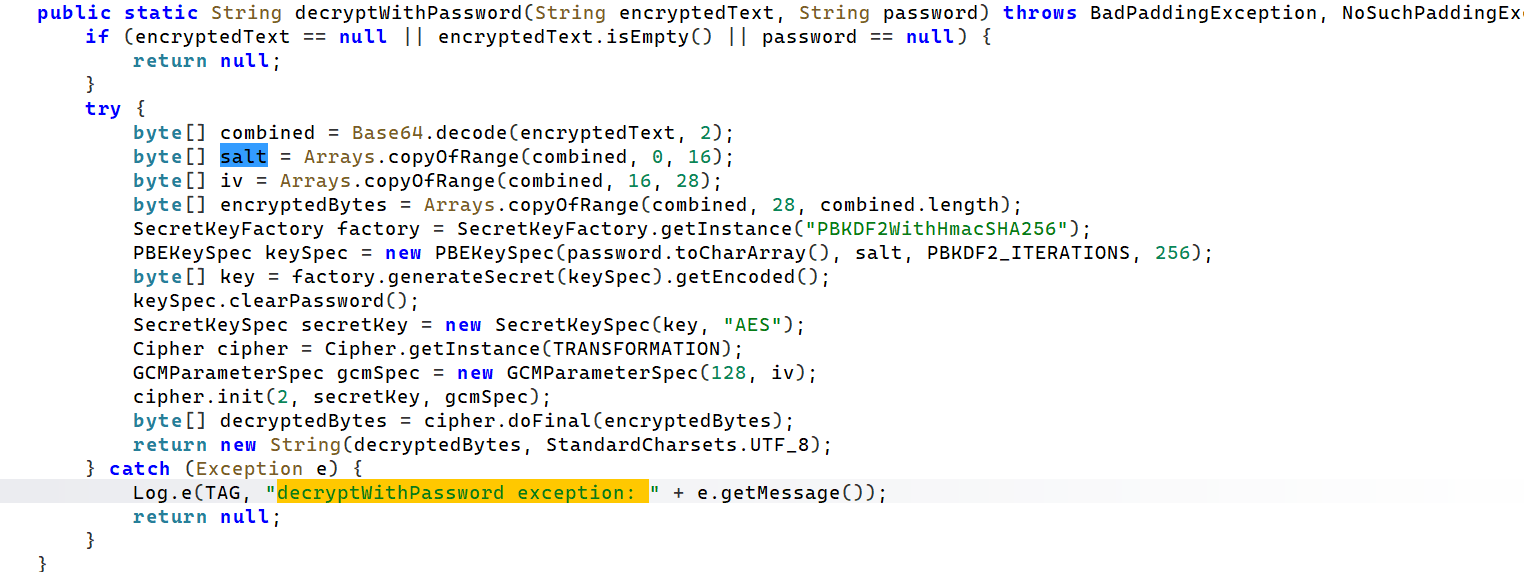
发现了密文格式在这边是Base64(salt+iv+encryptedBytes)

我们在数据库里还看见了config_key和config_value,所以
密文 = private_space_password
解密口令 = private_space_key
看这个Jadx也能明确,密钥派生依旧是PBKDF2WithHmacSHA256然后迭代10000次
import base64
from cryptography.hazmat.primitives import hashes
from cryptography.hazmat.primitives.kdf.pbkdf2 import PBKDF2HMAC
from cryptography.hazmat.primitives.ciphers.aead import AESGCM


def decrypt_with_password(cipher_b64: str, password: str) -> str:
    raw = base64.b64decode(cipher_b64)

    salt = raw[:16]
    iv = raw[16:28]
    ciphertext_and_tag = raw[28:]

    kdf = PBKDF2HMAC(
        algorithm=hashes.SHA256(),
        length=32,              # 256 bit = 32 bytes
        salt=salt,
        iterations=10000,
    )

    key = kdf.derive(password.encode("utf-8"))

    aesgcm = AESGCM(key)
    plaintext = aesgcm.decrypt(iv, ciphertext_and_tag, None)

    return plaintext.decode("utf-8")


if __name__ == "__main__":
    private_space_password = (
        "zkTkORgxvbRQI9ilBSelZ172slPhlMGkkZFy7oCOb+NJxOgV0OHi5GK9hKoV0hNsD3s/"
    )

    private_space_key = "e7GVttnoeahmWeFc"

    result = decrypt_with_password(private_space_password, private_space_key)

    print("[+] private_space_password =", result)
直接解得密码是8374723
7.请分析韦明辉手机,隐私空间笔记内容使用的什么数据库存储?答案格式:sqlite
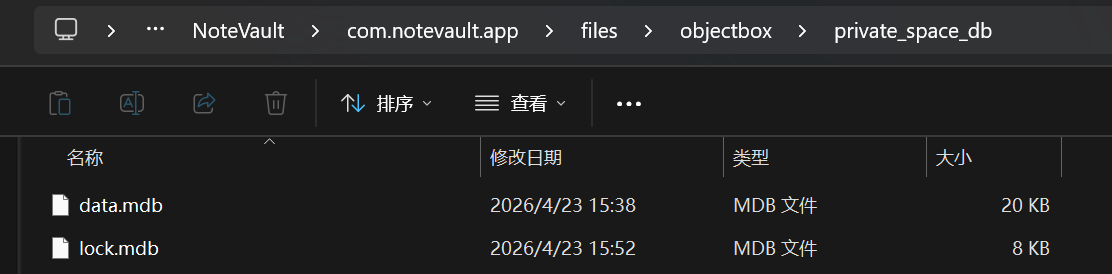
我们很容易定位到这个隐私部分的数据库

依旧先定位
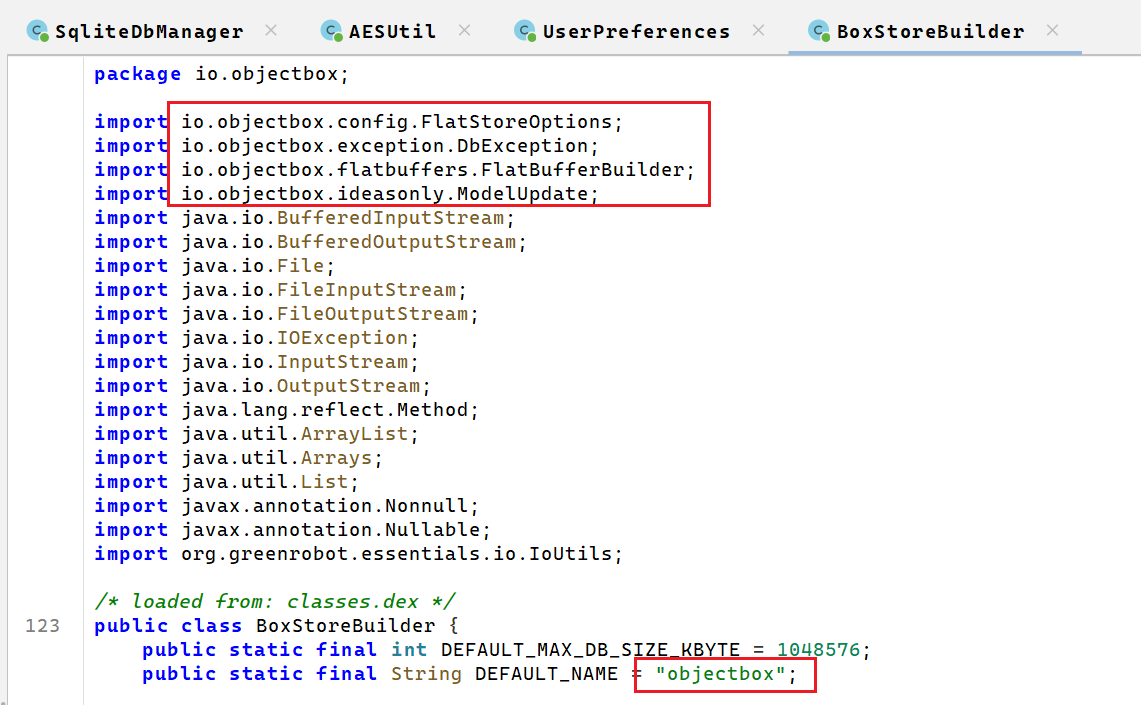
定位过来之后一看
明显就是objectbox的数据库类型啊,更何况文件名是.mdb,和ObjectBox使用LMDB作为存储引擎符合
8.请分析韦明辉手机,隐私笔记数据内容解密秘钥是?答案格式:Abc_ABC_1234
要开始解密了,说到解密,再次回到AESUtil
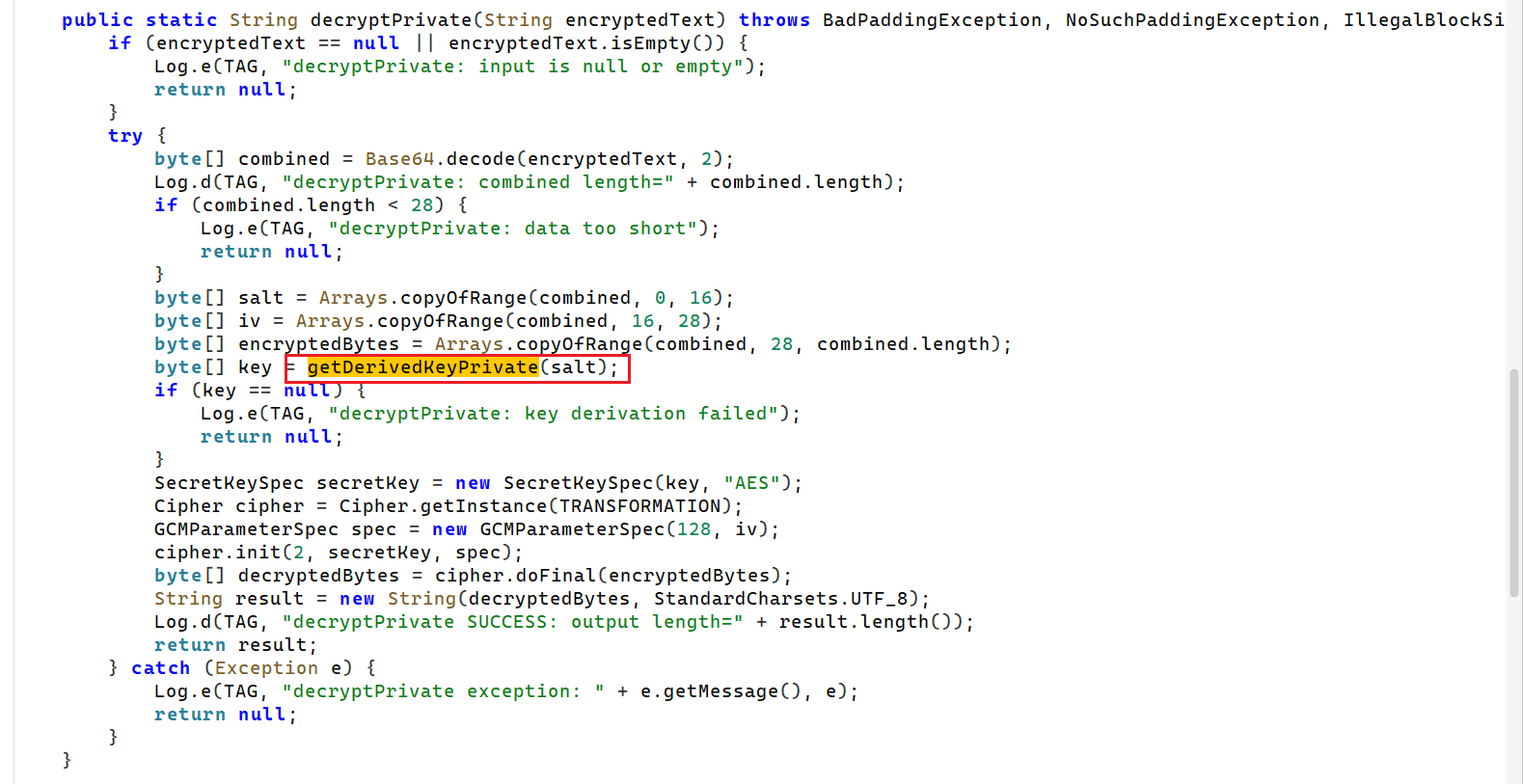
定位到解密的内容部分,可以看到在调用我们的getDerivedKeyPrivate
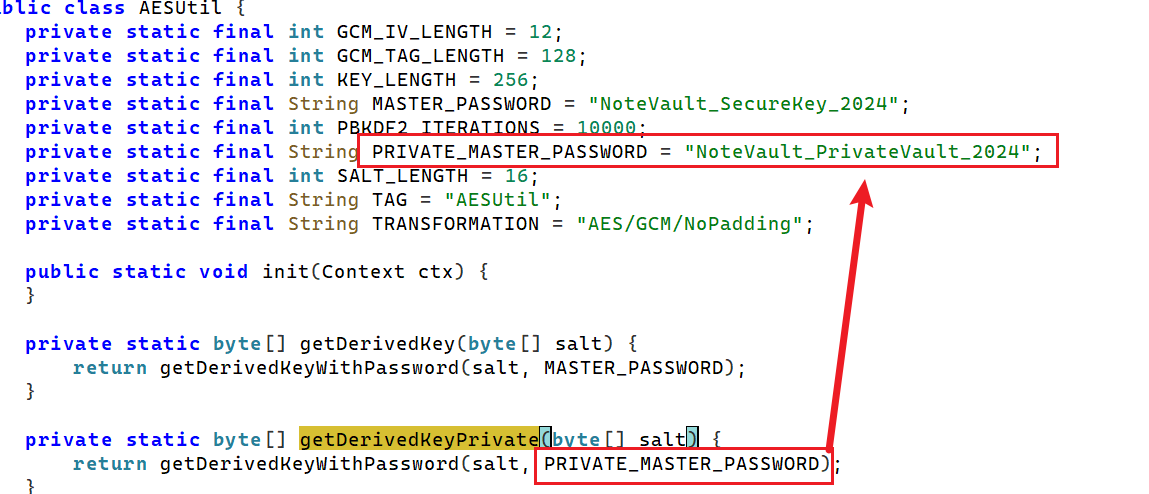
所以是NoteVault_PrivateVault_2024
9.请分析韦明辉手机,打手电话是多少?答案格式:18036310808
上一题都知道密文、知道密钥、知道加密算法了
自然可以解密了
import re
import base64
import hashlib
from pathlib import Path
from cryptography.hazmat.primitives.ciphers.aead import AESGCM

MASTER_PASSWORD = "NoteVault_PrivateVault_2024"

def decrypt_private_b64(value: str) -> str:
    raw = base64.b64decode(value)

    salt = raw[:16]
    iv = raw[16:28]
    ciphertext_and_tag = raw[28:]

    key = hashlib.pbkdf2_hmac(
        "sha256",
        MASTER_PASSWORD.encode("utf-8"),
        salt,
        10000,
        dklen=32
    )

    return AESGCM(key).decrypt(iv, ciphertext_and_tag, None).decode("utf-8")

data = Path("data.mdb").read_bytes()

# 提取可见 base64 密文
strings = re.findall(rb"[A-Za-z0-9+/=]{20,}", data)

for s in strings:
    try:
        text = s.decode()
        plain = decrypt_private_b64(text)
        print("[+] cipher:", text)
        print("[+] plain :", plain)
        print()
    except Exception:
        pass
得到打手电话是18067876543
当然了,这个还有个更好玩的
我们前边不是先账密登录了嘛
可以继续找隐藏部分
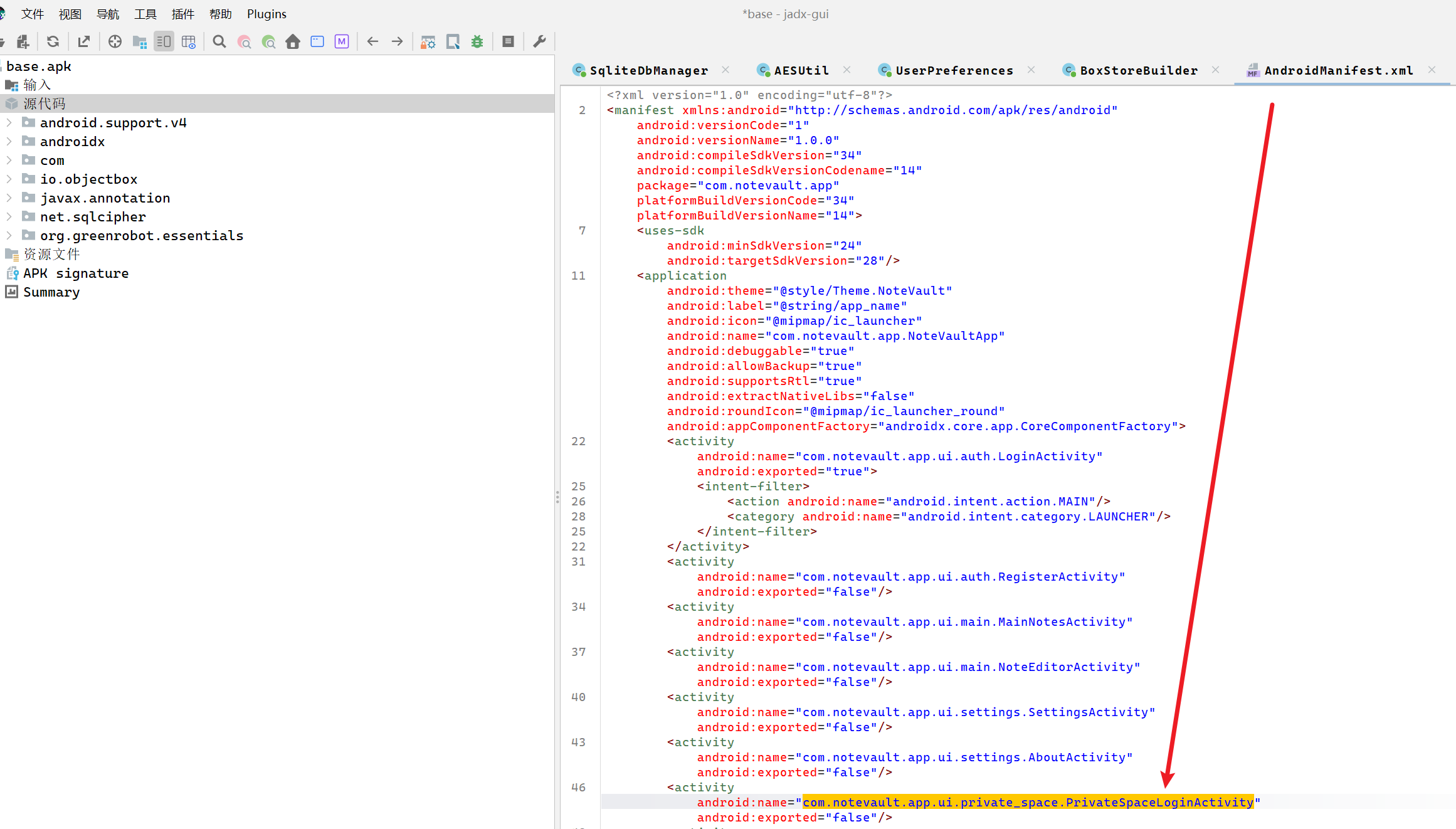
在这边看见了一个隐藏空间login相关类
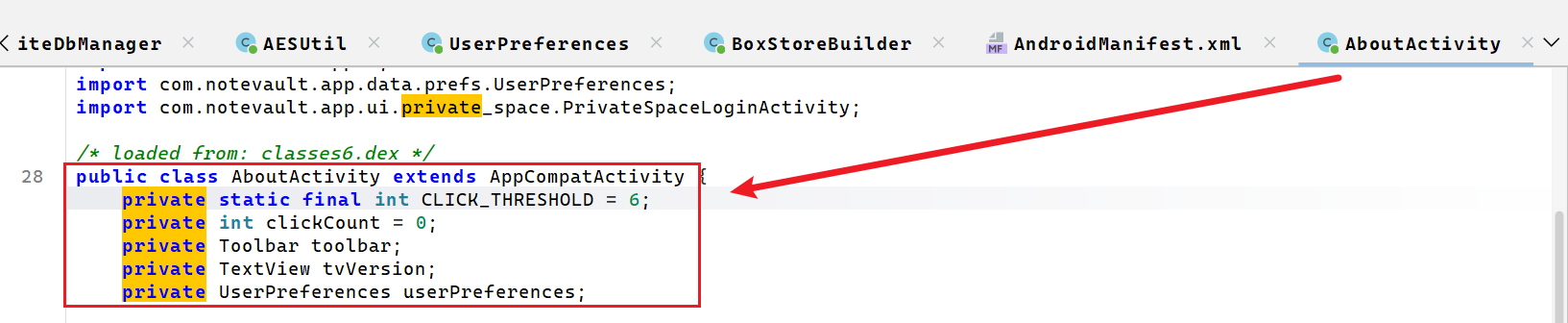
定位到这边
这边绑定的是版本号的控件tvVersion
所以这边进入隐藏空间的方法很简单------ 在"关于"页面里连续点版本号 6 次
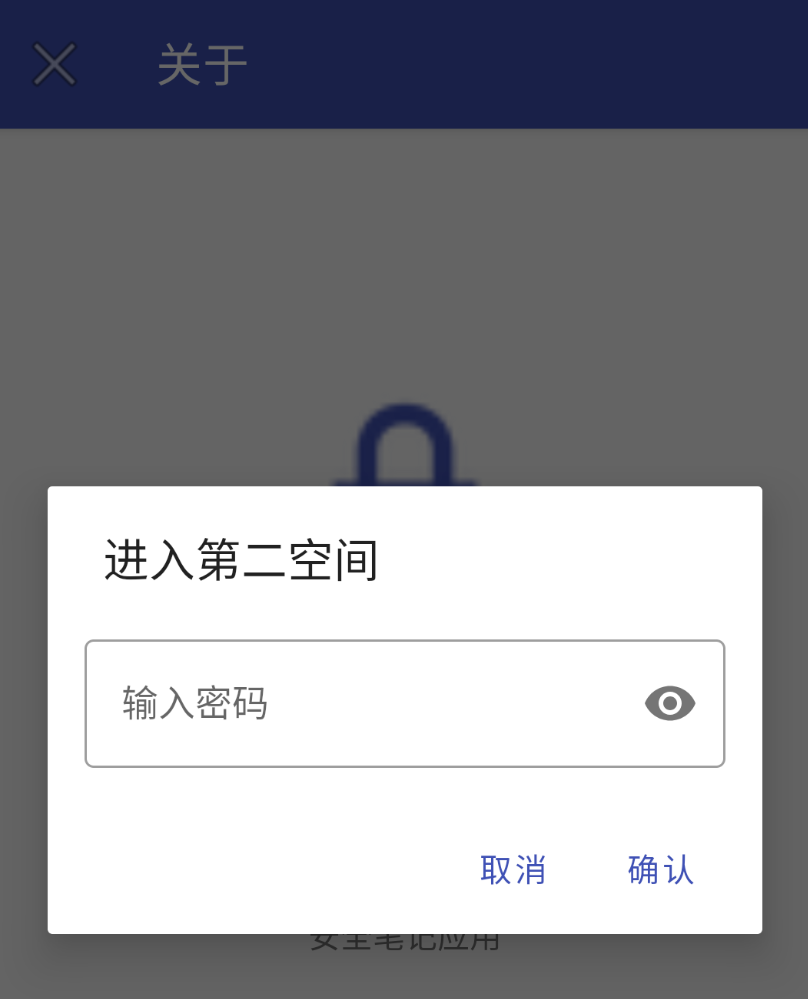
成功进入,我们知道密码的,第六题那个8374723

登录进入隐私笔记自然能看见答案了
10.请分析韦明辉手机,内容通联app数据库密码是?答案格式:a-abc1234Abc
这手机取证最好玩的就是这边有不少的内部通联app题目
打决赛的当然打过初赛了

那内部通联这个名词也太耳熟了,一看就看见老熟人了,这边直接就是social chat app

不确定我们还能直接看看base.apk的哈希值,发现一模一样,就是同一个apk啊
所以具体的做法可以直接翻我的初赛apk的wp
我们看这个图标就能发现是一个flutter编译的,它的特点就是需要去native层解析,解析起来可麻烦了,在初赛我们就是通过漫游得到了这边的数据库密码是"截取"的,明文就存在com.socialchat.social_chat_app/shared_prefs/FlutterSharedPreferences.xml文件中
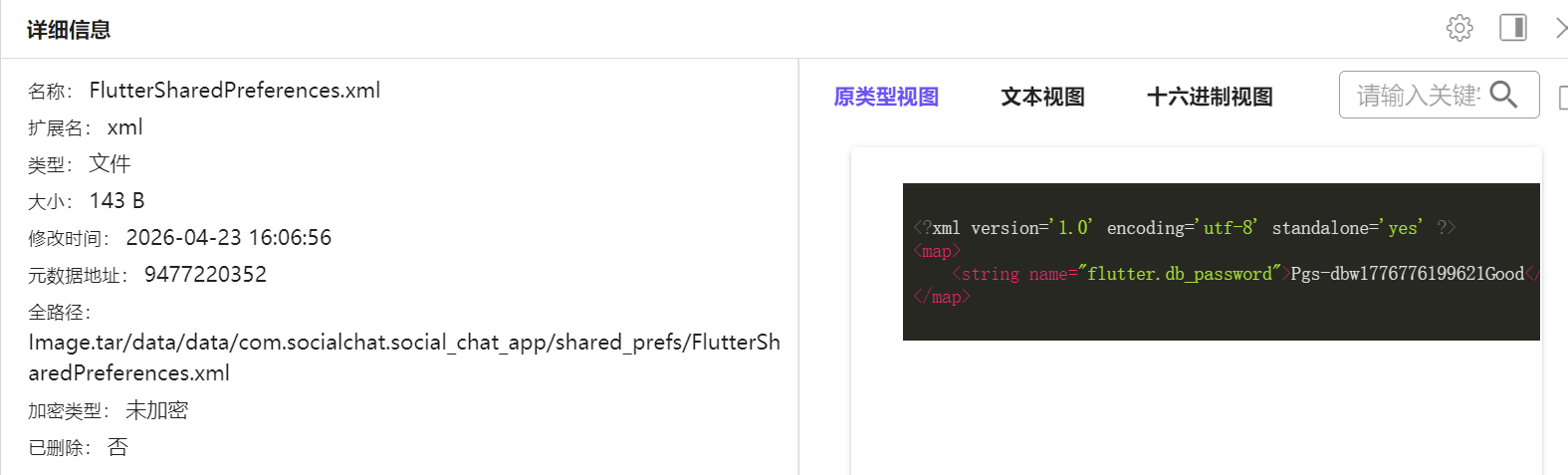
至于是怎么截取的,我们初赛就是通过frida脚本做的
function waitForAppContext(callback) {
    let count = 0;

    const timer = setInterval(function () {
        Java.perform(function () {
            try {
                const ActivityThread = Java.use("android.app.ActivityThread");
                const app = ActivityThread.currentApplication();

                if (app !== null) {
                    clearInterval(timer);
                    const ctx = app.getApplicationContext();
                    console.log("[+] getApplicationContext ok");
                    callback(ctx);
                    return;
                }

                count++;
                console.log("[*] waiting for Application context... " + count);
            } catch (e) {
                count++;
                console.log("[*] waiting context error:", e);
            }

            if (count >= 30) {
                clearInterval(timer);
                console.log("[-] still cannot get Application context");
            }
        });
    }, 500);
}

setImmediate(function () {
    console.log("[*] no-login social_chat.db decrypt hook loaded");

    Java.perform(function () {
        waitForAppContext(function (ctx) {
            try {
                const prefs = ctx.getSharedPreferences("FlutterSharedPreferences", 0);
                let raw = prefs.getString("flutter.db_password", null);

                console.log("[+] flutter.db_password =", raw);

                if (raw === null) {
                    console.log("[-] 没读到 flutter.db_password");
                    console.log("[-] 确认 XML 是否在 /data/user/0/com.socialchat.social_chat_app/shared_prefs/FlutterSharedPreferences.xml");
                    return;
                }

                const realPassword = raw.substring(2, raw.length - 1);

                console.log("[+] raw password  =", raw);
                console.log("[+] real password =", realPassword);

                const dbPath = "/data/user/0/com.socialchat.social_chat_app/databases/social_chat.db";

                console.log("[+] db path =", dbPath);

                forceLoadSqlcipher();

                setTimeout(function () {
                    waitForSqlcipherAndRun(dbPath, realPassword);
                }, 1000);

            } catch (e) {
                console.log("[-] main logic error:", e);
            }
        });
    });
});
当然了,这边其实可以不用,毕竟apk都没变,我们复盘过初赛的马上就能意识到是截取的
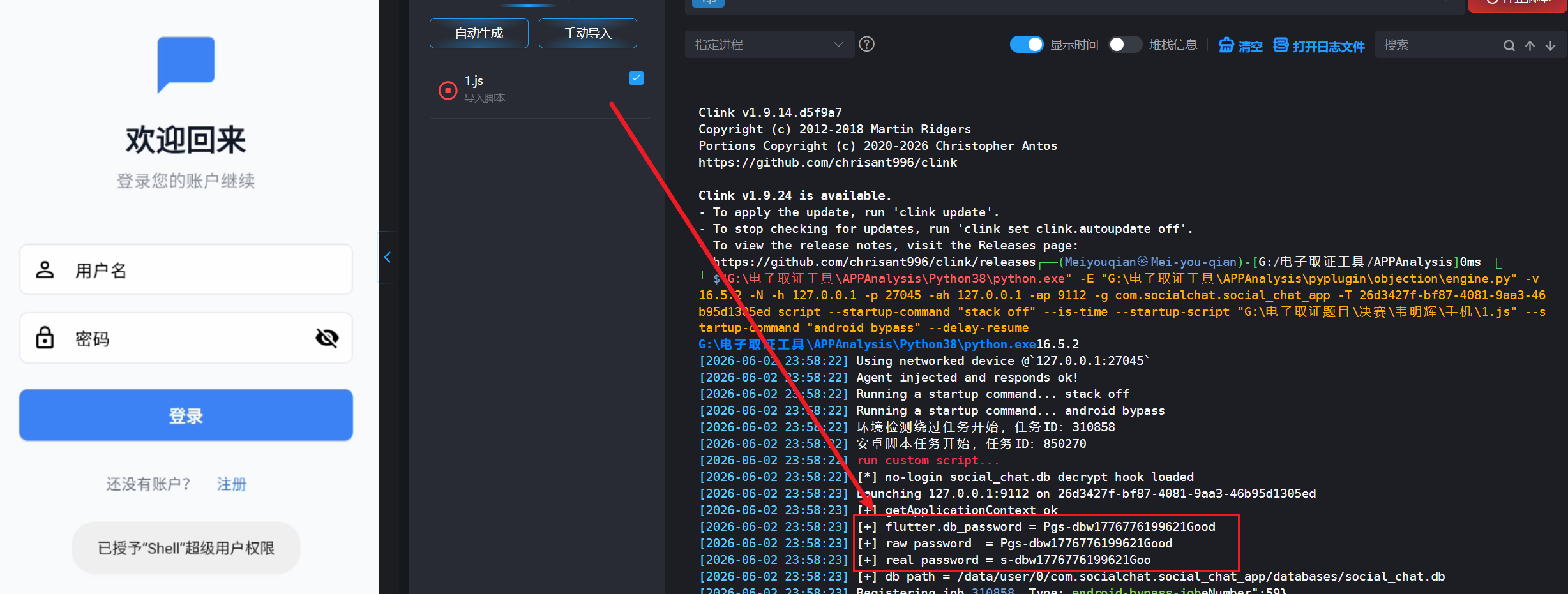
可以看见的确是一模一样,掐头去尾,头少2,尾巴少1即可
所以密码为
s-dbw1776776199621Goo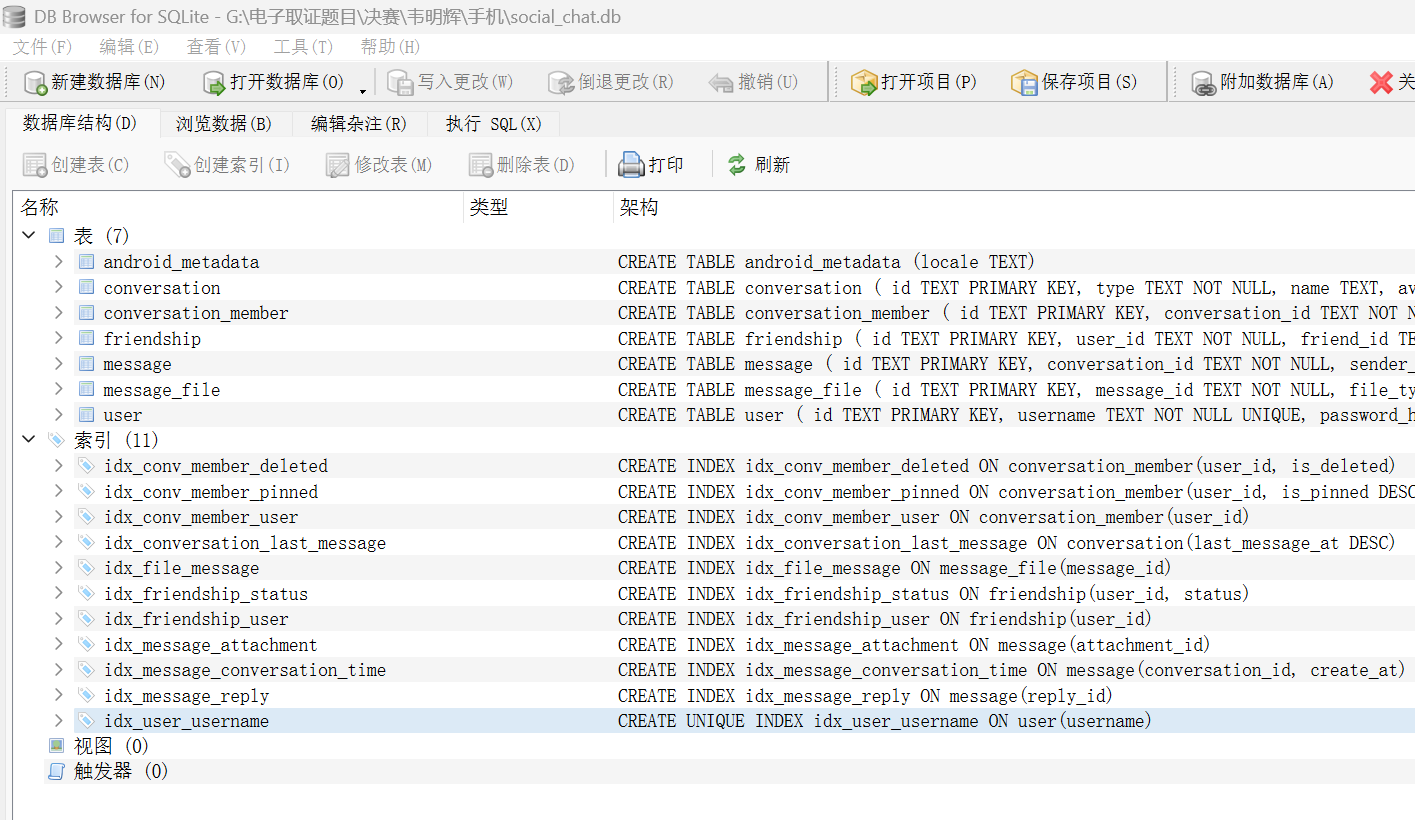
能成功解密,成功验证答案
11.请分析韦明辉手机,内容通联工具中,韦明辉一共撤回过几次聊天?答案格式:1
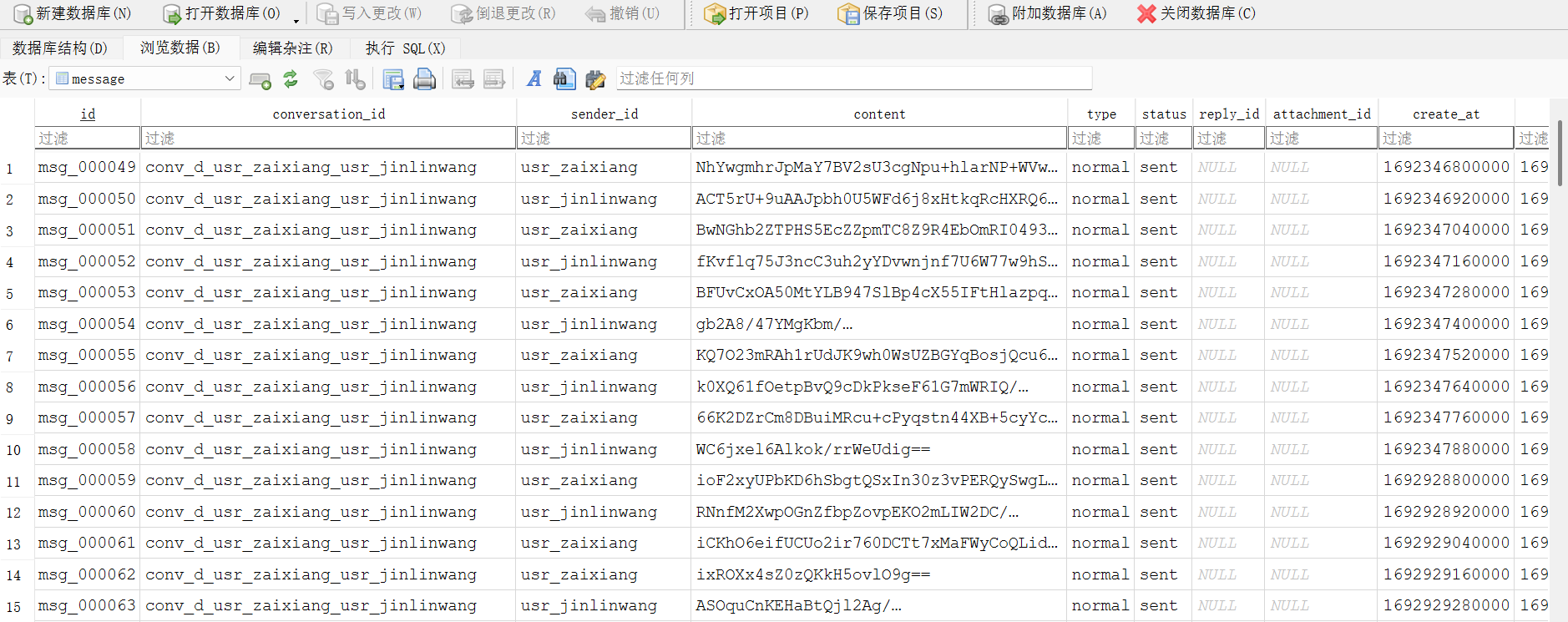
基本可以判断一模一样了,内容还是一样加密的
我们依旧拿出初赛用过的脚本即可,我习惯先生成一个无密码版本的,再解密成csv
import hashlib
import sqlite3
from pathlib import Path
from cryptography.hazmat.primitives.ciphers import Cipher, algorithms, modes

PASSPHRASE = "s-dbw1776776199621Goo"

def aes_cbc_decrypt(key, iv, ciphertext):
    cipher = Cipher(algorithms.AES(key), modes.CBC(iv))
    decryptor = cipher.decryptor()
    return decryptor.update(ciphertext) + decryptor.finalize()

def decrypt_sqlcipher4_db():
    input_db = Path("social_chat.db")
    output_db = Path("social_chat_plain.db")

    if not input_db.exists():
        print("[-] 未找到 social_chat.db")
        return

    data = input_db.read_bytes()
    page_size = 4096
    reserve_size = 80
    usable_size = page_size - reserve_size

    if len(data) % page_size != 0:
        raise RuntimeError("数据库大小不是 4096 的整数倍")

    page_count = len(data) // page_size
    print(f"[+] 数据库页数: {page_count}")

    file_salt = data[:16]
    print("[+] SQLCipher 文件 salt:", file_salt.hex())

    aes_key = hashlib.pbkdf2_hmac(
        "sha512",
        PASSPHRASE.encode("utf-8"),
        file_salt,
        256000,
        dklen=32,
    )

    print("[+] SQLCipher AES key:", aes_key.hex())

    out = bytearray()
    for page_no in range(1, page_count + 1):
        start = (page_no - 1) * page_size
        end = page_no * page_size
        page = data[start:end]
        iv = page[usable_size:usable_size + 16]

        if page_no == 1:
            ciphertext = page[16:usable_size]
            plaintext_part = aes_cbc_decrypt(aes_key, iv, ciphertext)
            out += b"SQLite format 3\x00"
            out += plaintext_part
            out += b"\x00" * reserve_size
        else:
            ciphertext = page[:usable_size]
            plaintext_page = aes_cbc_decrypt(aes_key, iv, ciphertext)
            out += plaintext_page
            out += b"\x00" * reserve_size

    output_db.write_bytes(out)
    print(f"[+] 已生成明文数据库: {output_db}")
    return output_db

def verify_plain_db(output_db):
    print("[+] 验证明文数据库...")
    conn = sqlite3.connect(output_db)
    cur = conn.cursor()

    cur.execute("SELECT name FROM sqlite_master WHERE type='table';")
    tables = [row[0] for row in cur.fetchall()]

    print("[+] 表名:")
    for table in tables:
        print("    ", table)

    if "chat_records" in tables:
        print("\n[+] chat_records 前5条记录:")
        cur.execute("SELECT * FROM chat_records LIMIT 5;")
        for row in cur.fetchall():
            print("    ", row)

    conn.close()
    print("[+] 验证完成")

def main():
    try:
        output_db = decrypt_sqlcipher4_db()
        verify_plain_db(output_db)
    except Exception as e:
        print(f"[-] 解密失败: {e}")

if __name__ == "__main__":
    main()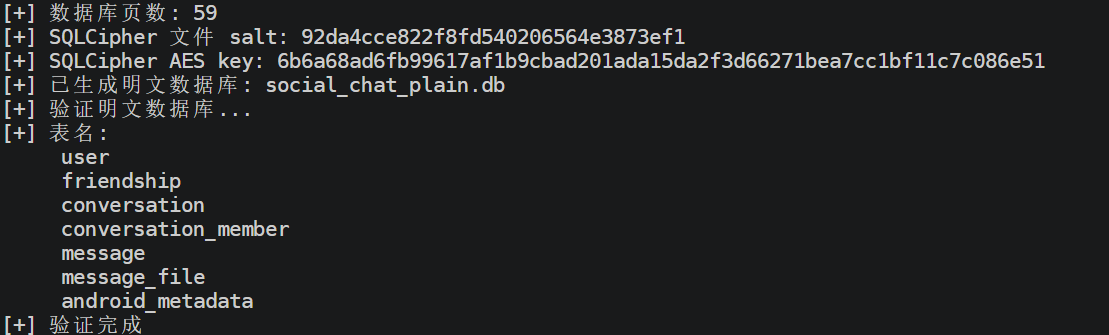
import argparse
import base64
import csv
import json
import sqlite3
from pathlib import Path

from cryptography.hazmat.primitives.ciphers import Cipher, algorithms, modes


def pkcs7_unpad(data: bytes) -> bytes:
    if not data:
        return data

    pad = data[-1]
    if 1 <= pad <= 16 and data[-pad:] == bytes([pad]) * pad:
        return data[:-pad]

    return data


def aes_cbc_decrypt_base64(cipher_b64: str, key: bytes, iv: bytes) -> str:
    cipher_data = base64.b64decode(cipher_b64)

    decryptor = Cipher(
        algorithms.AES(key),
        modes.CBC(iv)
    ).decryptor()

    plain = decryptor.update(cipher_data) + decryptor.finalize()
    plain = pkcs7_unpad(plain)

    return plain.decode("utf-8", errors="replace")


def get_key_iv(conn: sqlite3.Connection, user_id: str | None):
    conn.row_factory = sqlite3.Row
    cur = conn.cursor()

    if user_id:
        row = cur.execute(
            "SELECT id, config_data FROM user WHERE id = ?",
            (user_id,)
        ).fetchone()
    else:
        row = cur.execute(
            "SELECT id, config_data FROM user LIMIT 1"
        ).fetchone()

    if not row:
        raise RuntimeError("user 表中没有找到用户记录")

    config_data = row["config_data"]
    if not config_data:
        raise RuntimeError("user.config_data 为空")

    config = json.loads(config_data)

    key = base64.b64decode(config["enc_key"])
    iv = base64.b64decode(config["enc_iv"])

    print("[+] use user_id:", row["id"])
    print("[+] AES key:", key.hex())
    print("[+] AES iv :", iv.hex())

    return key, iv


def convert_messages(input_db: Path, output_csv: Path, user_id: str | None):
    conn = sqlite3.connect(input_db)
    conn.row_factory = sqlite3.Row

    key, iv = get_key_iv(conn, user_id)
    cur = conn.cursor()

    rows = cur.execute(
        """
        SELECT *
        FROM message
        ORDER BY create_at ASC
        """
    ).fetchall()

    if not rows:
        print("[-] message 表为空")
        conn.close()
        return

    fieldnames = list(rows[0].keys())

    # 增加一列明文
    if "content_plain" not in fieldnames:
        fieldnames.append("content_plain")

    output_rows = []

    for row in rows:
        item = dict(row)

        cipher_content = row["content"]

        try:
            plain = aes_cbc_decrypt_base64(cipher_content, key, iv)
        except Exception as e:
            plain = f"[DECRYPT_ERROR] {e}"

        item["content_plain"] = plain
        output_rows.append(item)

    with output_csv.open("w", encoding="utf-8-sig", newline="") as f:
        writer = csv.DictWriter(f, fieldnames=fieldnames)
        writer.writeheader()
        writer.writerows(output_rows)

    conn.close()

    print("[+] message 总数:", len(output_rows))
    print("[+] 已导出:", output_csv)


def main():
    parser = argparse.ArgumentParser()
    parser.add_argument(
        "-i",
        "--input",
        default="social_chat_plain.db",
        help="输入:已经解密后的普通 SQLite 数据库"
    )
    parser.add_argument(
        "-o",
        "--output",
        default="messages_plain.csv",
        help="输出 CSV"
    )
    parser.add_argument(
        "-u",
        "--user-id",
        default=None,
        help="指定 user.id,不填则默认取 user 表第一条"
    )

    args = parser.parse_args()

    input_db = Path(args.input)
    output_csv = Path(args.output)

    if not input_db.exists():
        raise FileNotFoundError(f"找不到数据库文件: {input_db}")

    convert_messages(input_db, output_csv, args.user_id)


if __name__ == "__main__":
    main()
得到messages_plain.csv
这边最好也是做过初赛
在初赛周文杰的内部通联app题目中,我们其实可以仿真登录软件
因此我们可以判断各字符的对应作用
周文杰和宰相第一句话撤回了
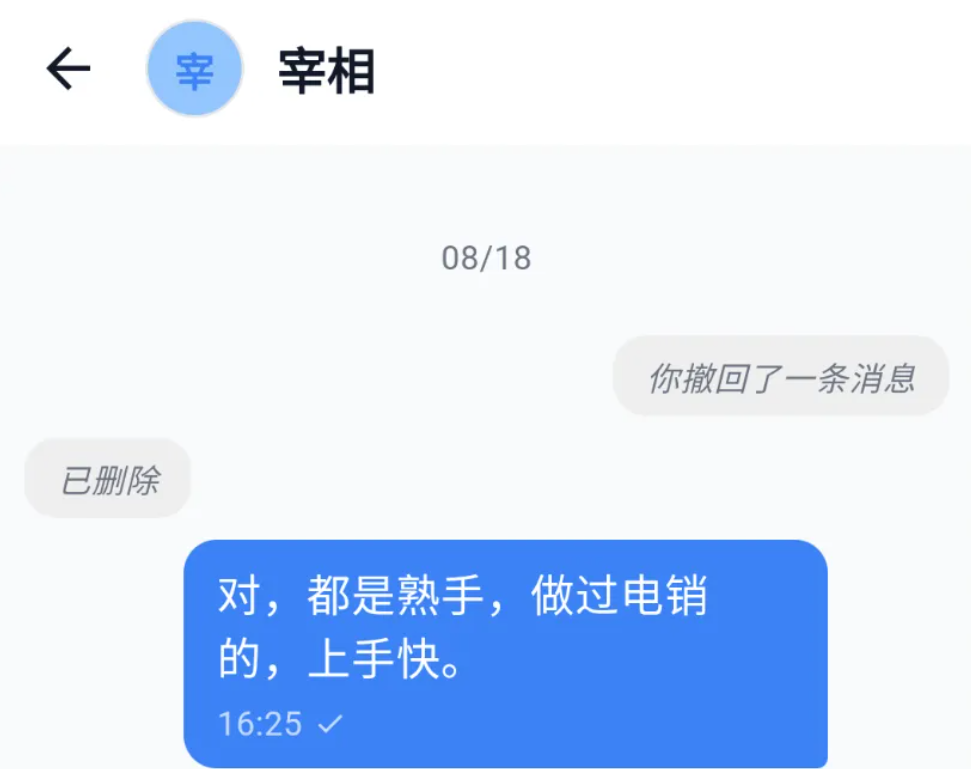

而对应的字段是state_bits
所以这边我们只需要筛选state_bits是1的对话即可,必定是撤回部分

最后筛选发现是6条撤回内容,答案为6
12.请分析韦明辉手机,内容通联工具中,韦明辉有几个好友?答案格式:1
这倒是简单了,我们只要打开刚刚解密过的那个数据库就好了
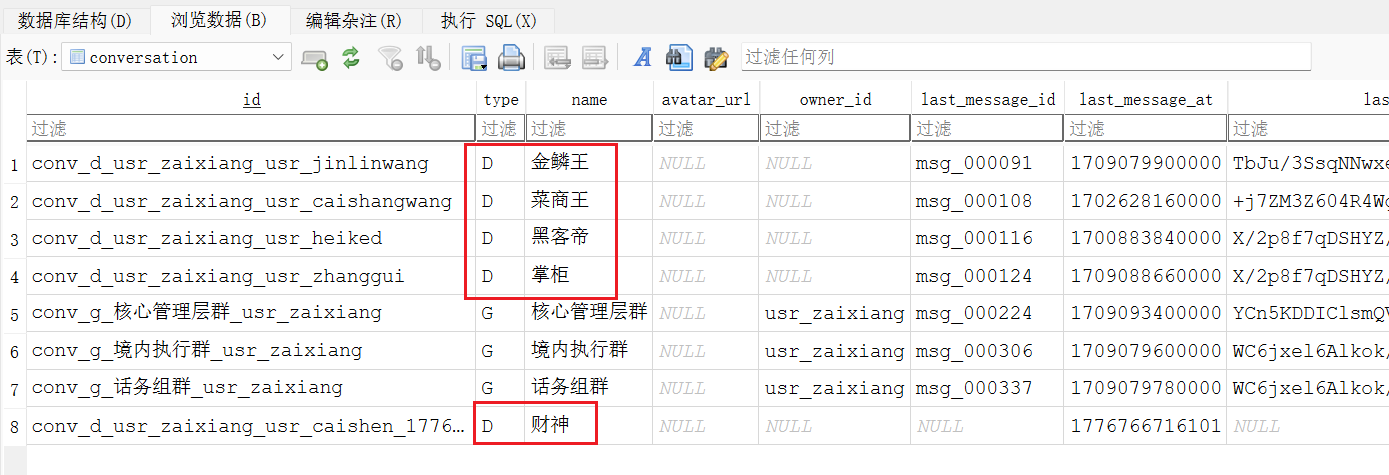
这边到conversation的表,发现type是D,也就是好友的共有5人
答案是5
13.分析陈志鹏手机,隐私笔记app的数据库是?答案格式:adb_adb.db
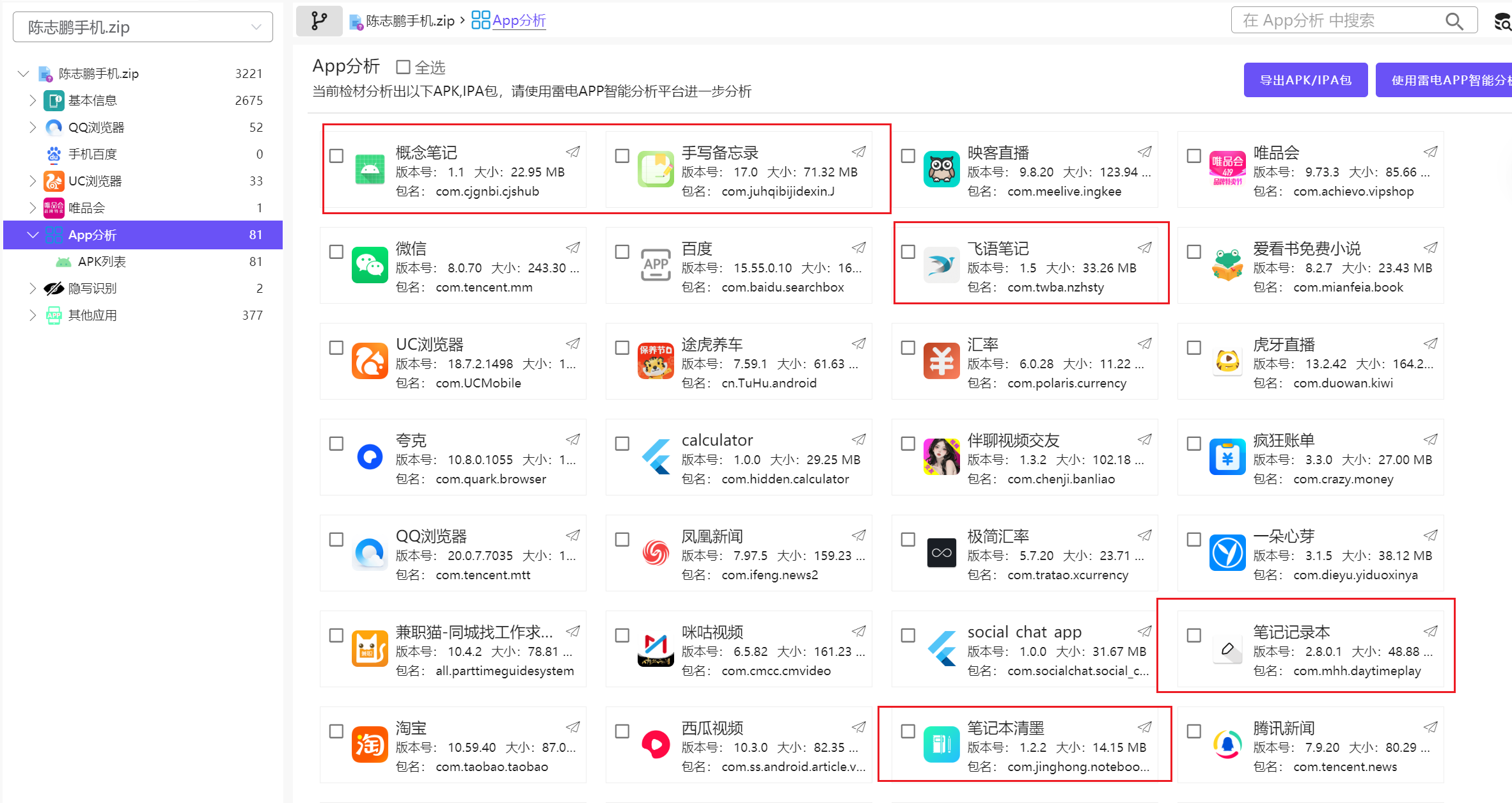
就像我在手机取证说的一样,这次的笔记软件真是多啊
直到我们最后发现有一个apk叫hidden
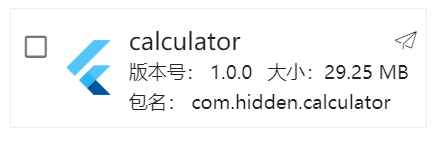
还是个flutter做的,很符合出题的情况,我们看看内容
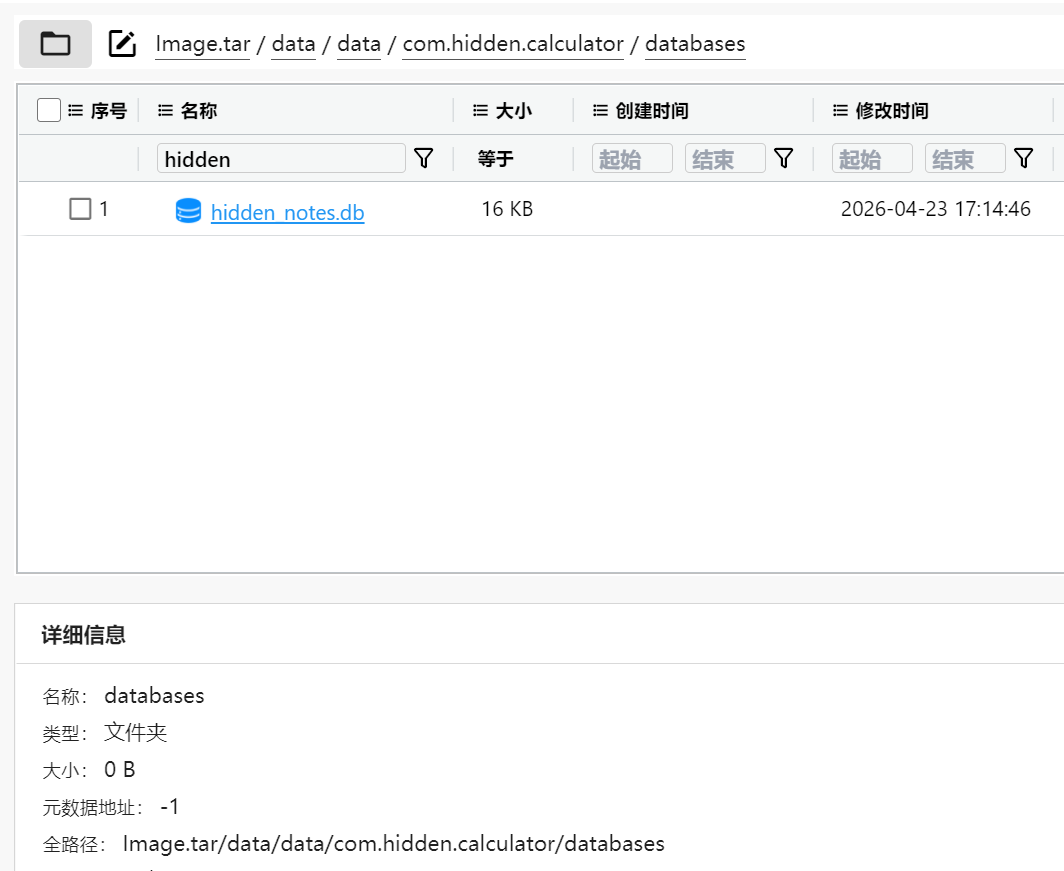
又发现了是一个加密的数据库,所以可以确定了我们要找的就是这一个数据库
所以数据库名字是hidden_notes.db
14.分析陈志鹏手机,隐私笔记app数据库密码保存在什么文件中?答案格式:adbcd.txt
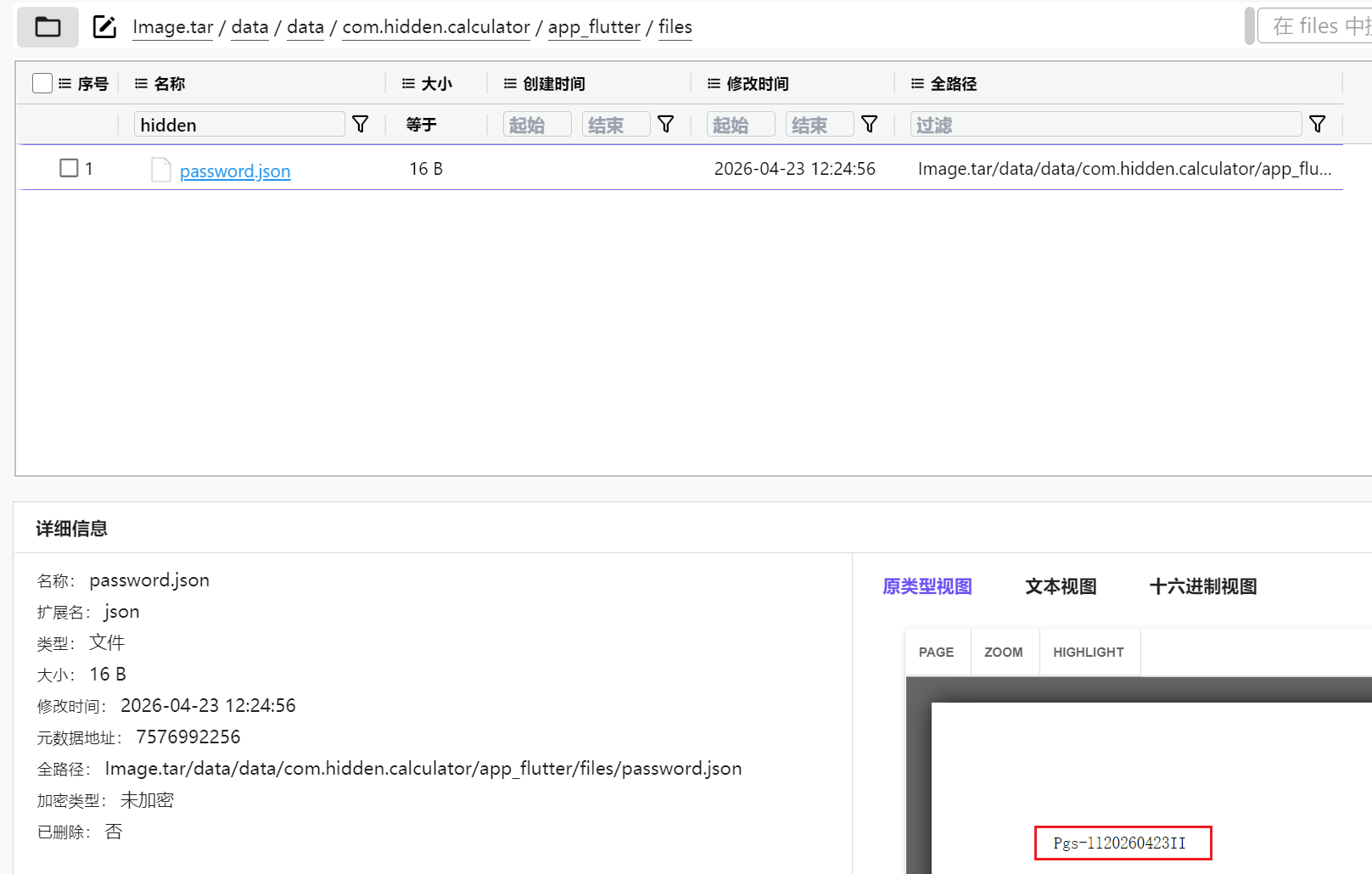
随便翻一下就发现在这个包的数据文件夹下放着一个password.json里存了一个很像密码的
所以这题初步判断就是这一个文件,后边我们继续验证
15.分析陈志鹏手机,隐私笔记数据库密码是?答案格式:ab-abc12345
虽然很大概率就是上一题那个文件,但是直接解密数据库失败了
面对这样子的情况,发现和之前那个内部通联怎么那么像,都是解不开,都是差不多的密码,而且还都是flutter做的
于是试了试掐头去尾,前2后1失败了,脑洞打开尝试反着来结果前1后2直接成功了,比赛的时候惊喜的很
所以答案其实就是
gs-ll20260423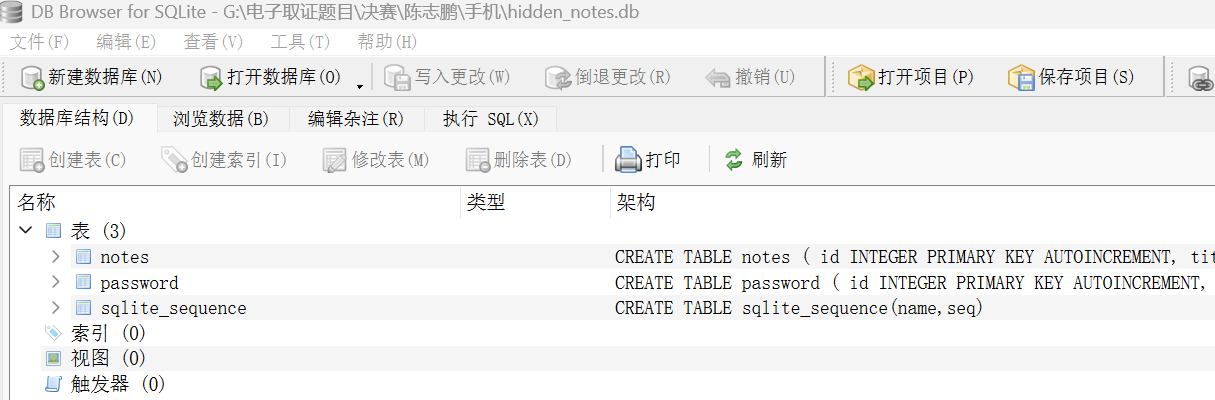
直接打开了
当然真正的做法其实和那个内部通联差不多
由于还是flutter编译的,要么就是拿着那个libsqlcipher.so去看字符串,可以看到我们上题的password.json其实
我们这边尝试根据password更改尝试以及直接抓SQL,写frida脚本(不会写ai了一份
// Frida script for com.hidden.calculator
// Run:
// frida -U -f com.hidden.calculator -l hidden_calculator_dump_v2.js --no-pause

const PKG = "com.hidden.calculator";
const DB_NAME = "hidden_notes.db";

// 你现在已知的密码
const MANUAL_PASSWORD = "gs-ll20260423";

function loge(prefix, e) {
    try {
        console.log(prefix, String(e));
        if (e && e.stack) {
            console.log(e.stack);
        }
    } catch (_) {
        console.log(prefix, e);
    }
}

function waitForAppContext(callback) {
    let count = 0;

    const timer = setInterval(function () {
        Java.perform(function () {
            try {
                const ActivityThread = Java.use("android.app.ActivityThread");
                const app = ActivityThread.currentApplication();

                if (app !== null) {
                    clearInterval(timer);
                    const ctx = app.getApplicationContext();
                    console.log("[+] getApplicationContext ok");
                    callback(ctx);
                    return;
                }

                count++;
                console.log("[*] waiting for Application context... " + count);
            } catch (e) {
                count++;
                loge("[*] waiting context error:", e);
            }

            if (count >= 30) {
                clearInterval(timer);
                console.log("[-] still cannot get Application context");
            }
        });
    }, 500);
}

function fileExists(path) {
    const File = Java.use("java.io.File");
    return File.$new(path).exists();
}

function readTextFile(path) {
    const FileInputStream = Java.use("java.io.FileInputStream");
    const ByteArrayOutputStream = Java.use("java.io.ByteArrayOutputStream");
    const JString = Java.use("java.lang.String");

    const fis = FileInputStream.$new(path);
    const baos = ByteArrayOutputStream.$new();
    const buf = Java.array("byte", new Array(4096).fill(0));

    let n = 0;
    while ((n = fis.read(buf)) > 0) {
        baos.write(buf, 0, n);
    }

    fis.close();

    return JString.$new(baos.toByteArray(), "UTF-8").toString();
}

function b64decodeToString(s) {
    try {
        const Base64 = Java.use("android.util.Base64");
        const JString = Java.use("java.lang.String");
        const bytes = Base64.decode(String(s), 0);
        return JString.$new(bytes, "UTF-8").toString();
    } catch (e) {
        return null;
    }
}

function uniqPush(arr, seen, value, reason) {
    if (value === null || value === undefined) return;

    value = String(value).trim();

    if (value.length === 0) return;
    if (seen[value]) return;

    seen[value] = true;
    arr.push({
        value: value,
        reason: reason
    });
}

function collectFromRaw(raw, candidates, seen, reasonPrefix) {
    if (raw === null || raw === undefined) return;

    raw = String(raw).trim();
    if (raw.length === 0) return;

    uniqPush(candidates, seen, raw, reasonPrefix + " raw");

    if (raw.indexOf("s:") === 0) {
        uniqPush(candidates, seen, raw.substring(2), reasonPrefix + " strip s:");
    }

    if (raw.length > 3) {
        uniqPush(
            candidates,
            seen,
            raw.substring(2, raw.length - 1),
            reasonPrefix + " substring(2,len-1)"
        );
    }

    if (
        (raw[0] === "\"" && raw[raw.length - 1] === "\"") ||
        (raw[0] === "'" && raw[raw.length - 1] === "'")
    ) {
        uniqPush(
            candidates,
            seen,
            raw.substring(1, raw.length - 1),
            reasonPrefix + " strip quotes"
        );
    }

    const b64 = b64decodeToString(raw);
    uniqPush(candidates, seen, b64, reasonPrefix + " base64");

    const rev = raw.split("").reverse().join("");
    uniqPush(candidates, seen, rev, reasonPrefix + " reverse");

    const b64rev = b64decodeToString(rev);
    uniqPush(candidates, seen, b64rev, reasonPrefix + " base64(reverse)");
}

function collectPasswordCandidates(ctx) {
    const candidates = [];
    const seen = {};

    const dataDir = String(ctx.getApplicationInfo().dataDir.value);
    const dbPath = ctx.getDatabasePath(DB_NAME).getAbsolutePath().toString();

    console.log("[+] package =", ctx.getPackageName());
    console.log("[+] dataDir =", dataDir);
    console.log("[+] db path =", dbPath);

    if (MANUAL_PASSWORD && MANUAL_PASSWORD.length > 0) {
        uniqPush(candidates, seen, MANUAL_PASSWORD, "MANUAL_PASSWORD");
    }

    const jsonPaths = [
        dataDir + "/app_flutter/password.json",
        dataDir + "/files/password.json",
        dataDir + "/databases/password.json",
        dataDir + "/shared_prefs/password.json"
    ];

    for (let i = 0; i < jsonPaths.length; i++) {
        const p = jsonPaths[i];

        console.log("[*] check password file:", p);

        if (!fileExists(p)) {
            continue;
        }

        console.log("[+] found password file:", p);

        const text = readTextFile(p);
        console.log("[+] password file raw =", text);

        collectFromRaw(text, candidates, seen, "file:" + p);

        try {
            const JSONObject = Java.use("org.json.JSONObject");
            const obj = JSONObject.$new(text);
            const keys = obj.keys();

            while (keys.hasNext()) {
                const k = keys.next().toString();
                const v = obj.optString(k, "").toString();

                console.log("[+] json", k, "=", v);
                collectFromRaw(v, candidates, seen, "json." + k);
            }
        } catch (e) {
            console.log("[*] not strict JSON, skipped json parse");
        }
    }

    // 顺手枚举 SharedPreferences,防止密码存在 XML 里
    const prefNames = [
        "FlutterSharedPreferences",
        PKG + "_preferences",
        "password",
        "settings"
    ];

    for (let i = 0; i < prefNames.length; i++) {
        try {
            const name = prefNames[i];
            const prefs = ctx.getSharedPreferences(name, 0);
            const all = prefs.getAll();

            console.log("[*] check SharedPreferences:", name, "size =", all.size());

            const it = all.entrySet().iterator();

            while (it.hasNext()) {
                const entry = it.next();
                const k = entry.getKey().toString();
                const vObj = entry.getValue();

                if (vObj === null) continue;

                const v = vObj.toString();

                if (
                    k.toLowerCase().indexOf("password") >= 0 ||
                    k.toLowerCase().indexOf("pass") >= 0 ||
                    k.toLowerCase().indexOf("db") >= 0 ||
                    k.toLowerCase().indexOf("key") >= 0 ||
                    v.toLowerCase().indexOf("gs-") >= 0
                ) {
                    console.log("[+] pref", name + "." + k, "=", v);
                    collectFromRaw(v, candidates, seen, "pref." + name + "." + k);
                }
            }
        } catch (e) {
            loge("[-] prefs read error:", e);
        }
    }

    console.log("[+] candidate password count =", candidates.length);

    for (let i = 0; i < candidates.length; i++) {
        console.log("    [" + i + "]", candidates[i].reason, "=>", candidates[i].value);
    }

    return {
        dbPath: dbPath,
        candidates: candidates
    };
}

function tryLoadSqlcipher(ctx) {
    const System = Java.use("java.lang.System");
    const appInfo = ctx.getApplicationInfo();

    let nativeLibraryDir = "";

    try {
        nativeLibraryDir = String(appInfo.nativeLibraryDir.value);
    } catch (e) {
        nativeLibraryDir = "";
    }

    console.log("[+] nativeLibraryDir =", nativeLibraryDir);

    const loadPaths = [];

    if (nativeLibraryDir && nativeLibraryDir.length > 0) {
        loadPaths.push(nativeLibraryDir + "/libsqlcipher.so");
    }

    // 如果你手动 push 了 libsqlcipher.so 到 /data/local/tmp,也可以被这里加载
    loadPaths.push("/data/local/tmp/libsqlcipher.so");

    for (let i = 0; i < loadPaths.length; i++) {
        const p = loadPaths[i];

        try {
            if (!fileExists(p)) {
                console.log("[*] lib not exists:", p);
                continue;
            }

            System.load.overload("java.lang.String").call(System, p);
            console.log("[+] System.load ok:", p);
            return true;
        } catch (e) {
            loge("[-] System.load failed: " + p, e);
        }
    }

    try {
        System.loadLibrary.overload("java.lang.String").call(System, "sqlcipher");
        console.log("[+] System.loadLibrary sqlcipher ok");
        return true;
    } catch (e) {
        loge("[-] System.loadLibrary sqlcipher failed:", e);
    }

    return false;
}

function quoteIdent(name) {
    return "\"" + String(name).replace(/"/g, "\"\"") + "\"";
}

function cursorRowToString(cursor) {
    const names = cursor.getColumnNames();
    const n = names.length;
    const parts = [];

    for (let i = 0; i < n; i++) {
        const col = names[i].toString();
        let val = null;

        try {
            const type = cursor.getType(i);

            if (type === 0) {
                val = "NULL";
            } else if (type === 1) {
                val = String(cursor.getLong(i));
            } else if (type === 2) {
                val = String(cursor.getDouble(i));
            } else if (type === 3) {
                val = cursor.getString(i);
            } else if (type === 4) {
                val = "<BLOB length=" + cursor.getBlob(i).length + ">";
            } else {
                val = cursor.getString(i);
            }
        } catch (e) {
            try {
                val = cursor.getString(i);
            } catch (_) {
                val = "<read error>";
            }
        }

        parts.push(col + "=" + val);
    }

    return parts.join(" | ");
}

// 这个 APK 里 rawQuery 被混淆成 n(String, String[])
function dumpQueryObf(db, sql, maxRows) {
    console.log("\n[SQL]", sql);

    let cursor = null;

    try {
        cursor = db.n.overload(
            "java.lang.String",
            "[Ljava.lang.String;"
        ).call(db, sql, null);

        let row = 0;

        while (cursor.moveToNext()) {
            console.log("  [row " + row + "] " + cursorRowToString(cursor));
            row++;

            if (row >= maxRows) {
                break;
            }
        }

        console.log("  [+] rows shown =", row);
    } catch (e) {
        loge("  [-] query failed:", e);
    } finally {
        if (cursor !== null) {
            try {
                cursor.close();
            } catch (_) {}
        }
    }
}

// 这个 APK 里 openDatabase 被混淆成 l(String, String, int, k.e, t.c)
function openDbObf(SQLiteDatabase, dbPath, pwd, flags) {
    return SQLiteDatabase.l.overload(
        "java.lang.String",
        "java.lang.String",
        "int",
        "k.e",
        "t.c"
    ).call(SQLiteDatabase, dbPath, pwd, flags, null, null);
}

function tryOpenAndDump(ctx, dbPath, candidates) {
    if (!fileExists(dbPath)) {
        console.log("[-] database not exists:", dbPath);
        console.log("[-] 先打开一次 App,让它初始化数据库");
        return;
    }

    tryLoadSqlcipher(ctx);

    let SQLiteDatabase = null;

    try {
        SQLiteDatabase = Java.use("net.zetetic.database.sqlcipher.SQLiteDatabase");
        console.log("[+] Java.use SQLiteDatabase ok");
    } catch (e) {
        loge("[-] Java.use SQLiteDatabase failed:", e);
        return;
    }

    const OPEN_READONLY = 1;

    for (let i = 0; i < candidates.length; i++) {
        const pwd = candidates[i].value;

        console.log("\n[*] try password [" + i + "]", candidates[i].reason, "=>", pwd);

        let db = null;

        try {
            db = openDbObf(SQLiteDatabase, dbPath, pwd, OPEN_READONLY);

            console.log("[+] open database success");
            console.log("[+] real db password =", pwd);

            dumpQueryObf(db, "PRAGMA cipher_version;", 5);

            dumpQueryObf(
                db,
                "SELECT type, name, sql FROM sqlite_master WHERE type IN ('table','view') ORDER BY type, name;",
                80
            );

            let c = null;

            try {
                c = db.n.overload(
                    "java.lang.String",
                    "[Ljava.lang.String;"
                ).call(
                    db,
                    "SELECT name FROM sqlite_master WHERE type='table' AND name NOT LIKE 'sqlite_%' ORDER BY name;",
                    null
                );

                while (c.moveToNext()) {
                    const table = c.getString(0).toString();
                    dumpQueryObf(db, "SELECT * FROM " + quoteIdent(table) + " LIMIT 30;", 30);
                }
            } catch (e) {
                loge("[-] table enum failed:", e);
            } finally {
                if (c !== null) {
                    try {
                        c.close();
                    } catch (_) {}
                }
            }

            try {
                db.close();
            } catch (_) {}

            return;
        } catch (e) {
            loge("[-] open failed:", e);

            try {
                if (db !== null) {
                    db.close();
                }
            } catch (_) {}
        }
    }

    console.log("[-] all candidate passwords failed");
    console.log("[-] 如果这里还失败,再看错误是否是 no such table / file is not database / wrong key");
}

setImmediate(function () {
    console.log("[*] hidden_notes.db decrypt hook v2 loaded");

    Java.perform(function () {
        waitForAppContext(function (ctx) {
            try {
                const result = collectPasswordCandidates(ctx);

                setTimeout(function () {
                    Java.perform(function () {
                        tryOpenAndDump(ctx, result.dbPath, result.candidates);
                    });
                }, 800);
            } catch (e) {
                loge("[-] main logic error:", e);
            }
        });
    });
});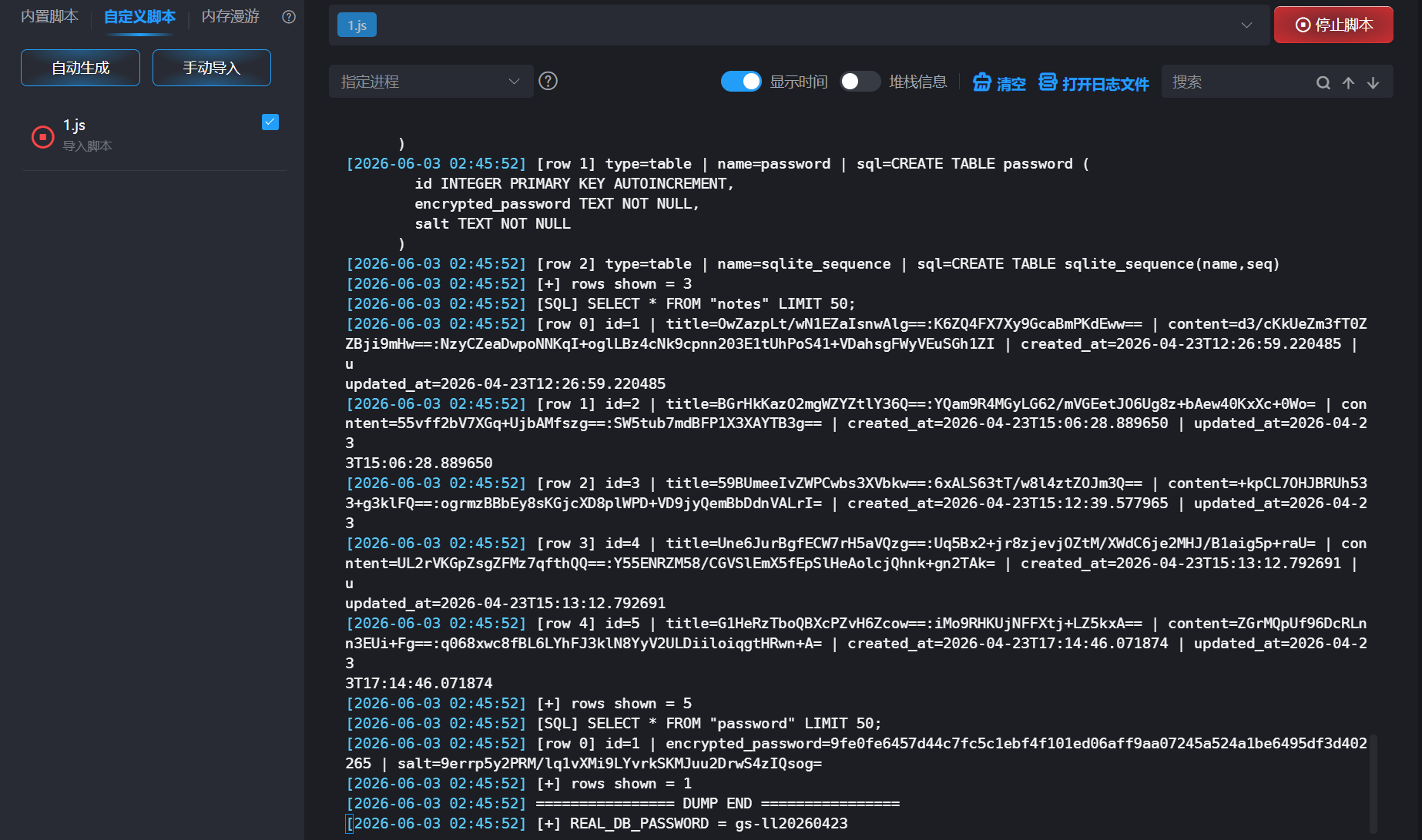
可能抓还是有点问题,不过很容易就能找到现在这个倒是真的,不知道有多少同学在搞之前就想到了截取并猜测成功的()
得到密码是gs-ll20260423
16.分析陈志鹏手机,隐私笔记数据库中有几个表?答案格式:1
我们其实已经有密码了,也有数据库了,直接解密就好了
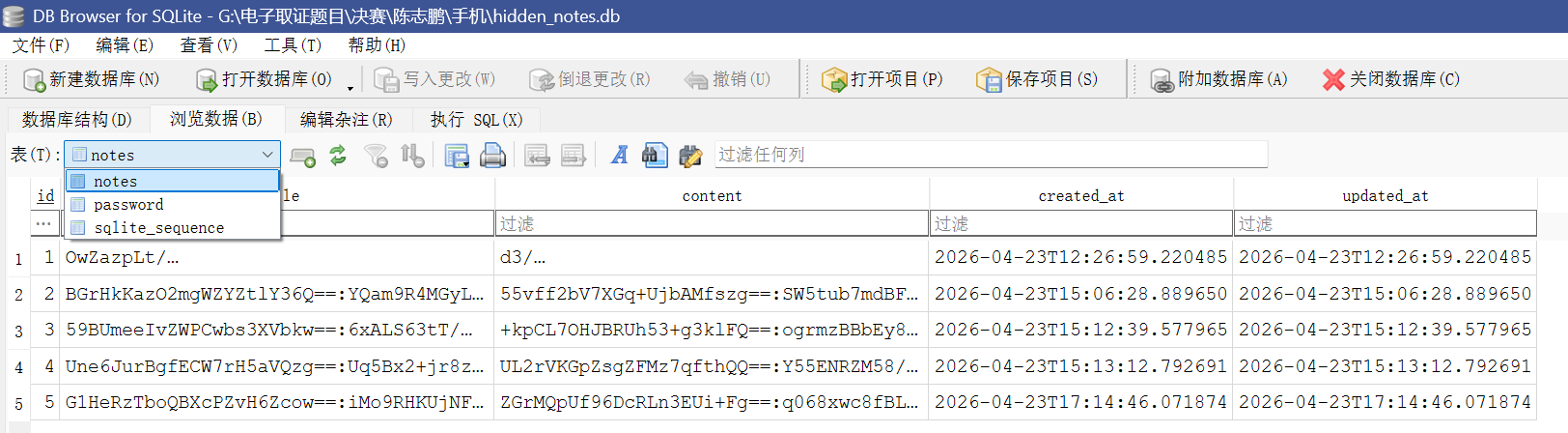
所以是一共3个表
17.分析陈志鹏手机,隐私笔记用户密码加密存储在数据库哪个表中?答案格式:note
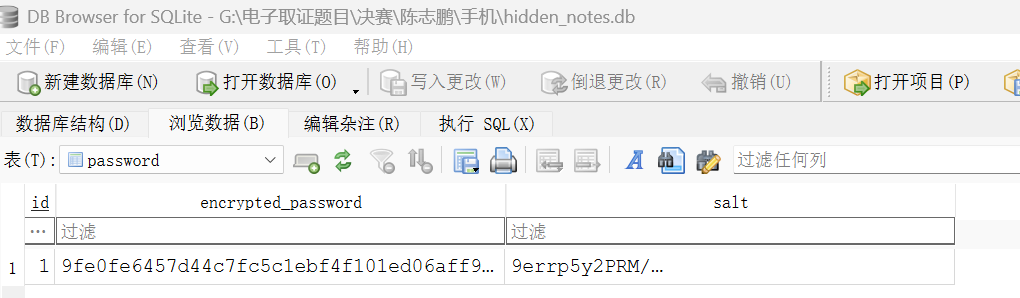
加密密码,明显存在表password里,所以本题答案为password
18.分析陈志鹏手机,隐私笔记中,对用户密码哈希共迭代多少次?答案格式:10
上一题已经发现了用户密码被加密存在password这个库里边
但是我们要知道迭代多少次其实主要还是要看逻辑,有空或许还是要对flutter的反编译有了解才行
String hashPassword(String password, String salt) {
  String hash = password + salt;

  for (int i = 0; i < 10; i++) {
    hash = sha256.convert(utf8.encode(hash)).toString();
  }

  return hash;
}
这边分析下来大概是这样子的一个逻辑
所以其实是迭代了10次
19.分析陈志鹏手机,隐私笔记用户密码是?答案格式:123456
我们已经用密码解开了外层
现在已经可以清晰看见内层了
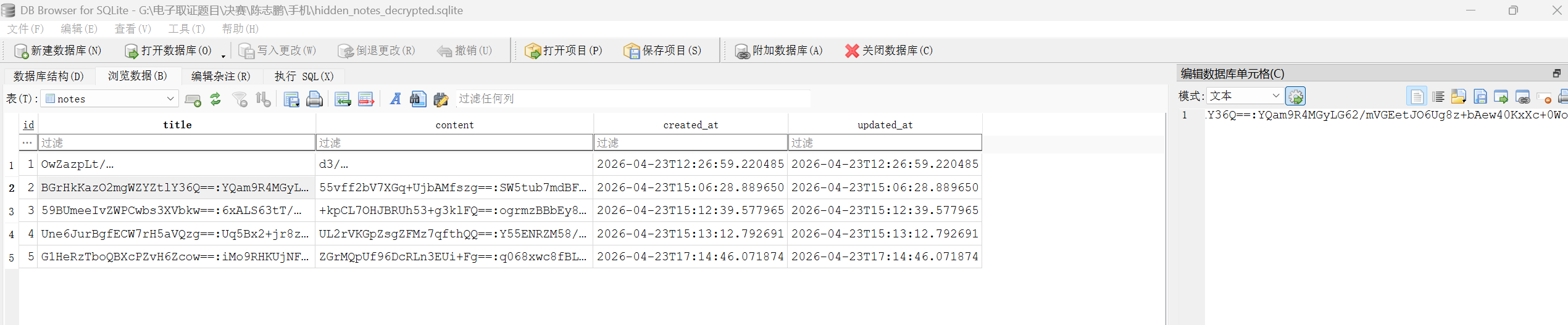
不难看出字段全部二次加密,而且这个是很标准的IV:密文
这意味着我们需要进行解密,对Flutter反编译之后理解可以得到这个内层是利用了AES-CBC-PKCS7然后解密
import argparse
import base64
import csv
import hashlib
import json
import os
import shutil
import sqlite3
import subprocess
import sys
import tempfile
import zipfile
from pathlib import Path
from typing import Dict, List, Optional, Tuple

from cryptography.hazmat.primitives.ciphers import Cipher, algorithms, modes
from cryptography.hazmat.primitives import padding


DEFAULT_OUTER_KEY = "gs-ll20260423"


def die(msg: str, code: int = 1) -> None:
    print(f"[!] {msg}", file=sys.stderr)
    raise SystemExit(code)


def sql_quote(value: str) -> str:
    return "'" + value.replace("'", "''") + "'"


def extract_db_if_zip(input_path: Path, workdir: Path) -> Path:
    """如果输入是 zip,自动寻找 hidden_notes.db 并解压;否则原样返回。"""
    if input_path.suffix.lower() != ".zip":
        return input_path

    print(f"[*] 输入是 ZIP,正在查找 hidden_notes.db:{input_path}")
    with zipfile.ZipFile(input_path, "r") as zf:
        candidates = [
            name for name in zf.namelist()
            if Path(name).name == "hidden_notes.db"
        ]

        if not candidates:
            # 放宽一点,找所有 .db
            candidates = [
                name for name in zf.namelist()
                if Path(name).suffix.lower() in {".db", ".sqlite", ".sqlite3"}
            ]

        if not candidates:
            die("ZIP 里没找到 hidden_notes.db / .db / .sqlite 文件。")

        # 优先选择 hidden_notes.db
        candidates.sort(key=lambda x: (Path(x).name != "hidden_notes.db", len(x)))
        chosen = candidates[0]
        out = workdir / Path(chosen).name
        print(f"[*] 找到数据库:{chosen}")
        with zf.open(chosen) as src, out.open("wb") as dst:
            shutil.copyfileobj(src, dst)
        return out


def is_plain_sqlite(db_path: Path) -> bool:
    """判断是否能用普通 sqlite3 打开。SQLCipher 未解密时这里会失败。"""
    try:
        con = sqlite3.connect(str(db_path))
        con.execute("SELECT name FROM sqlite_master LIMIT 1").fetchall()
        con.close()
        return True
    except Exception:
        return False


def open_plain_sqlite(db_path: Path) -> sqlite3.Connection:
    con = sqlite3.connect(str(db_path))
    con.row_factory = sqlite3.Row
    # 触发一次查询,避免假连接
    con.execute("SELECT name FROM sqlite_master LIMIT 1").fetchall()
    return con


def open_with_pysqlcipher3(db_path: Path, outer_key: str):
    """
    尝试用 pysqlcipher3 直接打开 SQLCipher 数据库。
    注意:需要先 pip install pysqlcipher3,并且系统有 SQLCipher 相关库。
    """
    try:
        from pysqlcipher3 import dbapi2 as sqlcipher
    except Exception as e:
        return None, f"未安装或无法导入 pysqlcipher3:{e}"

    try:
        con = sqlcipher.connect(str(db_path))
        con.row_factory = sqlcipher.Row

        # SQLCipher v4。多数情况下只需要 PRAGMA key。
        # cipher_compatibility=4 用于明确按 v4 参数打开。
        con.execute("PRAGMA cipher_compatibility = 4;")
        con.execute(f"PRAGMA key = {sql_quote(outer_key)};")

        # 触发解密校验
        con.execute("SELECT count(*) FROM sqlite_master;").fetchone()
        print("[*] 已通过 pysqlcipher3 打开 SQLCipher 数据库。")
        return con, None
    except Exception as e:
        try:
            con.close()
        except Exception:
            pass
        return None, f"pysqlcipher3 打开失败:{e}"


def export_with_sqlcipher_cli(db_path: Path, outer_key: str, out_plain: Path) -> Tuple[bool, str]:
    """
    尝试调用系统里的 sqlcipher 命令导出明文 SQLite。
    Linux/macOS 比较常见;Windows 需要自己安装 sqlcipher.exe 并加入 PATH。
    """
    exe = shutil.which("sqlcipher")
    if not exe:
        return False, "系统 PATH 里没有 sqlcipher 命令。"

    if out_plain.exists():
        out_plain.unlink()

    script = f"""
PRAGMA cipher_compatibility = 4;
PRAGMA key = {sql_quote(outer_key)};
ATTACH DATABASE {sql_quote(str(out_plain))} AS plaintext KEY '';
SELECT sqlcipher_export('plaintext');
DETACH DATABASE plaintext;
.quit
""".strip() + "\n"

    try:
        p = subprocess.run(
            [exe, str(db_path)],
            input=script,
            text=True,
            capture_output=True,
            timeout=60,
        )
    except Exception as e:
        return False, f"调用 sqlcipher 命令失败:{e}"

    if p.returncode != 0:
        return False, f"sqlcipher 导出失败:\nSTDOUT:\n{p.stdout}\nSTDERR:\n{p.stderr}"

    if not out_plain.exists() or out_plain.stat().st_size == 0:
        return False, "sqlcipher 执行结束,但没有生成明文数据库。"

    try:
        test = sqlite3.connect(str(out_plain))
        test.execute("SELECT name FROM sqlite_master LIMIT 1").fetchall()
        test.close()
    except Exception as e:
        return False, f"导出的文件不是有效 SQLite:{e}"

    print(f"[*] 已通过 sqlcipher 命令导出明文数据库:{out_plain}")
    return True, ""


def get_columns(con, table: str) -> List[str]:
    rows = con.execute(f"PRAGMA table_info({table})").fetchall()
    return [r["name"] if isinstance(r, sqlite3.Row) else r[1] for r in rows]


def table_exists(con, table: str) -> bool:
    row = con.execute(
        "SELECT name FROM sqlite_master WHERE type='table' AND name=?",
        (table,),
    ).fetchone()
    return row is not None


def aes_cbc_pkcs7_decrypt(value: Optional[str], key: bytes) -> Optional[str]:
    if value is None:
        return None

    value = str(value)
    if ":" not in value:
        # 不像 IV:密文,直接返回原文,避免脚本崩。
        return value

    iv_b64, ct_b64 = value.split(":", 1)
    iv = base64.b64decode(iv_b64)
    ct = base64.b64decode(ct_b64)

    if len(iv) != 16:
        raise ValueError(f"IV 长度不是 16 字节,实际 {len(iv)} 字节。")
    if len(ct) % 16 != 0:
        raise ValueError(f"密文长度不是 AES-CBC 分组的整数倍,实际 {len(ct)} 字节。")

    decryptor = Cipher(algorithms.AES(key), modes.CBC(iv)).decryptor()
    padded = decryptor.update(ct) + decryptor.finalize()

    unpadder = padding.PKCS7(128).unpadder()
    plain = unpadder.update(padded) + unpadder.finalize()
    return plain.decode("utf-8")


def derive_field_key(con, encrypted_password_override: Optional[str]) -> Tuple[str, bytes, Dict[str, str]]:
    """
    字段密钥 = sha256(encrypted_password.encode()).digest()
    encrypted_password 优先从参数取,否则从 password 表取。
    """
    info: Dict[str, str] = {}

    if encrypted_password_override:
        encrypted_password = encrypted_password_override.strip()
        info["encrypted_password_source"] = "command line --encrypted-password"
        info["encrypted_password"] = encrypted_password
        return encrypted_password, hashlib.sha256(encrypted_password.encode("utf-8")).digest(), info

    if not table_exists(con, "password"):
        die("没有 password 表。请用 --encrypted-password 手动传入 password.encrypted_password 的值。")

    cols = get_columns(con, "password")
    if "encrypted_password" not in cols:
        die(f"password 表没有 encrypted_password 字段,实际字段:{cols}")

    pw_row = con.execute("SELECT * FROM password LIMIT 1").fetchone()
    if not pw_row:
        die("password 表为空。")

    # 同时兼容 sqlite3.Row 和 pysqlcipher Row
    encrypted_password = pw_row["encrypted_password"]
    salt = pw_row["salt"] if "salt" in cols else None

    info["encrypted_password_source"] = "password.encrypted_password"
    info["encrypted_password"] = str(encrypted_password)
    if salt is not None:
        info["salt"] = str(salt)

    key = hashlib.sha256(str(encrypted_password).encode("utf-8")).digest()
    return str(encrypted_password), key, info


def decrypt_notes(con, key: bytes) -> List[Dict[str, object]]:
    if not table_exists(con, "notes"):
        # 兜底:列出表名给用户看
        rows = con.execute("SELECT name FROM sqlite_master WHERE type='table' ORDER BY name").fetchall()
        tables = [r["name"] if hasattr(r, "keys") else r[0] for r in rows]
        die(f"没有 notes 表。当前数据库表:{tables}")

    cols = get_columns(con, "notes")
    for need in ["title", "content"]:
        if need not in cols:
            die(f"notes 表没有 {need} 字段,实际字段:{cols}")

    select_cols = []
    for c in ["id", "title", "content", "created_at", "updated_at"]:
        if c in cols:
            select_cols.append(c)

    order_by = " ORDER BY id" if "id" in cols else ""
    rows = con.execute(f"SELECT {', '.join(select_cols)} FROM notes{order_by}").fetchall()

    result: List[Dict[str, object]] = []
    for idx, row in enumerate(rows, start=1):
        item: Dict[str, object] = {}

        # 先把原始列放进去
        for c in select_cols:
            try:
                item[c] = row[c]
            except Exception:
                item[c] = None

        # 解密 title/content
        try:
            item["title_plain"] = aes_cbc_pkcs7_decrypt(item.get("title"), key)
        except Exception as e:
            item["title_plain"] = f"[DECRYPT_ERROR] {e}"

        try:
            item["content_plain"] = aes_cbc_pkcs7_decrypt(item.get("content"), key)
        except Exception as e:
            item["content_plain"] = f"[DECRYPT_ERROR] {e}"

        if "id" not in item:
            item["id"] = idx

        result.append(item)

    return result


def write_outputs(notes: List[Dict[str, object]], meta: Dict[str, object], out_prefix: Path) -> None:
    out_json = out_prefix.with_suffix(".json")
    out_csv = out_prefix.with_suffix(".csv")
    out_txt = out_prefix.with_suffix(".txt")

    data = {
        "meta": meta,
        "notes": notes,
    }

    out_json.write_text(
        json.dumps(data, ensure_ascii=False, indent=2),
        encoding="utf-8",
    )

    csv_fields = ["id", "title_plain", "content_plain", "created_at", "updated_at", "title", "content"]
    all_fields = list(dict.fromkeys(csv_fields + [k for n in notes for k in n.keys()]))

    with out_csv.open("w", newline="", encoding="utf-8-sig") as f:
        writer = csv.DictWriter(f, fieldnames=all_fields)
        writer.writeheader()
        writer.writerows(notes)

    lines = []
    for n in notes:
        lines.append(f"id: {n.get('id')}")
        lines.append(f"标题: {n.get('title_plain')}")
        lines.append(f"内容: {n.get('content_plain')}")
        lines.append("-" * 40)
    out_txt.write_text("\n".join(lines), encoding="utf-8")

    print(f"[*] 已写出 JSON:{out_json}")
    print(f"[*] 已写出 CSV :{out_csv}")
    print(f"[*] 已写出 TXT :{out_txt}")


def print_notes(notes: List[Dict[str, object]]) -> None:
    print("\n========== 解密结果 ==========")
    for n in notes:
        print(f"id: {n.get('id')}")
        print(f"标题: {n.get('title_plain')}")
        print(f"内容: {n.get('content_plain')}")
        print("-" * 40)


def main() -> None:
    parser = argparse.ArgumentParser(
        description="Decrypt hidden_notes.db notes.title/content fields."
    )
    parser.add_argument("input", help="hidden_notes.db / exported sqlite / zip")
    parser.add_argument(
        "--outer-key",
        default=DEFAULT_OUTER_KEY,
        help=f"SQLCipher 外层数据库密码,默认:{DEFAULT_OUTER_KEY}",
    )
    parser.add_argument(
        "--encrypted-password",
        default=None,
        help="手动指定 password.encrypted_password;正常不用填,脚本会从 password 表读取。",
    )
    parser.add_argument(
        "--out-prefix",
        default=None,
        help="输出文件前缀;默认在当前目录生成 hidden_notes_plaintext.*",
    )
    args = parser.parse_args()

    input_path = Path(args.input).expanduser().resolve()
    if not input_path.exists():
        die(f"文件不存在:{input_path}")

    with tempfile.TemporaryDirectory(prefix="hidden_notes_") as td:
        workdir = Path(td)
        db_path = extract_db_if_zip(input_path, workdir)

        con = None
        opened_mode = None
        plain_export_path = workdir / "hidden_notes_exported_plain.sqlite"

        if is_plain_sqlite(db_path):
            print("[*] 数据库可以直接用普通 sqlite3 打开,按明文 SQLite 处理。")
            con = open_plain_sqlite(db_path)
            opened_mode = "plain_sqlite"
        else:
            print("[*] 普通 sqlite3 无法读取,判断为 SQLCipher 加密库,尝试外层解密。")

            con, err = open_with_pysqlcipher3(db_path, args.outer_key)
            if con is not None:
                opened_mode = "sqlcipher_pysqlcipher3"
            else:
                print(f"[-] {err}")
                ok, err2 = export_with_sqlcipher_cli(db_path, args.outer_key, plain_export_path)
                if ok:
                    con = open_plain_sqlite(plain_export_path)
                    opened_mode = "sqlcipher_cli_export"
                else:
                    print(f"[-] {err2}")
                    die(
                        "无法打开 SQLCipher 数据库。\n"
                        "解决办法二选一:\n"
                        "1)安装 pysqlcipher3:pip install pysqlcipher3\n"
                        "2)安装 sqlcipher 命令行工具,并确保 sqlcipher 在 PATH 里\n"
                        "或者先用 DB Browser for SQLite/SQLCipher 手动导出明文 SQLite,再把导出的文件传给本脚本。"
                    )

        encrypted_password, field_key, pw_info = derive_field_key(con, args.encrypted_password)
        print(f"[*] encrypted_password = {encrypted_password}")
        print(f"[*] 字段 AES key = SHA256(encrypted_password) = {field_key.hex()}")

        notes = decrypt_notes(con, field_key)

        meta: Dict[str, object] = {
            "opened_mode": opened_mode,
            "outer_sqlcipher_key_used": args.outer_key if opened_mode != "plain_sqlite" else None,
            "field_key_derivation": "SHA256(password.encrypted_password UTF-8 string)",
            "field_key_hex": field_key.hex(),
            "field_cipher": "AES-CBC-PKCS7",
            "field_format": "base64(IV):base64(ciphertext)",
            "password_info": pw_info,
        }

        print_notes(notes)

        if args.out_prefix:
            out_prefix = Path(args.out_prefix).expanduser().resolve()
        else:
            out_prefix = Path.cwd() / "hidden_notes_plaintext"

        write_outputs(notes, meta, out_prefix)

        try:
            con.close()
        except Exception:
            pass


if __name__ == "__main__":
    main()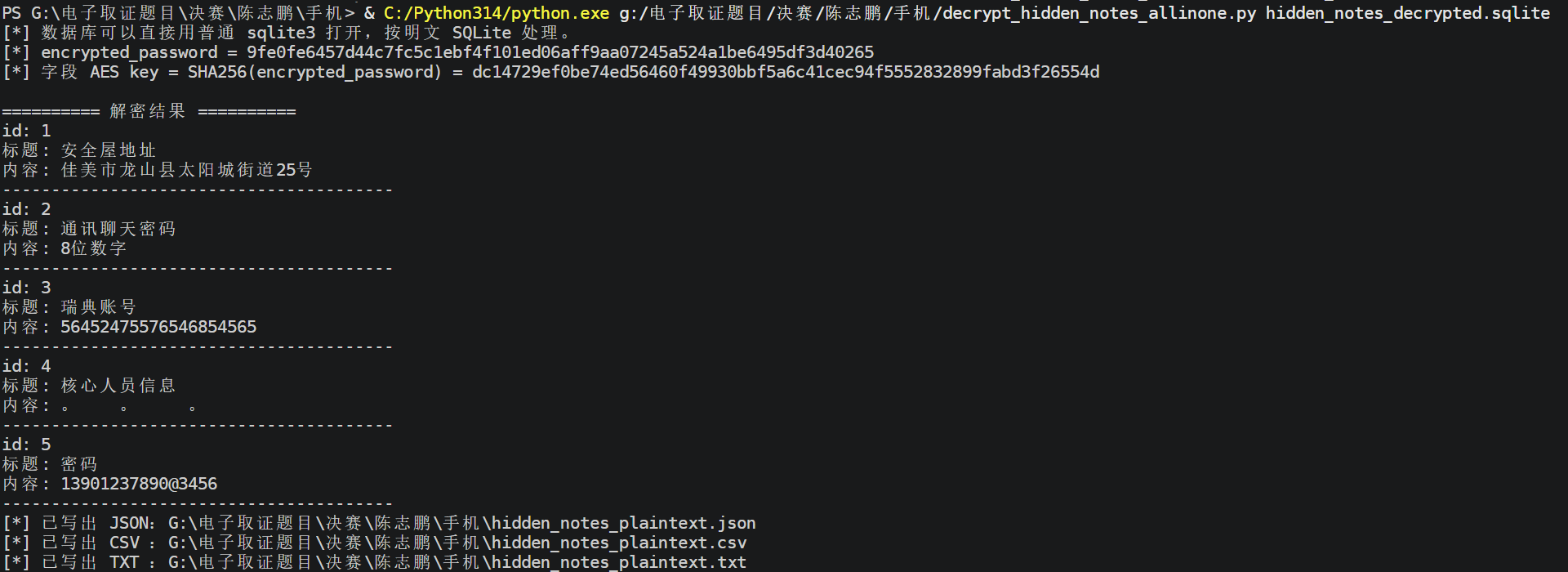

得到如上内容,所以密码是13901237890@3456
(这边比赛说是错的,我也不知道该是多少,因为这边想要进入笔记本应该是需要我们数字打完之后按'='号,但是这个显然有个@符号根本就大不了,adb我又没有,因此无法判定真伪,希望是真的)
20.分析陈志鹏手机,隐私笔记中,陈志鹏记录了几条笔记。答案格式:1

依旧同一份图片,写了一共5条笔记
21.分析陈志鹏手机,笔记应用中层记录了其安全屋地址,请问地址是?答案格式:龙江市山河县光明街道22号

也是直接写在明面上了,所以是佳美市龙山县太阳城街道25号
22.分析陈志鹏手机,内部通联app数据库密码是?答案格式:a-adb1234565Abc
我是真没想到陈志鹏最后也要搞一搞这个内部通联app,就是同一个
验证哈希发现依旧一模一样,上边10题讲过了,就不啰嗦了
data/data/com.socialchat.social_chat_app/shared_prefs/FlutterSharedPreferences.xml发现密码
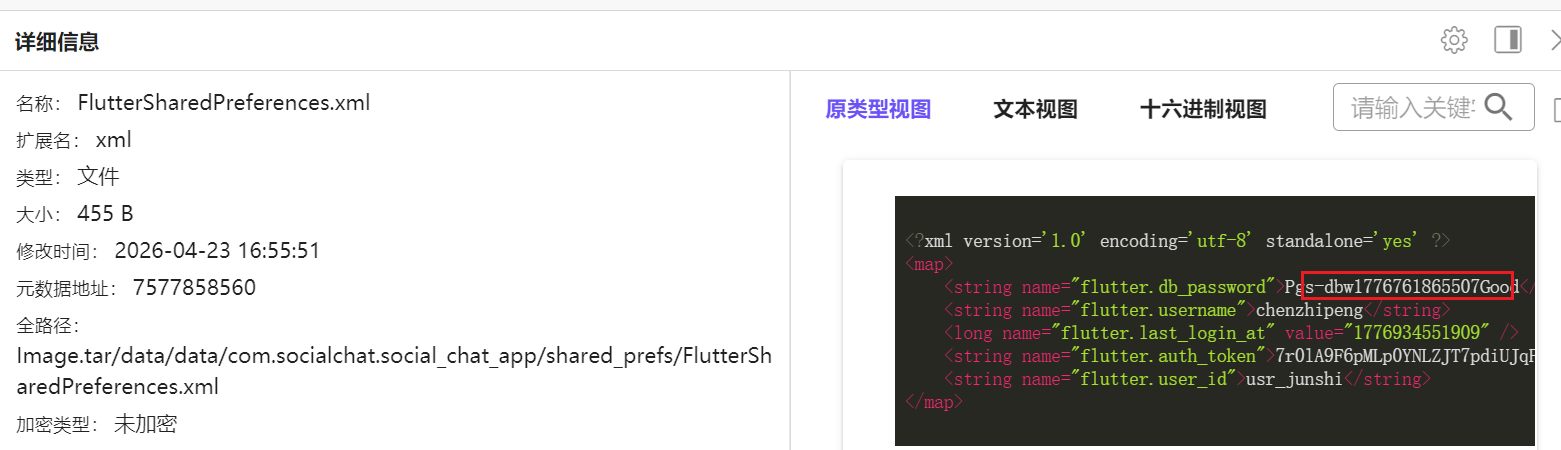
掐头去尾得到本题答案
s-dbw1776761865507Goo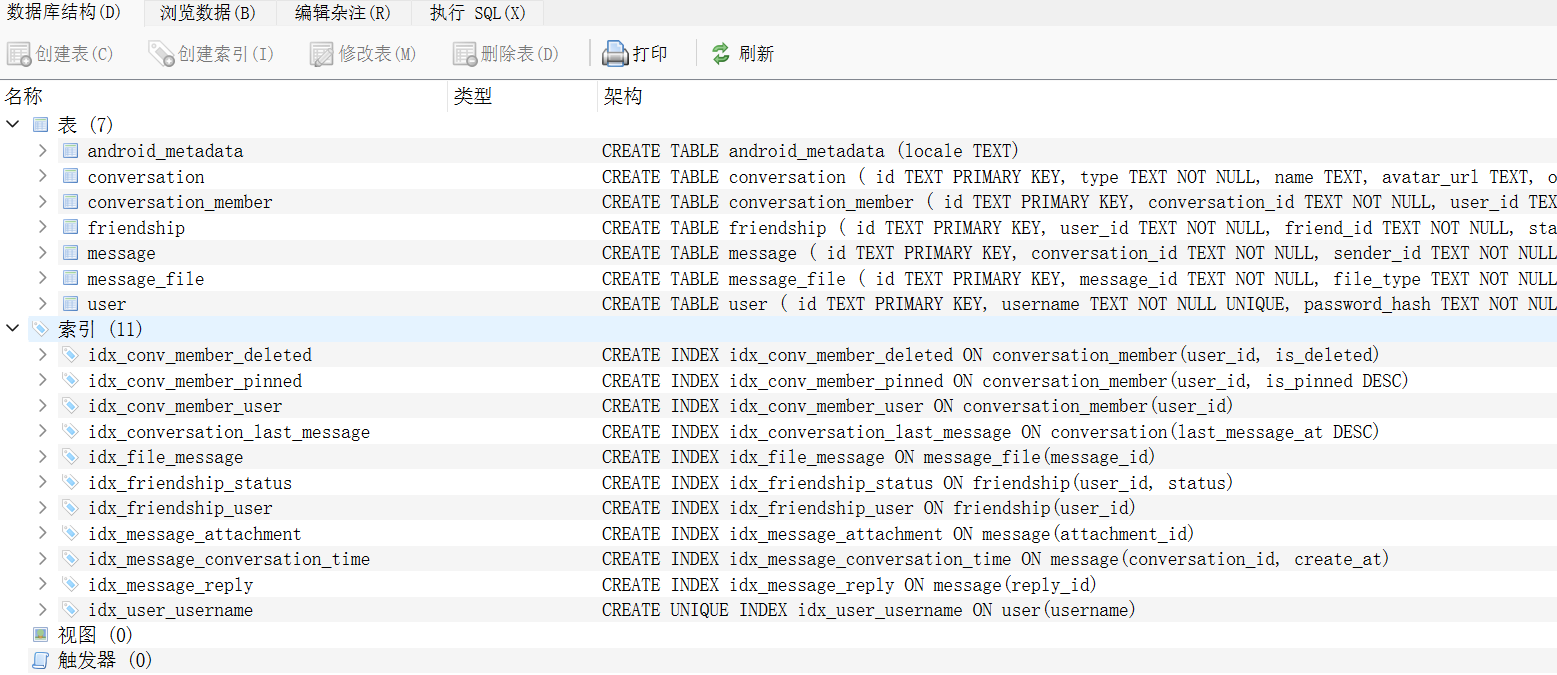
确认密码
23.分析陈志鹏手机,陈志鹏内部通联app中有几个好友?答案格式:1
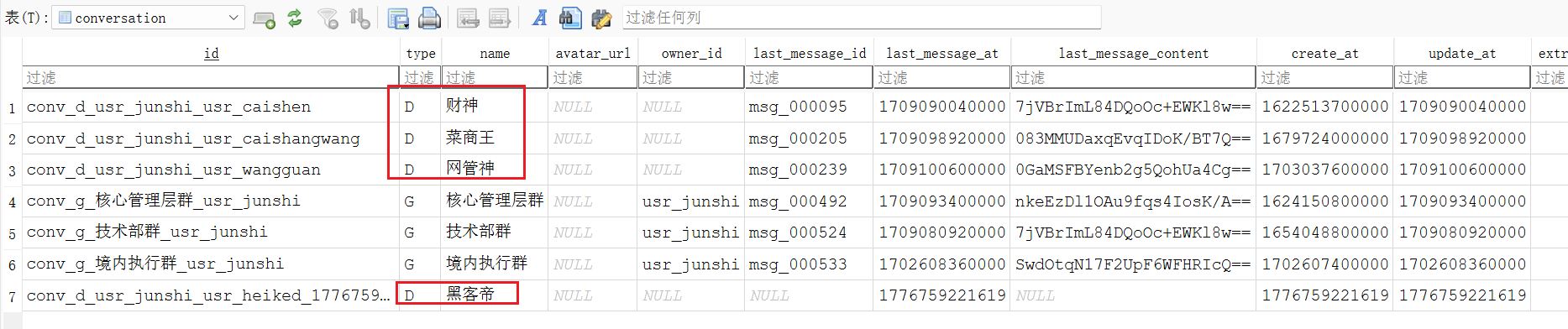
和12题几乎一模一样的考点,就是解密后看数据库的conversation表而已
得到是5人
24.分析陈志鹏手机,陈志鹏曾要求犯罪团伙其他人编写过远控木马,该木马加密协议用的什么加密算法?答案格式:ABC-123
"要求",很容易想到是聊天记录内部的内容,我们根据11题的做法直接用脚本解密成csv打开看看聊天记录
搜索"加密"看看能不能搜到
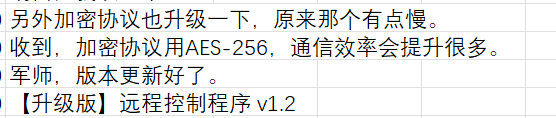
发现了这样子的聊天记录
得到加密协议用的是AES-256,和答案格式也一样
所以本题答案为AES-256
25.分析陈志鹏手机,第二次接收的远控木马保存在手机的完整路径是。答案格式:/storage/emulated/0/Android/data/com.app.app/files/app/木马.txt
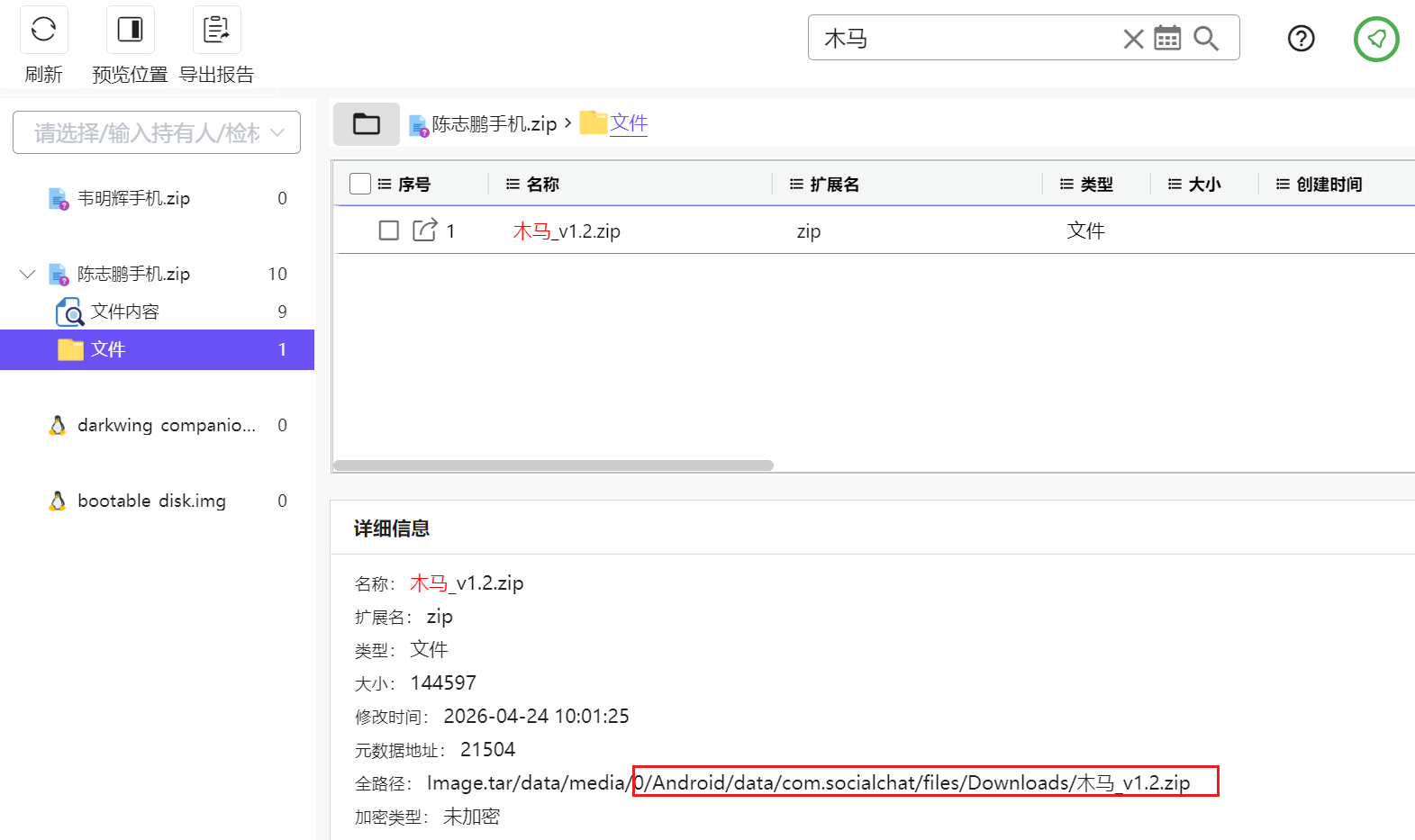
索引搜索密码即可,甚至没有干扰
仿照答案格式,全路径,所以应该是
/storage/emulated/0/Android/data/com.socialchat/files/Downloads/木马_v1.2.zip