Java异常处理完全指南
1.1 认识异常
1.1.1 异常的体系
Java中所有异常和错误的根类是java.lang.Throwable,其体系如下:
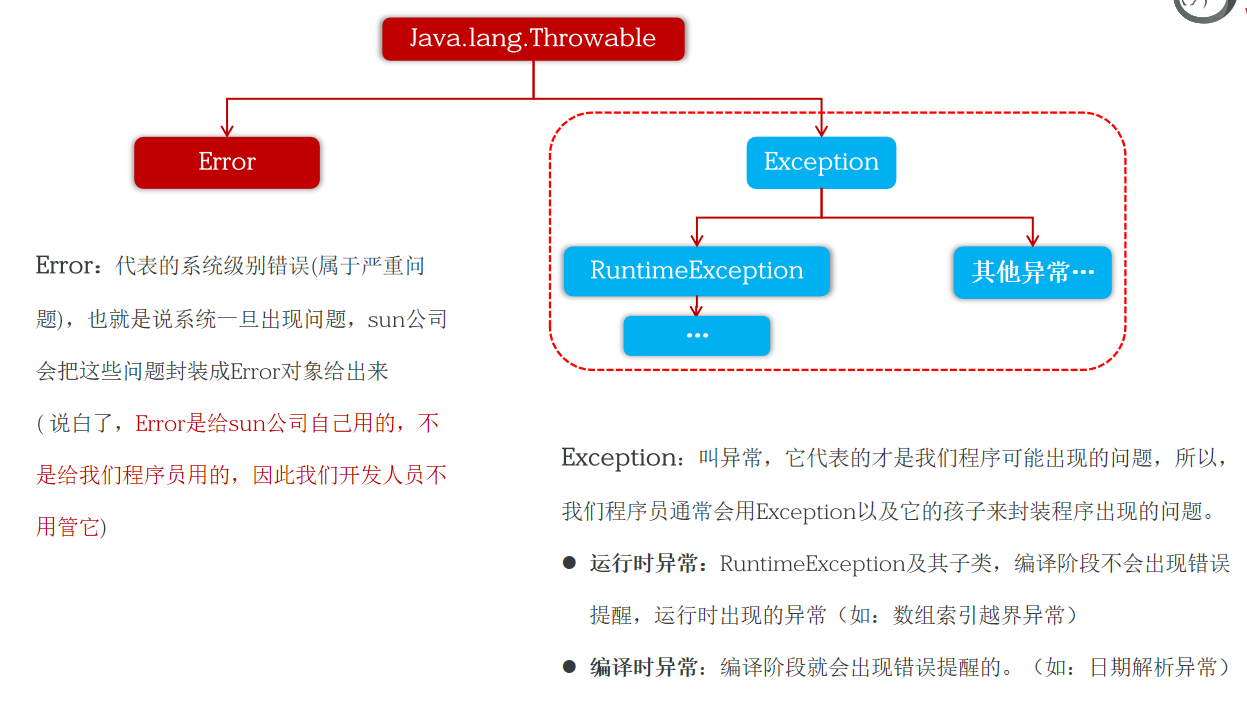
java.lang.Throwable
├── Error(系统级别错误,严重问题)
│   └── 例如:OutOfMemoryError、StackOverflowError
└── Exception(程序可能出现的问题)
    ├── RuntimeException(运行时异常)
    │   └── 例如:NullPointerException、ArrayIndexOutOfBoundsException、ArithmeticException
    └── 其他Exception(编译时异常)
└── 例如:ParseException、FileNotFoundException、SQLException- Error :代表系统级别错误(属于严重问题),一旦出现,sun公司会把这些问题封装成
Error对象。Error是给sun公司自己用的,不是给我们程序员用的,因此我们开发人员不用管它。 - Exception :叫异常,它代表的才是我们程序可能出现的问题,所以,我们程序员通常会用
Exception以及它的孩子来封装程序出现的问题。
异常分为两类:
| 类型 | 继承关系 | 编译阶段 | 典型例子 |
|---|---|---|---|
| 运行时异常 | RuntimeException及其子类 |
不会出现错误提醒 | NullPointerException、ArrayIndexOutOfBoundsException |
| 编译时异常 | 非RuntimeException的其他Exception |
出现错误提醒,必须处理 | ParseException、FileNotFoundException |
1.1.2 异常的作用
异常有两个核心作用:
- 定位程序bug的关键信息:异常堆栈可以精确告诉我们错误发生的位置和原因。
- 作为方法内部的一种特殊返回值:以便通知上层调用者方法的执行问题(成功还是失败,失败原因是什么)。
【案例】ExceptionDemo1:直观感受两种异常
java
package com.wfs.demo1exception;

import java.io.FileInputStream;
import java.io.InputStream;
import java.text.SimpleDateFormat;
import java.util.Date;

public class ExceptionDemo1 {
    public static void main(String[] args)  {
        // 运行时异常:编译通过,运行时报错
        show();

        // 编译时异常:必须处理
        try {
            show2();
        } catch (Exception e) {
            e.printStackTrace();
        }
    }

    // 运行时异常的特点:编译阶段不报错,运行时出现的异常,继承自 RuntimeException。
    public static void show(){
        System.out.println("==程序开始。。。。==");
        int[] arr = {1,2,3};
        // System.out.println(arr[3]);      // ArrayIndexOutOfBoundsException
        // System.out.println(10/0);        // ArithmeticException
        String str = null;
        System.out.println(str.length());    // NullPointerException
        System.out.println("==程序结束。。。。==");
    }

    // 编译异常:编译阶段报错,编译不通过。
    public static void show2() throws Exception {
        System.out.println("==程序开始。。。。==");
        String str = "2024-07-09 11:12:13";
        SimpleDateFormat sdf = new SimpleDateFormat("yyyy/MM/dd HH:mm:ss");
        Date date = sdf.parse(str);          // 编译时异常,提醒程序员这里的程序很容易出错,请您注意!
        InputStream is = new FileInputStream("D:/meinv.png");
        System.out.println("==程序结束。。。。==");
    }
}
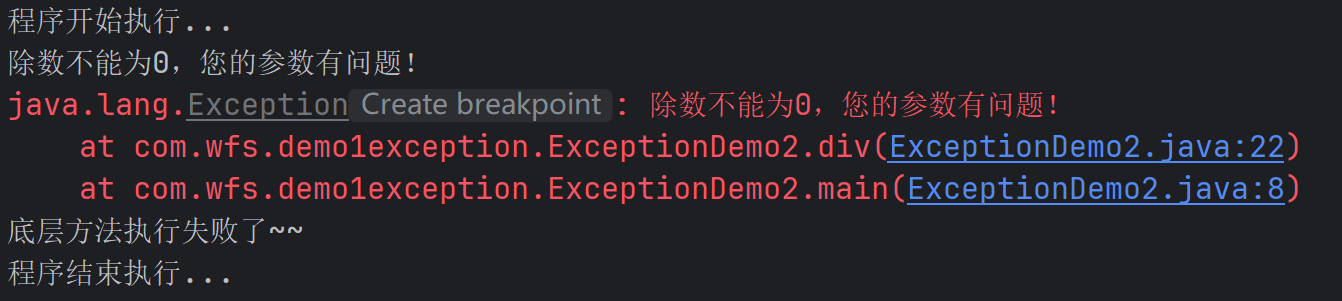
【案例】ExceptionDemo2:用异常表示底层执行成功与否
java
package com.wfs.demo1exception;

public class ExceptionDemo2 {
    public static void main(String[] args) {
        System.out.println("程序开始执行...");
        try {
            System.out.println(div(10, 0));
            System.out.println("底层方法执行成功了~~~");
        } catch (Exception e) {
            e.printStackTrace();
            System.out.println("底层方法执行失败了~~");
        }
        System.out.println("程序结束执行...");
    }

    // 通过抛出异常告知调用者参数问题
    public static int div(int a, int b) throws Exception {
        if(b == 0){
            System.out.println("除数不能为0,您的参数有问题!");
            throw new Exception("除数不能为0,您的参数有问题!");
        }
        int result = a / b;
        return result;
    }
}
执行结果
1.2 自定义异常
1.2.1 为什么需要自定义异常?
JDK内置的异常类型是通用的,无法准确表达业务层面的错误。比如:
- 年龄超出合法范围(1~200岁)
- 用户名已存在
- 库存不足
自定义异常可以让错误信息更精确,语义更清晰。
1.2.2 自定义编译时异常
步骤:
- 继承
Exception做爸爸。 - 重写
Exception的构造器。 - 哪里需要用这个异常返回,哪里就
throw。
【案例】ItheimaAgeIllegalException(编译时异常)
java
package com.wfs.demo1exception;

/**
 * 自定义的编译时异常
 * 1、继承Exception做爸爸。
 * 2、重写Exception的构造器。
 * 3、哪里需要用这个异常返回,哪里就throw
 */
public class ItheimaAgeIllegalException extends Exception{
    public ItheimaAgeIllegalException() {
    }
    public ItheimaAgeIllegalException(String message) {
        super(message);
    }
}
【案例】ExceptionDemo3:使用自定义编译时异常
java
package com.wfs.demo1exception;

public class ExceptionDemo3 {
    public static void main(String[] args) {
        System.out.println("程序开始。。。。");
        try {
            saveAge(300);   // 年龄非法
            System.out.println("成功了!");
        } catch (ItheimaAgeIllegalException e) {
            e.printStackTrace();
            System.out.println("失败了!");
        }
        System.out.println("程序结束。。。。");
    }

    // 方法声明 throws 自定义异常
    public static void saveAge(int age) throws ItheimaAgeIllegalException {
        if(age < 1 || age > 200){
            throw new ItheimaAgeIllegalException("年龄非法 age 不能低于1岁不能高于200岁");
        }else {
            System.out.println("年龄合法");
            System.out.println("保存年龄:" + age);
        }
    }
}
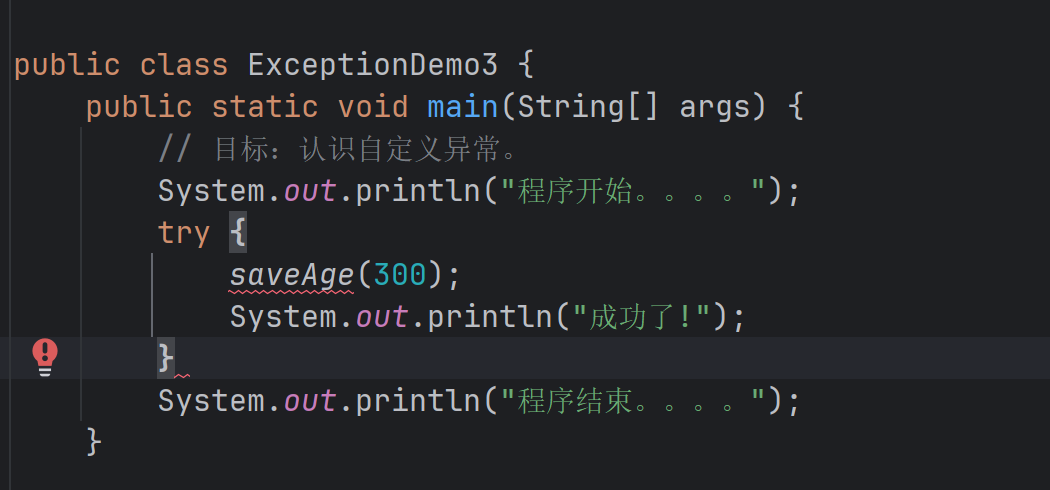
对于编译时异常,如果不捕获异常的话代码会标红

1.2.3 自定义运行时异常
步骤 :继承RuntimeException,其他与编译时异常相同。
【案例】ItheimaAgeIllegalRuntimeException(运行时异常)
java
package com.wfs.demo1exception;

/**
 * 自定义的运行时异常
 */
public class ItheimaAgeIllegalRuntimeException extends RuntimeException {
    public ItheimaAgeIllegalRuntimeException() {}
    public ItheimaAgeIllegalRuntimeException(String message) {
        super(message);
    }
}
【案例】ExceptionDemo4:使用自定义运行时异常
java
package com.wfs.demo1exception;

public class ExceptionDemo4 {
    public static void main(String[] args) {
        System.out.println("程序开始。。。。");
        try {
            saveAge(300);
            System.out.println("成功了~");
        } catch (Exception e) {
            e.printStackTrace();
            System.out.println("失败了");
        }
        System.out.println("程序结束。。。。");
    }

    // 运行时异常不需要 throws 声明
    public static void saveAge(int age) {
        if(age < 1 || age > 200){
            throw new ItheimaAgeIllegalRuntimeException("年龄非法 age 不能低于1岁不能高于200岁");
        }else {
            System.out.println("年龄合法");
            System.out.println("保存年龄:" + age);
        }
    }
}
1.2.4 如何选择继承 Exception 还是 RuntimeException?
| 类型 | 父类 | 调用者是否需要处理 | 适用场景 |
|---|---|---|---|
| 编译时异常 | Exception |
必须处理(try-catch或throws) | 外部环境导致的错误(如文件不存在、SQL异常) |
| 运行时异常 | RuntimeException |
可选处理 | 参数校验、业务逻辑错误(调用者应当传入合法参数) |
1.3 异常的处理方案
Java提供了两种手动处理异常的方式:
- 捕获处理 :
try-catch-finally,在当前位置解决问题 - 声明抛出 :
throws,把责任转嫁给调用者
此外,还有一种特殊用法:捕获异常后循环重试,让用户重新输入。
1.3.1 捕获处理:try-catch-finally
基本格式:
java
try {
    // 可能出错的代码
} catch (异常类型 变量名) {
    // 处理异常
} finally {
    // 可选,一定会执行(如释放资源)
}
1.3.2 声明抛出:throws
在方法签名上使用throws,表示该方法不处理异常,由调用者处理。
java
public void method() throws IOException, ParseException {
    // ...
}
1.3.3 循环重试修复(实战技巧)
【案例】ExceptionDemo6:捕获异常后让用户重新输入
java
package com.wfs.demo1exception;

import java.util.Scanner;

public class ExceptionDemo6 {
    public static void main(String[] args) {
        // 掌握异常的处理方案2:捕获异常对象,尝试重新修复。
        System.out.println("程序开始。。。。");

        while (true) {
            try {
                double price = userInputPrice();
                System.out.println("用户成功设置了商品定价:" + price);
                break;
            } catch (Exception e) {
                System.out.println("您输入的数据是瞎搞的,请不要瞎输入价格!");
            }
        }

        System.out.println("程序结束。。。。");
    }

    public static double userInputPrice(){
        Scanner sc = new Scanner(System.in);
        System.out.println("请您输入商品定价:");
        double price = sc.nextDouble();
        return price;
    }
}
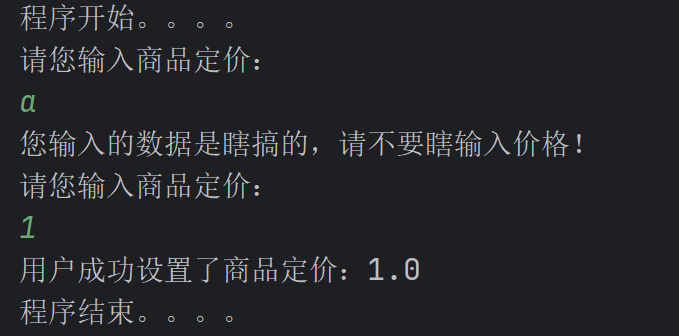
效果 :用户输入非数字时,程序不会崩溃,而是提示后重新要求输入,直到合法为止。这是异常处理在交互式程序中的典型应用。
1.3.4 处理方案的选择原则
| 场景 | 推荐方案 | 理由 |
|---|---|---|
| 底层方法(如DAO、工具类) | throws |
让上层决定如何处理 |
| 顶层界面(如Controller、main) | try-catch |
捕获后给用户友好提示 |
| 需要恢复的场景(如重新输入) | try-catch + 循环 |
利用异常控制流程 |
| 释放资源(关闭文件、连接) | finally 或 try-with-resources |
保证资源释放 |
好的,我现在将之前设计的"用户注册信息校验系统"练习案例整合到你已有的异常博客中,放在"1.3 异常的处理方案"之后,作为"1.4 综合练习:用户注册信息校验系统"。我会保持你博客的格式风格(包括代码块、图片引用等),并确保代码完整可直接运行。
1.4 综合练习:用户注册信息校验系统
本练习综合运用了自定义异常(编译时/运行时)、异常处理(try-catch + 循环重试)、校验逻辑等知识。通过完成该练习,可以加深对异常机制的理解。
1.4.1 练习需求
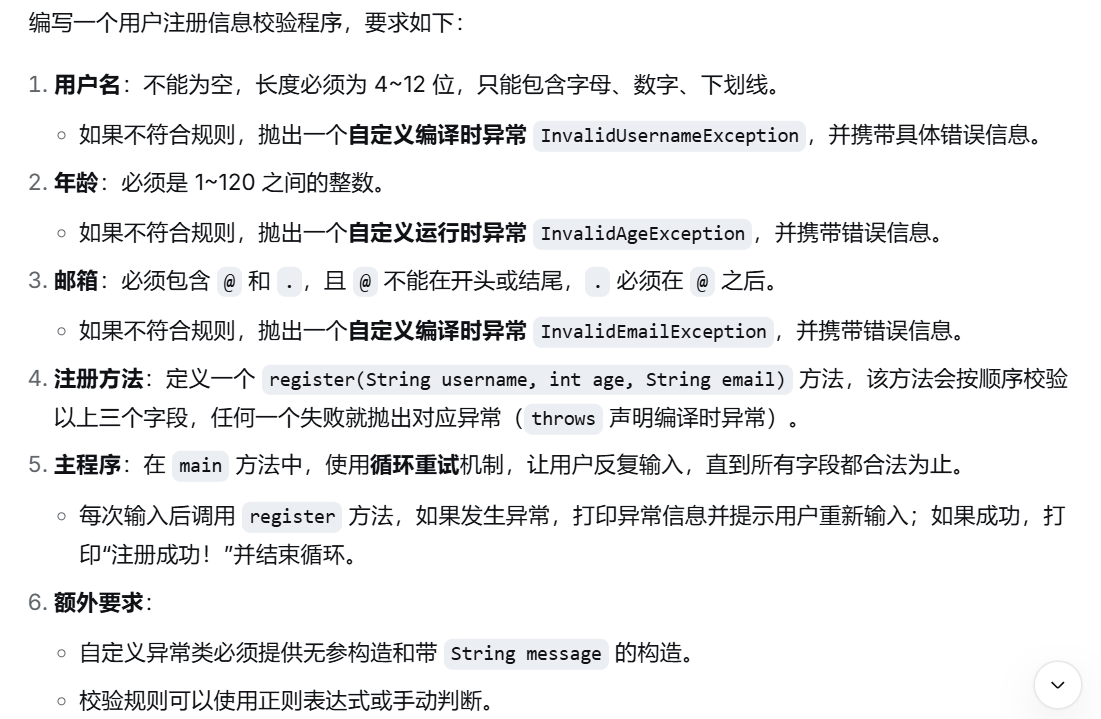
代码模板情补充完整
java
import java.util.Scanner;

// 1. 定义 InvalidUsernameException(编译时异常)
class InvalidUsernameException extends Exception {
    // TODO: 构造方法
}

// 2. 定义 InvalidAgeException(运行时异常)
class InvalidAgeException extends RuntimeException {
    // TODO: 构造方法
}

// 3. 定义 InvalidEmailException(编译时异常)
class InvalidEmailException extends Exception {
    // TODO: 构造方法
}

public class RegisterSystem {

    // 校验用户名(非空、长度4-12、字母数字下划线)
    public static void validateUsername(String username) throws InvalidUsernameException {
        // TODO: 实现校验逻辑,失败时抛出 InvalidUsernameException
    }

    // 校验年龄(1-120)
    public static void validateAge(int age) {
        // TODO: 实现校验逻辑,失败时抛出 InvalidAgeException
    }

    // 校验邮箱(包含@和.,且@不在首尾,.在@之后)
    public static void validateEmail(String email) throws InvalidEmailException {
        // TODO: 实现校验逻辑,失败时抛出 InvalidEmailException
    }

    // 注册方法:依次校验用户名、年龄、邮箱
    public static void register(String username, int age, String email)
            throws InvalidUsernameException, InvalidEmailException {
        validateUsername(username);
        validateAge(age);
        validateEmail(email);
        System.out.println("校验通过,注册成功!");
    }

    public static void main(String[] args) {
        Scanner sc = new Scanner(System.in);
        boolean success = false;

        while (!success) {
            try {
                System.out.println("===== 用户注册 =====");
                System.out.print("请输入用户名(4-12位字母数字下划线): ");
                String username = sc.nextLine();

                System.out.print("请输入年龄(1-120): ");
                int age = sc.nextInt();
                sc.nextLine(); // 消耗换行

                System.out.print("请输入邮箱: ");
                String email = sc.nextLine();

                // TODO: 调用 register 方法

                success = true;
            } catch (InvalidUsernameException e) {
                System.out.println("用户名错误:" + e.getMessage());
                System.out.println("请重新输入!\n");
            } catch (InvalidEmailException e) {
                System.out.println("邮箱错误:" + e.getMessage());
                System.out.println("请重新输入!\n");
            } catch (InvalidAgeException e) {
                System.out.println("年龄错误:" + e.getMessage());
                System.out.println("请重新输入!\n");
            } catch (Exception e) {
                System.out.println("输入格式有误,请按提示输入!");
                sc.nextLine(); // 清空缓冲区
                System.out.println();
            }
        }
        sc.close();
    }
}
1.4.2 参考代码
【步骤1】定义自定义异常类
java
// 编译时异常:用户名错误
class InvalidUsernameException extends Exception {
    public InvalidUsernameException() {}
    public InvalidUsernameException(String message) { super(message); }
}

// 编译时异常:邮箱错误
class InvalidEmailException extends Exception {
    public InvalidEmailException() {}
    public InvalidEmailException(String message) { super(message); }
}

// 运行时异常:年龄错误
class InvalidAgeException extends RuntimeException {
    public InvalidAgeException() {}
    public InvalidAgeException(String message) { super(message); }
}
【步骤2】编写校验逻辑和注册方法
java
public class RegisterSystem {

    // 校验用户名
    public static void validateUsername(String username) throws InvalidUsernameException {
        if (username == null || username.trim().isEmpty()) {
            throw new InvalidUsernameException("用户名不能为空");
        }
        if (username.length() < 4 || username.length() > 12) {
            throw new InvalidUsernameException("用户名长度必须为4~12位");
        }
        if (!username.matches("\\w+")) { // 字母数字下划线
            throw new InvalidUsernameException("用户名只能包含字母、数字、下划线");
        }
    }

    // 校验年龄(运行时异常,无需throws)
    public static void validateAge(int age) {
        if (age < 1 || age > 120) {
            throw new InvalidAgeException("年龄必须在1~120之间,当前:" + age);
        }
    }

    // 校验邮箱
    public static void validateEmail(String email) throws InvalidEmailException {
        if (email == null || !email.contains("@") || !email.contains(".")) {
            throw new InvalidEmailException("邮箱必须包含@和.");
        }
        int atIndex = email.indexOf('@');
        int dotIndex = email.lastIndexOf('.');
        if (atIndex == 0 || atIndex == email.length() - 1) {
            throw new InvalidEmailException("@不能出现在开头或结尾");
        }
        if (dotIndex < atIndex) {
            throw new InvalidEmailException(".必须在@之后");
        }
    }

    // 注册方法:依次校验三个字段
    public static void register(String username, int age, String email)
            throws InvalidUsernameException, InvalidEmailException {
        validateUsername(username);
        validateAge(age);
        validateEmail(email);
        System.out.println("校验通过,注册成功!");
    }
}
【步骤3】主程序(循环重试)
java
import java.util.Scanner;

public class Test {
    public static void main(String[] args) {
        Scanner sc = new Scanner(System.in);
        boolean success = false;

        while (!success) {
            try {
                System.out.println("===== 用户注册 =====");
                System.out.print("请输入用户名(4-12位字母数字下划线): ");
                String username = sc.nextLine();

                System.out.print("请输入年龄(1-120): ");
                int age = sc.nextInt();
                sc.nextLine(); // 消耗换行

                System.out.print("请输入邮箱: ");
                String email = sc.nextLine();

                // 调用注册方法
                RegisterSystem.register(username, age, email);
                success = true;

            } catch (InvalidUsernameException e) {
                System.out.println("用户名错误:" + e.getMessage());
                System.out.println("请重新输入!\n");
            } catch (InvalidEmailException e) {
                System.out.println("邮箱错误:" + e.getMessage());
                System.out.println("请重新输入!\n");
            } catch (InvalidAgeException e) {
                System.out.println("年龄错误:" + e.getMessage());
                System.out.println("请重新输入!\n");
            } catch (Exception e) {
                // 捕获 InputMismatchException 或其他未预料异常
                System.out.println("输入格式有误,请按提示输入!");
                sc.nextLine(); // 清空缓冲区
                System.out.println();
            }
        }
        sc.close();
    }
}
1.4.3 运行效果示例
===== 用户注册 =====
请输入用户名(4-12位字母数字下划线): u
请输入年龄(1-120): 25
请输入邮箱: test@com
邮箱错误:邮箱必须包含@和.
请重新输入!

===== 用户注册 =====
请输入用户名(4-12位字母数字下划线): user_123
请输入年龄(1-120): 130
年龄错误:年龄必须在1~120之间,当前:130
请重新输入!

===== 用户注册 =====
请输入用户名(4-12位字母数字下划线): user_123
请输入年龄(1-120): 25
请输入邮箱: user@example.com
校验通过,注册成功!
1.4.4 代码解析
-
为什么用户名和邮箱异常设计为编译时异常(继承
Exception)?因为用户名和邮箱的合法性依赖于用户输入,外部因素不可控,调用者(主程序)必须处理这些异常并给予用户明确提示。
-
为什么年龄异常设计为运行时异常(继承
RuntimeException)?年龄校验本质上是一种参数校验,调用者本应传入合法值。若传入非法值,属于编程逻辑错误,可以选择不强制处理,但为了更好的用户体验,主程序仍然捕获并给出了友好提示。
-
循环重试 + try-catch :
利用了异常机制,当输入不合法时,不会终止程序,而是让用户重新输入,直到正确为止。这是异常处理在交互式程序中的典型应用。