目录
[1. 线程池的概念](#1. 线程池的概念)
[2. 日志的概念](#2. 日志的概念)
[3. 日志模块](#3. 日志模块)
[3.1 日志的格式:](#3.1 日志的格式:)
[可读性很好的时间 日志等级 进程pid 打印对应日志的⽂件名行号 - 消息内容,支持可变参数](#[可读性很好的时间] [日志等级] [进程pid] [打印对应日志的⽂件名][行号] - 消息内容,支持可变参数)
[3.2 日志的两个核心的问题](#3.2 日志的两个核心的问题)
[3.2.1 需要有 刷新策略 --- 显示器 or 文件 or 网络 (本次代码只写显示器和文件)](#3.2.1 需要有 刷新策略 --- 显示器 or 文件 or 网络 (本次代码只写显示器和文件))
[3.2.2 构建一条完整的日志](#3.2.2 构建一条完整的日志)
[3.3 直接两个编码 --- 2个阶段](#3.3 直接两个编码 --- 2个阶段)
[3.3.1 显示器和文件的刷新策略:](#3.3.1 显示器和文件的刷新策略:)
[3.3.2 构建一条完整的日志](#3.3.2 构建一条完整的日志)
1. 线程池的概念
提前将一批线程创建出来,用户构建出任务,将任务放在对应的任务队列中,唤醒指定的线程,指定的线程从任务队列中拿任务,自己做处理。这批线程有任务就处理任务,没有认为就直接在代码中等待就行了。将这种提前先创建出来的线程,对外提供一个任务接口,让外部可以让线程池内部投递任务,这种模块就叫做线程池。
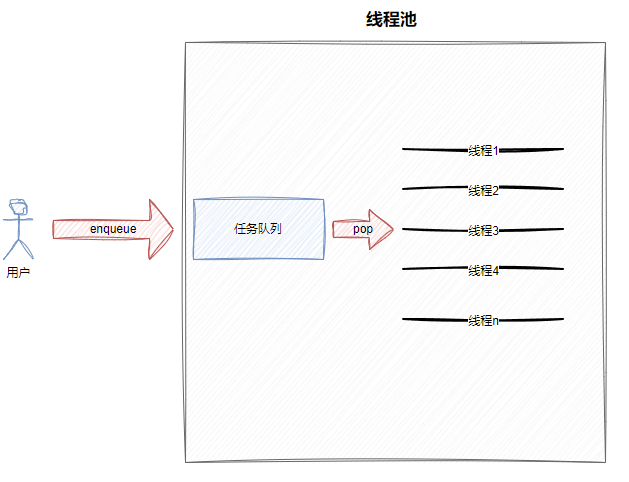
上面的图,线程的工作模式,就是典型的生产者消费者模型,中间的交易场所就是任务队列,所以线程池是基于生产消费模型的。
创建线程效率低,本质是因为底层要调用系统调用和各种数据的初始化工作。池化技术本质上是可以减少很多底层重复性工作的。
2. 日志的概念
计算机中的⽇志是记录系统和软件运⾏中发⽣事件的⽂件,主要作⽤是监控运行状态、记录异常信息,帮助快速定位问题并支持程序员进行问题修复。它是系统维护、故障排查和安全管理的重要⼯具。
⽇志格式以下几个指标是必须得有的:
- 时间戳
- 日志等级
- 日志内容
以下是可选的:
- 文件名行号
- 进程、线程相关的id信息等
⽇志有现成的解决⽅案,如:spdlog、glog(常用)、Boost.Log、Log4cxx(常用)等等,但是我采用自定义日志的方式。
这⾥我们采⽤设计模式-策略模式来进⾏⽇志的设计,具体策略模式介绍,详情看代码和课程。
3. 日志模块
3.1 日志的格式:
可读性很好的时间 日志等级 进程pid 打印对应日志的⽂件名行号 - 消息内容,支持可变参数
2026-06-06 06:06:06 DEBUG 202938 main.cc 16 - hello world
2026-06-06 06:06:06 DEBUG 202938 main.cc 17 - hello world
2026-06-06 06:06:06 DEBUG 202938 main.cc 18 - hello world
2026-06-06 06:06:06 DEBUG 202938 main.cc 20 - hello world
2026-06-06 06:06:06 DEBUG 202938 main.cc 21 - hello world
2026-06-06 06:06:06 WARNING 202938 main.cc 23 - hello world
3.2 日志的两个核心的问题
3.2.1 需要有 刷新策略 --- 显示器 or 文件 or 网络 (本次代码只写显示器和文件)
3.2.2 构建一条完整的日志
3.3 直接两个编码 --- 2个阶段
3.3.1 显示器和文件的刷新策略:
cpp
//Logger.hpp
#pragma once

#include <iostream>
#include <string>
#include "Mutex.hpp"
#include <filesystem> // C+++17 文件操作
#include <fstream>

// 规定出常见的日志等级  -- 枚举,枚举出来的就是一个整数

enum class LogLevel
{
    DEBUG,   // 0
    INFO,    // 1
    WARNING, // 2
    ERROR,   // 3
    FATAL    // 4
};

std::string Level2String(LogLevel level)
{
    switch (level)
    {
    case LogLevel::DEBUG:
        return "Debug";
    case LogLevel::INFO:
        return "Info";
    case LogLevel::WARNING:
        return "Warning";
    case LogLevel::ERROR:
        return "Error";
    case LogLevel::FATAL:
        return "Fatal";
    default:
        return "Unknown";
    }
}

////////////////////////////////////////////////////////////////////////////////////
// 1. 日志刷新的问题  -- 假设我们已经有了一条完整的日志,string ->设备(显示器,文件)
// 基类方法
class LogStrategy
{
public:
    virtual ~LogStrategy() = default;
    virtual void SyncLog(const std::string &logmessage) = 0;
};

// 显示器刷新
class ConsoleLogStrategy : public LogStrategy
{
public:
    ~ConsoleLogStrategy()
    {
    }
    void SyncLog(const std::string &logmessage) override
    {
        // 日志可被任何线程同时访问,显示器就是临界资源  -- 加锁,进行安全打印
        LockGuard lockguard(&_lock);
        std::cout << logmessage << std::endl;
    }

private:
    Mutex _lock;
};

const std::string logdefaultdir = "log";
const static std::string logfilename = "test.log";

// 文件刷新  在文件中追加式的写入
class FileLogStrategy : public LogStrategy
{
public:
    FileLogStrategy(const std::string &dir = logdefaultdir,
                    const std::string filename = logfilename)
        : _dir_path_name(dir), _filename(filename)
    {
        LockGuard lockguard(&_lock);
        // 目录不存在,新建;存在,构建过程就算完成
        if (std::filesystem::exists(_dir_path_name))
        {
            return;
        }
        try
        {
            std::filesystem::create_directories(_dir_path_name);
        }
        catch (const std::filesystem::filesystem_error &e)
        {
            std::cerr << e.what() << "\r\n";
        }
    }

    void SyncLog(const std::string &logmessage) override
    {
        {
            LockGuard lockguard(&_lock);
            std::string target = _dir_path_name;
            target += "/";
            target += _filename;

            std::ofstream out(target.c_str(), std::ios::app); // app -- append
            if (!out.is_open())                               // 打开失败
            {
                return;
            }
            out << logmessage << "\n"; // 等价于 out.wirte
            out.close();
        }
    }

    ~FileLogStrategy()
    {
    }

private:
    std::string _dir_path_name; // 目录路径的名字
    std::string _filename;      // 形成日志文件的文件名
    Mutex _lock;
};

// 网络刷新
cpp
//main.cc

#include "Logger.hpp"
#include <memory>

int main()
{
    std::string test = "hello log,test log";
    //测试策略1:显示器写入
    std::unique_ptr<LogStrategy> logger_ptr = std::make_unique<ConsoleLogStrategy>();
    logger_ptr -> SyncLog(test);
    logger_ptr -> SyncLog(test);
    logger_ptr -> SyncLog(test);
    logger_ptr -> SyncLog(test);
    logger_ptr -> SyncLog(test);

    return 0;
}
运行结果:

cpp
#include "Logger.hpp"
#include <memory>

int main()
{
    std::string test = "hello log,test log";

    //测试策略2:文件写入
    std::unique_ptr<LogStrategy> logger_ptr = std::make_unique<FileLogStrategy>();
    logger_ptr -> SyncLog(test);
    logger_ptr -> SyncLog(test);
    logger_ptr -> SyncLog(test);
    logger_ptr -> SyncLog(test);
    logger_ptr -> SyncLog(test);

    return 0;
}
运行结果:
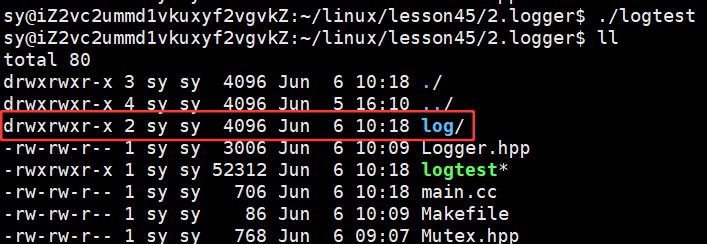
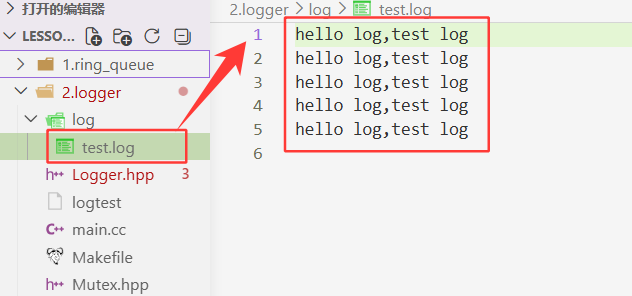
3.3.2 构建一条完整的日志
时间的获取:
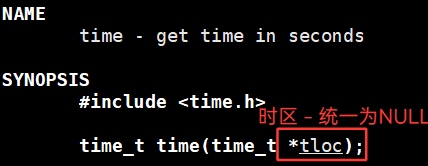
- time() :获得时间戳
- time_t :无符号的整数类型
- time() returns the time as the number of seconds since the Epoch,1970-01-01 00:00:00 +0000 (UTC).

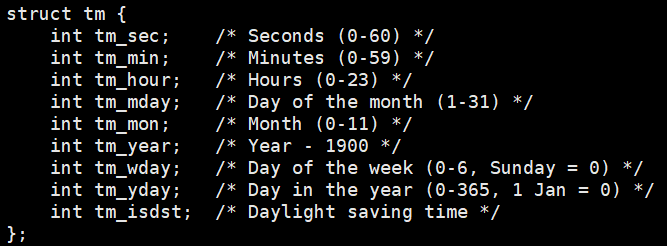
- 将时间戳转换为可重入的结构体
- 返回值失败为NULL,成功该结构体的地址
cpp
// 2026-06-06 06:06:06
std::string GetCurrentTime()
{
// 1. 获取时间戳
time_t currentime = time(nullptr);
// 2.如何将时间戳转换成为年月日时分秒的格式
struct tm currt_tm;
localtime_r(¤time, &currt_tm);
// 3. 将年月日时分秒转换成字符串
char timebuffer[64];
snprintf(timebuffer,sizeof(timebuffer),"%4d-%02d-%02d %02d:%02d:%02d",
currt_tm.tm_year,
currt_tm.tm_mon,
currt_tm.tm_mday,
currt_tm.tm_hour,
currt_tm.tm_min,
currt_tm.tm_sec
);
return timebuffer;
}
为什么是这样的呢???
是因为在struct tm结构体中的年份是减去1900,月份是0-11,所以对应的年份+1900,月份+1。
cpp
// 2026-06-06 06:06:06
std::string GetCurrentTime()
{
// 1. 获取时间戳
time_t currentime = time(nullptr);
// 2.如何将时间戳转换成为年月日时分秒的格式
struct tm currt_tm;
localtime_r(¤time, &currt_tm);
// 3. 将年月日时分秒转换成字符串
char timebuffer[64];
snprintf(timebuffer,sizeof(timebuffer),"%4d-%02d-%02d %02d:%02d:%02d",
currt_tm.tm_year+1900,
currt_tm.tm_mon+1,
currt_tm.tm_mday,
currt_tm.tm_hour,
currt_tm.tm_min,
currt_tm.tm_sec
);
return timebuffer;
}
此时的运行结果便是正确的!!
继续将日志的内容补充完整:
cpp
// Logger.hpp
#pragma once
#include <iostream>
#include <string>
#include "Mutex.hpp"
#include <filesystem> // C+++17 文件操作
#include <fstream>
#include <ctime>
#include <sys/types.h>
#include <unistd.h>
#include <sstream>
// 规定出常见的日志等级 -- 枚举,枚举出来的就是一个整数
enum class LogLevel
{
DEBUG, // 0
INFO, // 1
WARNING, // 2
ERROR, // 3
FATAL // 4
};
std::string Level2String(LogLevel level)
{
switch (level)
{
case LogLevel::DEBUG:
return "Debug";
case LogLevel::INFO:
return "Info";
case LogLevel::WARNING:
return "Warning";
case LogLevel::ERROR:
return "Error";
case LogLevel::FATAL:
return "Fatal";
default:
return "Unknown";
}
}
// 2026-06-06 06:06:06
std::string GetCurrentTime()
{
// 1. 获取时间戳
time_t currentime = time(nullptr);
// 2.如何将时间戳转换成为年月日时分秒的格式
struct tm currt_tm;
localtime_r(¤time, &currt_tm);
// 3. 将年月日时分秒转换成字符串
char timebuffer[64];
snprintf(timebuffer, sizeof(timebuffer), "%4d-%02d-%02d %02d:%02d:%02d",
currt_tm.tm_year + 1900,
currt_tm.tm_mon + 1,
currt_tm.tm_mday,
currt_tm.tm_hour,
currt_tm.tm_min,
currt_tm.tm_sec);
return timebuffer;
}
////////////////////////////////////////////////////////////////////////////////////
// 1. 日志刷新的问题 -- 假设我们已经有了一条完整的日志,string ->设备(显示器,文件)
// 基类方法
class LogStrategy
{
public:
virtual ~LogStrategy() = default;
virtual void SyncLog(const std::string &logmessage) = 0;
};
// 显示器刷新
class ConsoleLogStrategy : public LogStrategy
{
public:
~ConsoleLogStrategy()
{
}
void SyncLog(const std::string &logmessage) override
{
// 日志可被任何线程同时访问,显示器就是临界资源 -- 加锁,进行安全打印
LockGuard lockguard(&_lock);
std::cout << logmessage << std::endl;
}
private:
Mutex _lock;
};
const std::string logdefaultdir = "log";
const static std::string logfilename = "test.log";
// 文件刷新 在文件中追加式的写入
class FileLogStrategy : public LogStrategy
{
public:
FileLogStrategy(const std::string &dir = logdefaultdir,
const std::string filename = logfilename)
: _dir_path_name(dir), _filename(filename)
{
LockGuard lockguard(&_lock);
// 目录不存在,新建;存在,构建过程就算完成
if (std::filesystem::exists(_dir_path_name))
{
return;
}
try
{
std::filesystem::create_directories(_dir_path_name);
}
catch (const std::filesystem::filesystem_error &e)
{
std::cerr << e.what() << "\r\n";
}
}
void SyncLog(const std::string &logmessage) override
{
{
LockGuard lockguard(&_lock);
std::string target = _dir_path_name;
target += "/";
target += _filename;
std::ofstream out(target.c_str(), std::ios::app); // app -- append
if (!out.is_open()) // 打开失败
{
return;
}
out << logmessage << "\n"; // 等价于 out.wirte
out.close();
}
}
~FileLogStrategy()
{
}
private:
std::string _dir_path_name; // 目录路径的名字
std::string _filename; // 形成日志文件的文件名
Mutex _lock;
};
// 网络刷新
///////////////////////////////////////////////////////////////////////////////////////////////////////////////
// logger -- 1. 要有刷新策略 2. 要有构建一条完整日志的能力
class Logger
{
public:
Logger()
{
}
void EnableConsoleLogStrategy()
{
_strategy = std::make_unique<ConsoleLogStrategy>();
}
void EnableFileLogStrategy()
{
_strategy = std::make_unique<FileLogStrategy>();
}
// 形成一条完整日志的方式 -- 内部类
class LogMessage // 代表一条具体的message
{
public:
LogMessage(LogLevel level,std::string &filename, int line,Logger &logger)
:_curr_time(GetCurrentTime()),
_level(level),
_pid(getpid()),
_filename(filename),
_line(line),
_logger(logger)
{
std::stringstream ss;
ss << "[" << _curr_time << "] "
<< "[" << Level2String(_level) << "] "
<< "[" << _pid << "] "
<< "[" << _filename << "] "
<< "[" << _line << "]"
<< " - ";
_loginfo = ss.str();
}
template<typename T>
LogMessage& operator << (const T&info)
{
std::stringstream ss;
ss << info;
_loginfo += ss.str();
return *this;
}
~LogMessage()
{
if(_logger._strategy)
{
_logger._strategy->SyncLog(_loginfo);
}
}
private:
std::string _curr_time; // 日志时间
LogLevel _level; // 日志等级
pid_t _pid; // 进程pid
std::string _filename;
int _line; // 行号
std::string _loginfo; //一条合并完成的,完整的日志信息
Logger &_logger; //内部类使用外部logger类进行刷新,提供刷新策略的具体做法
};
LogMessage operator()(LogLevel level,std::string filename, int line)
{
return LogMessage(level,filename,line,*this);
}
~Logger()
{
}
private:
std::unique_ptr<LogStrategy> _strategy;
};
Logger logger;
#define LOG(level) logger(level,__FILE__,__LINE__)
#define EnableConsoleLogStrategy() logger.EnableConsoleLogStrategy()
#define EnableFileLogStrategy() logger.EnableFileLogStrategy()
cpp
//main.cc
#include "Logger.hpp"
#include <memory>
#include <unistd.h>

int main()
{
    EnableConsoleLogStrategy();
    LOG(LogLevel::ERROR) << "hello logger, hello log" << ", 22.22 "<< 1123;
    LOG(LogLevel::DEBUG) << "hello logger, hello log" << ", 22.22 "<< 1123;
    LOG(LogLevel::WARNING) << "hello logger, hello log" << ", 22.22 "<< 1123;
    LOG(LogLevel::ERROR) << "hello logger, hello log" << ", 22.22 "<< 1123;
    LOG(LogLevel::ERROR) << "hello logger, hello log" << ", 22.22 "<< 1123;

    return 0;
}
运行结果:

cpp
#include "Logger.hpp"
#include <memory>
#include <unistd.h>

int main()
{
    // EnableConsoleLogStrategy();
    EnableFileLogStrategy();
    LOG(LogLevel::ERROR) << "hello logger, hello log" << ", 22.22 "<< 1123;
    LOG(LogLevel::DEBUG) << "hello logger, hello log" << ", 22.22 "<< 1123;
    LOG(LogLevel::WARNING) << "hello logger, hello log" << ", 22.22 "<< 1123;
    LOG(LogLevel::ERROR) << "hello logger, hello log" << ", 22.22 "<< 1123;
    LOG(LogLevel::ERROR) << "hello logger, hello log" << ", 22.22 "<< 1123;
    return 0;
}
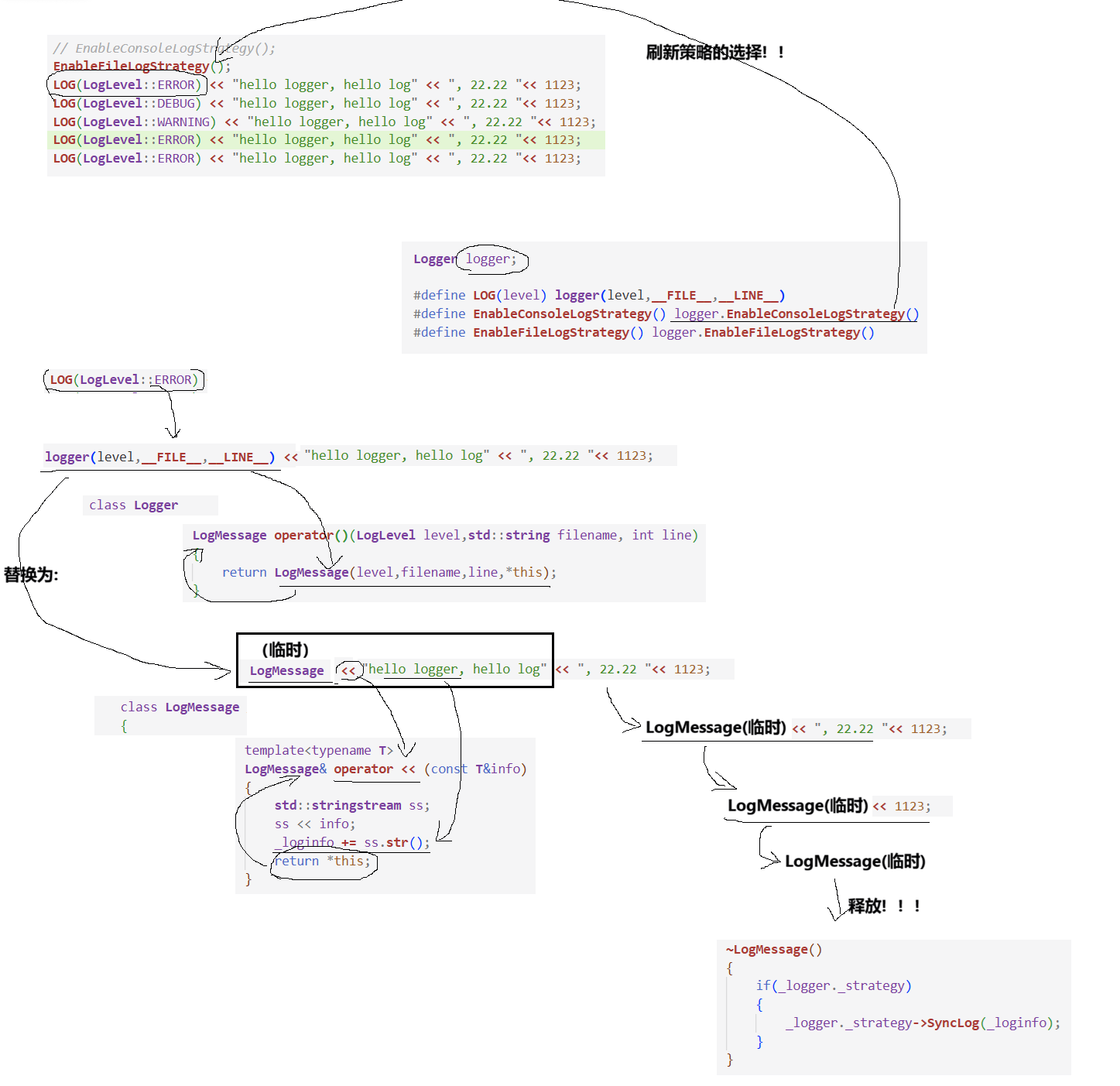
反向理解:
cpp
#include "Logger.hpp"
#include <memory>
#include <unistd.h>

int main()
{
    // EnableConsoleLogStrategy();
    EnableFileLogStrategy();

    //RAII风格的日志构建和输出刷新的过程
    LOG(LogLevel::ERROR) << "hello logger, hello log" << ", 22.22 "<< 1123;
    LOG(LogLevel::DEBUG) << "hello logger, hello log" << ", 22.22 "<< 1123;
    LOG(LogLevel::WARNING) << "hello logger, hello log" << ", 22.22 "<< 1123;
    LOG(LogLevel::ERROR) << "hello logger, hello log" << ", 22.22 "<< 1123;
    LOG(LogLevel::ERROR) << "hello logger, hello log" << ", 22.22 "<< 1123;

    return 0;
}