MathHub
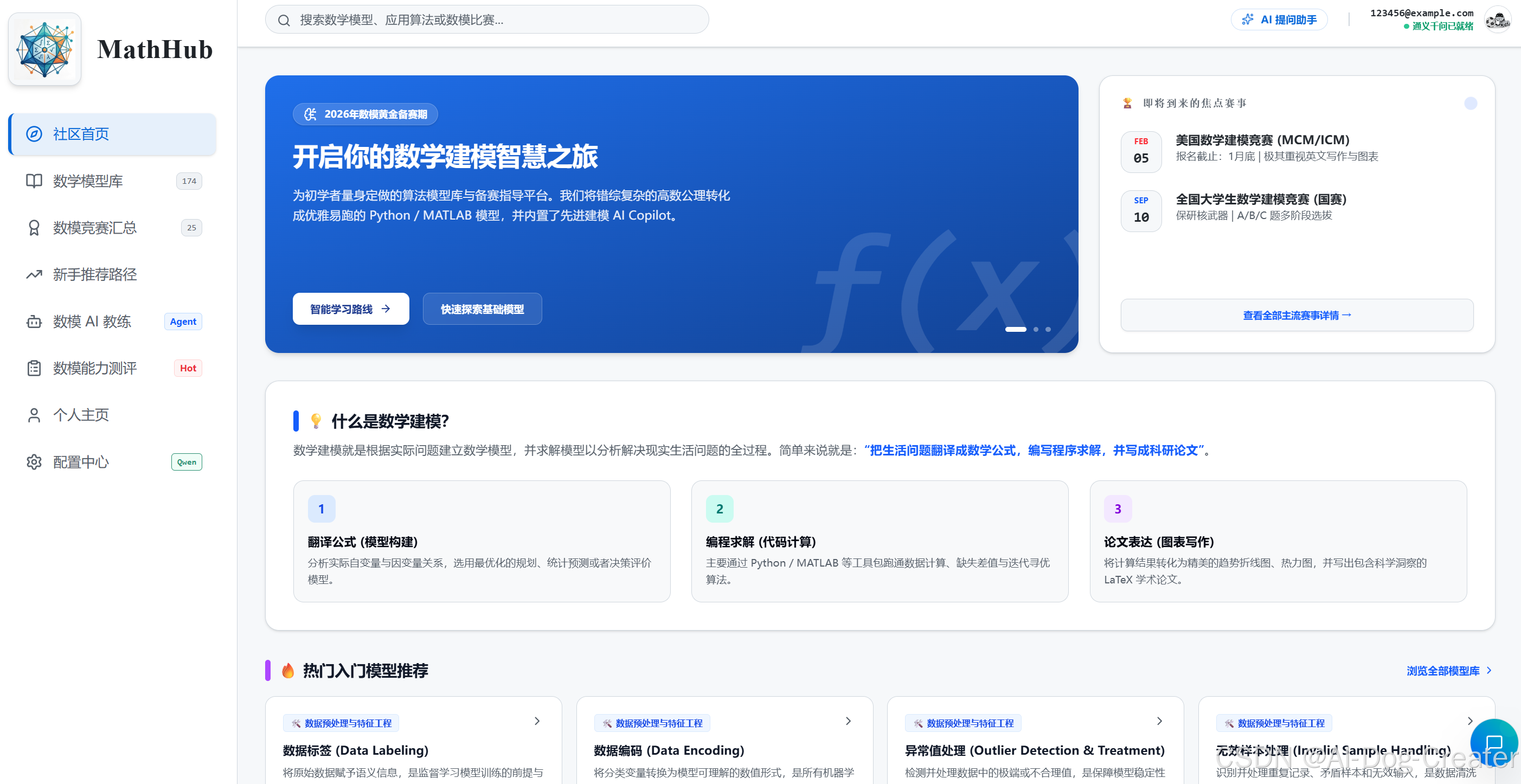
MathHub is a comprehensive platform for mathematical modeling learning, competition preparation, and AI-assisted analysis.
MathHub 是一个面向数学建模学习、竞赛备赛与 AI 辅助分析的综合平台。目前可以通过https://mathhub.805211419.workers.dev/直接访问,相较于V1更新完善了数学模型库相关内容,并且优化了数模AI Agent的相关功能,相关代码已在Github开源(AI-Dog-Creater/MathHub),希望各位粉丝朋友点击一下star!
English
Overview
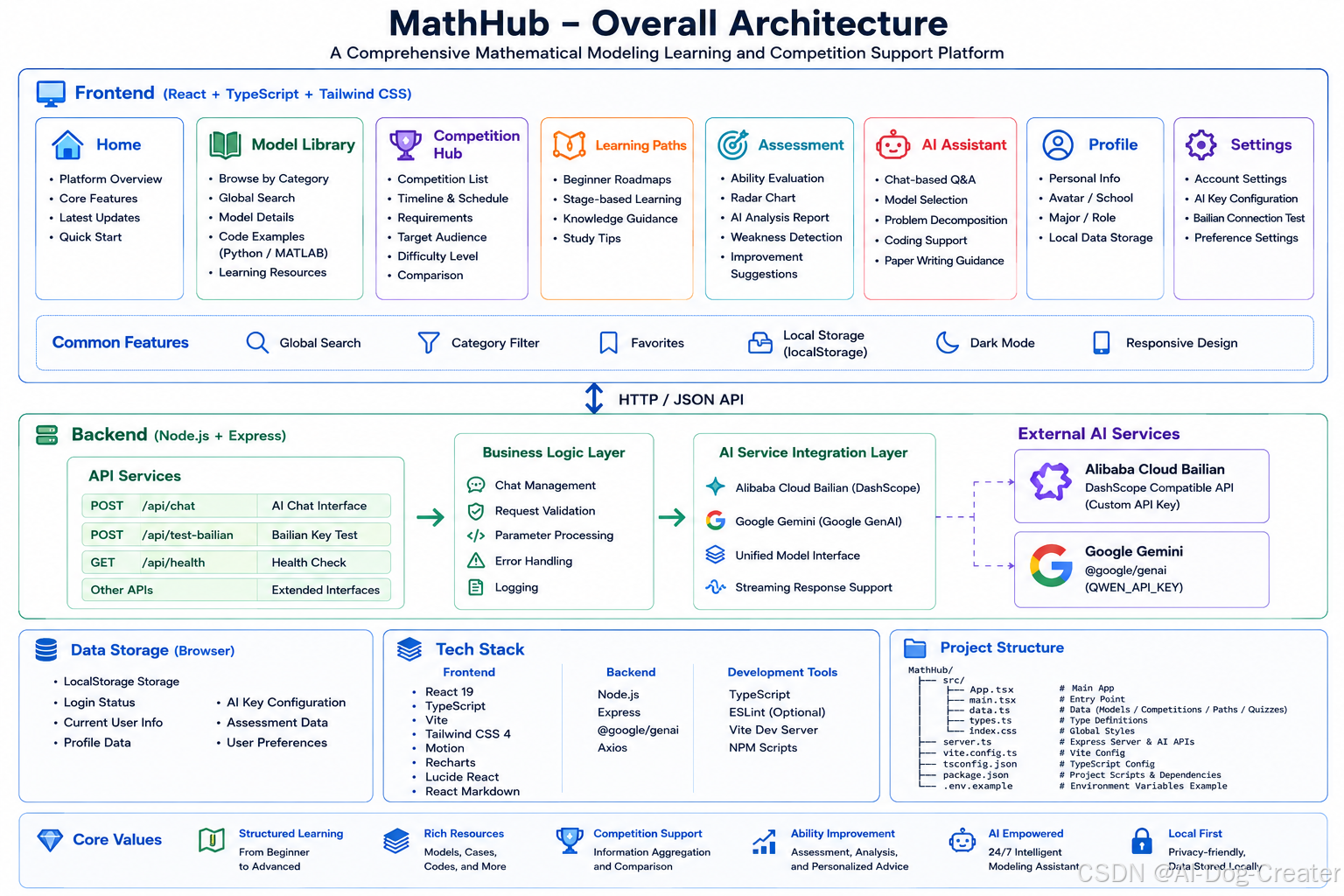
MathHub is a comprehensive platform for Chinese-language mathematical modeling learning, competition preparation, and AI-assisted analysis. The frontend is built with React, Vite, and TypeScript, while Express provides the local development server, AI gateway APIs, and file parsing services.
The project already includes a solid set of learning and practical features, including a structured model library, mathematical modeling competition information, learning pathways, ability assessment, an AI modeling assistant, multimodal file upload, and integration with Alibaba Cloud Bailian / Tongyi compatible models and Gemini.
Core Features
1. Structured Mathematical Model Library
-
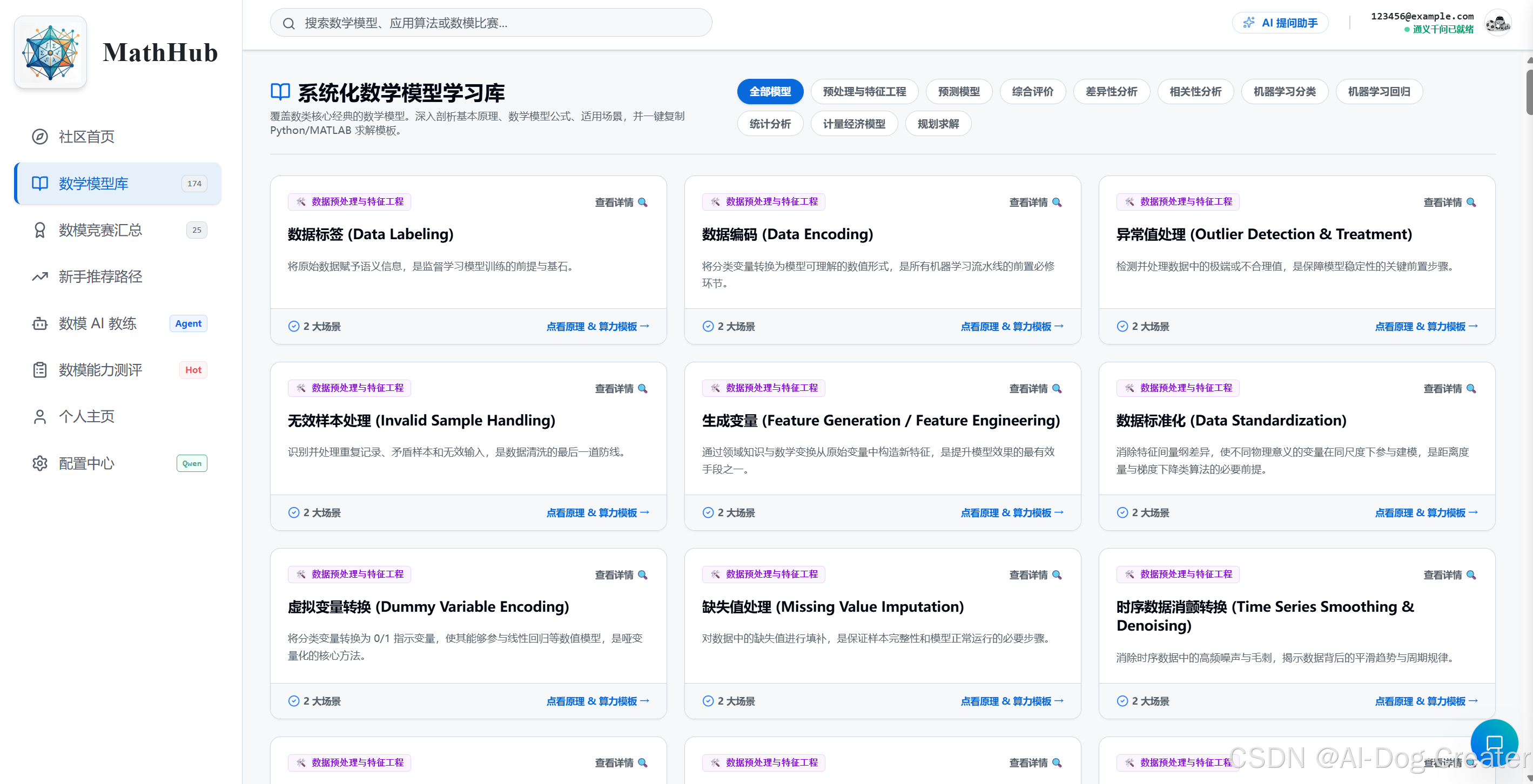
Browse a large collection of mathematical modeling and data analysis methods by category.
-
Each model entry includes:
-
Summary
-
Core principles
-
Applicable scenarios
-
Limitations
-
Case study
-
Sample Python code
-
Sample MATLAB code
-
Further learning resources
-
-
Supports global search and category filtering.
The current model library covers major areas such as:
-
Data preprocessing and feature engineering
-
Dimensionality reduction
-
Forecasting models
-
Comprehensive evaluation
-
Difference analysis
-
Correlation analysis
-
Machine learning classification
-
Machine learning regression
-
Statistical analysis
-
Econometric models
-
Optimization and mathematical programming
The econometrics section currently includes:
-
ADF unit root test
-
Differencing analysis
-
ACF / PACF
-
ARIMA / SARIMA
-
GARCH
-
Granger causality test
-
VAR
-
Cointegration test
-
Moving average method
-
Single exponential smoothing / double exponential smoothing / Winters method
-
Time series decomposition
-
Robust regression (RANSAC)
-
Quantile regression
-
Panel models
-
Two-stage least squares (2SLS)
-
GMM estimation
-
Difference-in-differences (DID)
-
Tobit regression
-
Count data regression
-
Propensity score matching (PSM)
-
Association analysis
-
Regression discontinuity design (RDD)
2. Mathematical Modeling Competition Hub
-
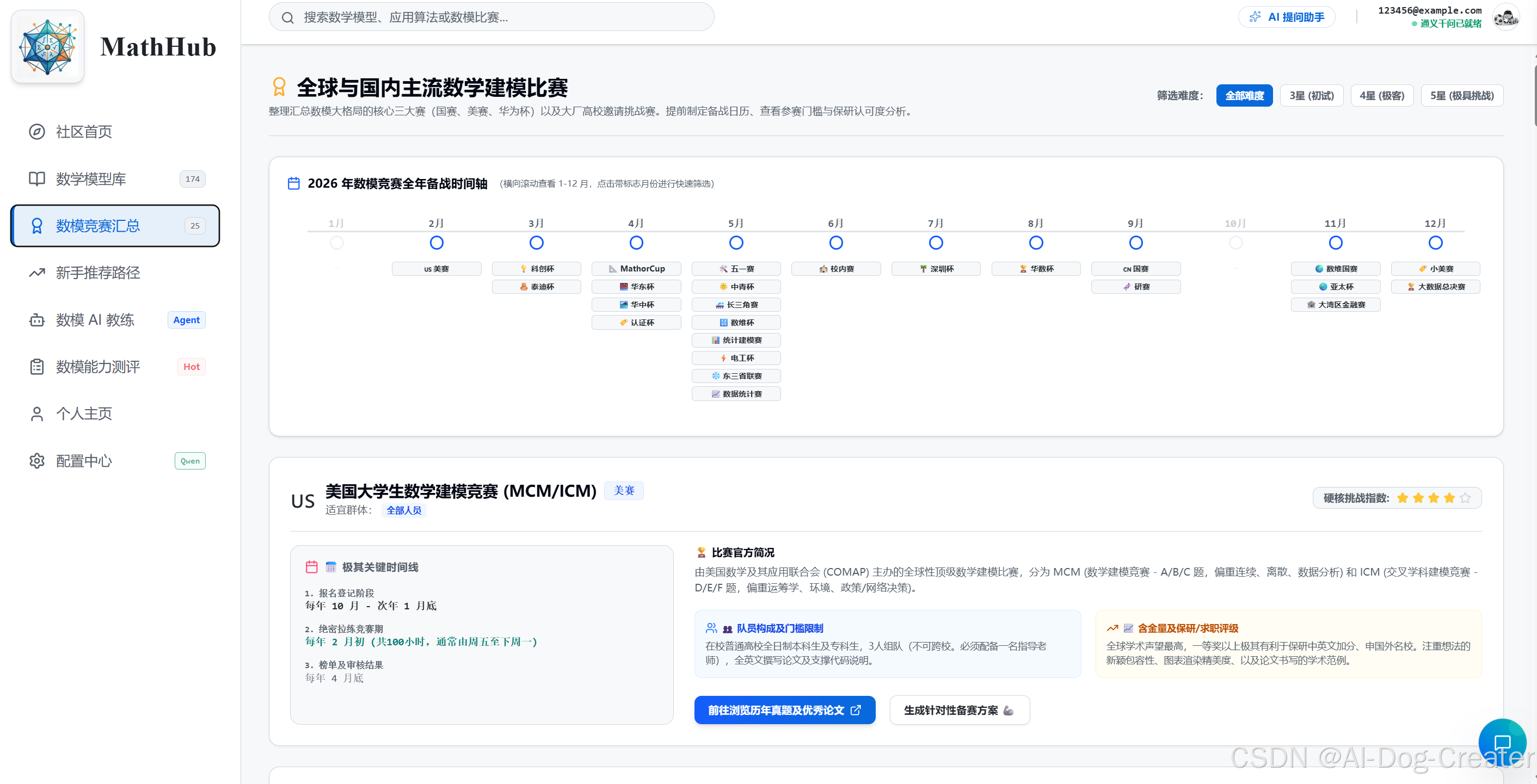
Collects information about common mathematical modeling competitions.
-
Displays timelines, participation requirements, difficulty levels, target participants, and historical problem entry links.
-
Helps users compare competitions and plan their preparation schedule.
3. Beginner Learning Pathways
-
Provides structured learning pathways.
-
Helps beginners understand what to learn first and what to learn next.
-
Suitable for self-study, campus team training, and competition bootcamps.
4. Mathematical Modeling Ability Assessment
-
Includes built-in assessment questions for modeling skills.
-
Visualizes results with a radar chart across multiple core dimensions.
-
Supports AI-generated analysis reports to identify weak areas.
Typical assessment dimensions include:
-
Abstraction and modeling ability
-
Model selection ability
-
Mathematical foundation
-
Algorithm understanding
-
Programming implementation
-
Paper writing and expression
5. AI Modeling Assistant
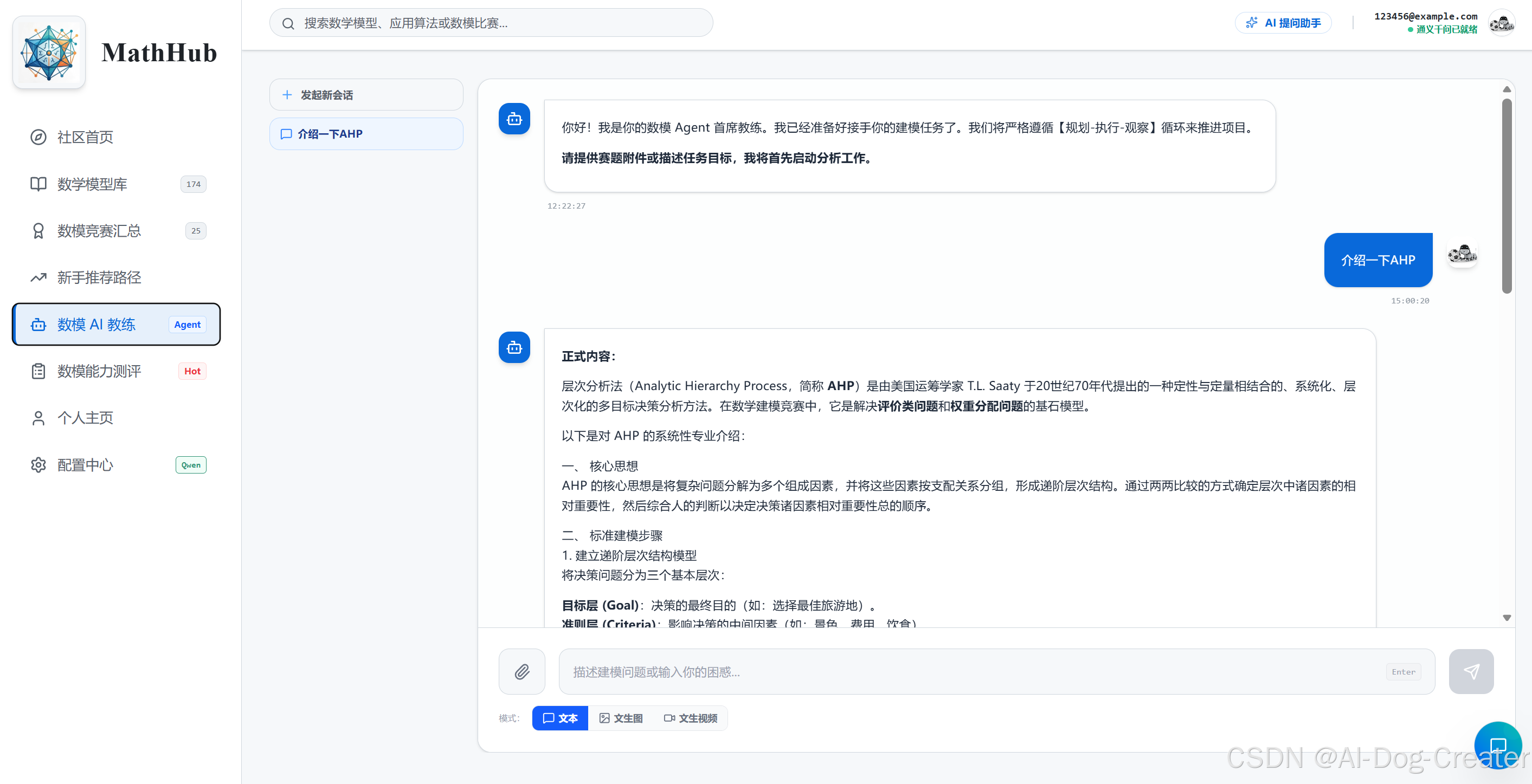
The project includes a built-in chat-style AI assistant for mathematical modeling tasks.
Supported capabilities include:
-
Modeling idea discussion
-
Problem decomposition
-
Method selection suggestions
-
Code assistance
-
Paper structure and writing advice
-
Assessment result analysis
It also supports multi-session management so users can retain different task conversations locally.
6. Multimodal File Upload and Parsing
The AI assistant supports file upload and content parsing, making it easier to work with contest materials, papers, and images.
The current backend supports:
-
OCR for images
-
PDF text extraction
-
Word document text extraction
-
Plain text file reading
Typical use cases include:
-
Uploading contest PDFs for problem interpretation
-
Uploading image tables for text/content extraction
-
Uploading Word documents for paper improvement
7. Alibaba Cloud Bailian / Tongyi Integration
Users can configure their own Bailian API key and model settings on the settings page.
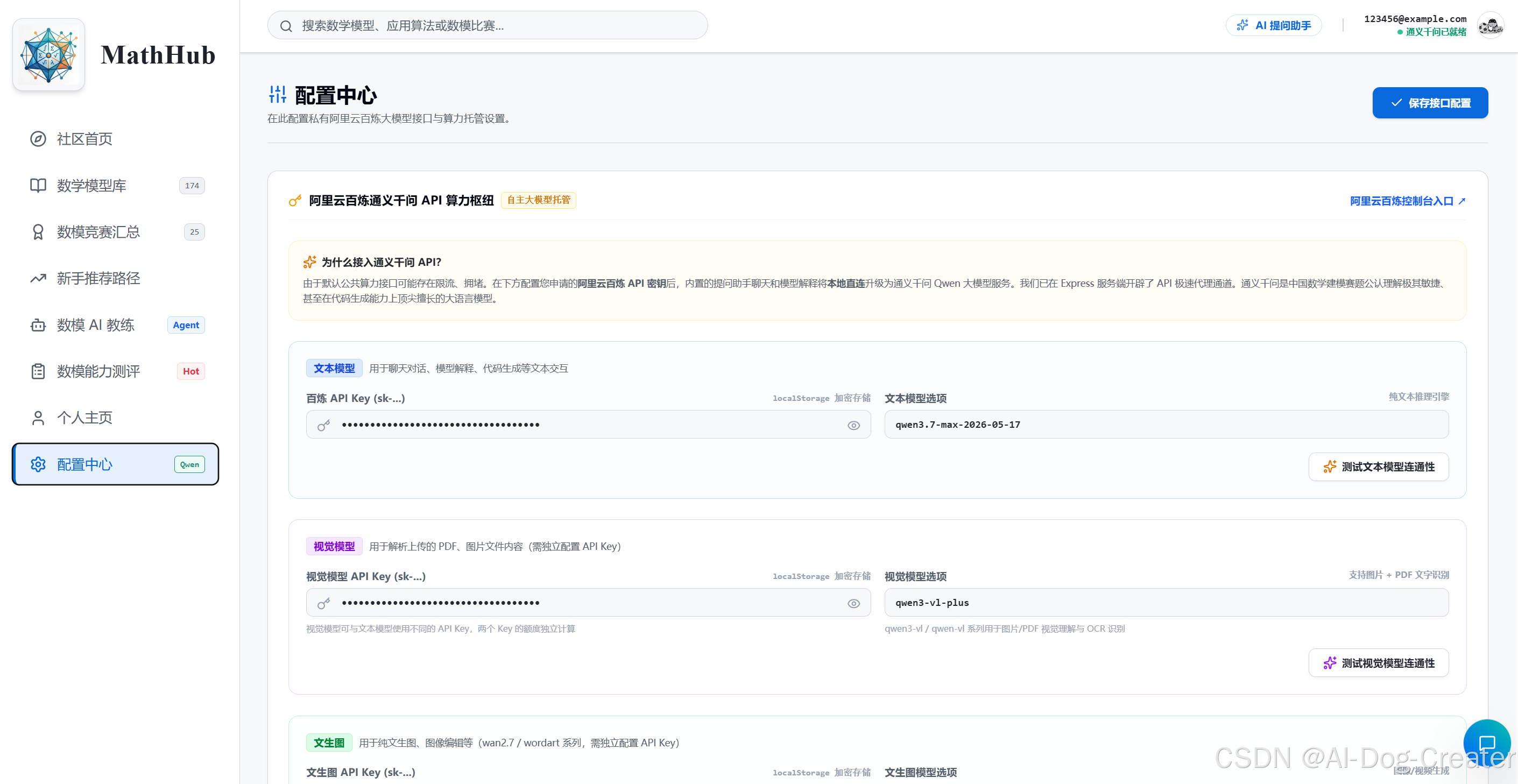
The current project supports or provides connectivity testing for:
-
Text chat models
-
Vision models
-
Image generation models
-
Video generation models
The frontend stores model parameters and keys per user account.
8. User Profile and Local Persistence
The project includes a local account UI and profile page, including:
-
Login / register screens
-
Avatar, school, major, and role settings
-
Local persistence for AI configuration
-
Browser-side persistence for assessments and chat sessions
Note: the current user system is mainly based on localStorage, which makes it suitable for local learning and demos rather than a full production-grade authentication system.
Tech Stack
Frontend
-
React 19
-
TypeScript
-
Vite
-
Lucide React
-
Motion
-
Recharts
-
React Markdown
-
KaTeX
-
remark-math
-
rehype-katex
Backend / Tooling
-
Express
-
tsx
-
esbuild
-
dotenv
-
multer
-
mammoth
-
sharp
-
pdfjs-dist
-
tesseract.js
AI
-
@google/genai -
Alibaba Cloud Bailian compatible APIs (DashScope Compatible Mode)
Project Structure
MathHub_v2/
├── src/
│   ├── App.tsx              # Main UI and core interaction logic
│   ├── data.ts              # Model library, competitions, pathways, and assessment data
│   ├── data_fixed.ts        # Backup / historical data file
│   ├── types.ts             # Shared TypeScript types
│   ├── main.tsx             # React entry point
│   ├── index.css            # Global styles
│   └── assets/              # Static assets
├── server.ts                # Express server and AI / upload endpoints
├── package.json             # Scripts and dependencies
├── tsconfig.json            # TypeScript configuration
├── vite.config.ts           # Vite configuration
├── .env.example             # Environment variable example
└── README.md                # Project documentation
Local Development
Requirements
-
Node.js 22 or higher
-
npm 10 or higher
1. Install dependencies
npm install2. Configure environment variables
Copy .env.example and create .env:
cp .env.example .envRecommended minimum configuration:
GEMINI_API_KEY="YOUR_GEMINI_API_KEY"
APP_URL="http://localhost:3000"
Notes:
-
GEMINI_API_KEYis used for default AI chat and part of the file understanding workflow. -
APP_URLis used for runtime service address configuration. -
If you use Alibaba Cloud Bailian for text, vision, image generation, or video generation, you can configure those keys directly in the app settings page.
3. Start the development environment
npm run devIn this project, the development command starts server.ts directly, and the server hosts Vite in middleware mode. The default local address is:
http://localhost:3000Available Scripts
npm run dev      # Start local development service (Express + Vite)
npm run build    # Build the frontend and bundle the server
npm start        # Run the production build
npm run preview  # Preview the Vite frontend build
npm run clean    # Remove build artifacts
npm run lint     # Run TypeScript type checking
Server Endpoint Overview
The main endpoints currently implemented in server.ts include:
AI / connectivity tests
-
POST /api/test-bailian -
POST /api/test-vision -
POST /api/test-imagegen -
POST /api/test-videogen
AI chat and file processing
-
POST /api/chat -
POST /api/upload
Content generation
-
POST /api/image-generation -
POST /api/video-generation
These endpoints mainly support the settings page and the AI assistant interface.
Production Build
Build
npm run buildThis generates:
-
Frontend static assets
-
dist/server.cjsserver bundle
Start production server
npm startData Storage Notes
A large amount of user-side state is currently stored in browser localStorage, including but not limited to:
-
Login status
-
Current account
-
User profile
-
AI API keys and model settings
-
AI conversation history
-
Assessment-related data
This makes the app feel persistent for local usage, but it also means:
-
Data is mainly persisted locally
-
Data may be lost if the browser storage is cleared or the browser changes
-
It is not suitable as a full cloud-based multi-user account system in its current form
Suitable Use Cases
This project is currently well suited for:
-
Mathematical modeling course projects
-
Internal campus modeling team learning platforms
-
Personal modeling knowledge bases
-
Competition training assistants
-
Demo projects combining AI and mathematical modeling
Possible Future Extensions
Natural next steps for the project include:
-
Integrating real authentication and a database
-
Adding backend content management for the model library
-
Expanding each model entry with more cases and charts
-
Adding contest analysis templates and paper templates
-
Supporting favorites, learning progress, and exercise history
-
Adding more fine-grained econometrics and time series topic navigation
中文说明
项目简介
MathHub 是一个面向中文数学建模学习、竞赛准备与 AI 辅助分析的综合平台。项目基于 React + Vite + TypeScript 构建前端,使用 Express 提供本地开发服务、AI 网关接口以及文件解析能力。
当前项目已经具备较完整的学习与实战支持能力,包括:系统化数学模型库、数模竞赛信息、学习路径、能力测评、AI 智能助手、多模态文件上传,以及阿里云百炼/通义与 Gemini 相关 AI 能力接入。
核心功能
1. 系统化数学模型库
-
按分类浏览大量数学建模与数据分析方法。
-
每个模型条目包含:
-
模型简介
-
基本原理
-
适用场景
-
使用限制
-
示例案例
-
Python 示例代码
-
MATLAB 示例代码
-
延伸学习资源
-
-
支持全局搜索与分类筛选。
当前模型库覆盖的主要方向包括:
-
数据预处理与特征工程
-
数据降维
-
预测模型
-
综合评价
-
差异性分析
-
相关性分析
-
机器学习分类
-
机器学习回归
-
统计分析
-
计量经济模型
-
规划求解
其中"计量经济模型"部分目前已包含:
-
单位根检验(ADF)
-
差分分析
-
ACF / PACF
-
ARIMA / SARIMA
-
GARCH
-
格兰杰因果检验
-
VAR 向量自回归
-
协整检验
-
移动平均法
-
单指数平滑 / 双指数平滑 / Winters 法
-
时间序列分解
-
稳健回归(RANSAC)
-
分位数回归
-
面板模型
-
两阶段回归(2SLS)
-
GMM 估计
-
DID 双重差分
-
Tobit 回归
-
计数数据回归
-
PSM 倾向得分匹配
-
关联分析
-
断点回归(RDD)
2. 数学建模竞赛信息中心
-
汇总常见数学建模竞赛信息。
-
展示比赛时间线、参赛要求、难度、适合人群与历年题入口。
-
便于用户比较不同赛事并规划备赛节奏。
3. 新手学习路径
-
提供结构化学习路径。
-
帮助初学者明确"先学什么、后学什么"。
-
适合自学、校队培养和竞赛训练营场景。
4. 数模能力测评
-
内置建模能力测评题目。
-
测评结果通过雷达图展示多个核心维度。
-
支持生成 AI 分析报告,用于识别薄弱环节。
典型评估维度包括:
-
抽象建模能力
-
模型选择能力
-
数学基础
-
算法理解
-
编程实现
-
论文表达
5. AI 数模助手
项目内置聊天式 AI 助手,支持围绕数学建模任务进行交互。
支持的能力包括:
-
建模思路讨论
-
问题拆解
-
方法选择建议
-
代码示例辅助
-
论文结构与表达建议
-
测评结果分析
同时支持多会话管理,用户可在本地保留不同建模任务的历史对话。
6. 多模态文件上传与解析
AI 助手支持上传附件并解析内容,便于围绕题目材料、论文、图片进行分析。
当前服务端已支持:
-
图片 OCR 识别
-
PDF 文本解析
-
Word 文档文本提取
-
常规文本类文件读取
适合的使用方式包括:
-
上传赛题 PDF 进行题目解读
-
上传图片表格做内容抽取
-
上传 Word 文档进行论文优化
7. 阿里云百炼 / 通义模型接入
设置页中可配置用户自己的百炼 API Key 与模型。
当前项目中已支持或已预留测试能力的方向包括:
-
文本对话模型测试
-
视觉模型测试
-
图片生成模型测试
-
视频生成模型测试
前端允许用户按账号保存自己的模型参数与密钥配置。
8. 用户资料与本地持久化
项目带有完整的本地账户 UI 与个人资料页,包括:
-
登录 / 注册界面
-
头像、学校、专业、角色等资料设置
-
AI 配置本地保存
-
测评与会话数据浏览器本地持久化
说明:当前用户系统主要基于 localStorage,更适合本地学习和演示,不是完整的后端鉴权系统。
技术栈
前端
-
React 19
-
TypeScript
-
Vite
-
Lucide React
-
Motion
-
Recharts
-
React Markdown
-
KaTeX
-
remark-math
-
rehype-katex
后端 / 工具
-
Express
-
tsx
-
esbuild
-
dotenv
-
multer
-
mammoth
-
sharp
-
pdfjs-dist
-
tesseract.js
AI 相关
-
@google/genai -
阿里云百炼兼容接口(DashScope Compatible Mode)
项目结构
MathHub/
├── src/
│   ├── App.tsx              # 主界面与核心交互逻辑
│   ├── data.ts              # 模型库、竞赛、学习路径、测评题数据
│   ├── data_fixed.ts        # 备用/历史数据文件
│   ├── types.ts             # 全局 TypeScript 类型定义
│   ├── main.tsx             # React 入口
│   ├── index.css            # 全局样式
│   └── assets/              # 图片等静态资源
├── server.ts                # Express 服务与 AI / 上传接口
├── package.json             # 脚本与依赖
├── tsconfig.json            # TypeScript 配置
├── vite.config.ts           # Vite 配置
├── .env.example             # 环境变量示例
└── README.md                # 项目说明文档
本地开发
环境要求
-
Node.js 22 或更高版本
-
npm 10 或更高版本
1. 安装依赖
npm install2. 配置环境变量
复制 .env.example 并创建 .env:
cp .env.example .env至少建议配置:
GEMINI_API_KEY="YOUR_GEMINI_API_KEY"
APP_URL="http://localhost:3000"
说明:
-
GEMINI_API_KEY用于默认 AI 对话与部分文件理解流程。 -
APP_URL用于应用运行时的服务地址配置。 -
若使用阿里云百炼文本/视觉/生图/视频能力,可直接在应用设置页中填写对应 Key,无需全部写入
.env。
3. 启动开发环境
npm run dev当前项目的开发命令会直接启动 server.ts,由服务端接管 Vite 中间件,因此默认访问地址为:
http://localhost:3000可用脚本
npm run dev      # 启动本地开发服务(Express + Vite)
npm run build    # 构建前端并打包服务端
npm start        # 运行生产构建产物
npm run preview  # 预览 Vite 前端构建
npm run clean    # 清理构建产物
npm run lint     # TypeScript 类型检查
服务端接口概览
当前 server.ts 中已实现的主要接口包括:
AI / 模型连通测试
-
POST /api/test-bailian -
POST /api/test-vision -
POST /api/test-imagegen -
POST /api/test-videogen
AI 对话与文件处理
-
POST /api/chat -
POST /api/upload
内容生成
-
POST /api/image-generation -
POST /api/video-generation
这些接口主要服务于前端设置页和 AI 助手页面。
生产构建
构建
npm run build构建后将生成:
-
前端静态资源
-
dist/server.cjs服务端产物
启动生产服务
npm start数据存储说明
当前项目大量用户态信息保存在浏览器 localStorage 中,包括但不限于:
-
登录状态
-
当前账号
-
个人资料
-
AI API Key 与模型配置
-
AI 会话历史
-
测评结果相关数据
这让项目在本地使用时体验较完整,但也意味着:
-
数据主要是本地持久化
-
更换浏览器或清空缓存会丢失
-
不适合作为正式的多用户云端账户系统
适合的使用场景
这个项目目前比较适合:
-
数学建模课程作品
-
数模校队内部学习平台
-
个人建模知识库
-
竞赛训练辅助工具
-
AI + 数模方向的演示项目
后续可扩展方向
如果继续迭代,比较自然的方向包括:
-
接入真实用户鉴权与数据库
-
为模型库增加后台管理功能
-
为不同模型补充更多案例与图表
-
增加赛题拆解模板与论文模板
-
支持模型收藏、学习记录、做题记录
-
增加更细粒度的计量经济学与时序专题导航