一、YAML
官方文档:pyyaml.org/wiki/PyYAMLDocumentation
YAML 是一种数据序列化语言,用于以人类可读的形式存储信息。它最初代表 "Yet Another Markup Language",但后来更改为 "YAML Ain't Markup Language"(YAML 不是一种标记语言),以区别于真正的标记语言。
它类似于 XML 和 JSON 文件,但使用更简洁的语法。
特点: YAML 是一种非常简单的基于文本的人类可读的语言,用于在人和计算机之间交换数据。
YAML 不是一种编程语言。它主要用于存储配置信息。
YAML 的缩进就像 Python 的缩进一样优雅。
YAML 还减少了 JSON 和 XML 文件中的大部分 "噪音" 格式,例如引号、方括号和大括号。
注意:
- YAML 区分大小写。
- YAML 不允许使用制表符 Tab 键,(按下 Tab 仍能使用,是因为编辑器被配置为按下 Tab 键会插入适当数量的空格)。
- YAML 遵循严格缩进规则。
1.YAML介绍
YAML 文件的后缀名是 .yaml 或 .yml ,本着能少写不多写的原则,我们常用的是 .yml 。
yaml 中支持不同数据类型,但在写法上稍有区别,详见下表:
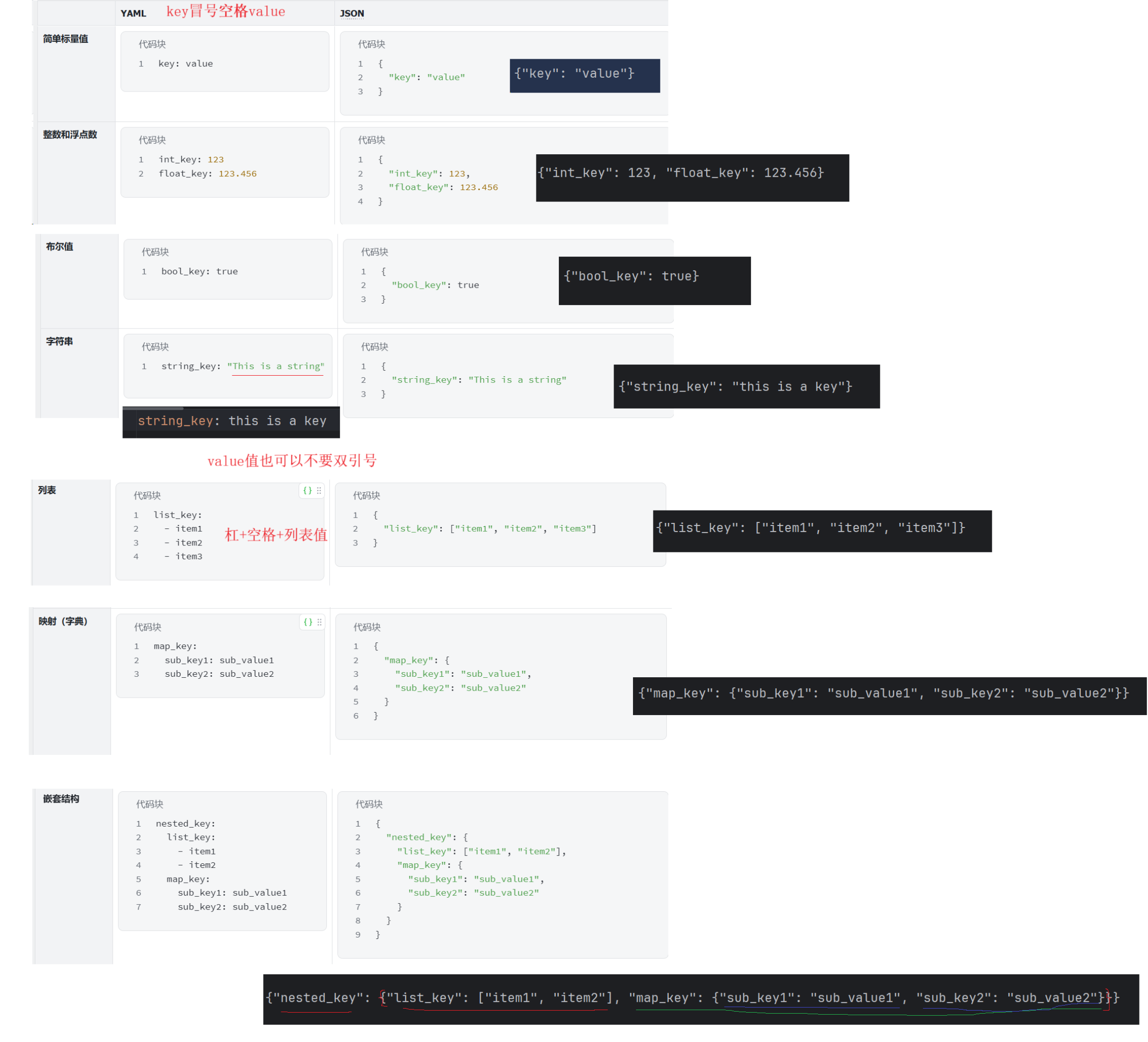
以上语法若短时间内⽆法掌握,我们也有很多⼯具可供使用,如json转yaml
JSON 转 YAML 工具 | 简化数据格式转换 - 嘉澍工具
2.使用
yaml 文件通常作为配置文件来使用,可以使用 yaml 库来读取和写入 YAML 文件
安装yaml库
pip install PyYAML==6.0.1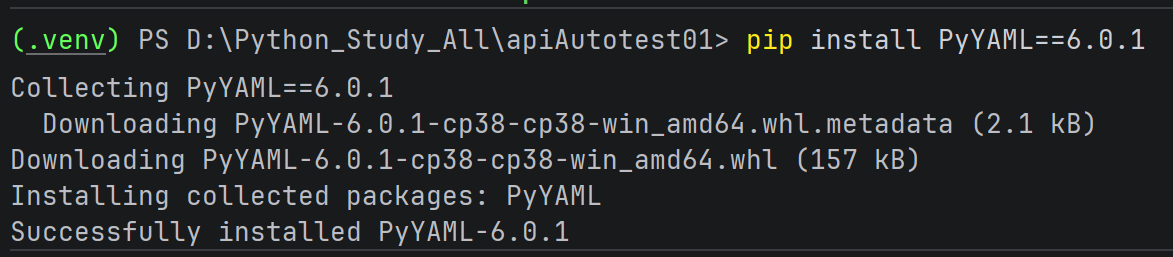
创建yaml文件
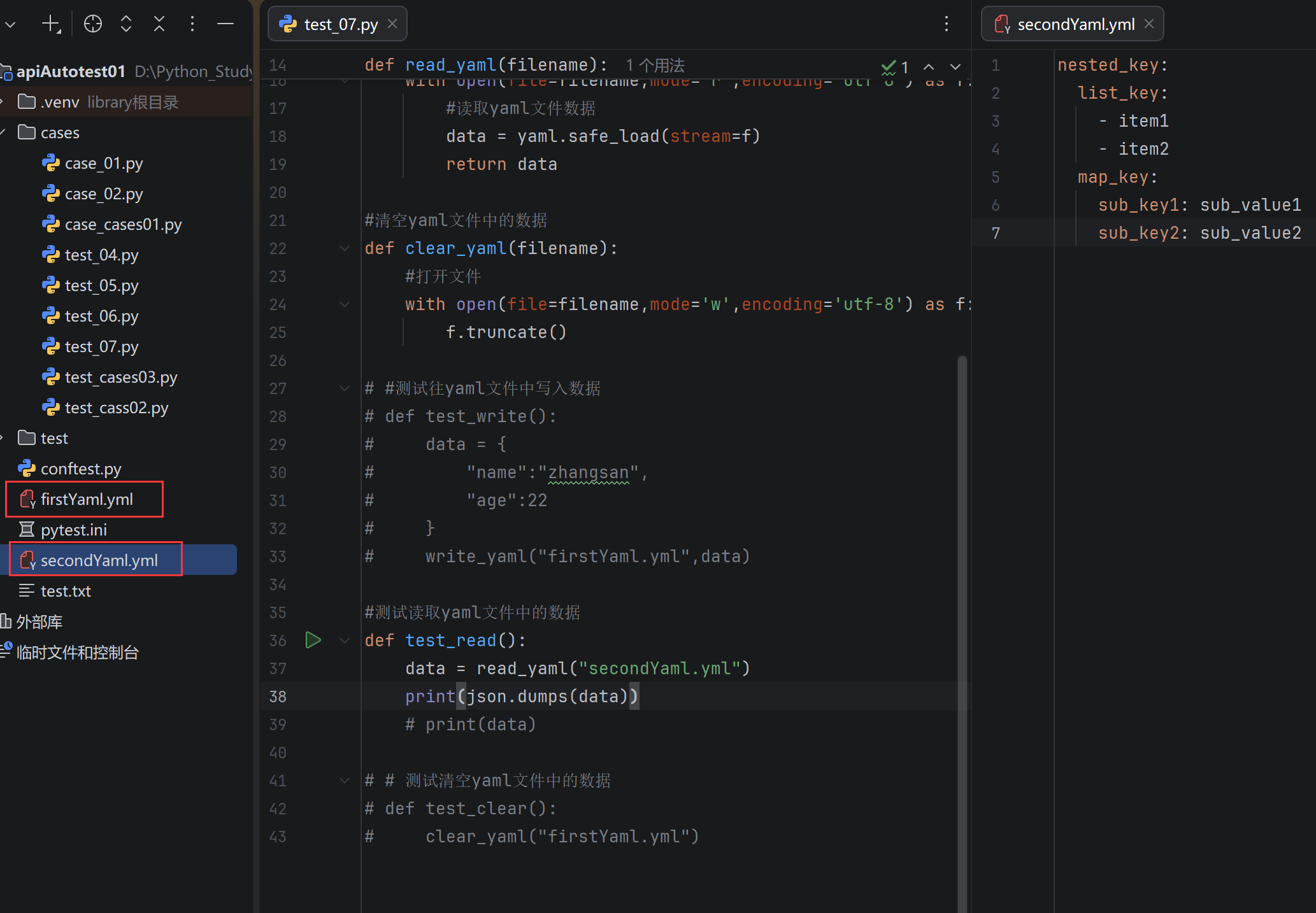
读取和写入yaml文件
import json

import yaml

#往yaml文件中写入数据
def write_yaml(filename,data):
    #打开文件
    with open(file=filename,mode='a+') as f:
        #往yaml文件中写数据
        yaml.safe_dump(data=data,stream=f,encoding='utf-8')


#读取yaml文件中的数据
def read_yaml(filename):
    #打开文件
    with open(file=filename,mode='r',encoding='utf-8') as f:
        #读取yaml文件数据
        data = yaml.safe_load(stream=f)
        return data

#清空yaml文件中的数据
def clear_yaml(filename):
    #打开文件
    with open(file=filename,mode='w',encoding='utf-8') as f:
        f.truncate()

# #测试往yaml文件中写入数据
# def test_write():
#     data = {
#         "name":"zhangsan",
#         "age":22
#     }
#     write_yaml("firstYaml.yml",data)

#测试读取yaml文件中的数据
def test_read():
    data = read_yaml("secondYaml.yml")
    print(json.dumps(data))#字典格式数据转json格式
    # print(data)

# # 测试清空yaml文件中的数据
# def test_clear():
#     clear_yaml("firstYaml.yml")
Python的内置类型字典和json格式非常像
json里key和字符串类型的值必须要用双引号
Python里单引号和双引号
二、JSON Schema
JSON Schema⼀个⽤来定义和校验JSON的web规范,简⽽⾔之,JSON Schema是⽤来校验json是否符合预期。
根据 json 创建 JSON Schema 后,你可以使⽤你选择的语⾔中的验证器将示例数据与你的模式进行验证。
1.安装
pip install jsonschema==4.23.0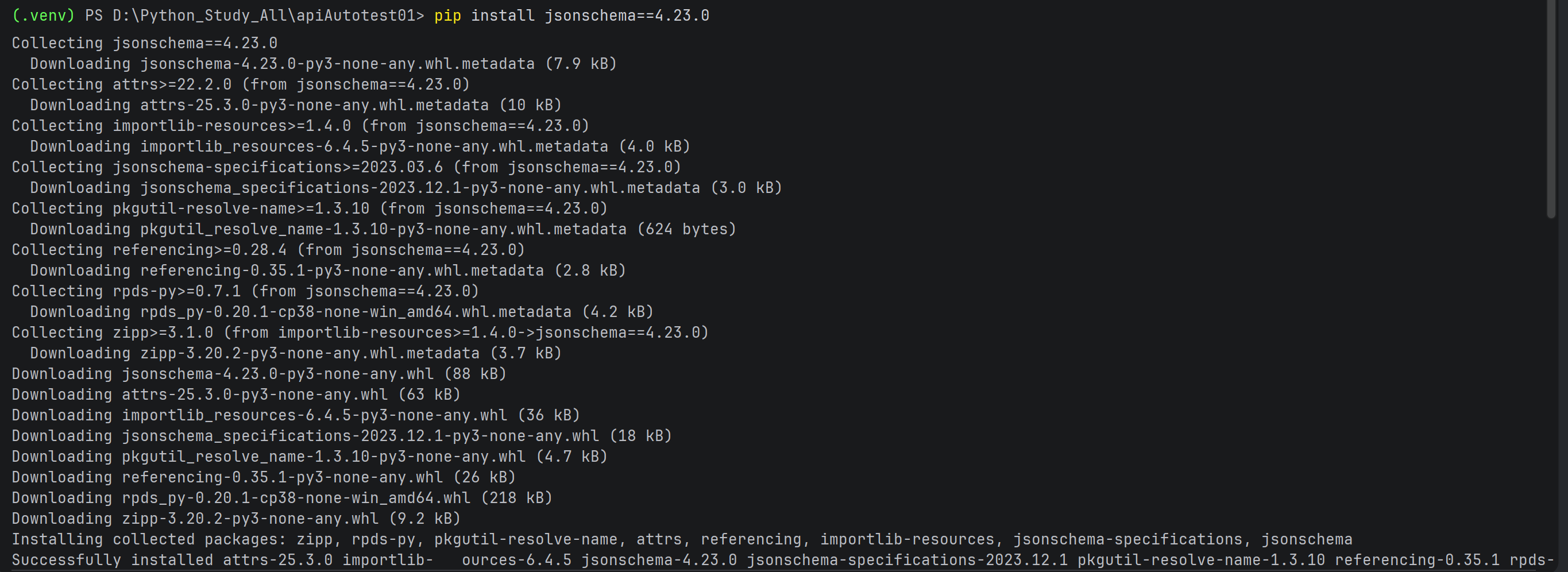
2.介绍
Json:
 json_data={
        "code": "success",
        "errMsg": "",
        "data":False

    }

json_scheam = {
        "type": "object",
        "required":[],
        "properties":{
            "code":{
                "type": "string",
            },
            "errMsg":{
                "type": "string",
            },
            "data":{
                "type": "boolean",
            }
        }
    }
通过上⾯的对⽐可见, JSON Schema 从多个方面对 JSON 数据进⾏校验。
如" type "、" required "、" properties "等以确保其正确性和⼀致性。接下来我们来
了解 JSON Schema 中的关键词以及作用。
json转JSON Schema太麻烦?使⽤现有⼯具自动转换:在线JSON转Schema工具 - ToolTT在线工具箱
注意:工具不是万能的,结果可能存在错误,要对自动⽣成的结果进行⼆次检查
示例:校验博客列表页返回的json数据
def test_02():
    #请求博客列表页
    #获取接口返回值
    #给定json schema来接口返回值是否正确
    url = "http://49.235.61.184:19090/blog/getList"
    header = {
        "user_token_header":"eyJhbGciOiJIUzI1NiJ9.eyJpZCI6NCwidXNlck5hbWUiOiJsaXNpIiwiZXhwIjoxNzgwNzM3NzYwfQ.jw-zvDZQKSseHqG3Y9BPfQPalE0m40AB8HN6cOH6mag"
    }
    r = requests.get(url=url,headers=header)
    json_schema = {
        "type": "object",
        "required": [],
        "properties":
            {
                "code": {
                    "type": "string"
                },
                "errMsg": {
                    "type": "string"
                },
                "data":
                    {
                    "type": "array",
                    "items": {
                        "type": "object",
                        "required": [],
                        "properties":
                            {
                            "id": {
                                "type": "number"
                            },
                            "title": {
                                "type": "string"
                            },
                            "content": {
                                "type": "string"
                            },
                            "userId": {
                                "type": "number"
                            },
                            "deleteFlag": {
                                "type": "number"
                            },
                            "createTime": {
                                "type": "string"
                            },
                            "updateTime": {
                                "type": "string"
                            },
                            "loginUser": {
                                "type": "boolean"
                            }
                        }
                    }
                }
            }
    }
    validate(r.json(),json_schema)
2.1 数据类型
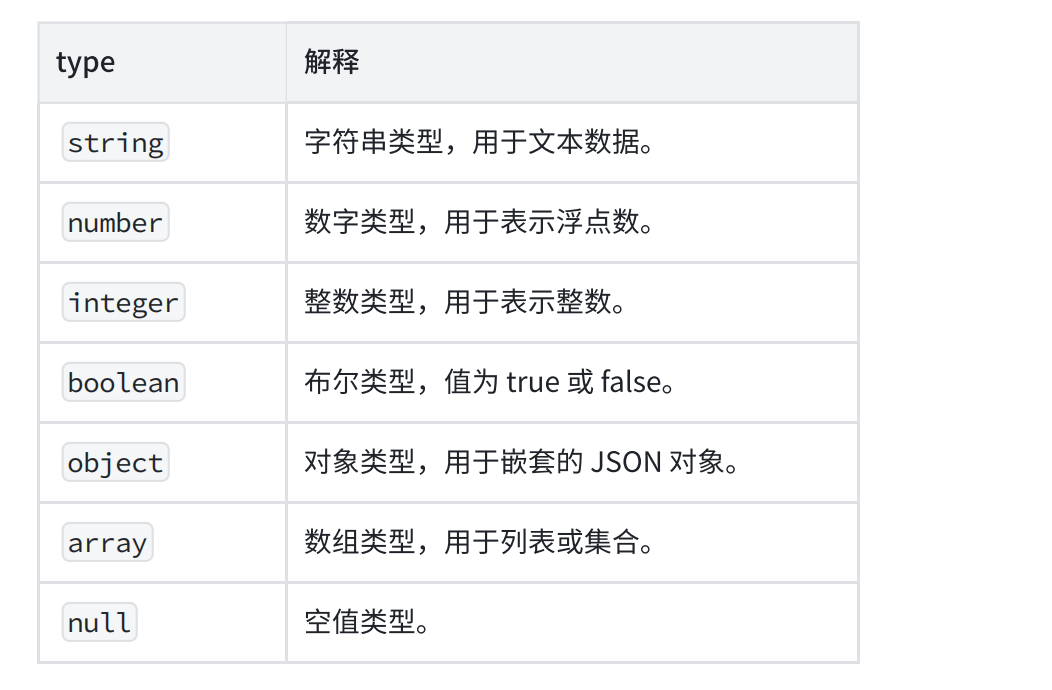
type 关键字指定了数据类型。
可以验证 JSON 数据中每个属性的数据类型是否符合预期。常⽤的数据类型包括:
示例:
{
    "type": "object",
    "properties": {
    "name": { "type": "string" },
    "age": { "type": "integer" }
    }
}
properties 是⼀个验证关键字。当你定义 properties 时,你创建了⼀个对象,其中每个属性代表正在验证的 JSON 数据中的⼀个键。
2.2 最大最小值
- minimum 和 maximum :指定数值的最⼩值和最⼤值。
- exclusiveMinimum 和 exclusiveMaximum :指定数值必须严格⼤于或⼩于某个值(不包含等于)。
示例:
def test_04():
    json = {
        "name":"zhangsan",
        "age":10
    }
    json_schema= {
      "type": "object",
      "required": [],
      "properties": {
        "name": {
          "type": "string"
        },
        "age": {
          "type": "number",
          # "minimum":0,
          # "maximum":100
          "exclusiveMinimum":0,
          "exclusiveMaximum":100
        }
      }
    }
2.3 字符串特殊校验
pattern :使用正则表达式来验证字符串是否符合特定的模式。
def test_05():
    json = {
        "name": "zhangsa",
        "age": 10
    }
    json_schema = {
        "type": "object",
        "required": [],
        "properties": {
            "name": {
                "type": "string",
                "pattern":"\S+"
            },
            "age": {
                "type": "number"
            }
        }
    }
    validate(instance=json,schema=json_schema)
2.4 数组约束
-
minItems 和 maxItems :指定数组的最⼩和最⼤⻓度。
-
uniqueItems :确保数组中的元素是唯一的。
-
items :定义数组中每个元素的类型和约束。
def test_06():
json = {
"data":["hello","world","a","b"],
"str":"hello"
}
json_schema = {
"type": "object",
"properties": {
"data":{
"type": "array",
#针对数组添加最大和最小长度限制
"minItems":1,
"maxItems":5,
#要求数组中元素唯一
"uniqueItems":True,
"items":{
"type": "string"
}
},
"str":{
"type": "string"
}
}
}
validate(json, json_schema)
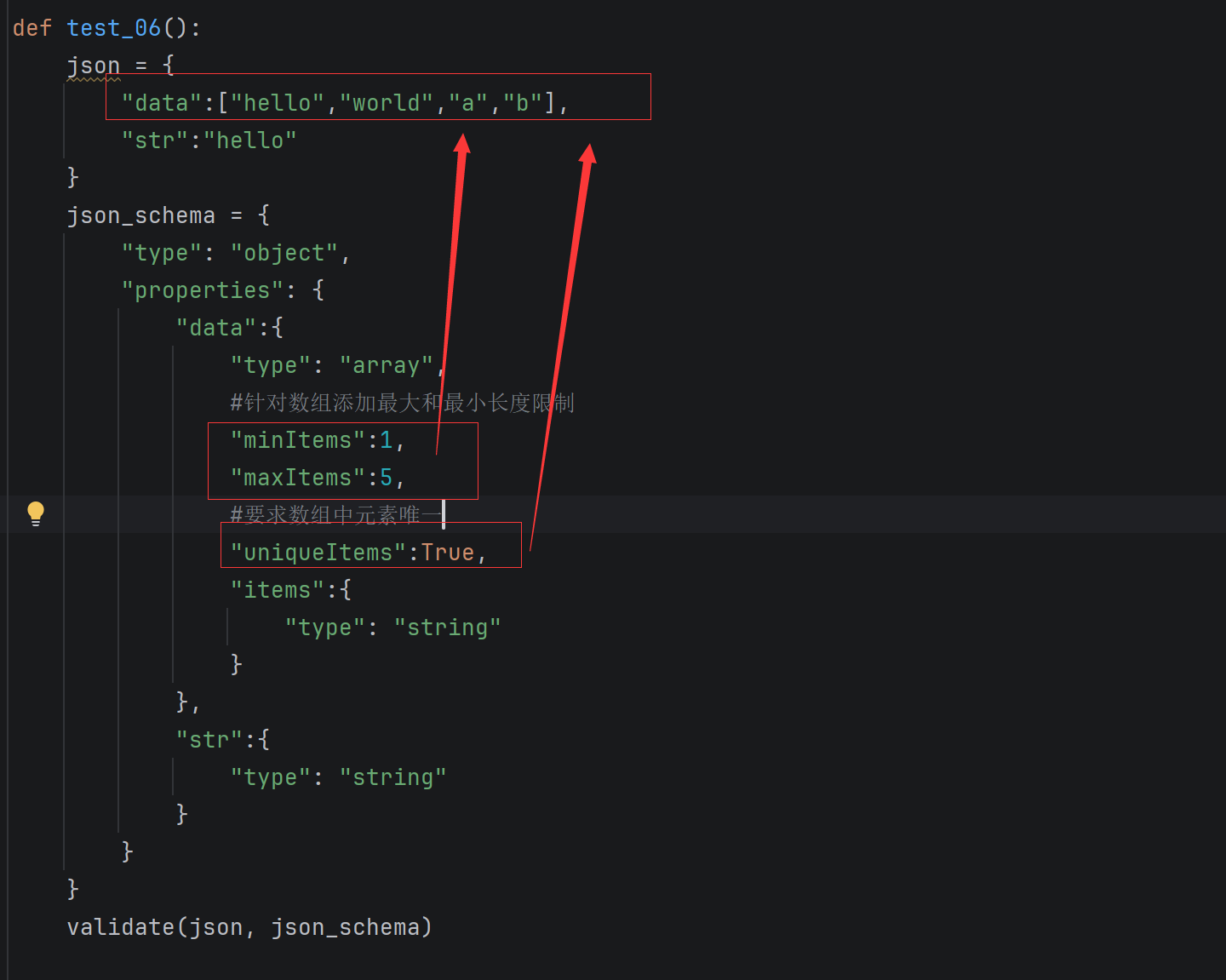
uniqueItems设置为True,表示元素必须是唯一的;设置为False,表示元素可以是唯一的(也可以是唯一的)
2.5 对象约束
- minProperties 和 maxProperties :指定对象的最⼩和最⼤属性数量。
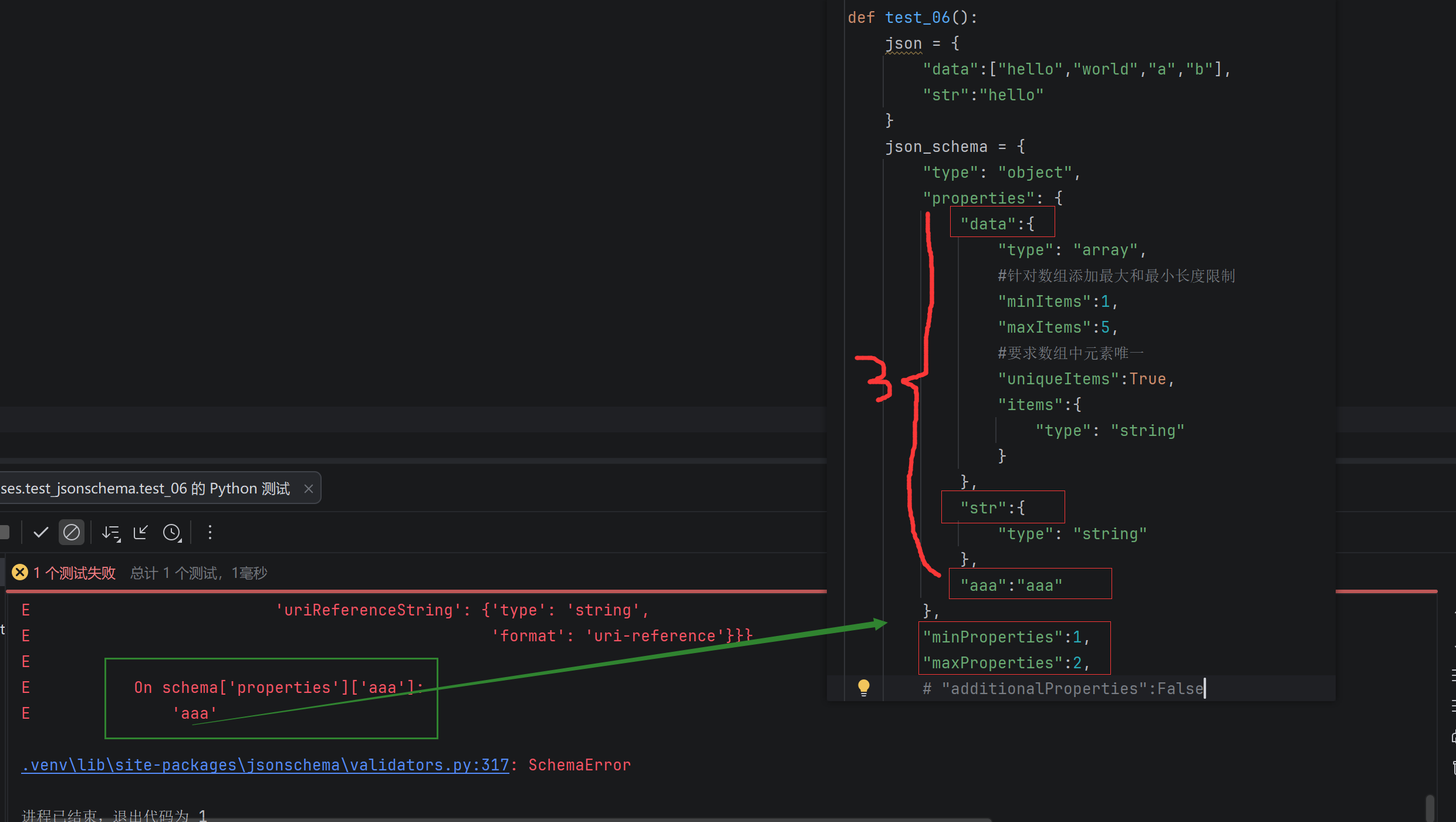
- additionalProperties :控制是否允许对象中存在未在 properties 中定义的额外属性,默认为True。
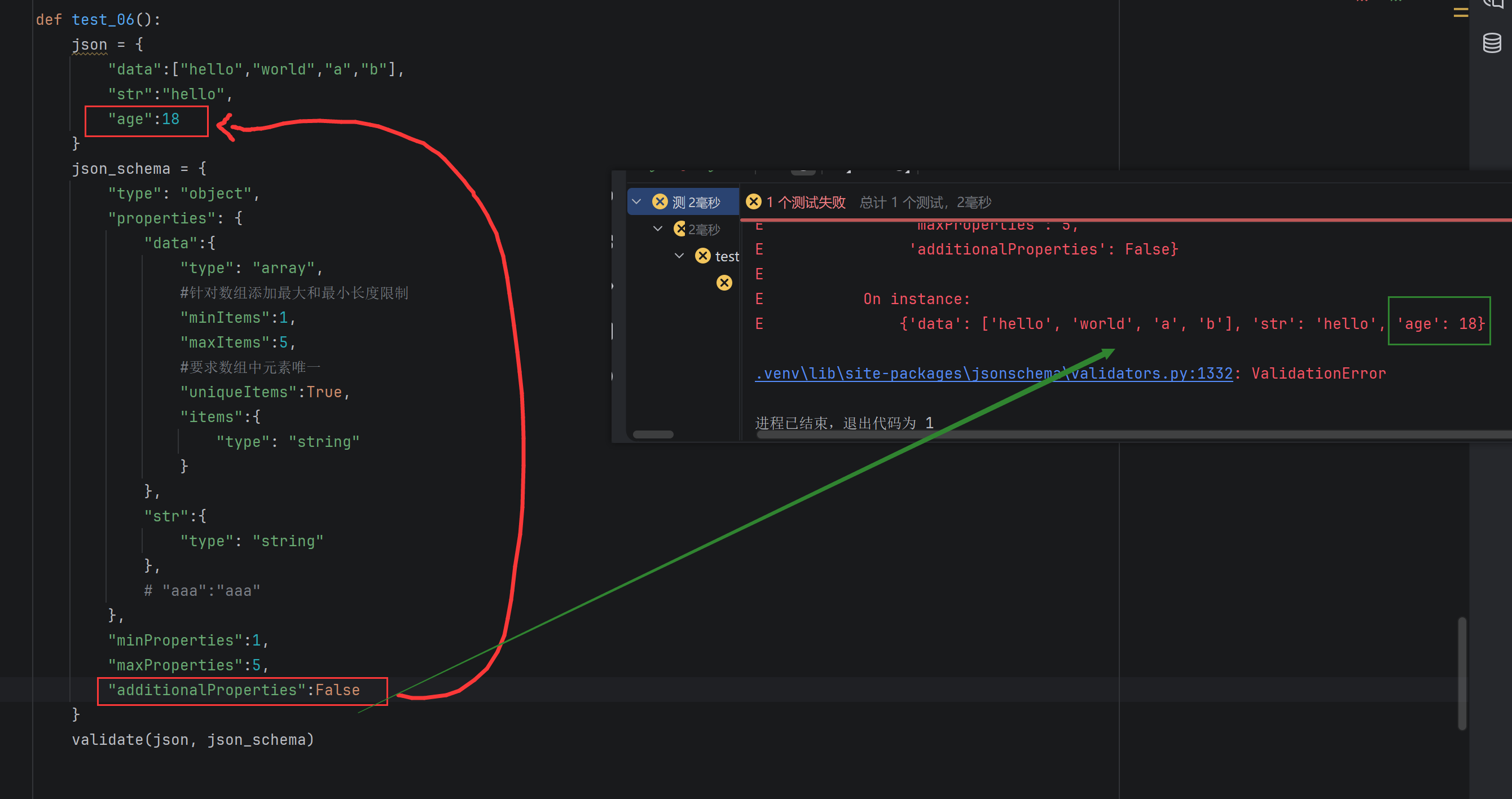
def test_06():
    json = {
        "data":["hello","world","a","b"],
        "str":"hello",
        "age":18
    }
    json_schema = {
        "type": "object",
        "properties": {
            "data":{
                "type": "array",
                #针对数组添加最大和最小长度限制
                "minItems":1,
                "maxItems":5,
                #要求数组中元素唯一
                "uniqueItems":True,
                "items":{
                    "type": "string"
                }
            },
            "str":{
                "type": "string"
            },
            # "aaa":"aaa"
        },
        "minProperties":1,
        "maxProperties":5,
        "additionalProperties":False
    }
    validate(json, json_schema)
注意:配置里不要存在其他字符或者空格,会导致识别不出来当前的配置,意味着配置是失效的
2.6 必需属性
通过 required 关键字,JSON Schema 可以指定哪些属性是必需的。如果 JSON 实例中缺少这些必需属性,验证将失败。
示例:
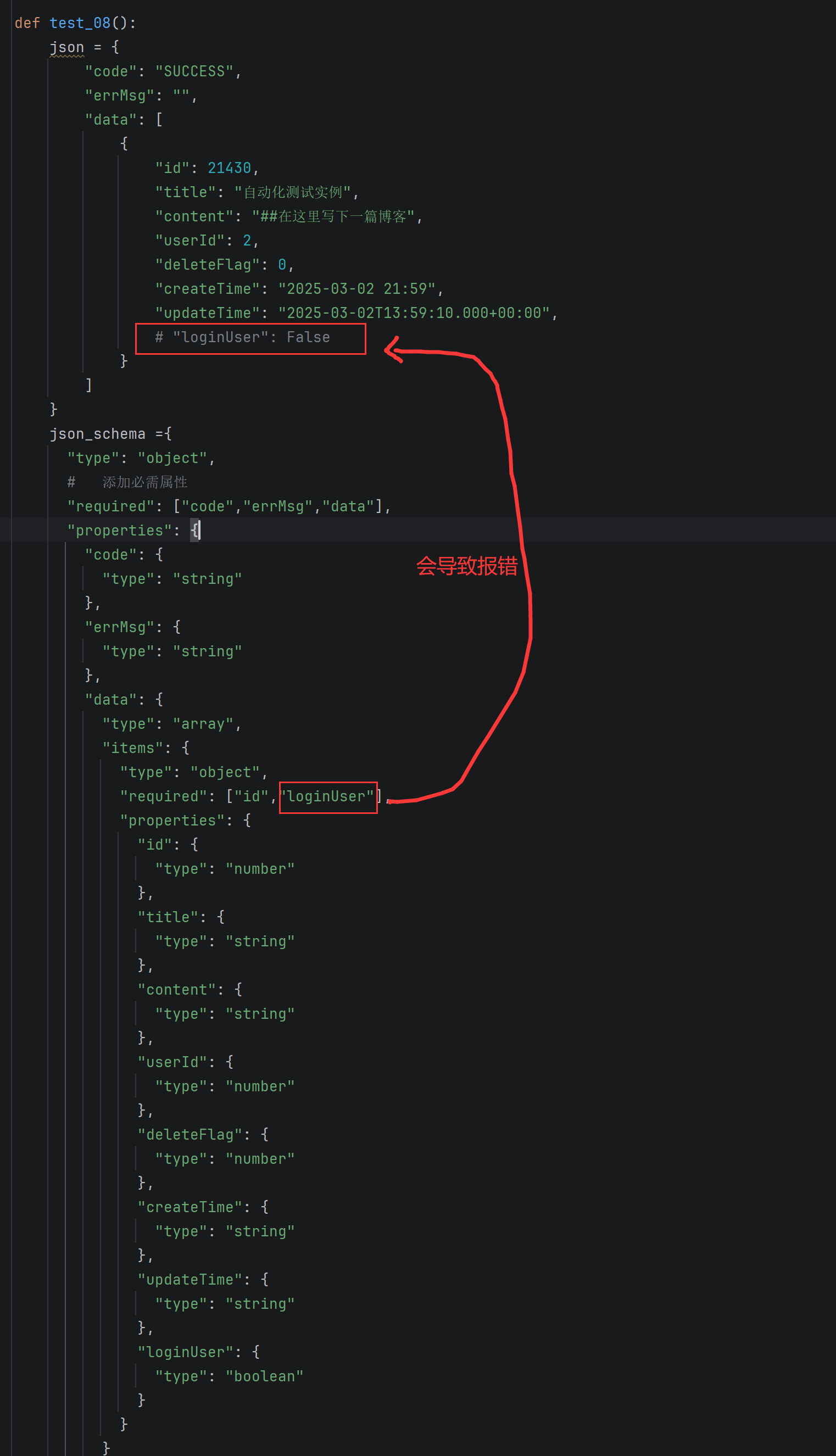
def test_08():
    json = {
        "code": "SUCCESS",
        "errMsg": "",
        "data": [
            {
                "id": 21430,
                "title": "自动化测试实例",
                "content": "##在这里写下一篇博客",
                "userId": 2,
                "deleteFlag": 0,
                "createTime": "2025-03-02 21:59",
                "updateTime": "2025-03-02T13:59:10.000+00:00",
                "loginUser": False
            }
        ]
    }
    json_schema ={
      "type": "object",
      #   添加必需属性
      "required": ["code","errMsg","data"],
      "properties": {
        "code": {
          "type": "string"
        },
        "errMsg": {
          "type": "string"
        },
        "data": {
          "type": "array",
          "items": {
            "type": "object",
            "required": ["id","loginUser"],
            "properties": {
              "id": {
                "type": "number"
              },
              "title": {
                "type": "string"
              },
              "content": {
                "type": "string"
              },
              "userId": {
                "type": "number"
              },
              "deleteFlag": {
                "type": "number"
              },
              "createTime": {
                "type": "string"
              },
              "updateTime": {
                "type": "string"
              },
              "loginUser": {
                "type": "boolean"
              }
            }
          }
        }
      }
    }

    validate(instance=json,schema=json_schema)
2.7 依赖关系
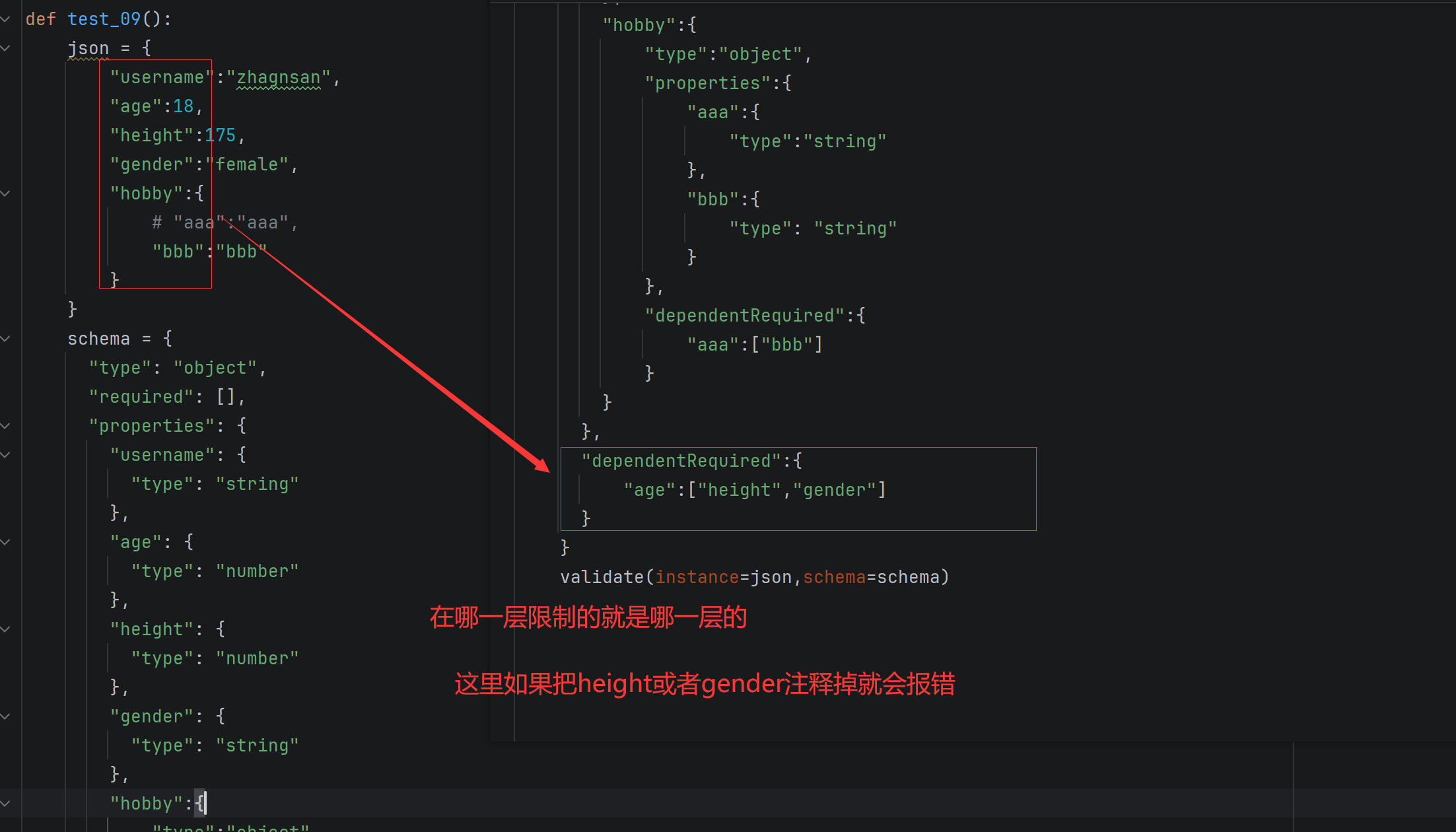
dependentRequired 可以定义属性之间的依赖关系。例如,如果某个属性存在,则必须存在另⼀
个属性。
def test_09():
    json = {
        "username":"zhagnsan",
        "age":18,
        "height":175,
        "gender":"female",
        "hobby":{
            # "aaa":"aaa",
            "bbb":"bbb"
        }
    }
    schema = {
      "type": "object",
      "required": [],
      "properties": {
        "username": {
          "type": "string"
        },
        "age": {
          "type": "number"
        },
        "height": {
          "type": "number"
        },
        "gender": {
          "type": "string"
        },
        "hobby":{
            "type":"object",
            "properties":{
                "aaa":{
                    "type":"string"
                },
                "bbb":{
                    "type": "string"
                }
            },
            "dependentRequired":{
                "aaa":["bbb"]
            }
        }
      },
      "dependentRequired":{
          "age":["height","gender"]
      }
    }
    validate(instance=json,schema=schema)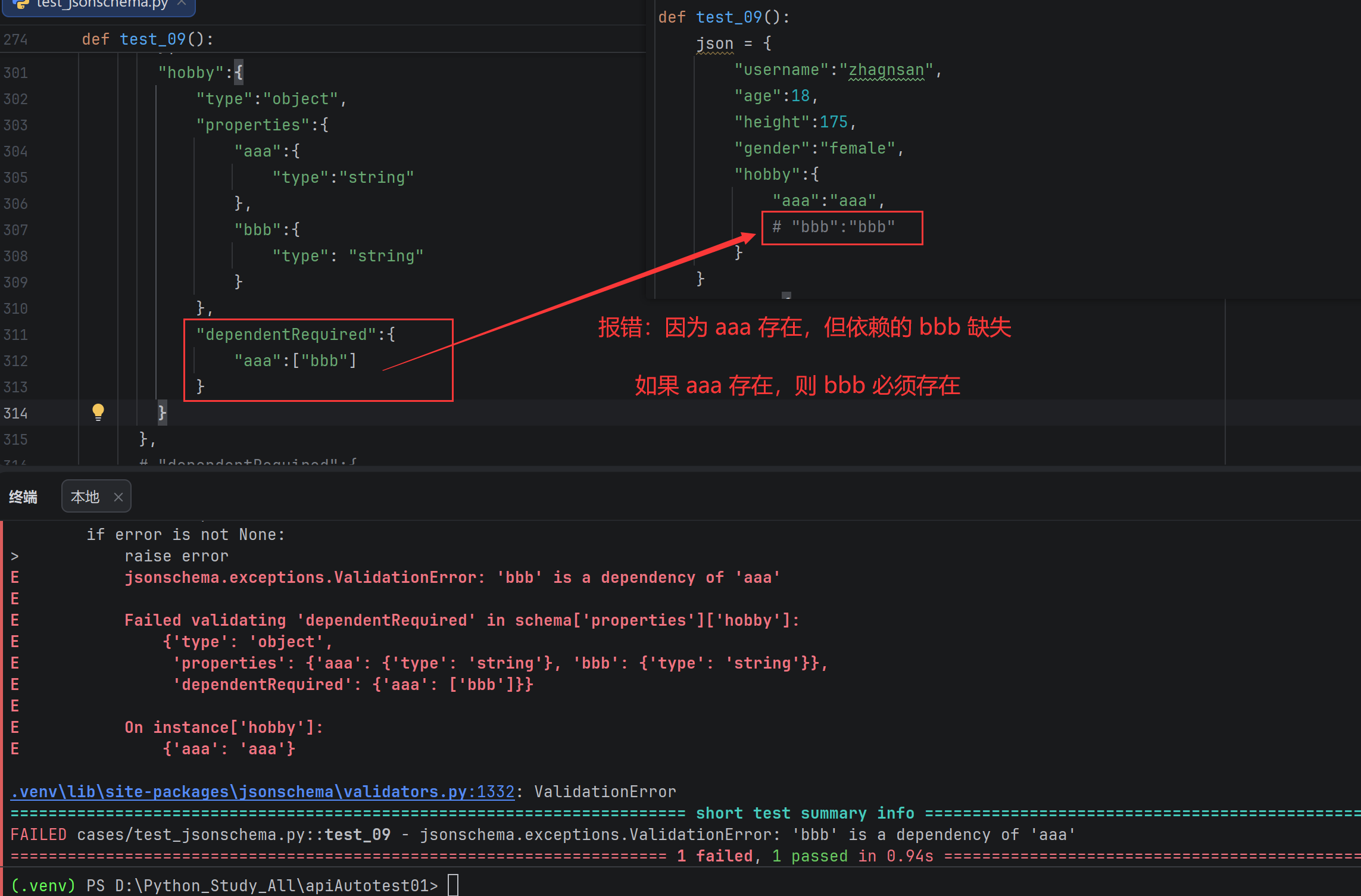
如果把aaa注释掉那么可以返回也可以不返回,因为他是一个单项限制

2.8 logging日志模块
2.8.1 介绍
logging 是 Python 标准库中的⼀个模块,它提供了灵活的⽇志记录功能。通过 logging ,开发
者可以⽅便地将⽇志信息输出到控制台、⽂件、⽹络等多种⽬标,同时⽀持不同级别的⽇志记录,以满⾜不同场景下的需求。
2.8.2 使用
示例1:全局logging
import logging

logging.basicConfig(level=logging.INFO)

logging.debug("this is a debug message")
logging.info("this is a info message")
logging.warning("this is a warning message")
logging.error("this is a error message")
logging.critical("this is a critical message")
示例2:自定义logger并输出到控制台
# 导⼊ logging 模块
import logging
logging.basicConfig(level=logging.INFO)
# 获取⼀个⽇志记录器对象,名称为当前模块的名称
logger = logging.getLogger(__name__)
# 设置⽇志记录器的级别为 DEBUG
# 这意味着所有级别为 DEBUG 及以上的⽇志都会被记录
logger.setLevel(logging.DEBUG)
if __name__ == "__main__":
    logger.debug('This is a debug message')
    logger.info('This is an info message')
    logger.warning('This is a warning message')
    logger.error('This is an error message')
    logger.critical('This is a critical message')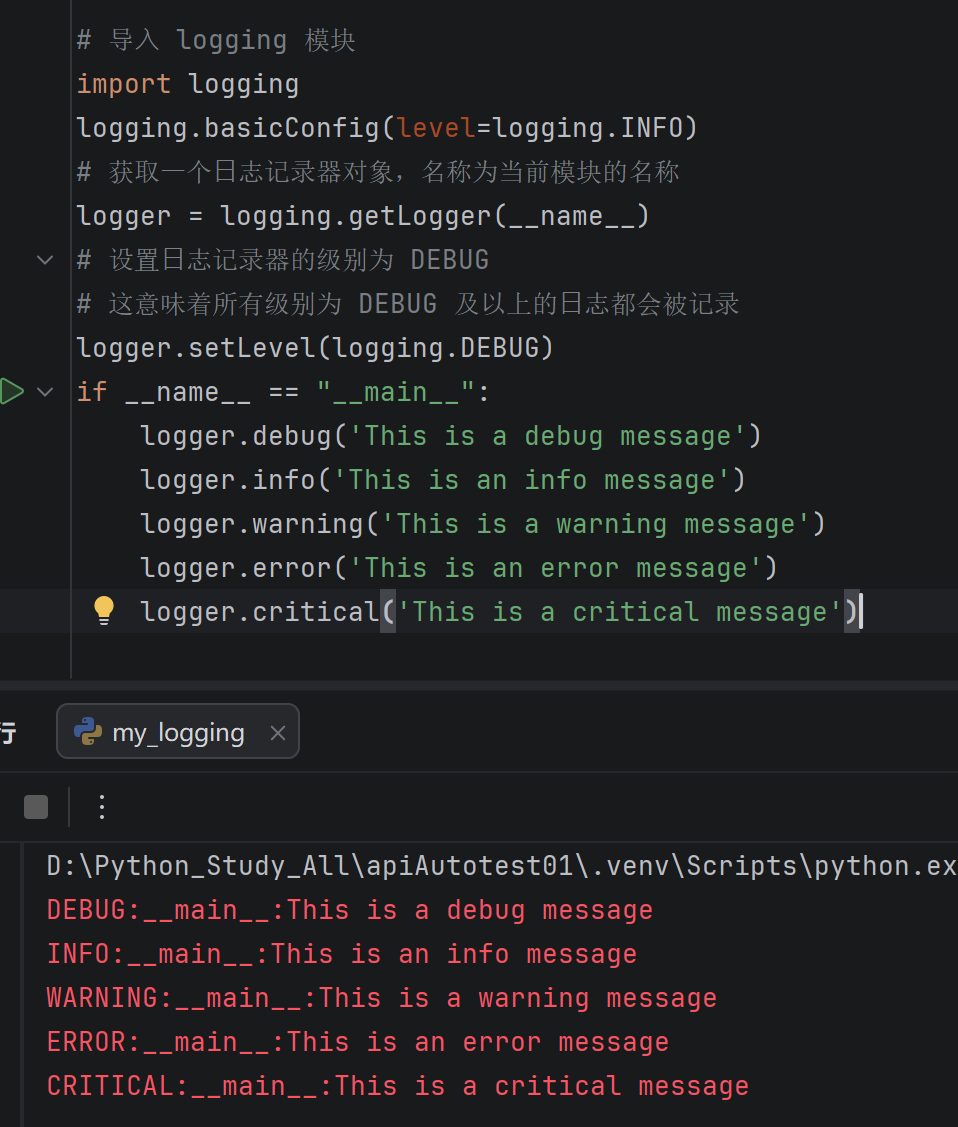
示例3:自定义logger并输出到日志文件
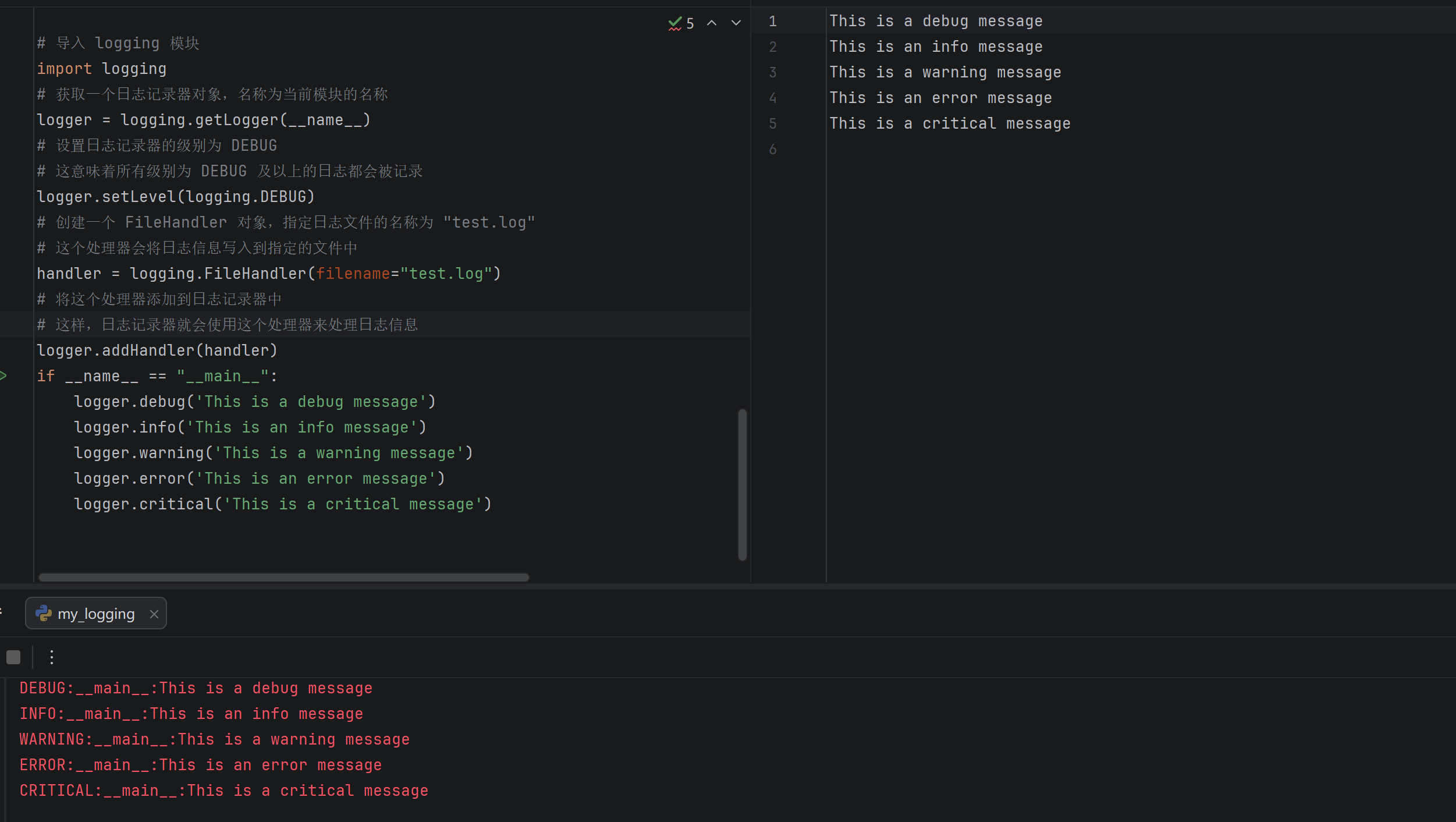
- 获取⽇志记录器: logging.getLogger(name) 获取⼀个⽇志记录器对象, name 是当前模块的名称。使⽤模块名称作为⽇志记录器的名称有助于在⼤型项⽬中区分不同模块的⽇志.
- 设置⽇志级别: logger.setLevel(logging.DEBUG) 将⽇志记录器的级别设置为
- DEBUG ,这意味着所有 DEBUG 及以上级别的⽇志都会被记录.
⽇志级别⾦字塔:DEBUG < INFO < WARNING < ERROR < CRITICAL
⾼于设定级别的⽇志才会被处理
- 创建⽂件处理器: logging.FileHandler(filename="test.log") 创建⼀个⽂件处理器,将⽇志信息写⼊到名为 test.log 的⽂件中.
- 添加处理器: logger.addHandler(handler) 将⽂件处理器添加到⽇志记录器中,这样⽇志记录器就会使⽤这个处理器来处理⽇志信息.
示例4:设置日志格式
# 导⼊ logging 模块
import logging
# 获取⼀个⽇志记录器对象,名称为当前模块的名称
logger = logging.getLogger(__name__)
# 设置⽇志记录器的级别为 DEBUG
# 这意味着所有级别为 DEBUG 及以上的⽇志都会被记录
logger.setLevel(logging.DEBUG)
# 创建⼀个 FileHandler 对象,指定⽇志⽂件的名称为 "test.log"
# 这个处理器会将⽇志信息写⼊到指定的⽂件中
handler = logging.FileHandler(filename="test.log")

# 创建⼀个⽇志格式器对象
formatter = logging.Formatter(
    "%(asctime)s %(levelname)s [%(name)s] [%(filename)s (%(funcName)s:%(lineno)d)] - %(message)s"
)

# 将格式器设置到处理器上
handler.setFormatter(formatter)

# 将这个处理器添加到⽇志记录器中
# 这样,⽇志记录器就会使⽤这个处理器来处理⽇志信息
logger.addHandler(handler)
if __name__ == "__main__":
    logger.debug('This is a debug message')
    logger.info('This is an info message')
    logger.warning('This is a warning message')
    logger.error('This is an error message')
    logger.critical('This is a critical message')
logging.Formatter 是⽤于定义⽇志输出格式的类。在构造函数中,传递了⼀个格式字符串,⽤
于指定⽇志信息的格式。格式字符串中使⽤了⼀些特殊的占位符(以 % 开头),这些占位符会被替换为相应的⽇志信息内容
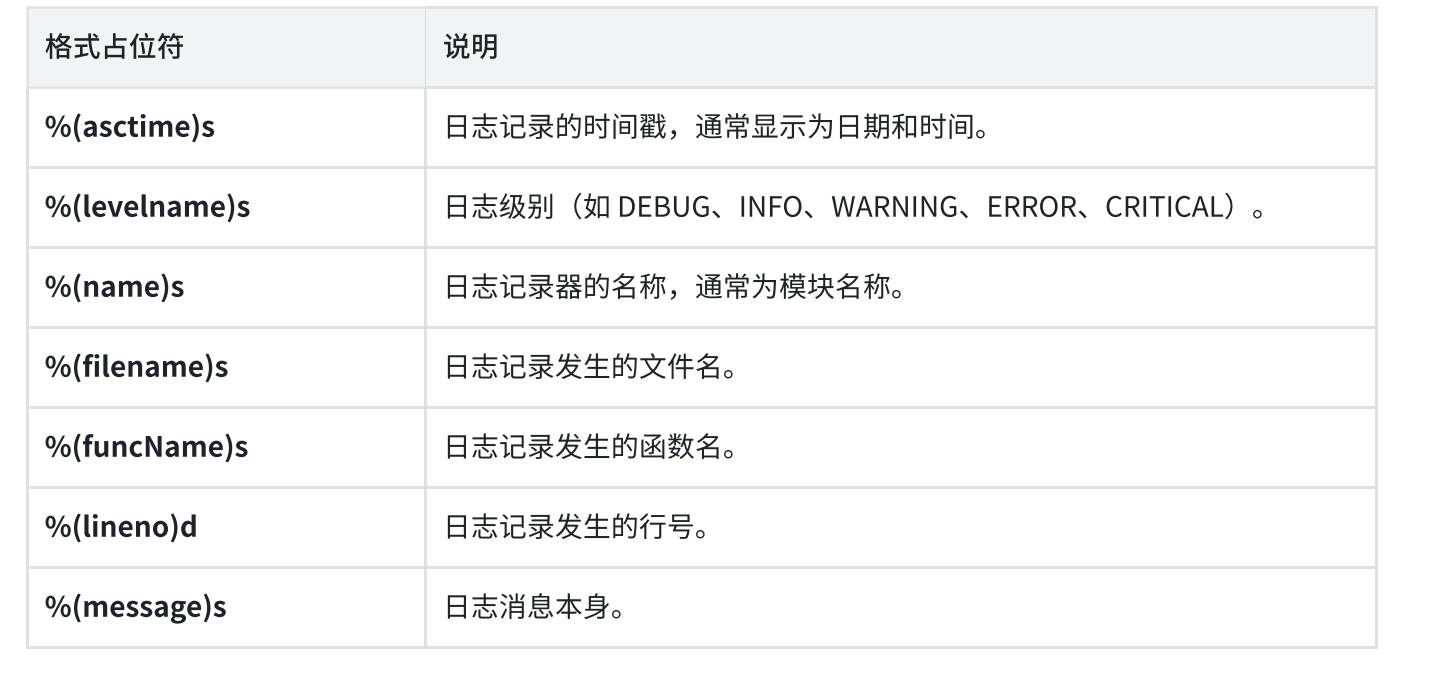
handler.setFormatter(formatter) 将创建的格式器对象设置到处理器上。这意味着处理器在处理日志信息时,会使用这个格式器来格式化⽇志信息
通过这种⽅式,你可以控制⽇志信息的输出格式,使其包含你感兴趣的信息,如时间戳、日志级别、文件名、函数名、⾏号等。
2.9 测试报告allure
官⽅⽂档: Allure Report Docs -- Pytest configuration
2.9.1 介绍
Allure Report 由⼀个框架适配器和 allure 命令⾏⼯具组成,是⼀个流⾏的开源⼯具,⽤于可视化
测试运⾏的结果。它可以以很少甚⾄零配置的⽅式添加到您的测试⼯作流中。它⽣成的报告可以在任何地⽅打开,并且任何⼈都可以阅读,⽆需深厚的技术知识
2.9.2 安装
1.下载allure-pytest包
pip install allure-pytest==2.13.5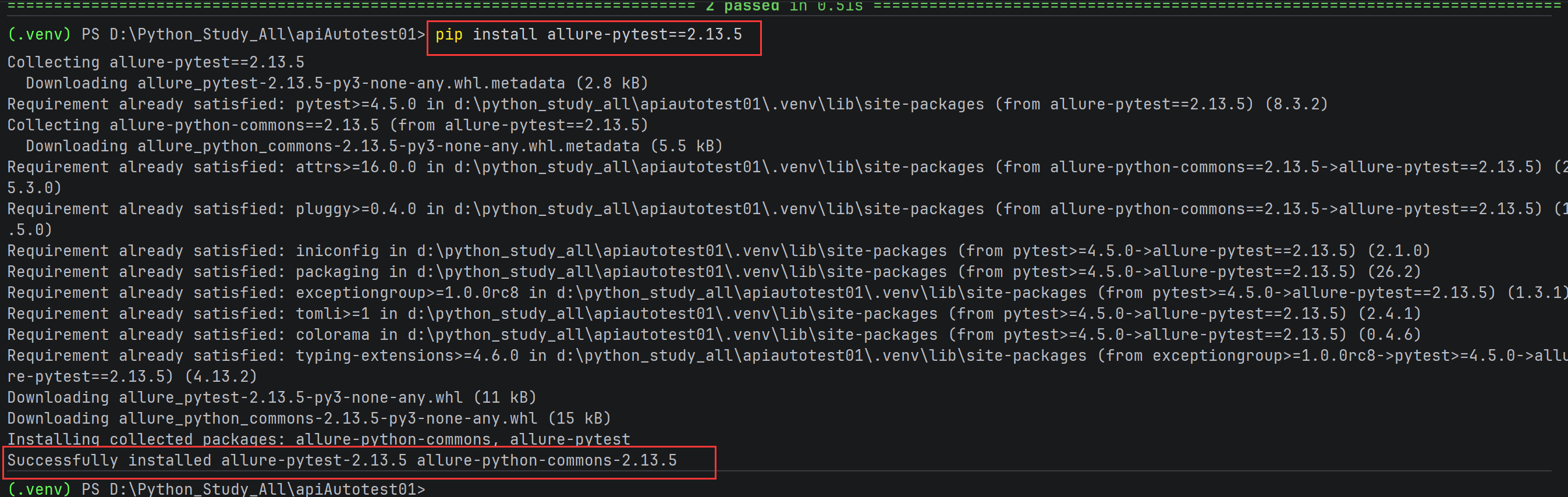
2.下载Windows版Allure报告
- 下载压缩包
下载链接: https://github.com/allure-framework/allure2/releases/download/2.30.0/allure-
2.30.0.zip
- 解压
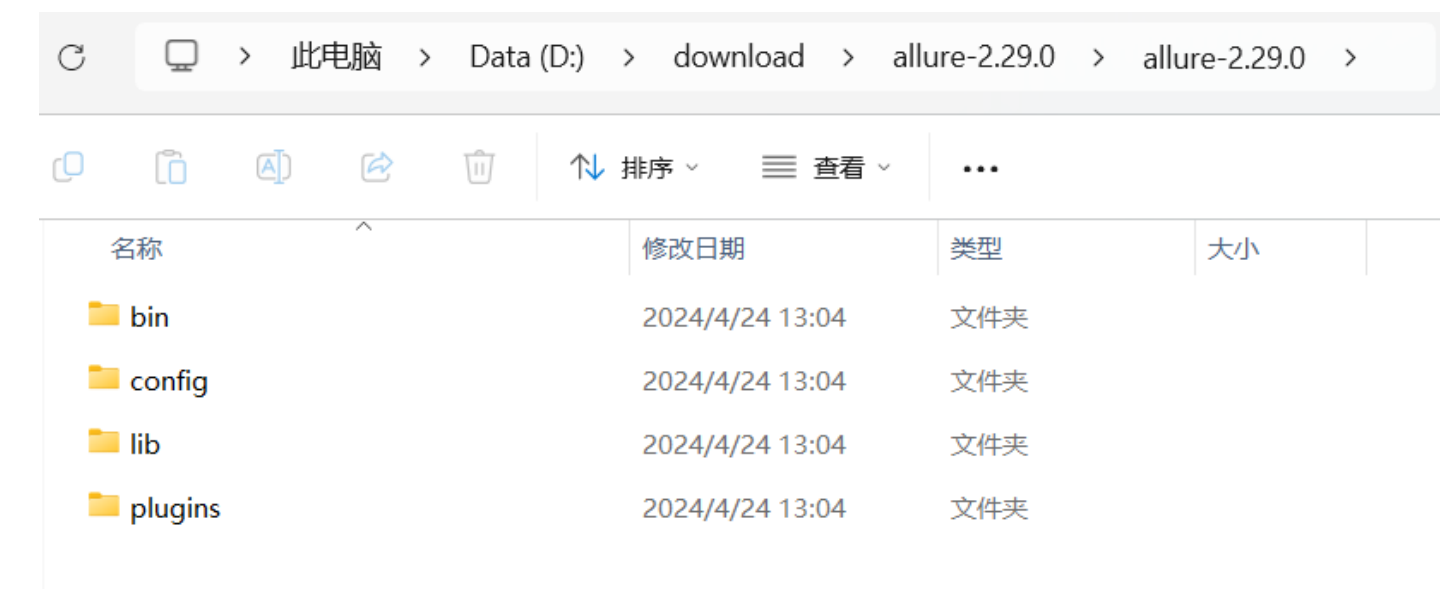
- 添加系统环境变量
将allure-2.29.0对应bin⽬录添加到系统环境变量中
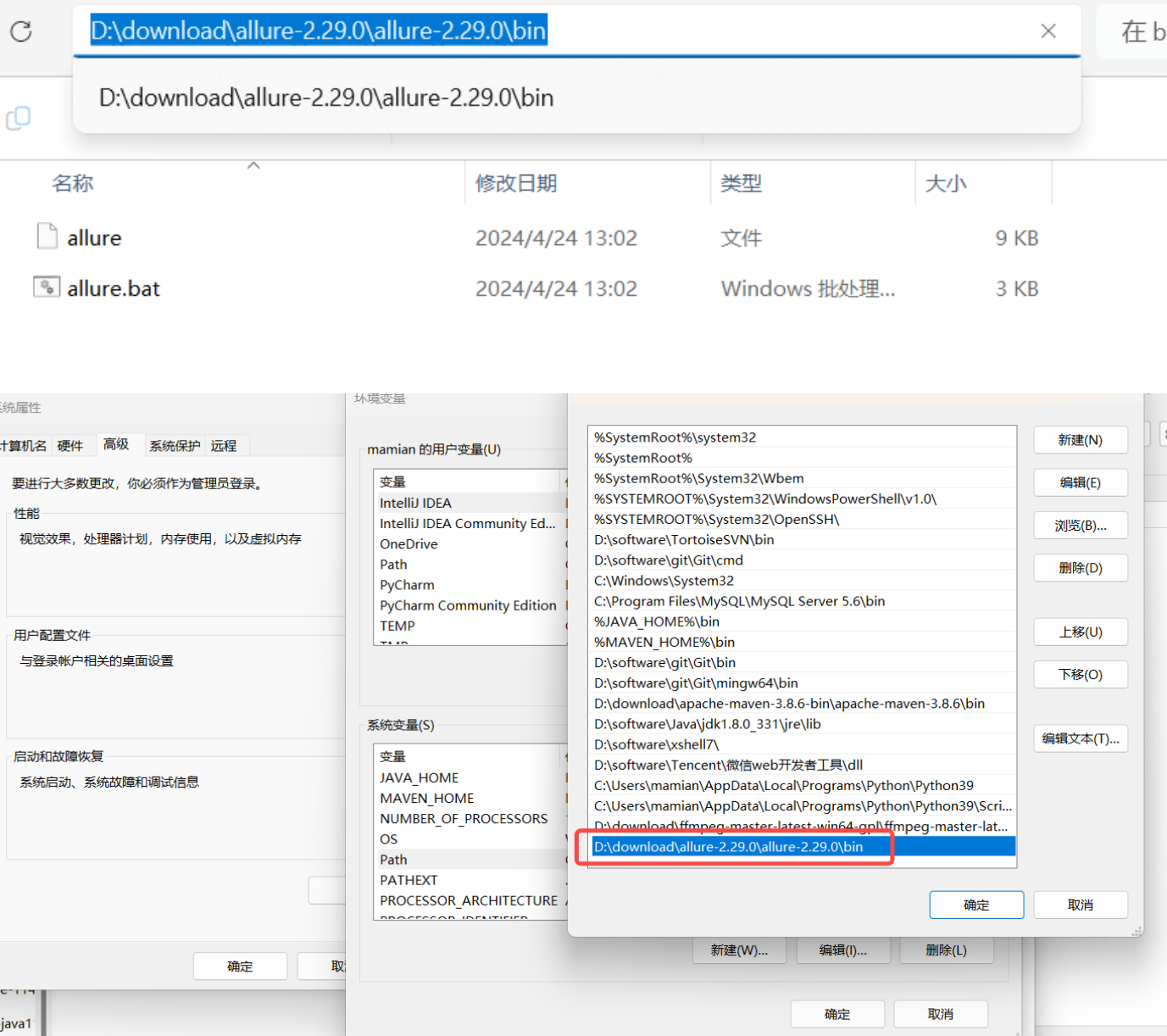
- 确认结果
打开cmd,查看allure版本
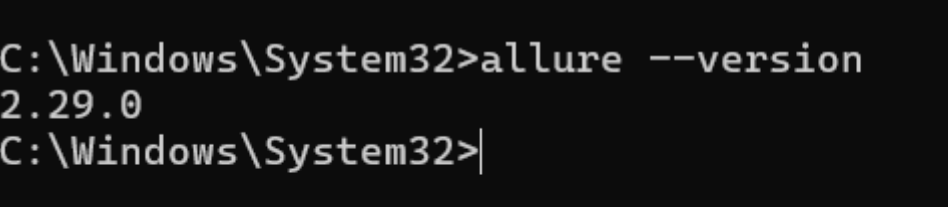
出现 allure 版本则安装成功。
主:若出现cmd中执行 allure --version 可以打印版本,但是pycharm控制台执⾏命令提
示命题找不到,则需要修改pycharm中命令⾏环境,如下:
保存后需要重启pycharm!!!!!!
检查pycharm中命令⾏是否可以使⽤allure命令
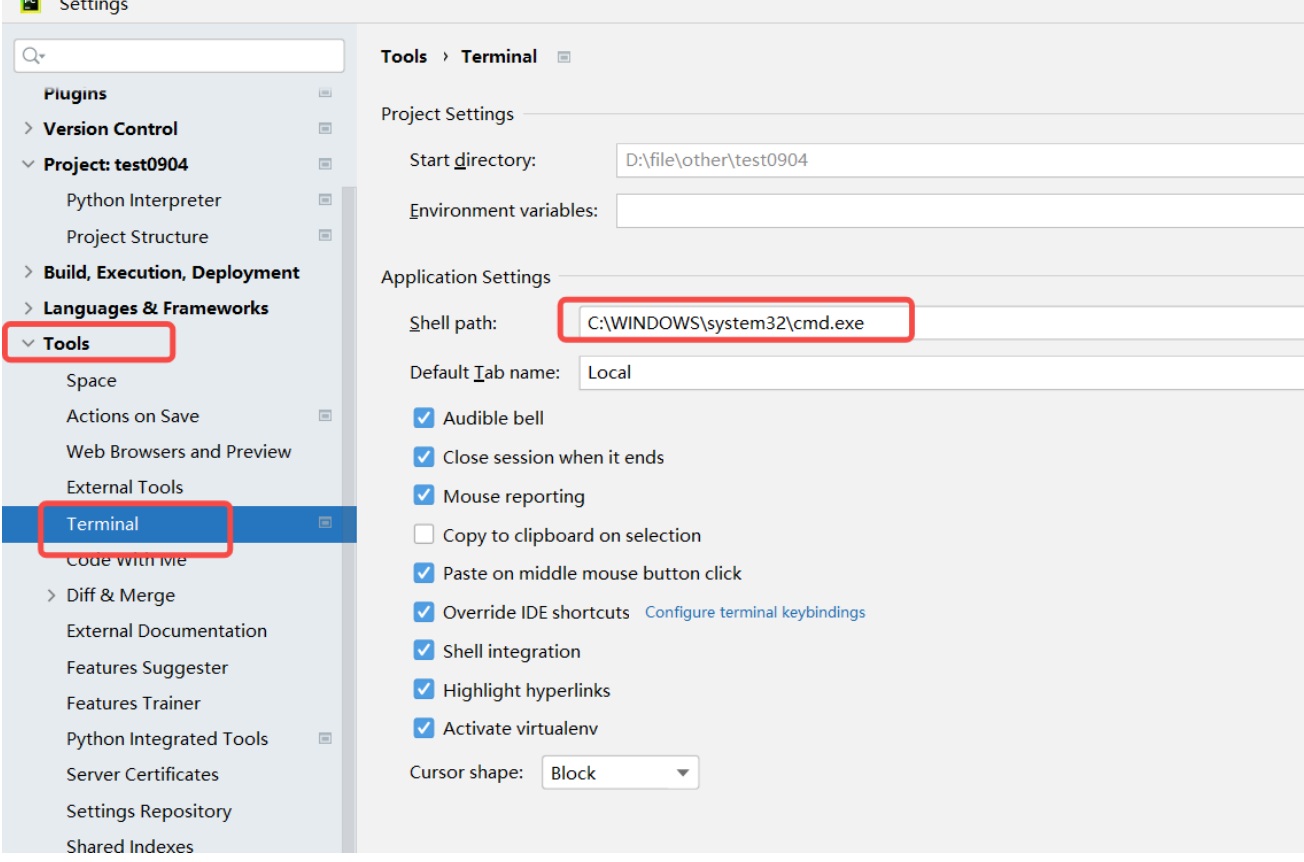
2.9.3 使用
step1:运行自动化,并指定测试报告放置路径
pytest --alluredir=allure-results(保存测试报告的路径)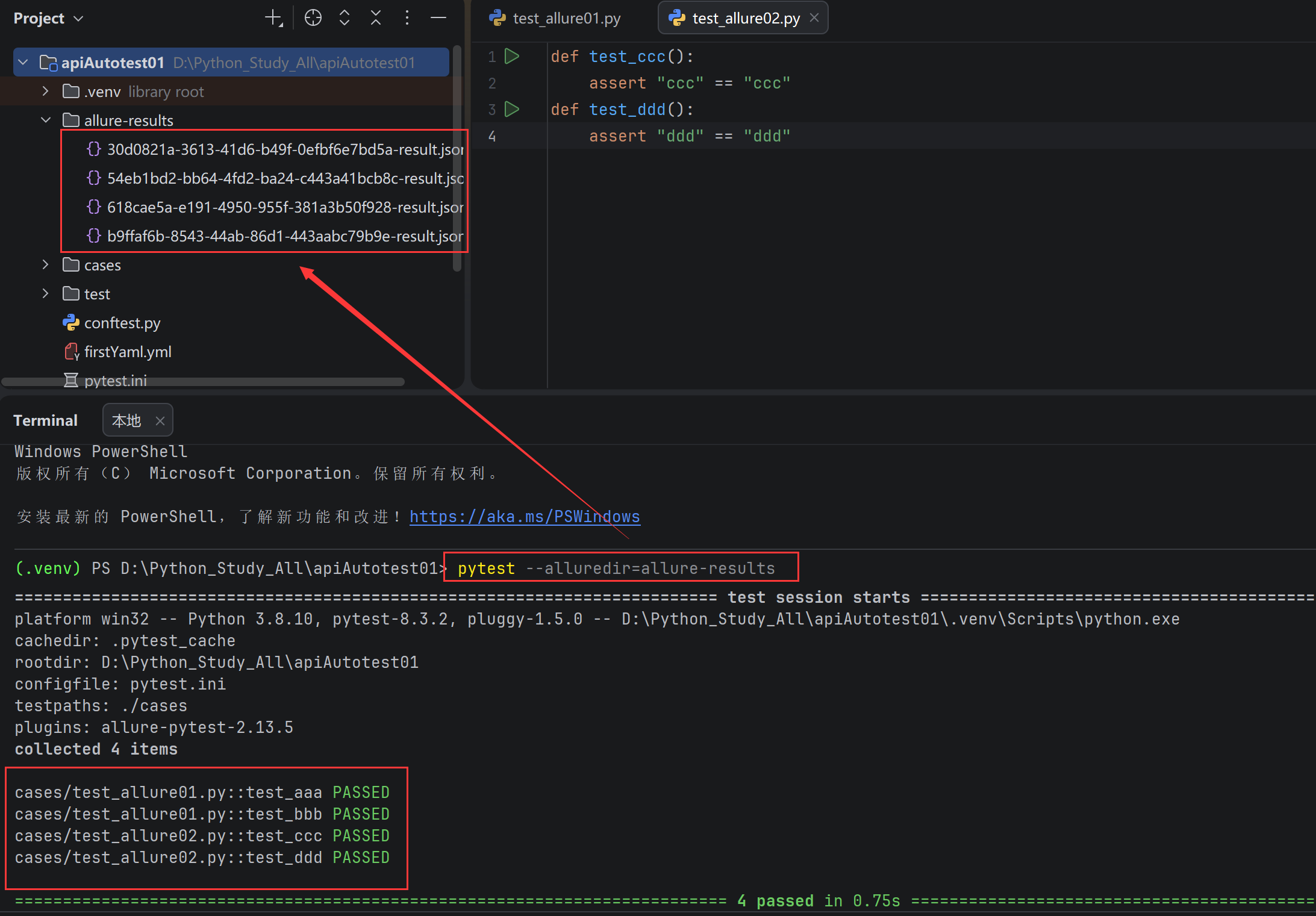
当前项⽬下⾃动⽣成 allre-results ⽂件夹,存放报告相关⽂件
⽣成测试报告可以在控制台通过命令将结果保存在 allre-results ⽂件夹中,也可以在
pytest.ini文件中配置测试报告放置路径
addopts = -vs --alluredir allure-results
step2:查看测试报告
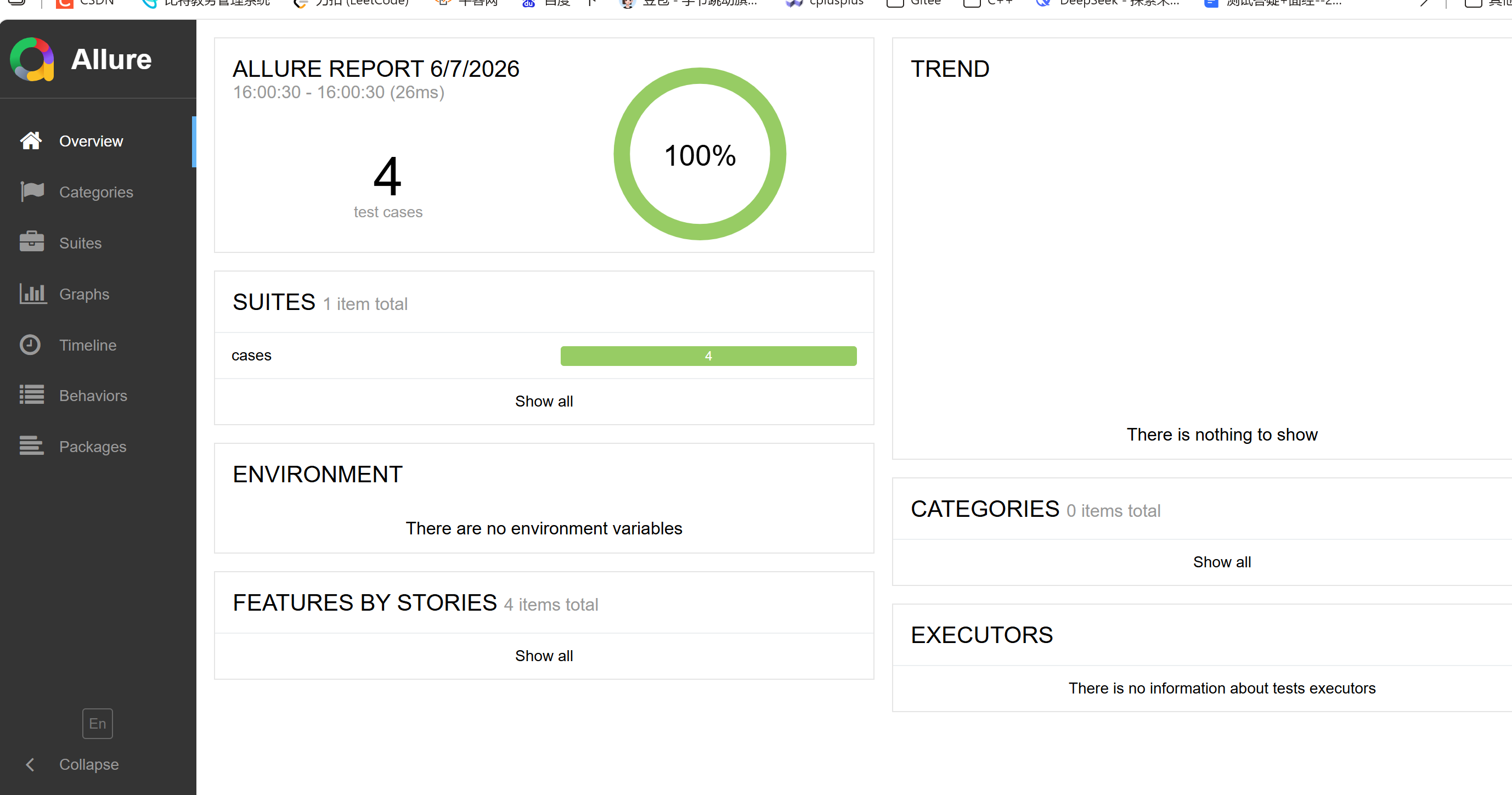
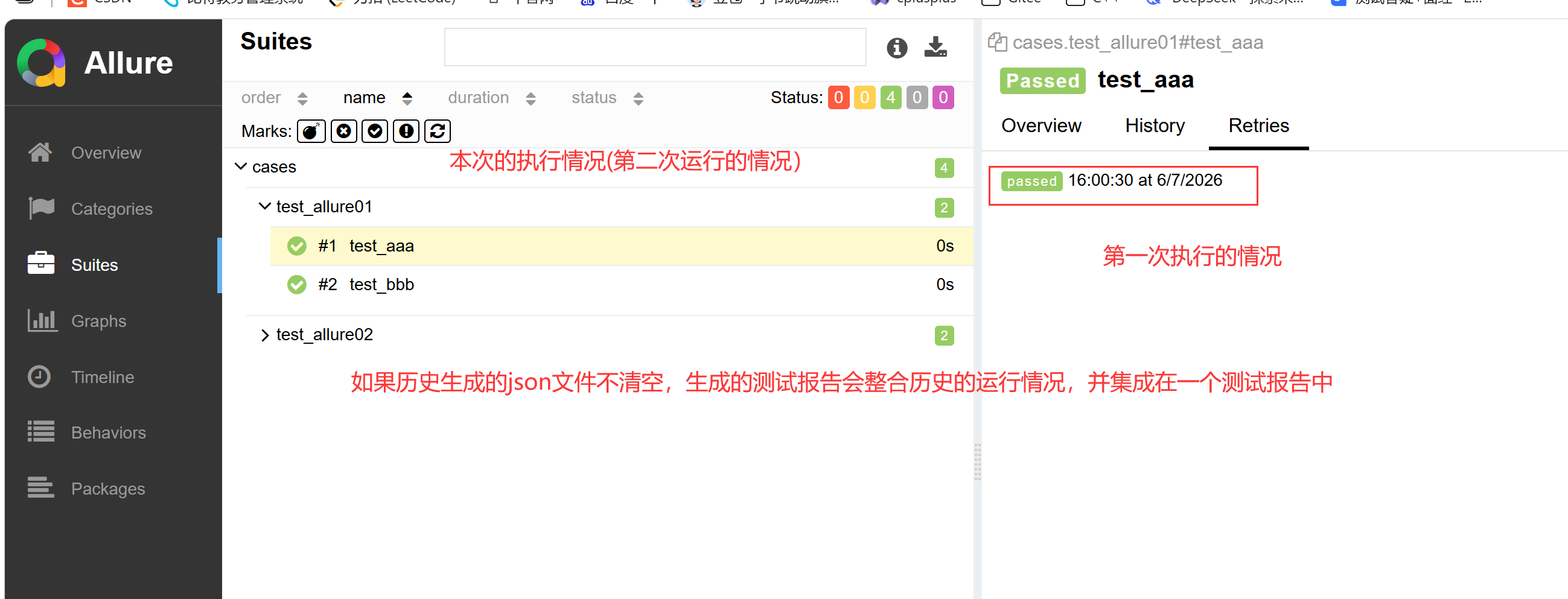
1)方法⼀:启动⼀个本地服务器来在浏览器中展示测试报告
终端执⾏命令: allure serve options <allure-results> ,自动在浏览器打开测试报告
- --host :指定服务器监听的主机地址,默认为 localhost。
- --port :指定服务器监听的端⼝号,默认为 0(自动选择空闲端口)
- --clean-alluredir :清除上⼀次⽣成的测试报告
示例:
#不指定端⼝号和主机地址
allure serve .\allure-results\

#指定端⼝号
#必须是空闲的端口号,不能被占用
allure serve --port 8787 .\allure-results\


#清除上⼀次⽣成的测试报告
allure serve .\allure-results\ --clean-alluredir
2)方法⼆:从测试结果生成测试报告
终端执行命令: allure generate options <allure-results> -o <reports>

⽰例:
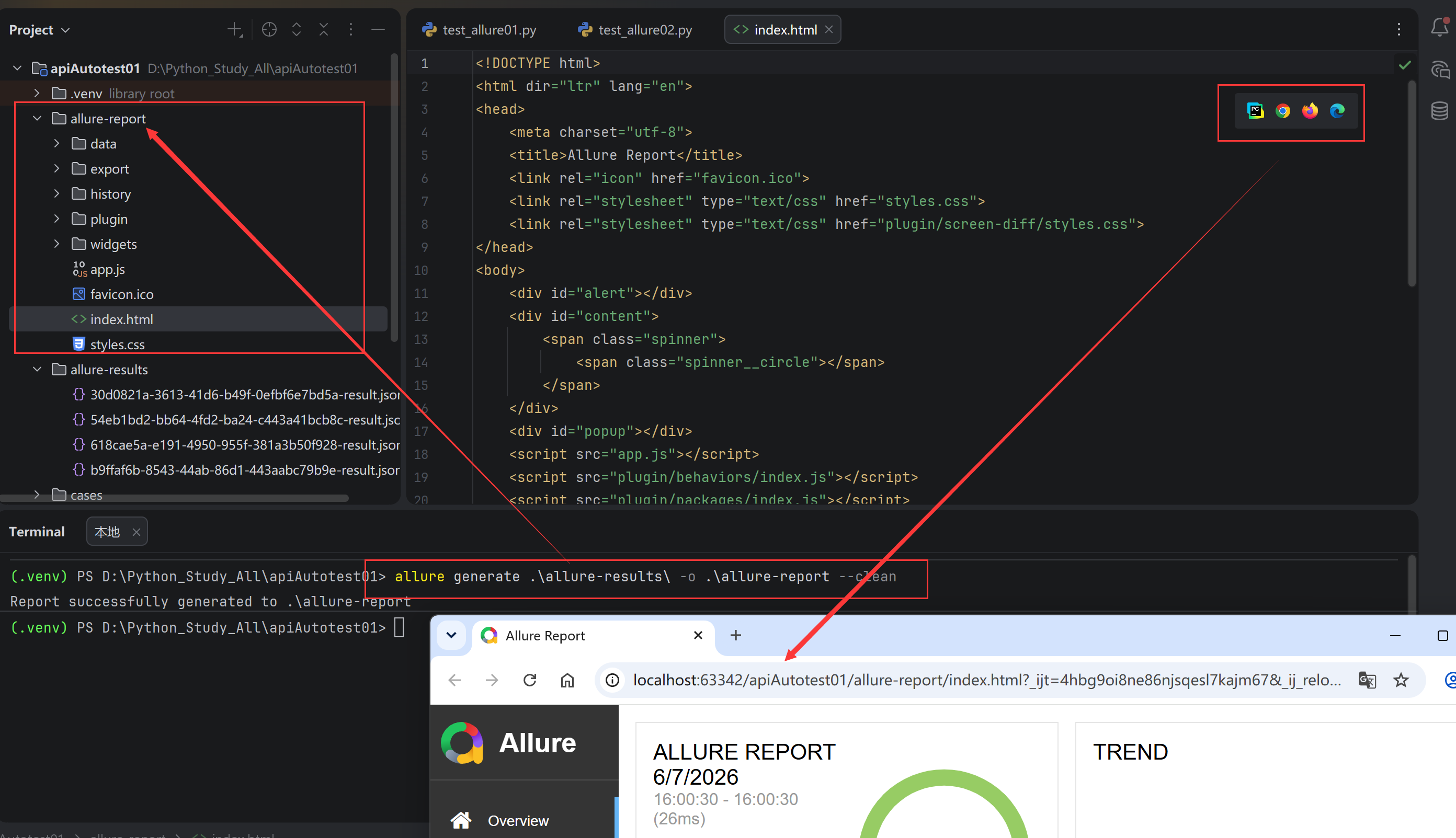
allure generate .\allure-results\ -o .\allure-report --clean
#--clean是生成新的html文件会将历史的html文件覆盖