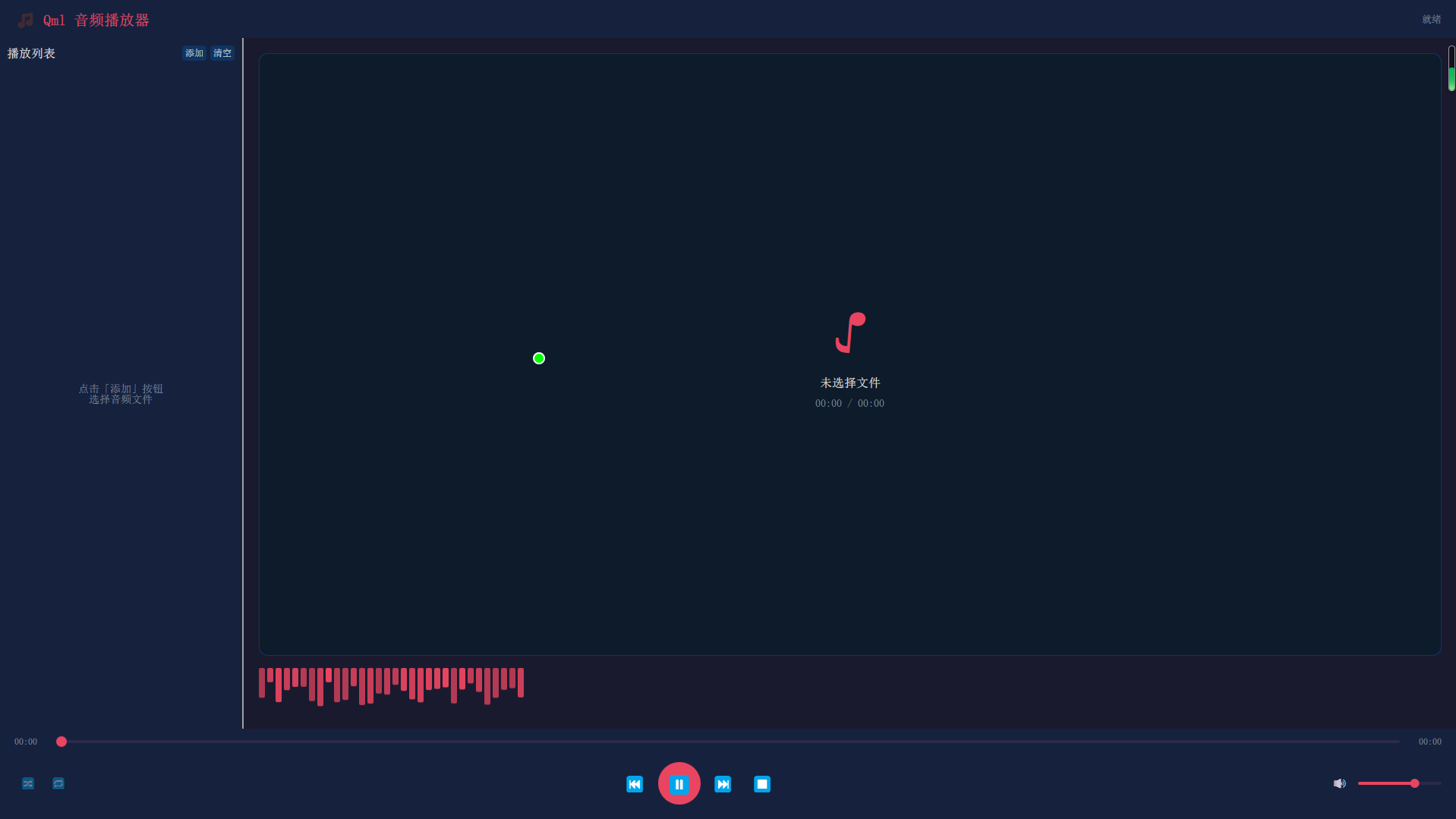
一、Qml 音频播放器程序
说明:跨平台选择MP3播放+跨平台自定义鼠标
QmlAudioPlayer.pro
bash
QT += quick multimedia quickcontrols2

CONFIG += c++17

# You can make your code fail to compile if it uses deprecated APIs.
# In order to do so, uncomment the following line.
#DEFINES += QT_DISABLE_DEPRECATED_BEFORE=0x060000    # disables all the APIs deprecated before Qt 6.0.0

SOURCES += \
    main.cpp

RESOURCES += qml.qrc

#指定编译产生的文件分门别类放到对应目录
MOC_DIR     = temp/moc
RCC_DIR     = temp/rcc
UI_DIR      = temp/ui
OBJECTS_DIR = temp/obj

#指定编译生成的可执行文件放到源码上一级目录下的bin目录 一般$$PWD/bin
!android:!ios {
DESTDIR = $$PWD/bin
}

# Additional import path used to resolve QML modules in Qt Creator's code model
QML_IMPORT_PATH =

# Additional import path used to resolve QML modules just for Qt Quick Designer
QML_DESIGNER_IMPORT_PATH =

# Default rules for deployment.
qnx: target.path = /tmp/$${TARGET}/bin
else: unix:!android: target.path = /opt/$${TARGET}/bin
!isEmpty(target.path): INSTALLS += target

HEADERS += \
    NativeMouseFilter.h
qml.qrc
bash
<RCC>
    <qresource prefix="/">
        <file>main.qml</file>
        <file>CustomCursor.qml</file>
    </qresource>
</RCC>
NativeMouseFilter.h
javascript
#ifndef NATIVEMOUSEFILTER_H
#define NATIVEMOUSEFILTER_H

#include <QObject>
#include <QDebug>
#include <QGuiApplication>
#include <QScreen>
#include <QCursor>
#include <QWindow>
// ================= 新增注入所需的头文件 =================
#include <QMouseEvent>
#include <QCoreApplication>
// ========================================================
//QCursor::setPos(x, y); // 影响Failed to move cursor on screen HDMI1: -14报错的罪魁祸首
// ================= 跨平台头文件引入 =================
#ifdef Q_OS_WIN
#ifndef NOMINMAX
#define NOMINMAX
#endif
#define WIN32_LEAN_AND_MEAN
#include <windows.h>
#include <windowsx.h>
#include <QAbstractNativeEventFilter>
#elif defined(Q_OS_LINUX) || defined(Q_OS_ANDROID)
#include <QThread>
// Linux evdev 头文件
#include <linux/input.h>
#include <fcntl.h>
#include <unistd.h>
#include <dirent.h>
#include <errno.h>
#include <string.h>
#endif

// ================= Linux: 直接读取 evdev 的后台线程 =================
#ifdef Q_OS_LINUX
class EvdevReader : public QThread {
    Q_OBJECT
public:
    explicit EvdevReader(QObject *parent = nullptr) : QThread(parent), m_running(false) {}

    void startReading() {
        m_running = true;
        start(QThread::HighPriority);
    }

    void stopReading() {
        m_running = false;
        quit();
        wait(1000);
    }

signals:
    void mouseMoved(int x, int y, bool absolute);
    void mouseButtonChanged(int button, bool pressed);
    // ================= 新增:滚轮信号 =================
    void mouseWheel(int y);
    // ================================================

protected:
    void run() override {
        // 1. 扫描 /dev/input/ 下所有鼠标设备
        QStringList mouseDevices = findMouseDevices();
        if (mouseDevices.isEmpty()) {
            qWarning() << "[EvdevReader] 未找到任何鼠标/触摸设备!";
            return;
        }
        qDebug() << "[EvdevReader] 找到设备:" << mouseDevices;

        // 2. 打开所有找到的设备
        QList<int> fds;
        for (const QString &dev : mouseDevices) {
            int fd = open(dev.toUtf8().constData(), O_RDONLY | O_NONBLOCK);
            if (fd < 0) {
                qWarning() << "[EvdevReader] 无法打开" << dev << ":" << strerror(errno);
                continue;
            }
            fds.append(fd);
            qDebug() << "[EvdevReader] 已打开" << dev << "fd=" << fd;
        }

        if (fds.isEmpty()) {
            qWarning() << "[EvdevReader] 没有成功打开任何设备";
            return;
        }

        int x = 0, y = 0;
        bool hasAbs = false;
        int absMinX = 0, absMaxX = 65535;
        int absMinY = 0, absMaxY = 65535;
        int screenW = 1920, screenH = 1080;

        // 获取屏幕分辨率
        if (!QGuiApplication::screens().isEmpty()) {
            QScreen *screen = QGuiApplication::primaryScreen();
            screenW = screen->size().width();
            screenH = screen->size().height();
        }

        // 3. 轮询读取事件
        fd_set readfds;
        int maxFd = 0;
        for (int fd : fds) {
            if (fd > maxFd) maxFd = fd;
        }

        while (m_running) {
            FD_ZERO(&readfds);
            for (int fd : fds) {
                FD_SET(fd, &readfds);
            }
            struct timeval tv;
            tv.tv_sec = 0;
            tv.tv_usec = 10000; // 10ms 超时

            int ret = select(maxFd + 1, &readfds, nullptr, nullptr, &tv);
            if (ret < 0) {
                if (errno == EINTR) continue;
                qWarning() << "[EvdevReader] select 错误:" << strerror(errno);
                break;
            }

            for (int fd : fds) {
                if (!FD_ISSET(fd, &readfds)) continue;

                struct input_event ev;
                while (read(fd, &ev, sizeof(ev)) == sizeof(ev)) {
                    if (ev.type == EV_ABS) {
                        hasAbs = true;
                        if (ev.code == ABS_X) {
                            x = mapAbs(ev.value, absMinX, absMaxX, screenW);
                        } else if (ev.code == ABS_Y) {
                            y = mapAbs(ev.value, absMinY, absMaxY, screenH);
                        }
                    } else if (ev.type == EV_REL) {
                        hasAbs = false;
                        if (ev.code == REL_X) {
                            x += ev.value;
                        } else if (ev.code == REL_Y) {
                            y += ev.value;
                        }
                        // ================= 新增:捕获滚轮事件 =================
                        else if (ev.code == REL_WHEEL) {
                            emit mouseWheel(ev.value);
                        }
                        // ====================================================
                    } else if (ev.type == EV_SYN && ev.code == SYN_REPORT) {
                        x = qBound(0, x, screenW - 1);
                        y = qBound(0, y, screenH - 1);
                        emit mouseMoved(x, y, hasAbs);
                    } else if (ev.type == EV_KEY) {
                        if (ev.code == BTN_LEFT || ev.code == BTN_RIGHT || ev.code == BTN_MIDDLE) {
                            int btn = (ev.code == BTN_LEFT) ? 0 : (ev.code == BTN_RIGHT) ? 1 : 2;
                            emit mouseButtonChanged(btn, ev.value == 1);
                        }
                    }
                }
            }
        }

        // 清理
        for (int fd : fds) {
            close(fd);
        }
    }

private:
    bool m_running;

    QStringList findMouseDevices() {
        QStringList devices;
        DIR *dir = opendir("/dev/input");
        if (!dir) return devices;

        struct dirent *entry;
        while ((entry = readdir(dir)) != nullptr) {
            if (strncmp(entry->d_name, "event", 5) == 0) {
                QString path = QString("/dev/input/") + entry->d_name;
                int fd = open(path.toUtf8().constData(), O_RDONLY | O_NONBLOCK);
                if (fd < 0) continue;

                unsigned long evBits[EV_MAX / 8 + 1] = {0};
                unsigned long relBits[REL_MAX / 8 + 1] = {0};
                unsigned long absBits[ABS_MAX / 8 + 1] = {0};
                unsigned long keyBits[KEY_MAX / 8 + 1] = {0};

                ioctl(fd, EVIOCGBIT(0, sizeof(evBits)), evBits);
                ioctl(fd, EVIOCGBIT(EV_REL, sizeof(relBits)), relBits);
                ioctl(fd, EVIOCGBIT(EV_ABS, sizeof(absBits)), absBits);
                ioctl(fd, EVIOCGBIT(EV_KEY, sizeof(keyBits)), keyBits);

                bool hasRelXY = testBit(relBits, REL_X) && testBit(relBits, REL_Y);
                bool hasAbsXY = testBit(absBits, ABS_X) && testBit(absBits, ABS_Y);
                bool hasMouseBtn = testBit(keyBits, BTN_LEFT);

                if (hasRelXY || (hasAbsXY && hasMouseBtn)) {
                    char name[256] = {0};
                    ioctl(fd, EVIOCGNAME(sizeof(name)), name);
                    qDebug() << "[EvdevReader] 发现鼠标设备:" << path << name << "relXY=" << hasRelXY << "absXY=" << hasAbsXY;
                    devices.append(path);
                }
                close(fd);
            }
        }
        closedir(dir);
        return devices;
    }

    bool testBit(const unsigned long *bits, int bit) {
        return (bits[bit / 8] >> (bit % 8)) & 1;
    }

    int mapAbs(int value, int min, int max, int targetRange) {
        if (max <= min) return 0;
        return (int)((long long)(value - min) * targetRange / (max - min));
    }
};
#endif // Q_OS_LINUX


// ================= 跨平台鼠标过滤器 =================
#ifdef Q_OS_WIN
class NativeMouseFilter : public QObject, public QAbstractNativeEventFilter
#elif defined(Q_OS_LINUX)
class NativeMouseFilter : public QObject
#endif
{
    Q_OBJECT
    Q_PROPERTY(int cursorX READ cursorX NOTIFY cursorPositionChanged)
    Q_PROPERTY(int cursorY READ cursorY NOTIFY cursorPositionChanged)
    Q_PROPERTY(bool buttonLeft READ buttonLeft NOTIFY buttonStateChanged)
    Q_PROPERTY(bool buttonRight READ buttonRight NOTIFY buttonStateChanged)
public:
    explicit NativeMouseFilter(QObject *parent = nullptr) : QObject(parent), m_targetWindow(nullptr)
    {
        m_x = 0;
        m_y = 0;
        m_buttonLeft = false;
        m_buttonRight = false;
        QPoint pos = QCursor::pos();
        m_x = pos.x();
        m_y = pos.y();

#ifdef Q_OS_LINUX
        qDebug() << "====== 鼠标拦截器启动(Linux 直接 evdev 模式)======";
        qDebug() << "初始坐标:" << m_x << m_y;

        m_reader = new EvdevReader(this);

        connect(m_reader, &EvdevReader::mouseMoved, this, [this](int x, int y, bool absolute) {
            Q_UNUSED(absolute)
            m_x = x;
            m_y = y;
            emit cursorPositionChanged();

            // ================= 修改:注入鼠标移动事件(携带正确的 buttons 状态) =================
            QWindow *targetWindow = m_targetWindow;
            if (!targetWindow) targetWindow = QGuiApplication::topLevelWindows().isEmpty() ? nullptr : QGuiApplication::topLevelWindows().first();
            if (targetWindow) {
                //QCursor::setPos(x, y);
                QPoint globalPos(x, y);
                QPointF localPos = targetWindow->mapFromGlobal(globalPos);

                // 【核心修正】获取当前实际按下的按钮状态
                Qt::MouseButtons currentButtons = getCurrentButtons();

                QMouseEvent *moveEvent = new QMouseEvent(
                    QEvent::MouseMove,
                    localPos,
                    localPos,
                    globalPos,
                    Qt::NoButton,      // button: Move事件本身不是由某个按钮触发的
                    currentButtons,    // buttons: 【关键】当前所有持续按下的按钮
                    Qt::NoModifier
                );
                QCoreApplication::postEvent(targetWindow, moveEvent);
            }
            // ========================================================
        });

        connect(m_reader, &EvdevReader::mouseButtonChanged, this, [this](int btn, bool pressed) {
            // 【核心修正】先更新内部按钮状态,确保后续事件使用最新状态
            Qt::MouseButton qtButton = Qt::NoButton;
            if (btn == 0) {
                m_buttonLeft = pressed;
                qtButton = Qt::LeftButton;
            } else if (btn == 1) {
                m_buttonRight = pressed;
                qtButton = Qt::RightButton;
            } else {
                qtButton = Qt::MiddleButton;
            }
            emit buttonStateChanged();

            // ================= 修改:注入鼠标点击事件(携带正确的 buttons 状态) =================
            QWindow *targetWindow = m_targetWindow;
            if (!targetWindow) targetWindow = QGuiApplication::topLevelWindows().isEmpty() ? nullptr : QGuiApplication::topLevelWindows().first();
            if (targetWindow) {
                QEvent::Type eventType = pressed ? QEvent::MouseButtonPress : QEvent::MouseButtonRelease;

                // 【核心修正】使用更新后的状态计算当前 buttons()
                Qt::MouseButtons currentButtons = getCurrentButtons();

                QPoint globalPos(m_x, m_y);
                QPointF localPos = targetWindow->mapFromGlobal(globalPos);

                QMouseEvent *btnEvent = new QMouseEvent(
                    eventType,
                    localPos,
                    localPos,
                    globalPos,
                    qtButton,       // button: 触发此事件的按钮
                    currentButtons, // buttons: 事件发生后(按下/释放)的当前按钮状态
                    Qt::NoModifier
                );
                QCoreApplication::postEvent(targetWindow, btnEvent);

                // 【核心修正】按下后立刻补发一个 MouseMove,确保 Qt 拖拽状态机正确初始化
                // 因为 Qt 的 drag 检测需要在 Press 之后立即收到一个带正确 buttons 的 Move
                if (pressed) {
                    QMouseEvent *moveEvent = new QMouseEvent(
                        QEvent::MouseMove,
                        localPos,
                        localPos,
                        globalPos,
                        Qt::NoButton,
                        currentButtons, // 包含刚刚按下的按钮
                        Qt::NoModifier
                    );
                    QCoreApplication::postEvent(targetWindow, moveEvent);
                }
            }
            // ========================================================
        });

        // ================= 修改:注入鼠标滚轮事件(携带正确的 buttons 状态) =================
        connect(m_reader, &EvdevReader::mouseWheel, this, [this](int y) {
            QWindow *targetWindow = m_targetWindow;
            if (!targetWindow) targetWindow = QGuiApplication::topLevelWindows().isEmpty() ? nullptr : QGuiApplication::topLevelWindows().first();
            if (targetWindow) {
                QPoint globalPos(m_x, m_y);
                QPointF localPos = targetWindow->mapFromGlobal(globalPos);

                // 【核心修正】获取当前按钮状态
                Qt::MouseButtons currentButtons = getCurrentButtons();

                QWheelEvent *wheelEvent = new QWheelEvent(
                    localPos,
                    globalPos,
                    QPoint(0, 0),
                    QPoint(0, y * 120),
                    currentButtons, // 【关键】使用当前按钮状态
                    Qt::NoModifier,
                    Qt::NoScrollPhase,
                    false
                );
                QCoreApplication::postEvent(targetWindow, wheelEvent);
            }
        });
        // ========================================================

        m_reader->startReading();

#elif defined(Q_OS_WIN)
        qDebug() << "====== 鼠标拦截器启动(Windows nativeEventFilter 模式)======";
        qDebug() << "初始坐标:" << m_x << m_y;
        // Windows: 使用 installNativeEventFilter 安装,在 nativeEventFilter 中处理
#endif
    }

    ~NativeMouseFilter() {
#ifdef Q_OS_LINUX
        if (m_reader) {
            m_reader->stopReading();
            m_reader->deleteLater();
        }
#endif
    }

    // ================= 新增:设置目标窗口方法 =================
    void setTargetWindow(QWindow *window) {
        m_targetWindow = window;
    }
    // ========================================================

    int cursorX() const { return m_x; }
    int cursorY() const { return m_y; }
    bool buttonLeft() const { return m_buttonLeft; }
    bool buttonRight() const { return m_buttonRight; }

signals:
    void cursorPositionChanged();
    void buttonStateChanged();

#ifdef Q_OS_WIN
protected:
#if QT_VERSION < QT_VERSION_CHECK(6, 0, 0)
    bool nativeEventFilter(const QByteArray &eventType, void *message, long *result) override {
#else
    bool nativeEventFilter(const QByteArray &eventType, void *message, qintptr *result) override {
#endif
        Q_UNUSED(result)
        if (eventType == "windows_generic_MSG" || eventType == "windows_dispatcher_MSG") {
            MSG* msg = static_cast<MSG*>(message);
            if (msg->message == WM_MOUSEMOVE) {
                m_x = GET_X_LPARAM(msg->lParam);
                m_y = GET_Y_LPARAM(msg->lParam);
                emit cursorPositionChanged();
                qDebug() << "[Windows Native] X:" << m_x << "Y:" << m_y;
            } else if (msg->message == WM_LBUTTONDOWN || msg->message == WM_LBUTTONUP) {
                m_buttonLeft = (msg->message == WM_LBUTTONDOWN);
                emit buttonStateChanged();
            } else if (msg->message == WM_RBUTTONDOWN || msg->message == WM_RBUTTONUP) {
                m_buttonRight = (msg->message == WM_RBUTTONDOWN);
                emit buttonStateChanged();
            }
        }
        return false; // 不拦截,继续传递
    }
#endif

private:
    int m_x, m_y;
    bool m_buttonLeft, m_buttonRight;

    // ================= 新增:目标窗口变量 =================
    QWindow *m_targetWindow;
    // ========================================================

    // ================= 新增:获取当前按钮状态辅助函数 =================
    Qt::MouseButtons getCurrentButtons() const {
        Qt::MouseButtons buttons = Qt::NoButton;
        if (m_buttonLeft) buttons |= Qt::LeftButton;
        if (m_buttonRight) buttons |= Qt::RightButton;
        return buttons;
    }
    // ========================================================

#ifdef Q_OS_LINUX
    EvdevReader *m_reader = nullptr;
#endif
};

#endif // NATIVEMOUSEFILTER_H
main.cpp
bash
#include <QGuiApplication>
#include <QQmlApplicationEngine>
#include <QQmlContext>
#include <QQuickStyle>
#include <QQuickWindow> // 修复2:必须引入此头文件
#include "NativeMouseFilter.h"

int main(int argc, char *argv[])
{
    QCoreApplication::setAttribute(Qt::AA_EnableHighDpiScaling);


#ifdef Q_OS_LINUX
    qputenv("QT_QPA_EGLFS_DISABLE_INPUT", "1");
    qputenv("QT_QPA_EGLFS_HIDECURSOR", "1");
    qputenv("QT_QPA_PLATFORM", "eglfs");
    qputenv("QT_OPENGL", "es2");
    qputenv("QT_QPA_EGLFS_INTEGRATION", "eglfs_kms");
#endif

    QGuiApplication app(argc, argv);

    NativeMouseFilter *mouseFilter = new NativeMouseFilter(&app);
#ifdef Q_OS_WIN
    app.installNativeEventFilter(mouseFilter);
#endif


    app.setOrganizationName("QmlAudioPlayer");
    app.setApplicationName("Qml Audio Player");

    // 使用 Fusion 风格,在 Linux 上表现一致
    QQuickStyle::setStyle("Fusion");

    QQmlApplicationEngine engine;

    engine.rootContext()->setContextProperty("nativeMouse", mouseFilter);

    const QUrl url(QStringLiteral("qrc:/main.qml"));
    QObject::connect(&engine, &QQmlApplicationEngine::objectCreated,
                     &app, [url](QObject *obj, const QUrl &objUrl) {
        if (!obj && url == objUrl)
            QCoreApplication::exit(-1);
    }, Qt::QueuedConnection);

    engine.load(url);

    return app.exec();
}
main.qml
javascript
// -*- coding: utf-8 -*-
import QtQuick 2.15
import QtQuick.Window 2.15
import QtQuick.Controls 2.15
import QtQuick.Layouts 1.15
import QtQuick.Dialogs 1.3 // FileDialog
import QtMultimedia 5.15
Window {
id: root
visible: true
width: 900
height: 640
minimumWidth: 700
minimumHeight: 500
title: qsTr("Qml 音频播放器")
visibility: Window.FullScreen
// ==================== 颜色主题 ====================
readonly property color bgColor: "#1a1a2e"
readonly property color panelColor: "#16213e"
readonly property color accentColor: "#0f3460"
readonly property color highlightColor:"#e94560"
readonly property color textColor: "#eaeaea"
readonly property color dimTextColor: "#8899aa"
readonly property color sliderTrack: "#2a2a4a"
color: bgColor
CustomCursor{
// 【保持不变】正确使用 Overlay.overlay
// parent: Overlay.overlay
z: 9999 // 确保在最上层
anchors.fill: parent
curScreenWidth: mainContainer.screenWidth
curScreenHeight:mainContainer.screenHeight
// 【关键】确保光标始终可见
cursorVisible: true
onMPositionChanged: {
//console.log("鼠标:", mouse.x, mouse.y);
}
}
// ==================== 音频引擎 ====================
Audio {
id: audioPlayer
property bool manualStop: false
// 播放结束自动下一首
onStatusChanged: {
if (status === Audio.EndOfMedia && !manualStop) {
playNext();
}
}
onError: {
console.error("Audio error:", errorString);
statusText.text = qsTr("播放错误: ") + errorString;
}
onPlaying: {
statusText.text = qsTr("正在播放");
}
onPaused: {
statusText.text = qsTr("已暂停");
}
onStopped: {
if (manualStop) {
statusText.text = qsTr("已停止");
manualStop = false;
}
}
}
// ==================== 播放列表数据 ====================
ListModel {
id: playlistModel
}
// ==================== 当前播放索引 ====================
property int currentIndex: -1
property bool shuffleMode: false
property int repeatMode: 0 // 0: 不重复, 1: 列表循环, 2: 单曲循环
// ==================== 辅助函数 ====================
function formatTime(ms) {
if (isNaN(ms) || ms <= 0) return "00:00";
var totalSeconds = Math.floor(ms / 1000);
var minutes = Math.floor(totalSeconds / 60);
var seconds = totalSeconds % 60;
return (minutes < 10 ? "0" : "") + minutes + ":" + (seconds < 10 ? "0" : "") + seconds;
}
function playNext() {
if (playlistModel.count === 0) return;
if (repeatMode === 2) { // 单曲循环
audioPlayer.seek(0);
audioPlayer.play();
return;
}
var nextIndex = -1;
if (shuffleMode) {
nextIndex = Math.floor(Math.random() * playlistModel.count);
} else {
nextIndex = (currentIndex + 1) % playlistModel.count;
}
if (nextIndex === 0 && repeatMode === 0 && !shuffleMode) {
// 不重复模式,播放到列表末尾停止
audioPlayer.stop();
return;
}
currentIndex = nextIndex;
playCurrentTrack();
}
function playPrevious() {
if (playlistModel.count === 0) return;
// 如果已播放超过3秒,则重新播放当前曲目
if (audioPlayer.position > 3000) {
audioPlayer.seek(0);
return;
}
var prevIndex = -1;
if (shuffleMode) {
prevIndex = Math.floor(Math.random() * playlistModel.count);
} else {
prevIndex = (currentIndex - 1 + playlistModel.count) % playlistModel.count;
}
currentIndex = prevIndex;
playCurrentTrack();
}
function playCurrentTrack() {
if (currentIndex < 0 || currentIndex >= playlistModel.count) return;
var track = playlistModel.get(currentIndex);
audioPlayer.source = track.filePath;
audioPlayer.play();
statusText.text = qsTr("正在播放: ") + track.fileName;
}
function addToPlaylist(fileUrl, fileName) {
// 检查是否已存在
for (var i = 0; i < playlistModel.count; i++) {
if (playlistModel.get(i).filePath === fileUrl) {
return;
}
}
playlistModel.append({ "filePath": fileUrl, "fileName": fileName });
}
function removeFromPlaylist(index) {
if (index < 0 || index >= playlistModel.count) return;
// 如果删除的是当前播放的曲目
if (index === currentIndex) {
audioPlayer.stop();
audioPlayer.manualStop = true;
if (playlistModel.count > 1) {
playlistModel.remove(index);
if (currentIndex >= playlistModel.count) {
currentIndex = 0;
}
playCurrentTrack();
} else {
playlistModel.remove(index);
currentIndex = -1;
audioPlayer.source = "";
statusText.text = qsTr("播放列表为空");
}
} else {
playlistModel.remove(index);
// 调整当前索引
if (index < currentIndex) {
currentIndex--;
}
}
}
function clearPlaylist() {
audioPlayer.stop();
audioPlayer.manualStop = true;
audioPlayer.source = "";
playlistModel.clear();
currentIndex = -1;
statusText.text = qsTr("播放列表已清空");
}
// ==================== 文件选择对话框 ====================
FileDialog {
id: fileDialog
title: qsTr("选择音频文件")
folder: shortcuts.home
selectMultiple: true
nameFilters: [
"音频文件 (*.mp3 *.wav *.ogg *.flac *.aac *.wma *.m4a)",
"MP3 文件 (*.mp3)",
"WAV 文件 (*.wav)",
"OGG 文件 (*.ogg)",
"FLAC 文件 (*.flac)",
"所有文件 (*)"
]
onAccepted: {
var urls = fileDialog.fileUrls;
for (var i = 0; i < urls.length; i++) {
var path = urls[i].toString();
// 提取文件名
var parts = path.split("/");
var name = decodeURIComponent(parts[parts.length - 1]);
addToPlaylist(path, name);
}
// 如果当前没有播放,自动开始播放第一个
if (currentIndex === -1 && playlistModel.count > 0) {
currentIndex = 0;
playCurrentTrack();
}
}
}
// ==================== 主布局 ====================
ColumnLayout {
anchors.fill: parent
spacing: 0
// ========== 顶部标题栏 ==========
Rectangle {
Layout.fillWidth: true
Layout.preferredHeight: 50
color: panelColor
RowLayout {
anchors.fill: parent
anchors.leftMargin: 20
anchors.rightMargin: 20
Text {
text: "🎵 Qml 音频播放器"
color: highlightColor
font.pixelSize: 20
font.bold: true
}
Item { Layout.fillWidth: true }
Text {
id: statusText
text: qsTr("就绪")
color: dimTextColor
font.pixelSize: 13
}
}
}
// ========== 中间内容区 ==========
SplitView {
Layout.fillWidth: true
Layout.fillHeight: true
orientation: Qt.Horizontal
// ===== 左侧:播放列表 =====
Rectangle {
SplitView.minimumWidth: 250
SplitView.preferredWidth: 320
color: panelColor
ColumnLayout {
anchors.fill: parent
anchors.margins: 10
spacing: 8
// 播放列表标题和操作按钮
RowLayout {
Layout.fillWidth: true
Text {
text: qsTr("播放列表")
color: textColor
font.pixelSize: 16
font.bold: true
}
Item { Layout.fillWidth: true }
Button {
text: qsTr("添加")
font.pixelSize: 12
onClicked: fileDialog.open()
background: Rectangle {
color: parent.pressed ? highlightColor : accentColor
radius: 4
}
contentItem: Text {
text: parent.text
color: "white"
font: parent.font
horizontalAlignment: Text.AlignHCenter
verticalAlignment: Text.AlignVCenter
}
}
Button {
text: qsTr("清空")
font.pixelSize: 12
onClicked: clearPlaylist()
background: Rectangle {
color: parent.pressed ? highlightColor : accentColor
radius: 4
}
contentItem: Text {
text: parent.text
color: "white"
font: parent.font
horizontalAlignment: Text.AlignHCenter
verticalAlignment: Text.AlignVCenter
}
}
}
// 播放列表
ListView {
id: playlistView
Layout.fillWidth: true
Layout.fillHeight: true
clip: true
model: playlistModel
highlight: Rectangle { color: accentColor; radius: 4 }
highlightMoveDuration: 200
delegate: Rectangle {
width: playlistView.width
height: 44
color: index === currentIndex ? accentColor : (mouseArea.containsMouse ? "#1e2d4a" : "transparent")
radius: 4
RowLayout {
anchors.fill: parent
anchors.leftMargin: 10
anchors.rightMargin: 10
spacing: 8
// 播放指示器
Text {
text: index === currentIndex && audioPlayer.playing ? "▶" : ""
color: highlightColor
font.pixelSize: 14
Layout.preferredWidth: 16
}
// 序号
Text {
text: (index + 1) + "."
color: dimTextColor
font.pixelSize: 12
Layout.preferredWidth: 28
}
// 文件名
Text {
text: fileName
color: index === currentIndex ? highlightColor : textColor
font.pixelSize: 13
elide: Text.ElideRight
Layout.fillWidth: true
}
// 删除按钮
Button {
text: "✕"
font.pixelSize: 11
Layout.preferredWidth: 24
Layout.preferredHeight: 24
background: Rectangle { color: "transparent" }
contentItem: Text {
text: parent.text
color: dimTextColor
font: parent.font
horizontalAlignment: Text.AlignHCenter
verticalAlignment: Text.AlignVCenter
}
onClicked: removeFromPlaylist(index)
}
}
MouseArea {
id: mouseArea
anchors.fill: parent
hoverEnabled: true
onDoubleClicked: {
currentIndex = index;
playCurrentTrack();
}
}
}
// 空列表提示
Text {
anchors.centerIn: parent
text: qsTr("点击「添加」按钮\n选择音频文件")
color: dimTextColor
font.pixelSize: 14
horizontalAlignment: Text.AlignHCenter
visible: playlistModel.count === 0
}
}
}
}
// ===== 右侧:可视化区域 =====
Rectangle {
SplitView.minimumWidth: 300
color: bgColor
ColumnLayout {
anchors.fill: parent
anchors.margins: 20
spacing: 16
// 专辑/封面占位区域
Rectangle {
Layout.fillWidth: true
Layout.fillHeight: true
color: "#0d1b2a"
radius: 12
border.color: accentColor
border.width: 1
ColumnLayout {
anchors.centerIn: parent
spacing: 12
// 旋转的音符图标
Text {
text: "♪"
color: highlightColor
font.pixelSize: 80
Layout.alignment: Qt.AlignHCenter
RotationAnimation on rotation {
from: 0
to: 360
duration: 4000
loops: Animation.Infinite
running: audioPlayer.playing
}
}
Text {
text: currentIndex >= 0 ? playlistModel.get(currentIndex).fileName : qsTr("未选择文件")
color: textColor
font.pixelSize: 16
font.bold: true
Layout.alignment: Qt.AlignHCenter
Layout.maximumWidth: parent.parent.width - 40
elide: Text.ElideMiddle
horizontalAlignment: Text.AlignHCenter
}
Text {
text: formatTime(audioPlayer.position) + " / " + formatTime(audioPlayer.duration)
color: dimTextColor
font.pixelSize: 14
Layout.alignment: Qt.AlignHCenter
}
}
}
// 频谱可视化占位(简单柱状动画)
Row {
Layout.fillWidth: true
Layout.preferredHeight: 60
Layout.alignment: Qt.AlignHCenter
spacing: 3
Repeater {
model: 32
Rectangle {
width: (root.width - 640) / 32 - 3 > 8 ? 8 : (root.width - 640) / 32 - 3
height: audioPlayer.playing ? (10 + Math.random() * 50) : 5
color: highlightColor
radius: 2
opacity: 0.7 + Math.random() * 0.3
Behavior on height { NumberAnimation { duration: 150 } }
Timer {
interval: 150
running: audioPlayer.playing
repeat: true
onTriggered: parent.height = 10 + Math.random() * 50
}
}
}
}
}
}
}
// ========== 底部控制栏 ==========
Rectangle {
Layout.fillWidth: true
Layout.preferredHeight: 120
color: panelColor
ColumnLayout {
anchors.fill: parent
anchors.leftMargin: 20
anchors.rightMargin: 20
anchors.topMargin: 8
anchors.bottomMargin: 8
spacing: 6
// ===== 进度条 =====
RowLayout {
Layout.fillWidth: true
spacing: 10
Text {
text: formatTime(audioPlayer.position)
color: dimTextColor
font.pixelSize: 12
Layout.preferredWidth: 45
}
Slider {
id: progressSlider
Layout.fillWidth: true
from: 0
to: audioPlayer.duration > 0 ? audioPlayer.duration : 1
value: audioPlayer.position
onMoved: {
audioPlayer.seek(value);
}
background: Rectangle {
x: progressSlider.leftPadding
y: progressSlider.topPadding + progressSlider.availableHeight / 2 - height / 2
width: progressSlider.availableWidth
height: 4
radius: 2
color: sliderTrack
Rectangle {
width: progressSlider.visualPosition * parent.width
height: parent.height
radius: 2
color: highlightColor
}
}
handle: Rectangle {
x: progressSlider.leftPadding + progressSlider.visualPosition * (progressSlider.availableWidth - width)
y: progressSlider.topPadding + progressSlider.availableHeight / 2 - height / 2
width: 14
height: 14
radius: 7
color: progressSlider.pressed ? "#ff6b81" : highlightColor
}
}
Text {
text: formatTime(audioPlayer.duration)
color: dimTextColor
font.pixelSize: 12
Layout.preferredWidth: 45
horizontalAlignment: Text.AlignRight
}
}
// ===== 控制按钮行 =====
RowLayout {
Layout.fillWidth: true
spacing: 6
// 左侧:模式按钮
RowLayout {
spacing: 4
// 随机播放
Button {
id: shuffleBtn
Layout.preferredWidth: 36
Layout.preferredHeight: 36
background: Rectangle { color: "transparent"; radius: 4 }
contentItem: Text {
text: "🔀"
font.pixelSize: 16
horizontalAlignment: Text.AlignHCenter
verticalAlignment: Text.AlignVCenter
opacity: shuffleMode ? 1.0 : 0.4
}
onClicked: shuffleMode = !shuffleMode
ToolTip.visible: pressed
ToolTip.text: shuffleMode ? qsTr("关闭随机播放") : qsTr("开启随机播放")
}
// 循环模式
Button {
id: repeatBtn
Layout.preferredWidth: 36
Layout.preferredHeight: 36
background: Rectangle { color: "transparent"; radius: 4 }
contentItem: Text {
text: repeatMode === 2 ? "🔂" : "🔁"
font.pixelSize: 16
horizontalAlignment: Text.AlignHCenter
verticalAlignment: Text.AlignVCenter
opacity: repeatMode > 0 ? 1.0 : 0.4
}
onClicked: repeatMode = (repeatMode + 1) % 3
ToolTip.visible: pressed
ToolTip.text: repeatMode === 0 ? qsTr("不重复") : (repeatMode === 1 ? qsTr("列表循环") : qsTr("单曲循环"))
}
}
Item { Layout.fillWidth: true }
// 中间:播放控制
RowLayout {
spacing: 8
Layout.alignment: Qt.AlignHCenter
// 上一首
Button {
Layout.preferredWidth: 44
Layout.preferredHeight: 44
background: Rectangle {
color: parent.pressed ? accentColor : "transparent"
radius: 22
}
contentItem: Text {
text: "⏮"
font.pixelSize: 22
color: textColor
horizontalAlignment: Text.AlignHCenter
verticalAlignment: Text.AlignVCenter
}
onClicked: playPrevious()
}
// 播放/暂停
Button {
Layout.preferredWidth: 56
Layout.preferredHeight: 56
background: Rectangle {
color: highlightColor
radius: 28
scale: parent.pressed ? 0.95 : 1.0
}
contentItem: Text {
text: audioPlayer.playing ? "⏸" : "▶"
font.pixelSize: 26
color: "white"
horizontalAlignment: Text.AlignHCenter
verticalAlignment: Text.AlignVCenter
}
onClicked: {
if (audioPlayer.playing) {
audioPlayer.pause();
} else if (playlistModel.count > 0) {
if (currentIndex === -1) currentIndex = 0;
if (audioPlayer.source.toString() === "") {
playCurrentTrack();
} else {
audioPlayer.play();
}
}
}
}
// 下一首
Button {
Layout.preferredWidth: 44
Layout.preferredHeight: 44
background: Rectangle {
color: parent.pressed ? accentColor : "transparent"
radius: 22
}
contentItem: Text {
text: "⏭"
font.pixelSize: 22
color: textColor
horizontalAlignment: Text.AlignHCenter
verticalAlignment: Text.AlignVCenter
}
onClicked: playNext()
}
// 停止
Button {
Layout.preferredWidth: 44
Layout.preferredHeight: 44
background: Rectangle {
color: parent.pressed ? accentColor : "transparent"
radius: 22
}
contentItem: Text {
text: "⏹"
font.pixelSize: 22
color: textColor
horizontalAlignment: Text.AlignHCenter
verticalAlignment: Text.AlignVCenter
}
onClicked: {
audioPlayer.manualStop = true;
audioPlayer.stop();
}
}
}
Item { Layout.fillWidth: true }
// 右侧:音量控制
RowLayout {
spacing: 6
Button {
Layout.preferredWidth: 36
Layout.preferredHeight: 36
background: Rectangle { color: "transparent"; radius: 4 }
contentItem: Text {
text: volumeSlider.value === 0 ? "🔇" : (volumeSlider.value < 0.5 ? "🔉" : "🔊")
font.pixelSize: 16
horizontalAlignment: Text.AlignHCenter
verticalAlignment: Text.AlignVCenter
}
onClicked: {
if (volumeSlider.value > 0) {
volumeSlider._prevValue = volumeSlider.value;
volumeSlider.value = 0;
} else {
volumeSlider.value = volumeSlider._prevValue || 0.7;
}
}
}
Slider {
id: volumeSlider
Layout.preferredWidth: 110
from: 0
to: 1.0
value: 0.7
property real _prevValue: 0.7
onValueChanged: {
audioPlayer.volume = value;
}
background: Rectangle {
x: volumeSlider.leftPadding
y: volumeSlider.topPadding + volumeSlider.availableHeight / 2 - height / 2
width: volumeSlider.availableWidth
height: 4
radius: 2
color: sliderTrack
Rectangle {
width: volumeSlider.visualPosition * parent.width
height: parent.height
radius: 2
color: highlightColor
}
}
handle: Rectangle {
x: volumeSlider.leftPadding + volumeSlider.visualPosition * (volumeSlider.availableWidth - width)
y: volumeSlider.topPadding + volumeSlider.availableHeight / 2 - height / 2
width: 12
height: 12
radius: 6
color: volumeSlider.pressed ? "#ff6b81" : highlightColor
}
}
}
}
}
}
}
// ==================== 键盘快捷键 ====================
Shortcut {
sequence: "Space"
onActivated: {
if (audioPlayer.playing) {
audioPlayer.pause();
} else {
if (currentIndex === -1 && playlistModel.count > 0) currentIndex = 0;
if (audioPlayer.source.toString() === "" && playlistModel.count > 0) {
playCurrentTrack();
} else {
audioPlayer.play();
}
}
}
}
Shortcut {
sequence: "Right"
onActivated: {
if (audioPlayer.seekable) {
audioPlayer.seek(Math.min(audioPlayer.position + 5000, audioPlayer.duration));
}
}
}
Shortcut {
sequence: "Left"
onActivated: {
if (audioPlayer.seekable) {
audioPlayer.seek(Math.max(audioPlayer.position - 5000, 0));
}
}
}
Shortcut {
sequence: "Ctrl+O"
onActivated: fileDialog.open()
}
Shortcut {
sequence: "Ctrl+Q"
onActivated: Qt.quit()
}
}CustomCursor.qml
javascript
// CustomCursor.qml
import QtQuick 2.15

Item {
    id: root
    /* 公共属性 */
    property url source: "qrc:/images/mouseIcon.png"
    property point hotSpot: Qt.point(image.width / 2, image.height / 2)
    property bool cursorVisible: true
    property int cursorZ: 10000

    property int curScreenWidth:1920
    property int curScreenHeight:1080

    /* 信号 */
    signal mPressed(var mouse)
    signal mReleased(var mouse)
    signal mClicked(var mouse)
    signal mDoubleClicked(var mouse)
    signal mPositionChanged(var mouse)
    signal mEntered()
    signal mExited()

    z: cursorZ - 1

    // --- 光标图片 ---
    Image {
        id: image
        source: root.source
        // 关键:使用 hoverHandler 的状态控制显示,不再依赖 MouseArea
        //visible: root.cursorVisible && hoverHandler.hovered
        z: root.cursorZ
        width: 16
        height: 16

        // 关键:中心对齐
        x: nativeMouse.cursorX //- root.curScreenWidth/ 2             //width
        y: nativeMouse.cursorY //- root.curScreenHeight/ 2

        // 点击时的缩放反馈
        scale: nativeMouse.buttonLeft ? 0.8 : 1.0
        Behavior on scale {
            NumberAnimation { duration: 50 }
        }
        // 占位矩形
        Rectangle {
            anchors.fill: parent
            color: "#00FF00"
            border.color: "#FFFFFF"
            border.width: 2
            radius: 8
            visible: parent.status === Image.Error
        }
        layer.enabled: true
        layer.smooth: true
    }

    // --- 鼠标事件转发层 ---
    // 职责简化:仅用于隐藏系统光标 和转发点击事件
    MouseArea {
        id: mouseArea
        anchors.fill: parent
        acceptedButtons: Qt.AllButtons
        z: root.cursorZ

        //cursorShape: Qt.BlankCursor // 注释掉  隐藏系统光标
        propagateComposedEvents: true

        // 【关键修改】关闭 hoverEnabled,避免拦截 HoverHandler 的事件
        // 同时防止在移动时因 MouseArea 状态更新不及时导致的光标闪烁
        hoverEnabled: false

        // 【关键修改】确保不窃取鼠标 Grab,让下层 MouseArea 的 drag 正常工作
        preventStealing: false

        onPressed: (mouse) => {
            mouse.accepted = false
            root.mPressed(mouse)
        }
        onReleased: (mouse) => {
            mouse.accepted = false
            root.mReleased(mouse)
        }
        onClicked: (mouse) => {
            mouse.accepted = false
            root.mClicked(mouse)
        }
        onDoubleClicked: (mouse) => {
            mouse.accepted = false
            root.mDoubleClicked(mouse)
        }
        // 【核心新增】显式透传 positionChanged,确保拖拽期间的 Move 事件能到达下层滑块
        onPositionChanged: (mouse) => {
            mouse.accepted = false
            root.mPositionChanged(mouse)
        }
    }
}
二、音频文件播放测试程序
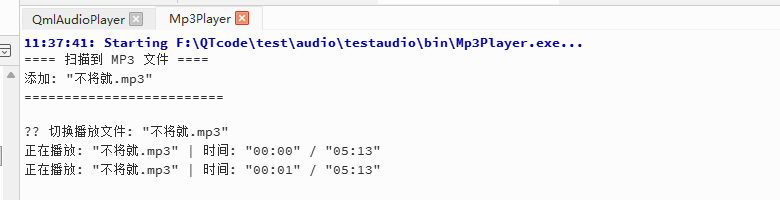
说明,扫描bin下的MP3音频文件并循环播放,并且调试信息显示时间和文件名称
1.分成.h.cpp:
Mp3Player.pro
bash
QT += core multimedia
QT -= gui

CONFIG += c++11 console
CONFIG -= app_bundle

TARGET = Mp3Player
TEMPLATE = app

MOC_DIR = temp/moc
RCC_DIR = temp/rcc
UI_DIR = temp/ui
OBJECTS_DIR = temp/obj
DESTDIR = $$PWD/bin

# 明确列出三个源文件
SOURCES += \
    main.cpp \
    audioplayer.cpp

# 明确列出头文件
HEADERS += \
    audioplayer.h
main.cpp
cpp
#include <QCoreApplication>
#include "audioplayer.h" // 引入我们的类头文件

int main(int argc, char *argv[])
{
    QCoreApplication a(argc, argv);

    AudioPlayer player;
    player.start();

    return a.exec();
}
audioplayer.cpp
cpp
#include "audioplayer.h"
#include <QCoreApplication>
#include <QDir>
#include <QUrl>
#include <QDebug>

AudioPlayer::AudioPlayer(QObject *parent) : QObject(parent)
{
    m_player = new QMediaPlayer(this);
    m_playlist = new QMediaPlaylist(this);

    // ★ 设置播放模式为循环播放
    m_playlist->setPlaybackMode(QMediaPlaylist::Loop);
    m_player->setPlaylist(m_playlist);

    // 连接状态变化信号
    connect(m_player, &QMediaPlayer::currentMediaChanged, this, &AudioPlayer::onCurrentMediaChanged);

    // 使用定时器每秒输出一次播放时间进度
    m_progressTimer = new QTimer(this);
    m_progressTimer->setInterval(1000);
    connect(m_progressTimer, &QTimer::timeout, this, &AudioPlayer::printProgress);

    // 播放状态变化时控制定时器
    connect(m_player, &QMediaPlayer::stateChanged, this, [this](QMediaPlayer::State state){
        if (state == QMediaPlayer::PlayingState) {
            m_progressTimer->start();
        } else {
            m_progressTimer->stop();
        }
    });
}

void AudioPlayer::start()
{
    QDir dir(QCoreApplication::applicationDirPath());
    QStringList mp3Files = dir.entryList(QStringList() << "*.mp3", QDir::Files);

    if (mp3Files.isEmpty()) {
        qWarning() << "未找到MP3文件!请将mp3文件放入程序所在目录:" << dir.absolutePath();
        QTimer::singleShot(2000, [](){ QCoreApplication::quit(); });
        return;
    }

    qDebug() << "==== 扫描到 MP3 文件 ====";
    for (const QString &file : mp3Files) {  // 注意这里加了 const 修了之前的警告
        QUrl url = QUrl::fromLocalFile(dir.absoluteFilePath(file));
        m_playlist->addMedia(url);
        qDebug() << "添加:" << file;
    }
    qDebug() << "=========================";

    m_playlist->setCurrentIndex(0);
    m_player->play();
}

void AudioPlayer::onCurrentMediaChanged(const QMediaContent &media)
{
    if (!media.isNull()) {
        qDebug() << "\n🎵 切换播放文件:" << media.request().url().fileName();
    }
}

void AudioPlayer::printProgress()
{
    if (m_player->state() == QMediaPlayer::PlayingState) {
        qint64 position = m_player->position();
        qint64 duration = m_player->duration();
        if (duration > 0) {
            qDebug() << "正在播放:" << m_player->currentMedia().request().url().fileName()
                     << "| 时间:" << formatTime(position) << "/" << formatTime(duration);
        }
    }
}

QString AudioPlayer::formatTime(qint64 milliseconds)
{
    qint64 seconds = milliseconds / 1000;
    qint64 mins = seconds / 60;
    qint64 secs = seconds % 60;
    return QString("%1:%2")
            .arg(mins, 2, 10, QChar('0'))
            .arg(secs, 2, 10, QChar('0'));
}
audioplayer.h
cpp
#ifndef AUDIOPLAYER_H
#define AUDIOPLAYER_H

#include <QObject>
#include <QMediaPlayer>
#include <QMediaPlaylist>
#include <QMediaContent>
#include <QTimer>

class AudioPlayer : public QObject
{
    Q_OBJECT

public:
    explicit AudioPlayer(QObject *parent = nullptr);

    // 扫描同目录下的 mp3 文件并开始播放
    void start();

private slots:
    void onCurrentMediaChanged(const QMediaContent &media);

private:
    void printProgress();
    QString formatTime(qint64 milliseconds);

private:
    QMediaPlayer *m_player;
    QMediaPlaylist *m_playlist;
    QTimer *m_progressTimer;
};

#endif // AUDIOPLAYER_H
2.极简测试:
#include "main.moc"
Mp3Player.pro
javascript
QT += core multimedia
QT -= gui

CONFIG += c++11 console
CONFIG -= app_bundle

TARGET = Mp3Player
TEMPLATE = app

MOC_DIR     = temp/moc
RCC_DIR     = temp/rcc
UI_DIR      = temp/ui
OBJECTS_DIR = temp/obj

DESTDIR =$$PWD/bin

SOURCES += main.cpp
main.cpp
cpp
#include <QCoreApplication>
#include <QMediaPlayer>
#include <QMediaPlaylist>
#include <QMediaContent>
#include <QDir>
#include <QUrl>
#include <QDebug>
#include <QTimer>

class AudioPlayer : public QObject
{
    Q_OBJECT
public:
    explicit AudioPlayer(QObject *parent = nullptr) : QObject(parent)
    {
        m_player = new QMediaPlayer(this);
        m_playlist = new QMediaPlaylist(this);

        // ★ 设置播放模式为循环播放(播完列表最后一个后重新回到第一个)
        m_playlist->setPlaybackMode(QMediaPlaylist::Loop);

        m_player->setPlaylist(m_playlist);

        // 连接状态变化信号,用于输出文件名
        connect(m_player, &QMediaPlayer::currentMediaChanged, this, &AudioPlayer::onCurrentMediaChanged);

        // 使用定时器每秒输出一次播放时间进度,避免控制台疯狂刷屏
        m_progressTimer = new QTimer(this);
        m_progressTimer->setInterval(1000);
        connect(m_progressTimer, &QTimer::timeout, this, &AudioPlayer::printProgress);

        // 播放状态变化时控制定时器
        connect(m_player, &QMediaPlayer::stateChanged, this, [this](QMediaPlayer::State state){
            if (state == QMediaPlayer::PlayingState) {
                m_progressTimer->start();
            } else {
                m_progressTimer->stop();
            }
        });
    }

    // 扫描同目录下的 mp3 文件并开始播放
    void start()
    {
        QDir dir(QCoreApplication::applicationDirPath());
        QStringList mp3Files = dir.entryList(QStringList() << "*.mp3", QDir::Files);

        if (mp3Files.isEmpty()) {
            qWarning() << "未找到MP3文件!请将mp3文件放入程序所在目录:" << dir.absolutePath();
            // 延迟2秒退出,保证控制台信息可见
            QTimer::singleShot(2000, [](){ QCoreApplication::quit(); });
            return;
        }

        qDebug() << "==== 扫描到 MP3 文件 ====";
        for (const QString &file : mp3Files) {
            QUrl url = QUrl::fromLocalFile(dir.absoluteFilePath(file));
            m_playlist->addMedia(url);
            qDebug() << "添加:" << file;
        }
        qDebug() << "=========================";

        // 设置从第一个文件开始播放
        m_playlist->setCurrentIndex(0);
        m_player->play();
    }

private slots:
    void onCurrentMediaChanged(const QMediaContent &media)
    {
        if (!media.isNull()) {
            qDebug() << "\n🎵 切换播放文件:" << media.request().url().fileName(); // 新接口
        }
    }


private:
    void printProgress()
    {
        if (m_player->state() == QMediaPlayer::PlayingState) {
            qint64 position = m_player->position();
            qint64 duration = m_player->duration();

            if (duration > 0) {
                qDebug() << "正在播放:" << m_player->currentMedia().request().url().fileName() // 新接口
                         << "| 时间:" << formatTime(position) << "/" << formatTime(duration);
            }
        }
    }


    // 格式化毫秒为 mm:ss 格式
    QString formatTime(qint64 milliseconds)
    {
        qint64 seconds = milliseconds / 1000;
        qint64 mins = seconds / 60;
        qint64 secs = seconds % 60;
        return QString("%1:%2")
            .arg(mins, 2, 10, QChar('0'))
            .arg(secs, 2, 10, QChar('0'));
    }

private:
    QMediaPlayer *m_player;
    QMediaPlaylist *m_playlist;
    QTimer *m_progressTimer;
};

int main(int argc, char *argv[])
{
    QCoreApplication a(argc, argv);

    AudioPlayer player;
    player.start();

    return a.exec();
}

#include "main.moc"