

✨博客主页: https://blog.csdn.net/m0_63815035?type=blog
💗《博客内容》:大数据、AI开发、Java、测试开发、Python、Android、Go、Node、Android前端小程序等相关领域知识
📢博客专栏: https://blog.csdn.net/m0_63815035/category_11954877.html
📢欢迎点赞 👍 收藏 ⭐留言 📝
📢本文为学习笔记资料,如有侵权,请联系我删除,疏漏之处还请指正🙉
📢大厦之成,非一木之材也;大海之阔,非一流之归也✨

目录
-
- [一、IO 流概述](#一、IO 流概述)
-
- [1.1 数据源与流的概念](#1.1 数据源与流的概念)
- [1.2 IO 流的分类](#1.2 IO 流的分类)
- [1.3 IO 操作的四步](#1.3 IO 操作的四步)
- 二、字符集与编码
-
- [2.1 字符集与编码](#2.1 字符集与编码)
- [2.2 常见编码格式](#2.2 常见编码格式)
- [三、字节流(InputStream / OutputStream)](#三、字节流(InputStream / OutputStream))
-
- [3.1 抽象基类方法](#3.1 抽象基类方法)
- [3.2 文件字节流 FileInputStream / FileOutputStream](#3.2 文件字节流 FileInputStream / FileOutputStream)
-
- [3.2.1 单个字节读取](#3.2.1 单个字节读取)
- [3.2.2 批量读取(推荐)](#3.2.2 批量读取(推荐))
- [3.2.3 文件输出(写入)](#3.2.3 文件输出(写入))
- [3.2.4 文件拷贝(综合示例)](#3.2.4 文件拷贝(综合示例))
- [四、字符流(Reader / Writer)](#四、字符流(Reader / Writer))
-
- [4.1 抽象基类方法](#4.1 抽象基类方法)
- [4.2 文件字符流 FileReader / FileWriter](#4.2 文件字符流 FileReader / FileWriter)
- [五、缓冲流(Buffered Stream)](#五、缓冲流(Buffered Stream))
-
- [5.1 字节缓冲流 BufferedInputStream / BufferedOutputStream](#5.1 字节缓冲流 BufferedInputStream / BufferedOutputStream)
- [5.2 字符缓冲流 BufferedReader / BufferedWriter](#5.2 字符缓冲流 BufferedReader / BufferedWriter)
- [六、转换流(InputStreamReader / OutputStreamWriter)](#六、转换流(InputStreamReader / OutputStreamWriter))
- [七、数据流(DataInputStream / DataOutputStream)](#七、数据流(DataInputStream / DataOutputStream))
- [八、对象流(ObjectInputStream / ObjectOutputStream)与序列化](#八、对象流(ObjectInputStream / ObjectOutputStream)与序列化)
-
- [8.1 序列化与反序列化](#8.1 序列化与反序列化)
- [8.2 实现 Serializable 接口](#8.2 实现 Serializable 接口)
- [8.3 序列化到文件](#8.3 序列化到文件)
- [九、ByteArray 流(内存流)](#九、ByteArray 流(内存流))
-
- [9.1 ByteArrayInputStream](#9.1 ByteArrayInputStream)
- [9.2 ByteArrayOutputStream](#9.2 ByteArrayOutputStream)
- [9.3 实用方法:将任何 InputStream 读入字节数组](#9.3 实用方法:将任何 InputStream 读入字节数组)
- [十、Commons IO 工具库](#十、Commons IO 工具库)
-
- [10.1 常用工具类](#10.1 常用工具类)
- [10.2 IOUtils 示例](#10.2 IOUtils 示例)
- [10.3 FileUtils 示例](#10.3 FileUtils 示例)
- [10.4 FilenameUtils 示例](#10.4 FilenameUtils 示例)
- [10.5 FileSystemUtils 示例](#10.5 FileSystemUtils 示例)
- 十一、练习实践
-
- [11.1 选择流的原则](#11.1 选择流的原则)
- [11.2 常见错误与避免](#11.2 常见错误与避免)
- [11.3 性能提示](#11.3 性能提示)
- [11.4 实战练习题:](#11.4 实战练习题:)
IO 流是 Java 中处理输入输出的核心机制。本文章涵盖 IO 流的完整知识体系,从基本概念到实际应用,包括字节流、字符流、缓冲流、转换流、数据流、对象流(序列化)、ByteArray 流以及 Commons IO 工具库。所有示例代码均可直接运行。
一、IO 流概述
1.1 数据源与流的概念
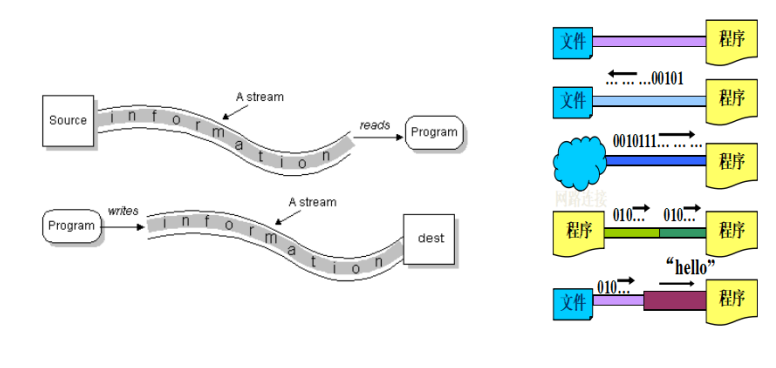
- 数据源(Data Source):提供原始数据的媒介,如文件、数据库、网络连接、内存、其他程序、IO 设备等。
- 流(Stream) :一连串连续动态的数据集合,像一个水流。程序通过流与数据源交互,读取数据(输入流)或写入数据(输出流)。
1.2 IO 流的分类
| 分类角度 | 类型 | 抽象基类 |
|---|---|---|
| 处理数据单位 | 字节流(8位) | InputStream, OutputStream |
| 字符流(16位) | Reader, Writer |
|
| 数据流向 | 输入流(从数据源到程序) | InputStream, Reader |
| 输出流(从程序到目的地) | OutputStream, Writer |
|
| 功能 | 节点流(直接操作数据源) | 如 FileInputStream, FileOutputStream |
| 处理流(包装节点流,增强功能) | 如 BufferedInputStream, ObjectOutputStream |
注意:字节流可以处理任何类型的数据(文本、图片、视频等),字符流只能处理纯文本。
1.3 IO 操作的四步
- 建立联系 :确定数据源或目的地(如
File对象)。 - 选择流:根据需求选择输入/输出、字节/字符、节点/处理流。
- 执行操作:读取或写入数据(循环读取、一次性写入等)。
- 释放资源 :关闭流(
close()),避免资源泄漏。
二、字符集与编码
2.1 字符集与编码
- 字符集(Character Set):一组字符的集合,如 ASCII、GB2312、Unicode。
- 字符编码(Character Encoding):将字符映射为二进制字节的规则。
- 乱码:编码与解码使用的字符集不一致导致显示异常。
2.2 常见编码格式
| 编码 | 描述 | 特点 |
|---|---|---|
| ASCII | 美国信息交换标准代码 | 7位,128个字符 |
| ISO-8859-1 | 西欧语言编码 | 单字节,256个字符 |
| GB2312 | 中国国家标准简体中文字符集 | 双字节,6763个汉字 |
| GBK | 扩展 GB2312 | 双字节,21003个汉字 |
| GB18030 | 最新国家标准 | 变长(1/2/4字节) |
| Unicode | 统一码 | 每个字符一个码点 |
| UTF-16 | Unicode 的一种存储形式 | 定长 2 字节 |
| UTF-8 | Unicode 的变长存储 | 1~6 字节,兼容 ASCII |
Java 内存中的
char使用 UTF-16 编码,文件读写时需指定编码。
三、字节流(InputStream / OutputStream)
3.1 抽象基类方法
InputStream(读):
int read():读取一个字节,返回 0~255,读到末尾返回 -1。int read(byte[] b):读取一批字节存到数组,返回实际读取的字节数。int read(byte[] b, int off, int len):读取最多len个字节到数组的指定位置。void close():关闭流。
OutputStream(写):
void write(int b):写入一个字节(int 的低 8 位)。void write(byte[] b):写入整个字节数组。void write(byte[] b, int off, int len):写入数组的一部分。void flush():强制将缓冲数据写出(对缓冲流有用)。void close():关闭流。
3.2 文件字节流 FileInputStream / FileOutputStream
3.2.1 单个字节读取
java
import java.io.*;

public class SingleByteRead {
    public static void main(String[] args) {
        File file = new File("f:/IO/test.txt");
        InputStream in = null;
        try {
            in = new FileInputStream(file);
            int data;
            while ((data = in.read()) != -1) {
                System.out.print((char) data);
            }
        } catch (FileNotFoundException e) {
            System.out.println("文件不存在");
        } catch (IOException e) {
            System.out.println("读取失败");
        } finally {
            if (in != null) {
                try {
                    in.close();
                } catch (IOException e) {
                    e.printStackTrace();
                }
            }
        }
    }
}
3.2.2 批量读取(推荐)
java
try (InputStream in = new FileInputStream(file)) {
    byte[] buffer = new byte[1024];
    int len;
    while ((len = in.read(buffer)) != -1) {
        String s = new String(buffer, 0, len);
        System.out.print(s);
    }
} catch (IOException e) {
    e.printStackTrace();
}
// try-with-resources 自动关闭
3.2.3 文件输出(写入)
java
File dest = new File("f:/IO/output.txt");
try (OutputStream out = new FileOutputStream(dest, true)) { // true 表示追加
    String str = "Hello, IO!\n";
    out.write(str.getBytes());
    out.flush();
} catch (IOException e) {
    e.printStackTrace();
}
3.2.4 文件拷贝(综合示例)
java
public static void copyFile(String srcPath, String destPath) throws IOException {
    File src = new File(srcPath);
    if (!src.isFile()) {
        throw new IOException("源文件不存在或不是文件");
    }
    try (InputStream in = new FileInputStream(src);
         OutputStream out = new FileOutputStream(destPath)) {
        byte[] buffer = new byte[8192];
        int len;
        while ((len = in.read(buffer)) != -1) {
            out.write(buffer, 0, len);
        }
        out.flush();
    }
}
四、字符流(Reader / Writer)
4.1 抽象基类方法
Reader 的读取方法与 InputStream 类似,但以 char 为单位。
Writer 提供了直接写入字符串的方法:write(String str)。
4.2 文件字符流 FileReader / FileWriter
java
// 字符流读取文本文件
try (Reader reader = new FileReader("f:/char.txt")) {
    char[] buffer = new char[1024];
    int len;
    while ((len = reader.read(buffer)) != -1) {
        System.out.print(new String(buffer, 0, len));
    }
} catch (IOException e) {
    e.printStackTrace();
}

// 字符流写入
try (Writer writer = new FileWriter("f:/char_out.txt", true)) {
    writer.write("你好,世界!\n");
    writer.append("追加内容");
    writer.flush();
} catch (IOException e) {
    e.printStackTrace();
}
注意 :FileWriter 使用系统默认编码,容易乱码。推荐使用 OutputStreamWriter 指定编码。
五、缓冲流(Buffered Stream)
缓冲流属于处理流,内部维护一个缓冲区,减少实际磁盘读写次数,提高性能。
5.1 字节缓冲流 BufferedInputStream / BufferedOutputStream
java
try (BufferedInputStream bis = new BufferedInputStream(
         new FileInputStream("bigfile.zip"));
     BufferedOutputStream bos = new BufferedOutputStream(
         new FileOutputStream("copy.zip"))) {
    byte[] buf = new byte[4096];
    int len;
    while ((len = bis.read(buf)) != -1) {
        bos.write(buf, 0, len);
    }
} catch (IOException e) {
    e.printStackTrace();
}
5.2 字符缓冲流 BufferedReader / BufferedWriter
BufferedReader 提供了 readLine() 方法(一次读一行),BufferedWriter 提供了 newLine() 方法。
java
try (BufferedReader br = new BufferedReader(
         new FileReader("test.txt"));
     BufferedWriter bw = new BufferedWriter(
         new FileWriter("copy.txt"))) {
    String line;
    while ((line = br.readLine()) != null) {
        bw.write(line);
        bw.newLine();  // 写入换行符
    }
} catch (IOException e) {
    e.printStackTrace();
}
注意 :
readLine()返回的字符串不包含换行符,需要手动添加。
六、转换流(InputStreamReader / OutputStreamWriter)
转换流用于将字节流转换为字符流,同时可以指定编码,解决乱码问题。
java
// 指定编码读取
try (BufferedReader br = new BufferedReader(
         new InputStreamReader(
             new FileInputStream("utf8.txt"), "UTF-8"))) {
    String line;
    while ((line = br.readLine()) != null) {
        System.out.println(line);
    }
} catch (IOException e) {
    e.printStackTrace();
}

// 指定编码写入
try (BufferedWriter bw = new BufferedWriter(
         new OutputStreamWriter(
             new FileOutputStream("gbk.txt"), "GBK"))) {
    bw.write("中文内容");
    bw.newLine();
} catch (IOException e) {
    e.printStackTrace();
}
七、数据流(DataInputStream / DataOutputStream)
数据流允许直接读写 Java 基本类型(int、long、double 等)和 String,并保留类型信息。读写的顺序必须一致。
java
// 写入
try (DataOutputStream dos = new DataOutputStream(
         new BufferedOutputStream(
             new FileOutputStream("data.dat")))) {
    dos.writeInt(100);
    dos.writeDouble(3.14);
    dos.writeUTF("Hello");
    dos.flush();
} catch (IOException e) {
    e.printStackTrace();
}

// 读取(顺序必须一致)
try (DataInputStream dis = new DataInputStream(
         new BufferedInputStream(
             new FileInputStream("data.dat")))) {
    int i = dis.readInt();
    double d = dis.readDouble();
    String s = dis.readUTF();
    System.out.println(i + ", " + d + ", " + s);
} catch (IOException e) {
    e.printStackTrace();
}
八、对象流(ObjectInputStream / ObjectOutputStream)与序列化
8.1 序列化与反序列化
- 序列化:将 Java 对象转换为字节流,便于保存到文件或通过网络传输。
- 反序列化:从字节流恢复为 Java 对象。
8.2 实现 Serializable 接口
要序列化的类必须实现 java.io.Serializable 接口(标记接口,无方法)。
java
import java.io.Serializable;

public class Employee implements Serializable {
    private static final long serialVersionUID = 1L; // 版本号

    private String name;
    private double salary;
    private transient String password; // transient 字段不会被序列化

    // 构造器、getter、setter 省略
}transient修饰的字段跳过序列化,反序列化时为默认值(对象为null,数值为 0)。serialVersionUID用于版本控制,若不显式声明,编译器会动态生成,类修改后反序列化会失败。
8.3 序列化到文件
java
// 序列化
try (ObjectOutputStream oos = new ObjectOutputStream(
         new BufferedOutputStream(
             new FileOutputStream("employee.dat")))) {
    Employee emp = new Employee("张三", 8000.0, "123456");
    oos.writeObject(emp);
    oos.flush();
} catch (IOException e) {
    e.printStackTrace();
}

// 反序列化
try (ObjectInputStream ois = new ObjectInputStream(
         new BufferedInputStream(
             new FileInputStream("employee.dat")))) {
    Employee emp = (Employee) ois.readObject();
    System.out.println(emp.getName() + " " + emp.getSalary());
    // password 为 null
} catch (IOException | ClassNotFoundException e) {
    e.printStackTrace();
}注意:
- 读取顺序必须与写入顺序一致。
- 静态成员不属于对象,不会被序列化。
- 若一个类包含另一个类的引用,被引用的类也必须实现
Serializable。
九、ByteArray 流(内存流)
ByteArrayInputStream 和 ByteArrayOutputStream 以字节数组为数据源或目的地,不涉及文件,因此不需要关闭 (close() 无实际作用)。
9.1 ByteArrayInputStream
java
byte[] data = "Hello, World!".getBytes();
try (ByteArrayInputStream bais = new ByteArrayInputStream(data)) {
    int b;
    while ((b = bais.read()) != -1) {
        System.out.print((char) b);
    }
} catch (IOException e) {
    e.printStackTrace();
}
9.2 ByteArrayOutputStream
常用于将数据临时写入内存,最后转为字节数组。
java
ByteArrayOutputStream baos = new ByteArrayOutputStream();
try (baos) {
    baos.write("Hello".getBytes());
    baos.write(" World".getBytes());
    byte[] result = baos.toByteArray();
    System.out.println(new String(result));
} catch (IOException e) {
    e.printStackTrace();
}
9.3 实用方法:将任何 InputStream 读入字节数组
java
public static byte[] toByteArray(InputStream in) throws IOException {
    ByteArrayOutputStream baos = new ByteArrayOutputStream();
    byte[] buffer = new byte[8192];
    int len;
    while ((len = in.read(buffer)) != -1) {
        baos.write(buffer, 0, len);
    }
    return baos.toByteArray();
}
十、Commons IO 工具库
Apache Commons IO 提供了大量简化 IO 操作的工具类。需要导入 commons-io-2.x.jar。
10.1 常用工具类
| 类名 | 用途 |
|---|---|
IOUtils |
复制、读取、写入流 |
FileUtils |
复制文件/目录、读取文件、删除目录等 |
FilenameUtils |
文件名处理(扩展名、路径等) |
FileSystemUtils |
获取磁盘剩余空间 |
10.2 IOUtils 示例
java
// 拷贝大文件
try (InputStream in = new FileInputStream("source.zip");
     OutputStream out = new FileOutputStream("dest.zip")) {
    IOUtils.copy(in, out);  // 适合 2GB 以上大文件
    // IOUtils.copyLarge(in, out);
}

// 将 InputStream 转为 String
String content = IOUtils.toString(new FileInputStream("test.txt"), "UTF-8");

// 将 String 写入 OutputStream
IOUtils.write("Hello", out, "UTF-8");
10.3 FileUtils 示例
java
// 复制文件夹(递归)
FileUtils.copyDirectory(new File("srcDir"), new File("destDir"));

// 复制文件到目录
FileUtils.copyFileToDirectory(new File("a.txt"), new File("targetDir"));

// 以字符串形式读取文件
String content = FileUtils.readFileToString(new File("test.txt"), "UTF-8");

// 写入字符串到文件
FileUtils.writeStringToFile(new File("out.txt"), "内容", "UTF-8", true); // 追加

// 删除目录
FileUtils.deleteDirectory(new File("tempDir"));
10.4 FilenameUtils 示例
java
String fullPath = "D:/docs/readme.txt";
String base = FilenameUtils.getBaseName(fullPath);   // "readme"
String ext = FilenameUtils.getExtension(fullPath);   // "txt"
String path = FilenameUtils.getPath(fullPath);       // "D:/docs/"
String prefix = FilenameUtils.getPrefix(fullPath);   // "D:"
boolean isTxt = FilenameUtils.isExtension(fullPath, "txt");
10.5 FileSystemUtils 示例
java
long freeSpaceKB = FileSystemUtils.freeSpaceKb("D:"); // D盘剩余空间(KB)十一、练习实践
11.1 选择流的原则
| 场景 | 推荐流 |
|---|---|
| 读取二进制文件(图片、视频) | FileInputStream + BufferedInputStream |
| 写入二进制文件 | FileOutputStream + BufferedOutputStream |
| 读取文本文件(已知编码) | BufferedReader + InputStreamReader(指定编码) |
| 写入文本文件(指定编码) | BufferedWriter + OutputStreamWriter |
| 读写 Java 基本类型 | DataInputStream / DataOutputStream |
| 读写 Java 对象 | ObjectInputStream / ObjectOutputStream |
| 临时内存操作 | ByteArrayInputStream / ByteArrayOutputStream |
11.2 常见错误与避免
- 忘记关闭流:使用 try-with-resources 自动关闭。
- 不指定编码:文本文件读写尽量显式指定 UTF-8,避免系统默认编码差异。
- 字符流处理非文本文件:字符流会按字符解码,处理二进制文件会损坏数据。
- 对象流读写顺序不一致:写入几个对象,读取时也必须按相同顺序。
- 序列化版本不一致 :显式声明
serialVersionUID。
11.3 性能提示
- 使用缓冲流(
BufferedXxx)包裹节点流,设置合理缓冲区大小(默认 8KB)。 - 批量读写比单字节读写效率高很多。
ByteArrayOutputStream可预先估算大小,避免频繁扩容。
11.4 实战练习题:
- 实现文件拷贝(支持大文件)。
- 读取文本文件,统计每个单词出现次数。
- 将对象集合序列化到文件,再反序列化出来。
- 使用 Commons IO 一行代码完成文件复制和目录删除。
Tips:多动手编写代码,尤其注意异常处理和资源关闭,这是生产环境的基本要求。
csharp
今天这篇文章就到这里了,大厦之成,非一木之材也;大海之阔,非一流之归也。感谢大家观看本文