1. 目标:让AI能计算数学表达式,通过Function Calling调用计算器工具。
2. 实现代码:在昨天的基础上增加,上一节学习地址:https://blog.csdn.net/weixin_42800530/article/details/161726697?spm=1011.2124.3001.6209
csharp
		public object GetCalculatorTool()
        {
            return new
            {
                type="function",
                function=new
                {
                    name="calculator",
                    description="计算数学表达式的结果。支持加减乘除、括号等基本运算。用户问数学计算时必须调用此函数。",
                    parameters=new
                    {
                        type="object",
                        properties=new
                        {
                            expression=new
                            {
                                type="string",
                                description="数学表达式,例如:1024*256、200+500、(15+20)*2"
                            }
                        },
                        required=new[] {"expression"}
                    }
                }
            };
        }
3. 实现计算功能代码 ,如果需要支持高级函数,使用 NCalc 库(功能更强大)
安装NuGet包:dotnet add package NCalc
csharp
using System;
using System.Collections.Generic;
using System.Data;
using System.Linq;
using System.Text;
using System.Text.Json;
using System.Threading.Tasks;
using NCalc;

namespace ConsoleApp1.Common
{
    public class CommonHelper
    {
        /// <summary>
        /// 执行本地工具
        /// </summary>
        public string ExecuteTool(string toolName, string arguments)
        {
            switch (toolName)
            {
                case "get_current_time":
                    return DateTime.Now.ToString("yyyy-MM-dd HH:mm:ss");
                case "calculator":  //计算器
                    return CalculateExpression(arguments);
                // 未来可以添加更多工具
                default:
                    return $"未知工具: {toolName}";
            }
        }

        private string CalculateExpression(string arguments)
        {
            try
            {
                // 解析参数
                var doc = JsonDocument.Parse(arguments);
                string expression = doc.RootElement.GetProperty("expression").GetString();

                // 替换中文符号和空格
                expression = expression.Replace("×", "*")
                                       .Replace("÷", "/")
                                       .Replace(" ", "");

                // 使用DataTable计算
                var table = new DataTable();
                var result = table.Compute(expression, "");

                return result.ToString();
            }
            catch (Exception ex)
            {
                return $"计算错误: {ex.Message}";
            }
        }

    }
}
4. 调用代码
csharp
		public static async Task Day()
        {
            try
            {
                Console.WriteLine($"-------------计算器工具测试-------------\r\n");

                CommonClass commonClass = new CommonClass();
                commonClass.SetSystemPrompt("当用户询问数学计算问题时,必须调用 calculator 函数来计算,不要自己计算。计算完成后,用自然语言告诉用户结果。");

                var tools = new object[] { commonClass.GetCalculatorTool() };

                // 测试1:乘法
                Console.WriteLine("用户:1024 * 256 等于多少?");
                var reply1 = await commonClass.CallAPIWithTools("1024 * 256 等于多少?", tools);
                Console.WriteLine($"AI回答:{reply1}\n");

                // 测试2:复杂表达式
                Console.WriteLine("用户:(100 + 50) * 2 ÷ 3 等于多少?");
                var reply2 = await commonClass.CallAPIWithTools("(100 + 50) * 2 ÷ 3 等于多少?", tools);
                Console.WriteLine($"AI回答:{reply2}\n");

                // 测试3:减法
                Console.WriteLine("用户:1000 - 357 等于多少?");
                var reply3 = await commonClass.CallAPIWithTools("1000 - 357 等于多少?", tools);
                Console.WriteLine($"AI回答:{reply3}\n");

                // 测试4:除法(小数)
                Console.WriteLine("用户:10 ÷ 3 等于多少?");
                var reply4 = await commonClass.CallAPIWithTools("10 ÷ 3 等于多少?", tools);
                Console.WriteLine($"AI回答:{reply4}\n");

                // 测试5:混合运算
                Console.WriteLine("用户:(2 + 3) × 4 - 5 ÷ 2 等于多少?");
                var reply5 = await commonClass.CallAPIWithTools("(2 + 3) × 4 - 5 ÷ 2 等于多少?", tools);
                Console.WriteLine($"AI回答:{reply5}\n");
            }
            catch (Exception ex)
            {
                Console.WriteLine($"异常:{ex.Message}");
            }
        }
5. 输出
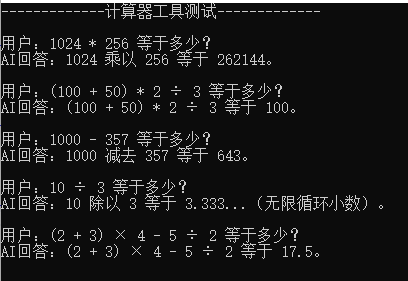
6. 常见问题:
Q1 问题:需要支持更复杂的数学函数(sin、cos、sqrt)
解决:使用 NCalc 库,支持更多函数
csharp
using NCalc;

var expr = new Expression("sqrt(16) + sin(30)");
expr.Evaluate();  // 支持数学函数
Q2 问题:计算错误:表达式包含不支持的字符
原因:用户输入了中文符号(×、÷)或其他特殊字符
解决:在计算前替换
csharp
expression = expression.Replace("×", "*").Replace("÷", "/");以上,计算器工具实现完成!