功能定位与当前状态
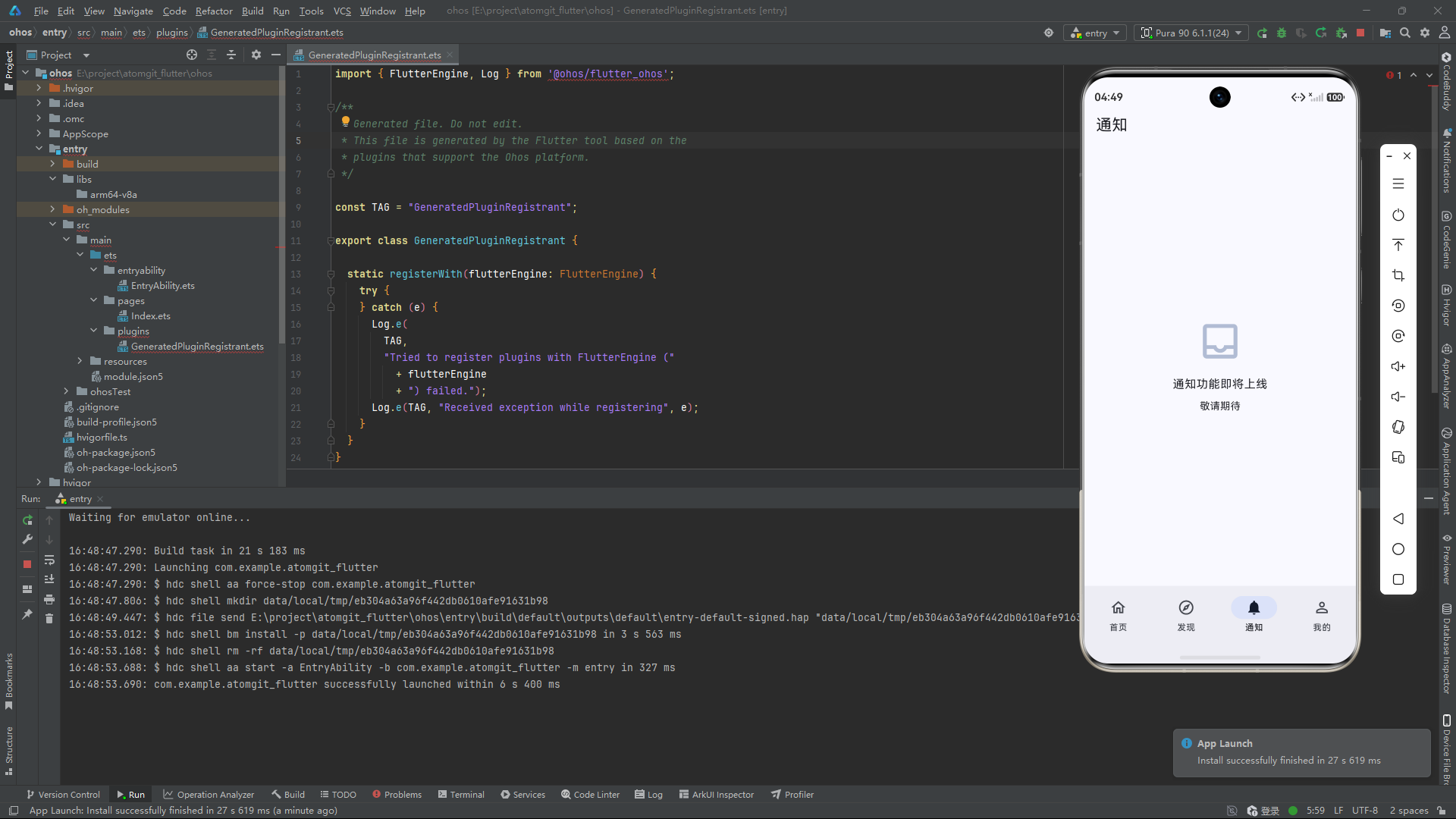
通知功能处于架构规划阶段。Tab 页面已在底部导航栏中创建,但后端功能尚未接入,目前展示占位 UI。这种"先建框架、后接数据"的开发方式允许早期用户就能看到应用的功能蓝图,也为后续开发预留了完整的代码骨架。
通知在 Git 平台中扮演着核心的信息聚合角色。开发者的日常协作------有人给你的 Issue 评论了、有人 Star 了你的仓库、有人发起了 PR ------都通过通知机制传递。一个好的通知系统能够显著提高开发者的响应效率。
Auth-Aware UI:身份驱动的界面切换
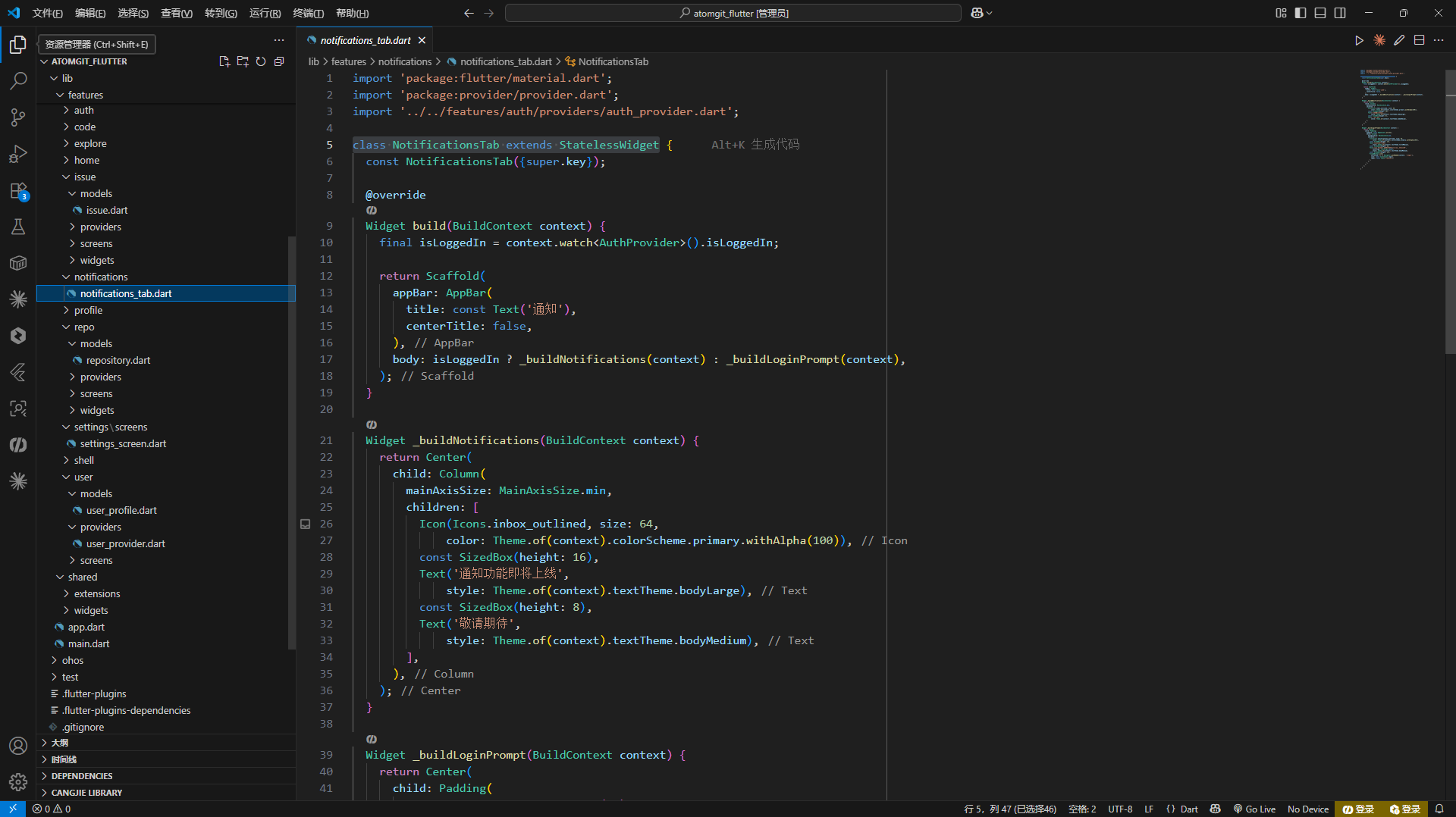
通知 Tab 是一个典型的 Auth-Aware 组件------其 UI 完全由登录状态决定。未登录时展示引导界面,已登录时展示功能内容(当前为占位)。这种设计遵循"根据用户状态提供合适界面"的原则。
dart
class NotificationsTab extends StatelessWidget {
  @override
  Widget build(BuildContext context) {
    final isLoggedIn = context.watch<AuthProvider>().isLoggedIn;

    return Scaffold(
      appBar: AppBar(title: const Text('通知')),
      body: isLoggedIn
          ? _buildPlaceholder(context)
          : _buildLoginPrompt(context),
    );
  }
}
context.watch<AuthProvider>() 建立了对 AuthProvider 的持续订阅。当用户完成登录或退出登录时,AuthProvider 调用 notifyListeners(),此 Widget 自动重建,无需手动刷新。这是 Provider 框架的核心价值------通过声明式依赖实现自动 UI 同步。
未登录引导的设计
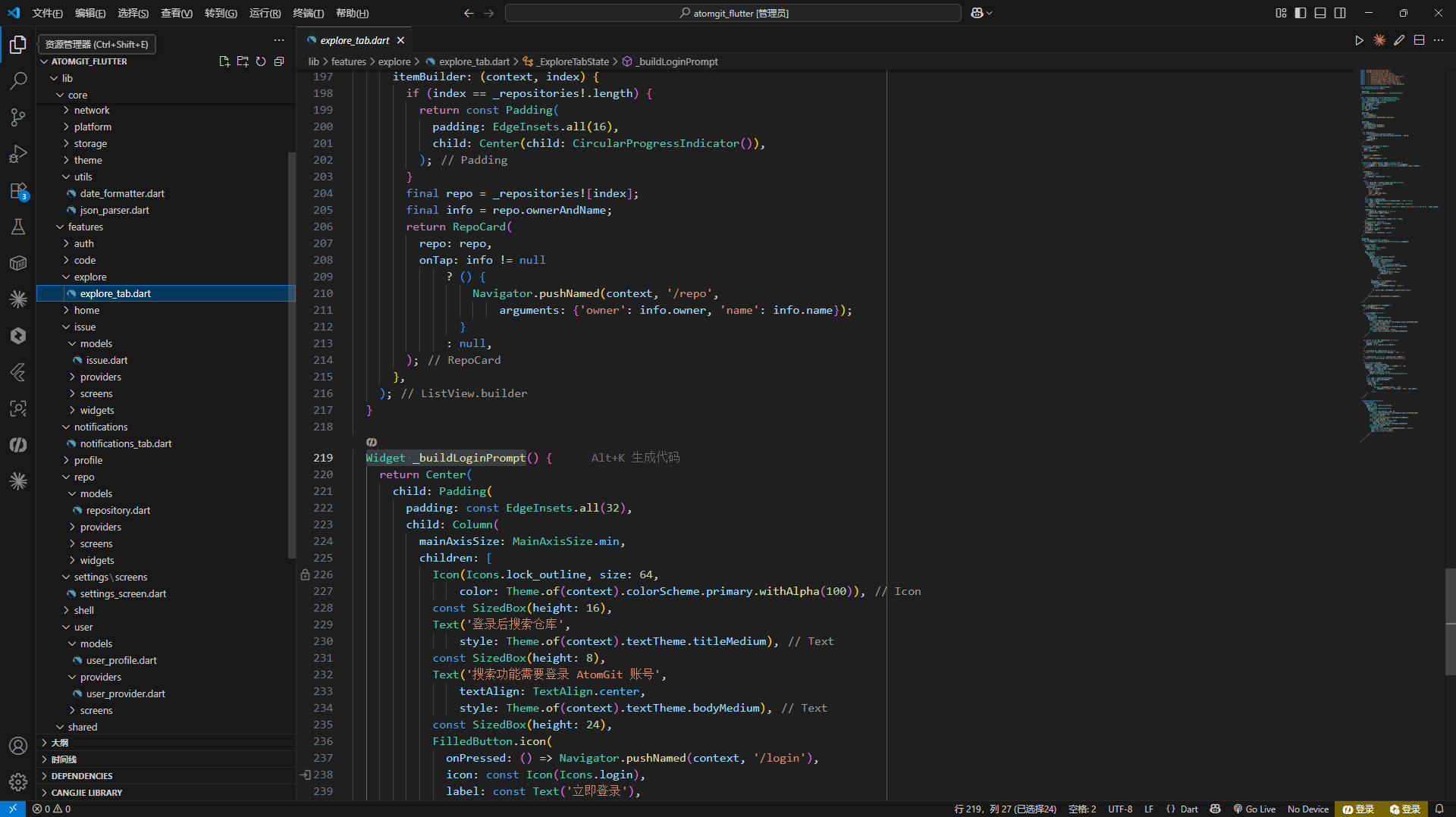
登录引导是用户进入未登录 Tab 时看到的第一个界面。设计上需要传达三个层次的信息:这个功能是什么、为什么需要登录、如何登录:
dart
Widget _buildLoginPrompt(BuildContext context) {
  return Center(
    child: Padding(
      padding: const EdgeInsets.all(32),
      child: Column(
        mainAxisAlignment: MainAxisAlignment.center,
        children: [
          // 第一层:视觉焦点 ------ 大尺寸功能图标
          Icon(
            Icons.notifications_outlined,
            size: 80,
            color: Colors.grey[400],
          ),
          const SizedBox(height: 16),

          // 第二层:功能说明 ------ 做什么
          Text(
            '登录后可查看通知',
            style: Theme.of(context).textTheme.titleMedium,
          ),
          const SizedBox(height: 8),

          // 第三层:价值主张 ------ 为什么值得登录
          Text(
            '关注仓库动态、Issue 讨论和 PR 更新',
            textAlign: TextAlign.center,
            style: Theme.of(context).textTheme.bodyMedium?.copyWith(
                  color: Colors.grey,
                ),
          ),
          const SizedBox(height: 24),

          // 第四层:行动引导 ------ 点击登录
          FilledButton.icon(
            onPressed: () =>
                Navigator.pushNamed(context, '/login'),
            icon: const Icon(Icons.login),
            label: const Text('立即登录'),
          ),
        ],
      ),
    ),
  );
}
引导页面的视觉层次设计:
- 大图标(80px,灰色调)------建立视觉焦点,暗示功能属性
- 标题文案(titleMedium,醒目的字号)------一句话说明功能价值
- 描述文案(bodyMedium,灰色文字)------补充功能细节
- 登录按钮(FilledButton,Material 3 填充样式)------明确的行动号召
图标使用 Icons.notifications_outlined(outlined 风格)而非 filled,与 Tab 未选中状态的图标保持视觉一致性。灰色调传达"功能尚未激活"的语义。
已登录占位 UI
功能尚未实现时,占位 UI 承担着管理用户期望的作用:
dart
Widget _buildPlaceholder(BuildContext context) {
  return Center(
    child: Column(
      mainAxisAlignment: MainAxisAlignment.center,
      children: [
        Icon(
          Icons.construction,
          size: 64,
          color: Colors.grey[400],
        ),
        const SizedBox(height: 16),
        Text(
          '通知功能即将上线',
          style: Theme.of(context).textTheme.titleMedium,
        ),
        const SizedBox(height: 8),
        Text(
          '敬请期待',
          style: Theme.of(context).textTheme.bodyMedium?.copyWith(
                color: Colors.grey,
              ),
        ),
      ],
    ),
  );
}
使用 Icons.construction(施工图标)明确表达"正在建设中"的含义,用户一看就理解这不是 Bug 而是功能尚未完成。
通知系统的完整设计规划
数据模型
AtomGit 的通知以 Thread 为单位组织,每个 Thread 对应一个事件主题:
dart
class NotificationItem {
  final String id;
  final String type;
  final String repoFullName;
  final String subject;
  final bool unread;
  final DateTime updatedAt;
  final String? reason;      // 触发原因:mention, assign, author 等
  final String? subjectUrl;   // 相关 Issue/PR 的 API URL
}
通知类型枚举:
dart
enum NotificationType {
  star,       // 有人 Star 了你的仓库
  issue,      // Issue 有更新(新评论、状态变更)
  pullRequest, // PR 有更新
  mention,    // 有人 @提及你
  assigned,   // 你被分配了 Issue
  forked,     // 有人 Fork 了你的仓库
}
Provider 骨架
dart
class NotificationProvider extends ChangeNotifier {
  final AtomGitApiClient _apiClient;

  List<NotificationItem> _notifications = [];
  int _unreadCount = 0;
  bool _isLoading = false;
  String? _error;
  int _page = 1;
  bool _hasMore = false;

  List<NotificationItem> get notifications =>
      List.unmodifiable(_notifications);
  int get unreadCount => _unreadCount;
  bool get isLoading => _isLoading;
  String? get error => _error;
  bool get hasMore => _hasMore;

  Future<void> load() async {
    _page = 1;
    _isLoading = true;
    _error = null;
    notifyListeners();

    try {
      final response = await _apiClient.get(
        '/notifications',
        queryParams: {
          'all': 'true',
          'per_page': '30',
          'page': '1',
        },
      );

      final items = parseList<dynamic>(response.data) ?? [];
      _notifications = items
          .whereType<Map<String, dynamic>>()
          .map(_parseNotification)
          .toList();

      _hasMore = _notifications.length >= 30;

      // 从未读计数 Header 更新
      _updateUnreadCount(response);
    } on ApiException catch (e) {
      _error = e.message;
    } finally {
      _isLoading = false;
      notifyListeners();
    }
  }

  Future<void> markAsRead(String threadId) async {
    try {
      await _apiClient.patch('/notifications/threads/$threadId');
      // 本地更新状态
      final index = _notifications.indexWhere((n) => n.id == threadId);
      if (index != -1) {
        _notifications[index] = _notifications[index].copyWith(unread: false);
        _unreadCount = _unreadCount > 0 ? _unreadCount - 1 : 0;
        notifyListeners();
      }
    } on ApiException {
      // 静默失败------标记已读失败不影响浏览
    }
  }

  Future<void> markAllAsRead() async {
    try {
      await _apiClient.put('/notifications');
      _notifications = _notifications
          .map((n) => n.copyWith(unread: false))
          .toList();
      _unreadCount = 0;
      notifyListeners();
    } on ApiException {
      // 静默失败
    }
  }
}
标记已读操作采用"乐观更新"策略:先更新本地 UI 状态(立即可见),再请求 API。如果 API 失败,本地状态已变更,用户会短暂看到"已读"但刷新后又恢复"未读"。为了简化,当前设计采用"悲观更新"------等 API 成功后再更新本地状态。
轮询策略设计
AtomGit API 不提供 WebSocket,移动端通知更新需要轮询:
| 策略 | 间隔 | 电量消耗 | 实时性 | 适用场景 |
|---|---|---|---|---|
| 前台短轮询 | 30s | 中等 | 较高 | 应用前台时 |
| 前台长轮询 | 5min | 低 | 低 | 应用前台闲置时 |
| 后台轮询 | 不轮询 | 无 | 无 | 切换到后台时 |
推荐的轮询方案:应用前台时 60 秒间隔轮询未读计数,有未读通知时才拉取完整列表。切换到后台时停止轮询(HarmonyOS 的后台任务限制也会自然终止轮询)。
dart
class NotificationProvider extends ChangeNotifier {
  Timer? _pollTimer;

  void startPolling() {
    _pollTimer?.cancel();
    _pollTimer = Timer.periodic(
      const Duration(seconds: 60),
      (_) => _pollUnreadCount(),
    );
  }

  void stopPolling() {
    _pollTimer?.cancel();
    _pollTimer = null;
  }

  Future<void> _pollUnreadCount() async {
    try {
      final response = await _apiClient.get(
        '/notifications',
        queryParams: {'all': 'false', 'per_page': '1'},
      );
      // 从响应头提取未读计数
    } on ApiException {
      // 轮询失败静默忽略
    }
  }

  @override
  void dispose() {
    stopPolling();
    super.dispose();
  }
}
Tab 角标实现
MainShell 的底部导航栏支持通知角标:
dart
NavigationDestination(
  icon: _buildNotificationIcon(false),
  selectedIcon: _buildNotificationIcon(true),
  label: '通知',
)

Widget _buildNotificationIcon(bool selected) {
  final unreadCount = context.watch<NotificationProvider>().unreadCount;

  if (unreadCount > 0) {
    return Badge(
      label: Text(
        unreadCount > 99 ? '99+' : '$unreadCount',
        style: const TextStyle(fontSize: 10),
      ),
      child: Icon(selected
          ? Icons.notifications
          : Icons.notifications_outlined),
    );
  }

  return Icon(selected
      ? Icons.notifications
      : Icons.notifications_outlined);
}
Material 3 的 Badge 组件提供标准的角标样式。超过 99 的未读数显示为 "99+" 避免角标过大。
通知列表 UI 规划
dart
Widget _buildNotificationList(BuildContext context) {
  final provider = context.watch<NotificationProvider>();

  if (provider.error != null && provider.notifications.isEmpty) {
    return ErrorRetryWidget(
      message: provider.error!,
      onRetry: () => provider.load(),
    );
  }

  if (provider.notifications.isEmpty && !provider.isLoading) {
    return const Center(child: Text('暂无通知'));
  }

  return ListView.builder(
    itemCount: provider.notifications.length +
        (provider.hasMore ? 1 : 0),
    itemBuilder: (context, index) {
      if (index >= provider.notifications.length) {
        return const Center(child: CircularProgressIndicator());
      }
      return _NotificationTile(
        notification: provider.notifications[index],
        onTap: () => _handleNotificationTap(
          provider.notifications[index],
        ),
      );
    },
  );
}
每条通知的设计:
dart
class _NotificationTile extends StatelessWidget {
  final NotificationItem notification;
  final VoidCallback onTap;

  Widget build(BuildContext context) {
    return ListTile(
      leading: _buildTypeIcon(notification.type),
      title: Text(notification.subject, maxLines: 2),
      subtitle: Row(children: [
        Text(notification.repoFullName),
        const Text(' · '),
        Text(DateFormatter.relative(notification.updatedAt)),
      ]),
      tileColor: notification.unread
          ? Theme.of(context).colorScheme.primaryContainer
              .withOpacity(0.3)
          : null,
      onTap: onTap,
    );
  }

  Widget _buildTypeIcon(String type) {
    return switch (type) {
      'star'     => const Icon(Icons.star, color: Colors.amber),
      'issue'    => const Icon(Icons.error_outline, color: Colors.green),
      'pull'     => const Icon(Icons.call_split, color: Colors.blue),
      'mention'  => const Icon(Icons.alternate_email, color: Colors.purple),
      'assigned' => const Icon(Icons.assignment_ind, color: Colors.orange),
      _          => const Icon(Icons.notifications, color: Colors.grey),
    };
  }
}
通知的交互设计
点击通知后的导航逻辑:
dart
void _handleNotificationTap(NotificationItem notification) {
  // 标记为已读
  context.read<NotificationProvider>().markAsRead(notification.id);

  // 根据类型跳转
  switch (notification.type) {
    case 'star':
    case 'forked':
      // 跳转到仓库详情
      final parts = notification.repoFullName.split('/');
      Navigator.pushNamed(context, '/repo', arguments: {
        'owner': parts[0],
        'name': parts[1],
      });
      break;

    case 'issue':
    case 'mention':
    case 'assigned':
      // 跳转到 Issue 详情
      Navigator.pushNamed(context, '/repo/issues/detail',
          arguments: _extractIssueArgs(notification));
      break;

    case 'pullRequest':
      // 跳转到 PR 详情
      Navigator.pushNamed(context, '/repo/pulls/detail',
          arguments: _extractIssueArgs(notification));
      break;
  }
}
性能考量
通知系统需要处理的性能问题:
未读计数 。不应每次切换 Tab 都发起 API 请求。未读计数缓存在 NotificationProvider._unreadCount 中,通过轮询更新。Tab 切换时的 UI 更新是纯本地操作(从内存读取)。
列表分页。通知列表支持无限滚动,每页 30 条。首次加载只获取最新一页。用户向下滚动时按需加载历史通知。
后台同步。应用在后台时不进行网络请求。用户回到前台时,立即触发一次未读计数更新。