双端架构
Flutter 与 HarmonyOS 原生层的通信通过 BasicMessageChannel 实现,分为 Dart 端和 ArkTS 端。
Flutter (Dart)  ←→  BasicMessageChannel  ←→  HarmonyOS (ArkTS)
     ↑                      ↑                        ↑
OhosPlatform          "com.atomgit/auth"        EntryAbility
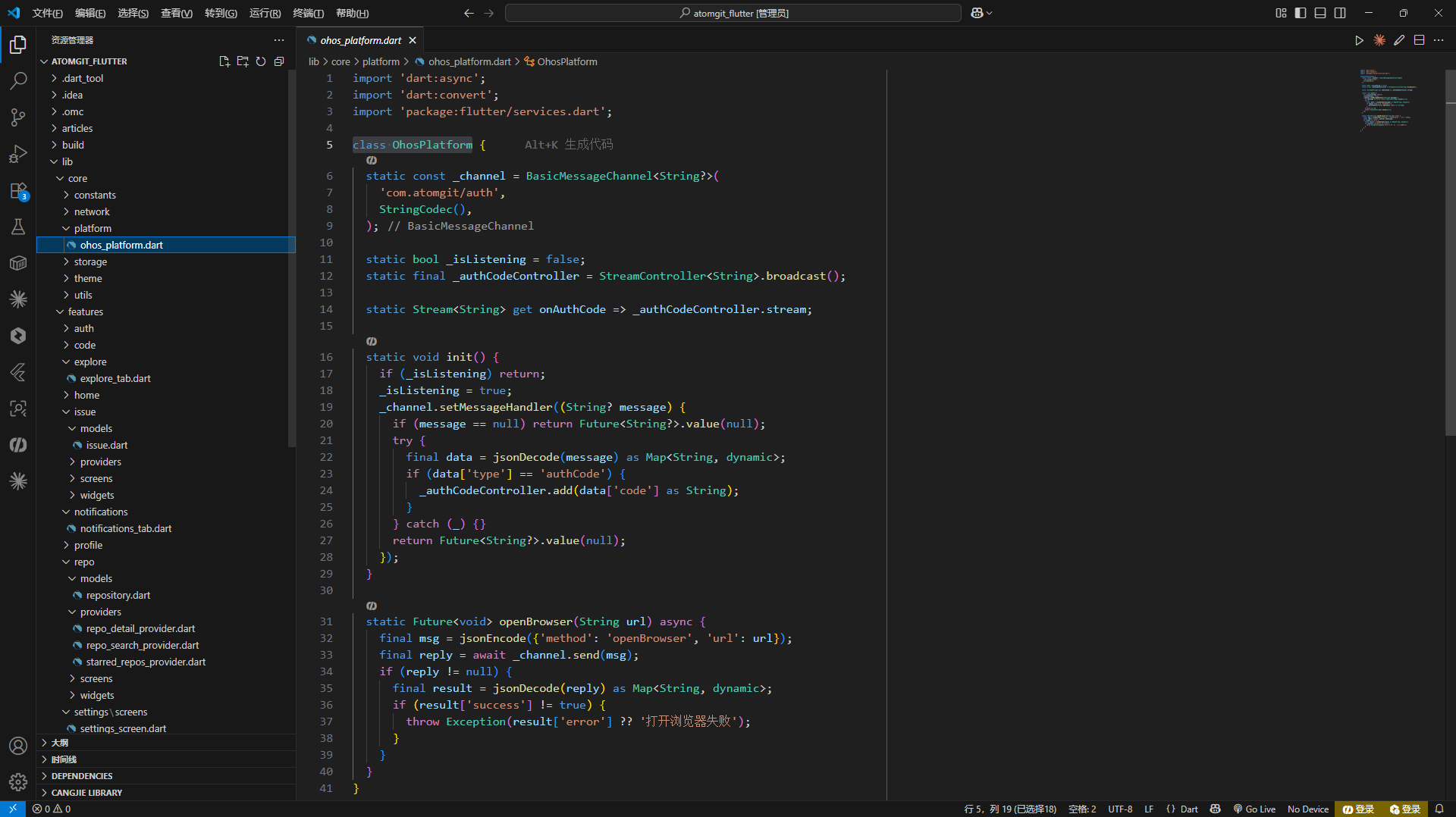
Dart 端:OhosPlatform
单例模式
dart
class OhosPlatform {
  static final OhosPlatform _instance = OhosPlatform._();
  static OhosPlatform get instance => _instance;
  OhosPlatform._();

  static const _channelName = 'com.atomgit/auth';
  BasicMessageChannel<String?>? _channel;
  bool _isListening = false;
  final _authCodeController = StreamController<String>.broadcast();
  Stream<String> get onAuthCode => _authCodeController.stream;
}
_isListening 守卫防止重复初始化 MessageChannel 的监听器。StreamController.broadcast() 支持多个监听者同时订阅 auth code 事件。
初始化
dart
void init() {
  if (_isListening) return;
  _channel = const BasicMessageChannel<String?>(
    _channelName,
    StringCodec(),
  );

  _channel!.setMessageHandler((String? message) async {
    if (message != null) {
      try {
        final decoded = jsonDecode(message) as Map<String, dynamic>;
        if (decoded['type'] == 'authCode') {
          _authCodeController.add(decoded['code'] as String);
        }
      } catch (_) {}
    }
    return null;
  });

  _isListening = true;
}
BasicMessageChannel 使用 StringCodec 编解码器,消息以 JSON 字符串传递。Handler 解析 JSON,识别 type: "authCode" 后通过 Stream 广播。
打开浏览器
dart
Future<bool> openBrowser(String url) async {
  if (_channel == null) return false;
  try {
    final message = jsonEncode({
      'method': 'openBrowser',
      'url': url,
    });
    final reply = await _channel!.send(message);
    if (reply != null) {
      final result = jsonDecode(reply) as Map<String, dynamic>;
      return result['success'] == true;
    }
  } catch (_) {}
  return false;
}
send() 是异步的 ------ Dart 发送消息后等待 ArkTS 处理完成并返回结果。
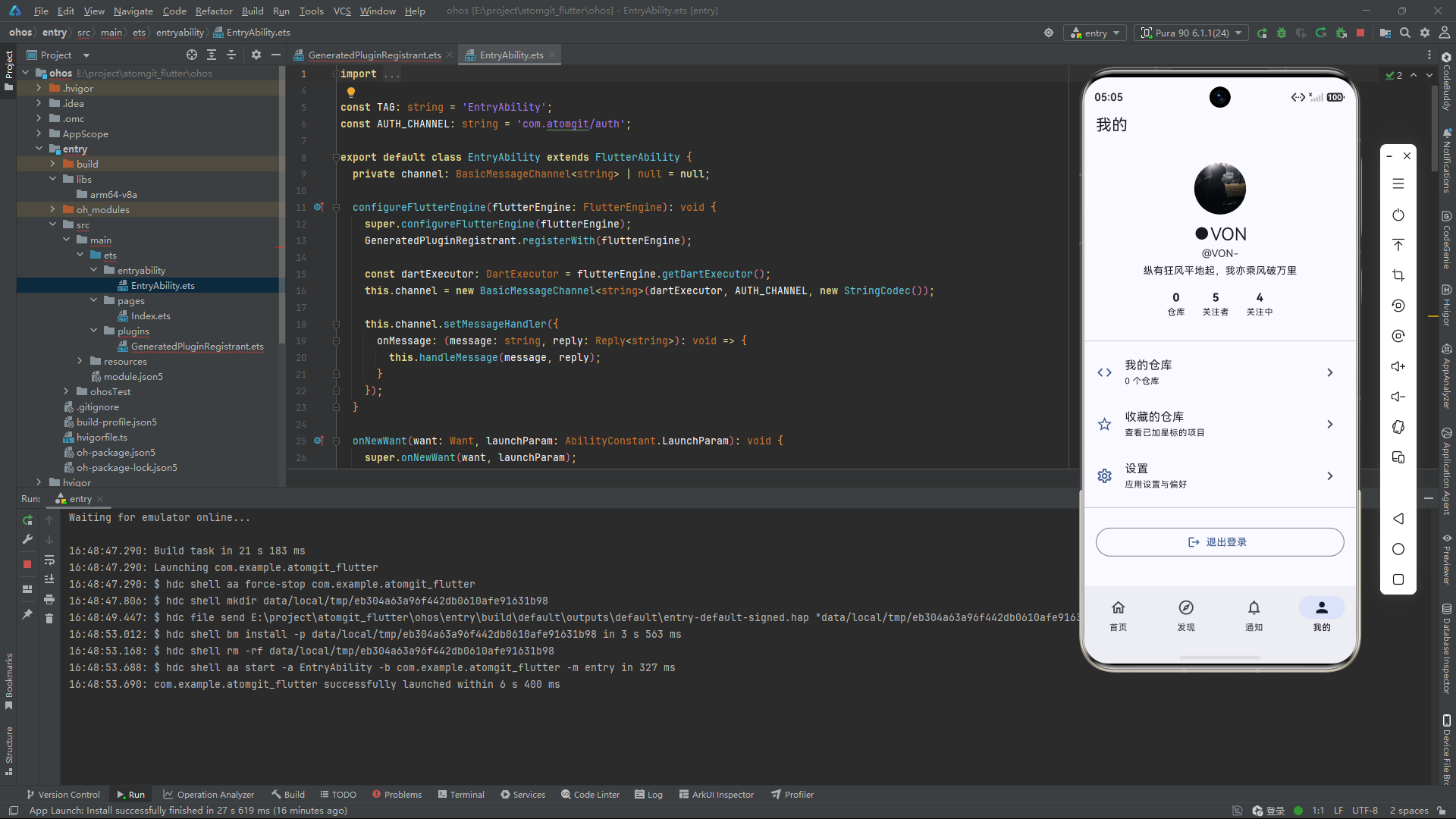
ArkTS 端:EntryAbility
基础结构
typescript
import { FlutterAbility, FlutterEngine } from '@ohos/flutter_ohos';
import { GeneratedPluginRegistrant } from '../plugins/GeneratedPluginRegistrant';
import { BasicMessageChannel, StringCodec } from '@ohos/flutter_ohos';

export default class EntryAbility extends FlutterAbility {
  private authChannel?: BasicMessageChannel<string>;
  private flutterEngine?: FlutterEngine;

  configureFlutterEngine(engine: FlutterEngine): void {
    this.flutterEngine = engine;
    GeneratedPluginRegistrant.registerWith(engine);

    this.authChannel = new BasicMessageChannel(
      engine.getBinaryMessenger(),
      'com.atomgit/auth',
      StringCodec.instance
    );

    this.authChannel.setMessageHandler((message: string | null) => {
      return this.handleMessage(message);
    });

    super.configureFlutterEngine(engine);
  }
}
EntryAbility 继承自 FlutterAbility(HarmonyOS Flutter 引擎提供的基类)。在 configureFlutterEngine 中注册插件和创建 MessageChannel。
消息处理
typescript
private handleMessage(message: string | null): string | null {
  if (!message) return null;
  try {
    const data = JSON.parse(message) as Record<string, string>;
    if (data.method === 'openBrowser') {
      this.openBrowser(data.url as string);
      return JSON.stringify({ success: true });
    }
  } catch (_) {}
  return null;
}

private openBrowser(url: string): void {
  const want: Want = {
    action: 'ohos.want.action.viewData',
    uri: url
  };
  this.context.startAbility(want);
}
解析 Dart 发来的 JSON → 匹配 method → 调用 startAbility 启动系统浏览器。ohos.want.action.viewData 是 HarmonyOS 的系统动作,用于打开 URL。
OAuth 回调处理
typescript
onNewWant(want: Want): void {
  super.onNewWant(want);
  const uri = want.uri;
  if (uri && uri.startsWith('atomgit://oauth/callback')) {
    const code = this.extractQueryParam(uri, 'code');
    if (code && this.authChannel) {
      const message = JSON.stringify({
        type: 'authCode',
        code: code
      });
      this.authChannel.send(message);
    }
  }
}

private extractQueryParam(uri: string, param: string): string | null {
  const queryIndex = uri.indexOf('?');
  if (queryIndex === -1) return null;
  const query = uri.substring(queryIndex + 1);
  const pairs = query.split('&');
  for (const pair of pairs) {
    const [key, value] = pair.split('=');
    if (key === param && value) {
      return decodeURIComponent(value);
    }
  }
  return null;
}
onNewWant 在系统浏览器回调时被调用。EntryAbility 检查是否是 OAuth 回调(atomgit://oauth/callback),提取 code 参数,通过 MessageChannel 发回 Dart 端。
extractQueryParam 手动解析 URL 参数(不依赖 URLSearchParams),用 decodeURIComponent 解码。
module.json5 配置
json5
{
  "module": {
    "name": "entry",
    "abilities": [
      {
        "name": "EntryAbility",
        "skills": [
          {
            "actions": ["ohos.want.action.viewData"],
            "uris": [
              {
                "scheme": "atomgit",
                "host": "oauth",
                "path": "/callback"
              }
            ]
          }
        ]
      }
    ],
    "requestPermissions": [
      { "name": "ohos.permission.INTERNET" }
    ]
  }
}
skills 配置声明了 EntryAbility 能处理 atomgit://oauth/callback 的自定义 URI scheme。当系统浏览器访问该 URI 时,系统会将 Want 路由回应用。
Index.ets --- Flutter 页面容器
typescript
import { FlutterPage } from '@ohos/flutter_ohos';

@Entry
@Component
struct Index {
  @StorageLink('viewId') viewId: string = '';

  build() {
    Column() {
      FlutterPage({ viewId: this.viewId })
    }
  }

  onBackPress(): boolean | void {
    getContext(this)
      .eventHub
      .emit('EVENT_BACK_PRESS');
  }
}
Index 是 ArkUI 的入口组件,内部只承载一个 FlutterPage 组件。viewId 通过 localStorage 传递,用于 Flutter 的视图管理。
OAuth 完整流程
1. 用户点击登录
2. Dart: OhosPlatform.openBrowser(authUrl)
3. ArkTS: startAbility({action: viewData, uri: authUrl})
4. 系统浏览器打开 AtomGit 授权页
5. 用户授权
6. AtomGit 重定向到 atomgit://oauth/callback?code=xxx
7. 系统路由回 EntryAbility.onNewWant()
8. ArkTS: authChannel.send({type: "authCode", code: "xxx"})
9. Dart: _authCodeController.add("xxx")
10. LoginScreen 收到 code → exchangeCode() → 获取 token
Broadcast Stream 的使用
LoginScreen 中订阅 auth code:
dart
StreamSubscription<String>? _authCodeSub;

@override
void initState() {
  super.initState();
  _authCodeSub = OhosPlatform.instance.onAuthCode.listen((code) {
    _handleAuthCode(code);
  });
}

@override
void dispose() {
  _authCodeSub?.cancel();
  super.dispose();
}
设计要点
- 单向业务流:Dart 发起请求(打开浏览器),ArkTS 执行操作并异步返回结果(auth code)
- JSON 协议 :所有消息以 JSON 编码,
method字段区分请求类型 - 守卫模式 :
_isListening防重复初始化,try-catch包裹所有 JSON 解析 - 手动 URL 解析:HarmonyOS 的 API 限制要求手动实现参数提取,而非使用 URL 对象