目录
src\views\AttendanceWorkHours.vue
[2、列表 / 上传 / 删除 / 下载 / 预览](#2、列表 / 上传 / 删除 / 下载 / 预览)
背景:
帮我实现一个需求功能:
关于XXXXXX。
项目使用的是 elementplus,然后我是刚开始接触使用 Vue3,不需要拆分的太细了,新生成一个路由页面以便我测试。
1、页面主体
src\views\AttendanceWorkHours.vue
Vue3 + Element Plus
html
<template>
  <div class="hr-page">
    <header class="hr-header">
      <h1 class="hr-title">工时与考勤管理</h1>
      <router-link class="hr-link" to="/survey-builder">返回其他演示</router-link>
    </header>

    <!-- Tab:考勤 / 工时 -->
    <el-tabs v-model="activeTab" class="hr-tabs" @tab-change="onTabChange">
      <el-tab-pane label="考勤" name="attendance" />
      <el-tab-pane label="工时" name="workhours" />
    </el-tabs>

    <!-- 第一行:搜索 -->
    <el-form :inline="true" class="search-form" @submit.prevent="handleSearch">
      <el-form-item label="文件名">
        <el-input
          v-model="searchForm.fileName"
          clearable
          placeholder="模糊搜索报表名称"
          style="width: 180px"
        />
      </el-form-item>
      <el-form-item label="姓名">
        <el-input
          v-model="searchForm.operatorName"
          clearable
          placeholder="模糊搜索操作人"
          style="width: 140px"
        />
      </el-form-item>
      <el-form-item v-if="activeTab === 'attendance'" label="年-月">
        <el-date-picker
          v-model="searchForm.yearMonth"
          type="month"
          placeholder="选择年月"
          value-format="YYYY-MM"
          clearable
          style="width: 150px"
        />
      </el-form-item>
      <el-form-item v-else label="年份">
        <el-date-picker
          v-model="searchForm.year"
          type="year"
          placeholder="选择年份"
          value-format="YYYY"
          clearable
          style="width: 120px"
        />
      </el-form-item>
      <el-form-item class="search-actions">
        <el-button @click="handleReset">重置</el-button>
        <el-button type="primary" :loading="tableLoading" @click="handleSearch">
          搜索
        </el-button>
      </el-form-item>
    </el-form>

    <!-- 第二行:上传 / 批量删除 -->
    <div class="toolbar">
      <el-button type="primary" :icon="Upload" @click="openUploadDialog">
        上传 Excel
      </el-button>
      <el-button
        type="danger"
        :icon="Delete"
        :disabled="!selectedIds.length"
        @click="handleBatchDelete"
      >
        批量删除
      </el-button>
      <span v-if="selectedIds.length" class="selected-tip">
        已选 {{ selectedIds.length }} 项
      </span>
    </div>

    <!-- 列表 -->
    <el-table
      v-loading="tableLoading"
      :data="tableData"
      border
      stripe
      row-key="id"
      @selection-change="onSelectionChange"
    >
      <el-table-column type="selection" width="48" align="center" />
      <el-table-column
        prop="reportName"
        label="汇总报表名称"
        min-width="240"
        show-overflow-tooltip
      />
      <el-table-column prop="operator" label="操作人" width="120" />
      <el-table-column prop="operateTime" label="操作时间" width="180" />
      <el-table-column label="操作" width="220" fixed="right" align="center">
        <template #default="{ row }">
          <el-button type="primary" link @click="handlePreview(row)">
            预览
          </el-button>
          <el-button type="primary" link @click="handleDownload(row)">
            下载
          </el-button>
          <el-button type="danger" link @click="handleDelete(row)">
            删除
          </el-button>
        </template>
      </el-table-column>
    </el-table>

    <!-- 分页 -->
    <div class="pagination-wrap">
      <el-pagination
        v-model:current-page="pagination.page"
        v-model:page-size="pagination.pageSize"
        :total="pagination.total"
        :page-sizes="[10, 20, 50]"
        layout="total, sizes, prev, pager, next, jumper"
        background
        @size-change="loadList"
        @current-change="loadList"
      />
    </div>

    <!-- 上传弹窗 -->
    <el-dialog
      v-model="uploadVisible"
      :title="uploadDialogTitle"
      width="560px"
      destroy-on-close
      @closed="resetUploadForm"
    >
      <el-form label-width="100px">
        <el-form-item
          v-if="activeTab === 'attendance'"
          label="考勤月份"
          required
        >
          <el-date-picker
            v-model="uploadForm.yearMonth"
            type="month"
            placeholder="选择上传数据所属月份"
            value-format="YYYY-MM"
            style="width: 100%"
          />
        </el-form-item>
        <el-form-item v-else label="工时年份" required>
          <el-date-picker
            v-model="uploadForm.year"
            type="year"
            placeholder="选择工时统计年份"
            value-format="YYYY"
            style="width: 100%"
          />
        </el-form-item>
        <el-form-item label="上传文件" required>
          <el-upload
            ref="uploadRef"
            drag
            multiple
            :auto-upload="false"
            accept=".xls,.xlsx,.zip"
            :file-list="uploadFileList"
            :on-change="onUploadFileChange"
            :on-remove="onUploadFileRemove"
            :before-upload="() => false"
          >
            <el-icon class="upload-icon"><UploadFilled /></el-icon>
            <div class="el-upload__text">
              将文件拖到此处,或 <em>点击选择</em>
            </div>
            <template #tip>
              <div class="upload-tip">
                <template v-if="activeTab === 'attendance'">
                  支持多个 Excel(文件名需含:加班列表 / 请假列表 / 记录报表 /
                  考勤)或一个 .zip 压缩包
                </template>
                <template v-else>
                  支持多个 Excel(文件名需含「工时」)或一个 .zip 压缩包
                </template>
              </div>
            </template>
          </el-upload>
        </el-form-item>
      </el-form>
      <template #footer>
        <el-button @click="uploadVisible = false">取消</el-button>
        <el-button type="primary" :loading="uploading" @click="submitUpload">
          确认上传
        </el-button>
      </template>
    </el-dialog>

    <!-- 预览弹窗 -->
    <el-dialog
      v-model="previewVisible"
      :title="previewTitle"
      width="720px"
      destroy-on-close
    >
      <el-table v-loading="previewLoading" :data="previewRows" border stripe>
        <el-table-column prop="dept" label="部门" width="120" />
        <el-table-column prop="name" label="姓名" width="100" />
        <el-table-column prop="detail" label="汇总数据" min-width="160" />
        <el-table-column prop="remark" label="备注" min-width="120" />
      </el-table>
      <template #footer>
        <el-button type="primary" @click="previewVisible = false">
          关闭
        </el-button>
      </template>
    </el-dialog>
  </div>
</template>

<script setup lang="ts">
import { computed, onMounted, reactive, ref } from 'vue'
import { ElMessage, ElMessageBox } from 'element-plus'
import type { UploadFile, UploadInstance, UploadUserFile } from 'element-plus'
import { Delete, Upload, UploadFilled } from '@element-plus/icons-vue'
import {
  deleteReports,
  downloadReport,
  fetchReportList,
  previewReport,
  uploadReports,
  type ReportRecord,
  type ReportType,
} from '@/api/hrReport'
import { validateUploadFiles } from '@/utils/hrFileValidate'

// ---------- 当前 Tab ----------
const activeTab = ref<ReportType>('attendance')

// ---------- 搜索表单 ----------
const searchForm = reactive({
  fileName: '',
  operatorName: '',
  yearMonth: '' as string,
  year: '' as string,
})

// ---------- 表格 ----------
const tableLoading = ref(false)
const tableData = ref<ReportRecord[]>([])
const selectedIds = ref<string[]>([])
const pagination = reactive({ page: 1, pageSize: 10, total: 0 })

// ---------- 上传 ----------
const uploadVisible = ref(false)
const uploading = ref(false)
const uploadRef = ref<UploadInstance>()
const uploadFileList = ref<UploadUserFile[]>([])
const uploadForm = reactive({
  yearMonth: '',
  year: '',
})

const uploadDialogTitle = computed(() =>
  activeTab.value === 'attendance' ? '上传考勤数据' : '上传工时统计表',
)

// ---------- 预览 ----------
const previewVisible = ref(false)
const previewLoading = ref(false)
const previewTitle = ref('')
const previewRows = ref<
  { dept: string; name: string; detail: string; remark: string }[]
>([])

/** 加载列表 */
async function loadList() {
  tableLoading.value = true
  try {
    const q: Parameters<typeof fetchReportList>[0] = {
      type: activeTab.value,
      page: pagination.page,
      pageSize: pagination.pageSize,
      fileName: searchForm.fileName || undefined,
      operatorName: searchForm.operatorName || undefined,
    }
    if (activeTab.value === 'attendance' && searchForm.yearMonth) {
      const [y, m] = searchForm.yearMonth.split('-')
      q.year = Number(y)
      q.month = Number(m)
    }
    if (activeTab.value === 'workhours' && searchForm.year) {
      q.year = Number(searchForm.year)
    }
    const res = await fetchReportList(q)
    tableData.value = res.list
    pagination.total = res.total
  } finally {
    tableLoading.value = false
  }
}

function onTabChange() {
  selectedIds.value = []
  pagination.page = 1
  handleReset()
}

function handleSearch() {
  pagination.page = 1
  loadList()
}

function handleReset() {
  searchForm.fileName = ''
  searchForm.operatorName = ''
  searchForm.yearMonth = ''
  searchForm.year = ''
  pagination.page = 1
  loadList()
}

function onSelectionChange(rows: ReportRecord[]) {
  selectedIds.value = rows.map((r) => r.id)
}

// ---------- 上传相关 ----------
function openUploadDialog() {
  uploadVisible.value = true
}

function resetUploadForm() {
  uploadForm.yearMonth = ''
  uploadForm.year = ''
  uploadFileList.value = []
  uploadRef.value?.clearFiles()
}

function onUploadFileChange(_file: UploadFile, fileList: UploadUserFile[]) {
  uploadFileList.value = fileList
}

function onUploadFileRemove(_file: UploadFile, fileList: UploadUserFile[]) {
  uploadFileList.value = fileList
}

function getUploadRawFiles(): File[] {
  const files: File[] = []
  for (const item of uploadFileList.value) {
    if (item.raw instanceof File) files.push(item.raw)
  }
  return files
}

async function submitUpload() {
  const files = getUploadRawFiles()
  const validate = validateUploadFiles(files, activeTab.value)
  if (!validate.ok) {
    ElMessage.warning(validate.message)
    return
  }

  let year = 0
  let month: number | undefined

  if (activeTab.value === 'attendance') {
    if (!uploadForm.yearMonth) {
      ElMessage.warning('请选择考勤月份')
      return
    }
    const [y, m] = uploadForm.yearMonth.split('-')
    year = Number(y)
    month = Number(m)
  } else {
    if (!uploadForm.year) {
      ElMessage.warning('请选择工时年份')
      return
    }
    year = Number(uploadForm.year)
  }

  uploading.value = true
  try {
    await uploadReports({
      type: activeTab.value,
      files,
      year,
      month,
      operator: '当前用户',
    })
    ElMessage.success('上传成功,后端已合并汇总')
    uploadVisible.value = false
    pagination.page = 1
    await loadList()
  } catch {
    ElMessage.error('上传失败,请稍后重试')
  } finally {
    uploading.value = false
  }
}

// ---------- 预览 / 下载 / 删除 ----------
async function handlePreview(row: ReportRecord) {
  previewTitle.value = `预览:${row.reportName}`
  previewVisible.value = true
  previewLoading.value = true
  previewRows.value = []
  try {
    previewRows.value = await previewReport(activeTab.value, row.id)
  } finally {
    previewLoading.value = false
  }
}

async function handleDownload(row: ReportRecord) {
  try {
    const blob = await downloadReport(activeTab.value, row)
    const url = URL.createObjectURL(blob)
    const a = document.createElement('a')
    a.href = url
    a.download = row.reportName
    a.click()
    URL.revokeObjectURL(url)
    ElMessage.success('下载已开始')
  } catch {
    ElMessage.error('下载失败')
  }
}

async function handleDelete(row: ReportRecord) {
  await ElMessageBox.confirm(`确定删除「${row.reportName}」吗?`, '提示', {
    type: 'warning',
  })
  await deleteReports(activeTab.value, [row.id])
  ElMessage.success('删除成功')
  if (tableData.value.length === 1 && pagination.page > 1) {
    pagination.page -= 1
  }
  await loadList()
}

async function handleBatchDelete() {
  if (!selectedIds.value.length) return
  await ElMessageBox.confirm(
    `确定删除选中的 ${selectedIds.value.length} 条记录吗?`,
    '批量删除',
    { type: 'warning' },
  )
  await deleteReports(activeTab.value, [...selectedIds.value])
  selectedIds.value = []
  ElMessage.success('批量删除成功')
  pagination.page = 1
  await loadList()
}

onMounted(() => {
  loadList()
})
</script>

<style scoped>
.hr-page {
  position: relative;
  left: 50%;
  right: 50%;
  margin-left: -50vw;
  margin-right: -50vw;
  width: 100vw;
  box-sizing: border-box;
  padding: 20px 24px 32px;
  background: #f5f7fa;
  min-height: calc(100vh - 32px);
}

.hr-header {
  display: flex;
  align-items: center;
  justify-content: space-between;
  margin-bottom: 8px;
}

.hr-title {
  margin: 0;
  font-size: 20px;
  font-weight: 600;
  color: #303133;
}

.hr-link {
  font-size: 13px;
  color: #409eff;
}

.hr-tabs {
  background: #fff;
  padding: 0 16px;
  border-radius: 8px 8px 0 0;
}

.search-form {
  background: #fff;
  padding: 16px 16px 4px;
  border-radius: 0;
}

.search-actions {
  float: right;
  margin-right: 0 !important;
}

.toolbar {
  background: #fff;
  padding: 0 16px 16px;
  display: flex;
  align-items: center;
  gap: 12px;
  border-radius: 0 0 8px 8px;
  margin-bottom: 16px;
}

.selected-tip {
  font-size: 13px;
  color: #909399;
}

.el-table {
  border-radius: 8px;
  overflow: hidden;
}

.pagination-wrap {
  margin-top: 16px;
  display: flex;
  justify-content: flex-end;
}

.upload-icon {
  font-size: 48px;
  color: #c0c4cc;
  margin-bottom: 8px;
}

.upload-tip {
  font-size: 12px;
  color: #909399;
  line-height: 1.6;
  margin-top: 8px;
}
</style>
2、列表 / 上传 / 删除 / 下载 / 预览
src\api\hrReport.ts
当前为 Mock
javascript
/**
 * 工时 / 考勤报表 API
 * 当前为 Mock 实现,对接后端时替换 fetch 地址与响应解析即可。
 */

export type ReportType = 'attendance' | 'workhours'

export interface ReportRecord {
  id: string
  reportName: string
  operator: string
  operateTime: string
  year: number
  month?: number
}

export interface ListQuery {
  type: ReportType
  page: number
  pageSize: number
  fileName?: string
  operatorName?: string
  year?: number
  month?: number
}

export interface ListResult {
  list: ReportRecord[]
  total: number
}

export interface PreviewRow {
  dept: string
  name: string
  detail: string
  remark: string
}

// ---------- Mock 内存数据(刷新页面会重置) ----------
const mockDb: Record<ReportType, ReportRecord[]> = {
  attendance: [
    {
      id: 'a1',
      reportName: 'KQHZ报表_2024年01月.xlsx',
      operator: '李四',
      operateTime: '2024-02-01 10:20:00',
      year: 2024,
      month: 1,
    },
    {
      id: 'a2',
      reportName: 'KQHZ报表_2024年02月.xlsx',
      operator: '王五',
      operateTime: '2024-03-02 14:35:00',
      year: 2024,
      month: 2,
    },
  ],
  workhours: [
    {
      id: 'w1',
      reportName: 'BMGS汇总_2023.xlsx',
      operator: '张三',
      operateTime: '2024-01-15 09:10:00',
      year: 2023,
    },
    {
      id: 'w2',
      reportName: 'BMGS汇总_2024.xlsx',
      operator: '李四',
      operateTime: '2024-06-20 16:40:00',
      year: 2024,
    },
  ],
}

function uid(): string {
  return crypto.randomUUID()
}

function nowStr(): string {
  const d = new Date()
  const pad = (n: number) => String(n).padStart(2, '0')
  return `${d.getFullYear()}-${pad(d.getMonth() + 1)}-${pad(d.getDate())} ${pad(d.getHours())}:${pad(d.getMinutes())}:${pad(d.getSeconds())}`
}

function filterList(type: ReportType, q: ListQuery): ReportRecord[] {
  let rows = [...mockDb[type]]
  if (q.fileName?.trim()) {
    const kw = q.fileName.trim().toLowerCase()
    rows = rows.filter((r) => r.reportName.toLowerCase().includes(kw))
  }
  if (q.operatorName?.trim()) {
    const kw = q.operatorName.trim()
    rows = rows.filter((r) => r.operator.includes(kw))
  }
  if (q.year) {
    rows = rows.filter((r) => r.year === q.year)
  }
  if (type === 'attendance' && q.month) {
    rows = rows.filter((r) => r.month === q.month)
  }
  return rows
}

/** 列表(分页 + 筛选) */
export async function fetchReportList(q: ListQuery): Promise<ListResult> {
  await delay(300)
  const all = filterList(q.type, q)
  const start = (q.page - 1) * q.pageSize
  return {
    list: all.slice(start, start + q.pageSize),
    total: all.length,
  }
}

export interface UploadParams {
  type: ReportType
  files: File[]
  year: number
  month?: number
  operator?: string
}

/** 上传并汇总(Mock:模拟后端合并) */
export async function uploadReports(p: UploadParams): Promise<ReportRecord> {
  await delay(1200)
  const operator = p.operator || '当前用户'
  let reportName: string
  if (p.type === 'attendance' && p.month) {
    reportName = `KQHZ报表_${p.year}年${String(p.month).padStart(2, '0')}月.xlsx`
  } else {
    reportName = `BMGS汇总_${p.year}.xlsx`
  }
  const record: ReportRecord = {
    id: uid(),
    reportName,
    operator,
    operateTime: nowStr(),
    year: p.year,
    month: p.month,
  }
  mockDb[p.type].unshift(record)
  return record
}

/** 批量删除 */
export async function deleteReports(
  type: ReportType,
  ids: string[],
): Promise<void> {
  await delay(400)
  mockDb[type] = mockDb[type].filter((r) => !ids.includes(r.id))
}

/** 下载汇总表(Mock:生成简易 xlsx 文本占位,真实环境接 blob) */
export async function downloadReport(
  type: ReportType,
  record: ReportRecord,
): Promise<Blob> {
  await delay(500)
  const header =
    type === 'workhours'
      ? '部门,姓名,工时(小时),备注\n'
      : '部门,姓名,出勤天数,加班(小时),请假(天),备注\n'
  const rows =
    type === 'workhours'
      ? '研发部,张三,168,正常\n产品部,李四,172,正常\n'
      : '研发部,张三,22,12,0,正常\n产品部,李四,21,8,1,事假1天\n'
  const content = `\uFEFF${header}${rows}`
  return new Blob([content], {
    type: 'application/vnd.ms-excel;charset=utf-8',
  })
}

/** 预览汇总数据 */
export async function previewReport(
  type: ReportType,
  id: string,
): Promise<PreviewRow[]> {
  await delay(400)
  if (type === 'workhours') {
    return [
      { dept: '研发部', name: '张三', detail: '168 小时', remark: '正常' },
      { dept: '产品部', name: '李四', detail: '172 小时', remark: '正常' },
      { dept: '市场部', name: '王五', detail: '160 小时', remark: '正常' },
    ]
  }
  return [
    { dept: '研发部', name: '张三', detail: '出勤22天 / 加班12h', remark: '正常' },
    { dept: '产品部', name: '李四', detail: '出勤21天 / 加班8h', remark: '事假1天' },
    { dept: '市场部', name: '王五', detail: '出勤20天 / 加班6h', remark: '正常' },
  ]
}

function delay(ms: number) {
  return new Promise((r) => setTimeout(r, ms))
}
3、上传文件类型与名称校验
src\utils\hrFileValidate.ts
javascript
/** 工时 / 考勤上传文件校验 */

const EXCEL_EXT = ['.xls', '.xlsx']
const ZIP_EXT = ['.zip']

function getExt(name: string): string {
  const i = name.lastIndexOf('.')
  return i >= 0 ? name.slice(i).toLowerCase() : ''
}

function isExcel(name: string): boolean {
  return EXCEL_EXT.includes(getExt(name))
}

function isZip(name: string): boolean {
  return ZIP_EXT.includes(getExt(name))
}

/** 工时 Excel:文件名需包含「工时」 */
function isWorkhoursExcelName(name: string): boolean {
  const base = name.replace(/\.(xls|xlsx)$/i, '')
  return /工时/.test(base)
}

/** 考勤 Excel:文件名需包含考勤相关关键词之一 */
function isAttendanceExcelName(name: string): boolean {
  const base = name.replace(/\.(xls|xlsx)$/i, '')
  return /(加班列表|请假列表|记录报表|考勤)/.test(base)
}

/** 压缩包:仅校验扩展名 */
function isZipName(name: string): boolean {
  return isZip(name)
}

export interface ValidateResult {
  ok: boolean
  message?: string
}

/** 校验单个文件(工时) */
export function validateWorkhoursFile(file: File): ValidateResult {
  const { name } = file
  if (isExcel(name)) {
    if (!isWorkhoursExcelName(name)) {
      return {
        ok: false,
        message: `「${name}」文件名需包含「工时」,例如:部门工时统计表.xlsx`,
      }
    }
    return { ok: true }
  }
  if (isZip(name)) {
    return { ok: true }
  }
  return {
    ok: false,
    message: `「${name}」仅支持 .xls / .xlsx / .zip`,
  }
}

/** 校验单个文件(考勤) */
export function validateAttendanceFile(file: File): ValidateResult {
  const { name } = file
  if (isExcel(name)) {
    if (!isAttendanceExcelName(name)) {
      return {
        ok: false,
        message: `「${name}」文件名需包含:加班列表、请假列表、记录报表或考勤`,
      }
    }
    return { ok: true }
  }
  if (isZip(name)) {
    return { ok: true }
  }
  return {
    ok: false,
    message: `「${name}」仅支持 .xls / .xlsx / .zip`,
  }
}

/** 批量校验,返回第一个错误 */
export function validateUploadFiles(
  files: File[],
  type: 'attendance' | 'workhours',
): ValidateResult {
  if (!files.length) {
    return { ok: false, message: '请至少选择一个文件' }
  }
  const fn =
    type === 'workhours' ? validateWorkhoursFile : validateAttendanceFile
  for (const f of files) {
    const r = fn(f)
    if (!r.ok) return r
  }
  return { ok: true }
}
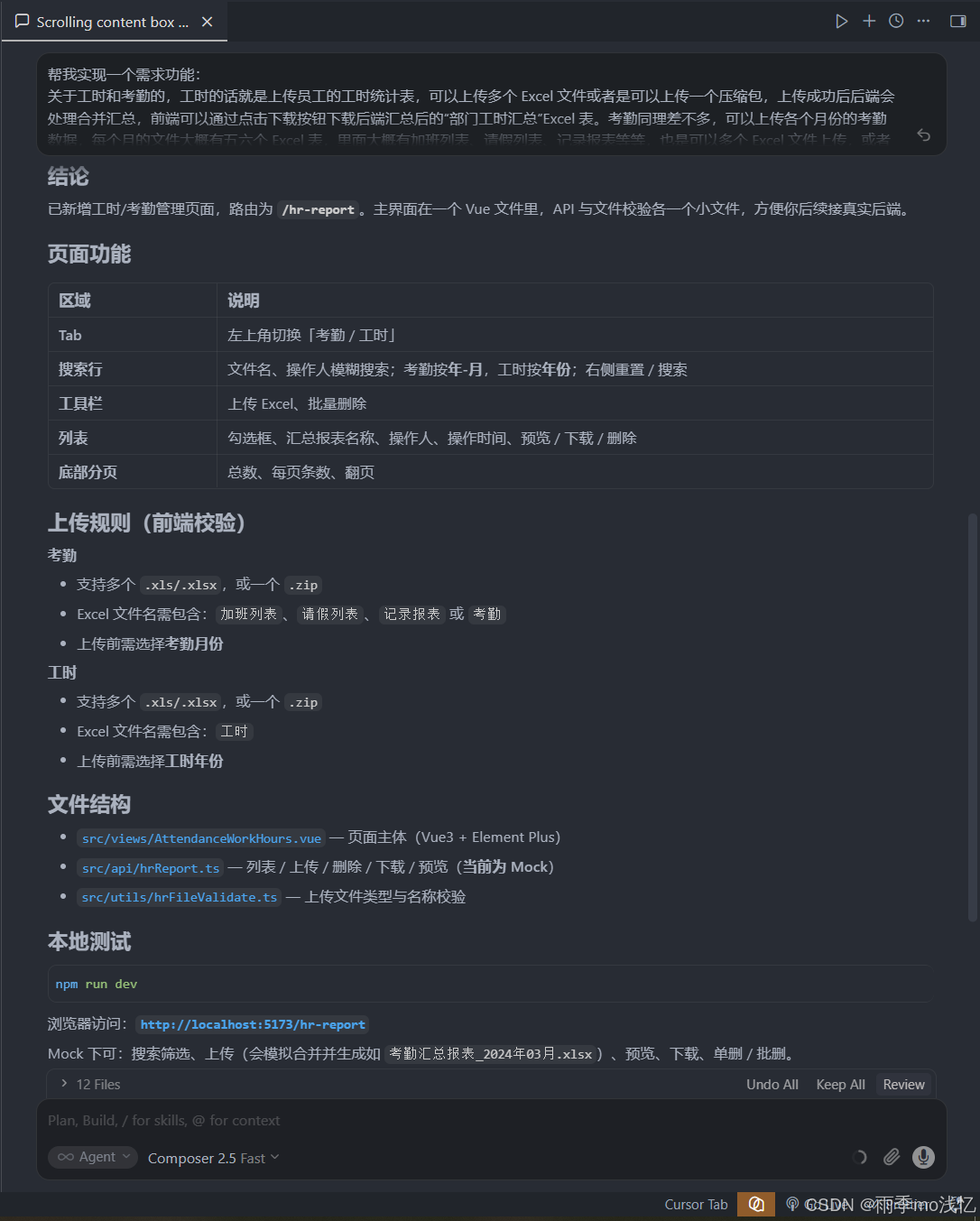
结论
已新增工时/考勤管理页面,路由为 /hr-report。主界面在一个 Vue 文件里,API 与文件校验各一个小文件,方便你后续接真实后端。
页面功能
| 区域 | 说明 |
|---|---|
| Tab | 左上角切换「考勤 / 工时」 |
| 搜索行 | 文件名、操作人模糊搜索;考勤按年-月,工时按年份;右侧重置 / 搜索 |
| 工具栏 | 上传 Excel、批量删除 |
| 列表 | 勾选框、汇总报表名称、操作人、操作时间、预览 / 下载 / 删除 |
| 底部分页 | 总数、每页条数、翻页 |
上传规则(前端校验)
考勤
- 支持多个
.xls/.xlsx,或一个.zip - Excel 文件名需包含:
加班列表、请假列表、记录报表或考勤 - 上传前需选择考勤月份
工时
- 支持多个
.xls/.xlsx,或一个.zip - Excel 文件名需包含:
工时 - 上传前需选择工时年份
文件结构
src/views/AttendanceWorkHours.vue--- 页面主体(Vue3 + Element Plus)src/api/hrReport.ts--- 列表 / 上传 / 删除 / 下载 / 预览(当前为 Mock)src/utils/hrFileValidate.ts--- 上传文件类型与名称校验
本地测试
npm run dev
浏览器访问:http://localhost:xxxx/hr-report
Mock 下可:搜索筛选、上传(会模拟合并并生成如 xxxxxx_2024年03月.xlsx)、预览、下载、单删 / 批删。
对接真实后端
在 src/api/hrReport.ts 里把 Mock 换成真实 fetch / axios 即可,建议接口形态:
GET /api/hr/{attendance|workhours}/list--- 分页列表POST /api/hr/{type}/upload---FormData传文件 + 年月/年份DELETE /api/hr/{type}--- 批量删除GET /api/hr/{type}/download/:id--- 下载 blobGET /api/hr/{type}/preview/:id--- 预览数据
页面逻辑不用大改,只换 API 层。若你已有后端接口文档,我可以按文档把 Mock 改成真实请求。