按键驱动
- [1 设备树文件](#1 设备树文件)
- [2 驱动代码](#2 驱动代码)
- [3 编译文件](#3 编译文件)
- [4 应用层测试文件](#4 应用层测试文件)
- [5 完整代码运行](#5 完整代码运行)
-
- [5.1 编译驱动](#5.1 编译驱动)
- [5.2 加载驱动模块](#5.2 加载驱动模块)
- [5.3 查看驱动加载 & 设备树匹配日志](#5.3 查看驱动加载 & 设备树匹配日志)
- [5.4 手动创建设备节点](#5.4 手动创建设备节点)
- [5.5 运行测试程序](#5.5 运行测试程序)
- [5.6 退出](#5.6 退出)
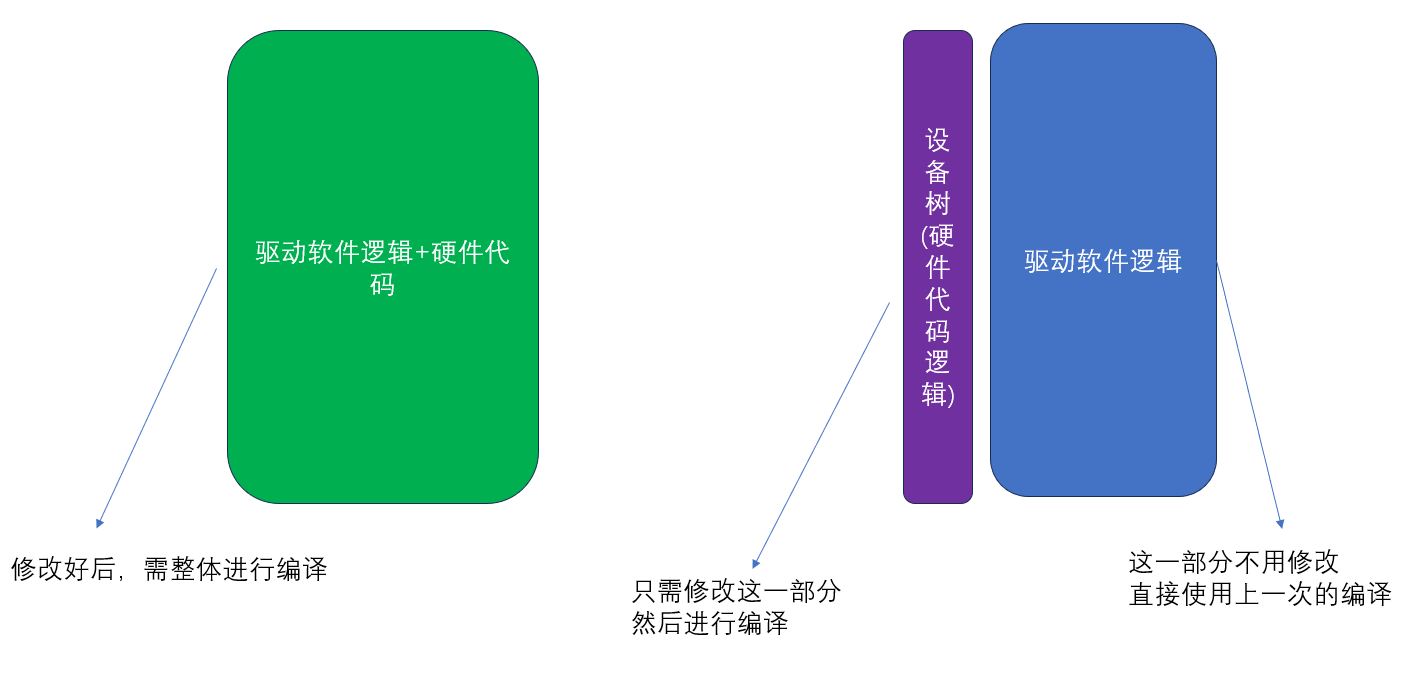
大部分的驱动,从输入上来看,需要写四个文件,分别是驱动源码、设备树文件、编译文件、上层应用测试文件,上期的LED驱动是一个字符设备驱动模型,存在一个问题,当切换不同的硬件的时候,需要重新编译驱动代码,而如果换用了设备树,只需要编译设备树即可,不需要编译驱动代码,驱动代码软件逻辑不变,只需要修改设备树上的硬件逻辑。
1 设备树文件
key_overlay.dts:
c
/dts-v1/;
/plugin/;

fragment@0 {
    target-path = "/";
    __overlay__ {
        platform_key {
            compatible = "rpi,platform-key";
            gpios = <&gpio 27 GPIO_ACTIVE_LOW>;
            status = "okay";
        };
    };
};
2 驱动代码
代码key_platform.c:
c
#include <linux/module.h>
#include <linux/platform_device.h>
#include <linux/gpio/consumer.h>
#include <linux/fs.h>
#include <linux/uaccess.h>
#include <linux/err.h>

/* 主设备号,自定义一个未被占用的号 */
#define KEY_MAJOR  243
#define KEY_DEV_NAME "rpi_plat_key"

/* 私有数据:保存当前设备的GPIO句柄 */
struct key_dev_data {
    struct gpio_desc *gpiod;
};

/* ==================== 文件操作接口 ==================== */
static int key_open(struct inode *inode, struct file *file)
{
    pr_info("Key dev opened\n");
    return 0;
}

static int key_release(struct inode *inode, struct file *file)
{
    pr_info("Key dev closed\n");
    return 0;
}

/* 应用 read 时调用:读取按键状态 */
static ssize_t key_read(struct file *file, char __user *buf,
                        size_t count, loff_t *ppos)
{
    struct platform_device *pdev = container_of(inode->i_cdev,
                                                struct platform_device, dev);
    struct key_dev_data *priv = platform_get_drvdata(pdev);
    char key_status;
    int gpio_level;

    // 读取GPIO电平
    gpio_level = gpiod_get_value(priv->gpiod);

    // 内部上拉:松开=高电平(1),按下=低电平(0)
    key_status = (gpio_level == 0) ? 1 : 0;

    // 内核数据 → 拷贝到用户空间
    if (copy_to_user(buf, &key_status, 1)) {
        return -EFAULT;
    }

    return 1;
}

/* 文件操作集合 */
static struct file_operations key_fops = {
    .owner   = THIS_MODULE,
    .open    = key_open,
    .read    = key_read,
    .release = key_release,
};

/* ==================== Platform 驱动回调 ==================== */
static int key_probe(struct platform_device *pdev)
{
    struct device *dev = &pdev->dev;
    struct key_dev_data *priv;
    int ret;

    // 1. 分配私有内存,存放GPIO等设备信息
    priv = devm_kzalloc(dev, sizeof(*priv), GFP_KERNEL);
    if (!priv) {
        dev_err(dev, "kzalloc failed\n");
        return -ENOMEM;
    }
    platform_set_drvdata(pdev, priv);

    // 2. 从设备树获取GPIO(输入模式)
    priv->gpiod = devm_gpiod_get(dev, NULL, GPIOD_IN);
    if (IS_ERR(priv->gpiod)) {
        ret = PTR_ERR(priv->gpiod);
        dev_err(dev, "get gpio from dts failed\n");
        return ret;
    }

    // 3. 注册字符设备
    ret = register_chrdev(KEY_MAJOR, KEY_DEV_NAME, &key_fops);
    if (ret < 0) {
        dev_err(dev, "register chrdev failed\n");
        return ret;
    }

    dev_info(dev, "Platform Key driver probe success\n");
    return 0;
}

static int key_remove(struct platform_device *pdev)
{
    // 注销字符设备
    unregister_chrdev(KEY_MAJOR, KEY_DEV_NAME);
    dev_info(&pdev->dev, "Platform Key driver removed\n");
    return 0;
}

/* 设备树匹配表:必须和DTS里 compatible 字符串完全一致 */
static const struct of_device_id key_of_match[] = {
    { .compatible = "rpi,platform-key" },
    { /* 结束标记 */ }
};
MODULE_DEVICE_TABLE(of, key_of_match);

/* 定义platform驱动主体 */
static struct platform_driver key_platform_driver = {
    .probe  = key_probe,
    .remove = key_remove,
    .driver = {
        .name = "rpi-key-driver",
        .of_match_table = key_of_match,
    },
};

/* 注册/卸载platform驱动 */
module_platform_driver(key_platform_driver);

MODULE_LICENSE("GPL");
MODULE_AUTHOR("Driver Demo");
MODULE_DESCRIPTION("Raspberry Pi Platform Key Driver with Device Tree");
3 编译文件
文件名Makefile:
c
obj-m += key_platform.o

KERNELDIR := /lib/modules/$(shell uname -r)/build
PWD := $(shell pwd)

all:
	make -C $(KERNELDIR) M=$(PWD) modules

clean:
	make -C $(KERNELDIR) M=$(PWD) clean
4 应用层测试文件
test_key.c:
c
#include <stdio.h>
#include <fcntl.h>
#include <unistd.h>

int main(void)
{
    int fd;
    char state;

    fd = open("/dev/key", O_RDONLY);
    if (fd < 0) {
        perror("open /dev/key failed");
        return -1;
    }

    while (1) {
        read(fd, &state, 1);
        if (state == 1) {
            printf("==== 按键按下 ====\n");
        } else {
            printf("按键松开\n");
        }
        usleep(200000);  // 200ms 简单防抖
    }

    close(fd);
    return 0;
}
5 完整代码运行
5.1 编译驱动
编译驱动生成 key_platform.ko
c
make5.2 加载驱动模块
c
sudo insmod key_platform.ko5.3 查看驱动加载 & 设备树匹配日志
c
dmesg | grep -i key5.4 手动创建设备节点
c
sudo mknod /dev/key c 243 05.5 运行测试程序
c
sudo ./test_key5.6 退出
终止测试程序 Ctrl+C
c
sudo rmmod key_platform
sudo rm /dev/key