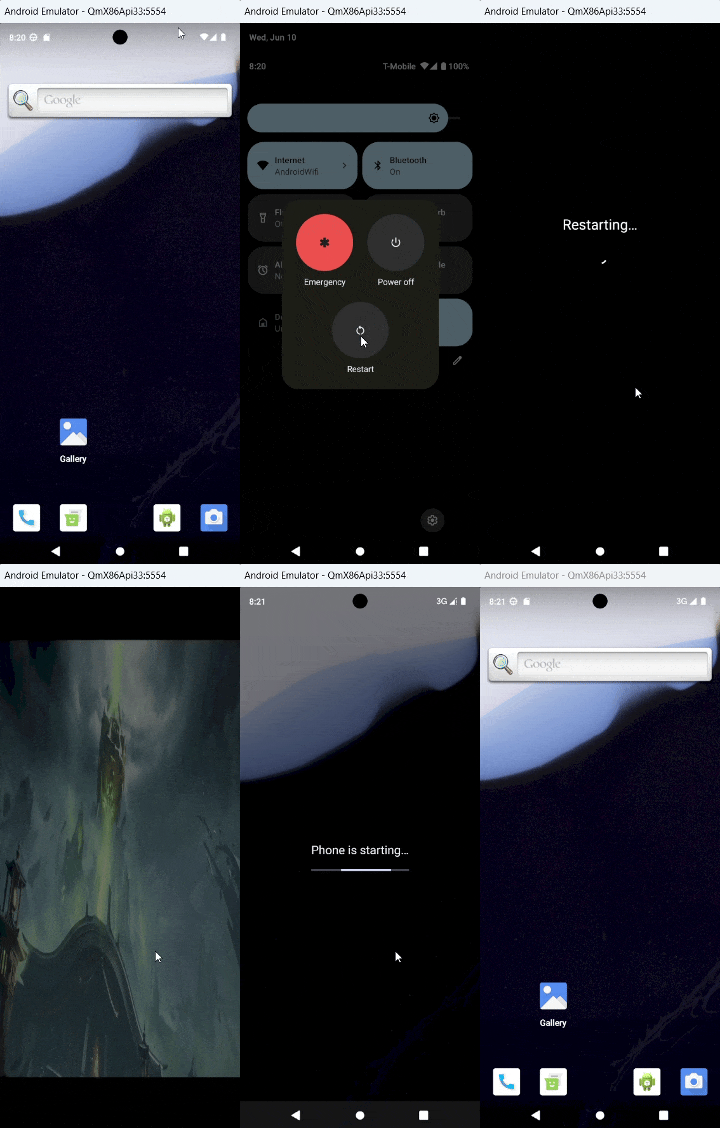
先看效果
编译
m libbootanimation -j8
手动播放 验证编码器可用
bash
PS C:\Users\HiMaq> adb push C:\Users\HiMaq\Videos\bootanimation.mp4 /system/media/bootanimation.mp4
C:\Users\HiMaq\Videos\bootanimation.mp4: 1 file pushed, 0 skipped. 8.9 MB/s (37097541 bytes in 3.994s)

adb push C:\Users\HiMaq\Videos\bootanimation.mp4 /sdcard/video.mp4
adb shell am start -a android.intent.action.VIEW -d file:///sdcard/video.mp4 -t video/mp4
Starting: Intent { act=android.intent.action.VIEW dat=file:///sdcard/video.mp4 typ=video/mp4 }
强行启动开机动画
修改思路,修改属性为1
bash
  void BootAnimation::checkExit() {
          char value[PROPERTY_VALUE_MAX];
          property_get("service.bootanim.exit", value, "0");  // 读系统属性
          int exitnow = atoi(value);
          if (exitnow) {
              requestExit();    // 设置 Thread::mExitPending = true
          }
      }
手动启动bootanmation 可执行文件
bash
PS C:\Users\HiMaq\Desktop> adb shell setprop service.bootanim.exit 0
PS C:\Users\HiMaq\Desktop> adb shell getprop service.bootanim.exit
0
PS C:\Users\HiMaq\Desktop> adb logcat -b main -s "BootAnimation"
PS C:\Users\HiMaq\Desktop> adb shell system/bin/bootanimation
或者
bash
emulator64_x86_64:/ #  setprop ctl.start bootanim
emulator64_x86_64:/ #  setprop ctl.stop bootanim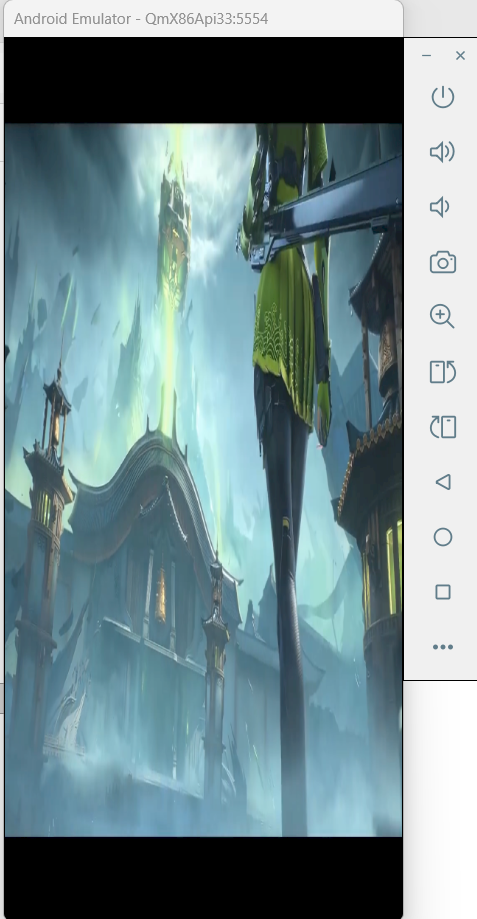
手动直接启动日志
./system/bin/bootanimation
bash
行 17207: 06-09 12:45:50.302  2195  2199 D BootAnimation: Found MP4 boot animation: /system/media/bootanimation.mp4
	行 17208: 06-09 12:45:50.302  2195  2199 D BootAnimation: Playing MP4 boot animation: /system/media/bootanimation.mp4
	行 17209: 06-09 12:45:50.302  2195  2199 D BootAnimation: Emulator detected, skipping MP4 boot animation
	行 17210: 06-09 12:45:50.302  2195  2199 D BootAnimation: media.player service available after 0ms
	行 17211: 06-09 12:45:50.805   514  1993 D NuPlayerDriver: NuPlayerDriver(0x707b9355cfb0) created, clientPid(2195)
	行 17215: 06-09 12:45:50.808   514  2201 D NuPlayer: onSetVideoSurface(0x707c53563640, no video decoder)
	行 17218: 06-09 12:45:50.815  2195  2199 D BootAnimation: MP4 boot animation started (attempt 1)
	行 17484: 06-09 12:45:50.978   514  1993 D NuPlayerDriver: stop(0x707b9355cfb0)
	行 17485: 06-09 12:45:50.979   514  1993 D NuPlayerDriver: reset(0x707b9355cfb0) at state 8
	行 17504: 06-09 12:45:51.027   514  2201 D NuPlayerDriver: notifyResetComplete(0x707b9355cfb0)
	行 17505: 06-09 12:45:51.027   514  1993 D NuPlayerDriver: reset(0x707b9355cfb0) at state 0
	行 17509: 06-09 12:45:51.028  2195  2199 D BootAnimation: MP4 boot animation finished
	行 17510: 06-09 12:45:51.043  2195  2199 D BootAnimation: BootAnimationStopTiming start time: 103220ms
	行 17521: 06-09 12:45:52.578  2217  2217 D BootAnimation: BootAnimationStartTiming start time: 104755ms
	行 17522: 06-09 12:45:52.578  2217  2217 D BootAnimation: BootAnimationPreloadTiming start time: 104755ms
	行 17523: 06-09 12:45:52.578  2217  2217 D BootAnimation: BootAnimationPreloadStopTiming start time: 104755ms
获取属性
bash
130|emulator64_x86_64:/ $ su
emulator64_x86_64:/ # getprop | grep exit
[service.bootanim.exit]: [1]
杀进程
bash
maqi@QiMa:~$ ps -A |grep java
 124655 pts/0    00:01:24 java
maqi@QiMa:~$ kill -9 124655
检查生成时间
bash
maqi@QiMa:~/android13-r44$ ls -l out/target/product/emulator_car_x86_64/system/lib64/libbootanimation.so
-rwxr-xr-x 1 maqi maqi 112040  6月  9 20:38 out/target/product/emulator_car_x86_64/system/lib64/libbootanimation.so
bash
maqi@QiMa:~/android13-r44$ ls -l out/target/product/emulator_car_x86_64/system/bin/bootanimation
-rwxr-xr-x 1 maqi maqi 17104  6月  9 17:35 out/target/product/emulator_car_x86_64/system/bin/bootanimation
md5sum检查
bash
maqi@QiMa:~/android13-r44$ md5sum out/target/product/emulator_car_x86_64/system/lib64/libbootanimation.so
050059780cb5b71aba61b362496c954c  out/target/product/emulator_car_x86_64/system/lib64/libbootanimation.so
推包
bash
maqi@QiMa:~/android13-r44$ adb root
restarting adbd as root
maqi@QiMa:~/android13-r44$ adb remount
remount succeeded
maqi@QiMa:~/android13-r44$ adb push out/target/product/emulator_car_x86_64/system/lib64/libbootanimation.so system/lib64/
out/target/product/emulator_car_x86_64/system/lib64/libbootanimation.so: 1 file pushed, 0 skipped. 147.6 MB/s (112040 bytes in 0.001s)
重启模拟器
这里我使用的是谷歌官方下载的模拟因为,我自己编译的模拟器不支持解码器
emulator -avd QmX86Api33 -writable-system
因为根本没有mediaserver NuPlayerDriver 报错无法找到解码器
bash
# 1. 检查 mediaserver 进程是否存在
ps -A | grep mediaserver
# 2. 检查 "media.player" 是否已注册
service list | grep media.player
# 3. 查看 mediaserver 启动日志
adb logcat -b system -s "mediaserver" -t 100
# 4. 看 BootAnimation 的等待输出
adb logcat -b main -s "BootAnimation" -t 200
# se 权限检查
adb logcat -b all -d | grep "avc: denied" | grep -E "bootanim|mediaserver"
权限问题 拒绝访问 media.player
bash
06-10 03:33:03.057   482   486 D BootAnimation: media.player service available after 27000ms
06-10 03:33:03.560   482   482 I BootAnimation: type=1400 audit(0.0:17): avc: denied { call } for scontext=u:r:bootanim:s0 tcontext=u:r:mediaserver:s0 tclass=binder permissive=1
06-10 03:33:03.560   482   482 I BootAnimation: type=1400 audit(0.0:18): avc: denied { transfer } for scontext=u:r:bootanim:s0 tcontext=u:r:mediaserver:s0 tclass=binder permissive=1
06-10 03:33:03.568   482   482 I BootAnimation: type=1400 audit(0.0:20): avc: denied { use } for path="/system/media/bootanimation.mp4" dev="overlay" ino=50 scontext=u:r:mediaserver:s0 tcontext=u:r:bootanim:s0 tclass=fd permissive=1
06-10 03:33:03.606   482   486 D BootAnimation: MP4 boot animation started (attempt 1)
06-10 03:33:06.858   482   486 D BootAnimation: MP4 boot animation finished
06-10 03:33:06.866   482   486 D BootAnimation: BootAnimationStopTiming start time: 40025ms
***手动验证 SE ***
启动途中 强行关闭se
bash
PS C:\Users\HiMaq\Desktop> adb root
restarting adbd as root
PS C:\Users\HiMaq\Desktop> adb shell setenforce 0
验证
bash
adb logcat | grep "avc: denied"编译和推送SE
bash
#!/bin/bash
set -e

cd /home/maqi/android13-r44
source build/envsetup.sh
lunch emulator_car_x86_64

# 编译
m selinux_policy
setools 权限检查工具
bash
sudo apt-get install setools查找precompiled_sepolicy
java
maqi@QiMa:~/android13-r44$ tree -L 1  out/target/product/emulator_car_x86_64/vendor/etc/selinux/
out/target/product/emulator_car_x86_64/vendor/etc/selinux/
├── plat_pub_versioned.cil
├── plat_sepolicy_vers.txt
├── precompiled_sepolicy
├── precompiled_sepolicy.plat_sepolicy_and_mapping.sha256
├── precompiled_sepolicy.product_sepolicy_and_mapping.sha256
├── selinux_denial_metadata
├── vendor_file_contexts
├── vendor_hwservice_contexts
├── vendor_mac_permissions.xml
├── vendor_property_contexts
├── vendor_seapp_contexts
├── vendor_sepolicy.cil
├── vendor_service_contexts
└── vndservice_contexts

0 directories, 14 files
sesearch 产物权限检查
bash
# 设置路径变量
POLICY_PATH="out/target/product/emulator_car_x86_64/vendor/etc/selinux/precompiled_sepolicy"

# 1. 查询 service_manager 权限
sesearch --allow -s bootanim -t mediaserver_service -c service_manager $POLICY_PATH

# 2. 查询 binder 权限
sesearch --allow -s bootanim -t mediaserver -c binder $POLICY_PATH

# 3. 查询 file 权限
sesearch --allow -s bootanim -t mnt_product_file -c file $POLICY_PATH
SE检查结果
bash
maqi@QiMa:~/android13-r44$ # 设置路径变量
maqi@QiMa:~/android13-r44$ POLICY_PATH="out/target/product/emulator_car_x86_64/vendor/etc/selinux/precompiled_sepolicy"

maqi@QiMa:~/android13-r44$ # 1. 查询 service_manager 权限
maqi@QiMa:~/android13-r44$ sesearch --allow -s bootanim -t mediaserver_service -c service_manager $POLICY_PATH
allow bootanim mediaserver_service:service_manager find;

maqi@QiMa:~/android13-r44$ # 2. 查询 binder 权限
maqi@QiMa:~/android13-r44$ sesearch --allow -s bootanim -t mediaserver -c binder $POLICY_PATH
allow bootanim mediaserver:binder { call transfer };

maqi@QiMa:~/android13-r44$ # 3. 查询 file 权限
maqi@QiMa:~/android13-r44$ sesearch --allow -s bootanim -t mnt_product_file -c file $POLICY_PATH
allow bootanim mnt_product_file:file { getattr ioctl lock map open read watch watch_reads };
好的! SE检查完毕
推送precompiled_sepolicy到设备
bash
adb root
adb remount

adb push out/target/product/emulator_car_x86_64/vendor/etc/selinux/. /vendor/etc/selinux/
adb push out/target/product/emulator_car_x86_64/system/etc/selinux/. /system/etc/selinux/
adb push out/target/product/emulator_car_x86_64/product/etc/selinux/. /product/etc/selinux/
adb reboot
附件代码diff
附件SE配置 说明
MP4 开机动画 SELinux 权限清单
Android 13 (AOSP) 主线自带,共 3 条规则 ,分布在 2 套策略副本中
涉及的策略文件(2 套副本)
| 策略副本 | 文件路径 |
|---|---|
| 当前策略 | system/sepolicy/public/bootanim.te |
system/sepolicy/private/bootanim.te |
|
| API 33 冻结 | system/sepolicy/prebuilts/api/33.0/public/bootanim.te |
system/sepolicy/prebuilts/api/33.0/private/bootanim.te |
每份副本的内容完全一致(同一笔 commit 同步写入)。修改时必须同步更新所有 2 套副本,否则
m selinux_policy编译时会因 API 冻结校验失败。
规则 1:文件系统权限
| 文件 | 行号 | 规则 |
|---|---|---|
private/bootanim.te |
22-23 | r_dir_file(bootanim, mnt_product_file) |
prebuilts/api/33.0/private/bootanim.te |
22-23 | 同上 |
含义: 允许 bootanim 读取 /product/media/ 目录及下面的 bootanimation.mp4。
说明:
r_dir_file是 SELinux 宏,展开等价于:allow bootanim mnt_product_file:dir r_dir_perms;--- 目录搜索/读allow bootanim mnt_product_file:file r_file_perms;--- 文件读取
- MP4 文件路径固定为
/product/media/bootanimation.mp4、/oem/media/bootanimation.mp4、/system/media/bootanimation.mp4,当前策略只覆盖了/product/media/(第一优先级路径)。
规则 2:Service Manager 权限
| 文件 | 行号 | 规则 |
|---|---|---|
public/bootanim.te |
49 | allow bootanim mediaserver_service:service_manager find; |
prebuilts/api/33.0/public/bootanim.te |
49 | 同上 |
含义: 允许 bootanim 在 servicemanager 中查找 media.player 服务。
说明:
- 代码中通过
defaultServiceManager()->checkService(String16("media.player"))调用。 - 这是
waitForMediaCodecs()中轮询检测的服务名。
规则 3:Binder IPC 权限
| 文件 | 行号 | 规则 |
|---|---|---|
public/bootanim.te |
48 | binder_call(bootanim, mediaserver) |
prebuilts/api/33.0/public/bootanim.te |
48 | 同上 |
含义: 允许 bootanim 通过 Binder 向 mediaserver 进程发起 IPC 调用。
说明:
binder_call是宏,展开为:allow bootanim mediaserver:fd use;allow bootanim mediaserver:binder { call transfer };
- 这是
MediaPlayer所有 API(setDataSource、prepare、start、stop等)的底层通信基础。
规则 4:mediaserver → bootanim 反向权限
Android 13 主线不包含以下规则,需要手动添加。
在 system/sepolicy/public/mediaserver.te 及对应的 API 冻结副本中添加:
| 文件 | 规则 | 含义 |
|---|---|---|
system/sepolicy/public/mediaserver.te |
allow mediaserver bootanim:fd use; |
允许 mediaserver 使用 bootanim 传过来的文件描述符 |
allow mediaserver bootanim:binder call; |
允许 mediaserver 调用 bootanim 的 Binder 接口 |
说明:
- 这两条是规则3的反向补充 。完整通信需要双向权限:
- 规则3:
binder_call(bootanim, mediaserver)→ bootanim 可调 mediaserver - 规则4:
allow mediaserver bootanim:binder call→ mediaserver 可调 bootanim
- 规则3:
fd use允许 mediaserver 接收 bootanim 通过 Binder 传递的ParcelFileDescriptor。- 可以添加到
mediaserver.te文件末尾的neverallow规则之前,与其他fd use规则(hal_graphics_allocator:fd use、system_server:fd use、vold:fd use等)放在一起。
涉及的策略文件(2 套副本):
| 策略副本 | 文件路径 |
|---|---|
| 当前策略 | system/sepolicy/public/mediaserver.te |
| API 33 冻结 | system/sepolicy/prebuilts/api/33.0/public/mediaserver.te |
如果 API 28-32 的冻结副本也需要支持 MP4 boot animation,应同步添加。
汇总
-----------------------------------------------------------------------------------
 策略副本                       文件           权限                    用途
-----------------------------------------------------------------------------------
 system/sepolicy/               public/        binder_call(bootanim,   Binder IPC
                                 bootanim.te    mediaserver)

                                public/        allow bootanim          查找 media.player
                                 bootanim.te    mediaserver_service:    服务
                                                service_manager find;

                                private/       r_dir_file(bootanim,    读 /product/media/
                                 bootanim.te    mnt_product_file)       *.mp4

 prebuilts/api/33.0/            public/        同上 (行号相同)
                                 bootanim.te
                                private/        同上 (行号相同)
                                 bootanim.te
-----------------------------------------------------------------------------------
⚠️ 注意:这 3 条规则已经是 不需要手动添加。 如果模拟器上
waitForMediaCodecs等 90 秒才超时,是SELinux 权限问题, 或模拟器根本没有注册media.player这个服务名。
附件源码
Android.bp
加入libmedia
bash
cc_library_shared {
    name: "libbootanimation",
    defaults: ["bootanimation_defaults"],

    srcs: ["BootAnimation.cpp"],

    shared_libs: [
        "libui",
        "libjnigraphics",
        "libEGL",
        "libGLESv2",
        "libgui",
        "libmedia",
    ],
}
Animation.h
bash
    // MP4 boot animation support
    static const char* findBootAnimationMp4();
    bool playMp4(const char* filePath);
Animation.cpp
c
// MP4 boot animation paths (checked before the traditional zip paths)
    static const char *BOOTANIMATION_MP4_FILES[] = {
            "/product/media/bootanimation.mp4",
            "/oem/media/bootanimation.mp4",
            "/system/media/bootanimation.mp4",
            nullptr,
    };

// Simple listener to track MediaPlayer playback completion and errors.
    class Mp4PlaybackListener : public MediaPlayerListener {
    public:
        bool completed = false;
        bool errored = false;
        int errorCode = 0;

        virtual void notify(int msg, int /*ext1*/, int /*ext2*/, const Parcel * /*obj*/) {
            if (msg == MEDIA_PLAYBACK_COMPLETE) {
                completed = true;
            } else if (msg == MEDIA_ERROR) {
                errored = true;
                errorCode = -100;
            }
        }
    };

    const char *BootAnimation::findBootAnimationMp4() {
        for (int i = 0; BOOTANIMATION_MP4_FILES[i] != nullptr; i++) {
            if (access(BOOTANIMATION_MP4_FILES[i], R_OK) == 0) {
                ALOGD("Found MP4 boot animation: %s", BOOTANIMATION_MP4_FILES[i]);
                return BOOTANIMATION_MP4_FILES[i];
            }
        }
        return nullptr;
    }
    static bool isEmulator() {
        char value[PROPERTY_VALUE_MAX];
        property_get("ro.kernel.qemu", value, "0");
        return atoi(value) == 1;
    }

    static bool waitForMediaCodecs(int maxWaitMs) {
        // 模拟器没有硬件 AVC decoder,直接跳过 MP4
        if (isEmulator()) {
            ALOGD("Emulator detected, skipping MP4 boot animation");
//            return false;
        }
        sp<IServiceManager> sm = defaultServiceManager();
        for (int waited = 0; waited < maxWaitMs; waited += 200) {
            sp<IBinder> binder = sm->checkService(String16("media.player"));
            if (binder != nullptr) {
                ALOGD("media.player service available after %dms", waited);
                usleep(500000);
                return true;
            }
            ALOGD("Waiting for media.player service... %dms", waited);
            usleep(200000);
        }
        SLOGE("media.player service not available after %dms", maxWaitMs);
        return false;
    }

    // ============================================================
    // playMp4: 使用 MediaPlayer 播放 MP4 开机动画
    // 参数: filePath - MP4 文件的绝对路径
    // 返回值: false = 播放完成或失败(需要回退到 ZIP 动画)
    // ============================================================
    bool BootAnimation::playMp4(const char* filePath) {
        ALOGD("Playing MP4 boot animation: %s", filePath);  // 日志:开始播放 MP4

        // 1. 销毁旧的 EGL 上下文/表面(之前的 ZIP 动画使用 GLES 渲染)
        eglMakeCurrent(mDisplay, EGL_NO_SURFACE, EGL_NO_SURFACE, EGL_NO_CONTEXT); // 解除当前 EGL 绑定
        eglDestroySurface(mDisplay, mSurface);      // 销毁 EGL 窗口表面
        eglDestroyContext(mDisplay, mContext);       // 销毁 EGL 上下文

        // 2. 等待 mediaserver 的 media.player 服务就绪(最多等 180 秒)
        //    注意:media.player 可能启动较慢(如模拟器上需 90 秒),
        //    这期间 service.bootanim.exit 可能已被 WMS 置为 "1",
        //    但我们必须在播放开始后再响应退出,否则 MP4 永远放不出来。
        if (!waitForMediaCodecs(10000*18)) {
            SLOGE("Media not available, falling back to ZIP");  // 超时,回退到 ZIP
            goto fallback_to_zip;                               // 跳转到 GLES 环境恢复逻辑
        }

        // 3. 最多重试 5 次(prepare/解码可能暂时失败)
        for (int attempt = 0; attempt < 5; attempt++) {
            sp<MediaPlayer> mp = new MediaPlayer();             // 创建 MediaPlayer 实例
            sp<Mp4PlaybackListener> listener = new Mp4PlaybackListener(); // 创建播放状态监听器
            mp->setListener(listener);                          // 绑定监听器

            // 4. 打开 MP4 文件并设置为 MediaPlayer 的数据源
            int fd = open(filePath, O_RDONLY);                  // 以只读方式打开文件
            if (fd < 0) {
                SLOGE("Failed to open MP4: %s", filePath);      // 文件不存在或无法读取
                goto fallback_to_zip;
            }
            struct stat sb;                                     // 获取文件大小
            fstat(fd, &sb);
            status_t err = mp->setDataSource(fd, 0, sb.st_size); // 设置数据源(文件描述符 + 偏移 + 大小)
            close(fd);                                          // 关闭 fd(MediaPlayer 内部已复制)

            if (err != NO_ERROR) {
                SLOGE("setDataSource failed: %d", err);         // MediaPlayer 不接受该文件
                goto fallback_to_zip;
            }

            // 5. 关联 SurfaceFlinger 的 BufferQueue,让视频渲染到启动动画图层
            err = mp->setVideoSurfaceTexture(
                    mFlingerSurface->getIGraphicBufferProducer());
            if (err != NO_ERROR) {
                SLOGE("setVideoSurfaceTexture failed: %d", err); // Surface 绑定失败
                goto fallback_to_zip;
            }

            // 6. 准备播放(setDataSource -> prepare 是异步的准备流程)
            mp->setLooping(true);                               // 设置循环播放
            err = mp->prepare();                                // 同步准备(解析文件头、初始化解码器)
            if (err != NO_ERROR) {
                ALOGW("prepare() failed (attempt %d/5): %d", attempt + 1, err); // 准备失败,可能解码器未就绪
                mp->reset();                                    // 重置 MediaPlayer 状态
                usleep(1000000);                                // 等待 1 秒后重试
                continue;
            }

            // 7. 开始播放
            mCallbacks->init({});                               // 通知回调初始化(清除之前的动画状态)
            mp->start();                                        // 启动 MP4 播放
            ALOGD("MP4 boot animation started (attempt %d)", attempt + 1); // 播放成功

            // 8. 短等 100ms 后检查解码器是否立刻报错(异步初始化失败检测)
            usleep(100000);
            if (listener->errored) {
                ALOGW("Async decoder failed immediately (attempt %d/5), retrying in 1s",
                      attempt + 1);                             // 解码器瞬间报错,重试
                mp->stop();
                mp->reset();
                usleep(1000000);                                // 等 1 秒
                continue;
            }

            // 9. 主循环:播放 MP4,同时轮询退出信号
            //    设计要点:
            //    - media.player 可能启动很慢(如 90 秒),导致进入此循环时
            //      service.bootanim.exit 早已被置 "1"。
            //    - 如果不给最低播放时间,checkExit() 会在第一个 50ms 周期
            //      就触发 requestExit(),MP4 几乎无机会渲染。
            //    - 因此加入 kMinPlayMs 保障:至少播放 N 毫秒后才响应退出。
            //    - 改为直接用 true 做 while 条件,手动控制 break 逻辑。
            {
                const int kMinPlayMs = 3000;  // 最低保障播放 3 秒
                int elapsedMs = 0;
                while (true) {
                    if (listener->errored) break;               // 播放出错则跳出
                    usleep(50000);                              // 每 50ms 检查一次
                    elapsedMs += 50;
                    // 超过最低保障时间后才开始响应退出请求
                    if (elapsedMs >= kMinPlayMs) {
                        checkExit();
                        if (exitPending()) break;
                    }
                }
            }

            // 10. 停止播放
            mp->stop();                                         // 停止播放
            mp->reset();                                        // 重置(释放解码器资源)

            // 11. 如果是正常退出(动画播放完毕),清理并结束进程
            if (exitPending()) {
                ALOGD("MP4 boot animation finished");           // 日志:播放结束
                mCallbacks->shutdown();                         // 通知回调关闭
                mFlingerSurface.clear();                        // 释放 Surface
                mFlingerSurfaceControl.clear();                 // 释放 SurfaceControl
                eglTerminate(mDisplay);                         // 终止 EGL 显示连接
                eglReleaseThread();                             // 释放线程 EGL 资源
                IPCThreadState::self()->stopProcess();          // 停止本进程(bootanim 退出)
                return false;
            }

            // 12. 如果不是退出(可能是出错循环重试),等 1 秒后进入下一次尝试
            usleep(1000000);
        }

        // 13. 5 次重试全部失败,记录错误并回退到 ZIP
        SLOGE("MP4 playback failed after all attempts, falling back to ZIP");

        fallback_to_zip:
        {
            // 14. 恢复 GLES 渲染环境,用于回退到 ZIP 动画播放
            //     必须指定 GLES2,否则 glCreateShader 等函数指针为 null 导致 SIGSEGV
            EGLConfig config = getEglConfig(mDisplay);                     // 获取 EGL 配置
            EGLint contextAttributes[] = {EGL_CONTEXT_CLIENT_VERSION, 2, EGL_NONE}; // GLES 2.0
            mContext = eglCreateContext(mDisplay, config, nullptr, contextAttributes); // 重建 EGL 上下文
            mSurface = eglCreateWindowSurface(mDisplay, config,            // 重建 EGL 窗口表面
                                              mFlingerSurface.get(), nullptr);
            eglMakeCurrent(mDisplay, mSurface, mSurface, mContext);        // 绑定到当前线程
        }
        return false;   // 返回 false,告知调用方需要回退到 ZIP 动画
    }