Buildroot完全指南:从入门到实战
- Buildroot完全指南:从入门到实战
-
- 引言
- 一、Buildroot是什么
-
- [1.1 定义与概述](#1.1 定义与概述)
- [1.2 核心功能](#1.2 核心功能)
- [1.3 与其他工具的对比](#1.3 与其他工具的对比)
- 二、Buildroot的发展历史
-
- [2.1 起源与早期发展](#2.1 起源与早期发展)
- [2.2 关键时间节点](#2.2 关键时间节点)
- [2.3 当前状态](#2.3 当前状态)
- 三、Buildroot的安装
-
- [3.1 系统要求](#3.1 系统要求)
- [3.2 获取Buildroot](#3.2 获取Buildroot)
- [3.3 安装依赖包](#3.3 安装依赖包)
- 四、Buildroot的配置
-
- [4.1 配置系统概述](#4.1 配置系统概述)
- [4.2 基础配置步骤](#4.2 基础配置步骤)
-
- [4.2.1 选择目标架构](#4.2.1 选择目标架构)
- [4.2.2 配置工具链](#4.2.2 配置工具链)
- [4.2.3 配置系统配置](#4.2.3 配置系统配置)
- [4.2.4 配置内核](#4.2.4 配置内核)
- [4.2.5 配置Bootloader](#4.2.5 配置Bootloader)
- [4.2.6 选择目标文件系统](#4.2.6 选择目标文件系统)
- [4.2.7 选择软件包](#4.2.7 选择软件包)
- [4.3 使用预配置文件](#4.3 使用预配置文件)
- 五、Buildroot的编译
- 六、Buildroot的运行
-
- [6.1 使用QEMU运行](#6.1 使用QEMU运行)
-
- [6.1.1 编译QEMU配置](#6.1.1 编译QEMU配置)
- [6.1.2 启动QEMU](#6.1.2 启动QEMU)
- [6.2 在真实硬件上运行](#6.2 在真实硬件上运行)
-
- [6.2.1 准备SD卡](#6.2.1 准备SD卡)
- [6.2.2 启动开发板](#6.2.2 启动开发板)
- 七、Buildroot的高级用法
-
- [7.1 BR2_EXTERNAL机制](#7.1 BR2_EXTERNAL机制)
- [7.2 创建自定义软件包](#7.2 创建自定义软件包)
- [7.3 增量编译](#7.3 增量编译)
- 八、踩坑总结
-
- [8.1 常见问题与解决方案](#8.1 常见问题与解决方案)
- [8.2 性能优化建议](#8.2 性能优化建议)
- 九、实际应用案例
-
- [9.1 构建一个简单的IoT网关系统](#9.1 构建一个简单的IoT网关系统)
- [9.2 构建多媒体播放器系统](#9.2 构建多媒体播放器系统)
- 结束语
Buildroot完全指南:从入门到实战
引言
大家好!今天我们来深入探讨一个在嵌入式Linux开发领域非常重要的工具------Buildroot。如果你曾经为嵌入式系统构建过根文件系统,或者对交叉编译环境感兴趣,那么这篇文章绝对值得一读。
在这篇文章中,我将详细介绍Buildroot是什么、它的发展历史、以及如何使用它来构建一个完整的嵌入式Linux系统,包括安装、配置、编译和运行等各个环节。让我们开始吧!
一、Buildroot是什么
1.1 定义与概述
Buildroot是一套用于简化和自动化嵌入式Linux系统构建过程的工具集。它是一个基于Makefile的框架,专门设计用于从源代码构建完整的嵌入式Linux系统。

图 1: Buildroot 项目图标
1.2 核心功能
Buildroot主要提供以下功能:
- 交叉编译工具链生成:自动生成针对目标架构的交叉编译工具链
- 根文件系统构建:构建完整的Linux根文件系统
- 内核编译:配置和编译Linux内核
- Bootloader编译:支持多种Bootloader(如U-Boot、GRUB等)
- 软件包管理:提供大量预配置的软件包,可选择性编译安装
1.3 与其他工具的对比
| 特性 | Buildroot | Yocto Project | OpenWrt |
|---|---|---|---|
| 学习曲线 | 简单 | 复杂 | 中等 |
| 构建速度 | 快 | 慢 | 中等 |
| 灵活性 | 中等 | 高 | 中等 |
| 社区规模 | 大 | 大 | 大 |
二、Buildroot的发展历史
2.1 起源与早期发展
Buildroot项目最初由Peter Korsgaard于2001年创建,最初是作为uClibc项目的一部分。uClibc是一个针对嵌入式系统优化的C标准库。
2.2 关键时间节点
#mermaid-svg-rZn9O0C51M5GLCNL{font-family:"trebuchet ms",verdana,arial,sans-serif;font-size:16px;fill:#333;}@keyframes edge-animation-frame{from{stroke-dashoffset:0;}}@keyframes dash{to{stroke-dashoffset:0;}}#mermaid-svg-rZn9O0C51M5GLCNL .edge-animation-slow{stroke-dasharray:9,5!important;stroke-dashoffset:900;animation:dash 50s linear infinite;stroke-linecap:round;}#mermaid-svg-rZn9O0C51M5GLCNL .edge-animation-fast{stroke-dasharray:9,5!important;stroke-dashoffset:900;animation:dash 20s linear infinite;stroke-linecap:round;}#mermaid-svg-rZn9O0C51M5GLCNL .error-icon{fill:#552222;}#mermaid-svg-rZn9O0C51M5GLCNL .error-text{fill:#552222;stroke:#552222;}#mermaid-svg-rZn9O0C51M5GLCNL .edge-thickness-normal{stroke-width:1px;}#mermaid-svg-rZn9O0C51M5GLCNL .edge-thickness-thick{stroke-width:3.5px;}#mermaid-svg-rZn9O0C51M5GLCNL .edge-pattern-solid{stroke-dasharray:0;}#mermaid-svg-rZn9O0C51M5GLCNL .edge-thickness-invisible{stroke-width:0;fill:none;}#mermaid-svg-rZn9O0C51M5GLCNL .edge-pattern-dashed{stroke-dasharray:3;}#mermaid-svg-rZn9O0C51M5GLCNL .edge-pattern-dotted{stroke-dasharray:2;}#mermaid-svg-rZn9O0C51M5GLCNL .marker{fill:#333333;stroke:#333333;}#mermaid-svg-rZn9O0C51M5GLCNL .marker.cross{stroke:#333333;}#mermaid-svg-rZn9O0C51M5GLCNL svg{font-family:"trebuchet ms",verdana,arial,sans-serif;font-size:16px;}#mermaid-svg-rZn9O0C51M5GLCNL p{margin:0;}#mermaid-svg-rZn9O0C51M5GLCNL .edge{stroke-width:3;}#mermaid-svg-rZn9O0C51M5GLCNL .section--1 rect,#mermaid-svg-rZn9O0C51M5GLCNL .section--1 path,#mermaid-svg-rZn9O0C51M5GLCNL .section--1 circle,#mermaid-svg-rZn9O0C51M5GLCNL .section--1 path{fill:hsl(240, 100%, 76.2745098039%);}#mermaid-svg-rZn9O0C51M5GLCNL .section--1 text{fill:#ffffff;}#mermaid-svg-rZn9O0C51M5GLCNL .node-icon--1{font-size:40px;color:#ffffff;}#mermaid-svg-rZn9O0C51M5GLCNL .section-edge--1{stroke:hsl(240, 100%, 76.2745098039%);}#mermaid-svg-rZn9O0C51M5GLCNL .edge-depth--1{stroke-width:17;}#mermaid-svg-rZn9O0C51M5GLCNL .section--1 line{stroke:hsl(60, 100%, 86.2745098039%);stroke-width:3;}#mermaid-svg-rZn9O0C51M5GLCNL .lineWrapper line{stroke:#ffffff;}#mermaid-svg-rZn9O0C51M5GLCNL .disabled,#mermaid-svg-rZn9O0C51M5GLCNL .disabled circle,#mermaid-svg-rZn9O0C51M5GLCNL .disabled text{fill:lightgray;}#mermaid-svg-rZn9O0C51M5GLCNL .disabled text{fill:#efefef;}#mermaid-svg-rZn9O0C51M5GLCNL .section-0 rect,#mermaid-svg-rZn9O0C51M5GLCNL .section-0 path,#mermaid-svg-rZn9O0C51M5GLCNL .section-0 circle,#mermaid-svg-rZn9O0C51M5GLCNL .section-0 path{fill:hsl(60, 100%, 73.5294117647%);}#mermaid-svg-rZn9O0C51M5GLCNL .section-0 text{fill:black;}#mermaid-svg-rZn9O0C51M5GLCNL .node-icon-0{font-size:40px;color:black;}#mermaid-svg-rZn9O0C51M5GLCNL .section-edge-0{stroke:hsl(60, 100%, 73.5294117647%);}#mermaid-svg-rZn9O0C51M5GLCNL .edge-depth-0{stroke-width:14;}#mermaid-svg-rZn9O0C51M5GLCNL .section-0 line{stroke:hsl(240, 100%, 83.5294117647%);stroke-width:3;}#mermaid-svg-rZn9O0C51M5GLCNL .lineWrapper line{stroke:black;}#mermaid-svg-rZn9O0C51M5GLCNL .disabled,#mermaid-svg-rZn9O0C51M5GLCNL .disabled circle,#mermaid-svg-rZn9O0C51M5GLCNL .disabled text{fill:lightgray;}#mermaid-svg-rZn9O0C51M5GLCNL .disabled text{fill:#efefef;}#mermaid-svg-rZn9O0C51M5GLCNL .section-1 rect,#mermaid-svg-rZn9O0C51M5GLCNL .section-1 path,#mermaid-svg-rZn9O0C51M5GLCNL .section-1 circle,#mermaid-svg-rZn9O0C51M5GLCNL .section-1 path{fill:hsl(80, 100%, 76.2745098039%);}#mermaid-svg-rZn9O0C51M5GLCNL .section-1 text{fill:black;}#mermaid-svg-rZn9O0C51M5GLCNL .node-icon-1{font-size:40px;color:black;}#mermaid-svg-rZn9O0C51M5GLCNL .section-edge-1{stroke:hsl(80, 100%, 76.2745098039%);}#mermaid-svg-rZn9O0C51M5GLCNL .edge-depth-1{stroke-width:11;}#mermaid-svg-rZn9O0C51M5GLCNL .section-1 line{stroke:hsl(260, 100%, 86.2745098039%);stroke-width:3;}#mermaid-svg-rZn9O0C51M5GLCNL .lineWrapper line{stroke:black;}#mermaid-svg-rZn9O0C51M5GLCNL .disabled,#mermaid-svg-rZn9O0C51M5GLCNL .disabled circle,#mermaid-svg-rZn9O0C51M5GLCNL .disabled text{fill:lightgray;}#mermaid-svg-rZn9O0C51M5GLCNL .disabled text{fill:#efefef;}#mermaid-svg-rZn9O0C51M5GLCNL .section-2 rect,#mermaid-svg-rZn9O0C51M5GLCNL .section-2 path,#mermaid-svg-rZn9O0C51M5GLCNL .section-2 circle,#mermaid-svg-rZn9O0C51M5GLCNL .section-2 path{fill:hsl(270, 100%, 76.2745098039%);}#mermaid-svg-rZn9O0C51M5GLCNL .section-2 text{fill:#ffffff;}#mermaid-svg-rZn9O0C51M5GLCNL .node-icon-2{font-size:40px;color:#ffffff;}#mermaid-svg-rZn9O0C51M5GLCNL .section-edge-2{stroke:hsl(270, 100%, 76.2745098039%);}#mermaid-svg-rZn9O0C51M5GLCNL .edge-depth-2{stroke-width:8;}#mermaid-svg-rZn9O0C51M5GLCNL .section-2 line{stroke:hsl(90, 100%, 86.2745098039%);stroke-width:3;}#mermaid-svg-rZn9O0C51M5GLCNL .lineWrapper line{stroke:#ffffff;}#mermaid-svg-rZn9O0C51M5GLCNL .disabled,#mermaid-svg-rZn9O0C51M5GLCNL .disabled circle,#mermaid-svg-rZn9O0C51M5GLCNL .disabled text{fill:lightgray;}#mermaid-svg-rZn9O0C51M5GLCNL .disabled text{fill:#efefef;}#mermaid-svg-rZn9O0C51M5GLCNL .section-3 rect,#mermaid-svg-rZn9O0C51M5GLCNL .section-3 path,#mermaid-svg-rZn9O0C51M5GLCNL .section-3 circle,#mermaid-svg-rZn9O0C51M5GLCNL .section-3 path{fill:hsl(300, 100%, 76.2745098039%);}#mermaid-svg-rZn9O0C51M5GLCNL .section-3 text{fill:black;}#mermaid-svg-rZn9O0C51M5GLCNL .node-icon-3{font-size:40px;color:black;}#mermaid-svg-rZn9O0C51M5GLCNL .section-edge-3{stroke:hsl(300, 100%, 76.2745098039%);}#mermaid-svg-rZn9O0C51M5GLCNL .edge-depth-3{stroke-width:5;}#mermaid-svg-rZn9O0C51M5GLCNL .section-3 line{stroke:hsl(120, 100%, 86.2745098039%);stroke-width:3;}#mermaid-svg-rZn9O0C51M5GLCNL .lineWrapper line{stroke:black;}#mermaid-svg-rZn9O0C51M5GLCNL .disabled,#mermaid-svg-rZn9O0C51M5GLCNL .disabled circle,#mermaid-svg-rZn9O0C51M5GLCNL .disabled text{fill:lightgray;}#mermaid-svg-rZn9O0C51M5GLCNL .disabled text{fill:#efefef;}#mermaid-svg-rZn9O0C51M5GLCNL .section-4 rect,#mermaid-svg-rZn9O0C51M5GLCNL .section-4 path,#mermaid-svg-rZn9O0C51M5GLCNL .section-4 circle,#mermaid-svg-rZn9O0C51M5GLCNL .section-4 path{fill:hsl(330, 100%, 76.2745098039%);}#mermaid-svg-rZn9O0C51M5GLCNL .section-4 text{fill:black;}#mermaid-svg-rZn9O0C51M5GLCNL .node-icon-4{font-size:40px;color:black;}#mermaid-svg-rZn9O0C51M5GLCNL .section-edge-4{stroke:hsl(330, 100%, 76.2745098039%);}#mermaid-svg-rZn9O0C51M5GLCNL .edge-depth-4{stroke-width:2;}#mermaid-svg-rZn9O0C51M5GLCNL .section-4 line{stroke:hsl(150, 100%, 86.2745098039%);stroke-width:3;}#mermaid-svg-rZn9O0C51M5GLCNL .lineWrapper line{stroke:black;}#mermaid-svg-rZn9O0C51M5GLCNL .disabled,#mermaid-svg-rZn9O0C51M5GLCNL .disabled circle,#mermaid-svg-rZn9O0C51M5GLCNL .disabled text{fill:lightgray;}#mermaid-svg-rZn9O0C51M5GLCNL .disabled text{fill:#efefef;}#mermaid-svg-rZn9O0C51M5GLCNL .section-5 rect,#mermaid-svg-rZn9O0C51M5GLCNL .section-5 path,#mermaid-svg-rZn9O0C51M5GLCNL .section-5 circle,#mermaid-svg-rZn9O0C51M5GLCNL .section-5 path{fill:hsl(0, 100%, 76.2745098039%);}#mermaid-svg-rZn9O0C51M5GLCNL .section-5 text{fill:black;}#mermaid-svg-rZn9O0C51M5GLCNL .node-icon-5{font-size:40px;color:black;}#mermaid-svg-rZn9O0C51M5GLCNL .section-edge-5{stroke:hsl(0, 100%, 76.2745098039%);}#mermaid-svg-rZn9O0C51M5GLCNL .edge-depth-5{stroke-width:-1;}#mermaid-svg-rZn9O0C51M5GLCNL .section-5 line{stroke:hsl(180, 100%, 86.2745098039%);stroke-width:3;}#mermaid-svg-rZn9O0C51M5GLCNL .lineWrapper line{stroke:black;}#mermaid-svg-rZn9O0C51M5GLCNL .disabled,#mermaid-svg-rZn9O0C51M5GLCNL .disabled circle,#mermaid-svg-rZn9O0C51M5GLCNL .disabled text{fill:lightgray;}#mermaid-svg-rZn9O0C51M5GLCNL .disabled text{fill:#efefef;}#mermaid-svg-rZn9O0C51M5GLCNL .section-6 rect,#mermaid-svg-rZn9O0C51M5GLCNL .section-6 path,#mermaid-svg-rZn9O0C51M5GLCNL .section-6 circle,#mermaid-svg-rZn9O0C51M5GLCNL .section-6 path{fill:hsl(30, 100%, 76.2745098039%);}#mermaid-svg-rZn9O0C51M5GLCNL .section-6 text{fill:black;}#mermaid-svg-rZn9O0C51M5GLCNL .node-icon-6{font-size:40px;color:black;}#mermaid-svg-rZn9O0C51M5GLCNL .section-edge-6{stroke:hsl(30, 100%, 76.2745098039%);}#mermaid-svg-rZn9O0C51M5GLCNL .edge-depth-6{stroke-width:-4;}#mermaid-svg-rZn9O0C51M5GLCNL .section-6 line{stroke:hsl(210, 100%, 86.2745098039%);stroke-width:3;}#mermaid-svg-rZn9O0C51M5GLCNL .lineWrapper line{stroke:black;}#mermaid-svg-rZn9O0C51M5GLCNL .disabled,#mermaid-svg-rZn9O0C51M5GLCNL .disabled circle,#mermaid-svg-rZn9O0C51M5GLCNL .disabled text{fill:lightgray;}#mermaid-svg-rZn9O0C51M5GLCNL .disabled text{fill:#efefef;}#mermaid-svg-rZn9O0C51M5GLCNL .section-7 rect,#mermaid-svg-rZn9O0C51M5GLCNL .section-7 path,#mermaid-svg-rZn9O0C51M5GLCNL .section-7 circle,#mermaid-svg-rZn9O0C51M5GLCNL .section-7 path{fill:hsl(90, 100%, 76.2745098039%);}#mermaid-svg-rZn9O0C51M5GLCNL .section-7 text{fill:black;}#mermaid-svg-rZn9O0C51M5GLCNL .node-icon-7{font-size:40px;color:black;}#mermaid-svg-rZn9O0C51M5GLCNL .section-edge-7{stroke:hsl(90, 100%, 76.2745098039%);}#mermaid-svg-rZn9O0C51M5GLCNL .edge-depth-7{stroke-width:-7;}#mermaid-svg-rZn9O0C51M5GLCNL .section-7 line{stroke:hsl(270, 100%, 86.2745098039%);stroke-width:3;}#mermaid-svg-rZn9O0C51M5GLCNL .lineWrapper line{stroke:black;}#mermaid-svg-rZn9O0C51M5GLCNL .disabled,#mermaid-svg-rZn9O0C51M5GLCNL .disabled circle,#mermaid-svg-rZn9O0C51M5GLCNL .disabled text{fill:lightgray;}#mermaid-svg-rZn9O0C51M5GLCNL .disabled text{fill:#efefef;}#mermaid-svg-rZn9O0C51M5GLCNL .section-8 rect,#mermaid-svg-rZn9O0C51M5GLCNL .section-8 path,#mermaid-svg-rZn9O0C51M5GLCNL .section-8 circle,#mermaid-svg-rZn9O0C51M5GLCNL .section-8 path{fill:hsl(150, 100%, 76.2745098039%);}#mermaid-svg-rZn9O0C51M5GLCNL .section-8 text{fill:black;}#mermaid-svg-rZn9O0C51M5GLCNL .node-icon-8{font-size:40px;color:black;}#mermaid-svg-rZn9O0C51M5GLCNL .section-edge-8{stroke:hsl(150, 100%, 76.2745098039%);}#mermaid-svg-rZn9O0C51M5GLCNL .edge-depth-8{stroke-width:-10;}#mermaid-svg-rZn9O0C51M5GLCNL .section-8 line{stroke:hsl(330, 100%, 86.2745098039%);stroke-width:3;}#mermaid-svg-rZn9O0C51M5GLCNL .lineWrapper line{stroke:black;}#mermaid-svg-rZn9O0C51M5GLCNL .disabled,#mermaid-svg-rZn9O0C51M5GLCNL .disabled circle,#mermaid-svg-rZn9O0C51M5GLCNL .disabled text{fill:lightgray;}#mermaid-svg-rZn9O0C51M5GLCNL .disabled text{fill:#efefef;}#mermaid-svg-rZn9O0C51M5GLCNL .section-9 rect,#mermaid-svg-rZn9O0C51M5GLCNL .section-9 path,#mermaid-svg-rZn9O0C51M5GLCNL .section-9 circle,#mermaid-svg-rZn9O0C51M5GLCNL .section-9 path{fill:hsl(180, 100%, 76.2745098039%);}#mermaid-svg-rZn9O0C51M5GLCNL .section-9 text{fill:black;}#mermaid-svg-rZn9O0C51M5GLCNL .node-icon-9{font-size:40px;color:black;}#mermaid-svg-rZn9O0C51M5GLCNL .section-edge-9{stroke:hsl(180, 100%, 76.2745098039%);}#mermaid-svg-rZn9O0C51M5GLCNL .edge-depth-9{stroke-width:-13;}#mermaid-svg-rZn9O0C51M5GLCNL .section-9 line{stroke:hsl(0, 100%, 86.2745098039%);stroke-width:3;}#mermaid-svg-rZn9O0C51M5GLCNL .lineWrapper line{stroke:black;}#mermaid-svg-rZn9O0C51M5GLCNL .disabled,#mermaid-svg-rZn9O0C51M5GLCNL .disabled circle,#mermaid-svg-rZn9O0C51M5GLCNL .disabled text{fill:lightgray;}#mermaid-svg-rZn9O0C51M5GLCNL .disabled text{fill:#efefef;}#mermaid-svg-rZn9O0C51M5GLCNL .section-10 rect,#mermaid-svg-rZn9O0C51M5GLCNL .section-10 path,#mermaid-svg-rZn9O0C51M5GLCNL .section-10 circle,#mermaid-svg-rZn9O0C51M5GLCNL .section-10 path{fill:hsl(210, 100%, 76.2745098039%);}#mermaid-svg-rZn9O0C51M5GLCNL .section-10 text{fill:black;}#mermaid-svg-rZn9O0C51M5GLCNL .node-icon-10{font-size:40px;color:black;}#mermaid-svg-rZn9O0C51M5GLCNL .section-edge-10{stroke:hsl(210, 100%, 76.2745098039%);}#mermaid-svg-rZn9O0C51M5GLCNL .edge-depth-10{stroke-width:-16;}#mermaid-svg-rZn9O0C51M5GLCNL .section-10 line{stroke:hsl(30, 100%, 86.2745098039%);stroke-width:3;}#mermaid-svg-rZn9O0C51M5GLCNL .lineWrapper line{stroke:black;}#mermaid-svg-rZn9O0C51M5GLCNL .disabled,#mermaid-svg-rZn9O0C51M5GLCNL .disabled circle,#mermaid-svg-rZn9O0C51M5GLCNL .disabled text{fill:lightgray;}#mermaid-svg-rZn9O0C51M5GLCNL .disabled text{fill:#efefef;}#mermaid-svg-rZn9O0C51M5GLCNL .section-root rect,#mermaid-svg-rZn9O0C51M5GLCNL .section-root path,#mermaid-svg-rZn9O0C51M5GLCNL .section-root circle{fill:hsl(240, 100%, 46.2745098039%);}#mermaid-svg-rZn9O0C51M5GLCNL .section-root text{fill:#ffffff;}#mermaid-svg-rZn9O0C51M5GLCNL .icon-container{height:100%;display:flex;justify-content:center;align-items:center;}#mermaid-svg-rZn9O0C51M5GLCNL .edge{fill:none;}#mermaid-svg-rZn9O0C51M5GLCNL .eventWrapper{filter:brightness(120%);}#mermaid-svg-rZn9O0C51M5GLCNL :root{--mermaid-font-family:"trebuchet ms",verdana,arial,sans-serif;} 2001 项目创建,作为uClibc的一部分 2005 成为独立项目 2008 引入kconfig配置系统 2013 支持更多架构(ARM、MIPS、PowerPC等) 2018 引入BR2_EXTERNAL机制 2020-至今 持续更新,支持更多软件包 Buildroot发展历程
2.3 当前状态
截至2026年,Buildroot已经发展成为一个成熟、稳定且广泛使用的嵌入式Linux构建系统,拥有活跃的社区和定期的发布周期(每3个月一个新版本)。
三、Buildroot的安装
3.1 系统要求
在开始之前,我们需要确保主机系统满足以下要求:
- 操作系统:Linux(推荐Ubuntu、Fedora、Debian等)
- 磁盘空间:至少20GB
- 内存:建议4GB以上
- 必要工具:gcc、make、git、patch、bison、flex等
3.2 获取Buildroot
有两种方式获取Buildroot:
方式一:下载发布版本
bash
# 访问Buildroot官网下载最新版本
# 或使用wget下载
wget https://buildroot.org/downloads/buildroot-2024.02.1.tar.gz
tar -xzf buildroot-2024.02.1.tar.gz
cd buildroot-2024.02.1
方式二:从Git仓库克隆
bash
git clone git://git.buildroot.net/buildroot
cd buildroot
# 切换到稳定版本分支
git checkout 2024.02.1
3.3 安装依赖包
在Ubuntu/Debian系统上:
bash
sudo apt-get update
sudo apt-get install -y build-essential git libncurses5-dev \
    bison flex gettext texinfo unzip wget cpio python3 \
    rsync bc file
在Fedora系统上:
bash
sudo dnf install -y @development-tools ncurses-devel \
    bison flex gettext texinfo unzip wget cpio python3 \
    rsync bc file
四、Buildroot的配置
4.1 配置系统概述
Buildroot使用Linux内核的kconfig配置系统,提供了直观的菜单配置界面。
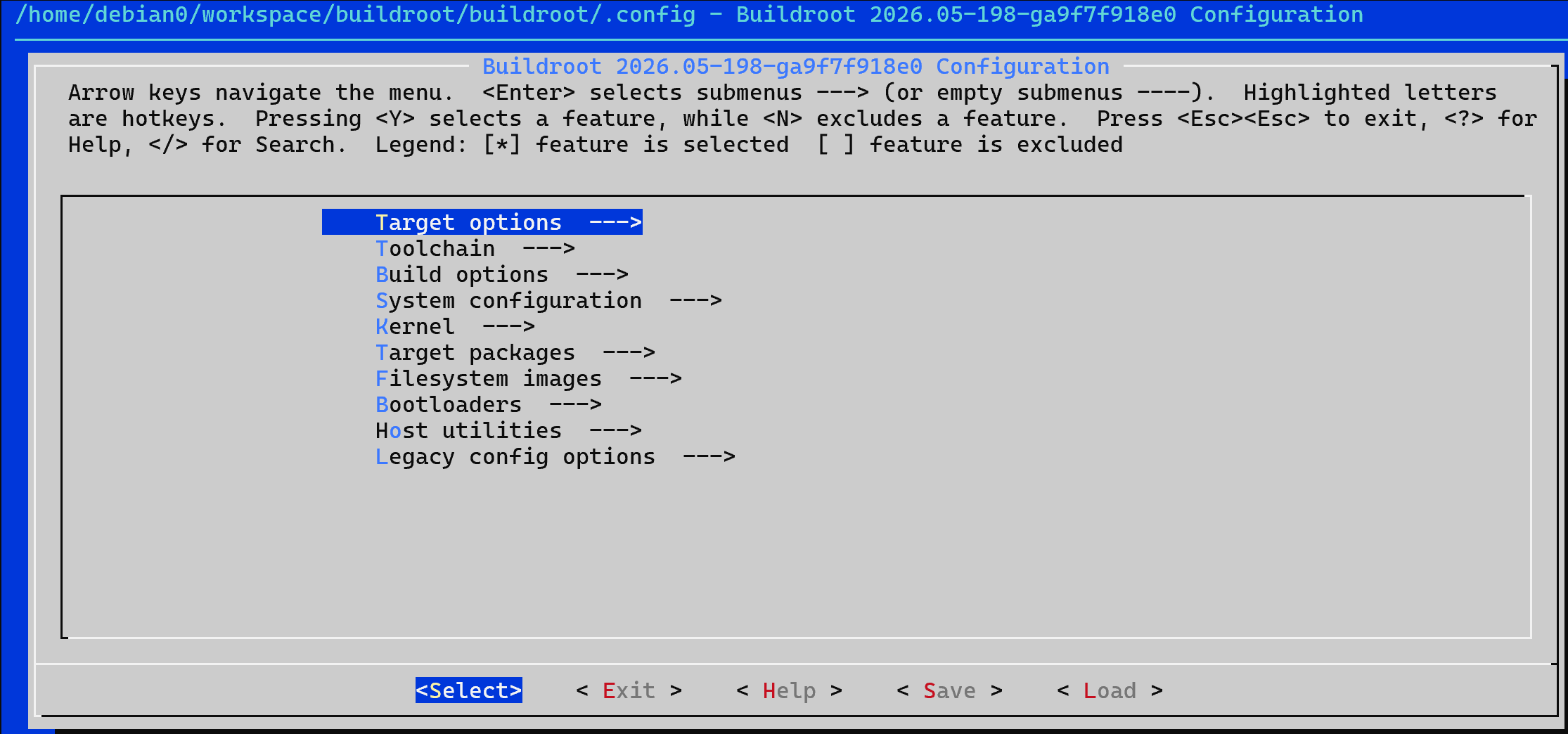
图 2: Buildroot配置界面
4.2 基础配置步骤
4.2.1 选择目标架构
bash
# 进入配置界面
make menuconfig
在配置界面中,依次选择:
Target options
  -> Target Architecture (选择目标架构,如 ARM、x86_64等)
  -> Target Architecture Variant (选择具体的CPU变体)
  -> Target ABI (选择应用程序二进制接口)
  -> Floating point strategy (浮点策略)
4.2.2 配置工具链
Toolchain
  -> Toolchain type (Buildroot toolchain / External toolchain)
  -> Kernel Headers (选择内核头文件版本)
  -> C library (uClibc-ng / glibc / musl)
  -> GCC compiler Version (选择GCC版本)
4.2.3 配置系统配置
System configuration
  -> System hostname (设置主机名)
  -> System banner (设置启动横幅)
  -> Root password (设置root密码)
  -> /dev management (Dynamic using devtmpfs + mdev)
  -> Path to the permission tables (权限表路径)
  -> Path to the users tables (用户表路径)
  -> Remount root filesystem read-write during boot (勾选)
4.2.4 配置内核
Kernel
  -> [*] Linux Kernel
  -> Kernel version (选择内核版本)
  -> Defconfig name (使用默认配置,如:omap2plus)
  -> Kernel binary format (zImage / uImage)
  -> Kernel boot arguments (内核启动参数)
4.2.5 配置Bootloader
Bootloaders
  -> [*] U-Boot
  -> U-Boot Version (选择U-Boot版本)
  -> Board defconfig (开发板配置,如:omap3_beagle)
4.2.6 选择目标文件系统
Filesystem images
  -> [*] ext2/3/4 root filesystem
  -> [*] tar the root filesystem
  -> [*] cpio the root filesystem (for use as an initial RAM filesystem)
4.2.7 选择软件包
Target packages
  -> 各类软件包分类
     -> Networking applications
     -> Libraries
     -> Debugging, profiling and benchmark
     -> 等等...
4.3 使用预配置文件
Buildroot为许多常见的开发板提供了预配置文件,位于configs/目录下:
bash
# 查看可用的预配置
ls configs/

# 使用预配置文件(例如树莓派3)
make raspberrypi3_defconfig

# 如果需要修改配置
make menuconfig
五、Buildroot的编译
5.1 开始编译
配置完成后,执行编译:
bash
# 开始构建(建议使用多线程加速)
make -j$(nproc)
5.2 编译过程详解
编译过程主要分为以下几个阶段:
#mermaid-svg-UHEpwYtXO9lFqRoT{font-family:"trebuchet ms",verdana,arial,sans-serif;font-size:16px;fill:#333;}@keyframes edge-animation-frame{from{stroke-dashoffset:0;}}@keyframes dash{to{stroke-dashoffset:0;}}#mermaid-svg-UHEpwYtXO9lFqRoT .edge-animation-slow{stroke-dasharray:9,5!important;stroke-dashoffset:900;animation:dash 50s linear infinite;stroke-linecap:round;}#mermaid-svg-UHEpwYtXO9lFqRoT .edge-animation-fast{stroke-dasharray:9,5!important;stroke-dashoffset:900;animation:dash 20s linear infinite;stroke-linecap:round;}#mermaid-svg-UHEpwYtXO9lFqRoT .error-icon{fill:#552222;}#mermaid-svg-UHEpwYtXO9lFqRoT .error-text{fill:#552222;stroke:#552222;}#mermaid-svg-UHEpwYtXO9lFqRoT .edge-thickness-normal{stroke-width:1px;}#mermaid-svg-UHEpwYtXO9lFqRoT .edge-thickness-thick{stroke-width:3.5px;}#mermaid-svg-UHEpwYtXO9lFqRoT .edge-pattern-solid{stroke-dasharray:0;}#mermaid-svg-UHEpwYtXO9lFqRoT .edge-thickness-invisible{stroke-width:0;fill:none;}#mermaid-svg-UHEpwYtXO9lFqRoT .edge-pattern-dashed{stroke-dasharray:3;}#mermaid-svg-UHEpwYtXO9lFqRoT .edge-pattern-dotted{stroke-dasharray:2;}#mermaid-svg-UHEpwYtXO9lFqRoT .marker{fill:#333333;stroke:#333333;}#mermaid-svg-UHEpwYtXO9lFqRoT .marker.cross{stroke:#333333;}#mermaid-svg-UHEpwYtXO9lFqRoT svg{font-family:"trebuchet ms",verdana,arial,sans-serif;font-size:16px;}#mermaid-svg-UHEpwYtXO9lFqRoT p{margin:0;}#mermaid-svg-UHEpwYtXO9lFqRoT .label{font-family:"trebuchet ms",verdana,arial,sans-serif;color:#333;}#mermaid-svg-UHEpwYtXO9lFqRoT .cluster-label text{fill:#333;}#mermaid-svg-UHEpwYtXO9lFqRoT .cluster-label span{color:#333;}#mermaid-svg-UHEpwYtXO9lFqRoT .cluster-label span p{background-color:transparent;}#mermaid-svg-UHEpwYtXO9lFqRoT .label text,#mermaid-svg-UHEpwYtXO9lFqRoT span{fill:#333;color:#333;}#mermaid-svg-UHEpwYtXO9lFqRoT .node rect,#mermaid-svg-UHEpwYtXO9lFqRoT .node circle,#mermaid-svg-UHEpwYtXO9lFqRoT .node ellipse,#mermaid-svg-UHEpwYtXO9lFqRoT .node polygon,#mermaid-svg-UHEpwYtXO9lFqRoT .node path{fill:#ECECFF;stroke:#9370DB;stroke-width:1px;}#mermaid-svg-UHEpwYtXO9lFqRoT .rough-node .label text,#mermaid-svg-UHEpwYtXO9lFqRoT .node .label text,#mermaid-svg-UHEpwYtXO9lFqRoT .image-shape .label,#mermaid-svg-UHEpwYtXO9lFqRoT .icon-shape .label{text-anchor:middle;}#mermaid-svg-UHEpwYtXO9lFqRoT .node .katex path{fill:#000;stroke:#000;stroke-width:1px;}#mermaid-svg-UHEpwYtXO9lFqRoT .rough-node .label,#mermaid-svg-UHEpwYtXO9lFqRoT .node .label,#mermaid-svg-UHEpwYtXO9lFqRoT .image-shape .label,#mermaid-svg-UHEpwYtXO9lFqRoT .icon-shape .label{text-align:center;}#mermaid-svg-UHEpwYtXO9lFqRoT .node.clickable{cursor:pointer;}#mermaid-svg-UHEpwYtXO9lFqRoT .root .anchor path{fill:#333333!important;stroke-width:0;stroke:#333333;}#mermaid-svg-UHEpwYtXO9lFqRoT .arrowheadPath{fill:#333333;}#mermaid-svg-UHEpwYtXO9lFqRoT .edgePath .path{stroke:#333333;stroke-width:2.0px;}#mermaid-svg-UHEpwYtXO9lFqRoT .flowchart-link{stroke:#333333;fill:none;}#mermaid-svg-UHEpwYtXO9lFqRoT .edgeLabel{background-color:rgba(232,232,232, 0.8);text-align:center;}#mermaid-svg-UHEpwYtXO9lFqRoT .edgeLabel p{background-color:rgba(232,232,232, 0.8);}#mermaid-svg-UHEpwYtXO9lFqRoT .edgeLabel rect{opacity:0.5;background-color:rgba(232,232,232, 0.8);fill:rgba(232,232,232, 0.8);}#mermaid-svg-UHEpwYtXO9lFqRoT .labelBkg{background-color:rgba(232, 232, 232, 0.5);}#mermaid-svg-UHEpwYtXO9lFqRoT .cluster rect{fill:#ffffde;stroke:#aaaa33;stroke-width:1px;}#mermaid-svg-UHEpwYtXO9lFqRoT .cluster text{fill:#333;}#mermaid-svg-UHEpwYtXO9lFqRoT .cluster span{color:#333;}#mermaid-svg-UHEpwYtXO9lFqRoT div.mermaidTooltip{position:absolute;text-align:center;max-width:200px;padding:2px;font-family:"trebuchet ms",verdana,arial,sans-serif;font-size:12px;background:hsl(80, 100%, 96.2745098039%);border:1px solid #aaaa33;border-radius:2px;pointer-events:none;z-index:100;}#mermaid-svg-UHEpwYtXO9lFqRoT .flowchartTitleText{text-anchor:middle;font-size:18px;fill:#333;}#mermaid-svg-UHEpwYtXO9lFqRoT rect.text{fill:none;stroke-width:0;}#mermaid-svg-UHEpwYtXO9lFqRoT .icon-shape,#mermaid-svg-UHEpwYtXO9lFqRoT .image-shape{background-color:rgba(232,232,232, 0.8);text-align:center;}#mermaid-svg-UHEpwYtXO9lFqRoT .icon-shape p,#mermaid-svg-UHEpwYtXO9lFqRoT .image-shape p{background-color:rgba(232,232,232, 0.8);padding:2px;}#mermaid-svg-UHEpwYtXO9lFqRoT .icon-shape .label rect,#mermaid-svg-UHEpwYtXO9lFqRoT .image-shape .label rect{opacity:0.5;background-color:rgba(232,232,232, 0.8);fill:rgba(232,232,232, 0.8);}#mermaid-svg-UHEpwYtXO9lFqRoT .label-icon{display:inline-block;height:1em;overflow:visible;vertical-align:-0.125em;}#mermaid-svg-UHEpwYtXO9lFqRoT .node .label-icon path{fill:currentColor;stroke:revert;stroke-width:revert;}#mermaid-svg-UHEpwYtXO9lFqRoT :root{--mermaid-font-family:"trebuchet ms",verdana,arial,sans-serif;} 开始
下载源代码
解压和打补丁
配置
编译
安装
生成镜像
完成
阶段1:下载源代码
Buildroot会自动从各个上游项目下载所需的源代码包,默认下载到dl/目录。
阶段2:解压和打补丁
将下载的源码解压,并应用Buildroot提供的补丁。
阶段3:配置
为每个软件包运行配置脚本。
阶段4:编译
交叉编译所有软件包。
阶段5:安装
将编译好的文件安装到目标目录output/target/。
阶段6:生成镜像
根据配置生成最终的文件系统镜像。
5.3 编译结果
编译完成后,所有输出文件位于output/目录:
output/
├── build/          # 各软件包的编译目录
├── host/           # 主机工具
├── images/         # 最终生成的镜像文件
├── target/         # 目标根文件系统内容
└── staging/        # 目标系统开发文件
重要的镜像文件:
output/images/bzImage或zImage:Linux内核镜像output/images/rootfs.ext2:根文件系统镜像output/images/u-boot.bin:Bootloader镜像
六、Buildroot的运行
6.1 使用QEMU运行
Buildroot支持使用QEMU模拟器运行构建好的系统。
6.1.1 编译QEMU配置
bash
# 使用QEMU ARM预配置
make qemu_arm_vexpress_defconfig

# 编译
make -j$(nproc)
6.1.2 启动QEMU
bash
# 进入输出目录
cd output/images

# 使用QEMU启动
qemu-system-arm \
    -M vexpress-a9 \
    -m 256M \
    -kernel zImage \
    -dtb vexpress-v2p-ca9.dtb \
    -drive file=rootfs.ext2,if=sd,format=raw \
    -append "console=ttyAMA0,115200 root=/dev/mmcblk0 rootwait" \
    -serial stdio \
    -net nic,model=lan9118 \
    -net user
6.2 在真实硬件上运行
6.2.1 准备SD卡
bash
# 假设SD卡设备为/dev/sdX,请根据实际情况修改
sudo dd if=output/images/sdcard.img of=/dev/sdX bs=1M status=progress
sync
6.2.2 启动开发板
将SD卡插入开发板,上电启动。使用串口终端连接:
bash
# 使用minicom
sudo minicom -D /dev/ttyUSB0 -b 115200

# 或使用screen
sudo screen /dev/ttyUSB0 115200
七、Buildroot的高级用法
7.1 BR2_EXTERNAL机制
BR2_EXTERNAL允许你在Buildroot源码树之外维护自己的软件包、板级配置等。
bash
# 使用BR2_EXTERNAL
make BR2_EXTERNAL=/path/to/your/external/tree menuconfig
7.2 创建自定义软件包
创建一个自定义软件包的基本结构:
package/mypackage/
├── Config.in
├── mypackage.mk
└── mypackage.hash (可选)
Config.in示例:
config BR2_PACKAGE_MYPACKAGE
    bool "mypackage"
    help
      This is my custom package.
mypackage.mk示例:
makefile
MYPACKAGE_VERSION = 1.0
MYPACKAGE_SOURCE = mypackage-$(MYPACKAGE_VERSION).tar.gz
MYPACKAGE_SITE = /path/to/source
MYPACKAGE_LICENSE = GPL-2.0+

$(eval $(autotools-package))
7.3 增量编译
修改某个软件包后,重新编译:
bash
# 重新编译特定软件包
make <package>-rebuild

# 重新配置特定软件包
make <package>-reconfigure

# 清理特定软件包
make <package>-dirclean
八、踩坑总结
8.1 常见问题与解决方案
-
编译失败
- 检查是否安装了所有依赖包
- 查看
output/build/<package>-<version>/config.log - 尝试使用
make <package>-dirclean清理后重新编译
-
下载失败
- 检查网络连接
- 配置代理:
export http_proxy=http://proxy:port - 手动下载包到
dl/目录
-
启动失败
- 检查内核启动参数
- 确认设备树文件正确
- 检查文件系统是否完整
8.2 性能优化建议
- 使用
ccache加速重新编译 - 配置本地下载镜像
- 使用
make -jN多线程编译(N为CPU核心数) - 只选择必要的软件包
九、实际应用案例
9.1 构建一个简单的IoT网关系统
bash
# 使用树莓派配置
make raspberrypi4_64_defconfig

# 添加必要的软件包
make menuconfig
# 选择:Networking applications -> [*] mosquitto
# 选择:Networking applications -> [*] python3
# 选择:Libraries -> [*] libmqtt

# 编译
make -j$(nproc)
9.2 构建多媒体播放器系统
bash
# 使用BeagleBone配置
make beaglebone_defconfig

# 添加多媒体软件包
make menuconfig
# 选择:Audio and video applications -> [*] ffmpeg
# 选择:Audio and video applications -> [*] mpd

# 编译
make -j$(nproc)
结束语
恭喜你!现在你已经掌握了Buildroot的基本使用方法。Buildroot是一个强大而灵活的工具,它可以帮助你快速构建定制化的嵌入式Linux系统。
回顾一下,我们学习了:
- Buildroot的基本概念和发展历史
- 如何安装和配置Buildroot
- 如何编译和运行构建好的系统
- 一些高级用法和踩坑经验
希望这篇文章对你有所帮助!如果你在使用过程中有任何问题,欢迎在评论区留言讨论。
参考资料:
感谢阅读!如果觉得本文对你有帮助,请点赞、收藏、关注三连支持一下博主哦!