系列文章目录
B站视频内容智能分析系统(二):Docker Compose 一键部署
B站视频内容智能分析系统(四):语音转写三级回退
文章目录
- 系列文章目录
- 前言
- 一、为什么需要三级回退
- 二、回退策略总览
- [三、第一级:云 ASR 转写(免费 + 预算控制)](#三、第一级:云 ASR 转写(免费 + 预算控制))
- [1. 硅基流动 SenseVoiceSmall](#1. 硅基流动 SenseVoiceSmall)
- [2. API 调用](#2. API 调用)
- [3. 月度预算控制](#3. 月度预算控制)
- [4. 用量记录](#4. 用量记录)
- [四、第二级:GPU 远程转写(RTX 4060 CUDA)](#四、第二级:GPU 远程转写(RTX 4060 CUDA))
- [1. GPU 服务架构](#1. GPU 服务架构)
- [2. HTTP 提交 + 轮询等待](#2. HTTP 提交 + 轮询等待)
- [3. 回退机制](#3. 回退机制)
- [五、第三级:本地 Whisper CPU(兜底方案)](#五、第三级:本地 Whisper CPU(兜底方案))
- [1. faster-whisper vs 原版 Whisper](#1. faster-whisper vs 原版 Whisper)
- [2. 模型加载与复用](#2. 模型加载与复用)
- [3. 转写流程](#3. 转写流程)
- 六、文件处理细节
- [1. 时长过滤](#1. 时长过滤)
- [2. 繁简转换](#2. 繁简转换)
- [3. 转写完成后删除音频](#3. 转写完成后删除音频)
- [4. 增量 Checkpoint](#4. 增量 Checkpoint)
- 七、三种方案对比
- 八、前端管理面板
- 总结
前言
上一篇讲了 B站视频采集的整体流程,其中下载完音频后下一步就是语音转写------把 m4a 音频文件变成文字。
这个看起来简单,但实际操作中有几个问题:
- NAS 上没有 GPU,用 CPU 跑 Whisper 转一个 20 分钟的视频要 3-5 分钟
- 开发机有 RTX 4060,但下班后不在家,怎么用?
- 有没有免费的云端方案?
我最后的方案是三级回退:云 ASR(免费)→ GPU 远程(快)→ CPU Whisper(兜底)。每一级都有独立的失败处理和回退逻辑,确保不管什么环境都能把音频转成文字。
一、为什么需要三级回退
先说背景。我的开发环境是一台有 RTX 4060 的笔记本电脑,生产环境是一台只有 Intel N150 的 NAS。两个环境的硬件差距很大:
| 开发机 | NAS | |
|---|---|---|
| CPU | AMD Ryzen 7 8845H | Intel N150 |
| GPU | RTX 4060 (8GB) | 无 |
| Whisper 速度 | 秒级(GPU CUDA) | 3-5分钟/条(CPU int8) |
问题在于:
- 开发机不是 24 小时在线的,上班的时候它可能关着
- NAS 24 小时在线,但没有 GPU,转写太慢
- 如果能用免费的云 API,NAS 也能快速转写
所以我做了三级回退,让系统根据当前环境自动选择最优方案。
二、回退策略总览
monitor.py 里的转写入口函数:
python
def trigger_transcribe(m4a_dir, config, uid, up_name, force_asr=False):
    """
    转写优先级:云 ASR > GPU 远程 > 本地 Whisper CPU
    """
    # 1. 检查是否使用云 ASR
    asr_config = _load_asr_config()
    use_asr = force_asr or asr_config.get("enabled", False)
    if use_asr:
        return _trigger_transcribe_asr(m4a_dir, config, uid, up_name)

    # 2. 检查是否有 GPU 远程服务
    gpu_url = os.getenv("GPU_SERVICE_URL", "")
    if gpu_url:
        return _trigger_transcribe_gpu_remote(m4a_dir, config, uid, up_name, gpu_url)

    # 3. 兜底:本地 Whisper CPU
    return _trigger_transcribe_local(m4a_dir, config, uid, up_name)
判断顺序:
- 云 ASR 是否开启 :前端有个开关,或者传了
--asr参数 - GPU 远程服务是否可达 :
GPU_SERVICE_URL环境变量不为空 - 兜底:用本地 faster-whisper CPU 模式
每一级如果失败了,会自动回退到下一级。比如云 ASR 预算用完了,就回退到 GPU;GPU 服务挂了,就回退到 CPU。
三、第一级:云 ASR 转写(免费 + 预算控制)
1. 硅基流动 SenseVoiceSmall
硅基流动(SiliconFlow)提供了一个免费的语音识别模型 FunAudioLLM/SenseVoiceSmall。这个模型的特点是:
- 完全免费:不收费,不限量
- 中文识别效果好:专门针对中文优化
- 文件限制:单文件 ≤ 50MB,时长 ≤ 1 小时
对于我的场景来说完全够用------一个 20 分钟的 m4a 音频大概 10-20MB,远在限制之内。
2. API 调用
调用方式很简单,就是一个 multipart/form-data 的 POST 请求:
python
ASR_API_URL = "https://api.siliconflow.cn/v1/audio/transcriptions"
ASR_DEFAULT_MODEL = "FunAudioLLM/SenseVoiceSmall"
ASR_MAX_FILE_SIZE = 50 * 1024 * 1024  # 50MB

def transcribe_file(audio_path: str, api_key: str, model: str) -> str:
    """单文件 ASR 转写"""
    path = Path(audio_path)

    # 检查文件大小
    file_size = path.stat().st_size
    if file_size > ASR_MAX_FILE_SIZE:
        raise ValueError(f"文件过大: {file_size / 1024 / 1024:.1f}MB > 50MB")

    headers = {"Authorization": f"Bearer {api_key}"}

    with open(path, "rb") as f:
        files = {
            "file": (path.name, f),
            "model": (None, model),
        }
        response = requests.post(ASR_API_URL, headers=headers, files=files, timeout=120)

    if response.status_code != 200:
        raise Exception(f"ASR API 错误 (HTTP {response.status_code})")

    return response.json().get("text", "")
就这么简单------把音频文件 POST 上去,拿回文本。
3. 月度预算控制
虽然 API 是免费的,但我还是做了预算控制------万一哪天模型不免费了,或者我手滑触发了大量转写,不至于出问题。
前端管理面板里可以设置月度预算(单位:分钟):
python
# 预算检查
asr_config = _load_asr_config()
budget_minutes = asr_config.get("monthly_budget_minutes", 60)
usage = _load_asr_usage()
used_minutes = usage.get("total_minutes", 0)

if used_minutes >= budget_minutes:
    print(f"[ASR] 月度预算已用完 ({used_minutes:.1f}/{budget_minutes} 分钟),跳过转写")
    return TranscribeResult(...)
每个文件转写前还会再检查一次:当前已用时长 + 这个文件的时长是否超过预算:
python
if used_minutes + duration / 60 > budget_minutes:
    print(f"  ⏭️ 预算不足(已用 {used_minutes:.1f} + {duration/60:.1f} > {budget_minutes}),跳过")
    skipped += 1
    continue
4. 用量记录
每次转写成功后,会记录用量:
python
def _add_usage_record(up_name, title, duration_minutes, bvid):
    """添加用量记录"""
    usage = _load_asr_usage()
    record = {
        "date": datetime.now().strftime("%Y-%m-%d"),
        "up_name": up_name,
        "title": title,
        "duration_minutes": duration_minutes,
        "bvid": bvid,
        "cost": 0,  # SenseVoiceSmall 免费
    }
    usage["records"].append(record)
    usage["total_minutes"] += duration_minutes
    _save_asr_usage(usage)
用量数据存在 .asr_config/usage.json 里,按月份自动重置:
python
def _load_asr_usage():
    usage_file = Path(data_dir) / ASR_USAGE_DIR_NAME / "usage.json"
    if usage_file.exists():
        usage = json.load(open(usage_file))
        # 检查月份------跨月自动清零
        if usage.get("month") == datetime.now().strftime("%Y-%m"):
            return usage
    # 新月份,返回空记录
    return {"month": datetime.now().strftime("%Y-%m"), "total_minutes": 0, "records": []}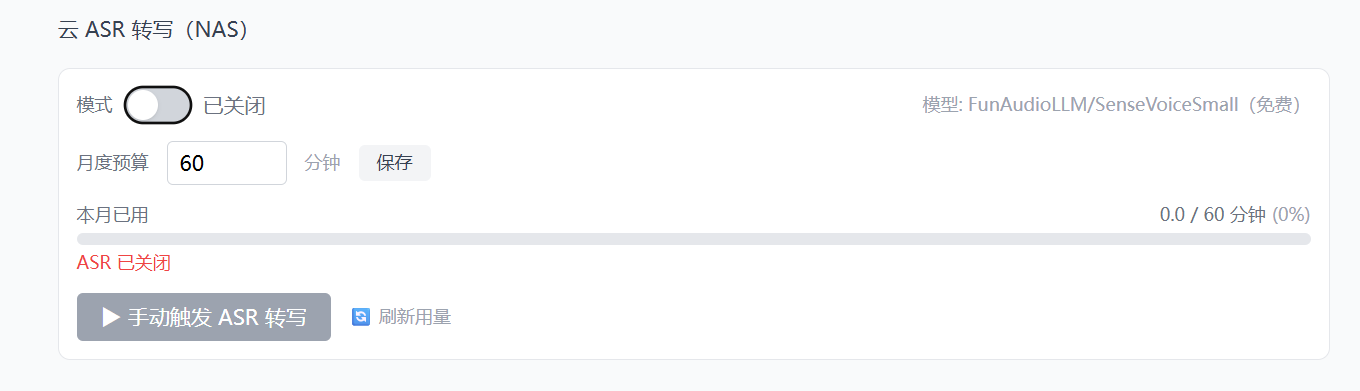
四、第二级:GPU 远程转写(RTX 4060 CUDA)
1. GPU 服务架构
开发机上跑了一个 gpu-service 容器(端口 8011),提供 GPU 转写的 HTTP API。它和 bilibili-monitor 通过共享 Volume 访问同一组音频文件。
bilibili-monitor (NAS / 开发机)
    ↓ HTTP POST /api/gpu/transcribe
gpu-service (开发机, RTX 4060)
    ├── 读取共享 Volume 中的 m4a 文件
    ├── faster-whisper CUDA float16 转写
    └── 写入共享 Volume 中的 .txt 文件
Docker Compose 里的 GPU 直通配置:
yaml
gpu-service:
  profiles: [dev]
  deploy:
    resources:
      reservations:
        devices:
          - driver: nvidia
            count: all
            capabilities: [gpu]
  volumes:
    - bilibili-data:/app/downloads    # 共享音频目录
    - ./bilibili-monitor/transcripts:/app/transcripts  # 共享转写目录
2. HTTP 提交 + 轮询等待
GPU 转写是异步的------提交任务后,gpu-service 在后台处理,bilibili-monitor 轮询状态等待完成:
python
def _trigger_transcribe_gpu_remote(m4a_dir, config, uid, up_name, gpu_url):
    """委托 gpu-service 进行 GPU 转写"""

    # 1. 提交转写任务
    resp = requests.post(f"{gpu_url}/api/gpu/transcribe", json={
        "downloads": m4a_dir,
        "transcripts": transcripts_dir,
        "model_size": model_size,
        "device": "cuda",
    }, timeout=30)

    if not resp.json().get("success"):
        print(f"  ⚠️ GPU 转写提交失败,回退到本地 Whisper")
        return _trigger_transcribe_local(...)

    # 2. 轮询等待完成
    print(f"  ⏳ GPU 转写任务已提交,等待完成...")
    while True:
        time.sleep(5)
        status = requests.get(f"{gpu_url}/api/gpu/status").json()
        task = status.get("task", {})
        progress = task.get("progress", {})

        found = progress.get("found", 0)
        success = progress.get("success", 0)
        if found > 0:
            print(f"    进度: {success}/{found}")

        if task.get("status") in ("done", "error", "idle"):
            break
GPU 模式下,一个 20 分钟的视频几秒钟就能转完。相比 CPU 的 3-5 分钟,快了几十倍。
3. 回退机制
GPU 服务可能不可达(比如开发机关机了),这时候自动回退到 CPU:
python
try:
    resp = requests.post(f"{gpu_url}/api/gpu/transcribe", json={...}, timeout=30)
except requests.exceptions.ConnectionError:
    print(f"  ⚠️ GPU 服务不可达 ({gpu_url}),回退到本地 Whisper")
    return _trigger_transcribe_local(m4a_dir, config, uid, up_name)
except Exception as e:
    print(f"  ⚠️ GPU 远程转写异常: {e},回退到本地 Whisper")
    return _trigger_transcribe_local(m4a_dir, config, uid, up_name)
三个回退点:
- 提交失败 (HTTP 响应
success=false)→ 回退 - 连接失败 (
ConnectionError)→ 回退 - 其他异常(超时、解析错误等)→ 回退
五、第三级:本地 Whisper CPU(兜底方案)
1. faster-whisper vs 原版 Whisper
项目用的是 faster-whisper,不是 OpenAI 的原版 Whisper。区别:
| 原版 Whisper | faster-whisper | |
|---|---|---|
| 引擎 | PyTorch | CTranslate2 |
| CPU 速度 | 1x | 4x |
| 内存占用 | 大 | 小(int8 量化) |
| GPU 模式 | float32 | float16 |
对于 NAS 这种低配环境(Intel N150 + 8GB 内存),faster-whisper 的 int8 量化模式是唯一可行的选择。
python
# CPU 模式:int8 量化,内存友好
compute_type = "float16" if device == "cuda" else "int8"
whisper_model = WhisperModel(model_size, device=device, compute_type=compute_type)
2. 模型加载与复用
模型加载是个耗时操作(small 模型大概 5-10 秒),所以只加载一次,所有文件复用同一个模型实例:
python
def process_directory(input_dir, model_size="medium", device="cuda", ...):
    # 只加载一次
    compute_type = "float16" if device == "cuda" else "int8"
    print(f"  加载 Whisper 模型: {model_size} (device={device}, compute={compute_type})")
    whisper_model = WhisperModel(model_size, device=device, compute_type=compute_type)

    # 所有文件复用同一个模型
    for m4a in to_transcribe:
        text = transcribe_m4a(m4a, whisper_model, min_duration=min_duration)
        # ...
如果每个文件都重新加载模型,10 个视频光加载就要 1 分钟,太浪费了。
3. 转写流程
单个文件的转写很简单:
python
def transcribe_m4a(audio_path, model, min_duration=60):
    """对单个 m4a 转写"""
    # 先探测时长
    duration = get_audio_duration(audio_path)
    if duration < min_duration:
        print(f"    ⏭️ 时长 {format_duration(duration)} < {min_duration}s,跳过")
        return None

    # 转写
    segments, info = model.transcribe(str(audio_path), language="zh")

    # 拼接所有段落
    full_text = "\n".join(seg.text.strip() for seg in segments if seg.text.strip())
    return full_text
language="zh" 告诉 Whisper 这是中文音频,跳过语言检测步骤,速度更快。
六、文件处理细节
1. 时长过滤
转写前先用 ffprobe 探测音频时长,低于 60 秒的直接跳过(通常是片头片尾、测试文件等):
python
probe = subprocess.run(
    ["ffprobe", "-v", "error", "-show_entries", "format=duration",
     "-of", "csv=p=0", str(audio_path)],
    capture_output=True, text=True, timeout=10
)
duration = float(probe.stdout.strip())
if duration < min_duration:
    return None  # 跳过
2. 繁简转换
有些博主的视频会夹杂繁体中文内容(比如引用港台资料),转写结果可能是繁体。统一转成简体:
python
def simplify(text: str) -> str:
    try:
        from opencc import OpenCC
        cc = OpenCC("t2s")  # 繁体 → 简体
        return cc.convert(text)
    except Exception:
        return text  # opencc 不可用时跳过
3. 转写完成后删除音频
转写成功后,m4a 文件就没用了,立即删除释放磁盘空间:
python
# 写入 .txt 文件
txt_path.write_text(text + "\n", encoding="utf-8")

# 删除音频
if delete_audio:
    m4a.unlink()
    print(f"    🗑️ 已删除音频")
这个很重要------如果不删,磁盘很快就会被几百个 m4a 文件塞满。
4. 增量 Checkpoint
每个文件转写成功后,立即追加到 done_bvid 文件:
python
if bvid and done_bvid_file:
    with open(done_bvid_file, "a", encoding="utf-8") as f:
        f.write(bvid + "\n")
这样即使中途崩溃了,下次运行时已经转写过的文件会被跳过,不会重复处理。
另外,转写开始前会先扫描 done_bvid 文件,跳过已转写的 m4a 并直接删除:
python
skip_bvids = {line.strip() for line in open(done_bvid_file) if line.strip()}
for m4a in m4a_files:
    bvid = extract_bvid(m4a.name)
    if bvid in skip_bvids:
        m4a.unlink()  # 已转写,直接删掉残留的 m4a
        skipped_count += 1
    else:
        to_transcribe.append(m4a)
GPU 模式下还会在每次转写后释放显存:
python
if device == 'cuda':
    import torch
    torch.cuda.empty_cache()
七、三种方案对比
| 指标 | 云 ASR | GPU 远程 | CPU Whisper |
|---|---|---|---|
| 速度 | ~30s/条 | ~5s/条 | 3-5min/条 |
| 成本 | 免费 | 电费 | 电费 |
| 可用环境 | 任何有网的地方 | 仅开发机 | 任何环境 |
| 依赖 | SiliconFlow API | NVIDIA GPU + Docker | 无 |
| 限制 | 50MB/文件 | 需要 GPU 服务在线 | NAS CPU 慢 |
| 适用场景 | NAS 日常采集 | 开发机批量转写 | 兜底方案 |
实际使用中,NAS 主要走云 ASR(快且免费),开发机主要走 GPU 远程(秒级),CPU 只在其他两种都不可用时才用。
八、前端管理面板
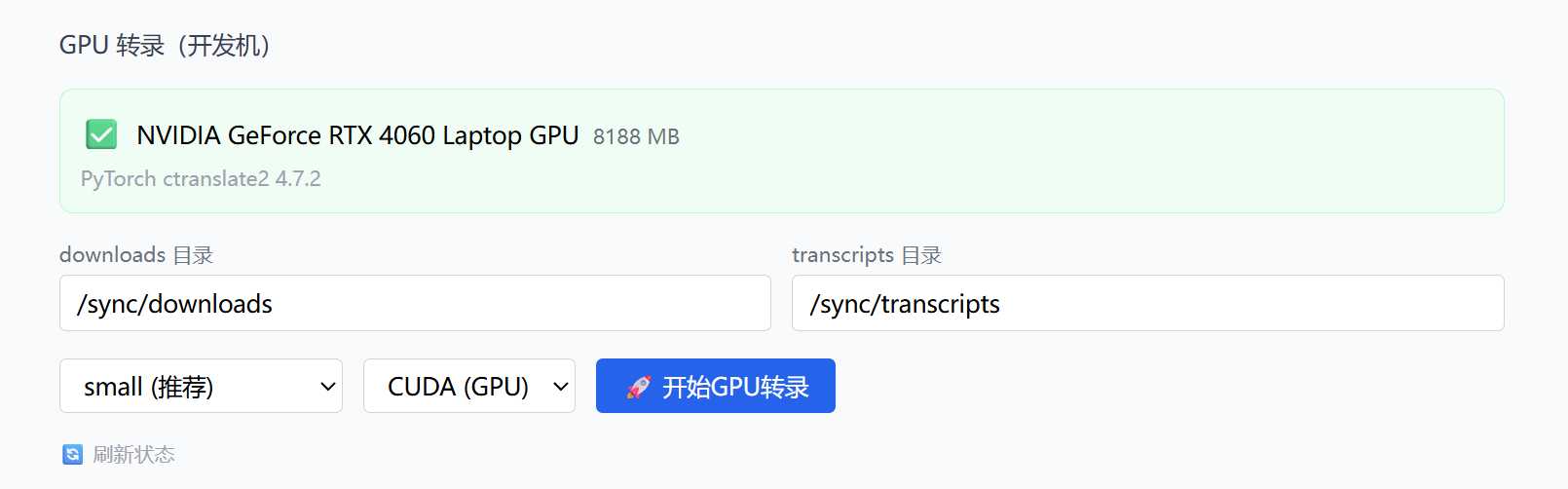
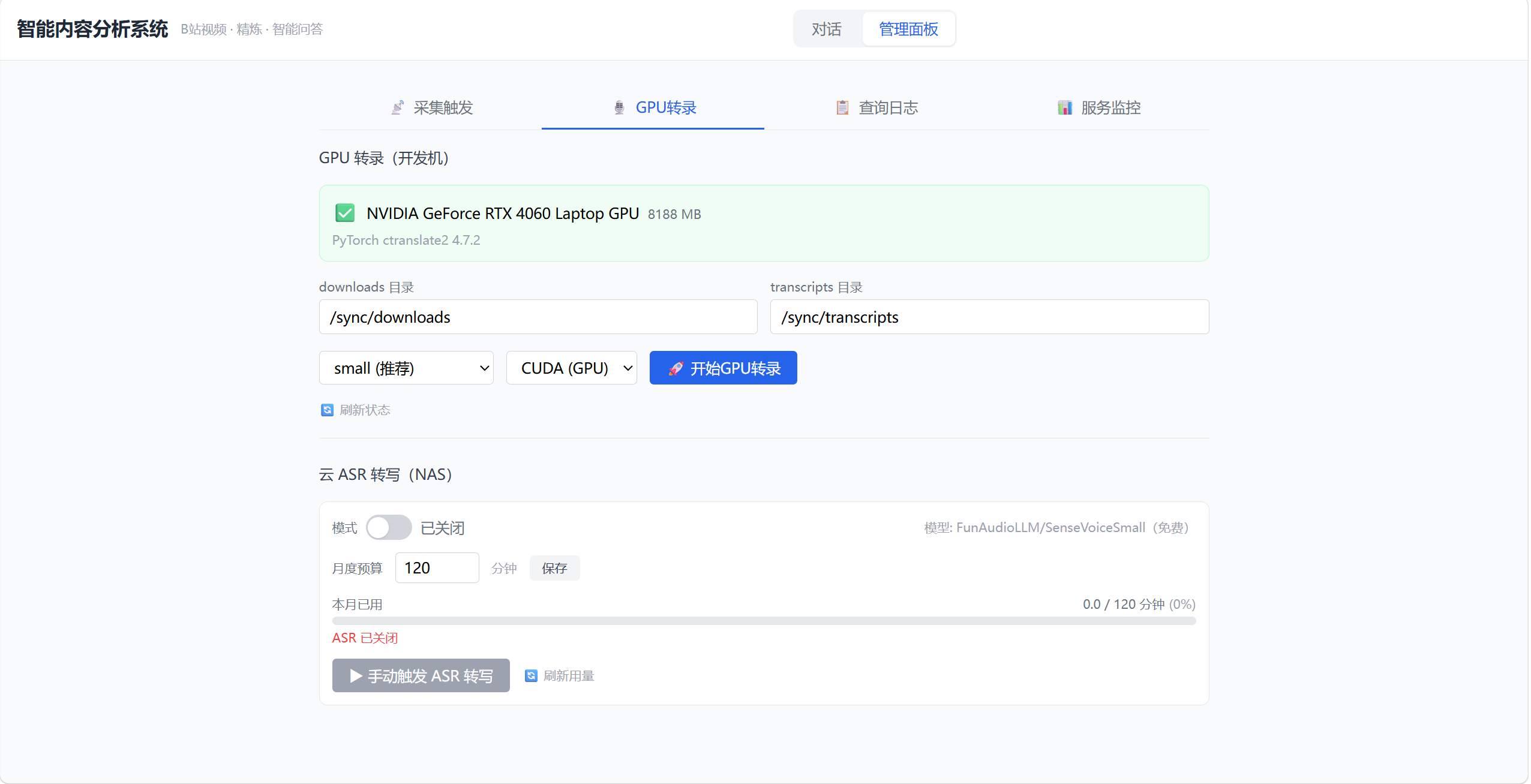
前端的管理面板里有一个"GPU转录"页面,分成两个区域:
GPU 转录(开发机):
- GPU 状态卡片(名称、显存、CUDA 版本)
- 模型选择(tiny/base/small/medium)
- 设备选择(CUDA/CPU)
- 开始按钮 + 进度条 + 实时日志
云 ASR 转写(NAS):
- 开关(启用/禁用)
- 月度预算设置(分钟数)
- 用量进度条(已用/预算)
- 手动触发按钮
- 最近转写记录
总结
三级回退策略让系统在任何环境下都能完成转写:NAS 上用免费的云 ASR,开发机上用 GPU 秒级转写,实在不行还有 CPU 兜底。每一级都有独立的失败处理,回退逻辑清晰。下一篇讲转写完成后的 LLM 精炼和分类。