📌 学习目标
- 掌握生成并添加缺失图标的实现方法
- 理解相关API的使用
- 能够独立完成类似功能开发
🎯 核心概念
生成并添加缺失的图标到地图,即样式中配置的图标缺失时,用map的styleimagemissing事件监听并重新定义图标。
💻 完 整 代 码
代码示例
js
const map = new maplibregl.Map({
    container: 'map',
    style: 'https://demotiles.maplibre.org/style.json',
});

map.on('styleimagemissing', (e) => {
    const id = e.id; // 缺失图像的ID

    // 检查这个缺失的图标是否是此函数可以生成的
    const prefix = 'square-rgb-';
    if (id.indexOf(prefix) !== 0) return;

    // 从ID中提取颜色
    const rgb = id.replace(prefix, '').split(',').map(Number);

    const width = 64; // 图像将是64x64像素
    const bytesPerPixel = 4; // 每个像素由4个字节表示:红、绿、蓝和透明度
    const data = new Uint8Array(width * width * bytesPerPixel);

    for (let x = 0; x < width; x++) {
        for (let y = 0; y < width; y++) {
            const offset = (y * width + x) * bytesPerPixel;
            data[offset + 0] = rgb[0]; // 红色
            data[offset + 1] = rgb[1]; // 绿色
            data[offset + 2] = rgb[2]; // 蓝色
            data[offset + 3] = 255; // 透明度
        }
    }

    map.addImage(id, {width, height: width, data});
});

map.on('load', () => {
    map.addSource('points', {
        'type': 'geojson',
        'data': {
            'type': 'FeatureCollection',
            'features': [
                {
                    'type': 'Feature',
                    'geometry': {
                        'type': 'Point',
                        'coordinates': [0, 0]
                    },
                    'properties': {
                        'color': '255,0,0'
                    }
                },
                {
                    'type': 'Feature',
                    'geometry': {
                        'type': 'Point',
                        'coordinates': [50, 0]
                    },
                    'properties': {
                        'color': '255,209,28'
                    }
                },
                {
                    'type': 'Feature',
                    'geometry': {
                        'type': 'Point',
                        'coordinates': [-50, 0]
                    },
                    'properties': {
                        'color': '242,127,32'
                    }
                }
            ]
        }
    });

    map.addLayer({
        'id': 'points',
        'type': 'symbol',
        'source': 'points',
        'layout': {
            'icon-image': ['concat', 'square-rgb-', ['get', 'color']]
        }
    });
});
代码示例
html
<!DOCTYPE html>
<html lang="en">
<head>
    <title>Generate and add a missing icon to the map</title>
    <meta property="og:description" content="在运行时动态生成缺失的图标并将其添加到地图。" />
    <meta property="og:created" content="2025-06-25" />
    <meta charset='utf-8'>
    <meta name="viewport" content="width=device-width, initial-scale=1">
    <link rel='stylesheet' href='https://unpkg.com/maplibre-gl@5.24.0/dist/maplibre-gl.css' />
    <script src='https://unpkg.com/maplibre-gl@5.24.0/dist/maplibre-gl.js'></script>
    <style>
        body { margin: 0; padding: 0; }
        html, body, #map { height: 100%; }
    </style>
</head>
<body>
<div id="map"></div>

<script>
    const map = new maplibregl.Map({
        container: 'map',
        style: 'https://demotiles.maplibre.org/style.json',
    });

    map.on('styleimagemissing', (e) => {
        const id = e.id; // 缺失图像的ID

        // 检查这个缺失的图标是否是此函数可以生成的
        const prefix = 'square-rgb-';
        if (id.indexOf(prefix) !== 0) return;

        // 从ID中提取颜色
        const rgb = id.replace(prefix, '').split(',').map(Number);

        const width = 64; // 图像将是64像素的正方形
        const bytesPerPixel = 4; // 每个像素由4个字节表示:红、绿、蓝和透明度。
        const data = new Uint8Array(width * width * bytesPerPixel);

        for (let x = 0; x < width; x++) {
            for (let y = 0; y < width; y++) {
                const offset = (y * width + x) * bytesPerPixel;
                data[offset + 0] = rgb[0]; // 红色
                data[offset + 1] = rgb[1]; // 绿色
                data[offset + 2] = rgb[2]; // 蓝色
                data[offset + 3] = 255; // 透明度
            }
        }

        map.addImage(id, {width, height: width, data});
    });

    map.on('load', () => {
        map.addSource('points', {
            'type': 'geojson',
            'data': {
                'type': 'FeatureCollection',
                'features': [
                    {
                        'type': 'Feature',
                        'geometry': {
                            'type': 'Point',
                            'coordinates': [0, 0]
                        },
                        'properties': {
                            'color': '255,0,0'
                        }
                    },
                    {
                        'type': 'Feature',
                        'geometry': {
                            'type': 'Point',
                            'coordinates': [50, 0]
                        },
                        'properties': {
                            'color': '255,209,28'
                        }
                    },
                    {
                        'type': 'Feature',
                        'geometry': {
                            'type': 'Point',
                            'coordinates': [-50, 0]
                        },
                        'properties': {
                            'color': '242,127,32'
                        }
                    }
                ]
            }
        });

        map.addLayer({
            'id': 'points',
            'type': 'symbol',
            'source': 'points',
            'layout': {
                'icon-image': ['concat', 'square-rgb-', ['get', 'color']]
            }
        });
    });
</script>
</body>
</html>
🔍 代码解析
初始化地图
使用 new maplibregl.Map() 创建地图实例,配置基本参数。本示例的核心特色是展示如何利用 styleimagemissing 事件动态生成缺失的图标。
关键配置项
- container: 地图容器的 DOM 元素 ID
- style : 使用 MapLibre 官方样式
https://demotiles.maplibre.org/style.json
styleimagemissing 事件处理
javascript
map.on('styleimagemissing', (e) => {
    const id = e.id; // 缺失图像的 ID

    // 检查是否是可生成的图标
    const prefix = 'square-rgb-';
    if (id.indexOf(prefix) !== 0) return;

    // 从 ID 中提取颜色值
    const rgb = id.replace(prefix, '').split(',').map(Number);

    // 生成 64x64 像素的纯色图像
    const width = 64;
    const bytesPerPixel = 4;
    const data = new Uint8Array(width * width * bytesPerPixel);

    for (let x = 0; x < width; x++) {
        for (let y = 0; y < width; y++) {
            const offset = (y * width + x) * bytesPerPixel;
            data[offset + 0] = rgb[0]; // 红色
            data[offset + 1] = rgb[1]; // 绿色
            data[offset + 2] = rgb[2]; // 蓝色
            data[offset + 3] = 255;   // 透明度
        }
    }

    map.addImage(id, {width, height: width, data});
});
动态图标引用
javascript
map.addLayer({
    'id': 'points',
    'type': 'symbol',
    'source': 'points',
    'layout': {
        'icon-image': ['concat', 'square-rgb-', ['get', 'color']]
    }
});
⚙️ 参数说明
| 参数 | 类型 | 必填 | 默认值 | 说明 |
|---|---|---|---|---|
| container | string | 是 | - | 地图容器元素的 ID |
| style | string/object | 是 | - | 地图样式 URL 或内联样式对象 |
styleimagemissing 事件
| 属性 | 类型 | 说明 |
|---|---|---|
| id | string | 缺失图像的 ID |
图标 ID 格式
| 格式 | 示例 | 说明 |
|---|---|---|
| square-rgb-r,g,b | square-rgb-255,0,0 | 红色方块图标 |
🎨 效果说明
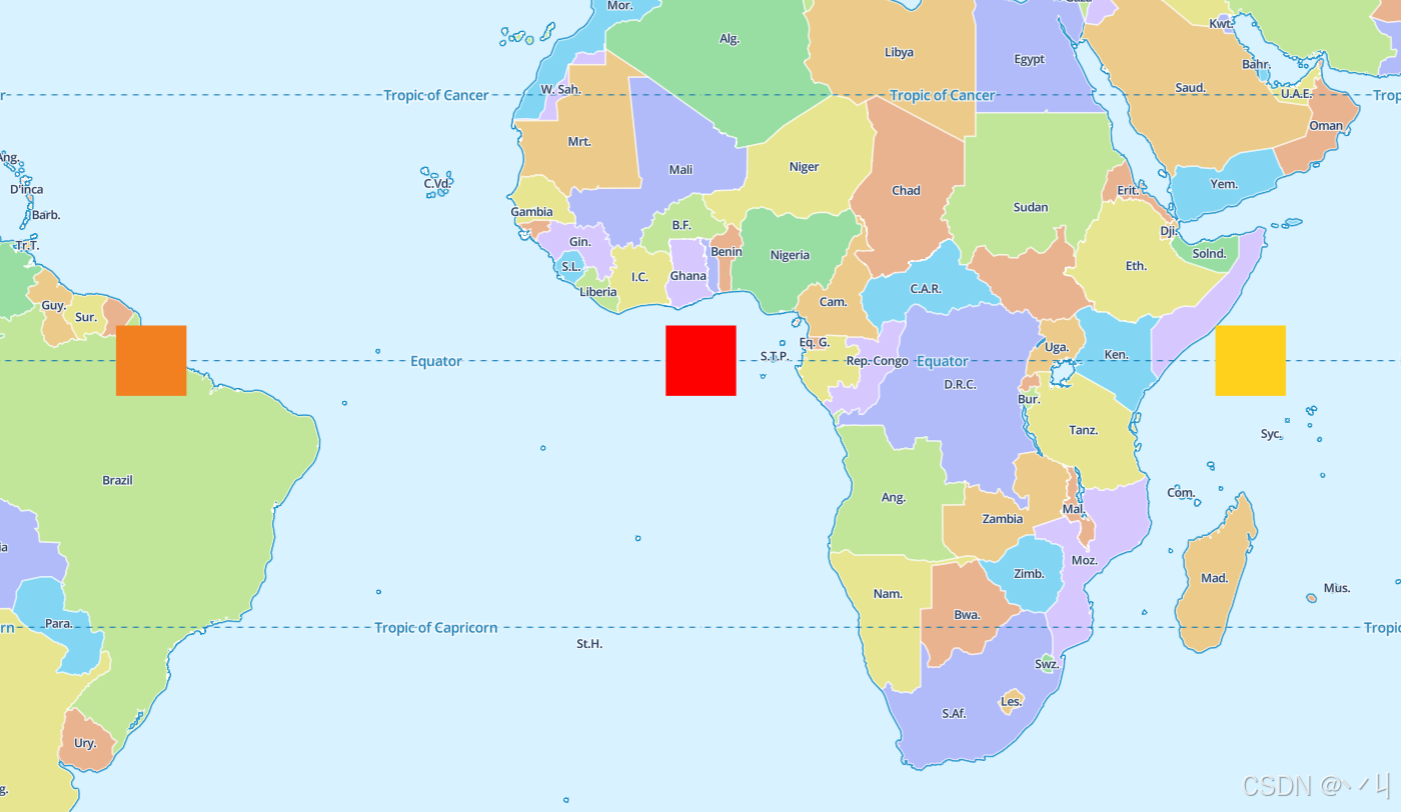
运行代码后,地图上会显示三个彩色方块图标:
- 红色方块 : 坐标
[0, 0],颜色255,0,0(纯红色) - 黄色方块 : 坐标
[50, 0],颜色255,209,28(金黄色) - 橙色方块 : 坐标
[-50, 0],颜色242,127,32(橙色)
工作流程:
- 图层引用图标
square-rgb-{color} - 地图发现图标不存在,触发
styleimagemissing事件 - 事件处理器解析颜色值,生成对应颜色的方块图像
- 将生成的图像添加到地图,图层正常显示
💡 常 见 问 题
Q1: styleimagemissing 事件何时触发?
A: 当地图尝试使用一个未注册的图像时触发,通常在渲染符号图层时。
Q2: 如何避免重复生成?
A: 事件只会为每个缺失的图像 ID 触发一次,MapLibre 会缓存已注册的图像。
Q3: 可以生成复杂图像吗?
A: 可以。除了纯色方块,还可以生成渐变、图案等任意像素数据。
Q4: 性能影响如何?
A: 生成图像会占用 CPU 资源,但只在缺失时生成一次,后续会缓存。
📝 练习任务
- 基础练习:修改颜色值,创建不同颜色的方块
- 进阶挑战:生成渐变色方块,而不是纯色方块
- 拓展思考:如何生成带边框的方块图标?
🌟 最佳实践
- 图标命名规范: 使用统一的前缀标识可生成的图标
- 参数验证: 在生成前验证 ID 格式和颜色值范围
- 性能优化: 限制生成图像的最大尺寸
- 错误处理: 添加颜色值越界的处理
- 缓存策略: 考虑缓存常用颜色的图标
- 测试覆盖: 测试各种颜色值和边界情况
🔗 延伸阅读
-
下一课预告:将继续学习地图图层的基础知识
本文是MapLibre GL JS实践课程系列的一部分,欢迎关注收藏