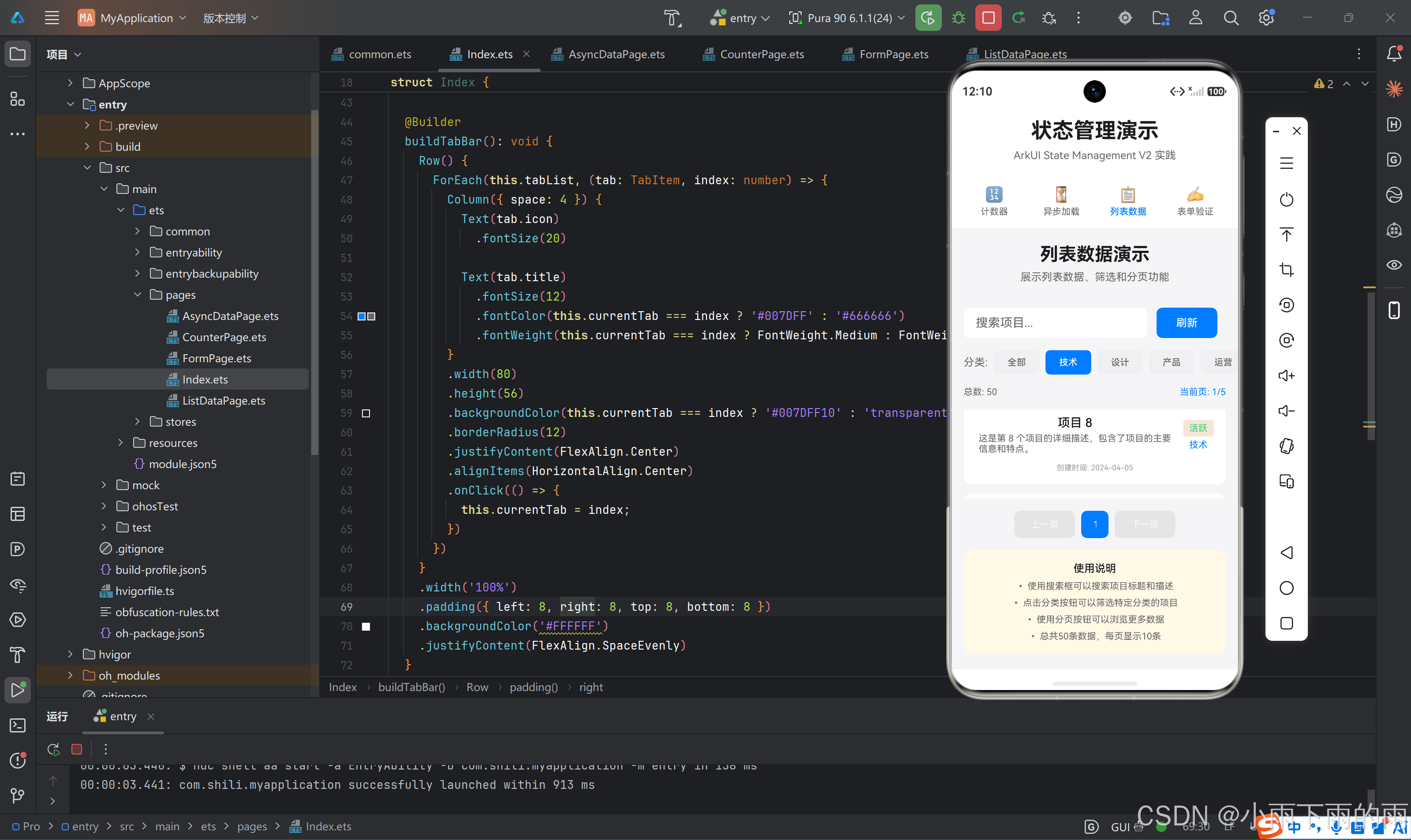

一、列表数据管理的复杂性
1.1 列表场景的核心挑战
列表数据管理是移动应用开发中最常见也是最复杂的场景之一。主要挑战包括:
| 挑战 | 描述 | 技术难点 |
|---|---|---|
| 大数据量 | 列表可能包含大量数据 | 性能优化、内存管理 |
| 分页加载 | 需要管理多页数据 | 状态同步、边界处理 |
| 搜索过滤 | 动态筛选数据 | 状态联动、缓存策略 |
| 状态保持 | 滚动位置、选中状态 | 状态持久化 |
| 性能优化 | 流畅的滚动体验 | 虚拟列表、懒加载 |
1.2 列表状态的维度
一个完整的列表状态需要管理多个维度:
typescript
interface ListState<T> {
  // 数据维度
  items: T[];           // 当前页数据
  allItems: T[];        // 全部数据
  filteredItems: T[];   // 过滤后数据

  // 分页维度
  currentPage: number;  // 当前页码
  pageSize: number;     // 每页大小
  totalCount: number;   // 总记录数
  totalPages: number;   // 总页数

  // 筛选维度
  searchKeyword: string;    // 搜索关键词
  selectedCategory: string; // 选中分类

  // 状态维度
  loading: boolean;     // 加载状态
  refreshing: boolean;  // 刷新状态
  error: string;        // 错误信息
}
1.3 列表状态管理的架构层次
┌─────────────────────────────────────────────────────┐
│                    UI Layer                         │
│  (List组件、ListItem、搜索框、分页器)                │
├─────────────────────────────────────────────────────┤
│                   Store Layer                       │
│  (ListStore、状态管理、业务逻辑)                     │
├─────────────────────────────────────────────────────┤
│                  Data Layer                         │
│  (API调用、数据转换、缓存管理)                        │
└─────────────────────────────────────────────────────┘
二、列表状态管理的核心模式
2.1 分页状态管理
typescript
@ObservedV2
class ListDataStore {
  @Trace items: ListItem[] = [];
  @Trace filteredItems: ListItem[] = [];
  @Trace loading: boolean = false;

  @Trace pagination: PaginationState = {
    currentPage: 1,
    pageSize: 10,
    totalCount: 0,
    totalPages: 0
  };

  @Trace selectedCategory: string = 'all';
  @Trace searchKeyword: string = '';

  private allItems: ListItem[] = [];

  async loadItems(): Promise<void> {
    this.loading = true;
    await this.delay(500);

    let filtered = this.allItems;

    // 分类过滤
    if (this.selectedCategory !== 'all') {
      filtered = filtered.filter(item => item.category === this.selectedCategory);
    }

    // 搜索过滤
    if (this.searchKeyword.trim()) {
      const keyword = this.searchKeyword.toLowerCase();
      filtered = filtered.filter(item =>
        item.title.toLowerCase().includes(keyword) ||
        item.description.toLowerCase().includes(keyword)
      );
    }

    this.filteredItems = filtered;
    this.pagination.totalCount = filtered.length;
    this.pagination.totalPages = Math.ceil(filtered.length / this.pagination.pageSize);

    // 分页截取
    const start = (this.pagination.currentPage - 1) * this.pagination.pageSize;
    const end = start + this.pagination.pageSize;
    this.items = filtered.slice(start, end);

    this.loading = false;
  }

  async loadNextPage(): Promise<void> {
    if (this.hasNextPage) {
      this.pagination.currentPage++;
      await this.loadItems();
    }
  }

  async loadPreviousPage(): Promise<void> {
    if (this.hasPreviousPage) {
      this.pagination.currentPage--;
      await this.loadItems();
    }
  }

  get hasNextPage(): boolean {
    return this.pagination.currentPage < this.pagination.totalPages;
  }

  get hasPreviousPage(): boolean {
    return this.pagination.currentPage > 1;
  }
}
2.2 状态联动机制
当搜索关键词或分类变化时,需要联动更新分页状态:
typescript
setCategory(category: string): void {
  this.selectedCategory = category;
  this.pagination.currentPage = 1;  // 重置到第一页
  this.loadItems();
}

setSearchKeyword(keyword: string): void {
  this.searchKeyword = keyword;
  this.pagination.currentPage = 1;  // 重置到第一页
  this.loadItems();
}
2.3 数据初始化策略
typescript
private constructor() {
  this.initializeData();
}

private initializeData(): void {
  const categories = ['技术', '设计', '产品', '运营', '市场'];
  const statuses: ('active' | 'inactive' | 'pending')[] = ['active', 'inactive', 'pending'];

  for (let i = 1; i <= 50; i++) {
    this.allItems.push({
      id: i,
      title: `项目 ${i}`,
      description: `这是第 ${i} 个项目的详细描述`,
      category: categories[Math.floor(Math.random() * categories.length)],
      status: statuses[Math.floor(Math.random() * statuses.length)],
      createdAt: this.generateRandomDate()
    });
  }
}
三、列表组件实现
3.1 完整的列表页面
typescript
@Entry
@ComponentV2
struct ListDataPage {
  @Local searchText: string = '';
  private store = listDataStore;
  private categories: string[] = ['all', '技术', '设计', '产品', '运营', '市场'];

  aboutToAppear(): void {
    this.store.loadItems();
  }

  build() {
    Column({ space: 16 }) {
      // 搜索框
      this.buildSearchBar();

      // 分类筛选
      this.buildCategoryFilter();

      // 列表内容
      this.buildList();

      // 分页器
      this.buildPagination();
    }
    .width('100%')
    .padding(20)
    .backgroundColor('#F5F5F7')
  }

  @Builder
  buildSearchBar(): void {
    Row({ space: 12 }) {
      Image($r('app.media.search'))
        .width(20)
        .height(20)
        .fillColor('#999999')

      TextInput({ placeholder: '搜索项目...', text: this.searchText })
        .flexGrow(1)
        .height(44)
        .backgroundColor('#FFFFFF')
        .borderRadius(8)
        .onChange((value: string) => {
          this.searchText = value;
          this.store.setSearchKeyword(value);
        })
    }
    .padding({ left: 12, right: 12 })
    .backgroundColor('#FFFFFF')
    .borderRadius(8)
  }

  @Builder
  buildCategoryFilter(): void {
    Scroll({ direction: Axis.Horizontal }) {
      Row({ space: 8 }) {
        ForEach(this.categories, (category: string) => {
          Button(category === 'all' ? '全部' : category)
            .width(60)
            .height(32)
            .backgroundColor(this.store.selectedCategory === category ? '#007DFF' : '#F0F0F2')
            .fontColor(this.store.selectedCategory === category ? '#FFFFFF' : '#666666')
            .fontSize(12)
            .borderRadius(16)
            .onClick(() => this.store.setCategory(category))
        })
      }
      .padding({ right: 16 })
    }
    .backgroundColor('#FFFFFF')
    .padding(12)
    .borderRadius(8)
  }

  @Builder
  buildList(): void {
    if (this.store.loading) {
      this.buildLoadingState();
    } else if (this.store.items.length === 0) {
      this.buildEmptyState();
    } else {
      this.buildDataList();
    }
  }

  @Builder
  buildLoadingState(): void {
    Column({ space: 12 }) {
      LoadingProgress()
        .width(48)
        .height(48)
        .color('#007DFF')
      Text('加载中...')
        .fontSize(14)
        .fontColor('#666666')
    }
    .width('100%')
    .height(300)
    .justifyContent(FlexAlign.Center)
  }

  @Builder
  buildEmptyState(): void {
    Column({ space: 12 }) {
      Text('📋')
        .fontSize(48)
      Text('暂无匹配的数据')
        .fontSize(14)
        .fontColor('#999999')
    }
    .width('100%')
    .height(300)
    .justifyContent(FlexAlign.Center)
  }

  @Builder
  buildDataList(): void {
    List({ space: 12 }) {
      ForEach(this.store.items, (item: ListItem) => {
        ListItem() {
          this.buildListItem(item);
        }
      })
    }
    .width('100%')
    .layoutWeight(1)
    .scrollBar(BarState.Off)
  }

  @Builder
  buildListItem(item: ListItem): void {
    Column({ space: 8 }) {
      Row({ space: 12 }) {
        Column({ space: 4 }) {
          Text(item.category)
            .fontSize(10)
            .fontColor('#007DFF')
            .backgroundColor('#E8F4FF')
            .padding({ left: 8, right: 8, top: 2, bottom: 2 })
            .borderRadius(4)
          Text(item.createdAt)
            .fontSize(10)
            .fontColor('#999999')
        }

        Column({ space: 4 }) {
          Text(item.title)
            .fontSize(16)
            .fontWeight(FontWeight.Medium)
          Text(item.description)
            .fontSize(12)
            .fontColor('#666666')
            .maxLines(2)
        }
        .flexGrow(1)

        this.buildStatusBadge(item.status)
      }
    }
    .width('100%')
    .padding(16)
    .backgroundColor('#FFFFFF')
    .borderRadius(12)
  }

  @Builder
  buildStatusBadge(status: string): void {
    let color: string;
    let text: string;

    switch (status) {
      case 'active':
        color = '#2ED573';
        text = '进行中';
        break;
      case 'inactive':
        color = '#FF4757';
        text = '已停止';
        break;
      case 'pending':
        color = '#FFA502';
        text = '待处理';
        break;
      default:
        color = '#999999';
        text = status;
    }

    Text(text)
      .fontSize(10)
      .fontColor('#FFFFFF')
      .backgroundColor(color)
      .padding({ left: 8, right: 8, top: 2, bottom: 2 })
      .borderRadius(4)
  }

  @Builder
  buildPagination(): void {
    Row({ space: 8 }) {
      // 上一页
      Button('‹')
        .width(40)
        .height(40)
        .backgroundColor(this.store.hasPreviousPage ? '#007DFF' : '#E0E0E0')
        .enabled(this.store.hasPreviousPage)
        .onClick(() => this.store.loadPreviousPage())

      // 页码显示
      Text(`${this.store.pagination.currentPage} / ${this.store.pagination.totalPages}`)
        .fontSize(14)
        .fontColor('#666666')

      // 下一页
      Button('›')
        .width(40)
        .height(40)
        .backgroundColor(this.store.hasNextPage ? '#007DFF' : '#E0E0E0')
        .enabled(this.store.hasNextPage)
        .onClick(() => this.store.loadNextPage())
    }
    .width('100%')
    .justifyContent(FlexAlign.Center)
    .padding(16)
    .backgroundColor('#FFFFFF')
    .borderRadius(8)
  }
}
3.2 列表项组件化
typescript
@ComponentV2
struct ListItemCard {
  @Param item: ListItem;

  build() {
    Column({ space: 8 }) {
      Row({ space: 12 }) {
        Column({ space: 4 }) {
          Text(this.item.category)
            .fontSize(10)
            .fontColor('#007DFF')
            .backgroundColor('#E8F4FF')
            .padding({ left: 8, right: 8, top: 2, bottom: 2 })
            .borderRadius(4)
          Text(this.item.createdAt)
            .fontSize(10)
            .fontColor('#999999')
        }

        Column({ space: 4 }) {
          Text(this.item.title)
            .fontSize(16)
            .fontWeight(FontWeight.Medium)
          Text(this.item.description)
            .fontSize(12)
            .fontColor('#666666')
            .maxLines(2)
        }
        .flexGrow(1)

        this.buildStatusBadge(this.item.status)
      }
    }
    .width('100%')
    .padding(16)
    .backgroundColor('#FFFFFF')
    .borderRadius(12)
  }

  @Builder
  buildStatusBadge(status: string): void {
    let color: string;
    let text: string;

    switch (status) {
      case 'active':
        color = '#2ED573';
        text = '进行中';
        break;
      case 'inactive':
        color = '#FF4757';
        text = '已停止';
        break;
      case 'pending':
        color = '#FFA502';
        text = '待处理';
        break;
      default:
        color = '#999999';
        text = status;
    }

    Text(text)
      .fontSize(10)
      .fontColor('#FFFFFF')
      .backgroundColor(color)
      .padding({ left: 8, right: 8, top: 2, bottom: 2 })
      .borderRadius(4)
  }
}
四、高级分页策略
4.1 无限滚动加载
typescript
@Entry
@ComponentV2
struct InfiniteScrollPage {
  private store = infiniteScrollStore;

  build() {
    Column({ space: 12 }) {
      List({ space: 12 }) {
        ForEach(this.store.items, (item: ListItem) => {
          ListItem() {
            ListItemCard({ item })
          }
          .onAppear(() => {
            // 当最后一项出现时加载下一页
            const index = this.store.items.indexOf(item);
            if (index === this.store.items.length - 1 && this.store.hasNextPage) {
              this.store.loadNextPage();
            }
          })
        })

        // 加载更多提示
        if (this.store.loading && this.store.items.length > 0) {
          ListItem() {
            Row({ space: 8 }) {
              LoadingProgress()
                .width(20)
                .height(20)
              Text('加载更多...')
                .fontSize(14)
                .fontColor('#666666')
            }
            .width('100%')
            .height(60)
            .justifyContent(FlexAlign.Center)
          }
        }
      }
      .width('100%')
      .layoutWeight(1)
    }
  }
}
4.2 虚拟列表优化
typescript
@Entry
@ComponentV2
struct VirtualListPage {
  @Local items: ListItem[] = [];

  aboutToAppear(): void {
    // 生成大量数据
    for (let i = 1; i <= 1000; i++) {
      this.items.push({
        id: i,
        title: `项目 ${i}`,
        description: `描述 ${i}`,
        category: '技术',
        status: 'active',
        createdAt: '2024-01-01'
      });
    }
  }

  build() {
    Column() {
      List({ space: 12, scroller: this.scroller }) {
        LazyForEach(this.items, (item: ListItem) => {
          ListItem() {
            ListItemCard({ item })
          }
          .height(100)
        })
      }
      .width('100%')
      .layoutWeight(1)
      .cachedCount(30)  // 缓存30个列表项
    }
  }
}
4.3 分页缓存策略
typescript
@ObservedV2
class CachedListStore {
  private pageCache: Map<number, ListItem[]> = new Map();

  async loadPage(page: number): Promise<ListItem[]> {
    // 检查缓存
    if (this.pageCache.has(page)) {
      return this.pageCache.get(page)!;
    }

    // 实际加载
    const items = await this.fetchPage(page);

    // 缓存结果
    this.pageCache.set(page, items);

    return items;
  }

  clearCache(): void {
    this.pageCache.clear();
  }
}
五、状态同步与更新策略
5.1 不可变更新模式
typescript
// 错误:直接修改数组
this.items.push(newItem);

// 正确:创建新数组
this.items = [...this.items, newItem];

// 对象更新
this.pagination = { ...this.pagination, currentPage: 2 };
5.2 批量更新优化
typescript
async loadItems(): Promise<void> {
  this.loading = true;

  const newItems = await this.fetchData();
  const newTotal = await this.fetchTotalCount();

  // 批量更新状态
  this.items = newItems;
  this.pagination = {
    ...this.pagination,
    totalCount: newTotal,
    totalPages: Math.ceil(newTotal / this.pagination.pageSize)
  };

  this.loading = false;
}
5.3 状态变更通知
typescript
class ListStore {
  private subscribers: Set<() => void> = new Set();

  protected notify(): void {
    this.subscribers.forEach(callback => callback());
  }

  subscribe(callback: () => void): () => void {
    this.subscribers.add(callback);
    return () => this.subscribers.delete(callback);
  }
}
六、性能优化技术
6.1 列表项复用
typescript
List({ space: 12 }) {
  ForEach(this.store.items, (item: ListItem, index: number) => {
    ListItem() {
      ItemComponent({
        item,
        index,
        key: item.id.toString()
      })
    }
    .sticky(StickyStyle.Header)
    .editable(true)
  }, (item: ListItem) => item.id.toString())
}
6.2 减少重渲染
typescript
@Builder
buildListItem(item: ListItem): void {
  Column({ space: 8 }) {
    // 静态内容
    Text(item.title)
      .fontSize(16)

    // 动态内容(可能频繁变化)
    if (item.status === 'active') {
      Text('进行中')
        .fontColor('#2ED573')
    }
  }
}
6.3 滚动性能优化
typescript
List({ space: 12 }) {
  ForEach(this.items, (item) => {
    ListItem() {
      ItemCard({ item })
    }
    .decoration({
      shadow: { radius: 4, color: '#00000010', offsetX: 0, offsetY: 2 }
    })
  })
}
.width('100%')
.layoutWeight(1)
.scrollBar(BarState.Off)
.cachedCount(20)
七、测试与调试
7.1 单元测试
typescript
describe('ListDataStore', () => {
  it('should load items with pagination', async () => {
    const store = new ListDataStore();

    await store.loadItems();

    expect(store.items.length).toBe(10);
    expect(store.pagination.currentPage).toBe(1);
    expect(store.pagination.totalPages).toBe(5);
  });

  it('should filter items by category', async () => {
    const store = new ListDataStore();

    store.setCategory('技术');

    expect(store.selectedCategory).toBe('技术');
    expect(store.pagination.currentPage).toBe(1);
  });

  it('should search items', async () => {
    const store = new ListDataStore();

    store.setSearchKeyword('项目1');

    expect(store.searchKeyword).toBe('项目1');
  });
});
7.2 集成测试
typescript
it('should display correct number of items', async () => {
  const page = new ListDataPage();
  page.build();

  await waitFor(() => {
    return page.store.items.length === 10;
  });
});

it('should navigate to next page', async () => {
  const page = new ListDataPage();
  page.build();

  await page.store.loadNextPage();

  expect(page.store.pagination.currentPage).toBe(2);
});
八、最佳实践总结
8.1 状态管理原则
- 状态集中:将列表相关状态集中在一个Store中
- 状态分离:区分数据状态、分页状态、筛选状态
- 不可变更新:使用不可变方式更新状态
- 状态验证:更新前验证状态合法性
8.2 列表性能原则
- 虚拟列表:大数据量使用LazyForEach
- 缓存策略:缓存已加载的页面数据
- 减少重渲染:拆分静态和动态内容
- 滚动优化:使用cachedCount优化滚动性能
8.3 代码组织建议
src/
├── stores/
│   ├── ListDataStore.ts
│   └── types.ts
├── pages/
│   └── ListDataPage.ts
├── components/
│   └── ListItemCard.ts
└── utils/
└── pagination.ts参考资料: