html
<!DOCTYPE html>
<html lang="zh-CN">
<head>
  <meta charset="UTF-8">
  <meta name="viewport" content="width=device-width, initial-scale=1.0">
  <title>画中画模式演示</title>
  <style>
    * {
      margin: 0;
      padding: 0;
      box-sizing: border-box;
    }

    body {
      font-family: -apple-system, BlinkMacSystemFont, 'Segoe UI', Roboto, sans-serif;
      background: linear-gradient(135deg, #667eea 0%, #764ba2 100%);
      min-height: 100vh;
      display: flex;
      flex-direction: column;
      align-items: center;
      justify-content: center;
      padding: 20px;
    }

    .container {
      background: #fff;
      border-radius: 16px;
      box-shadow: 0 20px 60px rgba(0, 0, 0, 0.3);
      padding: 30px;
      max-width: 600px;
      width: 100%;
    }

    h1 {
      text-align: center;
      color: #333;
      margin-bottom: 20px;
      font-size: 24px;
    }

    .video-container {
      position: relative;
      width: 100%;
      aspect-ratio: 16/9;
      background: #000;
      border-radius: 12px;
      overflow: hidden;
      margin-bottom: 20px;
    }

    video {
      width: 100%;
      height: 100%;
      object-fit: cover;
    }

    .controls {
      display: flex;
      gap: 12px;
      justify-content: center;
      flex-wrap: wrap;
    }

    button {
      padding: 12px 24px;
      font-size: 16px;
      font-weight: 600;
      border: none;
      border-radius: 8px;
      cursor: pointer;
      transition: all 0.3s ease;
      display: flex;
      align-items: center;
      gap: 8px;
    }

    .btn-primary {
      background: linear-gradient(135deg, #667eea 0%, #764ba2 100%);
      color: #fff;
    }

    .btn-primary:hover {
      transform: translateY(-2px);
      box-shadow: 0 8px 20px rgba(102, 126, 234, 0.4);
    }

    .btn-secondary {
      background: #f5f5f5;
      color: #333;
    }

    .btn-secondary:hover {
      background: #eee;
    }

    .btn:disabled {
      opacity: 0.5;
      cursor: not-allowed;
      transform: none !important;
    }

    .status {
      text-align: center;
      margin-top: 20px;
      padding: 12px;
      border-radius: 8px;
      font-size: 14px;
    }

    .status.active {
      background: #d4edda;
      color: #155724;
    }

    .status.inactive {
      background: #f8d7da;
      color: #721c24;
    }

    .instructions {
      margin-top: 20px;
      padding: 16px;
      background: #f8f9fa;
      border-radius: 8px;
      font-size: 14px;
      color: #666;
      line-height: 1.6;
    }

    .instructions h3 {
      color: #333;
      margin-bottom: 8px;
      font-size: 16px;
    }

    .feature-detection {
      text-align: center;
      margin-bottom: 16px;
      padding: 12px;
      border-radius: 8px;
    }

    .feature-detection.supported {
      background: #d4edda;
      color: #155724;
    }

    .feature-detection.not-supported {
      background: #f8d7da;
      color: #721c24;
    }
  </style>
</head>
<body>
  <div class="container">
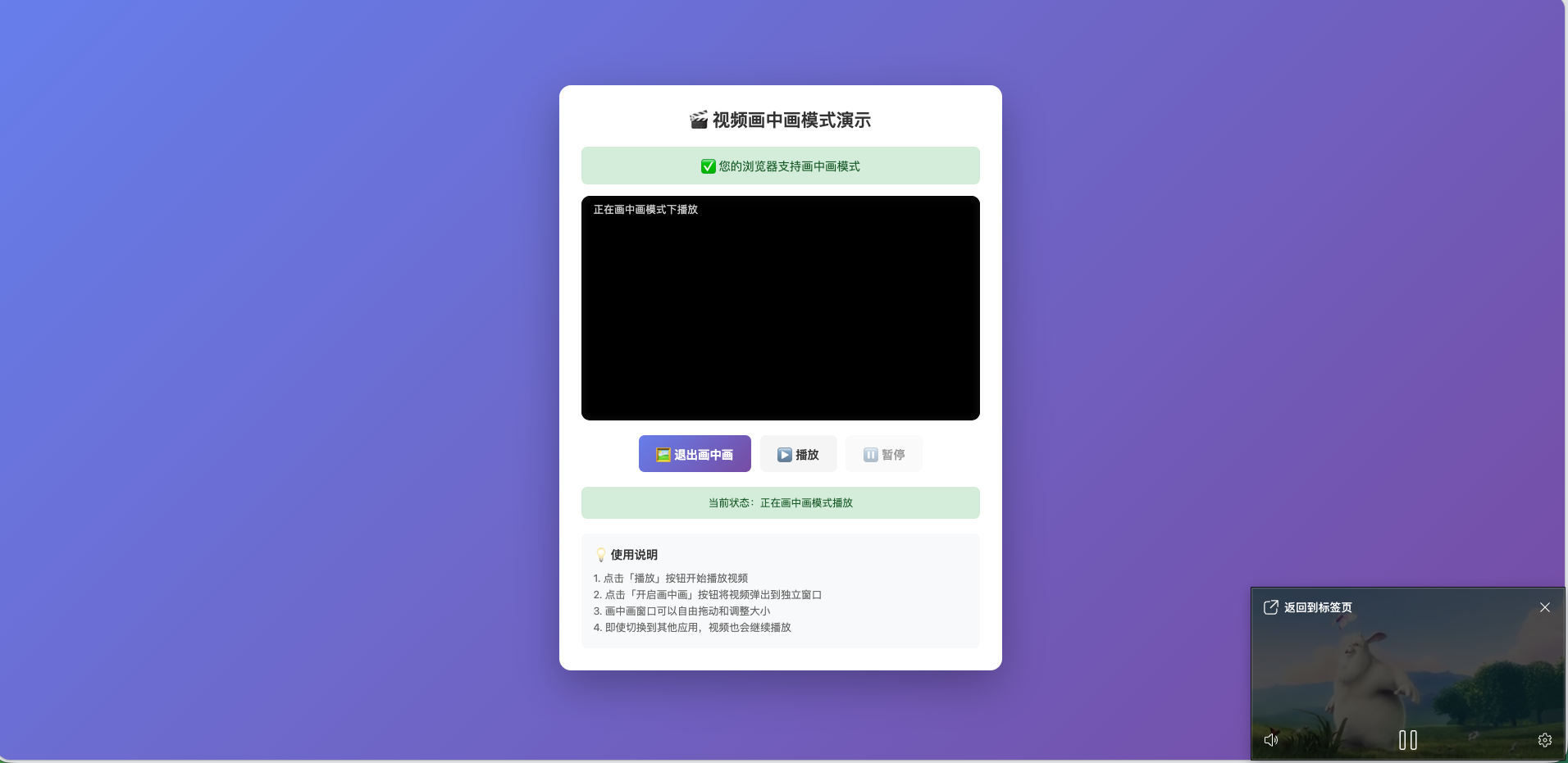
    <h1>🎬 视频画中画模式演示</h1>

    <div class="feature-detection" id="featureDetection">
      检测浏览器支持...
    </div>

    <div class="video-container">
      <video id="video" controls>
        <source src="https://www.w3schools.com/html/mov_bbb.mp4" type="video/mp4">
        <source src="https://www.w3schools.com/html/mov_bbb.ogg" type="video/ogg">
        您的浏览器不支持视频播放。
      </video>
    </div>

    <div class="controls">
      <button id="togglePip" class="btn btn-primary" disabled>
        🖼️ 开启画中画
      </button>
      <button id="playBtn" class="btn btn-secondary">
        ▶️ 播放
      </button>
      <button id="pauseBtn" class="btn btn-secondary" disabled>
        ⏸️ 暂停
      </button>
    </div>

    <div class="status" id="status" class="inactive">
      当前状态:未在画中画模式
    </div>

    <div class="instructions">
      <h3>💡 使用说明</h3>
      <p>1. 点击「播放」按钮开始播放视频</p>
      <p>2. 点击「开启画中画」按钮将视频弹出到独立窗口</p>
      <p>3. 画中画窗口可以自由拖动和调整大小</p>
      <p>4. 即使切换到其他应用,视频也会继续播放</p>
    </div>
  </div>

  <script>
    const video = document.getElementById('video');
    const togglePipBtn = document.getElementById('togglePip');
    const playBtn = document.getElementById('playBtn');
    const pauseBtn = document.getElementById('pauseBtn');
    const status = document.getElementById('status');
    const featureDetection = document.getElementById('featureDetection');

    // 检测画中画支持
    const supportsPip = !!document.pictureInPictureEnabled;

    if (supportsPip) {
      featureDetection.textContent = '✅ 您的浏览器支持画中画模式';
      featureDetection.classList.add('supported');
      togglePipBtn.disabled = false;
    } else {
      featureDetection.textContent = '❌ 您的浏览器不支持画中画模式';
      featureDetection.classList.add('not-supported');
      togglePipBtn.disabled = true;
    }

    // 切换画中画模式
    togglePipBtn.addEventListener('click', async () => {
      try {
        if (document.pictureInPictureElement) {
          // 当前在画中画模式,退出
          await document.exitPictureInPicture();
        } else {
          // 当前不在画中画模式,进入
          await video.requestPictureInPicture();
        }
      } catch (err) {
        console.error('画中画操作失败:', err);
        alert('画中画操作失败: ' + err.message);
      }
    });

    // 播放按钮
    playBtn.addEventListener('click', () => {
      video.play();
      playBtn.disabled = true;
      pauseBtn.disabled = false;
    });

    // 暂停按钮
    pauseBtn.addEventListener('click', () => {
      video.pause();
      pauseBtn.disabled = true;
      playBtn.disabled = false;
    });

    // 画中画进入事件
    video.addEventListener('enterpictureinpicture', () => {
      status.textContent = '当前状态:正在画中画模式播放';
      status.classList.remove('inactive');
      status.classList.add('active');
      togglePipBtn.textContent = '🖼️ 退出画中画';
    });

    // 画中画退出事件
    video.addEventListener('leavepictureinpicture', () => {
      status.textContent = '当前状态:未在画中画模式';
      status.classList.remove('active');
      status.classList.add('inactive');
      togglePipBtn.textContent = '🖼️ 开启画中画';
    });

    // 视频播放结束事件
    video.addEventListener('ended', () => {
      playBtn.disabled = false;
      pauseBtn.disabled = true;
    });
  </script>
</body>
</html>