Frida Hook Cocos2dx lua 3.15 的 lua 脚本
- [搭建 Frida Hook 环境](#搭建 Frida Hook 环境)
- [开始 Hook luaL_loadbuffer](#开始 Hook luaL_loadbuffer)
- [验收 dump_lua 中的内容](#验收 dump_lua 中的内容)
- 参考资料
搭建 Frida Hook 环境
准备 Python 环境
- 创建工作目录
powershell
F:\996dump- 创建 Python 虚拟环境
避免污染全局环境下的python。
行进入工作目录,创建虚拟环境。成功后会多出个 venv 目录
powershell
cd /d F:\996dump
python -m venv venv
激活虚拟环境
shell
venv\Scripts\activate提示符前出现 (venv) 说明激活成功
bash
(venv) F:\996dump>安装 Frida
这个工具是用来 Hook游戏进程的。
它可以:附加进程 > 注入JS > 读写内存 > Hook函数
安装
bash
pip install frida frida-tools验证
python
import frida
session = frida.attach("game.exe")
with open("test-hook.js", "r", encoding="utf8") as f:
    js = f.read()
script = session.create_script(js)
script.on("message", print)
script.load()
input()- test-hook.js
js
send("hello");- 执行 test.py 如下表示Hook成功:
powershell
(venv) F:\996dump>python test.py
{'type': 'send', 'payload': 'hello'} None
开始 Hook luaL_loadbuffer
所有Lua脚本,最终都会经过 luaL_loadbuffer() 来加载。
创建以下两脚本,执行后它会自动运行目标程序 Client.exe,并检测子程序 game.exe 只要它一启动就挂上去。
结果会输出到当 F:\996dump\dump_lua (保留所有lua脚本的原始目录结构)
dump.py
python
import frida
import subprocess
import time
import os
import psutil
import re

LAUNCHER = r"D:\JerryNew2\Client\Client.exe"
TARGET_NAME = "game.exe"
OUT_DIR = "dump_lua"

os.makedirs(OUT_DIR, exist_ok=True)

def safe_name(name):
    name = name.replace("\\", "/")
    name = re.sub(r'^[A-Za-z]:/', '', name)
    name = re.sub(r'[:*?"<>|]', "_", name)
    name = name.strip("/")
    return name or "unknown.lua"

def on_message(msg, data):
    if msg["type"] != "send":
        print(msg)
        return

    p = msg["payload"]

    if isinstance(p, dict) and p.get("type") == "dump":
        name = safe_name(p.get("name", "unknown.lua"))
        size = p.get("size", 0)

        path = os.path.join(OUT_DIR, name)
        if "." not in os.path.basename(path):
            path += ".lua"

        os.makedirs(os.path.dirname(path), exist_ok=True)

        with open(path, "wb") as f:
            f.write(data)

        print(f"[DUMP] {name} size={size}")
    else:
        print(msg)

def load_hook(session, label):
    with open("hook.js", "r", encoding="utf8") as f:
        js = f.read()

    script = session.create_script(js)
    script.on("message", on_message)
    script.load()
    print("[HOOKED]", label)

def get_game_processes():
    result = []
    for p in psutil.process_iter(["pid", "name"]):
        try:
            if p.info["name"] and p.info["name"].lower() == TARGET_NAME.lower():
                result.append(p)
        except:
            pass
    return result

old_pids = {p.pid for p in get_game_processes()}
print("[OLD GAME PIDS]", old_pids)

print("[START]", LAUNCHER)
subprocess.Popen([LAUNCHER], cwd=os.path.dirname(LAUNCHER))

device = frida.get_local_device()
attached = set()

while True:
    for proc in get_game_processes():
        pid = proc.pid
        if pid in old_pids or pid in attached:
            continue

        print("[FOUND GAME]", pid)

        try:
            session = device.attach(pid)
            load_hook(session, f"game.exe pid={pid}")
            attached.add(pid)
            print("[OK]", pid)
        except Exception as e:
            print("[ERROR]", pid, e)

    time.sleep(0.005)
hook.js
js
send("Hook Start");
var addr = null;
var modules = Process.enumerateModules();

for (var i = 0; i < modules.length; i++) {
    var m = modules[i];
    if (m.name.toLowerCase() === "lua51.dll") {
        send("FOUND lua51.dll");
        var exports = m.enumerateExports();
        for (var j = 0; j < exports.length; j++) {
            var e = exports[j];
            if (e.name === "luaL_loadbuffer") {
                addr = e.address;
                send("luaL_loadbuffer=" + addr);
                break;
            }
        }
    }
}

if (addr === null) {
    send("ERROR: luaL_loadbuffer not found");
} else {
    Interceptor.attach(addr, {
        onEnter: function(args) {
            var buff = args[1];
            var size = args[2].toInt32();
            var name = "unknown.lua";
            try {
                name = args[3].readCString();
            } catch (e) {}
            if (size <= 0 || size > 20 * 1024 * 1024) {
                return;
            }
            var data = buff.readByteArray(size);
            send({
                type: "dump",
                name: name,
                size: size
            }, data);
        }
    });
    send("Interceptor attached");
}
验收 dump_lua 中的内容
lua 明文
如果加载的明文lua,那我们 dump 出来就是直接可读的源码文件。
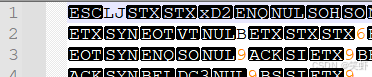
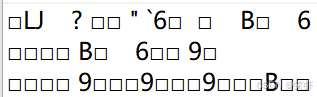
编译后的 LuaJIT (二进制)文件
查看文件头

如果直接用文本工具看可能是下面的样子
反编译
如果是标准字节码文件, 用 luajit-decompiler反编译,拿 lua 明文代码。
powershell
git clone https://github.com/Dr-MTN/luajit-decompiler.git
python main.py GUI.lua
反汇编
如果反编译不了,那么就返成 luajit 汇编,再对着汇编指令,翻译伪lua
(就是逻辑都能翻译出来,变量名暂时用a1,a2,a3这种代替。毕竟代码只能分析出逻辑,分析不出作者的癖好)。
尝试拿到:LuaJIT 字节码清单 看有没有混淆或加密过
注意: 这里一定要用对应版本的 luajit.exe。引擎集成工具中就有。
bash
luajit-win32.exe -bgl F:\\996dump\\input\\GUI.lua > GUI_bc.txt一般能输出就表示成功,内容片段如:
powershell
-- BYTECODE -- GUI.lua:0-0
0001    GGET     2   0      ; "SL"
0002    TGETS    2   2   1  ; "_DEBUG"
0003    IST          2
0004    JMP      2 => 0007
0005    MODVN    2   0
0006    RET1     2   2
0007 => GGET     2   0      ; "SL"
0008    MOV      3   2
0009    TGETS    2   2   2  ; "Print"
0010    ADDVN    4   3      ; "\n********** \n"
0011    MOV      5   0
0012    ADDVN    6   4      ; " was deprecated please use "
0013    MOV      7   1
0014    ADDVN    8   5      ; " instead.\n**********"
0015    KNIL     4   4   8
0016    CALL     2   1   3
0017    RET0     0   1
参考资料
https://luajit.me/ 贴源码显示反汇编,有助学习