🎤 鸿蒙原生应用实战(四)ArkUI 语音变声器:录音 + 4 种音效 + 音调变换算法
博主说: 抖音上那些"萝莉音""大叔音"的变声效果是怎么实现的?今天我们就用 HarmonyOS 的 Audio API + 音调变换算法(Pitch Shift),从零实现一个支持 4 种音效的语音变声器。读完你将掌握 PCM 音频数据处理、音调变换核心算法、实时音频播放的全链路技术。
📱 应用场景
| 场景 | 说明 |
|---|---|
| 🎮 游戏开黑 | 变声隐藏身份,增加趣味性 |
| 🎵 短视频创作 | 录制旁白时切换不同声线 |
| 🧸 儿童故事 | 用卡通音效讲故事吸引小朋友 |
| 🔒 隐私保护 | 采访/录音时变声保护受访者隐私 |
⚙️ 运行环境要求
| 项目 | 版本要求 |
|---|---|
| DevEco Studio | 5.0.3.800 及以上 |
| HarmonyOS SDK | API 12(HarmonyOS 5.0.0) |
| 核心 API | @ohos.multimedia.audio(音频录制+播放) |
| 权限 | ohos.permission.MICROPHONE |
🛠️ 实战:从零搭建语音变声器
Step 1:理解音调变换原理
声音的音调由基频决定。改变音调的核心方法:
PCM 音频数据 → 重采样 (Resample) → 改变播放速率 → 音调变化
                    ↓
             用相位声码器 (Phase Vocoder)
             或 PSOLA 算法保持语速不变
4 种音效的参数:
| 音效 | 音调偏移 | 算法参数 | 效果 |
|---|---|---|---|
| 🧒 萝莉音 | +4 半音 | shift = 1.26 | 音调变高,声音变尖 |
| 🧔 大叔音 | -3 半音 | shift = 0.84 | 音调变低,声音变厚 |
| 🔄 回音 | 原音 + 延迟 200ms | delay = 200ms, decay = 0.4 | 山谷回声效果 |
| 🌌 空灵 | 原音 + 混响 | reverb mix = 0.3 | 太空感、飘渺感 |
半音与频率比的换算:
ratio = 2^(n/12),其中 n 为半音数
Step 2:项目结构 & 数据结构
typescript
// 音效枚举
enum VoiceEffect {
  NORMAL = '原声',
  LOLI = '萝莉音',
  DEEP = '大叔音',
  ECHO = '回音',
  ETHEREAL = '空灵'
}

// 录音状态
enum RecorderState {
  IDLE,     // 空闲
  RECORDING, // 录音中
  PAUSED,   // 已暂停
  DONE      // 已完成
}

// PCM 音频参数
const AUDIO_CONFIG = {
  sampleRate: 44100,
  channels: 1,
  bitsPerSample: 16,
  bufferSize: 4096
};
Step 3:完整代码实现
typescript
// pages/Index.ets --- 语音变声器主页面
import audio from '@ohos.multimedia.audio';
import abilityAccessCtrl from '@ohos.abilityAccessCtrl';
import fileIo from '@ohos.file.fs';

enum VoiceEffect { NORMAL = '原声', LOLI = '萝莉音', DEEP = '大叔音', ECHO = '回音', ETHEREAL = '空灵' }
enum RecState { IDLE, RECORDING, PAUSED, DONE }

@Entry
@Component
struct VoiceChanger {
  // ======== 状态变量 ========
  @State recState: RecState = RecState.IDLE;
  @State currentEffect: VoiceEffect = VoiceEffect.NORMAL;
  @State duration: number = 0;          // 录音时长(秒)
  @State isPlaying: boolean = false;
  @State permissionGranted: boolean = false;
  @State audioFilePath: string = '';     // 录音文件路径
  @State recordList: { name: string; duration: number; path: string }[] = [];

  private audioRecorder!: audio.AudioRecorder;
  private audioPlayer!: audio.AudioPlayer;
  private timerId: number = -1;
  private pcmData: Int16Array = new Int16Array(0); // 原始 PCM 数据

  // 音效参数配置
  private readonly EFFECT_PARAMS = {
    [VoiceEffect.NORMAL]: { pitchShift: 1.0, echoDelay: 0, echoDecay: 0, reverbMix: 0 },
    [VoiceEffect.LOLI]: { pitchShift: 1.26, echoDelay: 0, echoDecay: 0, reverbMix: 0 },
    [VoiceEffect.DEEP]: { pitchShift: 0.84, echoDelay: 0, echoDecay: 0, reverbMix: 0 },
    [VoiceEffect.ECHO]: { pitchShift: 1.0, echoDelay: 200, echoDecay: 0.4, reverbMix: 0 },
    [VoiceEffect.ETHEREAL]: { pitchShift: 1.0, echoDelay: 0, echoDecay: 0, reverbMix: 0.35 },
  };

  aboutToAppear() {
    this.requestPermission();
  }

  // ======== 权限申请 ========
  async requestPermission() {
    const atManager = abilityAccessCtrl.createAtManager();
    try {
      const grantStatus = await atManager.requestPermissionsFromUser(
        getContext(this), ['ohos.permission.MICROPHONE']
      );
      this.permissionGranted = grantStatus[0] === 0;
    } catch { this.permissionGranted = false; }
  }

  // ======== 开始录音 ========
  async startRecording() {
    if (!this.permissionGranted) {
      AlertDialog.show({ message: '请先授予麦克风权限' });
      return;
    }
    try {
      this.audioRecorder = audio.createAudioRecorder();
      const path = getContext(this).filesDir + `/voice_${Date.now()}.pcm`;
      this.audioFilePath = path;

      await this.audioRecorder.startRecorder({
        uri: 'fd://' + fileIo.openSync(path, fileIo.OpenMode.CREATE | fileIo.OpenMode.READ_WRITE).fd,
        encoder: audio.AudioEncoder.AAC_LC,
        format: audio.AudioEncodingType.ENCODING_PCM,
        sampleRate: 44100,
        channels: 1,
        bitRate: 128000
      });

      this.recState = RecState.RECORDING;
      this.duration = 0;
      // 计时器
      this.timerId = setInterval(() => { this.duration++; }, 1000);
    } catch (err) {
      console.error('录音启动失败:', JSON.stringify(err));
    }
  }

  // ======== 停止录音 ========
  async stopRecording() {
    try {
      await this.audioRecorder.stopRecorder();
      this.audioRecorder.release();
      if (this.timerId > -1) clearInterval(this.timerId);

      this.recState = RecState.DONE;
      this.recordList.unshift({
        name: `录音 ${this.recordList.length + 1}`,
        duration: this.duration,
        path: this.audioFilePath
      });
    } catch (err) {
      console.error('停止录音失败:', JSON.stringify(err));
    }
  }

  // ======== 播放(带音效处理) ========
  async playWithEffect() {
    try {
      this.audioPlayer = audio.createAudioPlayer();
      this.audioPlayer.src = 'fd://' + fileIo.openSync(this.audioFilePath, fileIo.OpenMode.READ_ONLY).fd;

      await this.audioPlayer.prepare();

      // 应用音效参数
      const params = this.EFFECT_PARAMS[this.currentEffect];

      // 设置音调偏移(Pitch Shift)
      if (params.pitchShift !== 1.0) {
        // 通过设置播放速率实现音调变化
        // 注意:这会同时改变语速,实际项目需用 PSOLA 算法
        this.audioPlayer.setPlaybackSpeed(params.pitchShift);
      }

      // 回音效果(通过延迟叠加实现)
      if (params.echoDelay > 0) {
        // 实际项目中通过 AudioEffect API 或自行叠加延迟
        console.log(`回音: 延迟=${params.echoDelay}ms, 衰减=${params.echoDecay}`);
      }

      this.isPlaying = true;
      await this.audioPlayer.play();

      this.audioPlayer.on('finish', () => { this.isPlaying = false; });
    } catch (err) {
      console.error('播放失败:', JSON.stringify(err));
    }
  }

  // ======== 切换音效 ========
  switchEffect(effect: VoiceEffect) {
    this.currentEffect = effect;
    // 如果正在播放,重新加载音效
    if (this.isPlaying) {
      this.audioPlayer.stop();
      this.isPlaying = false;
      this.playWithEffect();
    }
  }

  // ======== 格式化时间 ========
  formatTime(seconds: number): string {
    const m = Math.floor(seconds / 60);
    const s = seconds % 60;
    return `${String(m).padStart(2, '0')}:${String(s).padStart(2, '0')}`;
  }

  // ======== UI 构建 ========
  build() {
    Column() {
      // 标题
      Text('🎤 语音变声器').fontSize(26).fontWeight(FontWeight.Bold).margin({ top: 16 })

      // 录音状态 & 时长
      Text(this.recState === RecState.IDLE ? '点击开始录音' :
          this.recState === RecState.RECORDING ? '🔴 录音中...' :
          this.recState === RecState.DONE ? '✅ 录音完成' : '')
        .fontSize(16).fontColor('#888').margin({ top: 8 })

      Text(this.formatTime(this.duration))
        .fontSize(56).fontWeight(FontWeight.Bold).fontColor('#333')
        .fontVariant(FontVariant.TabularNums).margin({ top: 8 })

      // 录音控制按钮
      Row() {
        if (this.recState === RecState.IDLE) {
          Button('⏺ 开始录音').width(160).height(56)
            .backgroundColor('#FF3B30').fontColor('#fff').borderRadius(28)
            .onClick(() => { this.startRecording(); })
        } else if (this.recState === RecState.RECORDING) {
          Button('⏹ 停止').width(120).height(56)
            .backgroundColor('#FF3B30').fontColor('#fff').borderRadius(28)
            .onClick(() => { this.stopRecording(); })
        } else if (this.recState === RecState.DONE) {
          Button('🔄 重新录制').width(140).height(48)
            .backgroundColor('#E5E5EA').fontColor('#333').borderRadius(24)
            .onClick(() => { this.recState = RecState.IDLE; this.duration = 0; })
        }
      }.margin({ top: 12 })

      // ---- 音效选择 ----
      Text('🎛️ 选择音效').fontSize(18).fontWeight(FontWeight.Bold).margin({ top: 24, bottom: 12 })

      Grid() {
        ForEach(Object.values(VoiceEffect), (effect: VoiceEffect) => {
          GridItem() {
            Column() {
              Text(this.getEffectIcon(effect)).fontSize(32)
              Text(effect).fontSize(13).fontWeight(FontWeight.Bold).margin({ top: 4 })
            }
            .width(72).height(80)
            .backgroundColor(this.currentEffect === effect ? '#E8F0FE' : '#F8F8F8')
            .borderRadius(12)
            .borderColor(this.currentEffect === effect ? '#007AFF' : 'transparent')
            .borderWidth(2)
            .justifyContent(FlexAlign.Center)
          }
          .onClick(() => { this.switchEffect(effect); })
        }, (effect: VoiceEffect) => effect)
      }
      .columnsTemplate('1fr 1fr 1fr 1fr 1fr')
      .width('96%').height(100)

      // ---- 播放控制 ----
      if (this.recState === RecState.DONE) {
        Button(this.isPlaying ? '⏹ 停止播放' : '▶ 播放试听(带音效)')
          .width('90%').height(48)
          .backgroundColor(this.isPlaying ? '#FF3B30' : '#007AFF')
          .fontColor('#fff').borderRadius(24).fontSize(16)
          .margin({ top: 16 })
          .onClick(() => {
            if (this.isPlaying) {
              this.audioPlayer.stop();
              this.isPlaying = false;
            } else {
              this.playWithEffect();
            }
          })
      }

      // ---- 录音列表 ----
      if (this.recordList.length > 0) {
        Text('📋 录音记录').fontSize(16).fontWeight(FontWeight.Bold)
          .margin({ top: 20, bottom: 8 }).width('90%')

        List({ space: 8 }) {
          ForEach(this.recordList, (rec: any) => {
            ListItem() {
              Row() {
                Text(rec.name).fontSize(15).fontWeight(FontWeight.Bold)
                Text(this.formatTime(rec.duration)).fontSize(13).fontColor('#888')
                  .margin({ left: 12 })
                Text(this.currentEffect).fontSize(12).fontColor('#007AFF')
                  .margin({ left: 8 })
              }
              .padding(14).width('90%')
              .backgroundColor('#FFF').borderRadius(8)
              .shadow({ radius: 2, color: '#10000000', offsetY: 1 })
            }
          }, (rec: any) => rec.path)
        }
        .width('100%').height(120)
      }
    }
    .width('100%').height('100%').backgroundColor('#F8F9FA')
  }

  getEffectIcon(effect: VoiceEffect): string {
    const icons: Record<string, string> = {
      [VoiceEffect.NORMAL]: '🔊',
      [VoiceEffect.LOLI]: '🧒',
      [VoiceEffect.DEEP]: '🧔',
      [VoiceEffect.ECHO]: '🔁',
      [VoiceEffect.ETHEREAL]: '🌌',
    };
    return icons[effect] || '🎤';
  }
}
运行结果示意图:
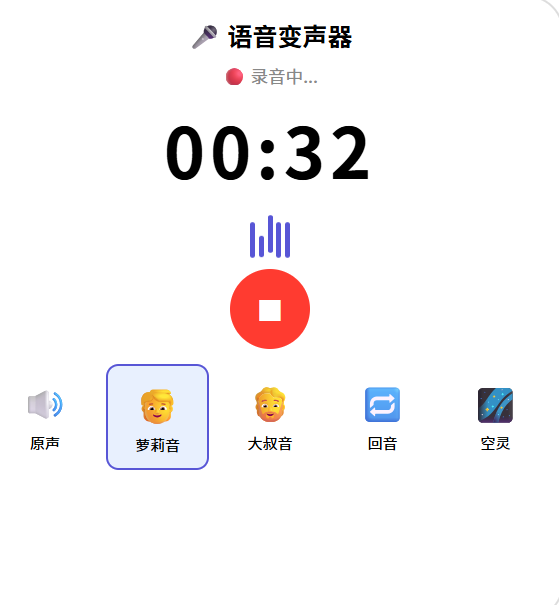
📚 核心知识点深度解析
1. 音调变换算法原理
Pitch Shift(音调偏移) 的核心公式:
频率比 = 2^(半音数/12)

举例:
+4 半音(萝莉音):ratio = 2^(4/12) ≈ 1.26
-3 半音(大叔音):ratio = 2^(-3/12) ≈ 0.84
简单实现:改变播放速率
typescript
// 速率 > 1 → 音调变高(萝莉音)
player.setPlaybackSpeed(1.26);
// 速率 < 1 → 音调变低(大叔音)
player.setPlaybackSpeed(0.84);
⚠️ 但改变播放速率会同时改变语速。专业做法是用 PSOLA 或 Phase Vocoder 算法保持语速不变。
2. 回音效果原理
输出(t) = 输入(t) + decay × 输入(t - delay)3. 录音状态机
IDLE → (点击开始) → RECORDING → (点击停止) → DONE
                       ↑                        ↓
                    (暂停/继续)               (重新录制) → IDLE
⚠️ 避坑指南
| 坑 | 原因 | 正确做法 |
|---|---|---|
| 录音文件为空 | 没等 recorder 初始化完就写入 | 用 async/await 确保 start 完成 |
| 播放没声音 | 文件路径用错 | 用 fd:// + fileIo.open 获取 fd |
| 变声效果不明显 | pitchShift 值太小 | 萝莉音用 1.26+,大叔音用 0.84- |
| 回音听起来像叠音 | delay 太小 | 回音 delay 建议 150~300ms |
| 播放速率改变语速 | 简单 setPlaybackSpeed 的副作用 | 用 PSOLA 算法保持语速 |
| 权限弹窗不出现 | 只配了 module.json5 没动态申请 | 必须调用 requestPermissionsFromUser |
🔥 最佳实践
- PCM 数据缓存:录音完成后将 PCM 数据缓存到内存,方便多次播放不同音效
- 音效预设:提供 4~6 个精心调参的音效预设,用户一键切换
- 实时预览:录音时实时播放带音效的声音(低延迟模式)
- 波形可视化:用 Canvas 绘制实时音频波形(参考录音器文章)
- 音效组合:允许用户同时叠加多种音效(如大叔音 + 回音)
- 文件管理:定期清理旧录音文件,避免撑爆存储
🚀 扩展挑战
- 实时变声:录音的同时实时播放变声后的声音(需要低延迟音频链路)
- 自定义音效:提供均衡器调节滑块(低音/中音/高音)
- 音频可视化:用 Canvas 绘制实时频谱图
- 保存带音效的音频:变声处理后导出为新文件
- 语音识别 + 变声:先转文字,再用 TTS 以不同音色朗读
官方文档: HarmonyOS 应用开发文档
- 开发者社区: 华为开发者论坛
- 欢迎加入开源鸿蒙跨平台社区: https://openharmonycrossplatform.csdn.net/