第 02 章:用户建档系统:从 0 搭出可信用户后端
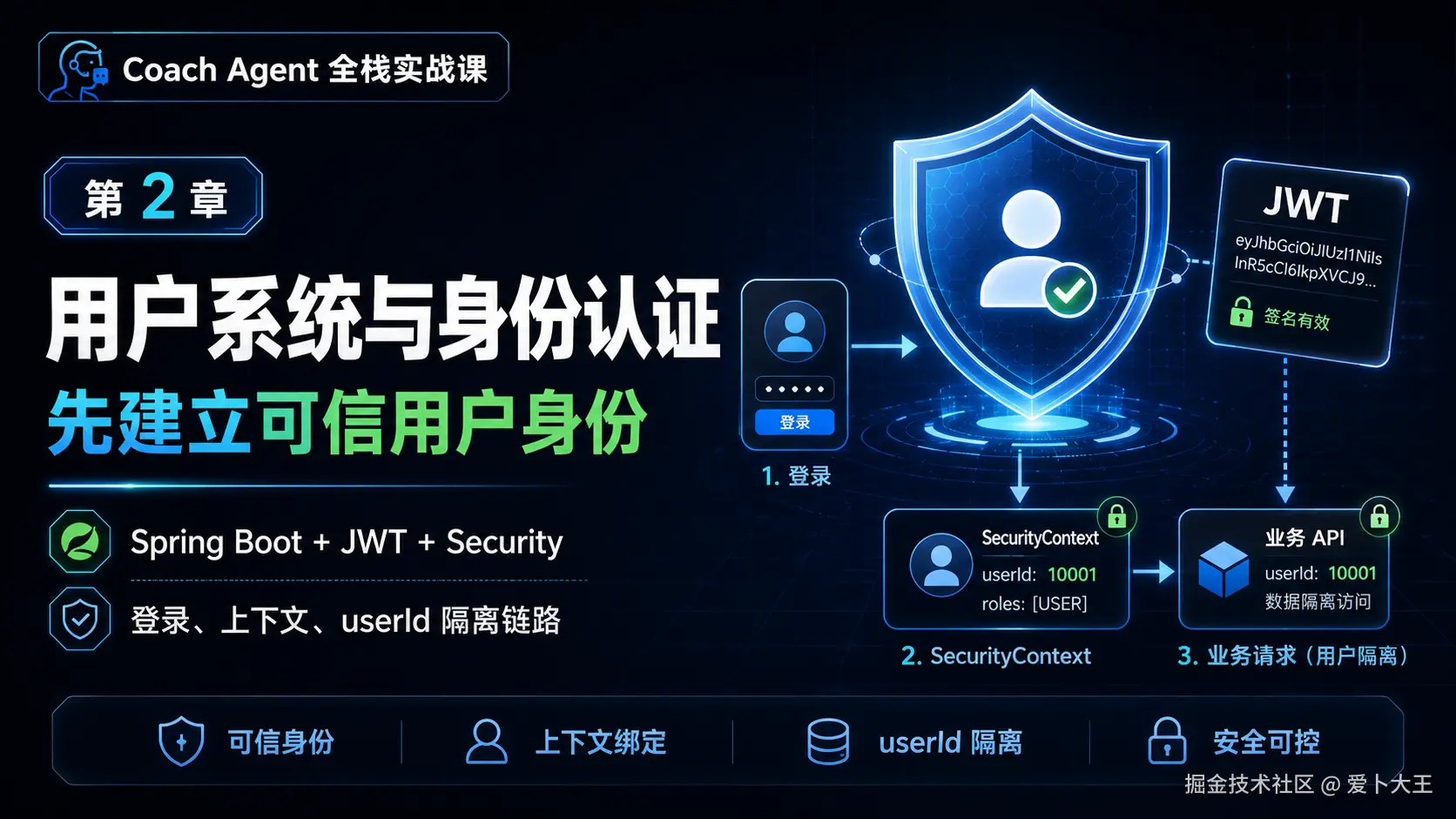
本章最终效果
这一章结束后,你会得到一个 Spring Boot 后端底座。它负责用户注册、登录、JWT 鉴权、用户档案、每日打卡、Today 计划缓存,以及调用第 01 章 Python Agent Service 的代理入口。
更重要的是,你要理解本章的主线:
text
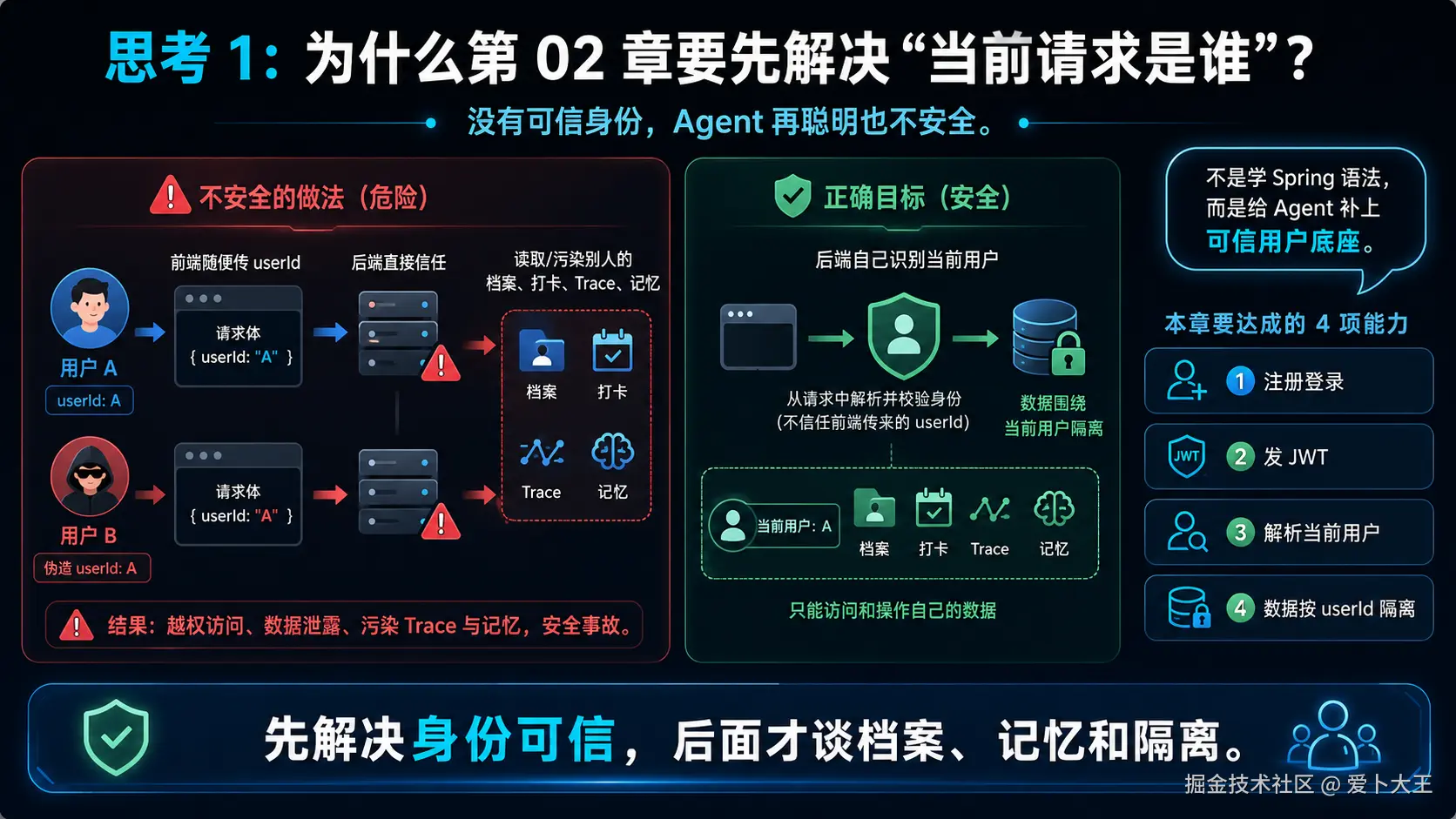
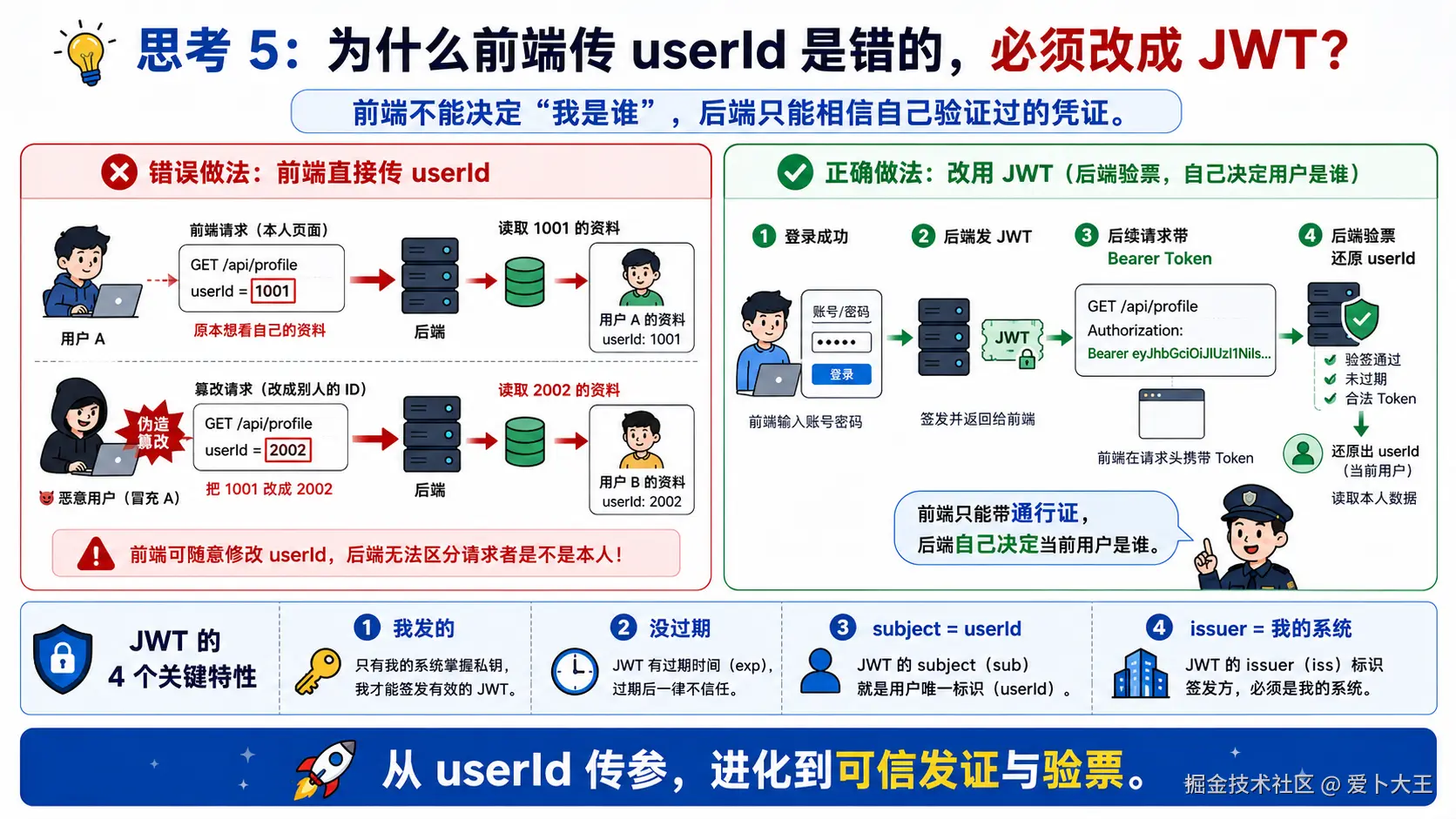
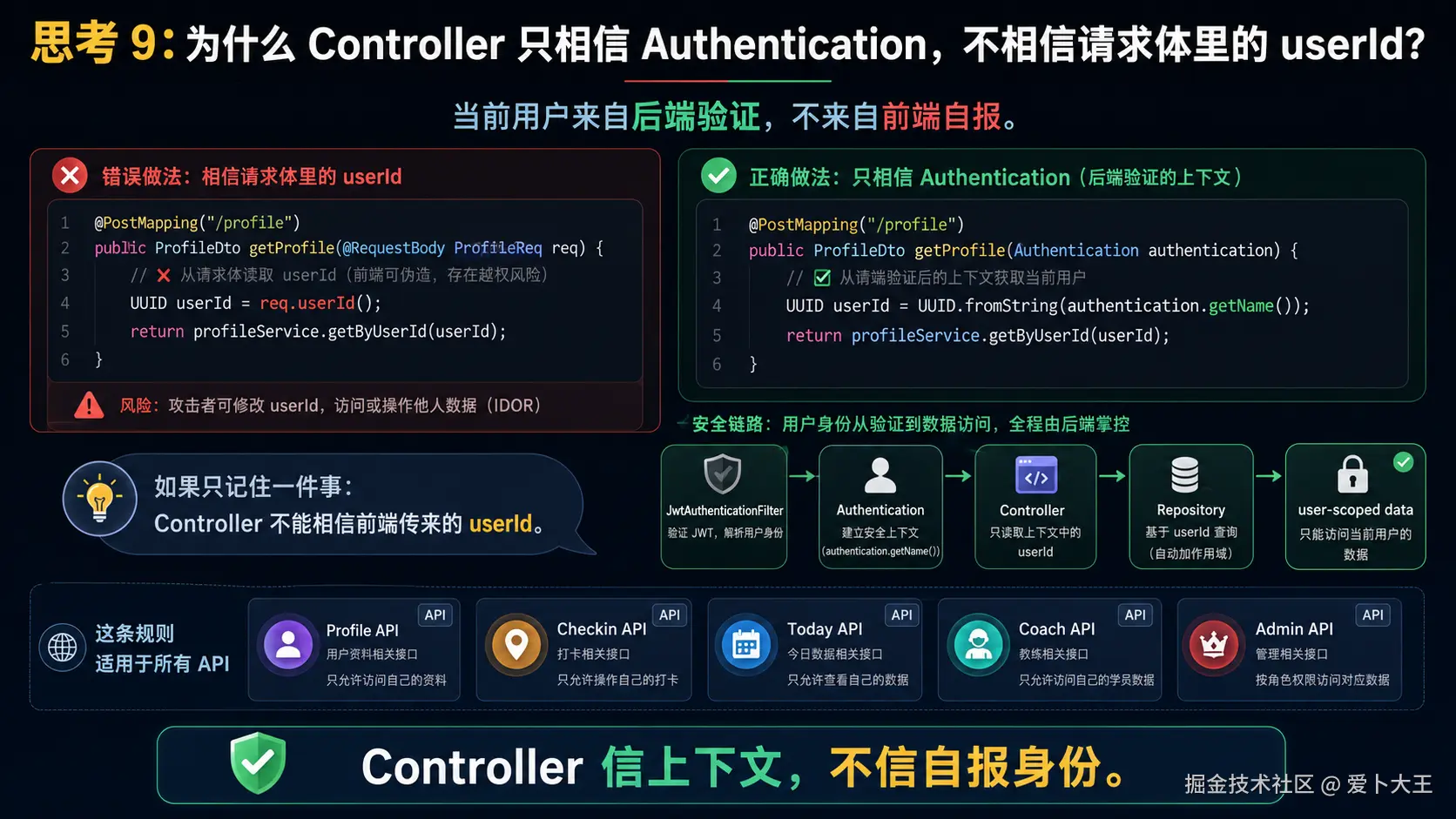
前端不能告诉后端"我是谁"。
后端必须从 JWT 验证当前用户,再用 user_id 读写数据。
如果后端相信前端传来的 userId,用户 A 就可能伪造请求读取用户 B 的资料。本章所有 Repository 和 Controller 都围绕这个边界展开。
本章复制规则
本章仍然使用三类代码块:
[执行命令]:在终端复制运行。[写入文件]:把代码完整复制到指定文件。[理解片段,不要复制]:只用于理解,不要写进项目。
每完成一个小阶段都要跑一次轻量验证。不要等整章结束才运行 ./gradlew test。
执行目录约定
先进入项目根目录:
bash
cd /Users/aibu/Aibu_System/Work_Projects/codex-template如果你在自己的目录复现,把路径替换成你的项目根目录即可。
阶段 1:创建 Spring Boot 后端骨架
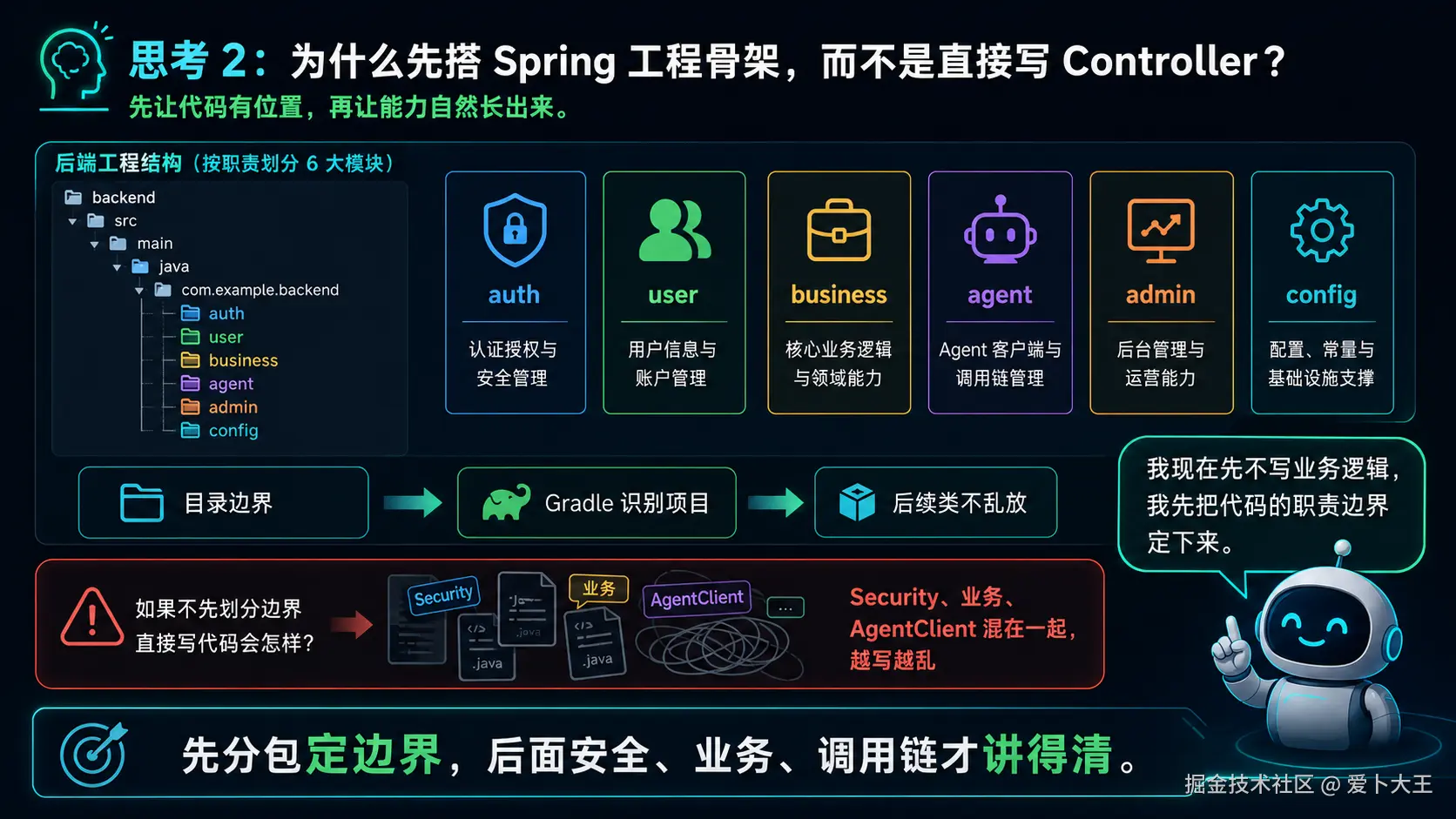
1.1 这一阶段要解决什么
第 01 章我们完成了 Python Agent Service。现在需要一个业务后端,因为真实产品不能让前端直接调用 Python Agent:
- 用户注册登录应该由后端负责。
- 密码哈希、JWT、权限判断应该由后端负责。
- 用户档案、打卡、Today 计划要按用户隔离。
- 后端再把可信上下文转发给 Python Agent。
所以这一阶段先搭 Spring Boot 项目骨架、Gradle 配置、Dockerfile、配置文件和启动类。
1.2 执行命令 创建目录
bash
mkdir -p services/backend/src/main/java/com/aibu/coachagent/{admin,agent,auth,business,config,user}
mkdir -p services/backend/src/main/resources/db/migration
mkdir -p services/backend/src/test/java/com/aibu/coachagent
1.3 立刻验证目录
bash
find services/backend/src -maxdepth 6 -type d | sort | head -40预期能看到 auth、business、config、user、db/migration、test 等目录。
如果目录不存在,先检查你是不是在项目根目录执行命令。
services/backend/settings.gradle
这个文件为什么现在出现
Gradle 需要先知道这是一个什么项目,以及从哪里下载插件和依赖。settings.gradle 是项目识别入口。
理解片段,不要复制 先看一个最小版本
groovy
rootProject.name = 'coach-agent-backend'这个最小版本马上会暴露这些问题:
- 没有配置插件仓库,Spring Boot 插件可能下载不到。
- 没有统一依赖仓库,后面依赖解析可能不稳定。
写入文件 services/backend/settings.gradle
groovy
pluginManagement {
    repositories {
        mavenCentral()
        gradlePluginPortal()
    }
}

dependencyResolutionManagement {
    repositoriesMode.set(RepositoriesMode.FAIL_ON_PROJECT_REPOS)
    repositories {
        mavenCentral()
    }
}

rootProject.name = 'coach-agent-backend'
代码分段解释
pluginManagement.repositories告诉 Gradle 从 Maven Central 和 Gradle Plugin Portal 下载插件。dependencyResolutionManagement统一依赖仓库,避免子项目各自声明仓库。rootProject.name是构建产物和项目显示名称。
services/backend/build.gradle
这个文件为什么现在出现
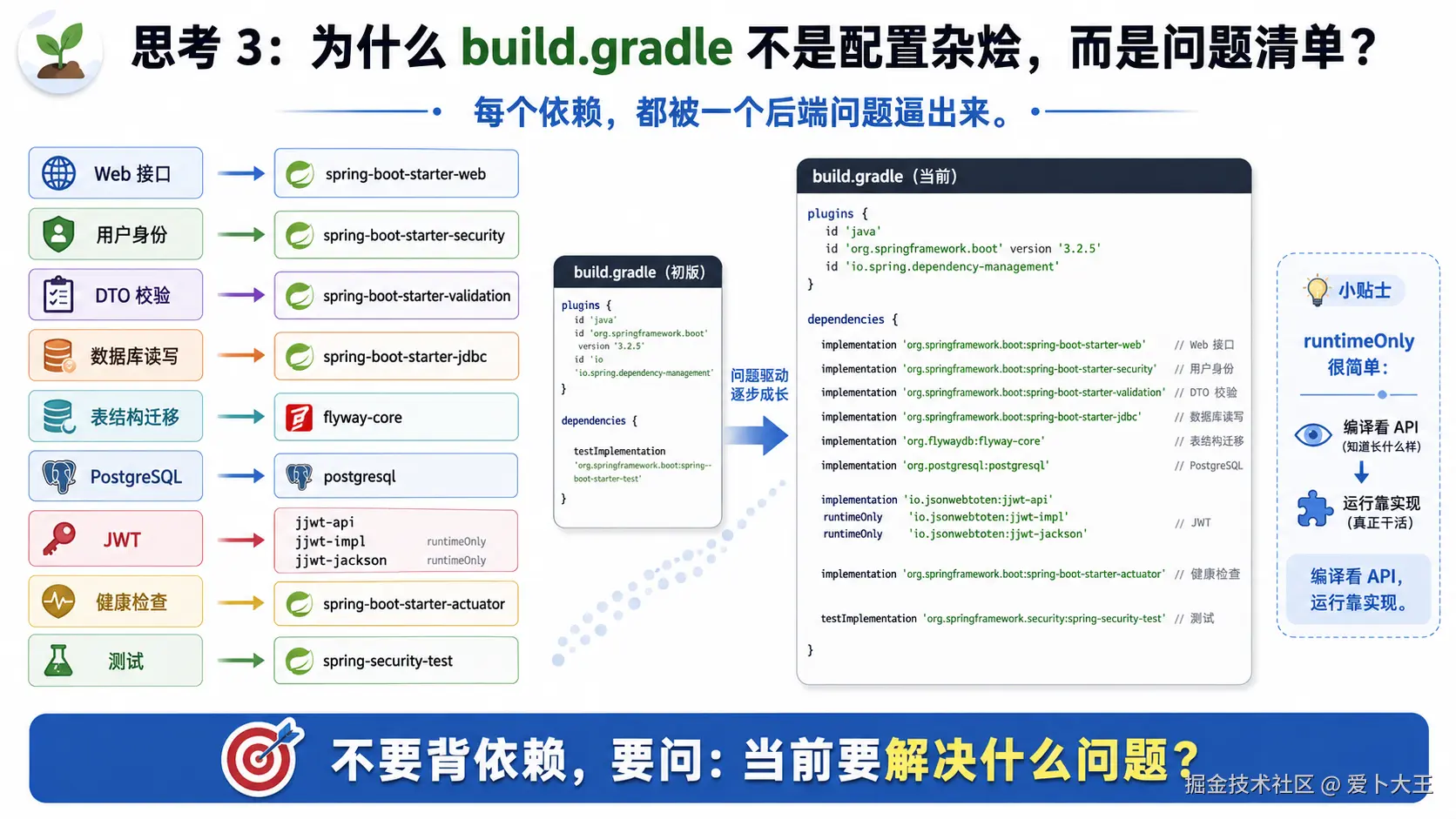
后端需要 Web、Security、JDBC、Flyway、PostgreSQL、JWT 和测试能力。build.gradle 把这些能力集中声明。
理解片段,不要复制 先看一个最小版本
groovy
plugins {
    id 'java'
}

dependencies {
    implementation 'org.springframework.boot:spring-boot-starter-web'
}
这个最小版本马上会暴露这些问题:
- 没有 Spring Boot 插件,不能直接构建可运行 jar。
- 没有 Security,不能做 JWT 鉴权。
- 没有 JDBC/Flyway/PostgreSQL,不能访问数据库和建表。
- 没有 jjwt,不能创建和解析 JWT。
- 没有测试依赖,不能写 JUnit 测试。
写入文件 services/backend/build.gradle
groovy
plugins {
    id 'java'
    id 'org.springframework.boot' version '3.4.1'
    id 'io.spring.dependency-management' version '1.1.7'
}

group = 'com.aibu'
version = '0.1.0'

java {
    toolchain {
        languageVersion = JavaLanguageVersion.of(17)
    }
}

dependencies {
    implementation 'org.springframework.boot:spring-boot-starter-actuator'
    implementation 'org.springframework.boot:spring-boot-starter-jdbc'
    implementation 'org.springframework.boot:spring-boot-starter-security'
    implementation 'org.springframework.boot:spring-boot-starter-validation'
    implementation 'org.springframework.boot:spring-boot-starter-web'
    implementation 'org.flywaydb:flyway-core'
    implementation 'org.flywaydb:flyway-database-postgresql'
    implementation 'org.postgresql:postgresql'
    implementation 'io.jsonwebtoken:jjwt-api:0.12.6'
    runtimeOnly 'io.jsonwebtoken:jjwt-impl:0.12.6'
    runtimeOnly 'io.jsonwebtoken:jjwt-jackson:0.12.6'

    testImplementation 'org.springframework.boot:spring-boot-starter-test'
    testImplementation 'org.springframework.security:spring-security-test'
    testRuntimeOnly 'org.junit.platform:junit-platform-launcher'
}

tasks.named('test') {
    useJUnitPlatform()
}
代码分段解释
java.toolchain固定 Java 17,避免不同机器 JDK 版本不一致。spring-boot-starter-web提供 Controller、JSON、内置 Web 能力。spring-boot-starter-security提供认证和过滤器链。spring-boot-starter-jdbc提供JdbcTemplate,本项目先不用 JPA。flyway-core和flyway-database-postgresql负责启动时执行 SQL 迁移。jjwt-api/impl/jackson负责 JWT 创建、签名和解析。useJUnitPlatform()让 JUnit 5 测试能被 Gradle 发现。
services/backend/Dockerfile
这个文件为什么现在出现
后端最终要和 Python、PostgreSQL、Redis 一起被 Docker Compose 启动,所以第 02 章先准备容器构建方式。
理解片段,不要复制 先看一个最小版本
dockerfile
FROM eclipse-temurin:17-jre
COPY app.jar app.jar
ENTRYPOINT ["java", "-jar", "app.jar"]
这个最小版本马上会暴露这些问题:
- 没有构建 jar 的阶段。
- 没有健康检查工具 curl。
- 没有固定工作目录和端口。
写入文件 services/backend/Dockerfile
dockerfile
FROM gradle:9.0.0-jdk17 AS build
WORKDIR /workspace
COPY settings.gradle build.gradle ./
COPY src ./src
RUN gradle bootJar --no-daemon

FROM eclipse-temurin:17-jre
WORKDIR /app
RUN apt-get update \
    && apt-get install -y --no-install-recommends curl \
    && rm -rf /var/lib/apt/lists/*
COPY --from=build /workspace/build/libs/*.jar app.jar
EXPOSE 8080
ENTRYPOINT ["java", "-jar", "app.jar"]
代码分段解释
- 第一阶段用
gradle:9.0.0-jdk17构建bootJar。 - 第二阶段用 JRE 运行 jar,比完整 JDK 更轻。
COPY --from=build把构建产物复制到运行镜像。EXPOSE 8080表明后端服务端口。
services/backend/src/main/resources/application.yml
这个文件为什么现在出现
Spring Boot 配置需要集中管理:端口、数据库、Flyway、JWT、Python Agent 地址都放在这里。
理解片段,不要复制 先看一个最小版本
yaml
server:
  port: 8080

app:
  jwt:
    secret: local-secret
这个最小版本马上会暴露这些问题:
- 没有数据库连接,Flyway 无法建表。
- 没有 JWT issuer 和 ttl,token 不完整。
- 没有 Agent Service URL,后端不能调用 Python 服务。
- 没有 actuator health,Compose 健康检查不方便。
写入文件 services/backend/src/main/resources/application.yml
yaml
server:
  port: 8080

spring:
  application:
    name: coach-agent-backend
  datasource:
    url: ${SPRING_DATASOURCE_URL:jdbc:postgresql://localhost:5432/coach_agent}
    username: ${SPRING_DATASOURCE_USERNAME:coach}
    password: ${SPRING_DATASOURCE_PASSWORD:coach_dev_password}
  flyway:
    enabled: true
    schemas: app,agent
    default-schema: app

management:
  endpoints:
    web:
      exposure:
        include: health,info

app:
  jwt:
    secret: ${JWT_SECRET:local-development-secret-change-before-real-deploy-32-bytes}
    issuer: coach-agent
    ttl-minutes: 1440
  agent-service-url: ${AGENT_SERVICE_URL:http://localhost:8000}
代码分段解释
server.port固定 Spring Boot 监听 8080。spring.datasource.*默认连本地 PostgreSQL,Docker 环境可用环境变量覆盖。spring.flyway.schemas声明app和agent两组 schema。app.jwt.secret当前是本地开发示例,真实部署必须换成强随机密钥。app.agent-service-url是 Spring 调 Python Agent Service 的基础地址。
services/backend/src/main/java/com/aibu/coachagent/CoachAgentApplication.java
这个文件为什么现在出现
Spring Boot 需要一个启动入口。没有启动类,Gradle 可以编译 Java,但无法作为 Spring Boot 应用运行。
理解片段,不要复制 先看一个最小版本
java
public class CoachAgentApplication {
    public static void main(String[] args) {}
}
这个最小版本马上会暴露这些问题:
- 没有
@SpringBootApplication,Spring 不会自动扫描组件。 - 没有
SpringApplication.run(...),应用不会启动 Spring 容器。
写入文件 services/backend/src/main/java/com/aibu/coachagent/CoachAgentApplication.java
java
package com.aibu.coachagent;

import org.springframework.boot.SpringApplication;
import org.springframework.boot.autoconfigure.SpringBootApplication;

@SpringBootApplication
public class CoachAgentApplication {
    public static void main(String[] args) {
        SpringApplication.run(CoachAgentApplication.class, args);
    }
}
代码分段解释
@SpringBootApplication会启用自动配置和组件扫描。SpringApplication.run(...)启动 Spring 容器。- 包名
com.aibu.coachagent是根包,下面的auth/business/config/user都会被扫描到。
复制后立即运行
bash
cd services/backend
./gradlew tasks --no-daemon | head -40
预期输出:
text
能看到 build、bootRun、test 等 Gradle 任务。如果失败,先检查:
- 如果
./gradlew不存在:从课程仓库开始时它应该已经存在;完全空目录复现时,先安装系统 Gradle,再运行gradle wrapper --gradle-version 9.0.0生成 wrapper。 - 如果
Permission denied: ./gradlew,执行chmod +x ./gradlew。 - 如果提示 Java 版本错误,确认本机 JDK 至少是 17。
阶段 1 检查点
现在你应该能解释:
- Java 17 是项目运行和编译的基础版本。
- Gradle Wrapper 的作用是固定构建工具版本,平时优先用
./gradlew,不要直接用系统gradle test。 - Spring Boot starter 不是魔法,它们分别提供 Web、Security、JDBC、Validation、Actuator 等能力。
阶段 2:用 Flyway 设计数据库归属
2.1 这一阶段要解决什么
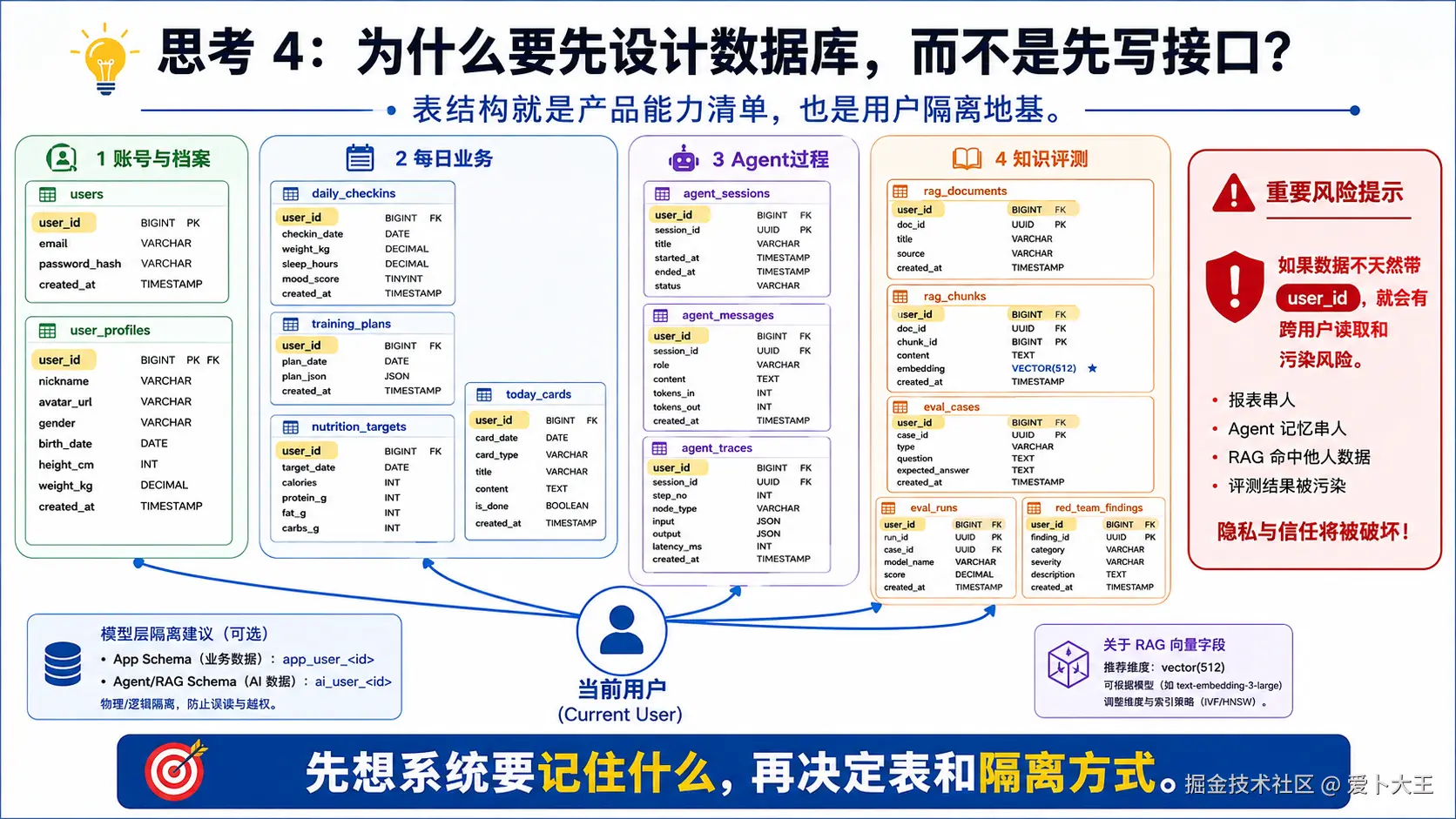
用户系统最先要解决的是"数据属于谁"。所以数据库表不能只看业务字段,还必须看 user_id。
这一章的数据库分两组 schema:
app:业务后端自己的用户、档案、打卡、Today 数据。agent:Agent 侧 trace、RAG、eval、red team 等数据。
Flyway 会在 Spring Boot 启动并连上数据库时执行 db/migration 里的 SQL。注意:只启动 PostgreSQL 不会自动执行 Flyway,必须启动 Spring 后端。
services/backend/src/main/resources/db/migration/V1__init.sql
这个文件为什么现在出现
Spring 后端需要统一建表。用 Flyway 写 SQL 迁移,可以让每个学员本地数据库结构一致,也方便后续章节增量演进。
理解片段,不要复制 先看一个最小版本
sql
create table users (
  id uuid primary key,
  email text not null unique
);

create table user_profiles (
  user_id uuid primary key,
  goal text
);
这个最小版本马上会暴露这些问题:
- 没有 schema 分组,业务表和 Agent 表会混在一起。
- 没有
user_id,无法做多用户隔离。 - 没有
unique(user_id, checkin_date),同一天打卡可能重复。 - 没有
jsonb,档案偏好和计划结构不方便扩展。 - 没有
vector(512),后续 RAG 无法用 pgvector 存 embedding。
写入文件 services/backend/src/main/resources/db/migration/V1__init.sql
sql
create extension if not exists vector;

create schema if not exists app;
create schema if not exists agent;

create table if not exists app.users (
  id uuid primary key,
  email text not null unique,
  display_name text not null,
  password_hash text not null,
  role text not null default 'USER',
  created_at timestamptz not null default now()
);

create table if not exists app.user_profiles (
  user_id uuid primary key references app.users(id) on delete cascade,
  goal text,
  height_cm numeric(6,2),
  weight_kg numeric(6,2),
  age int,
  training_experience text,
  weekly_training_days int,
  injury_history jsonb not null default '[]'::jsonb,
  diet_preferences jsonb not null default '[]'::jsonb,
  updated_at timestamptz not null default now()
);

create table if not exists app.daily_checkins (
  id uuid primary key,
  user_id uuid not null references app.users(id) on delete cascade,
  checkin_date date not null,
  weight_kg numeric(6,2),
  sleep_hours numeric(4,2),
  fatigue_level int,
  pain_level int,
  pain_area text,
  notes text,
  created_at timestamptz not null default now(),
  unique(user_id, checkin_date)
);

create table if not exists app.training_plans (
  id uuid primary key,
  user_id uuid not null references app.users(id) on delete cascade,
  title text not null,
  plan_json jsonb not null,
  active boolean not null default true,
  created_at timestamptz not null default now()
);

create table if not exists app.nutrition_targets (
  id uuid primary key,
  user_id uuid not null references app.users(id) on delete cascade,
  target_json jsonb not null,
  active boolean not null default true,
  created_at timestamptz not null default now()
);

create table if not exists app.today_cards (
  id uuid primary key,
  user_id uuid not null references app.users(id) on delete cascade,
  plan_date date not null,
  plan_json jsonb not null,
  created_at timestamptz not null default now(),
  unique(user_id, plan_date)
);

create table if not exists agent.agent_sessions (
  id uuid primary key,
  user_id uuid not null,
  title text,
  created_at timestamptz not null default now()
);

create table if not exists agent.agent_messages (
  id uuid primary key,
  session_id uuid not null,
  user_id uuid not null,
  role text not null,
  content text not null,
  trace_id uuid,
  created_at timestamptz not null default now()
);

create table if not exists agent.agent_traces (
  id bigserial primary key,
  trace_id uuid not null,
  step_type text not null,
  agent_name text not null,
  input_json jsonb not null default '{}'::jsonb,
  output_json jsonb not null default '{}'::jsonb,
  tool_name text,
  tool_args_json jsonb not null default '{}'::jsonb,
  guardrail_result_json jsonb not null default '{}'::jsonb,
  created_at timestamptz not null default now()
);

create table if not exists agent.rag_documents (
  id uuid primary key,
  source text not null,
  title text not null,
  trust_level text not null,
  raw_text text not null,
  created_at timestamptz not null default now()
);

create table if not exists agent.rag_chunks (
  id uuid primary key,
  document_id uuid not null references agent.rag_documents(id) on delete cascade,
  chunk_index int not null,
  content text not null,
  embedding vector(512) not null,
  metadata_json jsonb not null default '{}'::jsonb,
  created_at timestamptz not null default now()
);

create table if not exists agent.eval_cases (
  id uuid primary key,
  case_id text not null unique,
  category text not null,
  input text not null,
  expected_behavior text not null,
  fail_condition text not null,
  severity text not null,
  created_at timestamptz not null default now()
);

create table if not exists agent.eval_runs (
  id uuid primary key,
  user_id uuid not null,
  passed int not null,
  failed int not null,
  result_json jsonb not null,
  created_at timestamptz not null default now()
);

create table if not exists agent.red_team_findings (
  id uuid primary key,
  user_id uuid not null,
  category text not null,
  severity text not null,
  finding_json jsonb not null,
  created_at timestamptz not null default now()
);
代码分段解释
create extension if not exists vector要求数据库镜像支持 pgvector;普通 PostgreSQL 没有这个扩展会失败。app.users保存账号和密码哈希。app.user_profiles用user_id做主键,表示一个用户一份档案。app.daily_checkins用unique(user_id, checkin_date)限制每个用户每天一条打卡。jsonb用于保存伤病史、饮食偏好、Today 计划等结构化但会变化的数据。agent.agent_sessions/messages先预留短期记忆表,不等于本章已经实现完整聊天历史回放。agent.rag_chunks.embedding vector(512)为第 07 章 RAG 向量检索做准备。agent.eval_runs保存评测摘要,当前只做最小存储。
复制后立即运行
bash
rg -n "create schema|user_id|unique\(user_id, checkin_date\)|vector\(512\)|jsonb" services/backend/src/main/resources/db/migration/V1__init.sql预期输出:
text
能看到 app/agent schema、user_id、daily_checkins 唯一约束、jsonb、vector(512)。如果失败,先检查:
- 如果
vector(512)搜不到,检查 RAG chunk 表是否复制完整。 - 如果
user_id很少,说明用户隔离字段可能漏复制。 - 如果后续启动时报 vector extension 错误,确认 Docker Compose 使用的是 pgvector 镜像。
阶段 3:注册登录链路
3.1 这一阶段要解决什么
现在数据库表有了,但还没有 Java 代码读写用户。注册登录链路要完成这件事:
text
邮箱 + 密码 -> 创建用户 -> 密码哈希入库 -> 登录时校验密码 -> 返回 JWT这里有两个底线:
- 密码不能明文存数据库,必须用 BCrypt。
- 登录成功后不要让前端保存用户密码,只返回 token 和用户展示信息。
services/backend/src/main/java/com/aibu/coachagent/user/UserAccount.java
这个文件为什么现在出现
查询用户后,Java 代码需要一个对象承载用户字段。这里用 record,因为它适合不可变 DTO。
理解片段,不要复制 先看一个最小版本
java
public class UserAccount {
    public UUID id;
    public String email;
}
这个最小版本马上会暴露这些问题:
- 字段可变,不适合承载数据库查询结果。
- 需要手写构造器、getter、equals,样板代码多。
写入文件 services/backend/src/main/java/com/aibu/coachagent/user/UserAccount.java
java
package com.aibu.coachagent.user;

import java.util.UUID;

public record UserAccount(UUID id, String email, String displayName, String passwordHash, String role) {}
代码分段解释
record会自动生成构造器和访问器,例如user.id()。- 这里包含
passwordHash,但后面返回给前端的UserView不会包含它。
services/backend/src/main/java/com/aibu/coachagent/user/UserRepository.java
这个文件为什么现在出现
Repository 是数据库访问层。Controller 和 Service 不应该直接拼 SQL,否则业务逻辑和 SQL 会混在一起。
理解片段,不要复制 先看一个最小版本
java
public Optional<UserAccount> findByEmail(String email) {
    return Optional.empty();
}
这个最小版本马上会暴露这些问题:
- 不能创建用户。
- 不能按 email/id 查询。
- 没有统一小写 email,可能出现重复账号。
- 没有把 ResultSet 映射成 UserAccount。
写入文件 services/backend/src/main/java/com/aibu/coachagent/user/UserRepository.java
java
package com.aibu.coachagent.user;

import java.sql.ResultSet;
import java.sql.SQLException;
import java.util.Optional;
import java.util.UUID;
import org.springframework.jdbc.core.JdbcTemplate;
import org.springframework.stereotype.Repository;

@Repository
public class UserRepository {
    private final JdbcTemplate jdbc;

    public UserRepository(JdbcTemplate jdbc) {
        this.jdbc = jdbc;
    }

    public UserAccount create(String email, String displayName, String passwordHash) {
        UUID id = UUID.randomUUID();
        jdbc.update(
                "insert into app.users(id, email, display_name, password_hash) values (?, ?, ?, ?)",
                id,
                email.toLowerCase(),
                displayName,
                passwordHash);
        return new UserAccount(id, email.toLowerCase(), displayName, passwordHash, "USER");
    }

    public Optional<UserAccount> findByEmail(String email) {
        var rows = jdbc.query(
                "select id, email, display_name, password_hash, role from app.users where email = ?",
                this::map,
                email.toLowerCase());
        return rows.stream().findFirst();
    }

    public Optional<UserAccount> findById(UUID id) {
        var rows = jdbc.query(
                "select id, email, display_name, password_hash, role from app.users where id = ?",
                this::map,
                id);
        return rows.stream().findFirst();
    }

    private UserAccount map(ResultSet rs, int rowNum) throws SQLException {
        return new UserAccount(
                rs.getObject("id", UUID.class),
                rs.getString("email"),
                rs.getString("display_name"),
                rs.getString("password_hash"),
                rs.getString("role"));
    }
}
代码分段解释
JdbcTemplate是 Spring JDBC 的核心工具,本项目先不用 JPA。create()生成 UUID,把 email 转小写,再插入app.users。findByEmail()用于注册查重和登录。findById()用于根据 JWT 解析出的 userId 找展示名。map()把数据库行转换成UserAccountrecord。
services/backend/src/main/java/com/aibu/coachagent/auth/AuthDtos.java
这个文件为什么现在出现
认证接口需要清楚的请求和响应结构。Java record 很适合写这种 DTO。
理解片段,不要复制 先看一个最小版本
java
public record AuthRequest(String email, String password) {}
public record AuthResponse(String token) {}
这个最小版本马上会暴露这些问题:
- 没有参数校验。
- 没有 displayName。
- 响应里没有用户展示信息。
写入文件 services/backend/src/main/java/com/aibu/coachagent/auth/AuthDtos.java
java
package com.aibu.coachagent.auth;

import jakarta.validation.constraints.Email;
import jakarta.validation.constraints.NotBlank;
import jakarta.validation.constraints.Size;
import java.util.UUID;

public class AuthDtos {
    public record AuthRequest(
            @Email @NotBlank String email,
            @NotBlank @Size(min = 8) String password,
            String displayName) {}

    public record UserView(UUID id, String email, String displayName, String role) {}

    public record AuthResponse(String token, UserView user) {}
}
代码分段解释
@Email校验 email 格式。@NotBlank防止空 email 或空密码。@Size(min = 8)要求密码至少 8 位。UserView不包含 passwordHash,避免把敏感字段返回给前端。
services/backend/src/main/java/com/aibu/coachagent/auth/AuthService.java
这个文件为什么现在出现
Controller 只应该接收 HTTP 请求,注册登录的业务规则放在 AuthService 里。
理解片段,不要复制 先看一个最小版本
java
public AuthResponse login(AuthRequest request) {
    return new AuthResponse("token", null);
}
这个最小版本马上会暴露这些问题:
- 没有查重。
- 没有密码哈希。
- 没有密码校验。
- 没有真正创建 JWT。
写入文件 services/backend/src/main/java/com/aibu/coachagent/auth/AuthService.java
java
package com.aibu.coachagent.auth;

import com.aibu.coachagent.user.UserAccount;
import com.aibu.coachagent.user.UserRepository;
import org.springframework.http.HttpStatus;
import org.springframework.security.crypto.password.PasswordEncoder;
import org.springframework.stereotype.Service;
import org.springframework.web.server.ResponseStatusException;

@Service
public class AuthService {
    private final UserRepository users;
    private final PasswordEncoder passwordEncoder;
    private final JwtService jwtService;

    public AuthService(UserRepository users, PasswordEncoder passwordEncoder, JwtService jwtService) {
        this.users = users;
        this.passwordEncoder = passwordEncoder;
        this.jwtService = jwtService;
    }

    public AuthDtos.AuthResponse register(AuthDtos.AuthRequest request) {
        users.findByEmail(request.email()).ifPresent(user -> {
            throw new ResponseStatusException(HttpStatus.CONFLICT, "Email already registered");
        });
        String displayName = request.displayName() == null || request.displayName().isBlank()
                ? request.email().split("@")[0]
                : request.displayName();
        UserAccount user = users.create(
                request.email(),
                displayName,
                passwordEncoder.encode(request.password()));
        return response(user);
    }

    public AuthDtos.AuthResponse login(AuthDtos.AuthRequest request) {
        UserAccount user = users.findByEmail(request.email())
                .orElseThrow(() -> new ResponseStatusException(HttpStatus.UNAUTHORIZED, "Invalid credentials"));
        if (!passwordEncoder.matches(request.password(), user.passwordHash())) {
            throw new ResponseStatusException(HttpStatus.UNAUTHORIZED, "Invalid credentials");
        }
        return response(user);
    }

    public AuthDtos.UserView view(UserAccount user) {
        return new AuthDtos.UserView(user.id(), user.email(), user.displayName(), user.role());
    }

    private AuthDtos.AuthResponse response(UserAccount user) {
        return new AuthDtos.AuthResponse(jwtService.createToken(user.id(), user.email()), view(user));
    }
}
代码分段解释
register()先查 email 是否已注册,重复时返回 409。- displayName 为空时用邮箱前缀作为默认昵称。
passwordEncoder.encode()使用 BCrypt 保存密码哈希,而不是保存明文密码。login()用passwordEncoder.matches()校验密码。response()统一创建 JWT 和安全的用户视图。
复制后立即运行
bash
rg -n "passwordEncoder.encode|passwordEncoder.matches|Email already registered|Invalid credentials" services/backend/src/main/java/com/aibu/coachagent/auth/AuthService.java预期输出:
text
能看到密码哈希、密码校验、注册冲突、登录失败处理。如果失败,先检查:
- 如果搜不到
passwordEncoder.encode,说明密码可能被明文保存。 - 如果搜不到
Invalid credentials,说明登录失败分支可能漏复制。
阶段 4:JWT 安全链路
4.1 这一阶段要解决什么
注册登录返回 token 以后,后端之后的每个请求都要回答一个问题:
text
当前请求到底是谁发来的?错误做法是让前端在请求体里传 userId。正确做法是:前端带 Authorization: Bearer <token>,后端验证 token,取出 token 的 subject,再把它放进 Spring Security 的 Authentication。
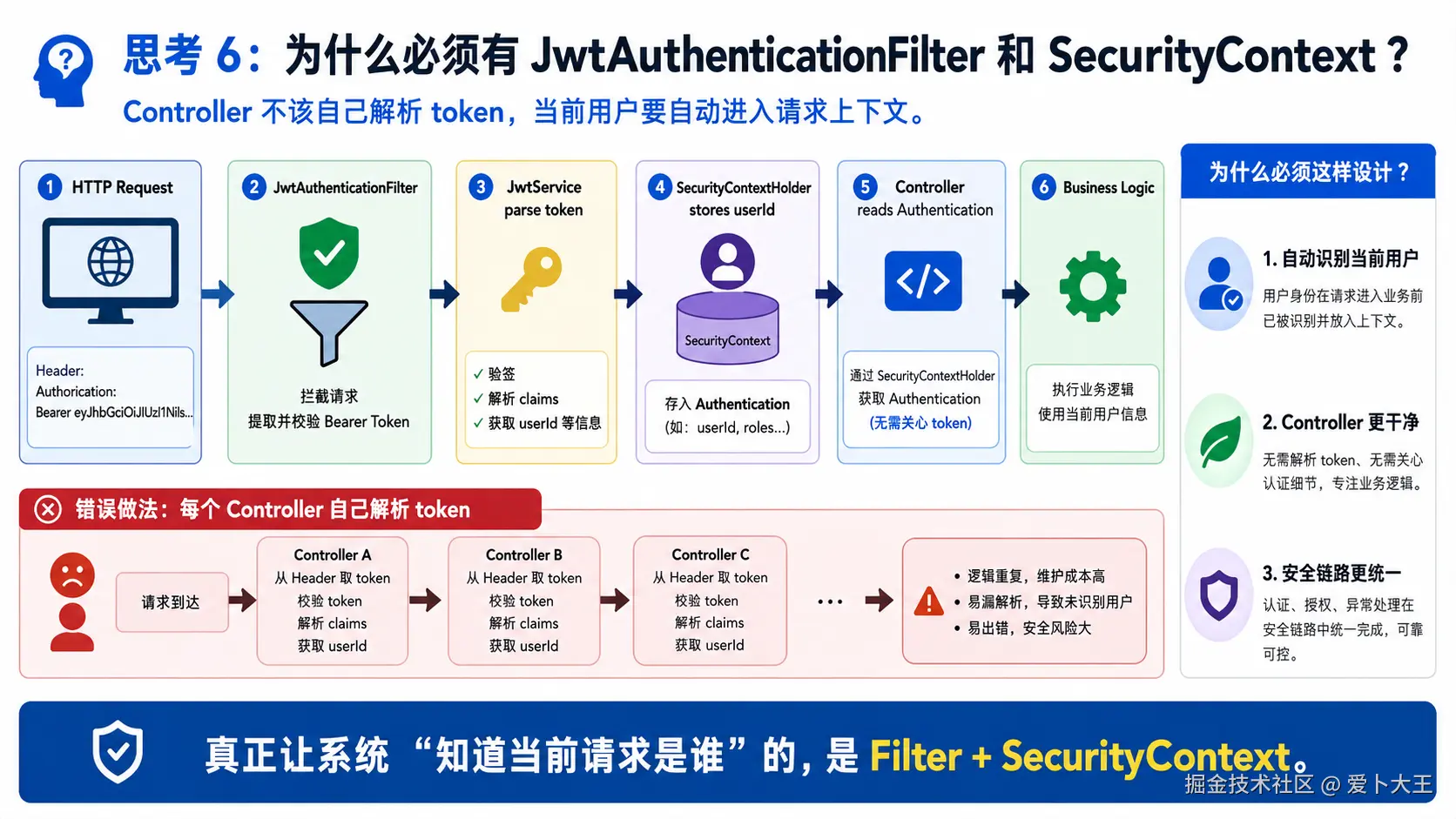
本阶段会写 JWT 创建/解析、请求过滤器、安全配置、认证 Controller 和 JWT 单测。
services/backend/src/main/java/com/aibu/coachagent/auth/JwtService.java
这个文件为什么现在出现
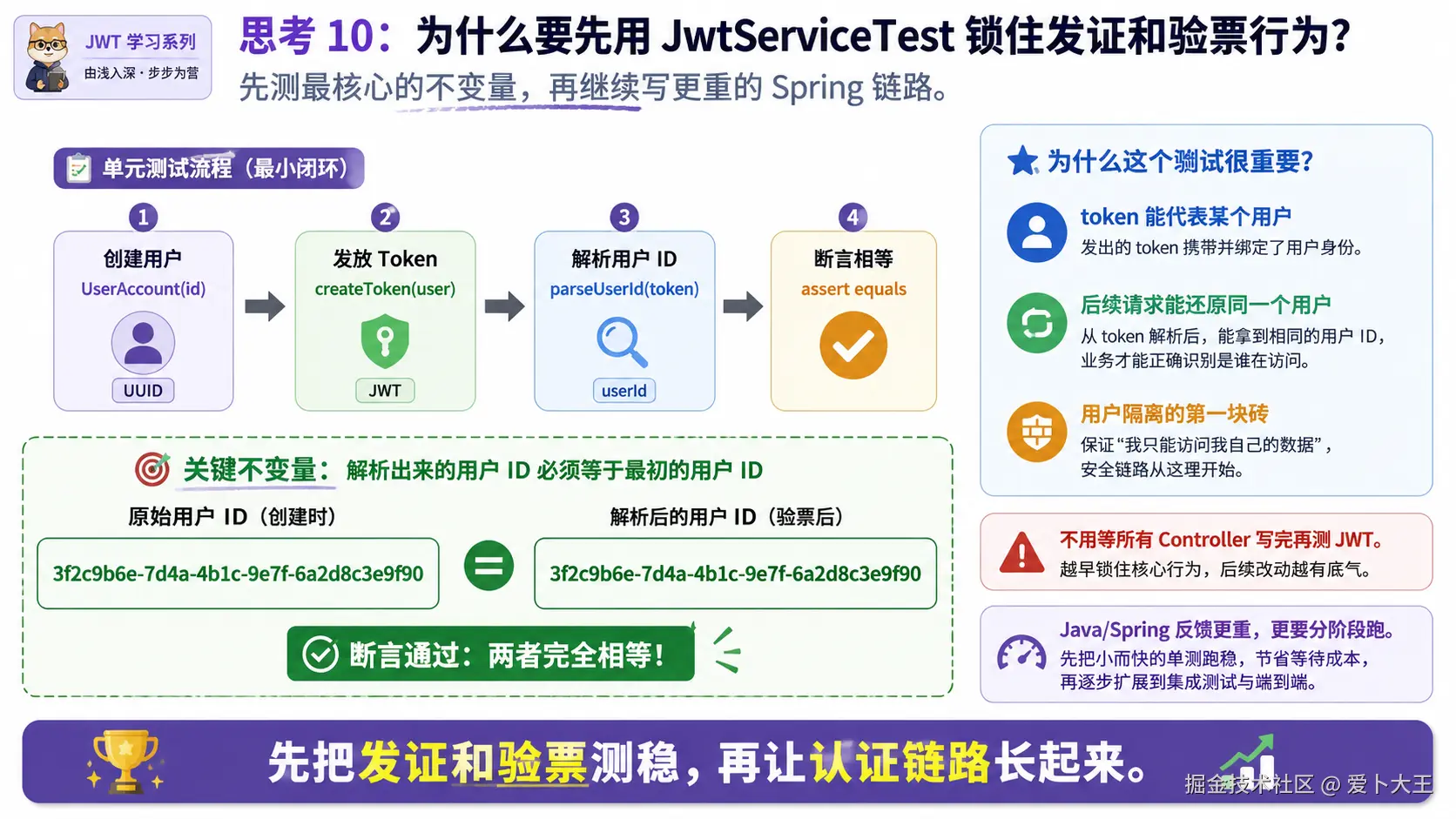
JWT 是登录后证明用户身份的凭证。这个类负责创建 token,也负责从 token 解析 userId。
理解片段,不要复制 先看一个最小版本
java
public String createToken(UUID userId) {
    return userId.toString();
}

public UUID parseUserId(String token) {
    return UUID.fromString(token);
}
这个最小版本马上会暴露这些问题:
- 没有签名,任何人都能伪造。
- 没有过期时间。
- 没有 issuer。
- 没有把 email 放入 claim。
写入文件 services/backend/src/main/java/com/aibu/coachagent/auth/JwtService.java
java
package com.aibu.coachagent.auth;

import io.jsonwebtoken.Jwts;
import io.jsonwebtoken.security.Keys;
import java.nio.charset.StandardCharsets;
import java.time.Instant;
import java.util.Date;
import java.util.UUID;
import javax.crypto.SecretKey;
import org.springframework.beans.factory.annotation.Value;
import org.springframework.stereotype.Service;

@Service
public class JwtService {
    private final String secret;
    private final String issuer;
    private final long ttlMinutes;

    public JwtService(
            @Value("${app.jwt.secret}") String secret,
            @Value("${app.jwt.issuer}") String issuer,
            @Value("${app.jwt.ttl-minutes}") long ttlMinutes) {
        this.secret = secret;
        this.issuer = issuer;
        this.ttlMinutes = ttlMinutes;
    }

    public String createToken(UUID userId, String email) {
        Instant now = Instant.now();
        return Jwts.builder()
                .issuer(issuer)
                .subject(userId.toString())
                .claim("email", email)
                .issuedAt(Date.from(now))
                .expiration(Date.from(now.plusSeconds(ttlMinutes * 60)))
                .signWith(key())
                .compact();
    }

    public UUID parseUserId(String token) {
        String subject = Jwts.parser()
                .verifyWith(key())
                .build()
                .parseSignedClaims(token)
                .getPayload()
                .getSubject();
        return UUID.fromString(subject);
    }

    private SecretKey key() {
        byte[] bytes = secret.getBytes(StandardCharsets.UTF_8);
        if (bytes.length < 32) {
            throw new IllegalStateException("JWT_SECRET must be at least 32 bytes.");
        }
        return Keys.hmacShaKeyFor(bytes);
    }
}
代码分段解释
subject(userId.toString())把用户 ID 放进 JWT subject;后续auth.getName()就能拿到 userId。claim("email", email)只是附加信息,不作为用户隔离依据。issuedAt和expiration控制 token 生命周期。signWith(key())用密钥签名,防止 token 被伪造。key()要求 secret 至少 32 bytes;课件里的默认 secret 只适合本地开发。
services/backend/src/main/java/com/aibu/coachagent/auth/JwtAuthenticationFilter.java
这个文件为什么现在出现
请求进入 Controller 前,需要从 Authorization header 里解析 JWT,并把当前用户写入 Spring Security 上下文。
理解片段,不要复制 先看一个最小版本
java
String header = request.getHeader("Authorization");
if (header != null) {
    // parse token
}
这个最小版本马上会暴露这些问题:
- 没有检查 Bearer 前缀。
- 没有解析 userId。
- 没有设置 SecurityContext。
- token 错误时没有清理上下文。
写入文件 services/backend/src/main/java/com/aibu/coachagent/auth/JwtAuthenticationFilter.java
java
package com.aibu.coachagent.auth;

import jakarta.servlet.FilterChain;
import jakarta.servlet.ServletException;
import jakarta.servlet.http.HttpServletRequest;
import jakarta.servlet.http.HttpServletResponse;
import java.io.IOException;
import java.util.List;
import org.springframework.security.authentication.UsernamePasswordAuthenticationToken;
import org.springframework.security.core.context.SecurityContextHolder;
import org.springframework.stereotype.Component;
import org.springframework.web.filter.OncePerRequestFilter;

@Component
public class JwtAuthenticationFilter extends OncePerRequestFilter {
    private final JwtService jwtService;

    public JwtAuthenticationFilter(JwtService jwtService) {
        this.jwtService = jwtService;
    }

    @Override
    protected void doFilterInternal(
            HttpServletRequest request,
            HttpServletResponse response,
            FilterChain filterChain) throws ServletException, IOException {
        String header = request.getHeader("Authorization");
        if (header != null && header.startsWith("Bearer ")) {
            try {
                var userId = jwtService.parseUserId(header.substring(7));
                var auth = new UsernamePasswordAuthenticationToken(userId.toString(), null, List.of());
                SecurityContextHolder.getContext().setAuthentication(auth);
            } catch (RuntimeException ignored) {
                SecurityContextHolder.clearContext();
            }
        }
        filterChain.doFilter(request, response);
    }
}
代码分段解释
OncePerRequestFilter保证一次请求只执行一次过滤逻辑。Authorization: Bearer ...是前端传 JWT 的标准位置。jwtService.parseUserId(header.substring(7))去掉Bearer后解析 userId。UsernamePasswordAuthenticationToken(userId.toString(), null, List.of())把 userId 放进Authentication.getName()。- 解析失败时
SecurityContextHolder.clearContext(),不要留下错误身份。
services/backend/src/main/java/com/aibu/coachagent/auth/AuthController.java
这个文件为什么现在出现
需要把注册、登录、登出、当前用户信息暴露成 HTTP API。Controller 只负责 HTTP 入口,业务细节交给 AuthService。
理解片段,不要复制 先看一个最小版本
java
@PostMapping("/login")
public AuthResponse login(@RequestBody AuthRequest request) {
    return authService.login(request);
}
这个最小版本马上会暴露这些问题:
- 没有 register。
- 没有
/api/me。 - 没有从 Authentication 解析当前用户。
- 没有 Validation。
写入文件 services/backend/src/main/java/com/aibu/coachagent/auth/AuthController.java
java
package com.aibu.coachagent.auth;

import com.aibu.coachagent.user.UserRepository;
import jakarta.validation.Valid;
import java.util.UUID;
import org.springframework.http.HttpStatus;
import org.springframework.security.core.Authentication;
import org.springframework.web.bind.annotation.GetMapping;
import org.springframework.web.bind.annotation.PostMapping;
import org.springframework.web.bind.annotation.RequestBody;
import org.springframework.web.bind.annotation.RequestMapping;
import org.springframework.web.bind.annotation.ResponseStatus;
import org.springframework.web.bind.annotation.RestController;
import org.springframework.web.server.ResponseStatusException;

@RestController
@RequestMapping("/api")
public class AuthController {
    private final AuthService authService;
    private final UserRepository users;

    public AuthController(AuthService authService, UserRepository users) {
        this.authService = authService;
        this.users = users;
    }

    @PostMapping("/auth/register")
    public AuthDtos.AuthResponse register(@RequestBody @Valid AuthDtos.AuthRequest request) {
        return authService.register(request);
    }

    @PostMapping("/auth/login")
    public AuthDtos.AuthResponse login(@RequestBody @Valid AuthDtos.AuthRequest request) {
        return authService.login(request);
    }

    @PostMapping("/auth/logout")
    @ResponseStatus(HttpStatus.NO_CONTENT)
    public void logout() {
        // JWT is stateless in v1. Clients discard the token.
    }

    @GetMapping("/me")
    public AuthDtos.UserView me(Authentication authentication) {
        var userId = UUID.fromString(authentication.getName());
        return users.findById(userId)
                .map(authService::view)
                .orElseThrow(() -> new ResponseStatusException(HttpStatus.NOT_FOUND, "User not found"));
    }
}
代码分段解释
@RequestMapping("/api/auth")让注册登录路径集中在/api/auth/*。@Valid触发AuthDtos.AuthRequest上的 email/password 校验。logout()当前是 stateless JWT 模式下的空操作,前端删除 token 即可。me(Authentication auth)用auth.getName()取当前 token 里的 userId,再查用户。
services/backend/src/main/java/com/aibu/coachagent/config/SecurityConfig.java
这个文件为什么现在出现
Spring Security 默认会保护所有接口。我们需要明确哪些接口公开,哪些接口必须带 JWT。
理解片段,不要复制 先看一个最小版本
java
http.authorizeHttpRequests(auth -> auth.anyRequest().authenticated());这个最小版本马上会暴露这些问题:
- 注册和登录也会被拦住。
- 没有 stateless session,JWT 项目不需要服务端 session。
- 没有把 JwtAuthenticationFilter 插入过滤器链。
- 没有 PasswordEncoder。
- 前端本地开发可能被 CORS 拦住。
写入文件 services/backend/src/main/java/com/aibu/coachagent/config/SecurityConfig.java
java
package com.aibu.coachagent.config;

import com.aibu.coachagent.auth.JwtAuthenticationFilter;
import java.util.List;
import org.springframework.context.annotation.Bean;
import org.springframework.context.annotation.Configuration;
import org.springframework.http.HttpMethod;
import org.springframework.security.config.annotation.web.builders.HttpSecurity;
import org.springframework.security.config.http.SessionCreationPolicy;
import org.springframework.security.crypto.bcrypt.BCryptPasswordEncoder;
import org.springframework.security.crypto.password.PasswordEncoder;
import org.springframework.security.web.SecurityFilterChain;
import org.springframework.security.web.authentication.UsernamePasswordAuthenticationFilter;
import org.springframework.web.cors.CorsConfiguration;
import org.springframework.web.cors.CorsConfigurationSource;
import org.springframework.web.cors.UrlBasedCorsConfigurationSource;

@Configuration
public class SecurityConfig {
    @Bean
    SecurityFilterChain securityFilterChain(HttpSecurity http, JwtAuthenticationFilter jwtFilter) throws Exception {
        return http
                .csrf(csrf -> csrf.disable())
                .cors(cors -> {})
                .sessionManagement(session -> session.sessionCreationPolicy(SessionCreationPolicy.STATELESS))
                .authorizeHttpRequests(auth -> auth
                        .requestMatchers("/actuator/health").permitAll()
                        .requestMatchers(HttpMethod.POST, "/api/auth/register", "/api/auth/login").permitAll()
                        .anyRequest().authenticated())
                .addFilterBefore(jwtFilter, UsernamePasswordAuthenticationFilter.class)
                .build();
    }

    @Bean
    PasswordEncoder passwordEncoder() {
        return new BCryptPasswordEncoder();
    }

    @Bean
    CorsConfigurationSource corsConfigurationSource() {
        CorsConfiguration config = new CorsConfiguration();
        config.setAllowedOrigins(List.of(
                "http://localhost:5173",
                "http://127.0.0.1:5173",
                "http://localhost:5174",
                "http://127.0.0.1:5174"));
        config.setAllowedMethods(List.of("GET", "POST", "PUT", "DELETE", "OPTIONS"));
        config.setAllowedHeaders(List.of("*"));
        config.setAllowCredentials(true);
        UrlBasedCorsConfigurationSource source = new UrlBasedCorsConfigurationSource();
        source.registerCorsConfiguration("/**", config);
        return source;
    }
}
代码分段解释
csrf.disable()适合当前 stateless API;不是所有项目都应该无脑关闭 CSRF。SessionCreationPolicy.STATELESS表示服务端不保存登录 session,每次请求都靠 JWT。/actuator/health、注册和登录允许匿名访问。anyRequest().authenticated()表示其他接口必须认证。addFilterBefore(jwtFilter, UsernamePasswordAuthenticationFilter.class)让 JWT 过滤器先解析身份。BCryptPasswordEncoder用于密码哈希。CorsConfigurationSource允许本地 Vite 前端访问后端。
services/backend/src/test/java/com/aibu/coachagent/JwtServiceTest.java
这个文件为什么现在出现
JWT 是本章安全链路最核心的部分。先用单元测试锁住"创建 token 后能解析回同一个 userId"。
理解片段,不要复制 先看一个最小版本
java
assertThat(service.parseUserId(service.createToken(userId, email))).isEqualTo(userId);写入文件 services/backend/src/test/java/com/aibu/coachagent/JwtServiceTest.java
java
package com.aibu.coachagent;

import static org.assertj.core.api.Assertions.assertThat;

import com.aibu.coachagent.auth.JwtService;
import java.util.UUID;
import org.junit.jupiter.api.Test;

class JwtServiceTest {
    @Test
    void createsAndParsesUserId() {
        JwtService service = new JwtService(
                "test-secret-value-that-is-longer-than-32-bytes",
                "coach-agent-test",
                60);
        UUID userId = UUID.randomUUID();

        String token = service.createToken(userId, "student@example.com");

        assertThat(service.parseUserId(token)).isEqualTo(userId);
    }
}
代码分段解释
- 测试使用超过 32 bytes 的本地 secret,避免触发密钥长度错误。
- 随机生成 UUID,证明不是写死值。
- 只测试 JWT 创建/解析,不等于已经完成所有认证接口集成测试。
复制后立即运行
bash
cd services/backend
./gradlew test --tests "*JwtServiceTest" --no-daemon
预期输出:
text
`JwtServiceTest` 通过,说明 token 能创建并解析 userId。如果失败,先检查:
- 如果提示 secret 长度不足,检查测试里的 secret 是否超过 32 bytes。
- 如果找不到测试,检查包名和文件路径是否是
src/test/java/com/aibu/coachagent/JwtServiceTest.java。 - 如果 Java 版本错误,确认使用 Java 17 或更高。
阶段 5:业务数据链路
5.1 这一阶段要解决什么
现在后端已经知道当前请求是谁。下一步是把这个身份用于业务数据:
text
Authentication -> auth.getName() -> userId -> Repository where user_id = ?请记住这个模式。只要涉及用户自己的数据,都不能相信请求体里的 userId,也不能少写 where user_id = ?。
services/backend/src/main/java/com/aibu/coachagent/business/ApiDtos.java
这个文件为什么现在出现
业务接口需要 DTO。Profile、Checkin、Coach 消息、Agent 请求 payload 都集中写在这里,避免 Controller 直接使用 Map。
理解片段,不要复制 先看一个最小版本
java
public record ProfileDto(String goal) {}
public record CheckinDto(LocalDate date) {}
这个最小版本马上会暴露这些问题:
- 字段不完整,不能支撑建档和打卡。
- 没有 AgentRequestPayload,后端无法把可信上下文转给 Python Agent。
- 没有 EvalRunRequest,Admin 评测接口无法转发。
写入文件 services/backend/src/main/java/com/aibu/coachagent/business/ApiDtos.java
java
package com.aibu.coachagent.business;

import com.fasterxml.jackson.databind.JsonNode;
import java.time.LocalDate;
import java.util.List;
import java.util.UUID;

public class ApiDtos {
    public record ProfileDto(
            String displayName,
            String goal,
            Double heightCm,
            Double weightKg,
            Integer age,
            String trainingExperience,
            Integer weeklyTrainingDays,
            List<String> injuryHistory,
            List<String> dietPreferences) {}

    public record CheckinDto(
            UUID id,
            LocalDate date,
            Double weightKg,
            Double sleepHours,
            Integer fatigueLevel,
            Integer painLevel,
            String painArea,
            String notes) {}

    public record CoachMessageRequest(String sessionId, String message) {}

    public record AgentRequestPayload(
            String userId,
            String sessionId,
            String message,
            ProfileDto profile,
            List<CheckinDto> recentCheckins,
            String mode) {}

    public record EvalRunRequest(String userId, List<JsonNode> cases, Integer maxCases) {}

    public record ApiEnvelope(JsonNode data) {}
}
代码分段解释
record适合 DTO,字段固定、不可变、样板代码少。ProfileDto对应用户档案。CheckinDto对应每日打卡。CoachMessageRequest是前端发来的聊天输入,只包含 sessionId 和 message。AgentRequestPayload是后端转给 Python Agent 的可信上下文,userId 由后端填。EvalRunRequest为后续 Eval/Red Team 管理接口服务。
services/backend/src/main/java/com/aibu/coachagent/business/BusinessRepository.java
这个文件为什么现在出现
业务表读写统一放在 Repository。它的核心不是 SQL 多复杂,而是每一次读写都带当前用户的 userId。
理解片段,不要复制 先看一个最小版本
java
public Optional<ProfileDto> getProfile(UUID userId) {
    return jdbc.query("select * from app.user_profiles", mapper).stream().findFirst();
}
这个最小版本马上会暴露这些问题:
- 没有
where user_id = ?,会读到别人的档案。 - 没有 upsert,重复保存档案会失败。
- 没有 JSON 序列化,伤病史和偏好列表无法存入 jsonb。
- 没有 checkin 日期唯一处理。
写入文件 services/backend/src/main/java/com/aibu/coachagent/business/BusinessRepository.java
java
package com.aibu.coachagent.business;

import com.aibu.coachagent.business.ApiDtos.CheckinDto;
import com.aibu.coachagent.business.ApiDtos.ProfileDto;
import com.fasterxml.jackson.core.JsonProcessingException;
import com.fasterxml.jackson.core.type.TypeReference;
import com.fasterxml.jackson.databind.ObjectMapper;
import java.sql.ResultSet;
import java.sql.SQLException;
import java.time.LocalDate;
import java.util.List;
import java.util.Optional;
import java.util.UUID;
import org.springframework.jdbc.core.JdbcTemplate;
import org.springframework.stereotype.Repository;

@Repository
public class BusinessRepository {
    private final JdbcTemplate jdbc;
    private final ObjectMapper objectMapper;

    public BusinessRepository(JdbcTemplate jdbc, ObjectMapper objectMapper) {
        this.jdbc = jdbc;
        this.objectMapper = objectMapper;
    }

    public Optional<ProfileDto> getProfile(UUID userId, String displayName) {
        var rows = jdbc.query(
                """
                select goal, height_cm, weight_kg, age, training_experience, weekly_training_days,
                       injury_history::text, diet_preferences::text
                from app.user_profiles where user_id = ?
                """,
                (rs, rowNum) -> mapProfile(rs, displayName),
                userId);
        return rows.stream().findFirst();
    }

    public ProfileDto upsertProfile(UUID userId, String displayName, ProfileDto profile) {
        jdbc.update(
                """
                insert into app.user_profiles
                (user_id, goal, height_cm, weight_kg, age, training_experience,
                 weekly_training_days, injury_history, diet_preferences, updated_at)
                values (?, ?, ?, ?, ?, ?, ?, cast(? as jsonb), cast(? as jsonb), now())
                on conflict (user_id) do update set
                  goal = excluded.goal,
                  height_cm = excluded.height_cm,
                  weight_kg = excluded.weight_kg,
                  age = excluded.age,
                  training_experience = excluded.training_experience,
                  weekly_training_days = excluded.weekly_training_days,
                  injury_history = excluded.injury_history,
                  diet_preferences = excluded.diet_preferences,
                  updated_at = now()
                """,
                userId,
                profile.goal(),
                profile.heightCm(),
                profile.weightKg(),
                profile.age(),
                profile.trainingExperience(),
                profile.weeklyTrainingDays(),
                json(profile.injuryHistory()),
                json(profile.dietPreferences()));
        return getProfile(userId, displayName).orElse(profile);
    }

    public CheckinDto addCheckin(UUID userId, CheckinDto checkin) {
        UUID id = checkin.id() == null ? UUID.randomUUID() : checkin.id();
        LocalDate date = checkin.date() == null ? LocalDate.now() : checkin.date();
        jdbc.update(
                """
                insert into app.daily_checkins
                (id, user_id, checkin_date, weight_kg, sleep_hours, fatigue_level, pain_level, pain_area, notes)
                values (?, ?, ?, ?, ?, ?, ?, ?, ?)
                on conflict (user_id, checkin_date) do update set
                  weight_kg = excluded.weight_kg,
                  sleep_hours = excluded.sleep_hours,
                  fatigue_level = excluded.fatigue_level,
                  pain_level = excluded.pain_level,
                  pain_area = excluded.pain_area,
                  notes = excluded.notes
                """,
                id,
                userId,
                date,
                checkin.weightKg(),
                checkin.sleepHours(),
                checkin.fatigueLevel(),
                checkin.painLevel(),
                checkin.painArea(),
                checkin.notes());
        return new CheckinDto(
                id,
                date,
                checkin.weightKg(),
                checkin.sleepHours(),
                checkin.fatigueLevel(),
                checkin.painLevel(),
                checkin.painArea(),
                checkin.notes());
    }

    public List<CheckinDto> listCheckins(UUID userId, int limit) {
        return jdbc.query(
                """
                select id, checkin_date, weight_kg, sleep_hours, fatigue_level, pain_level, pain_area, notes
                from app.daily_checkins
                where user_id = ?
                order by checkin_date desc
                limit ?
                """,
                this::mapCheckin,
                userId,
                limit);
    }

    public void saveToday(UUID userId, String planJson) {
        jdbc.update(
                """
                insert into app.today_cards(id, user_id, plan_date, plan_json)
                values (?, ?, current_date, cast(? as jsonb))
                on conflict (user_id, plan_date) do update set plan_json = excluded.plan_json
                """,
                UUID.randomUUID(),
                userId,
                planJson);
    }

    public Optional<String> getToday(UUID userId) {
        var rows = jdbc.queryForList(
                "select plan_json::text from app.today_cards where user_id = ? and plan_date = current_date",
                String.class,
                userId);
        return rows.stream().findFirst();
    }

    public void saveEvalRun(UUID userId, String resultJson, int passed, int failed) {
        jdbc.update(
                "insert into agent.eval_runs(id, user_id, passed, failed, result_json) values (?, ?, ?, ?, cast(? as jsonb))",
                UUID.randomUUID(),
                userId,
                passed,
                failed,
                resultJson);
    }

    private ProfileDto mapProfile(ResultSet rs, String displayName) throws SQLException {
        return new ProfileDto(
                displayName,
                rs.getString("goal"),
                getDouble(rs, "height_cm"),
                getDouble(rs, "weight_kg"),
                (Integer) rs.getObject("age"),
                rs.getString("training_experience"),
                (Integer) rs.getObject("weekly_training_days"),
                readList(rs.getString("injury_history")),
                readList(rs.getString("diet_preferences")));
    }

    private CheckinDto mapCheckin(ResultSet rs, int rowNum) throws SQLException {
        return new CheckinDto(
                rs.getObject("id", UUID.class),
                rs.getObject("checkin_date", LocalDate.class),
                getDouble(rs, "weight_kg"),
                getDouble(rs, "sleep_hours"),
                (Integer) rs.getObject("fatigue_level"),
                (Integer) rs.getObject("pain_level"),
                rs.getString("pain_area"),
                rs.getString("notes"));
    }

    private Double getDouble(ResultSet rs, String column) throws SQLException {
        Object value = rs.getObject(column);
        return value == null ? null : ((Number) value).doubleValue();
    }

    private String json(Object value) {
        try {
            return objectMapper.writeValueAsString(value == null ? List.of() : value);
        } catch (JsonProcessingException exc) {
            throw new IllegalArgumentException("Cannot serialize JSON", exc);
        }
    }

    private List<String> readList(String value) {
        try {
            return objectMapper.readValue(value == null ? "[]" : value, new TypeReference<>() {});
        } catch (JsonProcessingException exc) {
            return List.of();
        }
    }
}
代码分段解释
getProfile()只查where user_id = ?,这是用户隔离底线。upsertProfile()使用on conflict (user_id),同一用户重复保存会更新。addCheckin()使用on conflict (user_id, checkin_date),同一天打卡会覆盖当天记录。listCheckins()只按当前 userId 查最近记录。saveToday()和getToday()只操作当前用户当天 Today。saveEvalRun()把评测结果摘要保存到agent.eval_runs,仍然带 userId。json()用 ObjectMapper 把 List 转成 JSON 字符串再 cast 成 jsonb。readList()从 jsonb 文本恢复 List,失败时返回空列表,避免接口崩溃。
services/backend/src/main/java/com/aibu/coachagent/business/ProfileController.java
这个文件为什么现在出现
Profile API 是用户建档入口。它必须从 Authentication 取当前用户,而不是相信请求体里的 userId。
理解片段,不要复制 先看一个最小版本
java
@GetMapping
public ProfileDto get(@RequestParam UUID userId) {
    return business.getProfile(userId, "name").orElse(null);
}
这个最小版本马上会暴露这些问题:
- 前端可以伪造 userId。
- 没有从 JWT 解析当前用户。
- 没有补 displayName。
写入文件 services/backend/src/main/java/com/aibu/coachagent/business/ProfileController.java
java
package com.aibu.coachagent.business;

import com.aibu.coachagent.business.ApiDtos.ProfileDto;
import com.aibu.coachagent.user.UserRepository;
import java.util.List;
import java.util.UUID;
import org.springframework.http.HttpStatus;
import org.springframework.security.core.Authentication;
import org.springframework.web.bind.annotation.GetMapping;
import org.springframework.web.bind.annotation.PutMapping;
import org.springframework.web.bind.annotation.RequestBody;
import org.springframework.web.bind.annotation.RequestMapping;
import org.springframework.web.bind.annotation.RestController;
import org.springframework.web.server.ResponseStatusException;

@RestController
@RequestMapping("/api/profile")
public class ProfileController {
    private final BusinessRepository business;
    private final UserRepository users;

    public ProfileController(BusinessRepository business, UserRepository users) {
        this.business = business;
        this.users = users;
    }

    @GetMapping
    public ProfileDto get(Authentication auth) {
        UUID userId = userId(auth);
        String displayName = displayName(userId);
        return business.getProfile(userId, displayName)
                .orElse(new ProfileDto(displayName, null, null, null, null, null, null, List.of(), List.of()));
    }

    @PutMapping
    public ProfileDto put(Authentication auth, @RequestBody ProfileDto profile) {
        UUID userId = userId(auth);
        return business.upsertProfile(userId, displayName(userId), profile);
    }

    private UUID userId(Authentication auth) {
        return UUID.fromString(auth.getName());
    }

    private String displayName(UUID userId) {
        return users.findById(userId)
                .map(user -> user.displayName())
                .orElseThrow(() -> new ResponseStatusException(HttpStatus.NOT_FOUND, "User not found"));
    }
}
代码分段解释
Authentication auth是 Spring Security 已验证的当前请求身份。UUID.fromString(auth.getName())把 JWT subject 转成 userId。GET /api/profile没有档案时返回带 displayName 的空档案。PUT /api/profile只保存当前用户的档案。displayName()再查一次 users 表,保证展示名来自后端数据库。
services/backend/src/main/java/com/aibu/coachagent/business/CheckinController.java
这个文件为什么现在出现
Today 计划不能只靠用户一句话生成,还需要睡眠、疲劳、疼痛、体重等每日状态。Checkin API 就负责这些记录。
理解片段,不要复制 先看一个最小版本
java
@PostMapping
public CheckinDto add(@RequestBody CheckinDto checkin) {
    return business.addCheckin(null, checkin);
}
这个最小版本马上会暴露这些问题:
- 没有当前用户,打卡不知道属于谁。
- 没有 list 接口,Agent 无法读取最近状态。
写入文件 services/backend/src/main/java/com/aibu/coachagent/business/CheckinController.java
java
package com.aibu.coachagent.business;

import com.aibu.coachagent.business.ApiDtos.CheckinDto;
import java.util.List;
import java.util.UUID;
import org.springframework.security.core.Authentication;
import org.springframework.web.bind.annotation.GetMapping;
import org.springframework.web.bind.annotation.PostMapping;
import org.springframework.web.bind.annotation.RequestBody;
import org.springframework.web.bind.annotation.RequestMapping;
import org.springframework.web.bind.annotation.RestController;

@RestController
@RequestMapping("/api/checkins")
public class CheckinController {
    private final BusinessRepository business;

    public CheckinController(BusinessRepository business) {
        this.business = business;
    }

    @GetMapping
    public List<CheckinDto> list(Authentication auth) {
        return business.listCheckins(UUID.fromString(auth.getName()), 30);
    }

    @PostMapping
    public CheckinDto add(Authentication auth, @RequestBody CheckinDto checkin) {
        return business.addCheckin(UUID.fromString(auth.getName()), checkin);
    }
}
代码分段解释
GET /api/checkins读取当前用户最近 30 条打卡。POST /api/checkins写入当前用户打卡。- Controller 不接收 userId,统一从
auth.getName()来。
复制后立即运行
bash
rg -n "auth.getName\(\)|where user_id = \?|on conflict \(user_id|saveEvalRun" services/backend/src/main/java/com/aibu/coachagent/business预期输出:
text
能看到 Controller 从 Authentication 取用户,以及 Repository 查询/写入按 user_id 隔离。如果失败,先检查:
- 如果 Controller 里出现从请求体读取 userId 的写法,要停下来改回
auth.getName()。 - 如果 Repository 查询没有
where user_id = ?,说明用户隔离有风险。
阶段 6:Agent/Admin 代理入口和最终验证
6.1 这一阶段要解决什么
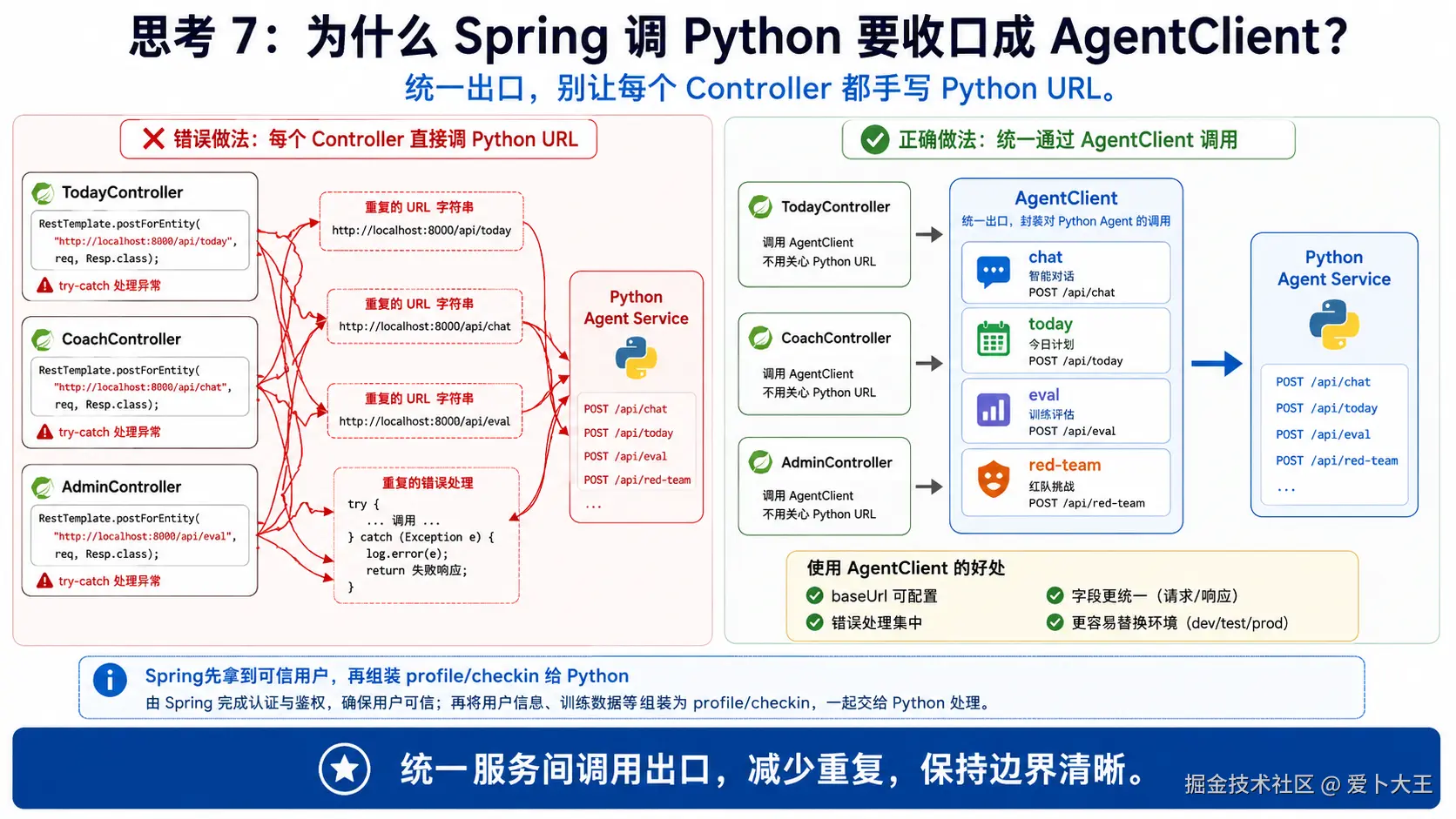
Profile 和 Checkin 是业务数据;Today、Coach、Eval、Red Team 要调用 Python Agent Service。Spring 后端在这里扮演"可信代理":
text
前端请求 -> JWT 当前用户 -> 后端补 profile/checkins -> 调 Python Agent -> 返回结果这比前端直接调用 Python Agent 更安全,因为 userId、profile、recentCheckins 都由后端根据当前 token 补齐。
services/backend/src/main/java/com/aibu/coachagent/agent/AgentClient.java
这个文件为什么现在出现
后端需要统一调用 Python Agent Service。把 RestClient 调用集中在 AgentClient,Controller 不需要知道 Python 具体路径细节。
理解片段,不要复制 先看一个最小版本
java
public JsonNode chat(Object request) {
    return restClient.post().uri("/agent/chat").body(request).retrieve().body(JsonNode.class);
}
这个最小版本马上会暴露这些问题:
- 没有 baseUrl 配置。
- 没有 today/eval/red-team/traces 方法。
- Controller 会散落 RestClient 调用。
写入文件 services/backend/src/main/java/com/aibu/coachagent/agent/AgentClient.java
java
package com.aibu.coachagent.agent;

import com.aibu.coachagent.business.ApiDtos.AgentRequestPayload;
import com.aibu.coachagent.business.ApiDtos.EvalRunRequest;
import com.fasterxml.jackson.databind.JsonNode;
import org.springframework.beans.factory.annotation.Value;
import org.springframework.http.MediaType;
import org.springframework.stereotype.Service;
import org.springframework.web.client.RestClient;

@Service
public class AgentClient {
    private final RestClient restClient;

    public AgentClient(@Value("${app.agent-service-url}") String agentServiceUrl) {
        this.restClient = RestClient.builder().baseUrl(agentServiceUrl).build();
    }

    public JsonNode chat(AgentRequestPayload request) {
        return restClient.post()
                .uri("/agent/chat")
                .contentType(MediaType.APPLICATION_JSON)
                .body(request)
                .retrieve()
                .body(JsonNode.class);
    }

    public JsonNode today(AgentRequestPayload request) {
        return restClient.post()
                .uri("/agent/today")
                .contentType(MediaType.APPLICATION_JSON)
                .body(request)
                .retrieve()
                .body(JsonNode.class);
    }

    public JsonNode eval(EvalRunRequest request) {
        return restClient.post()
                .uri("/agent/eval/run")
                .contentType(MediaType.APPLICATION_JSON)
                .body(request)
                .retrieve()
                .body(JsonNode.class);
    }

    public JsonNode redTeam(EvalRunRequest request) {
        return restClient.post()
                .uri("/agent/red-team/run")
                .contentType(MediaType.APPLICATION_JSON)
                .body(request)
                .retrieve()
                .body(JsonNode.class);
    }

    public JsonNode traces() {
        return restClient.get().uri("/traces").retrieve().body(JsonNode.class);
    }

    public JsonNode trace(String traceId) {
        return restClient.get().uri("/traces/{traceId}", traceId).retrieve().body(JsonNode.class);
    }
}
代码分段解释
@Value("${app.agent-service-url}")从配置读取 Python 服务地址。RestClient.builder().baseUrl(...)固定基础地址。chat()、today()、eval()、redTeam()转发到 Python 内部 API。traces()和trace()为 Web Trace 时间线做准备。
services/backend/src/main/java/com/aibu/coachagent/business/TodayController.java
这个文件为什么现在出现
Today API 把用户档案、最近打卡和 Python Agent 串起来。它先查今天是否已有计划,没有才生成并保存。
理解片段,不要复制 先看一个最小版本
java
@GetMapping
public JsonNode get() {
    return agentClient.today(...);
}
这个最小版本马上会暴露这些问题:
- 每次 GET 都会重新生成,浪费模型调用。
- 没有带 profile 和 recent checkins。
- 没有按当前用户保存 Today。
写入文件 services/backend/src/main/java/com/aibu/coachagent/business/TodayController.java
java
package com.aibu.coachagent.business;

import com.aibu.coachagent.agent.AgentClient;
import com.aibu.coachagent.business.ApiDtos.AgentRequestPayload;
import com.aibu.coachagent.user.UserRepository;
import com.fasterxml.jackson.core.JsonProcessingException;
import com.fasterxml.jackson.databind.JsonNode;
import com.fasterxml.jackson.databind.ObjectMapper;
import java.util.List;
import java.util.UUID;
import org.springframework.http.HttpStatus;
import org.springframework.security.core.Authentication;
import org.springframework.web.bind.annotation.GetMapping;
import org.springframework.web.bind.annotation.PostMapping;
import org.springframework.web.bind.annotation.RequestMapping;
import org.springframework.web.bind.annotation.RestController;
import org.springframework.web.server.ResponseStatusException;

@RestController
@RequestMapping("/api/today")
public class TodayController {
    private final BusinessRepository business;
    private final UserRepository users;
    private final AgentClient agentClient;
    private final ObjectMapper objectMapper;

    public TodayController(
            BusinessRepository business,
            UserRepository users,
            AgentClient agentClient,
            ObjectMapper objectMapper) {
        this.business = business;
        this.users = users;
        this.agentClient = agentClient;
        this.objectMapper = objectMapper;
    }

    @GetMapping
    public JsonNode get(Authentication auth) throws JsonProcessingException {
        UUID userId = UUID.fromString(auth.getName());
        var existing = business.getToday(userId);
        if (existing.isPresent()) {
            return objectMapper.readTree(existing.get());
        }
        return generate(auth);
    }

    @PostMapping("/generate")
    public JsonNode generate(Authentication auth) throws JsonProcessingException {
        UUID userId = UUID.fromString(auth.getName());
        var profile = business.getProfile(userId, displayName(userId)).orElse(null);
        var recent = business.listCheckins(userId, 7);
        JsonNode plan = agentClient.today(
                new AgentRequestPayload(userId.toString(), null, "生成今日计划", profile, recent, "today"));
        business.saveToday(userId, objectMapper.writeValueAsString(plan));
        return plan;
    }

    @PostMapping("/checkin")
    public JsonNode checkin(Authentication auth) throws JsonProcessingException {
        return generate(auth);
    }

    private String displayName(UUID userId) {
        return users.findById(userId)
                .map(user -> user.displayName())
                .orElseThrow(() -> new ResponseStatusException(HttpStatus.NOT_FOUND, "User not found"));
    }
}
代码分段解释
GET /api/today先查business.getToday(userId)。- 没有已有计划时调用
generate(auth)。 generate()从后端数据库补 profile 和最近 7 条 checkins。AgentRequestPayload的 userId 由后端填,不由前端传。business.saveToday()把当天计划缓存到app.today_cards。/checkin当前复用生成逻辑,后续章节可以扩展成更细的打卡闭环。
services/backend/src/main/java/com/aibu/coachagent/business/CoachController.java
这个文件为什么现在出现
Coach Chat 不是纯聊天。后端要给 Python Agent 补齐可信用户上下文:profile、recentCheckins、sessionId。
理解片段,不要复制 先看一个最小版本
java
@PostMapping("/chat")
public JsonNode chat(@RequestBody CoachMessageRequest request) {
    return agentClient.chat(...);
}
这个最小版本马上会暴露这些问题:
- 没有 Authentication,无法知道当前用户。
- 没有 profile/checkins,Python Agent 上下文不足。
- 如果信任前端传 profile,用户可以伪造健康状态。
写入文件 services/backend/src/main/java/com/aibu/coachagent/business/CoachController.java
java
package com.aibu.coachagent.business;

import com.aibu.coachagent.agent.AgentClient;
import com.aibu.coachagent.business.ApiDtos.AgentRequestPayload;
import com.aibu.coachagent.business.ApiDtos.CoachMessageRequest;
import com.aibu.coachagent.user.UserRepository;
import com.fasterxml.jackson.databind.JsonNode;
import java.util.UUID;
import org.springframework.http.HttpStatus;
import org.springframework.security.core.Authentication;
import org.springframework.web.bind.annotation.GetMapping;
import org.springframework.web.bind.annotation.PathVariable;
import org.springframework.web.bind.annotation.PostMapping;
import org.springframework.web.bind.annotation.RequestBody;
import org.springframework.web.bind.annotation.RequestMapping;
import org.springframework.web.bind.annotation.RestController;
import org.springframework.web.server.ResponseStatusException;

@RestController
@RequestMapping("/api/coach")
public class CoachController {
    private final BusinessRepository business;
    private final UserRepository users;
    private final AgentClient agentClient;

    public CoachController(BusinessRepository business, UserRepository users, AgentClient agentClient) {
        this.business = business;
        this.users = users;
        this.agentClient = agentClient;
    }

    @PostMapping("/chat")
    public JsonNode chat(Authentication auth, @RequestBody CoachMessageRequest request) {
        UUID userId = UUID.fromString(auth.getName());
        var profile = business.getProfile(userId, displayName(userId)).orElse(null);
        return agentClient.chat(new AgentRequestPayload(
                userId.toString(),
                request.sessionId(),
                request.message(),
                profile,
                business.listCheckins(userId, 7),
                "chat"));
    }

    @GetMapping("/sessions/{sessionId}")
    public JsonNode session(Authentication auth, @PathVariable String sessionId) {
        return agentClient.trace(sessionId);
    }

    private String displayName(UUID userId) {
        return users.findById(userId)
                .map(user -> user.displayName())
                .orElseThrow(() -> new ResponseStatusException(HttpStatus.NOT_FOUND, "User not found"));
    }
}
代码分段解释
POST /api/coach/chat从 JWT 当前用户取 userId。- 后端自己查 profile 和最近 7 条 checkins。
- 前端只传
message和sessionId,不传可信健康上下文。 GET /api/coach/sessions/{sessionId}当前代理到 trace 查询,是教学阶段的最小入口,不是完整聊天历史系统。
services/backend/src/main/java/com/aibu/coachagent/admin/AdminController.java
这个文件为什么现在出现
Web 后台需要查看 Trace、运行 Eval 和 Red Team。AdminController 先提供最小代理入口,详细评测逻辑在后续章节展开。
理解片段,不要复制 先看一个最小版本
java
@GetMapping("/traces")
public JsonNode traces() {
    return agentClient.traces();
}
这个最小版本马上会暴露这些问题:
- 没有 eval/red-team 入口。
- 没有把 eval run 和当前用户关联。
- 没有 report 占位接口。
写入文件 services/backend/src/main/java/com/aibu/coachagent/admin/AdminController.java
java
package com.aibu.coachagent.admin;

import com.aibu.coachagent.agent.AgentClient;
import com.aibu.coachagent.business.ApiDtos.EvalRunRequest;
import com.aibu.coachagent.business.BusinessRepository;
import com.fasterxml.jackson.core.JsonProcessingException;
import com.fasterxml.jackson.databind.JsonNode;
import com.fasterxml.jackson.databind.ObjectMapper;
import java.util.UUID;
import org.springframework.security.core.Authentication;
import org.springframework.web.bind.annotation.GetMapping;
import org.springframework.web.bind.annotation.PathVariable;
import org.springframework.web.bind.annotation.PostMapping;
import org.springframework.web.bind.annotation.RequestBody;
import org.springframework.web.bind.annotation.RequestMapping;
import org.springframework.web.bind.annotation.RestController;

@RestController
@RequestMapping("/api/admin")
public class AdminController {
    private final AgentClient agentClient;
    private final BusinessRepository business;
    private final ObjectMapper objectMapper;

    public AdminController(AgentClient agentClient, BusinessRepository business, ObjectMapper objectMapper) {
        this.agentClient = agentClient;
        this.business = business;
        this.objectMapper = objectMapper;
    }

    @GetMapping("/traces")
    public JsonNode traces() {
        return agentClient.traces();
    }

    @GetMapping("/traces/{traceId}")
    public JsonNode trace(@PathVariable String traceId) {
        return agentClient.trace(traceId);
    }

    @PostMapping("/evals/run")
    public JsonNode runEval(Authentication auth, @RequestBody(required = false) EvalRunRequest request)
            throws JsonProcessingException {
        UUID userId = UUID.fromString(auth.getName());
        EvalRunRequest payload = request == null
                ? new EvalRunRequest(userId.toString(), null, 5)
                : new EvalRunRequest(userId.toString(), request.cases(), request.maxCases());
        JsonNode result = agentClient.eval(payload);
        business.saveEvalRun(
                userId,
                objectMapper.writeValueAsString(result),
                result.path("passed").asInt(),
                result.path("failed").asInt());
        return result;
    }

    @GetMapping("/evals/runs/{runId}")
    public JsonNode evalRun(@PathVariable String runId) {
        return objectMapper.createObjectNode()
                .put("runId", runId)
                .put("status", "stored summaries are available in agent.eval_runs");
    }

    @PostMapping("/red-team/run")
    public JsonNode redTeam(Authentication auth, @RequestBody(required = false) EvalRunRequest request) {
        UUID userId = UUID.fromString(auth.getName());
        EvalRunRequest payload = request == null
                ? new EvalRunRequest(userId.toString(), null, 5)
                : new EvalRunRequest(userId.toString(), request.cases(), request.maxCases());
        return agentClient.redTeam(payload);
    }

    @GetMapping("/reports/{reportId}")
    public JsonNode report(@PathVariable String reportId) {
        return objectMapper.createObjectNode()
                .put("reportId", reportId)
                .put("title", "Coach Agent 风险评测报告")
                .put("status", "generated-on-demand");
    }
}
代码分段解释
/api/admin/traces和/api/admin/traces/{traceId}代理 Python Trace。runEval()从Authentication取当前 userId,并覆盖请求体里的 userId。business.saveEvalRun()保存 Eval 摘要。redTeam()同样由后端填可信 userId。- 当前 Admin Trace 没有做完整细粒度用户隔离,后续加固时要补。
复制后立即运行
bash
cd services/backend
./gradlew compileJava --no-daemon
./gradlew test --no-daemon
预期输出:
text
`compileJava` 成功,`JwtServiceTest` 通过。如果失败,先检查:
- 如果 TodayController 找不到 AgentClient,检查
agent/AgentClient.java是否已经复制。 - 如果 BusinessRepository JSON 相关编译失败,检查 ObjectMapper、JsonProcessingException、TypeReference import。
- 如果测试失败,先看
JwtServiceTest的 secret 是否超过 32 bytes。
最终手动验证建议
本章默认自动测试只覆盖 JWT 创建/解析和整体编译。它不是完整接口集成测试。等你启动 PostgreSQL 和 Python Agent 后,可以再做接口级验证。
执行命令 后端本章默认验证
bash
cd services/backend
./gradlew compileJava --no-daemon
./gradlew test --no-daemon
预期结果:
text
BUILD SUCCESSFUL执行命令 启动后端前的数据库提醒
Flyway 只有在 Spring Boot 成功连接数据库时才会执行。也就是说:
text
只启动 PostgreSQL,不会自动建表。
启动 Spring 后端,并且 datasource 能连上 PostgreSQL,Flyway 才会执行 V1__init.sql。
如果你只想先检查 SQL 静态结构,可以运行:
bash
rg -n "create table|user_id|jsonb|vector\(512\)" services/backend/src/main/resources/db/migration/V1__init.sql本章常见报错与修复
1. ./gradlew: Permission denied
执行:
bash
chmod +x services/backend/gradlew2. JAVA_HOME 或 Java 版本错误
本章要求 Java 17 或更高。检查:
bash
java -version3. JWT_SECRET must be at least 32 bytes
JWT HMAC 密钥至少需要 32 bytes。application.yml 里的默认值只用于本地开发,真实部署必须换成强随机密钥。
4. 启动时报 extension "vector" is not available
说明当前数据库不是 pgvector 镜像,或者没有安装 pgvector 扩展。第 07 章 RAG 需要 vector(512),所以本项目 Docker Compose 应使用支持 pgvector 的 PostgreSQL。
5. 接口返回 401
除 /actuator/health、/api/auth/register、/api/auth/login 外,其他接口都需要:
text
Authorization: Bearer <token>6. 用户 A 能看到用户 B 数据
优先检查两处:
- Controller 是否从
Authentication auth读取当前用户。 - Repository SQL 是否带
where user_id = ?。
本章验收清单
完成本章后,你应该能做到:
- 解释为什么后端不能相信前端传来的
userId。 - 解释 Gradle Wrapper、Java 17、Spring Boot starters 的作用。
- 解释 Flyway 什么时候执行,以及
app/agentschema 为什么拆分。 - 解释 JWT 的 subject 为什么放
userId。 - 解释
Authentication auth为什么是可信用户来源。 - 解释 BCrypt 为什么不能明文存密码。
- 解释
where user_id = ?为什么是用户隔离底线。 - 解释
jsonb、unique(user_id, checkin_date)、vector(512)的用途和边界。 - 跑通
./gradlew compileJava和./gradlew test。
下一章衔接
第 02 章解决了"当前请求是谁"和"数据属于谁"。下一章开始,我们会把这些可信用户数据用起来:读取 profile 和 recent checkins,生成 Today 计划,并把同一套上下文传给 Coach Chat。