游戏想法
突然想用ai做一个闯迷宫随机地图的游戏,然后想制作几十个关卡,每个关卡随机生成,难度越来越高这种,然后使用Pygame开发,通过 上下左右按键操作移动的游戏。
开始搭建
安装好python
安装好pygame==2.5.2
游戏效果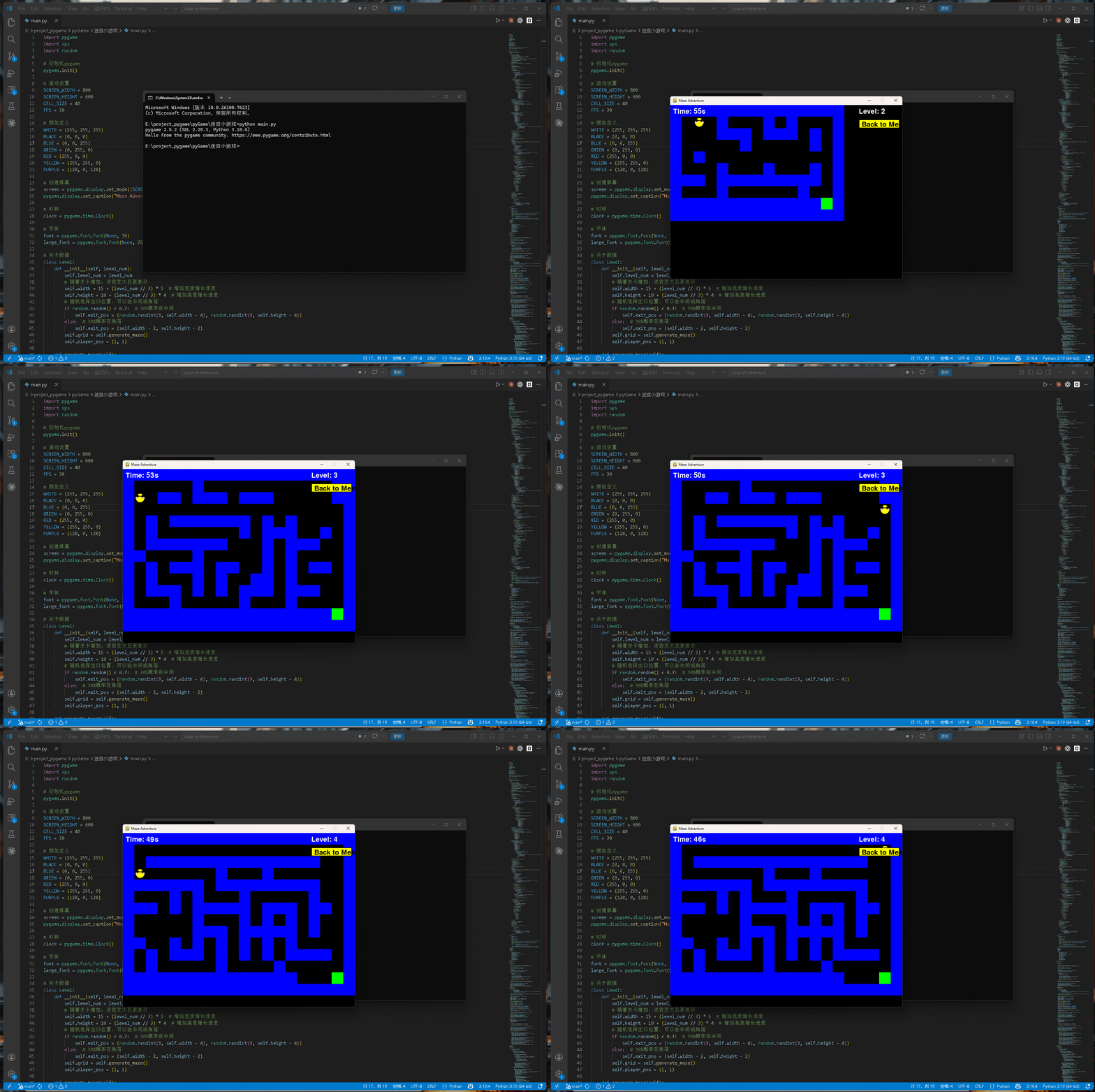
核心源代码
python
# 主游戏循环
running = True
while running:
    clock.tick(FPS)

    # 事件处理
    for event in pygame.event.get():
        if event.type == pygame.QUIT:
            running = False

        if event.type == pygame.MOUSEBUTTONDOWN:
            if game_state.state == GameState.MENU:
                mouse_x, mouse_y = pygame.mouse.get_pos()

                # 检测关卡选择
                scroll_area = pygame.Rect(150, 250, 520, 200)
                if scroll_area.collidepoint(mouse_x, mouse_y):
                    # 计算点击的关卡
                    visible_levels = 5
                    start_level = max(0, game_state.current_level - visible_levels // 2)
                    for i in range(start_level, min(20, start_level + visible_levels)):
                        level_num = i + 1
                        x = 160
                        y = 260 + (i - start_level) * 35
                        rect = pygame.Rect(x, y, 500, 30)
                        if rect.collidepoint(mouse_x, mouse_y):
                            game_state.current_level = level_num
                            break

                # 检测开始按钮
                start_rect = pygame.Rect(SCREEN_WIDTH//2 - 80, 500, 160, 50)
                if start_rect.collidepoint(mouse_x, mouse_y):
                    game_state.state = GameState.PLAYING
                    game_state.start_time = pygame.time.get_ticks()
                    game_state.timer = 60
                    # 重置按键状态,防止长按连续移动在游戏开始后继续
                    game_state.key_states.clear()
            elif game_state.state in [GameState.WIN, GameState.LOSE]:
                mouse_x, mouse_y = pygame.mouse.get_pos()

                # 重新开始
                restart_rect = pygame.Rect(SCREEN_WIDTH//2 - 150, 350, 140, 50)
                if restart_rect.collidepoint(mouse_x, mouse_y):
                    game_state.button_clicked = 'restart'
                    # 重新生成当前关卡的迷宫
                    game_state.levels[game_state.current_level - 1] = Level(game_state.current_level)
                    game_state.state = GameState.PLAYING
                    game_state.start_time = pygame.time.get_ticks()
                    game_state.timer = 60
                    # 重置按键状态,防止长按连续移动在重启后继续
                    game_state.key_states.clear()

                # 下一关(仅胜利界面)
                if game_state.state == GameState.WIN:
                    next_rect = pygame.Rect(SCREEN_WIDTH//2 + 10, 350, 140, 50)
                    if next_rect.collidepoint(mouse_x, mouse_y):
                        game_state.button_clicked = 'next'
                        # 进入下一关
                    if game_state.current_level < 20:
                        game_state.current_level += 1
                        game_state.state = GameState.PLAYING
                        game_state.start_time = pygame.time.get_ticks()
                        game_state.timer = 60
                        # 重置按键状态,防止长按连续移动在关卡切换后继续
                        game_state.key_states.clear()
                    else:
                        # 所有关卡通关
                        game_state.state = GameState.MENU

                    # 返回主界面按钮(胜利界面)
                    menu_rect = pygame.Rect(SCREEN_WIDTH//2 - 100, 430, 200, 50)
                    if menu_rect.collidepoint(mouse_x, mouse_y):
                        game_state.button_clicked = 'menu'
                        game_state.state = GameState.MENU
                        # 重置按键状态,防止长按连续移动在返回菜单后继续
                        game_state.key_states.clear()
                else:
                    # 返回菜单(失败界面)
                    menu_rect = pygame.Rect(SCREEN_WIDTH//2 - 100, 430, 200, 50)
                    if menu_rect.collidepoint(mouse_x, mouse_y):
                        game_state.button_clicked = 'menu'
                        game_state.state = GameState.MENU
                        # 重置按键状态,防止长按连续移动在返回菜单后继续
                        game_state.key_states.clear()

        # 鼠标滚轮滚动关卡
        if event.type == pygame.MOUSEWHEEL:
            if game_state.state == GameState.MENU:
                if event.y > 0:
                    game_state.current_level = max(1, game_state.current_level - 1)
                else:
                    game_state.current_level = min(20, game_state.current_level + 1)

        # 重置按钮点击状态
        if event.type == pygame.MOUSEBUTTONUP:
            game_state.button_clicked = None

        if event.type == pygame.KEYDOWN:
            if game_state.state == GameState.PLAYING:
                game_state.key_states[event.key] = True
                current_level = game_state.levels[game_state.current_level - 1]
                x, y = current_level.player_pos

                if event.key == pygame.K_UP:
                    if y > 0 and current_level.grid[y - 1][x] == 0:
                        current_level.player_pos = (x, y - 1)
                        game_state.last_move_time = pygame.time.get_ticks()
                elif event.key == pygame.K_DOWN:
                    if y < current_level.height - 1 and current_level.grid[y + 1][x] == 0:
                        current_level.player_pos = (x, y + 1)
                        game_state.last_move_time = pygame.time.get_ticks()
                elif event.key == pygame.K_LEFT:
                    if x > 0 and current_level.grid[y][x - 1] == 0:
                        current_level.player_pos = (x - 1, y)
                        game_state.last_move_time = pygame.time.get_ticks()
                elif event.key == pygame.K_RIGHT:
                    if x < current_level.width - 1 and current_level.grid[y][x + 1] == 0:
                        current_level.player_pos = (x + 1, y)
                        game_state.last_move_time = pygame.time.get_ticks()

        if event.type == pygame.KEYUP:
            if game_state.state == GameState.PLAYING:
                game_state.key_states[event.key] = False

        # 游戏中返回主界面按钮点击
        if event.type == pygame.MOUSEBUTTONDOWN:
            if game_state.state == GameState.PLAYING:
                mouse_x, mouse_y = pygame.mouse.get_pos()
                menu_button_rect = pygame.Rect(SCREEN_WIDTH - 150, 50, 140, 30)
                if menu_button_rect.collidepoint(mouse_x, mouse_y):
                    game_state.state = GameState.MENU
                    # 重置按键状态,防止长按连续移动在返回菜单后继续
                    game_state.key_states.clear()

    # 更新计时器 - 难度递增,关卡越高时间越短
    if game_state.state == GameState.PLAYING:
        elapsed_time = (pygame.time.get_ticks() - game_state.start_time) / 1000
        base_time = 60
        time_reduction = min(30, game_state.current_level * 2)
        game_state.timer = (base_time - time_reduction) - elapsed_time

        if game_state.timer <= 0:
            game_state.state = GameState.LOSE

        # 检查是否到达出口
        current_level = game_state.levels[game_state.current_level - 1]
        if current_level.player_pos == current_level.exit_pos:
            game_state.state = GameState.WIN

        # 长按连续移动
        current_time = pygame.time.get_ticks()
        if current_time - game_state.last_move_time > game_state.move_delay:
            for key in game_state.key_states:
                if game_state.key_states[key]:
                    x, y = current_level.player_pos
                    moved = False

                    if key == pygame.K_UP:
                        if y > 0 and current_level.grid[y - 1][x] == 0:
                            current_level.player_pos = (x, y - 1)
                            moved = True
                    elif key == pygame.K_DOWN:
                        if y < current_level.height - 1 and current_level.grid[y + 1][x] == 0:
                            current_level.player_pos = (x, y + 1)
                            moved = True
                    elif key == pygame.K_LEFT:
                        if x > 0 and current_level.grid[y][x - 1] == 0:
                            current_level.player_pos = (x - 1, y)
                            moved = True
                    elif key == pygame.K_RIGHT:
                        if x < current_level.width - 1 and current_level.grid[y][x + 1] == 0:
                            current_level.player_pos = (x + 1, y)
                            moved = True

                    if moved:
                        game_state.last_move_time = current_time

    # 绘制
    if game_state.state == GameState.MENU:
        draw_menu()
    elif game_state.state == GameState.PLAYING:
        draw_maze(game_state.levels[game_state.current_level - 1])
    elif game_state.state == GameState.WIN:
        draw_maze(game_state.levels[game_state.current_level - 1])
        draw_result(True)
    elif game_state.state == GameState.LOSE:
        draw_maze(game_state.levels[game_state.current_level - 1])
        draw_result(False)

    # 更新显示
    pygame.display.flip()

# 退出游戏
pygame.quit()
sys.exit()
仓库链接
引言
喜欢文章给俺点个关注!!
我会持续更新!
一起创造世界!!!!