1. 前言
前面几章,我们讲了 Tools、Tool Calling、Agent Loop。现在进入新版 LangChain Agent 的入口:create_agent。
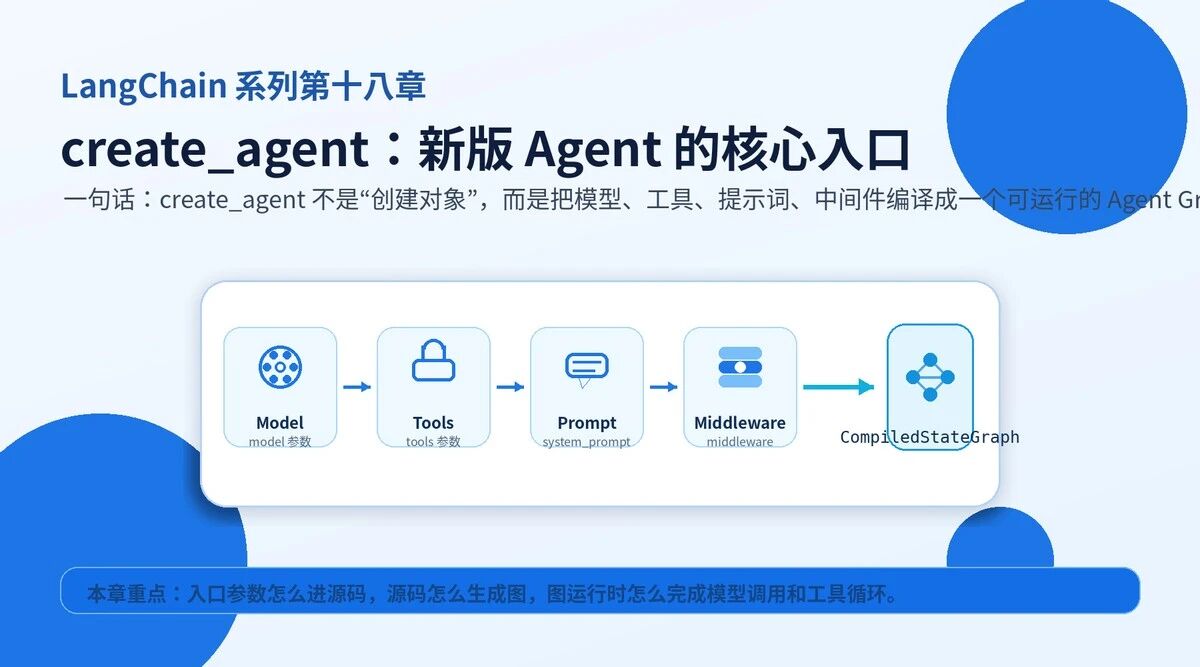
它是新式 Agent 的总装厂。你把 model、tools、system_prompt、middleware 交给它,它返回的不是普通对象,而是一张 CompiledStateGraph。
这意味着两件事:第一,Agent 的运行过程本质上是图执行;第二,模型调用、工具调用、状态更新、中间件拦截,全部被放进图里统一调度。
2. 先看参数:不要背,按职责分组
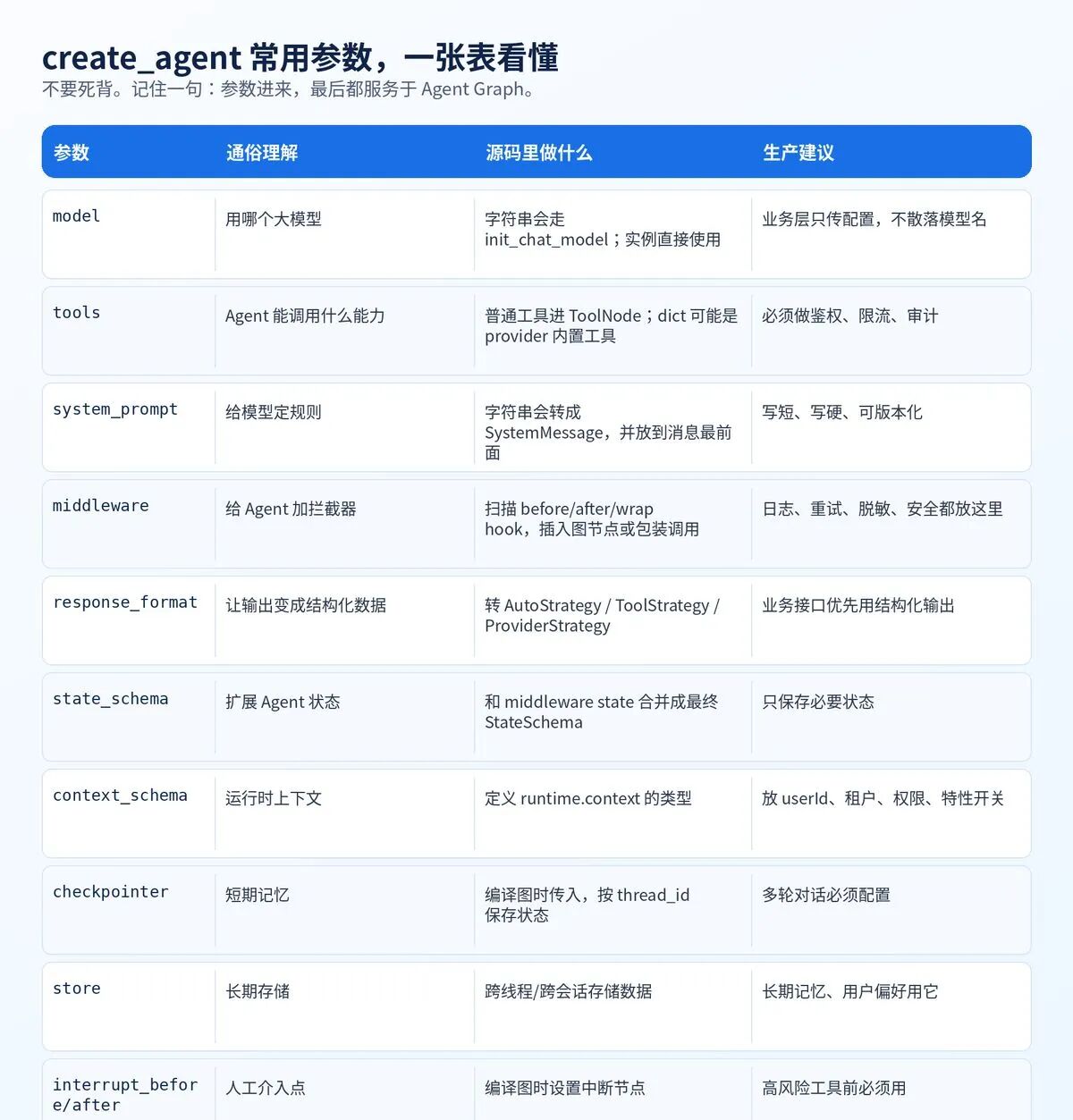
create_agent 的参数看起来多,其实只有四类:核心组件、状态记忆、人工控制、工程治理。
3. 最小代码:三行搭起一个 Agent
最小形态只需要模型和工具。system_prompt 用来定规则。其他能力后面再加。
from langchain.agents import create_agent
agent = create_agent(
model="openai:gpt-5.5",
tools=search_tool, query_order_tool,
system_prompt="你是一个企业助手,回答必须简洁、准确、可追溯。",
)
result = agent.invoke({
"messages": {"role": "user", "content": "帮我查一下订单 123456"}
})
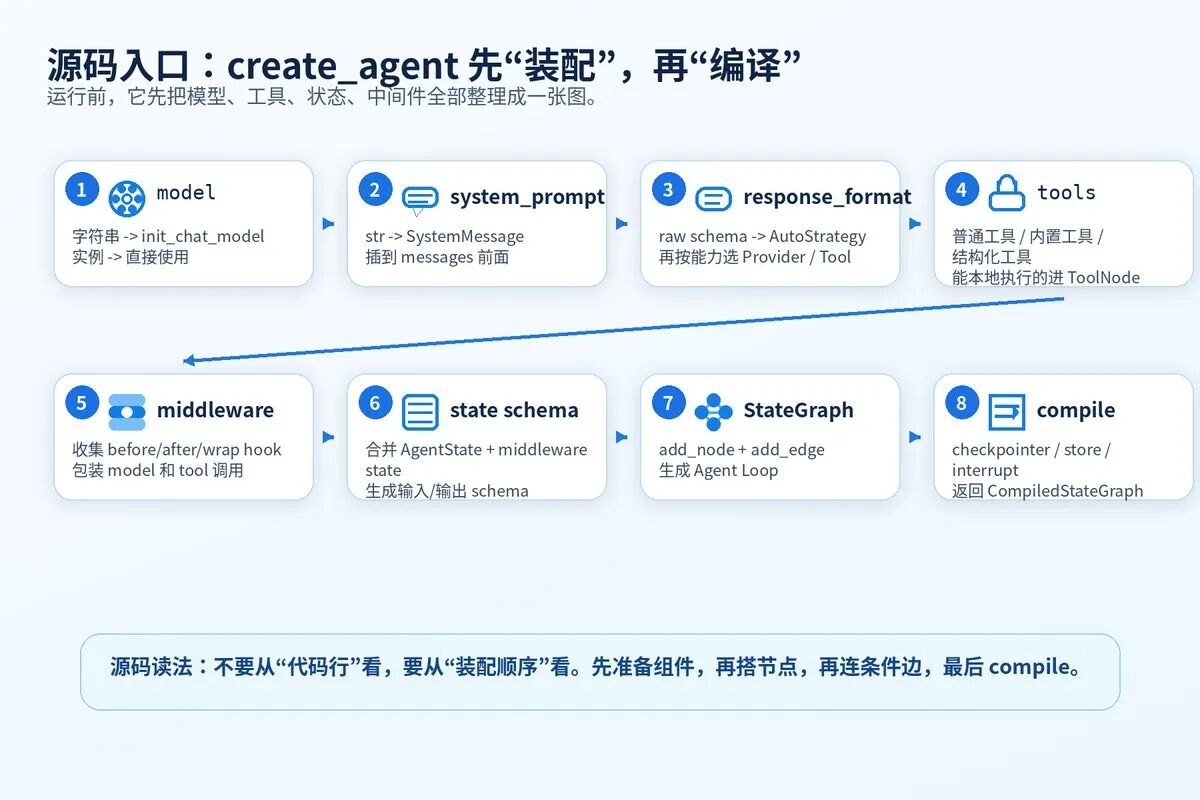
这段代码表面很短。源码里面做了很多事:初始化模型、转换工具、构造状态、创建节点、连边、编译图。
4. 源码主线:create_agent 先装配,再编译
源码不要一行一行死扣。先抓主线。它不是运行 Agent,而是先生成一张 Agent Graph。
5. 源码第一步:处理 model 和 system_prompt
源码先判断 model 是字符串还是模型实例。字符串会走 init_chat_model。实例直接用。
接着处理 system_prompt。字符串会被转成 SystemMessage。调用模型时,它会被放到 messages 前面。
伪代码:对应 factory.py 的初始化思路
if isinstance(model, str):
model = init_chat_model(model)
if system_prompt is not None:
system_message = SystemMessage(content=system_prompt)
else:
system_message = None
|----------------------------------------------------------|
| 系统提示词不是普通文本。它进入源码后会变成 SystemMessage,作为模型调用的最高优先级上下文。 |
6. 源码第二步:处理 response_format
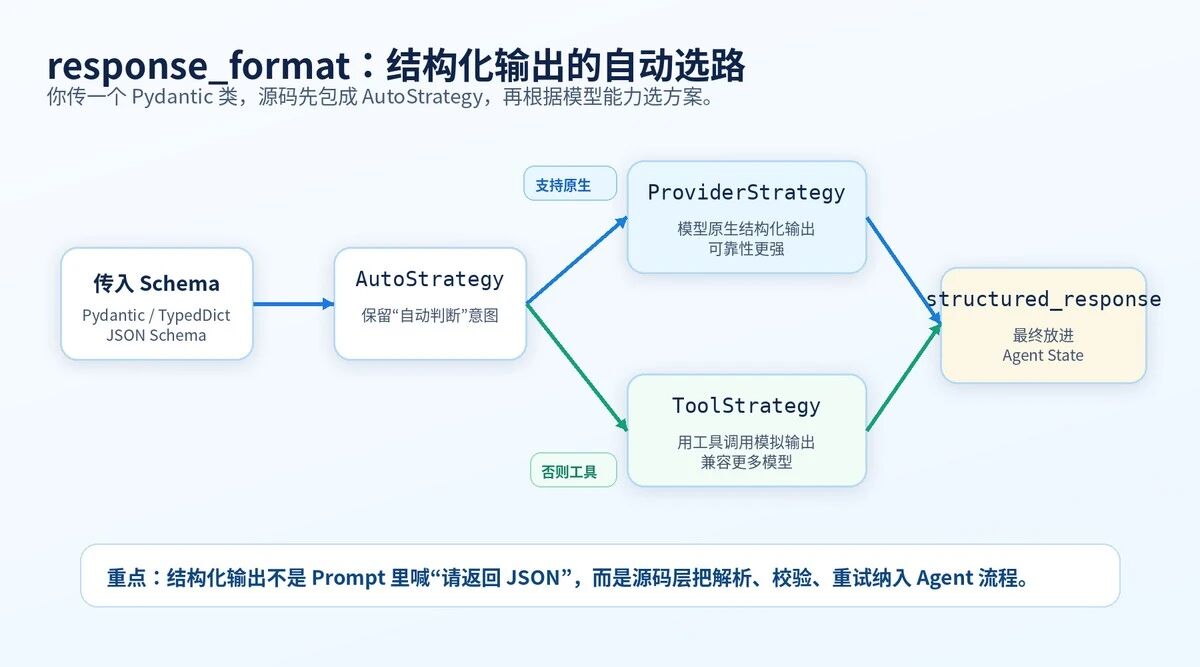
response_format 负责结构化输出。你可以传 Pydantic、TypedDict、JSON Schema,也可以显式传 ToolStrategy 或 ProviderStrategy。
源码的核心动作是:如果你直接传 Schema,先包成 AutoStrategy。后面再根据模型能力决定走 ProviderStrategy 还是 ToolStrategy。
伪代码:结构化输出的核心逻辑
if response_format is None:
initial_response_format = None
elif isinstance(response_format, (ToolStrategy, ProviderStrategy, AutoStrategy)):
initial_response_format = response_format
else:
initial_response_format = AutoStrategy(schema=response_format)
ProviderStrategy 更像"模型服务商原生保证"。ToolStrategy 更像"通过工具调用让模型返回结构化结果"。
7. 源码第三步:收集工具,创建 ToolNode
tools 不是直接塞给模型就完事。源码会拆分工具类型。
普通工具和中间件注册的工具,通常需要本地执行,会进入 ToolNode。dict 格式的 provider 内置工具,可能由模型提供商处理。结构化输出工具,会根据 response_format 动态加入。
伪代码:工具装配思路
middleware_tools = tool for m in middleware for tool in m.tools
regular_tools = t for t in tools if not isinstance(t, dict)
built_in_tools = t for t in tools if isinstance(t, dict)
available_tools = middleware_tools + regular_tools
tool_node = ToolNode(tools=available_tools) if available_tools else None
|-------------------------------------------------------------------|
| ToolNode 是工具执行中心。模型只负责"要不要调工具、调哪个工具、传什么参数"。真正执行工具的是 ToolNode。 |
8. 源码第四步:收集中间件 Hook
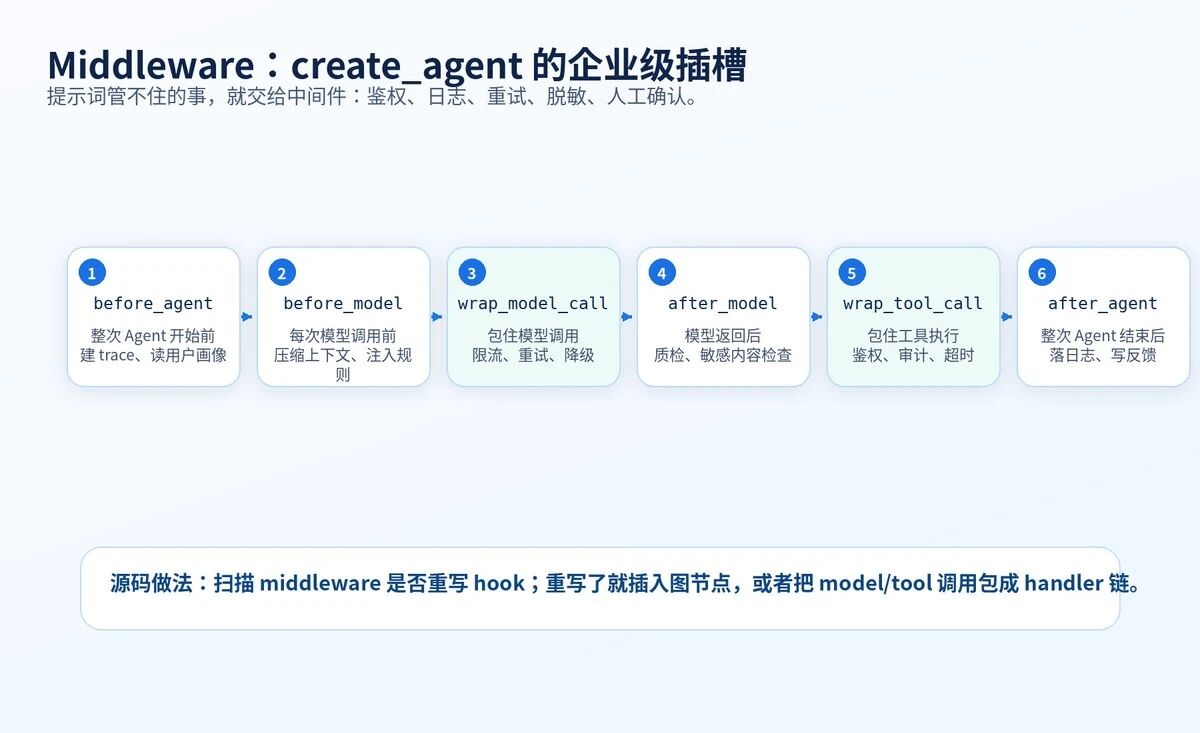
middleware 是 create_agent 变强的地方。源码会检查每个中间件是否重写了 before_agent、before_model、after_model、after_agent、wrap_model_call、wrap_tool_call。
before/after 类型会变成图节点。wrap 类型会变成调用链,包住模型调用或工具调用。
伪代码:中间件收集思路
middleware_w_before_model = m for m in middleware if m.before_model 被重写
middleware_w_after_model = m for m in middleware if m.after_model 被重写
middleware_w_wrap_model = m for m in middleware if m.wrap_model_call 被重写
middleware_w_wrap_tool = m for m in middleware if m.wrap_tool_call 被重写
wrap_model_call_handler = chain(wrap_model_call_hooks)
wrap_tool_call_wrapper = chain(wrap_tool_call_hooks)
9. 源码第五步:创建 StateGraph
Agent 运行时必须有状态。最核心的状态就是 messages。
源码会把 AgentState、middleware 的 state_schema、你传入的 state_schema 合并,得到最终的状态结构。然后用这个状态结构创建 StateGraph。
伪代码:状态图创建思路
base_state = state_schema if state_schema is not None else AgentState
state_schemas = middleware.state_schema..., base_state
resolved_state_schema, input_schema, output_schema = resolve_schemas(state_schemas)
graph = StateGraph(
state_schema=resolved_state_schema,
input_schema=input_schema,
output_schema=output_schema,
context_schema=context_schema,
)
这里的 context_schema 不是聊天历史。它是运行时上下文,比如 user_id、tenant_id、feature_flag、权限信息。
10. 源码第六步:定义 model_node
model_node 是 Agent Loop 的心脏。每次循环,都会走这里。
它做五件事:构造 ModelRequest,绑定工具,拼 system_message,调用模型,处理模型输出。
伪代码:model_node 的核心流程
request = ModelRequest(
model=model,
tools=default_tools,
system_message=system_message,
response_format=initial_response_format,
messages=state"messages",
runtime=runtime,
)
bound_model, effective_response_format = get_bound_model(request)
output = bound_model.invoke(system_message, \*messages)
handled = handle_model_output(output, effective_response_format)
return Command(update={"messages": handled"messages"})
|-------------------------------------------------------|
| model_node 不只是调用模型。它还决定工具如何绑定、结构化输出如何解析、结果如何写回状态。 |
11. 源码第七步:加节点、连边、编译图
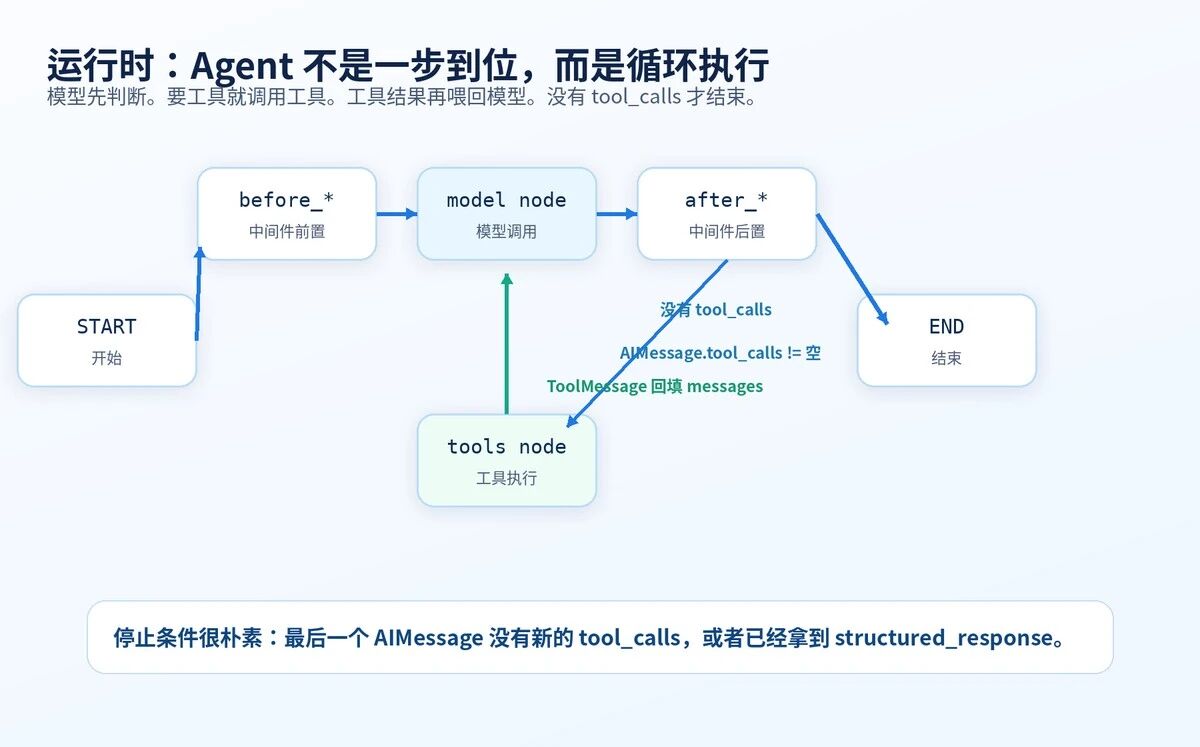
节点有 model、tools,以及中间件节点。边决定流程怎么走。
最关键的条件边是:如果 AIMessage 有 tool_calls,就去 tools;如果没有,就结束。tools 执行完,会把 ToolMessage 放回 messages,再回到 model。
伪代码:图结构主线
graph.add_node("model", model_node)
if tool_node:
graph.add_node("tools", tool_node)
graph.add_edge(START, entry_node)
graph.add_conditional_edges("model", model_to_tools_or_end)
graph.add_conditional_edges("tools", tools_to_model_or_end)
return graph.compile(
checkpointer=checkpointer,
store=store,
interrupt_before=interrupt_before,
interrupt_after=interrupt_after,
debug=debug,
)
12. invoke、stream、thread_id:运行时怎么用?
create_agent 返回的是可执行图。你可以 invoke 拿最终结果,也可以 stream 看中间过程。
多轮对话要配 checkpointer,并在 config 里传 thread_id。thread_id 决定这轮会话的状态保存在哪里。
from langgraph.checkpoint.memory import InMemorySaver
from langchain.agents import create_agent
agent = create_agent(
model="openai:gpt-5.5",
tools=query_order,
checkpointer=InMemorySaver(),
)
config = {"configurable": {"thread_id": "user-1001-session-01"}}
agent.invoke(
{"messages": {"role": "user", "content": "我的订单到哪了?"}},
config=config,
)
同一个 thread_id,下一轮可以接上上一轮状态
agent.invoke(
{"messages": {"role": "user", "content": "那能改地址吗?"}},
config=config,
)
13. 把源码压缩成一条线
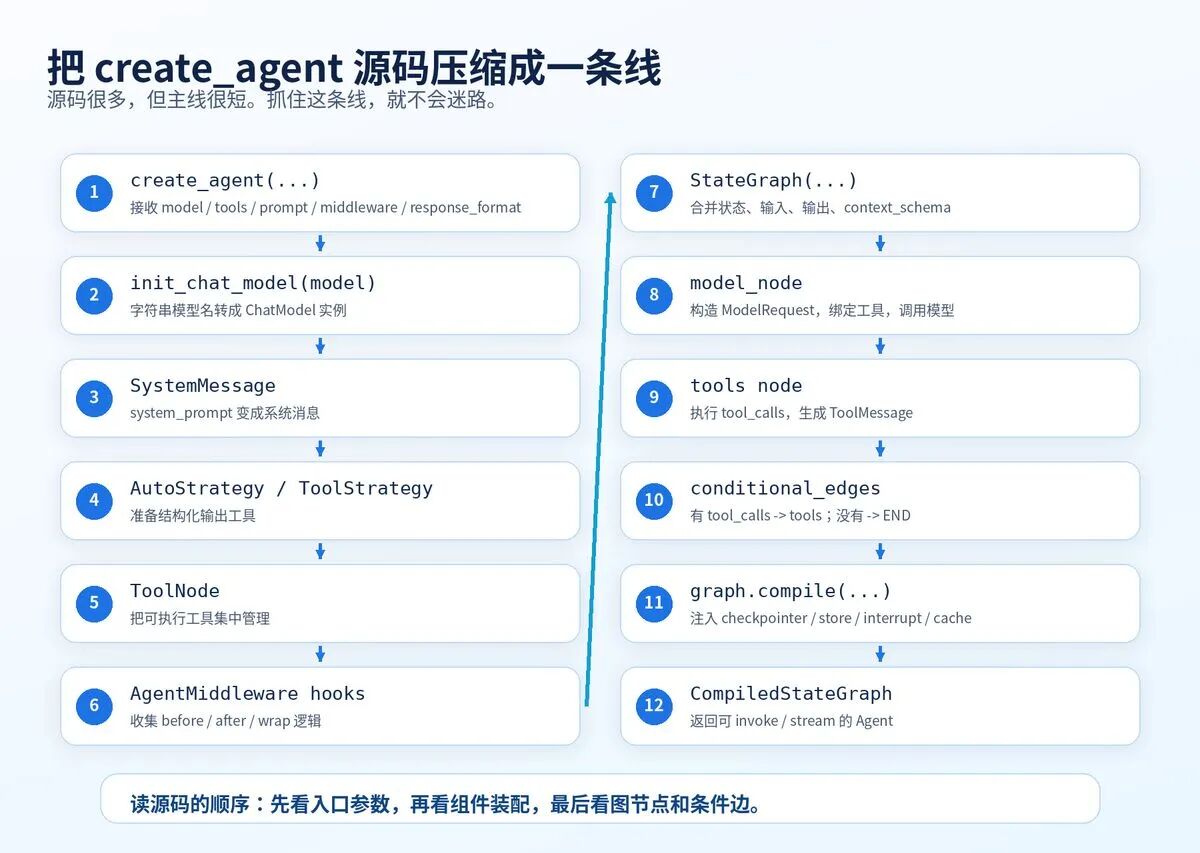
源码很长,但主线可以压缩成下面这条线。
14. 企业落地:封装 AgentFactory,不要散落 create_agent
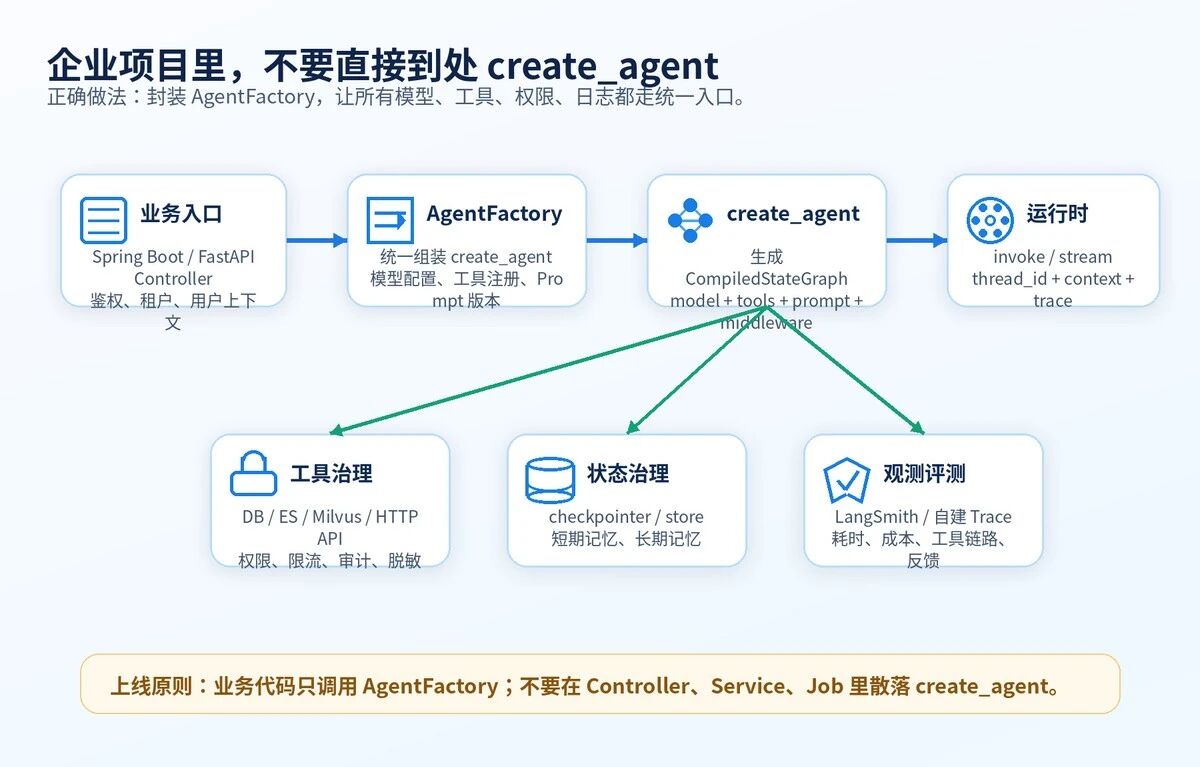
真实项目里,不建议在每个业务接口里直接 create_agent。这样模型、工具、Prompt、权限、日志都会散。
更好的方式是做一个 AgentFactory。业务方只传场景和上下文。AgentFactory 统一选择模型、加载工具、注入中间件、配置 checkpointer 和 trace。
15. 总结
• create_agent 是新版 LangChain Agent 的核心入口。
• 它返回的是 CompiledStateGraph,不是普通 Python 对象。
• model、tools、system_prompt、middleware、response_format 都会在源码里被装配进图。
• Agent Loop 的关键判断很简单:有 tool_calls 就去工具,没有 tool_calls 就结束。
• 中间件是企业级能力的插槽:日志、鉴权、重试、脱敏、人工确认都应该放进去。
• 生产项目要封装 AgentFactory,统一管理模型、工具、Prompt、状态、观测和安全策略。
|--------------------------------------------------------------------------|
| 最后记住一句:create_agent 不是让模型变聪明,而是把模型变成一个可执行、可拦截、可持久化、可观测的 Agent Graph。 |