在 Ubuntu 24.04 及更高版本 (如 25.04)中,APT 软件源配置文件已从传统的 /etc/apt/sources.list 迁移到 /etc/apt/sources.list.d/ubuntu.sources,更换阿里云镜像需要直接修改该文件。
bash
# -----------------------------------------------------
# - 🚀 Powered by Moshow郑锴
# - 🌟 Might the holy code be with you!
# -----------------------------------------------------
# 🔍 公众号 👉 软件开发大百科
# 💻 CSDN 👉 https://zhengkai.blog.csdn.net
# 📂 Github 👉 https://github.com/moshowgame
步骤 1:编辑源配置文件
在修改前备份原配置:
sudo cp /etc/apt/sources.list.d/ubuntu.sources ~/ubuntu.sources.bak
nano修改
sudo nano /etc/apt/sources.list.d/ubuntu.sources
步骤 2:替换为阿里云镜像地址
bash
moshow@moshow-ubuntu:~/Downloads$ sudo nano /etc/apt/sources.list.d/ubuntu.sources
moshow@moshow-ubuntu:~/Downloads$ cat /etc/apt/sources.list.d/ubuntu.sources
Types: deb
URIs: https://mirrors.aliyun.com/ubuntu/
Suites: resolute resolute-updates resolute-backports
Components: main restricted universe multiverse
Signed-By: /usr/share/keyrings/ubuntu-archive-keyring.gpg

Types: deb
URIs: https://mirrors.aliyun.com/ubuntu/
Suites: resolute-security
Components: main restricted universe multiverse
Signed-By: /usr/share/keyrings/ubuntu-archive-keyring.gpg
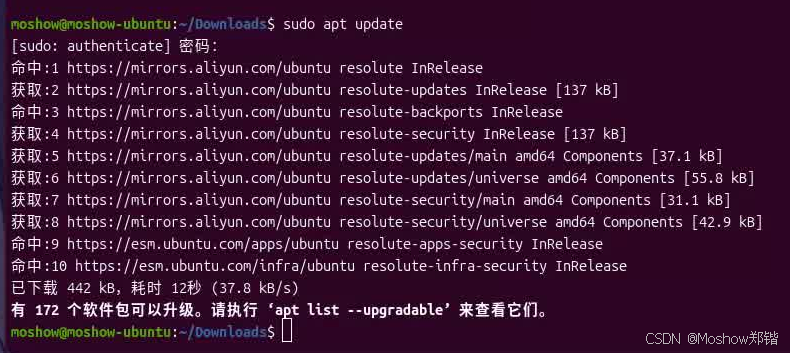
步骤 3:更新软件包索引
sudo apt update
bash
moshow@moshow-ubuntu:~/Downloads$ sudo apt update
[sudo: authenticate] 密码:
获取:1 http://archive.ubuntu.com/ubuntu resolute InRelease [136 kB]
获取:2 http://archive.ubuntu.com/ubuntu resolute-updates InRelease [137 kB]
命中:3 http://archive.ubuntu.com/ubuntu resolute-backports InRelease
获取:4 http://archive.ubuntu.com/ubuntu resolute/main i386 Packages [1,069 kB]
获取:5 http://archive.ubuntu.com/ubuntu resolute/main amd64 Packages [1,480 kB]
获取:6 http://security.ubuntu.com/ubuntu resolute-security InRelease [137 kB]
命中:7 https://esm.ubuntu.com/apps/ubuntu resolute-apps-security InRelease
命中:8 https://esm.ubuntu.com/infra/ubuntu resolute-infra-security InRelease
获取:9 http://security.ubuntu.com/ubuntu resolute-security/main i386 Packages [93.8 kB]
获取:10 http://security.ubuntu.com/ubuntu resolute-security/main amd64 Packages [203 kB]
获取:11 http://security.ubuntu.com/ubuntu resolute-security/main Translation-en [54.8 kB]
获取:12 http://security.ubuntu.com/ubuntu resolute-security/main amd64 Components [31.1 kB]
获取:13 http://security.ubuntu.com/ubuntu resolute-security/main Icons (48x48) [14.3 kB]
获取:14 http://security.ubuntu.com/ubuntu resolute-security/main Icons (64x64) [20.3 kB]
获取:15 http://security.ubuntu.com/ubuntu resolute-security/main amd64 c-n-f Metadata [3,332 B]
获取:16 http://security.ubuntu.com/ubuntu resolute-security/restricted i386 Packages [13.0 kB]
获取:17 http://security.ubuntu.com/ubuntu resolute-security/restricted amd64 Packages [201 kB]
获取:18 http://security.ubuntu.com/ubuntu resolute-security/restricted Translation-en [35.1 kB]
获取:19 http://security.ubuntu.com/ubuntu resolute-security/restricted amd64 c-n-f Metadata [396 B]
获取:20 http://security.ubuntu.com/ubuntu resolute-security/universe amd64 Packages [110 kB]
获取:21 http://security.ubuntu.com/ubuntu resolute-security/universe i386 Packages [52.8 kB]
获取:22 http://security.ubuntu.com/ubuntu resolute-security/universe Translation-en [34.6 kB]
获取:23 http://archive.ubuntu.com/ubuntu resolute/main amd64 c-n-f Metadata [32.4 kB]
获取:24 http://security.ubuntu.com/ubuntu resolute-security/universe amd64 Components [42.9 kB]
获取:25 http://security.ubuntu.com/ubuntu resolute-security/universe Icons (48x48) [14.6 kB]
获取:26 http://security.ubuntu.com/ubuntu resolute-security/universe Icons (64x64) [23.3 kB]
获取:27 http://security.ubuntu.com/ubuntu resolute-security/universe amd64 c-n-f Metadata [2,996 B]
获取:28 http://archive.ubuntu.com/ubuntu resolute/universe amd64 Packages [16.0 MB]
获取:29 http://archive.ubuntu.com/ubuntu resolute/universe i386 Packages [8,511 kB]
获取:30 http://archive.ubuntu.com/ubuntu resolute/universe Translation-en [6,329 kB]