使用多张表
1、合并多个行集
问题:
你想返回存储在多张表中的数据,即将多个结果集合并。这些表并非必须有相同的键,但它们的列的数据类型必须相同。例如,你想显示 EMP 表中部门编号为 10 的员工的姓名和部门编号,以及 DEPT 表中每个部门的名称和编号。换言之,你希望返回如下结果集。
sql
ENAME_AND_DNAME      DEPTNO
---------------  ----------
CLARK                    10
KING                     10
MILLER                   10
----------
ACCOUNTING               10
RESEARCH                 20
SALES                    30
OPERATIONS 40解决方案:
使用集合运算 UNION ALL 合并来自多张表的行。
sql
select ename as ename_and_dname, deptno
from emp
where deptno = 10
union all
select '----------', null
from t1
union all
select dname, deptno
from dept;


 ename_and_dname | deptno
-----------------+--------
 CLARK           |     10
 KING            |     10
 MILLER          |     10
 ----------      |
 ACCOUNTING      |     10
 RESEARCH        |     20
 OPERATIONS      |     40
(7 rows)
UNION ALL 可以将来自多个数据源的行合并为一个结果集。与所有的集合运算一样,在 SELECT 子句中指定的列的数量和类型必须匹配。例如,下面两个查询都将以失败告终。
sql
select deptno   |  select deptno, dname
from dept       |    from dept
union all       |   union all
select ename    |  select deptno
from emp        |    from emp
需要指出的是,UNION ALL 不会剔除重复的行。要剔除重复的行,可以使用运算符 UNION。例如,对EMP.DEPTNO 和 DEPT.DEPTNO 执行 UNION 操作时,只会返回 4 行数据。
sql
select deptno
from emp
union
select deptno
from dept;

 deptno
--------
     40
     10
     30
     20
(4 rows)
使用 UNION(而不是 UNION ALL)时,很可能引发排序操作以消除重复的行。处理大型结果集时,务必牢记这一点。使用 UNION 的效果与下面的查询大致相同,该查询对 UNION ALL 的输出执行了 DISTINCT 操作。
sql
select distinct deptno
from (
	select deptno
  from emp
	union all
	select deptno
  from dept
) temp;

 deptno
--------
     40
     30
     10
     20
(4 rows)
除非必要,否则不要在查询中使用 DISTINCT。这条规则也适用于 UNION:除非必要,否则不要使用 UNION,而应该使用 UNION ALL。例如,在本书中,为教学而使用的表不多,但在实际场景中,如果查询单张表,则可能有更合适的方式。
2、合并相关的行
问题:
你想执行基于相同列或相同列值的连接,以返回多张表中的行。例如,你想显示所有部门编号为 10 的员工的姓名以及每位员工所属部门的位置,但这些数据存储在两张表中。换言之,你想返回如下结果集。
sql
ENAME       LOC
----------  ----------
CLARK       NEW YORK
KING        NEW YORK
MILLER NEW YORK解决方案:
基于 DEPTNO 连接 EMP 表和 DEPT 表。
sql
select e.ename, d.loc
from emp e, dept d
where e.deptno = d.deptno and e.deptno = 10;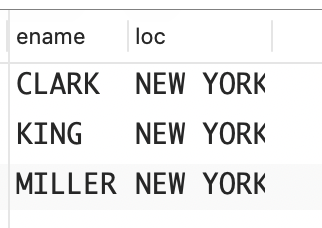
上述解决方案使用了连接,准确地说是相等连接------内连接的一种。连接是一种将两张表中的行合并的操作,而相等连接是基于相等条件(比如一张表的部门编号与另一张表的部门编号相等)的连接。内连接是最基本的连接,它返回的每一行都包含来自参与连接查询的各张表的数据。
从概念上说,为生成结果集,连接首先会创建 FROM 子句中指定的表的笛卡儿积(所有可能的行组合)。
sql
select e.ename, d.loc,
       e.deptno as emp_deptno,
       d.deptno as dept_deptno
from emp e, dept d
where e.deptno = 10;

 ename  |   loc    | emp_deptno | dept_deptno
--------+----------+------------+-------------
 CLARK  | NEW YORK |         10 |          10
 KING   | NEW YORK |         10 |          10
 MILLER | NEW YORK |         10 |          10
 CLARK  | DALLAS   |         10 |          20
 KING   | DALLAS   |         10 |          20
 MILLER | DALLAS   |         10 |          20
 CLARK  | BOSTON   |         10 |          40
 KING   | BOSTON   |         10 |          40
 MILLER | BOSTON   |         10 |          40
(9 rows)
这将返回 EMP 表中部门编号为 10 的每位员工与 DEPT 表中每个部门的组合。然后 WHERE 子句中涉及 e.deptno和 d.deptno(连接)的表达式会对结果集进行限制,使其只包含 EMP.DEPTNO 和 DEPT.DEPTNO 相等的行。
sql
select e.ename, d.loc,
       e.deptno as emp_deptno,
       d.deptno as dept_deptno
  from emp e, dept d
 where e.deptno = d.deptno
   and e.deptno = 10

ENAME       LOC             EMP_DEPTNO  DEPT_DEPTNO
----------  --------------  ----------  -----------
CLARK       NEW YORK                10           10
KING        NEW YORK                10           10
MILLER      NEW YORK                10           10
另一种解决方案是显式地指定 JOIN 子句(关键字INNER 是可选的)。
sql
select e.ename, d.loc
from emp e inner join dept d
on e.deptno = d.deptno
where e.deptno = 10;
如果你喜欢在 FORM 子句(而不是 WHERE 子句)中指定连接逻辑,那么可以使用 JOIN 子句。这里介绍的两种风格都符合 ANSI 标准,提及的所有 RDBMS 的最新版本都支持它们。
3、查找两张表中相同的行
问题:
你想找出两张表中相同的行,但需要连接多列。例如,请看下面的视图 V,它是为了教学而使用 EMP 表创建的。
sql
create view V
as
select ename, job, sal
from emp
where job = 'CLERK';

select * from V;

 ename  |  job  | sal
--------+-------+------
 SMITH  | CLERK |  800
 ADAMS  | CLERK | 1100
 JAMES  | CLERK |  950
 MILLER | CLERK | 1300
(4 rows)
视图 V 只包含普通职员,并没有显示 EMP 表中所有可能的列。你想返回 EMP 表中与视图 V 中行匹配的每位员工的 EMPNO、ENAME、JOB、SAL 和 DEPTNO。换言之,你希望返回如下结果集。
sql
   EMPNO  ENAME       JOB              SAL    DEPTNO
--------  ----------  --------- ---------- ---------
    7369 SMITH        CLERK            800        20
    7876 ADAMS        CLERK           1100        20
    7900 JAMES        CLERK            950        30
7934 MILLER CLERK 1300 10解决方案:
基于必要的列将表连接起来,以返回正确的结果。也可以使用集合运算 INTERSECT 来返回两张表的交集(两张表中相同的行),这样可以避免执行连接操作。
MySQL 和 SQL Server:使用多个连接条件将 EMP 表和视图 V 连接起来。
sql
select e.empno, e.ename, e.job, e.sal, e.deptno
from emp e, V v
where e.ename = v.ename
and e.job = v.job
and e.sal = v.sal;

 empno | ename  |  job  | sal  | deptno
-------+--------+-------+------+--------
  7369 | SMITH  | CLERK |  800 |     20
  7876 | ADAMS  | CLERK | 1100 |     20
  7900 | JAMES  | CLERK |  950 |     30
  7934 | MILLER | CLERK | 1300 |     10
(4 rows)
也可以使用 JOIN 子句来执行这个连接。
sql
select e.empno, e.ename, e.job, e.sal, e.deptno
from emp e inner join V v
on e.ename = v.ename
and e.job = v.job
and e.sal = v.sal;
DB2、Oracle 和 PostgreSQL:MySQL 和 SQL Server 解决方案也适用于 DB2、Oracle和 PostgreSQL。需要返回视图 V 中的值时,应该使用该解决方案。
如果不需要返回视图 V 中的列,那么可以结合使用集合运算 INTERSECT 和谓词 IN。
sql
select empno,ename,job,sal,deptno
from emp
where (ename,job,sal) in (
	select ename,job,sal from emp
	intersect
	select ename,job,sal from V
);
集合运算 INTERSECT 会返回两个数据源中相同的行。使用 INTERSECT 时,必须对两张表中数据类型相同的列进行比较。别忘了,集合运算默认不会返回重复的行。
4、从一张表中检索没有出现在另一张表中的值
问题:你想找出一张表(源表)中没有出现在目标表中的值。例如,你想找出 DEPT 表中都有哪些部门没有出现在 EMP表中。在使用的示例数据库中,DEPT 表中的DEPTNO 40 没有出现在 EMP 表中,因此结果集如下所示。
sql
    DEPTNO
----------
40解决方案:解决这个问题时,计算差集的函数很有用。DB2、PostgreSQL、SQL Server 和 Oracle 都支持差集运算。如果你使用的 DBMS 没有提供计算差集的函数,则可以像 MySQL 解决方案那样使用子查询。
DB2、PostgreSQL 和 SQL Server:使用集合运算 EXCEPT。
sql
select deptno from dept
except
select deptno from emp;

 deptno
--------
     40
(1 row)
差集函数让这种操作易如反掌。EXCEPT 运算符会将出现在第一个结果集中但属于第二个结果集的行都删除。这种操作很像减法运算。
对于包含 EXCEPT 在内的集合运算符,存在一定的限制:在两个 SELECT 子句中,指定的列的数量和数据类型必须匹配。另外,EXCEPT 会剔除重复的行,同时不同于使用 NOT IN 的子查询,NULL 不会给它带来麻烦(参见有关 MySQL 的讨论)。EXCEPT 运算符会返回上查询(位于 EXCEPT 前面的查询)中没有出现在下查询(位于 EXCEPT 后面的查询)中的行。
Oracle:使用集合运算 MINUS。
sql
select deptno from dept
minus
select deptno from emp;
Oracle 解决方案与使用 EXCEPT 运算符的解决方案相同,但 Oracle 差集运算符名为 MINUS,而不是EXCEPT。除这一点外,前述说明也适用于 Oracle 解决方案。
MySQL:使用子查询将 EMP 表中所有的 DEPTNO 都返回给外部查询,而外部查询在 DEPT 表中查找 DEPTO 没有出现在子查询返回结果中的行。
sql
select deptno
from dept
where deptno not in (
	select deptno
	from emp
);
在 MySQL 解决方案中,子查询会返回 EMP 表中所有的DEPTNO,而外部查询会返回 DEPT 表中未出现(未包含)在子查询返回的结果集中的所有 DEPTNO。
使用 MySQL 解决方案时,必须考虑消除重复行的问题。基于 EXCEPT 和 MINUS 的解决方案会消除结果集中的重复行,确保每个 DEPTNO 都只报告一次。当然,在示例数据库中,DEPTNO 是主键,因此在 DEPT 表中不会重复。如果 DEPTNO 不是主键,则可以像下面这样使用 DISTINCT,来确保未出现在 EMP 表中的每个DEPTNO 值都只报告一次。
sql
select distinct deptno
from dept
where deptno not in (
	select deptno from emp
);
使用 NOT IN 时,务必注意 NULL 值。请看下面的NEW_DEPT 表。
sql
create table new_dept(deptno integer);
insert into new_deptvalues (10);
insert into new_dept values (50);
insert into new_dept values (null);
如果结合子查询和 NOT IN 来查找出现在 DEPT 表中而没有出现在 NEW_DEPT 表中的 DEPTNO,你将发现没有返回任何行。
sql
select *
from dept
where deptno not in (select deptno from new_dept);

 deptno | dname | loc
--------+-------+-----
(0 rows)
DEPTNO 20、DEPTNO 30 和 DEPTNO 40 都未出现在NEW_DEPT 表中,但上述查询并没有返回它们。这是为什么呢?原因是 NEW_DEPT 表中包含 NULL 值。子查询返回了 3 行,它们的 DEPTNO 值分别是 10、50 和NULL。从本质上说,IN 和 NOT IN 就是 OR 运算,由于逻辑运算符 OR 处理 NULL 值的方式,导致 IN 和 NOTIN 的结果出乎意料。
为弄明白这一点,请看下面的真值表(T=true、F=false、N=null)。
sql
  OR | T | F | N  |
+----+---+---+----+
| T  | T | T | T  |
| F  | T | F | N  |
| N  | T | N | N  |
+----+---+---+----+

  NOT |
+-----+---+
|  T  | F |
|  F  | T |
|  N  | N |
+-----+---+

  AND | T | F | N |
+-----+---+---+---+
|  T  | T | F | N |
|  F  | F | F | F |
|  N  | N | F | N |
+-----+---+---+---+
现在来看一个使用 IN 的示例以及与之等价但使用 OR 的示例。
sql
select deptno
  from dept
 where deptno in ( 10,50,null );

 DEPTNO
-------
     10

select deptno
  from dept
 where (deptno=10 or deptno=50 or deptno=null)

DEPTNO
-------
     10
为什么只返回了 DEPTNO 10 呢?DEPT 表中有 4 个DEPTNO(10、20、30 和 40),对于每个 DEPTNO,都将使用谓词(deptno=10 or deptno=50 ordeptno=null)对其进行评估。根据前面的真值表,对于每个 DEPTNO(10、20、30 和 40),这个谓词的评估结果如下所示。
sql
DEPTNO=10
(deptno=10 or deptno=50 or deptno=null)
= (10=10 or 10=50 or 10=null)
= (T or F or N)
= (T or N)
= (T)

DEPTNO=20
(deptno=10 or deptno=50 or deptno=null)
= (20=10 or 20=50 or 20=null)
= (F or F or N)
= (F or N)
= (N)

DEPTNO=30
(deptno=10 or deptno=50 or deptno=null)
= (30=10 or 30=50 or 30=null)
= (F or F or N)
= (F or N)
= (N)

DEPTNO=40
(deptno=10 or deptno=50 or deptno=null)
= (40=10 or 40=50 or 40=null)
= (F or F or N)
= (F or N)
= (N)
至此,使用 IN 和 OR 时只返回 DEPTNO 10 的原因就显而易见了。接下来,看看使用 NOT IN 和 NOT OR 的示例。
sql
select deptno
  from dept
 where deptno not in ( 10,50,null )

( no rows )

select deptno
  from dept
 where not (deptno=10 or deptno=50 or deptno=null)

( no rows )
为什么没有返回任何行呢?下面来看看真值表。
sql
DEPTNO=10
NOT (deptno=10 or deptno=50 or deptno=null)
= NOT (10=10 or 10=50 or 10=null)
= NOT (T or F or N)
= NOT (T or N)
= NOT (T)
= (F)

DEPTNO=20
NOT (deptno=10 or deptno=50 or deptno=null)
= NOT (20=10 or 20=50 or 20=null)
= NOT (F or F or N)
= NOT (F or N)
= NOT (N)
= (N)

DEPTNO=30
NOT (deptno=10 or deptno=50 or deptno=null)
= NOT (30=10 or 30=50 or 30=null)
= NOT (F or F or N)
= NOT (F or N)
= NOT (N)
= (N)

DEPTNO=40
NOT (deptno=10 or deptno=50 or deptno=null)
= NOT (40=10 or 40=50 or 40=null)
= NOT (F or F or N)
= NOT (F or N)
= NOT (N)
= (N)
在 SQL 中,TRUE or NULL 的结果为 TRUE,但FALSE or NULL 的结果为 NULL!使用谓词 IN 或执行逻辑 OR 运算时,如果涉及 NULL 值,务必牢记这一点。
为了避免 NULL 给 NOT IN 带来的问题,可以结合使用关联子查询和 NOT EXISTS。为什么叫关联子查询呢?这是因为在子查询中引用了外部查询返回的行。下面的示例演示了一种不受 NULL 值影响的解决方案
sql
select d.deptno
  from dept d
 where not exists (
   select 1
     from emp e
    where d.deptno = e.deptno
)

DEPTNO
----------
40

select d.deptno
  from dept d
 where not exists (
   select 1
     from new_dept nd
    where d.deptno = nd.deptno
)

DEPTNO
----------
30
40
20
从概念上讲,该解决方案中的外部查询考虑了 DEPT 表中的每一行。对于 DEPT 表中的每一行,都将做如下处理。
- 执行子查询,看看该部门编号是否出现在了 EMP 表中。请注意,条件 D.DEPTNO = E.DEPTNO 会比较两张表中的部门编号。
- 如果子查询返回了结果,那么 EXISTS (...) 将为 TRUE,而 NOT EXISTS (...) 将为 FALSE,因此丢弃外部查询的话,当前检查的行将被丢弃。
- 如果子查询没有返回结果,那么 NOT EXISTS (...)将为 TRUE,因此将返回外部查询当前检查的行(因为该行中的部门编号未出现在 EMP 表中)。
结合使用关联子查询和 EXISTS/NOT EXISTS 时,关联子查询中 SELECT 子句列出的内容无关紧要。有鉴于此,我们使用了 SELECT 1,旨在让你将注意力放在关联子查询中的连接上,而不是 SELECT 子句的内容列表中。
5、从一张表中检索在另一张表中没有对应行的行
问题:有两张包含相同键的表,你想从一张表中找出在另一张表中没有与之匹配的行。例如,你想确定哪个部门没有员工,结果集如下所示。
sql
    DEPTNO  DNAME           LOC
----------  --------------  -------------
        40  OPERATIONS      BOSTON
如果想确定每个员工所属的部门,就需要在 EMP 表和DEPT 表之间建立基于 DEPTNO 的相等连接。DEPTNO 列是这两张表中都有的值。可惜相等连接无法让你知道哪个部门没有员工,因为在 EMP 表和 DEPT 表之间建立相等连接时,将返回满足连接条件的所有行,而你想知道的是DEPT 表中不满足连接条件的行。
这个问题与前一个问题之间的差别很细微,因此乍一看它们好像是相同的。差别在于,前一个实例要获得的是未出现在 EMP 表中的部门编号列表。然而,本实例可以轻松地返回 DEPT 表中的其他列:除了部门编号,还可以返回其他列。
解决方案: 返回一张表中的所有行,以及在另一张表中可能有匹配行也可能没有匹配行的行。然后,只留下没有匹配行的行。
DB2、MySQL、PostgreSQL 和 SQL Server:使用外连接并执行基于 NULL 的筛选(关键字 OUTER 是可选的)。
sql
select d.deptno, d.dname, d.loc
from dept d left join emp e
on d.deptno = e.deptno
where e.deptno is null;

 deptno |   dname    |  loc
--------+------------+--------
     40 | OPERATIONS | BOSTON
(1 row)
6、在查询中添加连接并确保不影响其他连接
问题:你有一个查询,它可以返回你想要的结果。你需要获取其他信息,但尝试这样做时,结果集中少了原本该有的数据。例如,你想返回每位员工、他们所属部门的位置以及他们获得奖金的日期。这个问题需要用到包含如下数据的EMP_BONUS 表。
sql
create table emp_bonus(
	EMPNO INT PRIMARY KEY,
	RECEIVED VARCHAR(20) NOT NULL,
	TYPE INT NOT NULL
);

INSERT INTO emp_bonus VALUES
(7369, '14-MAR-2005', 1),
(7900, '14-MAR-2005', 2),
(7788, '14-MAR-2005', 3);
你希望查询结果中包含员工获得奖金的日期,为此连接到了 EMP_BONUS 表,但返回的行数更少了,因为并非每位员工都获得过奖金。
sql
select e.ename, d.loc,eb.received
  from emp e, dept d, emp_bonus eb
 where e.deptno=d.deptno
   and e.empno=eb.empno

ENAME       LOC           RECEIVED
----------  ------------- -----------
SCOTT       DALLAS        14-MAR-2005
SMITH       DALLAS        14-MAR-2005
JAMES       CHICAGO       14-MAR-2005
你希望得到如下结果集。
sql
ENAME       LOC           RECEIVED
----------  ------------- -----------
ALLEN       CHICAGO
WARD        CHICAGO
MARTIN      CHICAGO
JAMES       CHICAGO       14-MAR-2005
TURNER      CHICAGO
BLAKE       CHICAGO
SMITH       DALLAS        14-MAR-2005
FORD        DALLAS
ADAMS       DALLAS
JONES       DALLAS
SCOTT       DALLAS        14-MAR-2005
CLARK       NEW YORK
KING        NEW YORK
MILLER NEW YORK解决方案:可以使用外连接来获得额外的信息,同时避免返回的数据比原来的查询少。先将 EMP 表连接到 DEPT 表,以返回所有的员工及其所在的部门,然后外连接到 EMP_BONUS表,以返回员工获得奖金的日期。下面的语法适用于DB2、MySQL、PostgreSQL 和 SQL Server。
sql
select e.ename, d.loc, eb.received
from emp e
join dept d on (e.deptno=d.deptno)
left join emp_bonus eb on (e.empno=eb.empno)
order by 2;
也可以使用标量子查询(放在 SELECT 列表中的子查询)来模拟外连接。
sql
select e.ename, d.loc,
	(select eb.received
	from emp_bonus eb
	where eb.empno=e.empno) as received
from emp e, dept d
where e.deptno=d.deptno
order by 2;
使用标量子查询的解决方案适用于所有平台。
外连接可以返回一张表中的所有行以及另一张表中与之匹配的行。前一个实例也使用了这种连接。为什么使用外连接能够解决这个问题呢?这是因为它不会删除任何原本返回了的行。查询将返回添加外连接前被返回的所有行。它还会返回获得奖金的日期(如果获得过奖金的话)。
对于这种问题,使用标量子查询也是一种便利的解决方案,因为不需要修改主查询中正确的既有连接。使用标量子查询是一种简易方式,可以在不破坏既有结果集的情况下添加额外的数据。使用标量子查询时,必须确保它们返回标量值(单个值)。如果 SELECT 列表中的子查询返回多行,那么将导致错误。
7、判断两张表包含的数据是否相同
问题:你想知道两张表或两个视图中包含的数据(包括基数和值)是否相同。请看下面的视图。
sql
create view V
as
select * from emp where deptno != 10
union all
select * from emp where ename = 'WARD';

select * from V

 empno | ename  |   job    | mgr  |  hiredate   | sal  | comm | deptno
-------+--------+----------+------+-------------+------+------+--------
  7369 | SMITH  | CLERK    | 7902 | 17-DEC-2005 |  800 |      |     20
  7499 | ALLEN  | SALESMAN | 7698 | 20-FEB-2006 | 1600 |  300 |     30
  7521 | WARD   | SALESMAN | 7698 | 22-FEB-2006 | 1250 |  500 |     30
  7566 | JONES  | MANAGER  | 7839 | 02-APR-2006 | 2975 |      |     20
  7654 | MARTIN | SALESMAN | 7698 | 28-SEP-2006 | 1250 | 1400 |     30
  7698 | BLAKE  | MANAGER  | 7839 | 01-MAY-2006 | 2850 |      |     30
  7788 | SCOTT  | ANALYST  | 7566 | 09-DEC-2007 | 3000 |      |     20
  7844 | TURNER | SALESMAN | 7698 | 08-SEP-2006 | 1500 |    0 |     30
  7876 | ADAMS  | CLERK    | 7788 | 12-JAN-2008 | 1100 |      |     20
  7900 | JAMES  | CLERK    | 7698 | 03-DEC-2006 |  950 |      |     30
  7902 | FORD   | ANALYST  | 7566 | 03-DEC-2006 | 3000 |      |     20
  7521 | WARD   | SALESMAN | 7698 | 22-FEB-2006 | 1250 |  500 |     30
你想确定这个视图是否与 EMP 表包含完全相同的数据。
这里复制了表示员工 WARD 的行,旨在证明此处提供的解决方案不仅能显示不同的数据,还能显示重复的数据。根据 EMP 表中包含的行可知,二者的不同之处包括 3 行表示部门编号为 10 的员工的数据以及两行表示员工WARD 的数据。
解决方案:根据你所使用的 DBMS,可以使用执行差集计算的函数MINUS 或 EXCEPT 相对轻松地解决比较表中数据的问题。如果你所使用的 DBMS 中没有提供这样的函数,则可以使用关联子查询。
DB2 和 PostgreSQL:使用集合运算 EXCEPT 计算视图 V 和 EMP 表的差集以及EMP 表和视图 V 的差集,然后使用集合运算 UNION ALL合并这两个差集。
sql
(
	select empno,ename,job,mgr,hiredate,sal,comm,deptno,count(*) as cnt
	from V
	group by empno,ename,job,mgr,hiredate,sal,comm,deptno
	except
	select empno,ename,job,mgr,hiredate,sal,comm,deptno,	count(*) as cnt
	from emp
	group by empno,ename,job,mgr,hiredate,sal,comm,deptno
)
union all
(
	select empno,ename,job,mgr,hiredate,sal,comm,deptno,count(*) as cnt
	from emp
		group by empno,ename,job,mgr,hiredate,sal,comm,deptno
	except
	select empno,ename,job,mgr,hiredate,sal,comm,deptno,
	count(*) as cnt
	from v
	group by empno,ename,job,mgr,hiredate,sal,comm,deptno
);


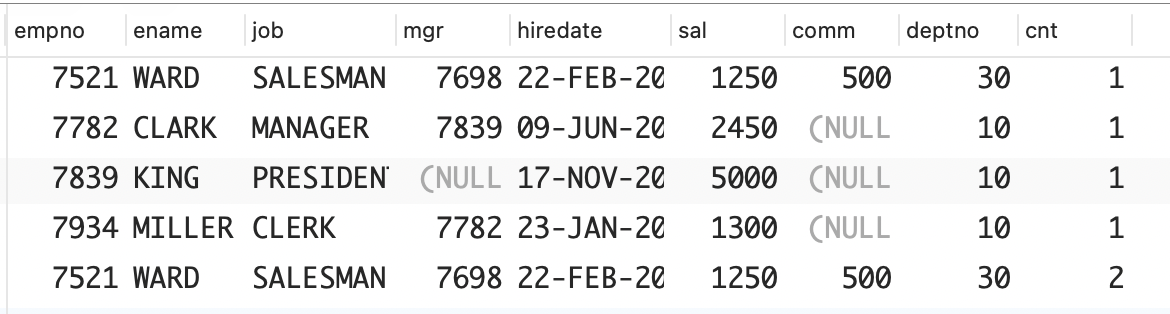
 empno | ename  |    job    | mgr  |  hiredate   | sal  | comm | deptno | cnt
-------+--------+-----------+------+-------------+------+------+--------+-----
  7521 | WARD   | SALESMAN  | 7698 | 22-FEB-2006 | 1250 |  500 |     30 |   2
  7934 | MILLER | CLERK     | 7782 | 23-JAN-2007 | 1300 |      |     10 |   1
  7521 | WARD   | SALESMAN  | 7698 | 22-FEB-2006 | 1250 |  500 |     30 |   1
  7782 | CLARK  | MANAGER   | 7839 | 09-JUN-2006 | 2450 |      |     10 |   1
  7839 | KING   | PRESIDENT |      | 17-NOV-2006 | 5000 |      |     10 |   1
(5 rows)Oracle:使用集合运算 MINUS 计算视图 V 和 EMP 表的差集以及EMP 表和视图 V 的差集,然后使用集合运算 UNION ALL合并这两个差集。
sql
(
	select empno,ename,job,mgr,hiredate,sal,comm,deptno,count(*) as cnt
	from V
	group by empno,ename,job,mgr,hiredate,sal,comm,deptno
	minus
	select empno,ename,job,mgr,hiredate,sal,comm,deptno,	count(*) as cnt
	from emp
	group by empno,ename,job,mgr,hiredate,sal,comm,deptno
)
union all
(
	select empno,ename,job,mgr,hiredate,sal,comm,deptno,count(*) as cnt
	from emp
	group by empno,ename,job,mgr,hiredate,sal,comm,deptno
	minus
	select empno,ename,job,mgr,hiredate,sal,comm,deptno,
	count(*) as cnt
	from v
	group by empno,ename,job,mgr,hiredate,sal,comm,deptno
);MySQL:和 SQL Server使用关联子查询找出位于视图 V 中但不位于 EMP 表中的行,以及位于 EMP 表中但不位于视图 V 中的行,然后使用 UNION ALL 合并这些行。
sql
select *
from (
	select e.empno,e.ename,e.job,e.mgr,e.hiredate,e.sal,e.comm,e.deptno, count(*) as cnt
	from emp e
	group by empno,ename,job,mgr,hiredate,sal,comm,deptno
) e
where not exists (
	select null
	from (
		select v.empno,v.ename,v.job,v.mgr,v.hiredate,v.sal,v.comm,v.deptno, count(*) as cnt
		from V v
		group by empno,ename,job,mgr,hiredate,sal,comm,deptno
	) v
	where v.empno = e.empno
	and v.ename = e.ename
	and v.job = e.job
	and coalesce(v.mgr,0) = coalesce(e.mgr,0)
	and v.hiredate = e.hiredate
	and v.sal      = e.sal
	and v.deptno   = e.deptno
	and v.cnt      = e.cnt
	and coalesce(v.comm,0) = coalesce(e.comm,0)
)
union all
select *
from (
	select v.empno,v.ename,v.job,v.mgr,v.hiredate,v.sal,v.comm,v.deptno, count(*) as cnt
	from V v
	group by empno,ename,job,mgr,hiredate,sal,comm,deptno
) v
where not exists (
	select null
	from (
		select e.empno,e.ename,e.job,e.mgr,e.hiredate,e.sal,e.comm,e.deptno, count(*) as cnt
		from emp e
		group by empno,ename,job,mgr,hiredate,sal,comm,deptno
	) e
	where v.empno     = e.empno
	and v.ename     = e.ename
	and v.job       = e.job
	and coalesce(v.mgr,0) = coalesce(e.mgr,0)
	and v.hiredate  = e.hiredate
	and v.sal       = e.sal
	and v.deptno    = e.deptno
	and v.cnt       = e.cnt
	and coalesce(v.comm,0) = coalesce(e.comm,0)
);
8、识别并避免笛卡尔积
问题:你想返回部门编号为 10 的所有员工的姓名以及这个部门的位置。下面的查询返回的数据是错误的。
sql
select e.ename, d.loc
  from emp e, dept d
 where e.deptno = 10

ENAME       LOC
----------  -------------
CLARK       NEW YORK
CLARK       DALLAS
CLARK       CHICAGO
CLARK       BOSTON
KING        NEW YORK
KING        DALLAS
KING        CHICAGO
KING        BOSTON
MILLER      NEW YORK
MILLER      DALLAS
MILLER      CHICAGO
MILLER      BOSTON
正确的结果集如下所示。
sql
ENAME       LOC
----------  ---------
CLARK       NEW YORK
KING        NEW YORK
MILLER NEW YORK解决方案:在 FROM 子句中的表之间执行连接,以返回正确的结果集。
sql
select e.ename, d.loc
from emp e, dept d
where e.deptno = 10 and d.deptno = e.deptno;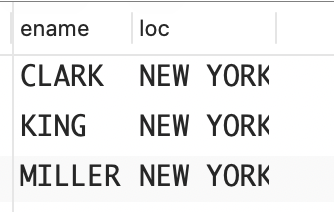
9、同时使用连接和聚合
问题:你想执行聚合操作,但查询涉及多张表,因此需要确保连接不影响聚合。例如,你需要计算部门编号为 10 的所有员工的薪水总额以及奖金总额。有些员工有多笔奖金,但连接 EMP 表和 EMP_BONUS 表将导致聚合函数 SUM 返回的值不正确。这里涉及的 EMP_BONUS 表包含如下数据。
sql
create table emp_bonus(
	EMPNO INT,
	RECEIVED VARCHAR(20) NOT NULL,
	TYPE INT NOT NULL
);

INSERT INTO emp_bonus VALUES
(7934, '17-MAR-2005', 1),
(7934, '15-FEB-2005', 2),
(7839, '15-FEB-2005', 3),
(7782, '15-FEB-2005', 1);
下面的查询将返回部门编号为 10 的所有员工的薪水和奖金。EMP_BONUS.TYPE 决定了奖金的金额:1 类奖金为员工薪水的 10%,2 类奖金为员工薪水的 20%,3 类奖金为员工薪水的 30%。
sql
select e.empno,
       e.ename,
       e.sal,
       e.deptno,
       e.sal*case when eb.type = 1 then .1
                  when eb.type = 2 then .2
                  else .3
             end as bonus
from emp e, emp_bonus eb
where e.empno = eb.empno
and e.deptno = 10;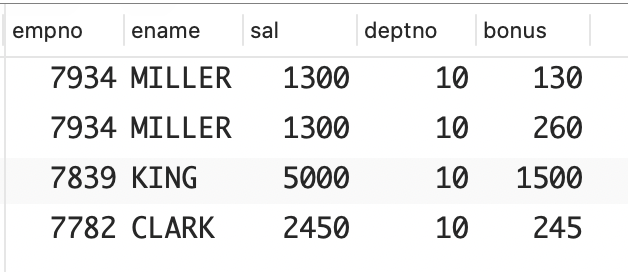
到目前为止,一切顺利。然而,当你试图连接到EMP_BONUS 表以计算奖金总额时,问题便出现了。
sql
select deptno,
       sum(sal) as total_sal,
       sum(bonus) as total_bonus
from (
	select e.empno,
				 e.ename,
         e.sal,
         e.deptno,
         e.sal*case when eb.type = 1 then .1
                  when eb.type = 2 then .2
                  else .3
               end as bonus
	from emp e, emp_bonus eb
	where e.empno = eb.empno
  and e.deptno = 10
) x
group by deptno;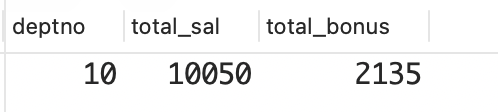
TOTAL_BONUS 是正确的,TOTAL_SAL 则不正确。部门编号为 10 的所有员工的薪水总额应为 8750 美元,如下面的查询所示。
为什么 TOTAL_SAL 不正确呢?这是因为连接导致有些员工的记录被重复了多次。请看下面的查询,它连接了 EMP表和 EMP_BONUS 表。
sql
select e.ename,e.sal
from emp e, emp_bonus eb
where e.empno = eb.empno and e.deptno = 10;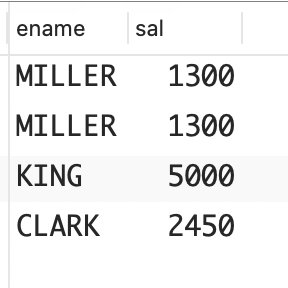
从中可以清楚地看到 TOTAL_SAL 不正确的原因:MILLER 的薪水被计算了两次。你希望得到的最终结果集如下所示。
sql
DEPTNO TOTAL_SAL TOTAL_BONUS
------ --------- -----------
10 8750 2135解决方案:同时使用连接和聚合时,必须非常小心。当连接导致相同的数据被返回多次时,为了避免聚合函数执行错误的计算,通常有两种方法。
- 一种方法是在调用聚合函数时使用关键字 DISTINCT,这样计算时相同的值将只计算一次;
- 另一种方法是在连接前先执行聚合(在内嵌视图中),这样可以避免聚合函数执行错误的计算,因为聚合发生在了连接之前。
下面的解决方案使用了关键字 DISTINCT。
MySQL 和 PostgreSQL:使用关键字 DISTINCT 避免重复计算薪水。
sql
select deptno,
	sum(distinct sal) as total_sal,
	sum(bonus) as total_bonus
from (
	select e.empno,
		     e.ename,
			   e.sal,
				 e.deptno,
				 e.sal*case when eb.type = 1 then .1
							 when eb.type = 2 then .2
							 else .3
							 end as bonus
from emp e, emp_bonus eb
where e.empno = eb.empno
and e.deptno = 10
) x
group by deptno;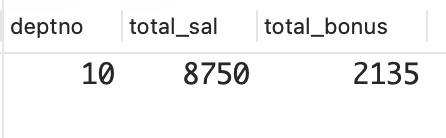
DB2、Oracle 和 SQL Server:这些平台支持上面的解决方案,但也支持另一种解决方案,即使用窗口函数 SUM OVER。
sql
select distinct deptno,total_sal,total_bonus
from (
	select e.empno,
				 e.ename,
				 sum(distinct e.sal) over (partition by e.deptno) as total_sal, e.deptno,
				 sum(e.sal*case when eb.type = 1 then .1
												when eb.type = 2 then .2
												else .3 end) over
				(partition by deptno) as total_bonus
	from emp e, emp_bonus eb
	where e.empno = eb.empno and e.deptno = 10
) x;
10、同时使用外连接和聚合
问题:本节的问题与 9 节相同,但对 EMP_BONUS 表做了修改,使得并非部门编号为 10 的每位员工都有奖金。下面列出了修改后的 EMP_BONUS 表的内容,以及一个错误的查询,该查询试图计算部门编号为 10 的所有员工的薪水总额以及奖金总额。
sql
select * from emp_bonus

     EMPNO RECEIVED          TYPE
---------- ----------- ----------
      7934 17-MAR-2005          1
      7934 15-FEB-2005          2

select deptno,
       sum(sal) as total_sal,
       sum(bonus) as total_bonus
  from (
select e.empno,
       e.ename,
       e.sal,
       e.deptno,
       e.sal*case when eb.type = 1 then .1
                  when eb.type = 2 then .2
                  else .3 end as bonus
  from emp e, emp_bonus eb
 where e.empno = eb.empno
   and e.deptno = 10
       )
 group by deptno

 DEPTNO  TOTAL_SAL TOTAL_BONUS
 ------ ---------- -----------
     10       2600         390
TOTAL_BONUS 是正确的,但 TOTAL_SAL 并不是部门编号为 10 的所有员工的薪水总额。下面的查询说明了TOTAL_SAL 不正确的原因。
sql
select e.empno,
       e.ename,
       e.sal,
       e.deptno,
       e.sal*case when eb.type = 1 then .1
                  when eb.type = 2 then .2
             else .3 end as bonus
  from emp e, emp_bonus eb
 where e.empno = eb.empno
   and e.deptno = 10

    EMPNO ENAME          SAL     DEPTNO      BONUS
--------- ---------  ------- ---------- ----------
     7934 MILLER        1300         10        130
     7934 MILLER        1300         10        260
以上查询计算的并不是部门编号为 10 的所有员工的薪水总额,而是 MILLER 的薪水(还错误地将其薪水计算了两次)。你原本想返回的结果集如下所示。
sql
DEPTNO TOTAL_SAL TOTAL_BONUS
------ --------- -----------
10 8750 390解决方案:下面的解决方案也与 3.9 节类似,但为涵盖部门编号为10 的所有员工,这里将外连接到 EMP_BONUS 表。
DB2、MySQL、PostgreSQL 和 SQL Server:外连接到 EMP_BONUS 表,然后以剔除重复项的方式计算部门编号为 10 的所有员工的薪水总额。
sql
select deptno,
	sum(distinct sal) as total_sal,
	sum(bonus) as total_bonus
from (
	select e.empno,e.ename,e.sal,e.deptno,
			e.sal*case when eb.type is null then 0
								 when eb.type = 1 then .1
								 when eb.type = 2 then .2
								 else .3 end as bonus
	from emp e left outer join emp_bonus eb
	on (e.empno = eb.empno)
	where e.deptno = 10
) x
group by deptno;
也可以使用窗口函数 SUM OVER。
sql
select distinct deptno,total_sal,total_bonus
from (
	select e.empno,e.ename,
				 sum(distinct e.sal) over (partition by e.deptno) as total_sal,e.deptno,
				 sum(e.sal*case when eb.type is null then 0
												when eb.type = 1 then .1
												when eb.type = 2 then .2
												else .3
												end)
				 over (partition by deptno) as total_bonus
from emp e left outer join emp_bonus eb
on (e.empno = eb.empno)
where e.deptno = 10
) x;
下面的查询是另一种解决方案。它先根据 EMP 表计算部门编号为 10 的所有员工的薪水总额,然后再将返回的结果集连接到 EMP_BONUS 表(因此无须使用外连接)。这个查询适用于所有 DBMS。
sql
select d.deptno,
       d.total_sal,
       sum(e.sal*case when eb.type = 1 then .1
                      when eb.type = 2 then .2
                      else .3 end) as total_bonus
from emp e, emp_bonus eb, (
	select deptno, sum(sal) as total_sal
  from emp
	where deptno = 10
	group by deptno
) d
where e.deptno = d.deptno
and e.empno = eb.empno
group by d.deptno,d.total_sal;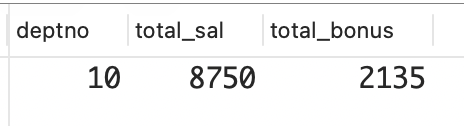
13、返回多张表中不匹配的行
问题:你想返回多张表中不匹配的行。要返回 DEPT 表中不与EMP 表中任何行匹配的行(没有任何员工的部门),需要使用外连接。请看下面的查询,它返回了 DEPT 表中所有的 DEPTNO 和 DNAME,以及每个部门所有员工的姓名(如果该部门有员工的话)。
sql
select d.deptno,d.dname,e.ename
from dept d left outer join emp e
on (d.deptno=e.deptno);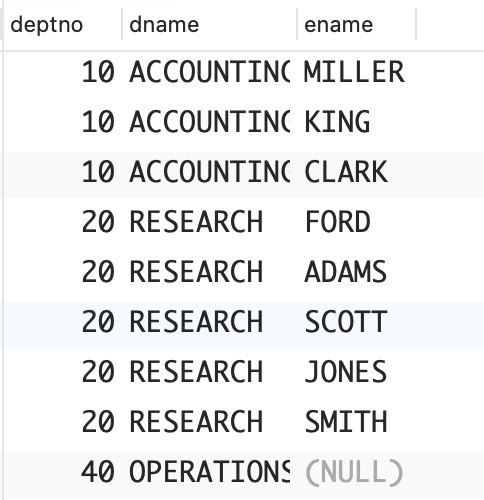
最后一行表明,部门 OPERATIONS 也被返回了,虽然这个部门没有任何员工。这是因为将 EMP 表外连接到了DEPT 表。现在假设有一位员工没有部门,那么如何返回上述结果集,同时返回另一行,表示这位没有部门的员工呢?换言之,你要在同一个查询中外连接到 EMP 表和DEPT 表。下面创建一位没有部门的员工并尝试返回他。
sql
insert into emp (empno,ename,job,mgr,hiredate,sal,comm,deptno)
select 1111,'YODA','JEDI',null,hiredate,sal,comm,null
from emp
where ename = 'KING';

select d.deptno,d.dname,e.ename
from dept d right outer join emp e
on (d.deptno=e.deptno);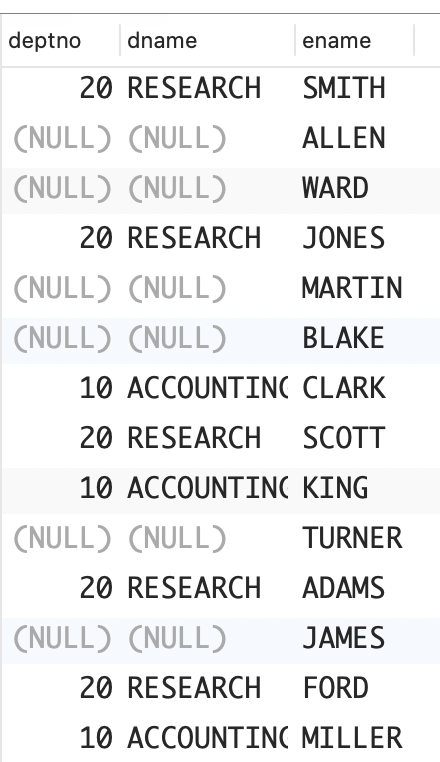
以上外连接返回了这位新员工,但未能像前面的查询那样返回部门 OPERATIONS。你希望最终的结果集中既包含表示员工 YODA 的行,也包含表示部门 OPERATIONS 的行。
解决方案:使用全外连接返回两张表中的所有数据。
DB2、PostgreSQL 和 SQL Server:使用显式命令 FULL OUTER JOIN 返回两张表中匹配的行以及不匹配的行。
sql
select d.deptno,d.dname,e.ename
from dept d full outer join emp e
on (d.deptno=e.deptno);

 deptno |   dname    | ename
--------+------------+--------
     20 | RESEARCH   | SMITH
        |            | ALLEN
        |            | WARD
     20 | RESEARCH   | JONES
        |            | MARTIN
        |            | BLAKE
     10 | ACCOUNTING | CLARK
     20 | RESEARCH   | SCOTT
     10 | ACCOUNTING | KING
        |            | TURNER
     20 | RESEARCH   | ADAMS
        |            | JAMES
     20 | RESEARCH   | FORD
     10 | ACCOUNTING | MILLER
        |            | YODA
     40 | OPERATIONS |
(16 rows)MySQL:由于 MySQL 还不支持 FULL OUTER JOIN,因此需要使用 UNION 合并两个外连接的结果。
sql
select d.deptno,d.dname,e.ename
from dept d right outer join emp e
on (d.deptno=e.deptno)
union
select d.deptno,d.dname,e.ename
from dept d left outer join emp e
on (d.deptno=e.deptno);Oracle:Oracle 用户既可以使用上述两种解决方案中的任何一种,也可以使用 Oracle 特有的外连接语法。
sql
select d.deptno,d.dname,e.ename
from dept d, emp e
where d.deptno = e.deptno(+)
union
select d.deptno,d.dname,e.ename
from dept d, emp e
where d.deptno(+) = e.deptno
12、在运算和比较中使用NULL
问题:NULL 与包含自己在内的任何值都不相等,也不会相等,但你想像评估实际值一样评估可为 NULL 的列返回的值。例如,你想在 EMP 表中找出业务提成(COMM)比 WARD低的所有员工,包括业务提成为 NULL 的员工。
解决方案:在标准评估中,可以使用诸如 COALESCE 等函数将 NULL转换为实际值。
sql
select ename, comm
from emp
where coalesce(comm, 0) < (
	select comm
	from emp
	where ename = 'WARD'
);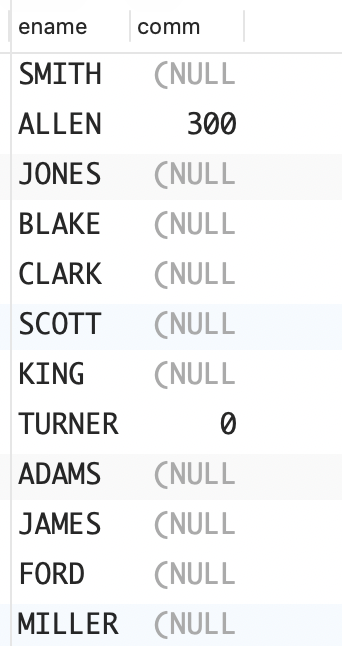
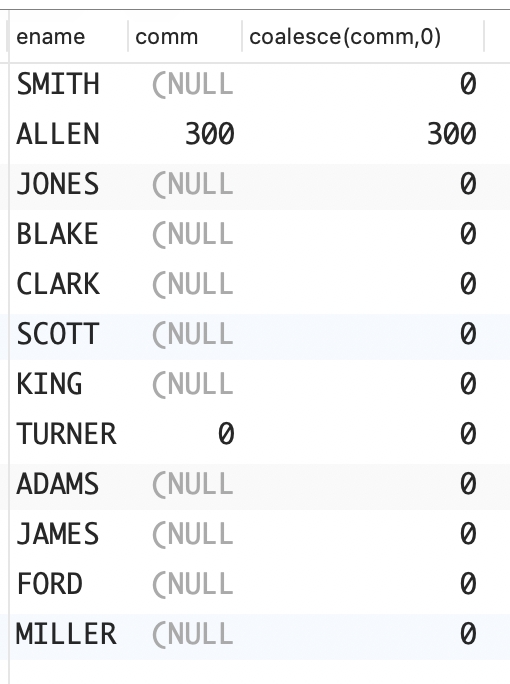
函数 COALESCE 会返回其参数列表中第一个非 NULL值。在上面的查询中,遇到业务提成为 NULL 时,就将它转换为 0,然后再与 WARD 的业务提成进行比较。要证明这一点,可以在 SELECT 列表中使用函数COALESCE。
sql
select ename,comm,coalesce(comm,0)
from emp
where coalesce(comm,0) < (
	select comm
	from emp
	where ename = 'WARD'
);